bluetooth HONDA FIT 2020 (in English) Owner's Guide
[x] Cancel search | Manufacturer: HONDA, Model Year: 2020, Model line: FIT, Model: HONDA FIT 2020Pages: 599, PDF Size: 41.91 MB
Page 317 of 599
315
uuAudio Error Messages uPandora ®
Features
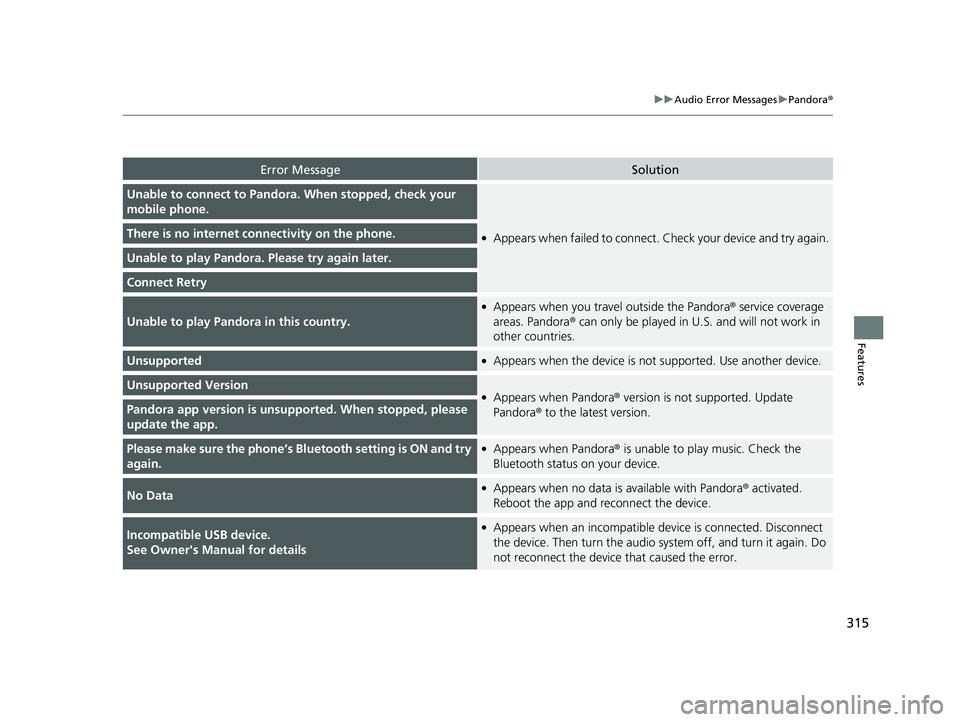
Error MessageSolution
Unable to connect to Pandora . When stopped, check your
mobile phone.
●Appears when failed to connect. Check your device and try again.There is no internet connectivity on the phone.
Unable to play Pandora. Please try again later.
Connect Retry
Unable to play Pandora in this country.
●Appears when you travel outside the Pandora ® service coverage
areas. Pandora ® can only be played in U.S. and will not work in
other countries.
Unsupported●Appears when the device is not supported. Use another device.
Unsupported Version●Appears when Pandora ® version is not supported. Update
Pandora® to the latest version.Pandora app version is unsupported. When stopped, please
update the app.
Please make sure the phone’s Blue tooth setting is ON and try
again.●Appears when Pandora ® is unable to play music. Check the
Bluetooth status on your device.
No Data●Appears when no data is available with Pandora® activated.
Reboot the app and reconnect the device.
Incompatible USB device.
See Owner's Manual for details●Appears when an incompatible device is connected. Disconnect
the device. Then turn the audio syst em off, and turn it again. Do
not reconnect the device that caused the error.
20 FIT-31T5A6500.book 315 ページ 2019年9月26日 木曜日 午後4時41分
Page 324 of 599
322
uuCustomized Features u
Features
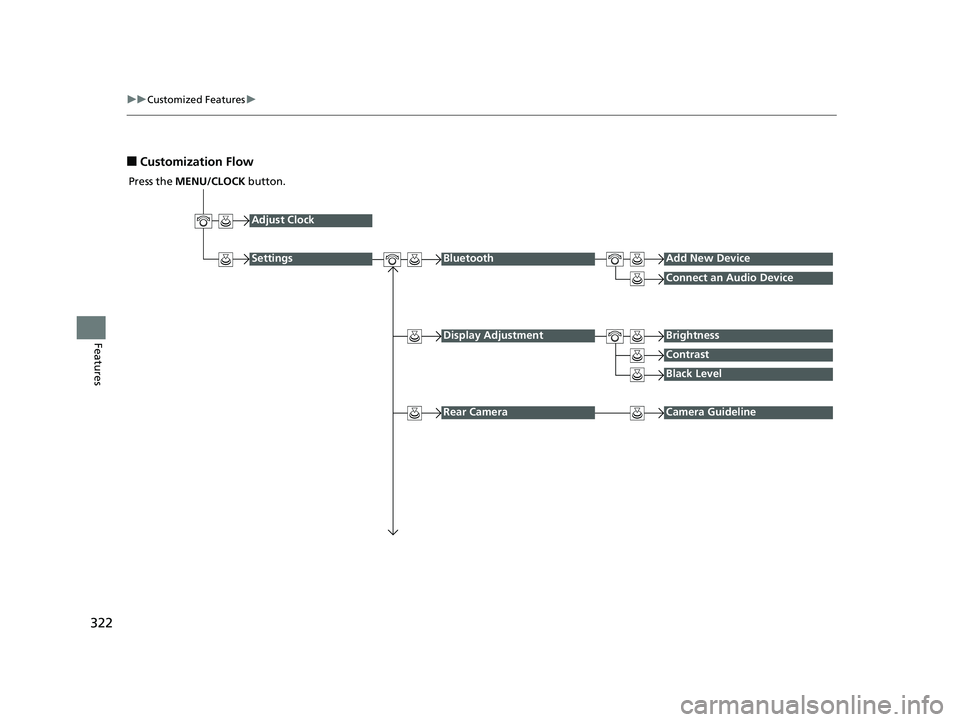
■Customization Flow
Press the MENU/CLOCK button.
Adjust Clock
SettingsBluetoothAdd New Device
Connect an Audio Device
Display AdjustmentBrightness
Contrast
Black Level
Rear CameraCamera Guideline
20 FIT-31T5A6500.book 322 ページ 2019年9月26日 木曜日 午後4時41分
Page 326 of 599
324
uuCustomized Features u
Features
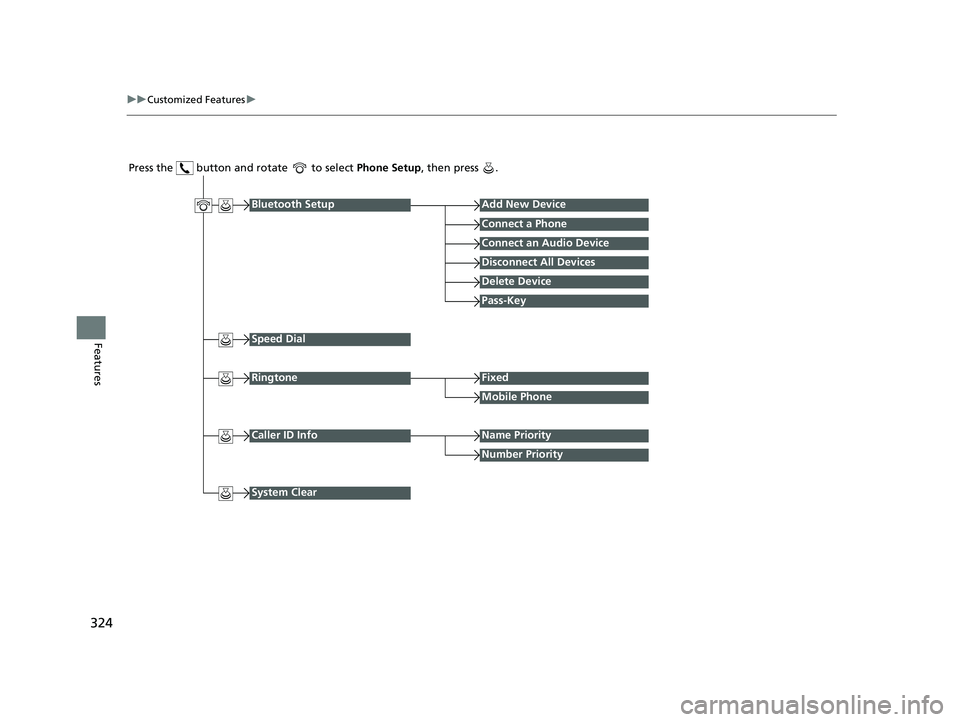
Press the button and rotate to select Phone Setup, then press .
RingtoneFixed
Mobile Phone
Bluetooth SetupAdd New Device
Connect a Phone
Connect an Audio Device
Disconnect All Devices
Delete Device
Pass-Key
Speed Dial
Caller ID InfoName Priority
Number Priority
System Clear
20 FIT-31T5A6500.book 324 ページ 2019年9月26日 木曜日 午後4時41分
Page 327 of 599
325
uuCustomized Features u
Continued
Features
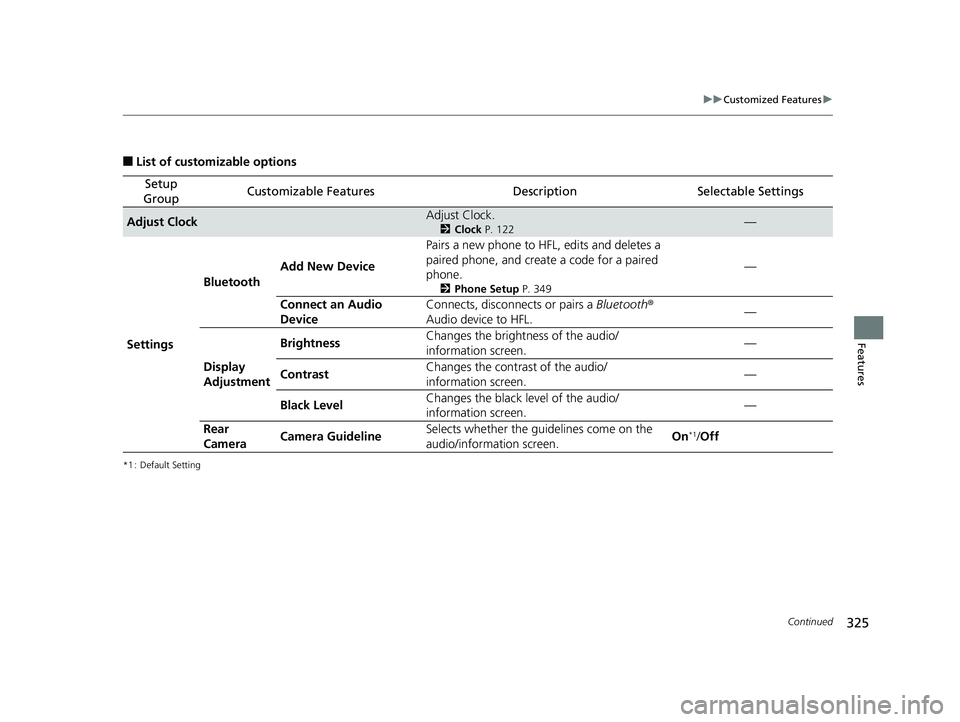
■List of customizable options
*1 : Default Setting
Setup
GroupCustomizable FeaturesDescriptionSelectable Settings
Adjust ClockAdjust Clock.
2 Clock P. 122—
Settings Bluetooth
Add New Device Pairs a new phone to HFL, edits and deletes a
paired phone, and create
a code for a paired
phone.
2 Phone Setup P. 349
—
Connect an Audio
Device Connects, disconnects or pairs a
Bluetooth®
Audio device to HFL. —
Display
Adjustment Brightness
Changes the brightness of the audio/
information screen.
—
Contrast Changes the contrast of the audio/
information screen. —
Black Level Changes the black level of the audio/
information screen. —
Rear
Camera Camera Guideline Selects whether the guidelines come on the
audio/information screen.
On
*1/
Off
20 FIT-31T5A6500.book 325 ページ 2019年9月26日 木曜日 午後4時41分
Page 329 of 599
327
uuCustomized Features u
Features
*1 : Default Setting
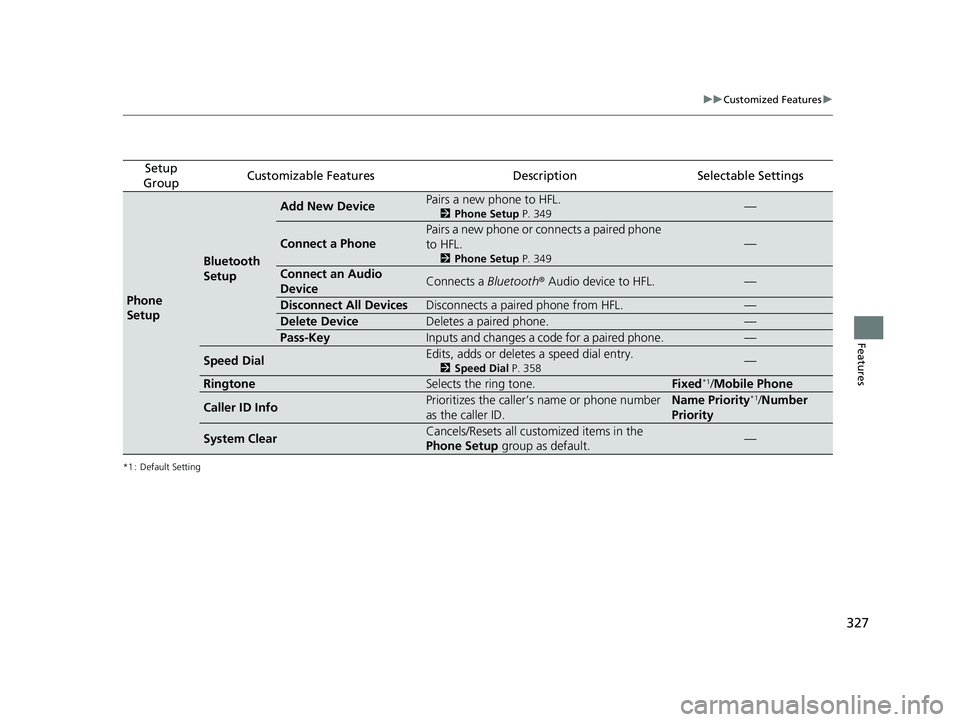
Setup
GroupCustomizable FeaturesDescriptionSelectable Settings
Phone
Setup
Bluetooth
Setup
Add New DevicePairs a new phone to HFL.
2 Phone Setup P. 349—
Connect a Phone
Pairs a new phone or connects a paired phone
to HFL.
2Phone Setup P. 349
—
Connect an Audio
DeviceConnects a Bluetooth® Audio device to HFL.—
Disconnect All DevicesDisconnects a paired phone from HFL.—
Delete DeviceDeletes a paired phone.—
Pass-KeyInputs and changes a code for a paired phone.—
Speed DialEdits, adds or deletes a speed dial entry.
2Speed Dial P. 358—
RingtoneSelects the ring tone.Fixed*1/Mobile Phone
Caller ID InfoPrioritizes the caller’s name or phone number
as the caller ID.Name Priority*1/Number
Priority
System ClearCancels/Resets all customized items in the
Phone Setup group as default.—
20 FIT-31T5A6500.book 327 ページ 2019年9月26日 木曜日 午後4時41分
Page 331 of 599
329
uuCustomized Features u
Continued
Features
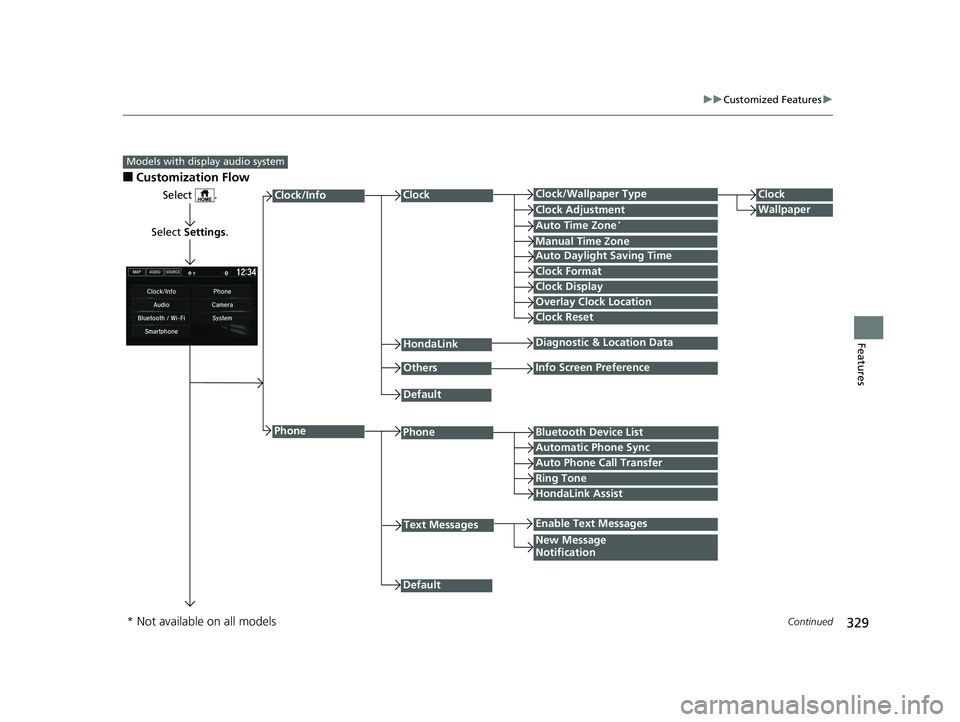
■Customization Flow
Models with display audio system
Select .
Select Settings .
PhoneBluetooth Device List
Manual Time Zone
HondaLink
Auto Time Zone*
Default
New Message
Notification
Phone
Diagnostic & Location Data
Others
Auto Daylight Saving Time
Info Screen Preference
Default
Enable Text Messages
Clock Format
ClockClock/Wallpaper TypeClock
WallpaperClock Adjustment
Clock Display
Overlay Clock Location
Clock Reset
Auto Phone Call Transfer
Text Messages
Automatic Phone Sync
HondaLink Assist
Ring Tone
Clock/Info
* Not available on all models
20 FIT-31T5A6500.book 329 ページ 2019年9月26日 木曜日 午後4時41分
Page 332 of 599
330
uuCustomized Features u
Features
*1 : May change depending on your currently selected source.
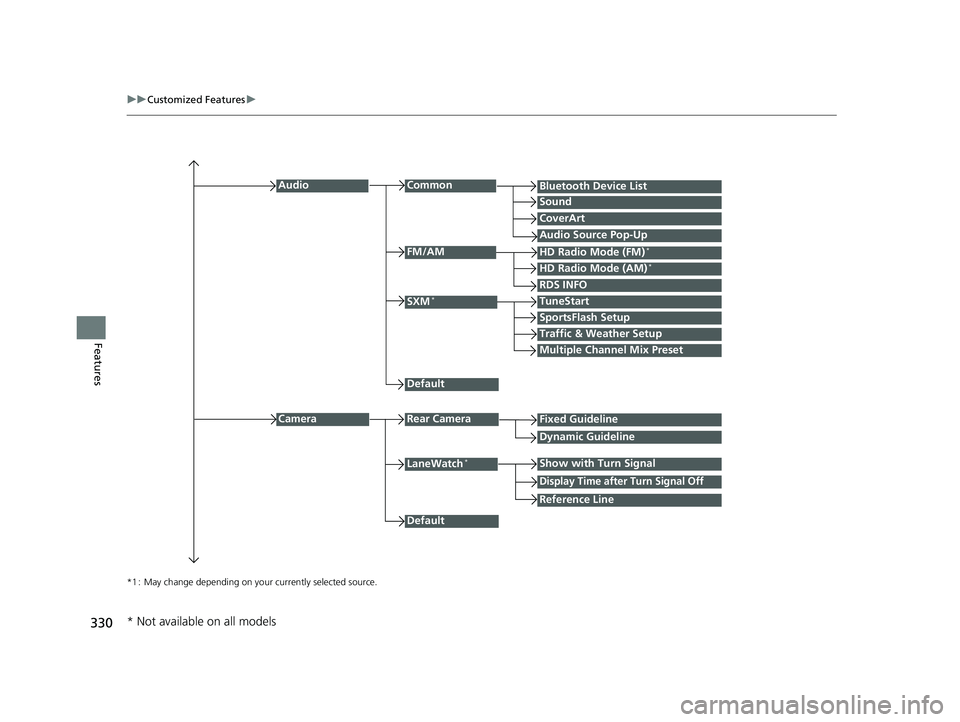
Common
Multiple Channel Mix Preset
Audio
Sound
Audio Source Pop-Up
SXM*
HD Radio Mode (AM)*HD Radio Mode (FM)*
TuneStart
Traffic & Weather Setup
CameraRear Camera
LaneWatch*
Default
CoverArt
RDS INFO
Bluetooth Device List
FM/AM
Fixed Guideline
Dynamic Guideline
Show with Turn Signal
Default
Display Time after Turn Signal Off
Reference Line
SportsFlash Setup
* Not available on all models
20 FIT-31T5A6500.book 330 ページ 2019年9月26日 木曜日 午後4時41分
Page 335 of 599
333
uuCustomized Features u
Continued
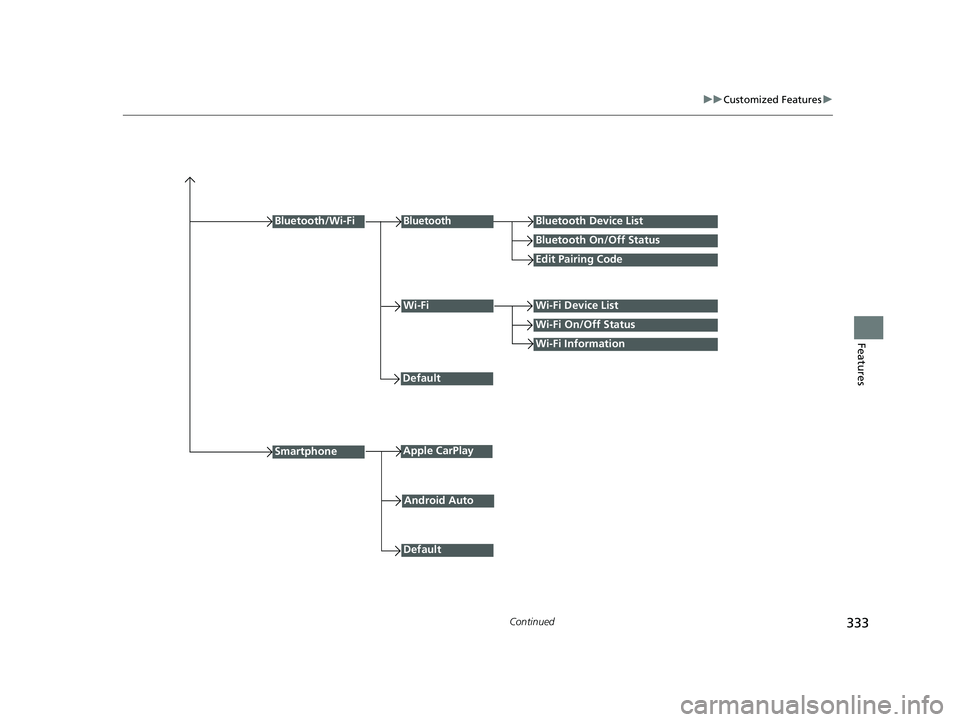
FeaturesWi-Fi Information
Wi-FiWi-Fi Device List
Wi-Fi On/Off Status
Default
Bluetooth/Wi-Fi
Default
BluetoothBluetooth Device List
Bluetooth On/Off Status
Edit Pairing Code
SmartphoneApple CarPlay
Android Auto
20 FIT-31T5A6500.book 333 ページ 2019年9月26日 木曜日 午後4時41分
Page 337 of 599
335
uuCustomized Features u
Continued
Features
*1 : Default Setting
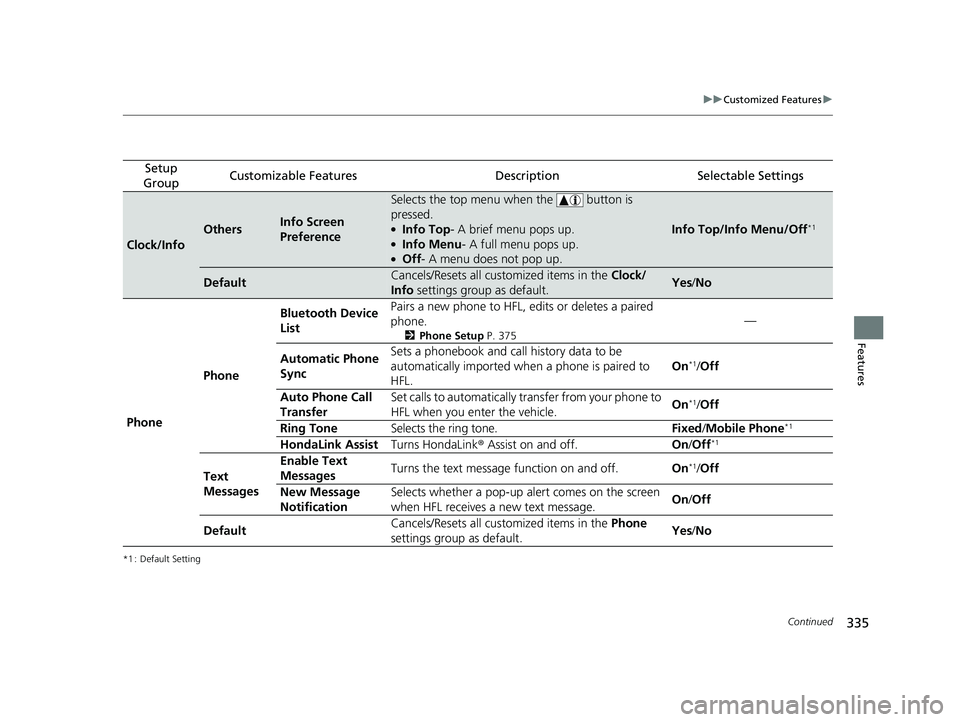
Setup
GroupCustomizable FeaturesDescriptionSelectable Settings
Clock/Info
OthersInfo Screen
Preference
Selects the top menu when the button is
pressed.
●Info Top- A brief menu pops up.●Info Menu - A full menu pops up.●Off- A menu does not pop up.
Info Top/Info Menu/Off*1
DefaultCancels/Resets all customized items in the Clock/
Info settings group as default.Yes/No
Phone Phone Bluetooth Device
List
Pairs a new phone to HFL, edits or deletes a paired
phone.
2
Phone Setup P. 375
—
Automatic Phone
Sync Sets a phonebook and call history data to be
automatically imported when
a phone is paired to
HFL. On
*1/
Off
Auto Phone Call
Transfer Set calls to automatically transfer from your phone to
HFL when you enter the vehicle.
On
*1/
Off
Ring Tone Selects the ring tone. Fixed/Mobile Phone
*1
HondaLink Assist Turns HondaLink® Assist on and off. On/Off*1
Text
Messages Enable Text
Messages
Turns the text message function on and off.
On*1/Off
New Message
Notification Selects whether a pop-up alert comes on the screen
when HFL receives a new text message.
On
/Off
Default Cancels/Resets all customized items in the
Phone
settings group as default. Yes
/No
20 FIT-31T5A6500.book 335 ページ 2019年9月26日 木曜日 午後4時41分
Page 338 of 599
336
uuCustomized Features u
Features
*1 : Default Setting
Setup
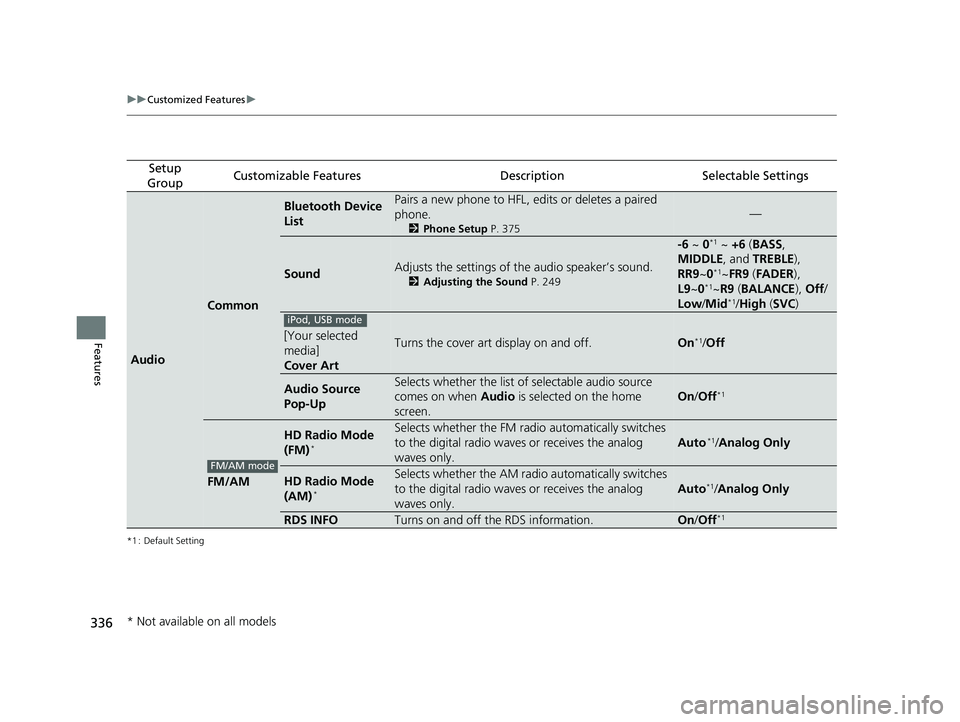
GroupCustomizable FeaturesDescriptionSelectable Settings
Audio
Common
Bluetooth Device
ListPairs a new phone to HFL, edits or deletes a paired
phone.
2 Phone Setup P. 375
—
SoundAdjusts the settings of the audio speaker’s sound.
2Adjusting the Sound P. 249
-6 ~ 0*1 ~ +6 (BASS ,
MIDDLE , and TREBLE ),
RR9 ~0
*1~FR9 (FADER ),
L9 ~0*1~R9 (BALANCE ), Off /
Low/ Mid*1/High (SVC )
[Your selected
media]
Cover ArtTurns the cover art display on and off.On*1/Off
Audio Source
Pop-UpSelects whether the list of selectable audio source
comes on when Audio is selected on the home
screen.
On /Off*1
FM/AM
HD Radio Mode
(FM)*
Selects whether the FM radio automatically switches
to the digital radio waves or receives the analog
waves only.
Auto*1/ Analog Only
HD Radio Mode
(AM)*
Selects whether the AM radio automatically switches
to the digital radio waves or receives the analog
waves only.
Auto*1/ Analog Only
RDS INFOTurns on and off the RDS information.On /Off*1
iPod, USB mode
FM/AM mode
* Not available on all models
20 FIT-31T5A6500.book 336 ページ 2019年9月26日 木曜日 午後4時41分