park assist HONDA FIT 2020 Owner's Manual (in English)
[x] Cancel search | Manufacturer: HONDA, Model Year: 2020, Model line: FIT, Model: HONDA FIT 2020Pages: 599, PDF Size: 41.91 MB
Page 13 of 599
11
Quick Reference Guide
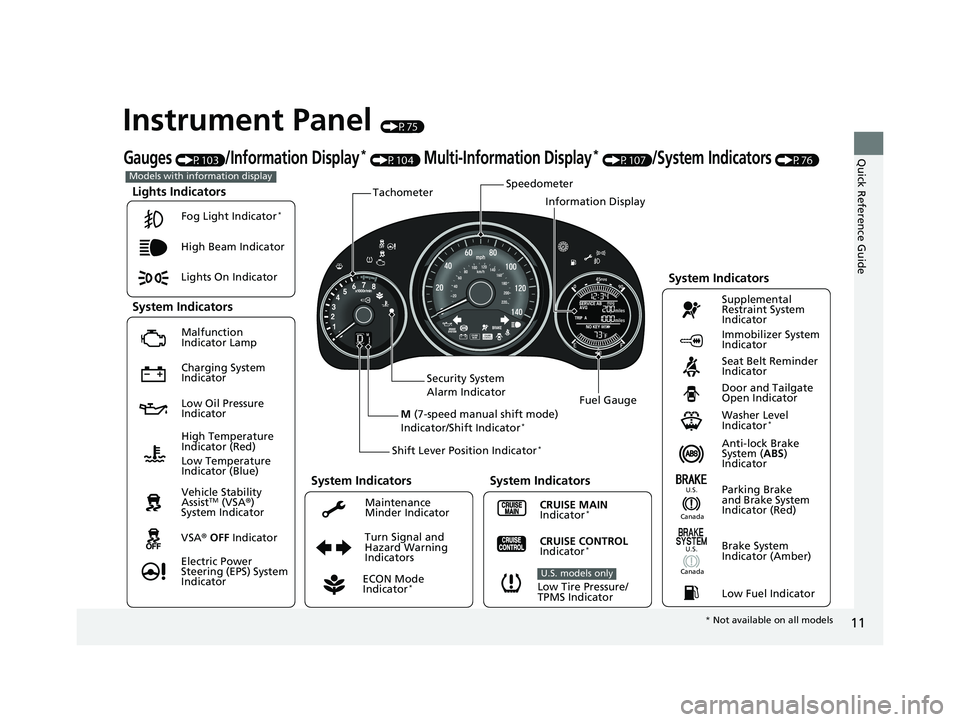
Instrument Panel (P75)
Lights Indicators
Malfunction
Indicator Lamp
Low Oil Pressure
IndicatorAnti-lock Brake
System (ABS)
Indicator
Vehicle Stability
Assist
TM (VSA ®)
System Indicator
VSA ® OFF Indicator
Electric Power
Steering (EPS) System
Indicator Lights On Indicator High Beam Indicator
Immobilizer System
Indicator
Seat Belt Reminder
Indicator
System Indicators
CRUISE MAIN
Indicator*
Supplemental
Restraint System
Indicator
Door and Tailgate
Open Indicator
Tachometer
Speedometer
Fuel Gauge
Security System
Alarm Indicator
Shift Lever Position Indicator
*
Low Fuel Indicator
Gauges (P103)/Information Display* (P104) Multi-Information Display* (P107)/System Indicators (P76)
Turn Signal and
Hazard Warning
Indicators
High Temperature
Indicator (Red)
System Indicators
System Indicators
Low Tire Pressure/
TPMS Indicator
U.S. models only
Parking Brake
and Brake System
Indicator (Red)
CRUISE CONTROL
Indicator*
System Indicators
Charging System
Indicator
U.S.
Washer Level
Indicator*
ECON Mode
Indicator*
Maintenance
Minder Indicator
Fog Light Indicator
*
Canada
Brake System
Indicator (Amber)
Canada
U.S.
M
(7-speed manual shift mode)
Indicator/Shift Indicator*
Information Display
Models with information display
Low Temperature
Indicator (Blue)
* Not available on all models
20 FIT-31T5A6500.book 11 ページ 2019年9月26日 木曜日 午後4時41分
Page 14 of 599
12
Quick Reference Guide
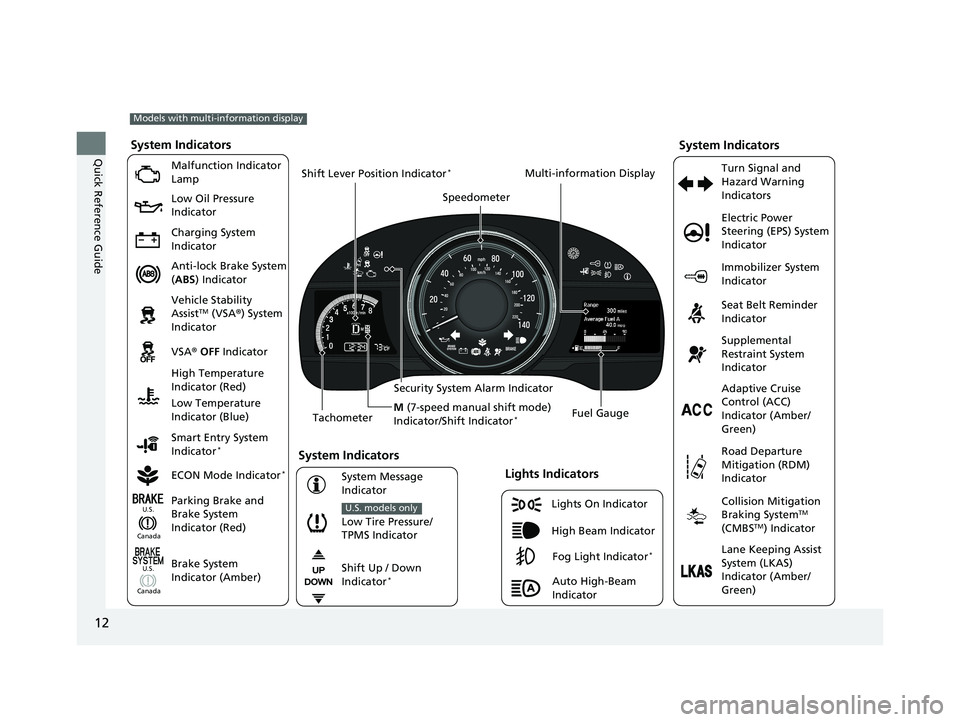
Lights On Indicator
System Indicators
Malfunction Indicator
Lamp
Low Oil Pressure
Indicator
Charging System
Indicator
Anti-lock Brake System
(ABS ) Indicator
Vehicle Stability
Assist
TM (VSA ®) System
Indicator
VSA ® OFF Indicator
Low Tire Pressure/
TPMS Indicator
U.S. models only
Electric Power
Steering (EPS) System
Indicator
Seat Belt Reminder
Indicator
System Indicators
Parking Brake and
Brake System
Indicator (Red) Supplemental
Restraint System
Indicator
Tachometer Speedometer
Fuel Gauge
Security System Alarm Indicator
Shift Lever Position Indicator
*
Immobilizer System
Indicator
ECON Mode Indicator
*
Turn Signal and
Hazard Warning
Indicators
Models with multi-information display
Brake System
Indicator (Amber)
System Indicators
High Temperature
Indicator (Red)
Low Temperature
Indicator (Blue)
Lights Indicators
High Beam Indicator
Fog Light Indicator*
Adaptive Cruise
Control (ACC)
Indicator (Amber/
Green)
System Message
Indicator Collision Mitigation
Braking System
TM
(CMBSTM) Indicator
Road Departure
Mitigation (RDM)
Indicator
Lane Keeping Assist
System (LKAS)
Indicator (Amber/
Green)
Smart Entry System
Indicator
*
U.S.
Canada
Canada U.S.
Shift Up / Down
Indicator*
Multi-information Display
Auto High-Beam
Indicator
M
(7-speed manual shift mode)
Indicator/Shift Indicator
*
20 FIT-31T5A6500.book 12 ページ 2019年9月26日 木曜日 午後4時41分
Page 168 of 599
uuOperating the Switches Around the Steering Wheel uAuto High-Beam*
166
Controls
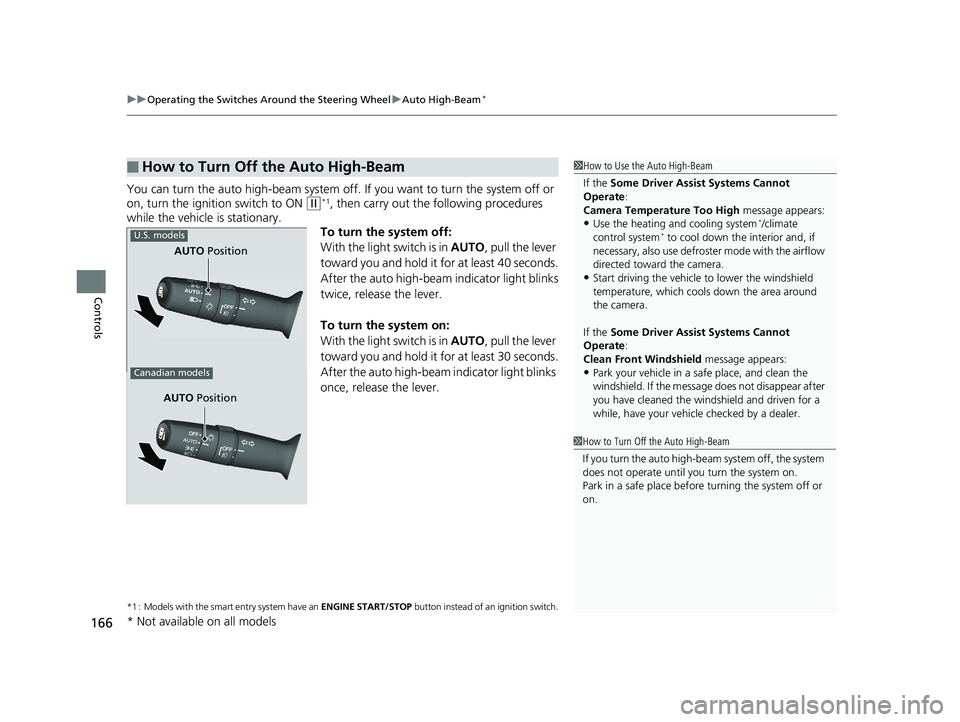
You can turn the auto high-beam system off. If you want to turn the system off or
on, turn the ignition switch to ON
(w*1, then carry out the following procedures
while the vehicle is stationary.
To turn the system off:
With the light switch is in AUTO, pull the lever
toward you and hold it for at least 40 seconds.
After the auto high-beam indicator light blinks
twice, release the lever.
To turn the system on:
With the light switch is in AUTO, pull the lever
toward you and hold it for at least 30 seconds.
After the auto high-beam indicator light blinks
once, release the lever.
*1 : Models with the smart entry system have an ENGINE START/STOP button instead of an ignition switch.
■How to Turn Off the Auto High-Beam1How to Use the Auto High-Beam
If the Some Driver Assist Systems Cannot
Operate :
Camera Temperature Too High message appears:
•Use the heating and cooling system*/climate
control system* to cool down the interior and, if
necessary, also use defroster mode with the airflow
directed toward the camera.
•Start driving the vehicle to lower the windshield
temperature, which cool s down the area around
the camera.
If the Some Driver Assist Systems Cannot
Operate :
Clean Front Windshield message appears:
•Park your vehicle in a safe place, and clean the
windshield. If the message does not disappear after
you have cleaned the windshield and driven for a
while, have your vehicle checked by a dealer.
1 How to Turn Off the Auto High-Beam
If you turn the auto high-b eam system off, the system
does not operate until you turn the system on.
Park in a safe place before turning the system off or
on.
AUTO Position
U.S. models
Canadian models
AUTO Position
* Not available on all models
20 FIT-31T5A6500.book 166 ページ 2019年9月26日 木曜日 午後4時41分
Page 401 of 599
399
Driving
This chapter discusses driving and refueling.
Before DrivingDriving Preparation .............................. 400
Maximum Load Limit............................ 403
Towing a Trailer .................................... 405
Towing Your Vehicle ............................ 406
When Driving
Starting the Engine .............................. 409
Starting the Engine .............................. 411
Precautions While Driving..................... 415
Continuously Variable Transmission
*.... 416
Shifting ................................................ 417
Models without smart entry system
Models with smart entry system
Continuously variable transmission models
without paddle shifters
Shifting................................................ 419
Shifting................................................ 423
ECON Button
*..................................... 427
Cruise Control*................................... 428
Front Sensor Camera*......................... 431
Adaptive Cruise Control (ACC)*........... 433Road Departure Mitigation (RDM) System*.... 447Lane Keeping Assist System (LKAS)*.... 452Vehicle Stability AssistTM (VSA®), aka Electronic
Stability Control (ESC), System ............... 459
LaneWatchTM*...................................... 461
Tire Pressure Monitoring System (TPMS)..... 463
Continuously variable transmission models
with paddle shifters
Manual transmission models
Tire Pressure Monitoring System (TPMS) - Required Federal Explanation .............. 467
Braking Brake System ........................................ 469
Anti-lock Brake System (ABS) ................ 471
Brake Assist System .............................. 472
Collision Mitigation Braking SystemTM (CMBSTM)*... 473Parking Your VehicleWhen Stopped ..................................... 481
Multi-View Rear Camera ....................... 482
Refueling
Fuel Information ................................... 484
How to Refuel ...................................... 485
Fuel Economy and CO
2 Emissions
Improving Fuel Economy and Reducing CO2
Emissions ............................................. 487
* Not available on all models
20 FIT-31T5A6500.book 399 ページ 2019年9月26日 木曜日 午後4時41分
Page 412 of 599
uuWhen Driving uStarting the Engine
410
Driving
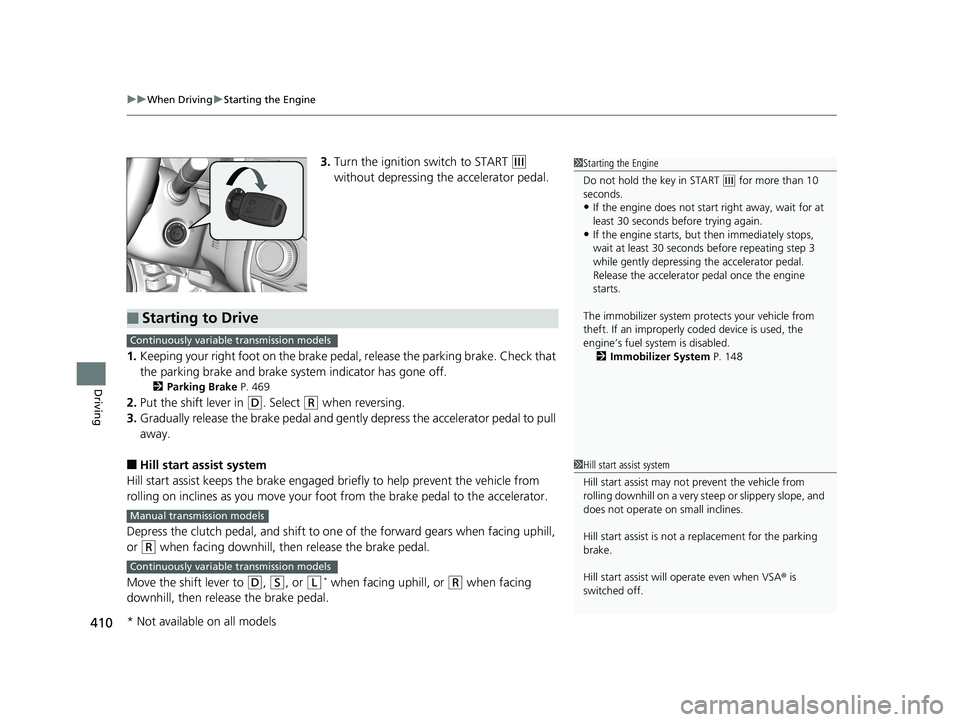
3. Turn the ignition switch to START (e
without depressing the accelerator pedal.
1. Keeping your right foot on the brake peda l, release the parking brake. Check that
the parking brake and brake system indicator has gone off.
2 Parking Brake P. 469
2.Put the shift lever in (D. Select (R when reversing.
3. Gradually release the brake pedal and gently depress the accelerator pedal to pull
away.
■Hill start assist system
Hill start assist keeps the brake engaged br iefly to help prevent the vehicle from
rolling on inclines as you move your fo ot from the brake pedal to the accelerator.
Depress the clutch pedal, and shift to on e of the forward gears when facing uphill,
or
(R when facing downhill, then release the brake pedal.
Move the shift lever to
(D, (S, or (L* when facing uphill, or (R when facing
downhill, then release the brake pedal.
1 Starting the Engine
Do not hold the key in START
(e for more than 10
seconds.
•If the engine does not start right away, wait for at
least 30 seconds before trying again.
•If the engine starts, but then immediately stops,
wait at least 30 seconds before repeating step 3
while gently depressing the accelerator pedal.
Release the accelerator pedal once the engine
starts.
The immobilizer system pr otects your vehicle from
theft. If an improperly c oded device is used, the
engine’s fuel system is disabled. 2 Immobilizer System P. 148
■Starting to Drive
Continuously variable transmission models
Manual transmission models
Continuously variable transmission models
1Hill start assist system
Hill start assist may not prevent the vehicle from
rolling downhill on a very st eep or slippery slope, and
does not operate on small inclines.
Hill start assist is not a replacement for the parking
brake.
Hill start assist will operate even when VSA ® is
switched off.
* Not available on all models
20 FIT-31T5A6500.book 410 ページ 2019年9月26日 木曜日 午後4時41分
Page 416 of 599
uuWhen Driving uStarting the Engine
414
Driving
■Hill start assist system
Hill start assist keeps the brake engaged br iefly to help prevent the vehicle from
rolling on inclines as you move your fo ot from the brake pedal to the accelerator.
Depress the clutch pedal, and shift to on e of the forward gears when facing uphill,
or
(R when facing downhill, then release the brake pedal.
Move the shift lever to
(D or (S when facing uphill, or (R when facing downhill,
then release the brake pedal.
1 Hill start assist system
Hill start assist may not prevent the vehicle from
rolling downhill on a very st eep or slippery slope, and
does not operate on small inclines.
Hill start assist is not a replacement for the parking
brake.
Hill start assist will operate even when VSA ® is
switched off.
Manual transmission models
Continuously variable transmission models
20 FIT-31T5A6500.book 414 ページ 2019年9月26日 木曜日 午後4時41分
Page 434 of 599
uuWhen Driving uFront Sensor Camera*
432
Driving
1Front Sensor Camera*
If the Some Driver Assist Systems Cannot
Operate: Camera Temperature Too High message
appears:
•Use the climate control system to cool down the
interior and, if necessary, also use defroster mode
with the airflow directed towards the camera.
•Start driving the vehicle to lower the windshield
temperature, which cool s down the area around
the camera.
If the Some Driver Assist Systems Cannot
Operate: Clean Front Windshield message
appears:
•Park your vehicle in a sa fe place, and clean the
windshield. If the message does not disappear after
you have cleaned the windshield and driven for a
while, have your vehicle checked by a dealer.
* Not available on all models
20 FIT-31T5A6500.book 432 ページ 2019年9月26日 木曜日 午後4時41分
Page 436 of 599
uuWhen Driving uAdaptive Cruise Control (ACC)*
434
Driving
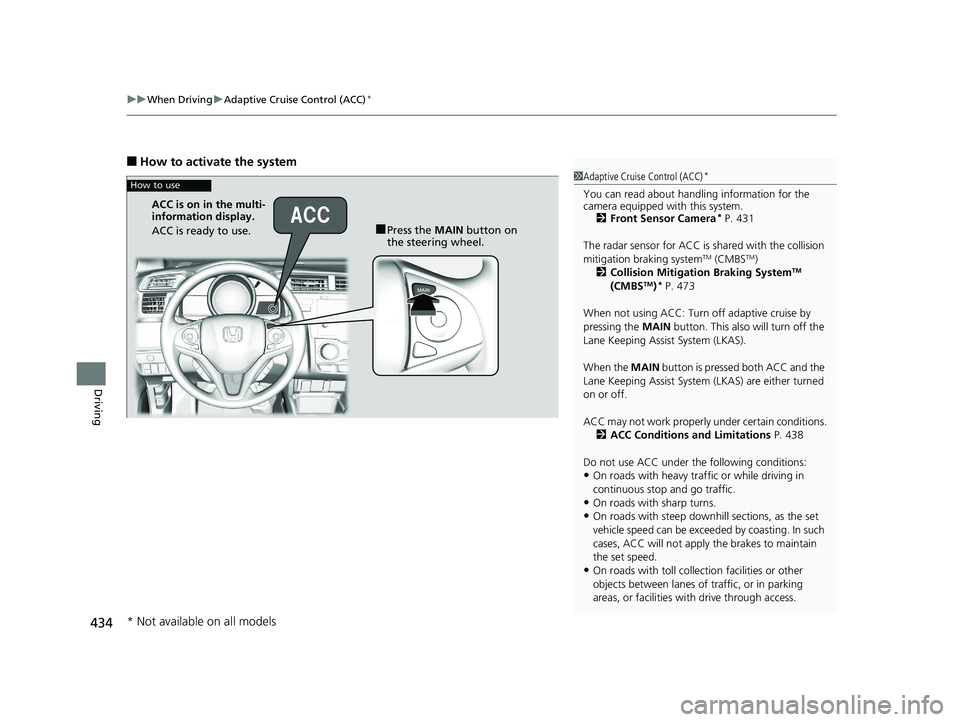
■How to activate the system
1Adaptive Cruise Control (ACC)*
You can read about handling information for the
camera equipped with this system.
2 Front Sensor Camera
* P. 431
The radar sensor for ACC is shared with the collision
mitigation braking system
TM (CMBSTM)
2 Collision Mitigation Braking SystemTM
(CMBSTM)* P. 473
When not using ACC: Turn off adaptive cruise by
pressing the MAIN button. This also will turn off the
Lane Keeping Assist System (LKAS).
When the MAIN button is pressed both ACC and the
Lane Keeping Assist System (LKAS) are either turned
on or off.
ACC may not work properly under certain conditions. 2 ACC Conditions and Limitations P. 438
Do not use ACC under the following conditions:
•On roads with heavy traf fic or while driving in
continuous stop and go traffic.
•On roads with sharp turns.
•On roads with steep downhill sections, as the set
vehicle speed can be exceeded by coasting. In such
cases, ACC will not apply the brakes to maintain
the set speed.
•On roads with toll collection facilities or other
objects between lanes of traffic, or in parking
areas, or faci lities with driv e through access.
How to use
■Press the MAIN button on
the steering wheel.
ACC is on in the multi-
information display.
ACC is ready to use.
* Not available on all models
20 FIT-31T5A6500.book 434 ページ 2019年9月26日 木曜日 午後4時41分
Page 559 of 599
557Continued
Handling the Unexpected
Jump Starting
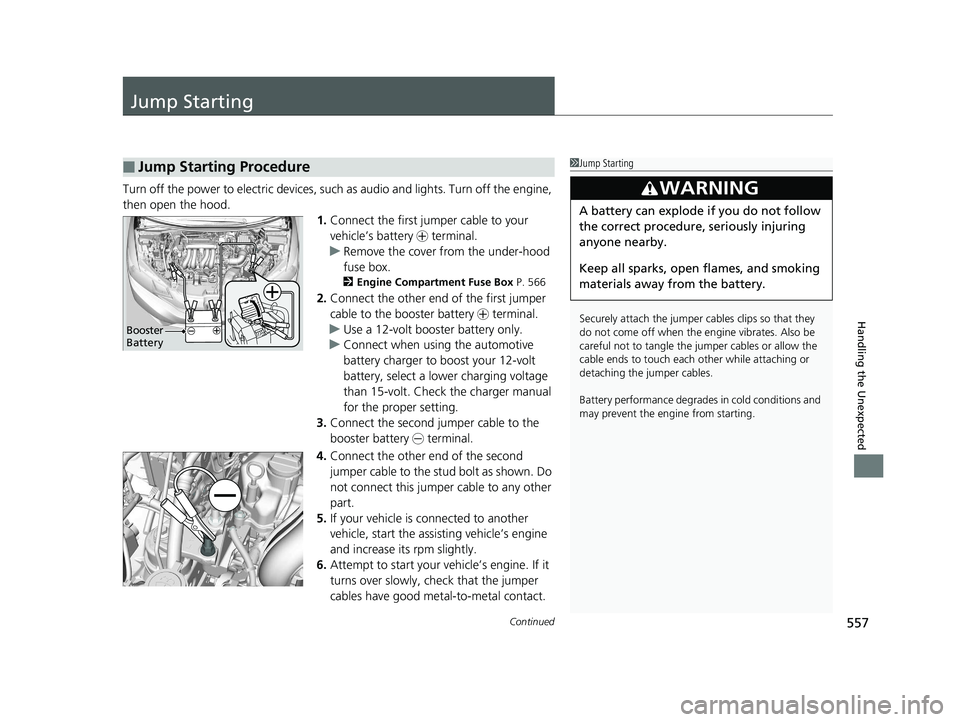
Turn off the power to electric devices, such as audio and lights. Turn off the engine,
then open the hood. 1.Connect the first jumper cable to your
vehicle’s battery + terminal.
u Remove the cover from the under-hood
fuse box.
2 Engine Compartment Fuse Box P. 566
2.Connect the other end of the first jumper
cable to the booster battery + terminal.
u Use a 12-volt booster battery only.
u Connect when using the automotive
battery charger to boost your 12-volt
battery, select a lower charging voltage
than 15-volt. Check the charger manual
for the proper setting.
3. Connect the second jumper cable to the
booster battery - terminal.
4. Connect the other end of the second
jumper cable to the stud bolt as shown. Do
not connect this jumper cable to any other
part.
5. If your vehicle is connected to another
vehicle, start the assisting vehicle’s engine
and increase its rpm slightly.
6. Attempt to start your ve hicle’s engine. If it
turns over slowly, check that the jumper
cables have good metal-to-metal contact.
■Jump Starting Procedure1 Jump Starting
Securely attach the jumper cables clips so that they
do not come off when the e ngine vibrates. Also be
careful not to tangle the ju mper cables or allow the
cable ends to touch each other while attaching or
detaching the jumper cables.
Battery performance degrades in cold conditions and
may prevent the engi ne from starting.
3WARNING
A battery can explode if you do not follow
the correct procedure, seriously injuring
anyone nearby.
Keep all sparks, open flames, and smoking
materials away from the battery.
Booster
Battery
20 FIT-31T5A6500.book 557 ページ 2019年9月26日 木曜日 午後4時41分
Page 590 of 599
Index
588
Index
Index
Numbers
7-Speed Manual Shift Mode.................... 421
A
ABS (Anti-lock Brake System) ................... 471
Accessories and Modifications ................. 544
Accessory Power Socket ........................... 191
Adaptive Cruise Control (ACC) ........... 89, 433
Additives
Coolant ................................................... 508
Engine Oil ................................................ 503
Washer .................................................... 512
Additives, Engine Oil ................................ 503
Adjusting Front Seats .............................................. 174
Head Restraints........................................ 181
Headlights ............................................... 513
Mirrors .................................................... 173
Rear Seats................................................ 178
Steering Wheel ........................................ 172
Temperature ............................................ 103
Adjusting the Sound ................................. 249
Air Conditioning System
Climate Control System ........................... 199
Defrosting the Windshield and Windows ....................................... 200
Dust and Pollen Filter ............................... 538
Air Conditioning System (Heating and Cooling System)
Cooling ................................................... 198 Defrosting the Windshield
and Windows ....................................... 198
Heating ................................................... 197
Heating and Cooling System ................... 196
Air Pressure ....................................... 526, 577
Airbags ........................................................ 46
Advanced Airbags ..................................... 52
Airbag Care............................................... 59
Event Data Recorder .................................... 0
Front Airbags (SRS) .................................... 49
Indicator.............................................. 57, 80
Passenger Front Airbag Off Indicator ......... 58
Sensors ..................................................... 46
Side Airbags .............................................. 53
Side Curtain Airbags.................................. 55
Android Auto ........................................... 293
Anti-lock Brake System (ABS) .................. 471
Indicator.................................................... 80
Apple CarPlay ........................................... 289
Armrest ..................................................... 185
Audio Remote Controls ........................... 210
Audio System ............................................ 206
Adjusting the Sound................................ 217
Error Messages ........................................ 312
General Information ................................ 317
MP3/WMA/AAC .............................. 227, 276
Recommended CDs ................................. 318
Recommended Devices............................ 320
Remote Controls ................................. 5, 210
Security Code .......................................... 208
Theft Protection ...................................... 208 USB Flash Drives...................................... 320
USB Port(s) .............................................. 207
Audio/Information Screen ............... 213, 234
Authorized Manuals ................................ 585
Auto Door Locking/Unlocking ................ 139
Customize .............................................. 140
Auto High-Beam ...................................... 164
Automatic Climate Control Sensors ........ 203
Average Fuel Economy .................... 105, 109
Average Speed ......................................... 110
B
Battery...................................................... 534
Charging System Indicator ................ 78, 562
Jump Starting ......................................... 557
Maintenance (Checking the Battery) ....... 534
Maintenance (Replacing) ......................... 536
Belts (Seat) .................................................. 36
Beverage Holders ..................................... 189
Bluetooth ® HandsFreeLink ®............. 343, 368
Booster Seats (For Children) ...................... 72
Brake System ............................................ 469
Anti-lock Brake System (ABS) .................. 471
Brake Assist System................................. 472
Fluid ....................................................... 511
Foot Brake .............................................. 470
Indicator ........................................... 76, 564
Parking Brake.......................................... 469
Brake System Indicator .............................. 76
Brightness Control (Instrument Panel) ... 170
20 FIT-31T5A6500.book 588 ページ 2019年9月26日 木曜日 午後4時41分