phone HONDA HR-V 2016 2.G Navigation Manual
[x] Cancel search | Manufacturer: HONDA, Model Year: 2016, Model line: HR-V, Model: HONDA HR-V 2016 2.GPages: 250, PDF Size: 4.84 MB
Page 196 of 250
195Continued
Bluetooth® HandsFreeLink ®
HondaLink Assist
If your vehicle’s airbags deploy or if the unit detects that the vehicle is severely
impacted, your vehicle automatically wi ll attempt to connect to the HondaLink
operator. If connected, information about yo ur vehicle, its location and its condition
will be sent to the operator; you also can speak to the operator when connected.
To use this function, you need to connect a phone via Blu
etooth® in advance.
2Pairing a Phone P. 170
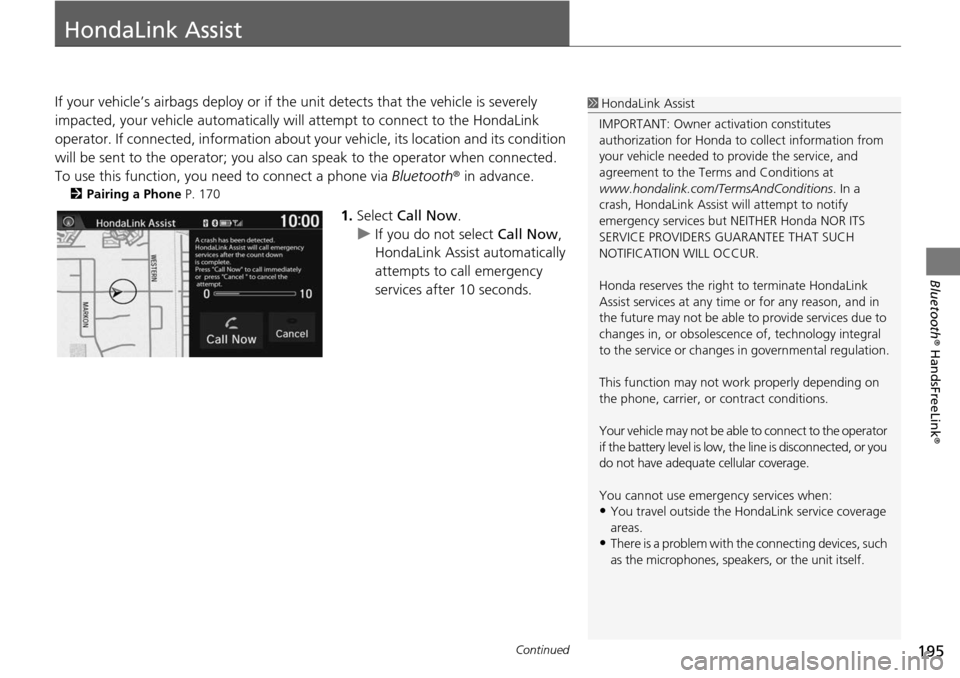
1. Select Call Now .
u If you do not select Call
Now,
HondaLink Assist automatically
attempts to call emergency
services after 10 seconds.
1 HondaLink Assist
IMPORTANT: Owner ac tivation constitutes
authorization for Honda to collect information from
your vehicle needed to provide the service, and
agreement to the Terms and Conditions at
www.hondalink.com/TermsAndConditions . In a
crash, HondaLink Assist will attempt to notify
emergency services but NEITHER Honda NOR ITS
SERVICE PROVIDERS GUARANTEE THAT SUCH
NOTIFICATION WILL OCCUR.
Honda reserves the right to terminate HondaLink
Assist services at any time or for any reason, and in
the future may not be able to provide services due to
changes in, or obsolescence of, technology integral
to the service or changes in governmental regulation.
This function may not wo rk properly depending on
the phone, carrier, or contract conditions.
Your vehicle may not be able to connect to the operator
if the battery level is low, the line is disconnected, or you
do not have adequate cellular coverage.
You cannot use emergency services when:
•You travel outside the H ondaLink service coverage
areas.
•There is a problem with th e connecting devices, such
as the microphones, speakers, or the unit itself.
Page 197 of 250
uu HondaLink Assist u
196
Bluetooth® HandsFreeLink ®
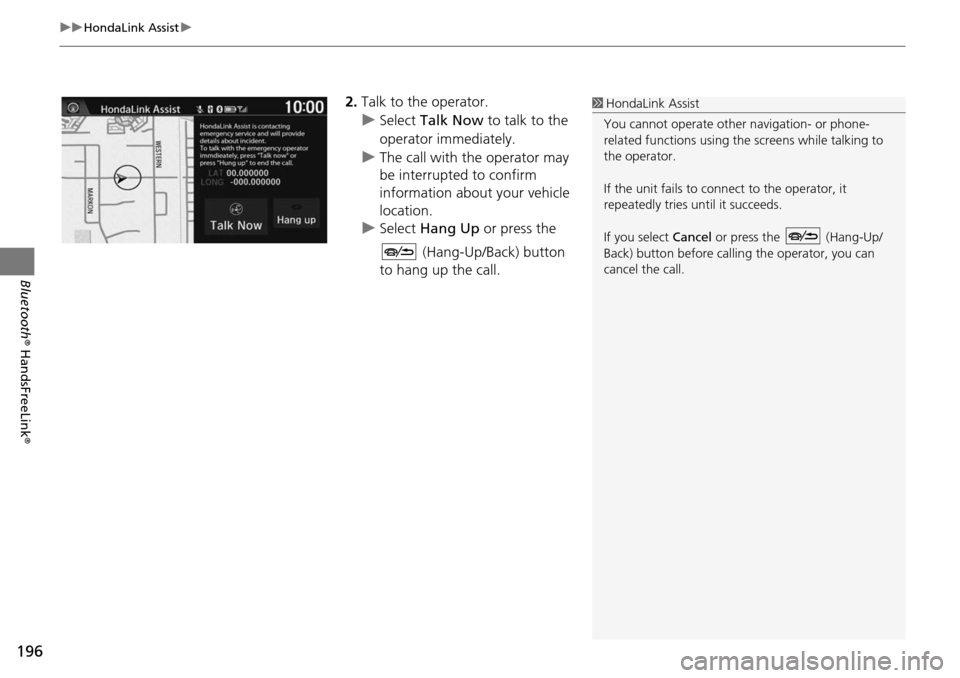
2.Talk to the operator.
u Select Talk Now to talk to the
operator immediately.
u The call with the operator may
be
interrupted to confirm
information about your vehicle
location.
u Select Hang Up or
press the
(Hang-Up/Back) button
to hang up the call.
1 HondaLink Assist
You cannot operate othe r navigation- or phone-
related functions using the screens while talking to
the operator.
If the unit fails to connect to the operator, it
repeatedly tries until it succeeds.
If you select Cancel or press the (Hang-Up/
Back) button before callin g the operator, you can
cancel the call.
Page 206 of 250
205
Troubleshooting
Troubleshooting....................................206
Map, Voice, Entering Destinations .........206
Traffic ...................................................208
Guidance, Routing ................................209
Update, Coverage, Map Errors ..............210
Smartphone Connection .......................211
Display, Accessories ..............................212
Multi-View Rear Camera .......................212
Miscellaneous Questions .......................213 Error Messages
......................................
214
Navigation System ................................ 214
Disc Player............................................ 215
Pandora ®...... .....................
.................. 216
iPod/USB Flash Drive............................. 218
Bluetooth ® HandsFreeL i
nk®.................. 219
Smartphone Connection ...................... 220
Page 208 of 250
207
uu Troubleshooting u Map, Voice, Entering Destinations
Troubleshooting
The voice control system is having difficulty
recognizing my voice commands.●Check that the vents are not blowing air onto the microphones at the top of the
navigation screen, the vehicle interior is as quiet as possible, and you are using
the correct command when speaking.
2 Voice Recognition P. 23●Say “Help ” on any screen to see a list of the applicable voice commands.
The navigation system pronunciation of destination
address sounds strange.The basic guidance phrases use a studio-reco rded voice, but destination address is
pronounced using a machine-generate d voice. Consequently, it may be
mispronounced or sound strange at times.
The screen is bright when I drive at night.1.Check that the nighttime dashboard brightness control is not set to maximum.
2. Press the (Display mode) button to change the Night mode.
2Switching Display Mode Manually P. 25
The screen is dark when I drive during the day.Press the (Display mode) button to change the Day mode.
2Switching Display Mode Manually P. 25
How do I change or remove my PIN?1.Select HOME > Settings > Navigation > Personal Info tab > PIN Number >
GO Home 1 PIN or GO Home 2 PIN or Address Book PIN .
2. Enter your existing PIN. You then have the choice
to change or remove the PIN.
2PIN Numbers P. 34
I have forgotten my PIN. How do I reset the PIN for
Home or the PIN for address books?Your dealer must reset the PIN for you.
Why is the phone number grayed out on the
Calculate Route screen?Your phone is not paired to Bluetooth® HandsFreeLink ® or, if paired, your phone
is in use.
ProblemSolution
Page 210 of 250
209
uu Troubleshooting u Guidance, Routing
Continued
Troubleshooting
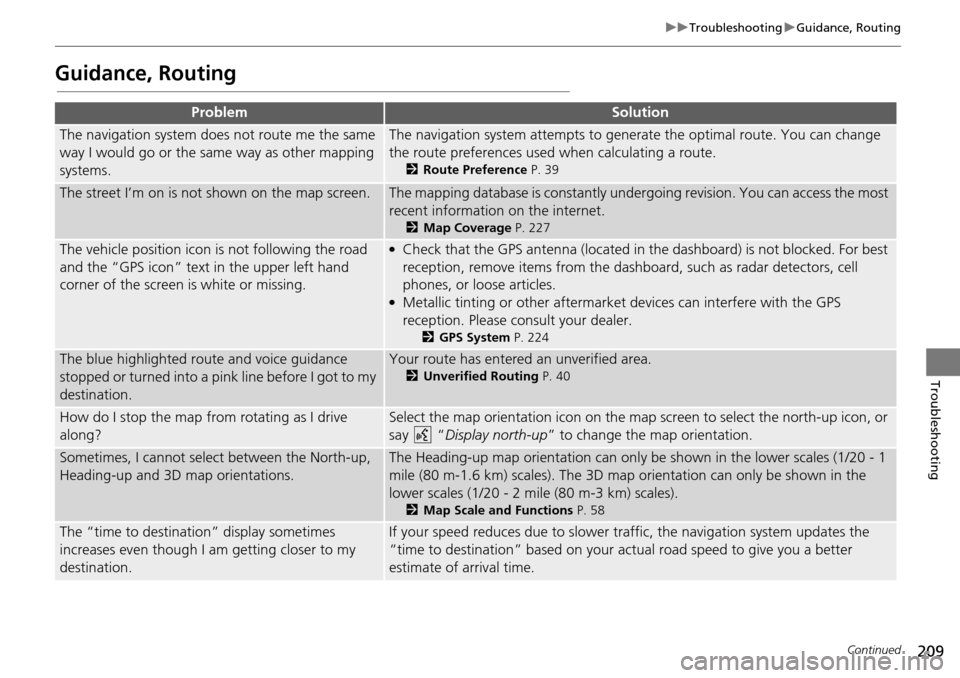
Guidance, Routing
ProblemSolution
The navigation system does not route me the same
way I would go or the same way as other mapping
systems.The navigation system attempts to genera te the optimal route. You can change
the route preferences used when calculating a route.
2 Route Preference P. 39
The street I’m on is not shown on the map screen.The mapping database is constantly under going revision. You can access the most
recent information on the internet.
2 Map Coverage P. 227
The vehicle position icon is not following the road
and the “GPS icon” text in the upper left hand
corner of the screen is white or missing.●Check that the GPS antenna (located in the dashboard) is not blocked. For best
reception, remove items from the dash board, such as radar detectors, cell
phones, or loose articles.
●Metallic tinting or other aftermarket devices can interfere with the GPS
reception. Please consult your dealer.
2 GPS System P. 224
The blue highlighted route and voice guidance
stopped or turned into a pink line before I got to my
destination.Your route has entered an unverified area.
2 Unverified Routing P. 40
How do I stop the map from rotating as I drive
along?Select the map orientation icon on the map screen to select the north-up icon, or
say
“Display north-up ” to change the map orientation.
Sometimes, I cannot sele ct between the North-up,
Heading-up and 3D map orientations.The Heading-up map orientation can only be shown in the lower scales (1/20 - 1
mile (80 m-1.6 km) scales). The 3D map orientation can only be shown in the
lower scales (1/20 - 2 mile (80 m-3 km) scales).
2 Map Scale and Functions P. 58
The “time to destination” display sometimes
increases even though I am getting closer to my
destination.If your speed reduces due to slower tra ffic, the navigation system updates the
“time to destination” based on your ac tual road speed to give you a better
estimate of arrival time.
Page 212 of 250
211
uu Troubleshooting u Smartphone Connection
Troubleshooting
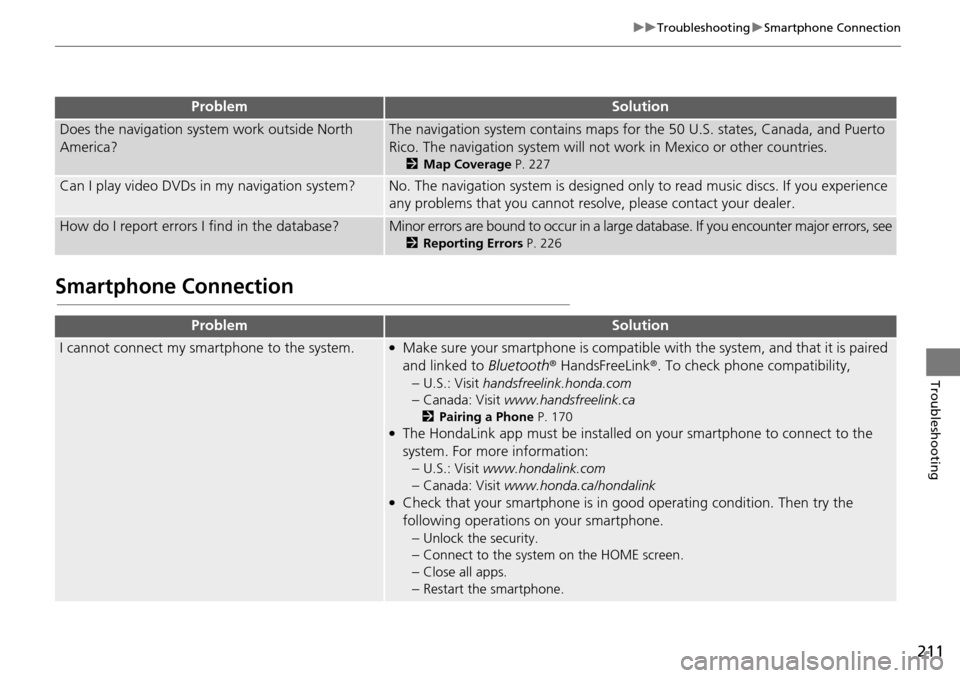
Smartphone Connection
Does the navigation system work outside North
America?The navigation system contains maps for the 50 U.S. states, Canada, and Puerto
Rico. The navigation system will not work in Mexico or other countries.
2 Map Coverage P. 227
Can I play video DVDs in my navigation system?No. The navigation system is designed only to read music discs. If you experience
any problems that you cannot resolve, please contact your dealer.
How do I report errors I find in the database?Minor errors are bound to occur in a large database. If you encounter major errors, see
2Reporting Errors P. 226
ProblemSolution
I cannot connect my smartphone to the system.●Make sure your smartphone is compatible with the system, and that it is paired
and linked to Bluetooth® HandsFreeLink ®. To check phone compatibility,
–
U.S.: Visit handsfreelink.honda.com
–Canada: Visit www.handsfreelink.ca
2Pairing a Phone P. 170●The HondaLink app must be installed on your smartphone to connect to the
system. For more information: –
U.S.: Visit www.hondalink.com
–Canada: Visit www.honda.ca/hondalink●Check that your smartphone is in good operating condition. Then try the
following operations on your smartphone.
–
Unlock the security.
–Connect to the system on the HOME screen.
–Close all apps.
–Restart the smartphone.
ProblemSolution
Page 218 of 250
217
uu Error Messages u Pandora ®
Troubleshooting
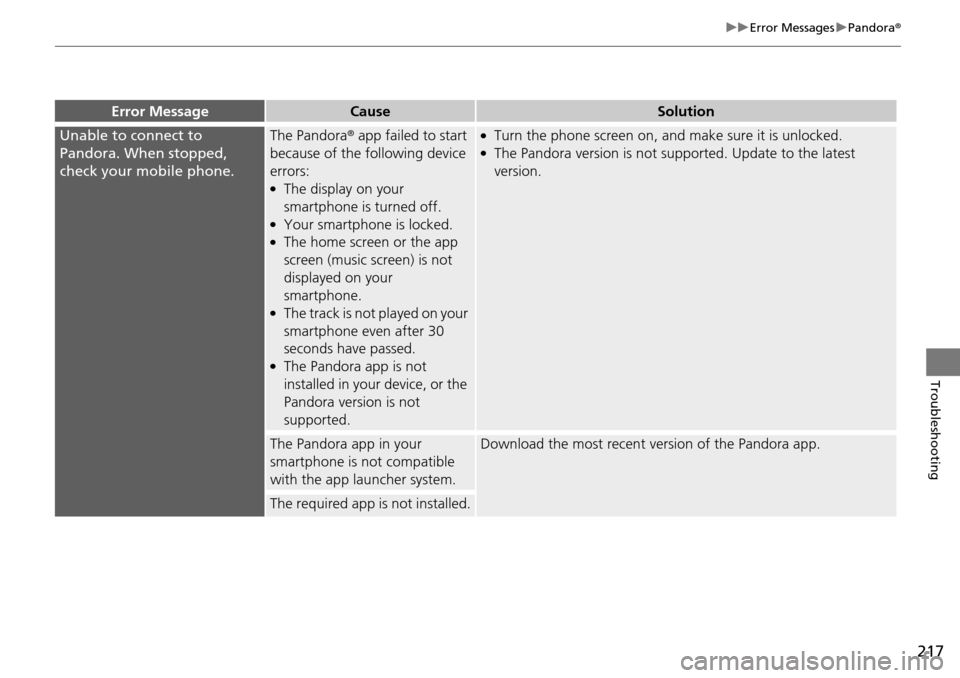
Error MessageCauseSolution
Unable to connect to
Pandora. When stopped,
check your mobile phone.The Pandora® app failed to start
because of the following device
errors:
●The display on your
smartphone is turned off.
●Your smartphone is locked.●The home screen or the app
screen (music screen) is not
displayed on your
smartphone.
●The track is not played on your
smartphone even after 30
seconds have passed.
●The Pandora app is not
installed in your device, or the
Pandora version is not
supported.
●Turn the phone screen on, and make sure it is unlocked.●The Pandora version is not supported. Update to the latest
version.
The Pandora app in your
smartphone is not compatible
with the app launcher system.Download the most recent version of the Pandora app.
The required app is not installed.
Page 220 of 250
219
uu Error Messages u Bluetooth ® HandsFreeLink ®
Troubleshooting
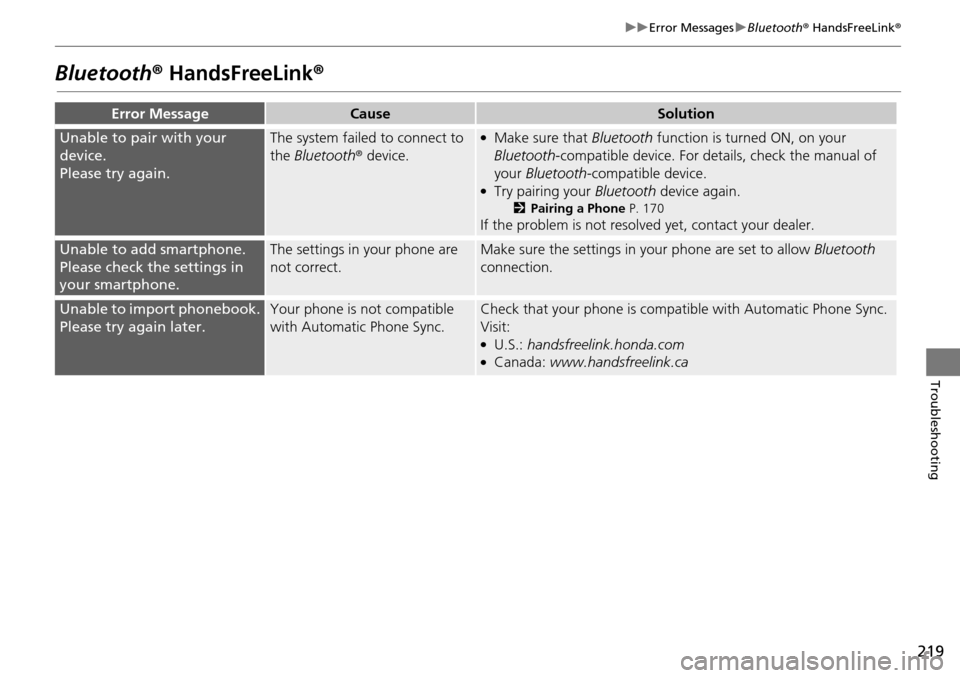
Bluetooth® HandsFreeLink®
Error MessageCauseSolution
Unable to pair with your
device.
Please try again.
The system failed to connect to
the Bluetooth ® device.●Make sure that Bluetooth function is turned ON, on your
Bluetooth -compatible device. For details, check the manual of
your Bluetooth -compatible device.
●Try pairing your Bluetooth device again.
2Pairing a Phone P. 170
If the problem is not resolved yet, contact your dealer.
Unable to add smartphone.
Please check the settings in
your smartphone.
The settings in your phone are
not correct.Make sure the settings in your phone are set to allow Bluetooth
connection.
Unable to import phonebook.
Please try again later.
Your phone is not compatible
with Automatic Phone Sync.Check that your phone is compat ible with Automatic Phone Sync.
Visit:
●U.S.: handsfreelink.honda.com●Canada: www.handsfreelink.ca
Page 221 of 250
220
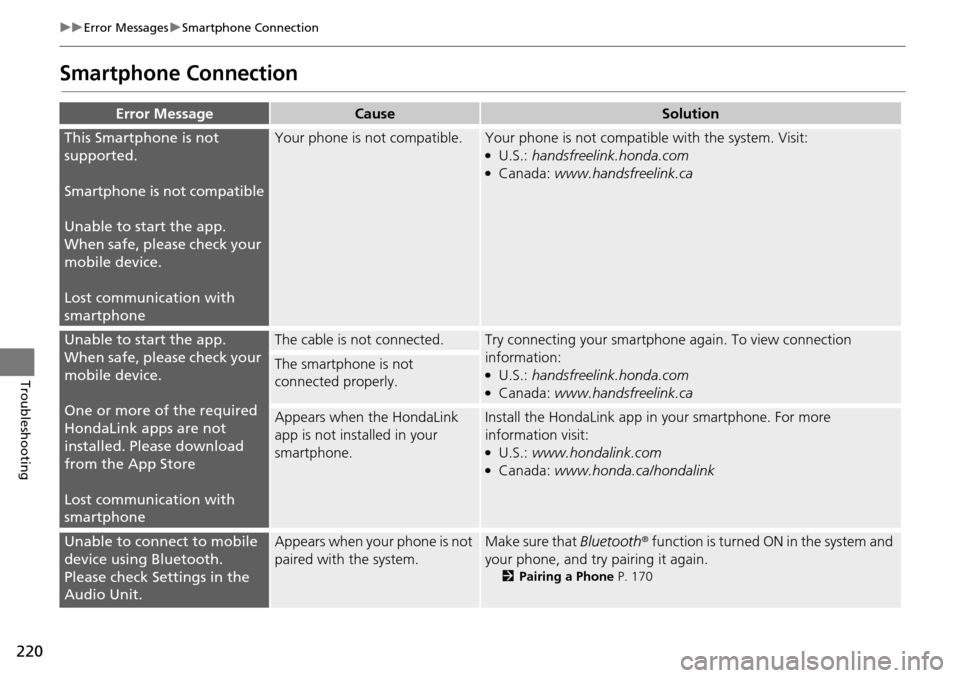
uu Error Messages u Smartphone Connection
Troubleshooting
Smartphone Connection
Error MessageCauseSolution
This Smartphone is not
supported.
Smartphone is not compatible
Unable to start the app.
Wh en
safe, please check your
mobile device.
Lost communication with
smartphone
Your phone is not compatible.Your phone is not compatib le with the system. Visit:●U.S.: handsfreelink.honda.com●Canada: www.handsfreelink.ca
Unable to start the app.
When safe, please check your
mobile device.
One or more of the required
HondaLink apps
are not
installed. Please download
from the App Store
Lost communication with
smartphone
The cable is not connected.Try connecting your smartphone again. To view connection
information:
●U.S.: handsfreelink.honda.com●Canada: www.handsfreelink.ca
The smartphone is not
connected properly.
Appears when the HondaLink
app is not installed in your
smartphone.Install the HondaLink app in your smartphone. For more
information visit:
●U.S.: www.hondalink.com●Canada: www.honda.ca/hondalink
Unable to connect to mobile
device using Bluetooth.
Please check Settings in the
Audio Unit.Appears when your phone is not
paired with the system.Make sure that Bluetooth ® function is turned ON in the system and
your phone, and try pairing it again.
2 Pairing a Phone P. 170
Page 225 of 250
224
Reference Information
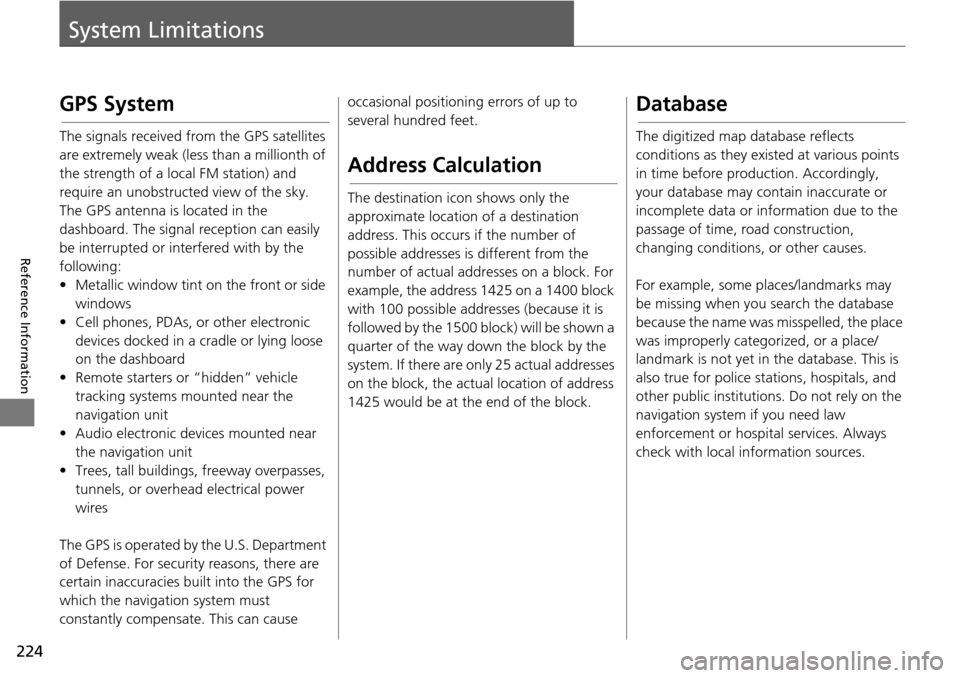
System Limitations
GPS System
The signals received from the GPS satellites
are extremely weak (less than a millionth of
the strength of a local FM station) and
require an unobstructed view of the sky.
The GPS antenna is located in the
dashboard. The signal reception can easily
be interrupted or interfered with by the
following:
• Metallic window tint on the front or side wind ows
•
Cell phones, PDAs, or other electronic
de
vices docked in a cradle or lying loose
on the dashboard
• Remote starters or “hidden” vehicle tracking system s
mounted near the
navigation unit
• Audio electronic devices mounted near the nav i
gation unit
• Trees, tall buildings , freeway overpasse
s,
tunnels, or overhead electrical power
wires
The GPS is operated by the U.S. Department
of Def ense. For
security reasons, there are
certain inaccuracies bu ilt into the GPS for
which the navigation system must
constantly compensate. This can cause occasional positioning errors of up to
several hundred feet.
Address Calculation
The destination icon shows only the
approximate location of a destination
address. This occurs if the number of
possible addresses is different from the
number of actual addr
esses on a block. For
example, the address 1425 on a 1400 block
with 100 possible addresses (because it is
followed by the 1500 block) will be shown a
quarter of the way down the block by the
system. If there are only 25 actual addresses
on the block, the actual location of address
1425 would be at the end of the block.
Database
The digitized map database reflects
conditions as they existed at various points
in time before production. Accordingly,
your database may contain inaccurate or
incomplete data or information due to the
passage of time, road construction,
changing conditions, or other causes.
For example, some places/landmarks may
be missing when you
search the database
because the name was misspelled, the place
was improperly categorized, or a place/
landmark is not yet in the database. This is
also true for police st ations, hospitals, and
other public institutions. Do not rely on the
navigation system if you need law
enforcement or hospital services. Always
check with local in formation sources.