phone HONDA HR-V 2016 2.G Navigation Manual
[x] Cancel search | Manufacturer: HONDA, Model Year: 2016, Model line: HR-V, Model: HONDA HR-V 2016 2.GPages: 250, PDF Size: 4.84 MB
Page 99 of 250
98
Navigation
Calculating the Route
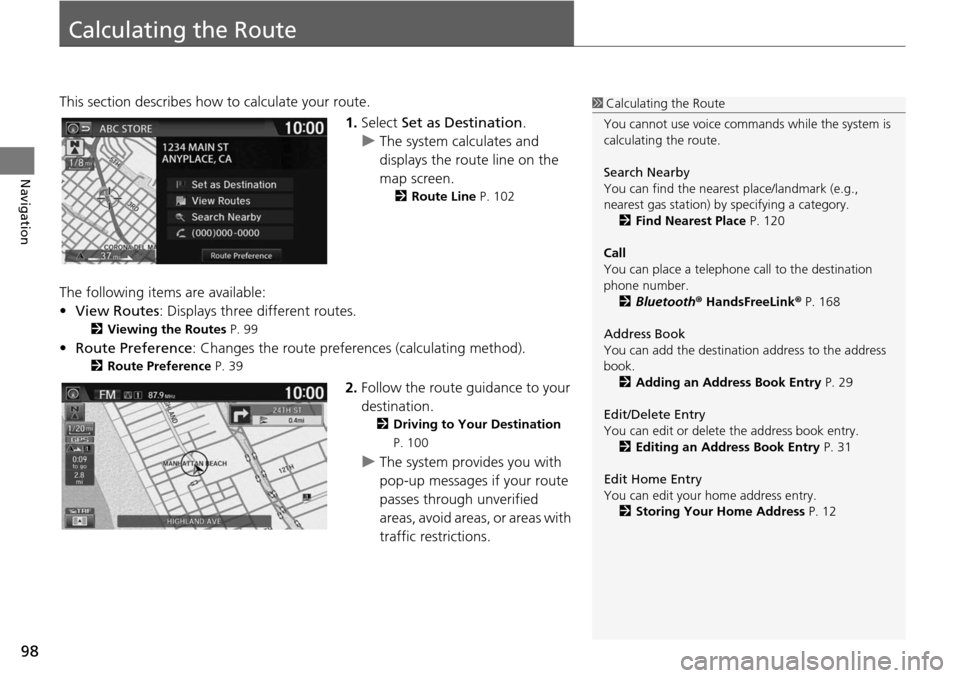
This section describes how to calculate your route.1.Select Set a
s Destination.
u The system calculates and
di
splays the route line on the
map screen.
2 Route Line P. 102
The following items are available:
• View Routes: Displays three different routes.
2 Viewing the Routes P. 99
• Route Preference : Changes the route preferences (calculating method).
2Route Preference P. 39
2. Follow the route guidance to your
destination.
2 Driving to Your Destination
P. 100
u The system provides you with
pop-up messages if your route
passes through unverified
areas, avoid areas, or areas with
traffic restrictions.
1Calculating the Route
You cannot use voice commands while the system is
calculating the route.
Search Nearby
You can find the nearest place/landmark (e.g.,
nearest gas station) by specifying a category. 2 Find Nearest Place P. 120
Call
You can place a telephone call to the destination
phone number.
2 Bluetooth ® HandsFreeLink ® P. 168
Address Book
You can add the destinati on address to the address
book. 2 Adding an Address Book Entry P. 29
Edit/Delete Entry
You can edit or delete the address book entry.
2 Editing an Address Book Entry P. 31
Edit Home Entry
You can edit your home address entry. 2 Storing Your Home Address P. 12
Page 124 of 250
123
Navigation
Resuming Your Trip
Stop your vehicle en route (e.g., to rest, stop for gas, etc.), and then continue on
your route.
If you did not complete your route, the Cont
inue trip to screen is displayed when
you restart your vehicle.
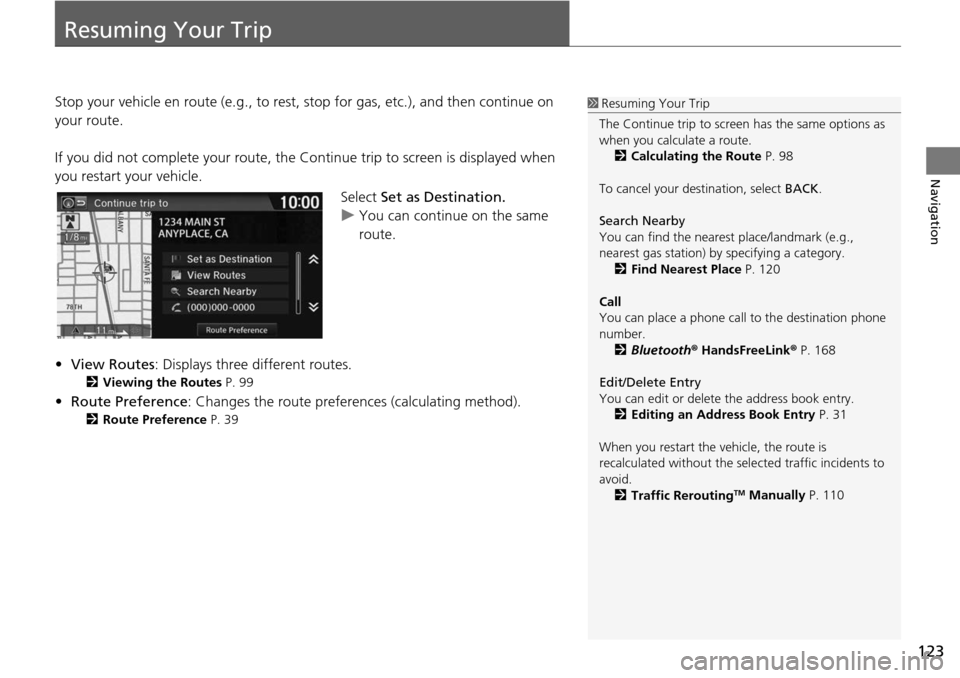
Select Set as Destination.
u You can continue on the same
ro
ute.
• View Ro utes: Displays
three different routes.
2Viewing the Routes P. 99
• Route Preference: Changes the route preferen ces (calculating method).
2Route Preference P. 39
1 Resuming Your Trip
The Continue trip to screen has the same options as
when you calculate a route. 2 Calculating the Route P. 98
To cancel your de stination, select BACK.
Search Nearby
You can find the nearest place/landmark (e.g.,
nearest gas station) by specifying a category. 2 Find Nearest Place P. 120
Call
You can place a phone call to the destination phone
number.
2 Bluetooth ® HandsFreeLink ® P. 168
Edit/Delete Entry
You can edit or delete the address book entry.
2 Editing an Address Book Entry P. 31
When you restart the vehicle, the route is
recalculated without the sele cted traffic incidents to
avoid. 2 Traffic Rerouting
TM Manually P. 110
Page 127 of 250
126
Audio
Audio System
About Your Audio System
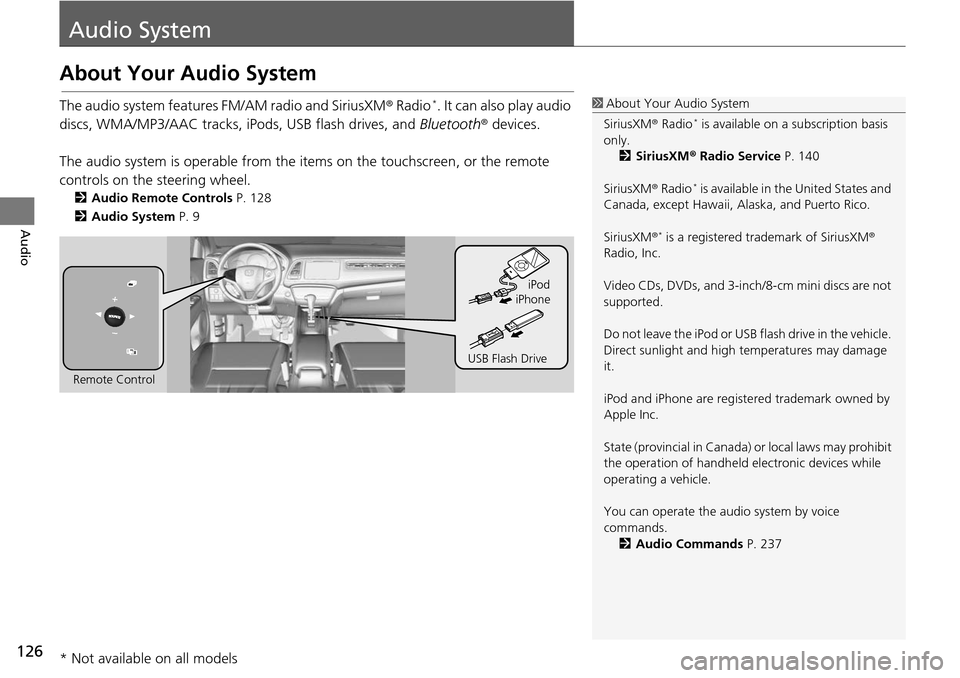
The audio system features FM/AM radio and SiriusXM® Radio *. It can also play audio
discs, WMA/MP3/AAC tracks, iP ods, USB flash drives, and Bluetooth® devices.
The audio system is operable from the it ems on the touchscreen,
or the remote
controls on the steering wheel.
2 Audio Remote Controls P. 128
2 Audio System P. 9
1 About Your Audio System
SiriusXM ® Radio
* is available on a subscription basis
only. 2 SiriusXM ® Radio Service P. 140
SiriusXM ® Radio
* is available in the United States and
Canada, except Ha waii, Alaska, and Puerto Rico.
SiriusXM ®
* is a registered trademark of SiriusXM®
Radio, Inc.
Video CDs, DVDs, and 3-inch /8-cm mini discs are not
supported.
Do not leave the iPod or USB flash drive in the vehicle.
Direct sunlight and high temperatures may damage
it.
iPod and iPhone are regist ered trademark owned by
Apple Inc.
State (provincial in Canada) or local laws may prohibit
the operation of handheld electronic devices while
operating a vehicle.
You can operate the audio system by voice
commands. 2 Audio Commands P. 237
Remote Control iPod
USB Flash Drive iPhone
* Not available on all models
Page 129 of 250
128
Audio
Audio Remote Controls
Steering Wheel Controls
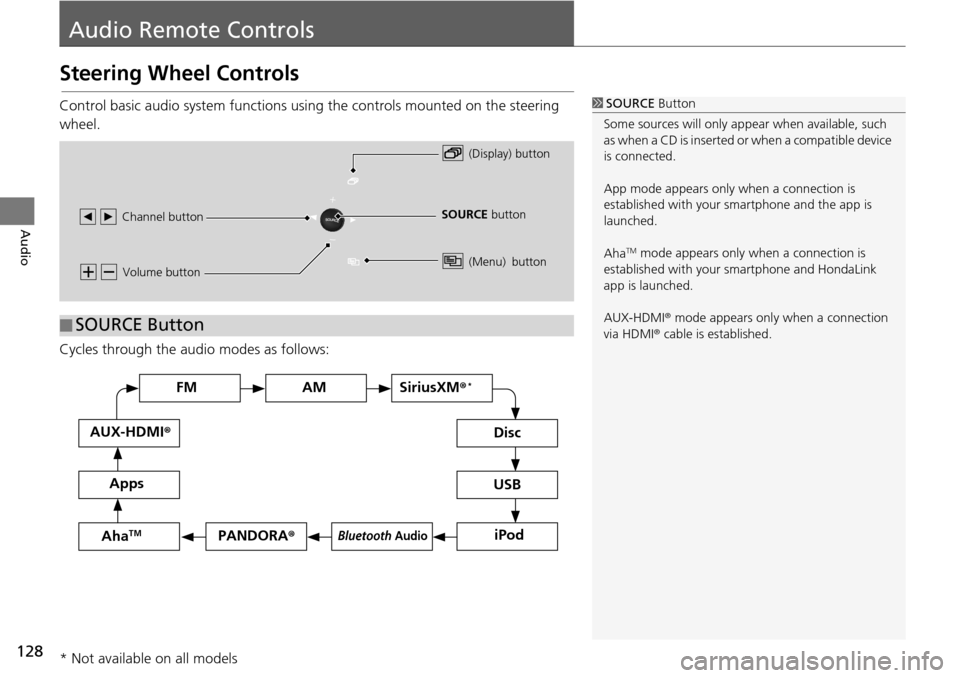
Control basic audio system functions using the controls mounted on the steering
wheel.
Cycles through the au d
i
o modes as follows:
1SOURCE Button
Some sources will only appe ar when available, such
as when a CD is inserted or when a compatible device
is connected.
App mode appears only when a connection is
established with your smartphone and the app is
launched.
Aha
TM mode appears only when a connection is
established with your smartphone and HondaLink
app is launched.
AUX-HDMI ® mode appears only when a connection
via HDMI ® cable is established.
Volume button
SOURCE button
Channel button
(Display) button
(Menu) button
■SOURCE Button
FM
PANDORA
®
AM SiriusXM® *
iPod
Disc
USBBluetooth Audio
Apps
AUX-HDMI
®
AhaTM
* Not available on all models
Page 130 of 250
129
uu Audio Remote Controls u Steering Wheel Controls
Continued
Audio
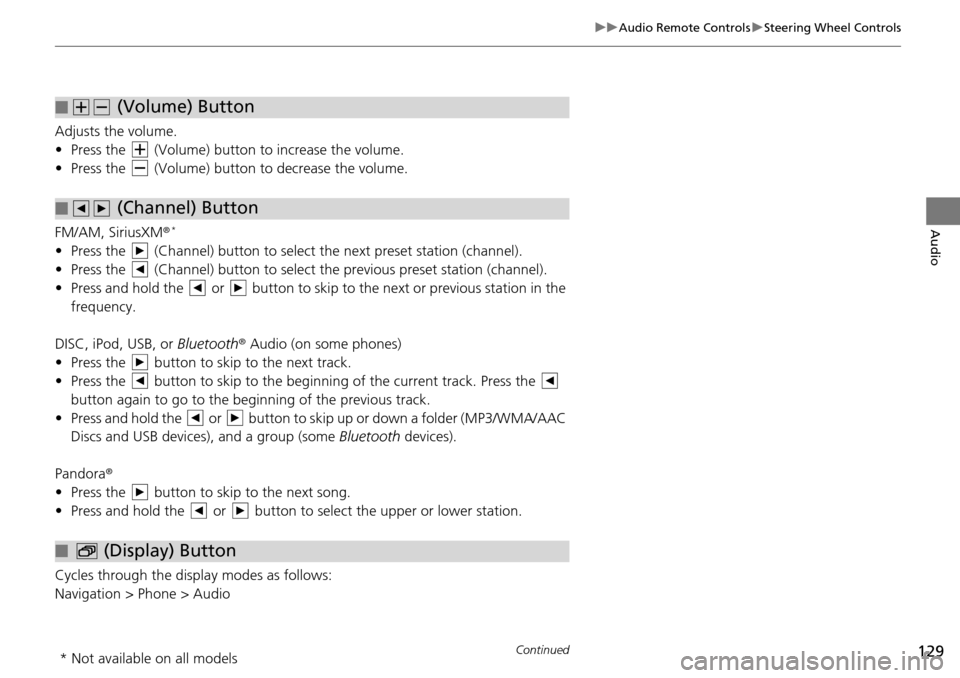
Adjusts the volume.
• Press the (Volume) button to increase the volume .
• Press the (Volume) button to decrease the
volume.
FM/AM, SiriusXM ®
*
• Press the (Channel) button to select the next preset station (channel).
• Press the (Channel) button to select the pr evious
preset station (channel).
• Press and hold the or button to skip to the next or previous station in t
he
frequency.
DISC, iPod, USB, or Bluetooth ® Aud
io (on some phones)
• Press the button to skip to the next track.
• Press the button to skip to the beginning of the current track. Press the
button again to go to the beginning of the previous track.
• Press and hold the or button to skip up or down a folder (MP3/WMA/AAC
Discs and USB devices), and a group (some Bl
uetooth de
vices).
Pandora ®
• Press the button to skip to the next song.
• Press and hold the or button to select the upper or lower station.
Cycles through the display modes as follows:
Navigation > Phone > Audio
■ (Volume) Button
■ (Channel) Button
■ (Display) Button
* Not available on all models
Page 136 of 250
Continued135
uu Playing FM/AM Radio u Audio Menu
Audio
• Scan : Scans for stations with a strong signal in the current band and plays a 10-
second sample. Select Cancel to stop scanning and play the current selection.
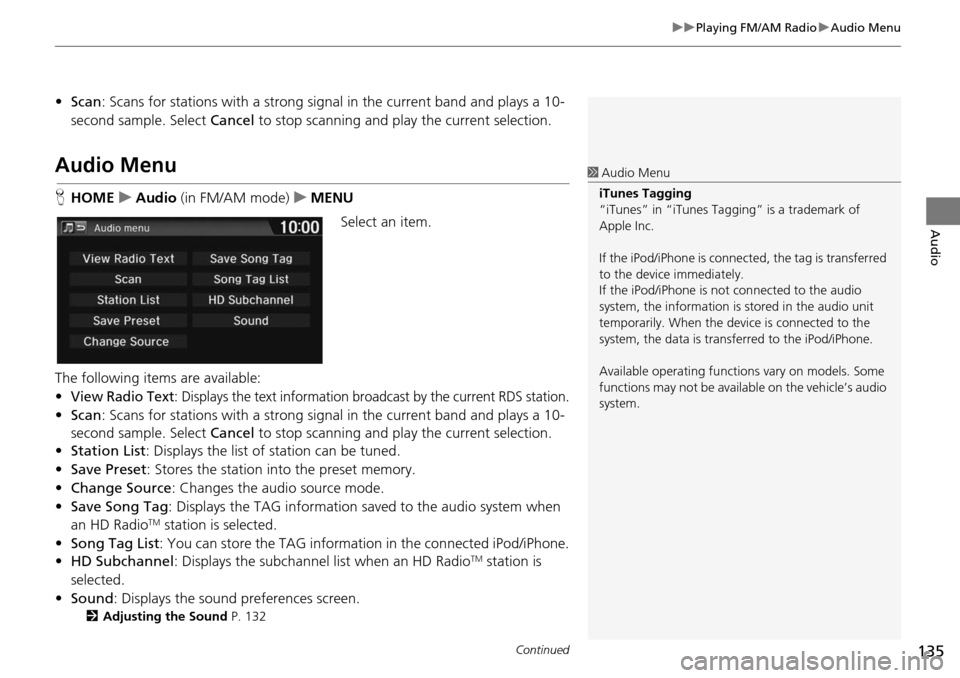
Audio Menu
HHOME u Audio (in FM/AM mode) u ME NU
Select an item.
The following items are available:
•
View Radio Text: Displays the text information broadcast by the current RDS station.
• Scan : Scans for stations with a strong signal in the current band and plays a 10-
second sample. Select Cancel to stop scanning and pl ay the current selection.
• Station List : Di
splays the list of station can be tuned.
• Save Pr eset: Stores the stat
ion into the preset memory.
• Change Source : Changes
the audio source mode.
• Save Song Tag : D
isplays the TAG information sa ved to the audio system when
an HD RadioTM station is selected.
• Song Tag List: You ca
n store the TAG information in the connected iPod/iPhone.
• HD Subchannel : Di
splays the subchannel list when an HD RadioTM station is
selected.
• Sound : Display
s the sound preferences screen.
2Adjusting the Sound P. 132
1 Audio Menu
iTunes Tagging
“iTunes” in “iTunes Ta gging” is a trademark of
Apple Inc.
If the iPod/iPhone is connect ed, the tag is transferred
to the device immediately.
If the iPod/iPhone is not connected to the audio
system, the information is stored in the audio unit
temporarily. When the device is connected to the
system, the data is transferred to the iPod/iPhone.
Available operating function s vary on models. Some
functions may not be availa ble on the vehicle’s audio
system.
Page 147 of 250
146
Audio
Playing an iPod
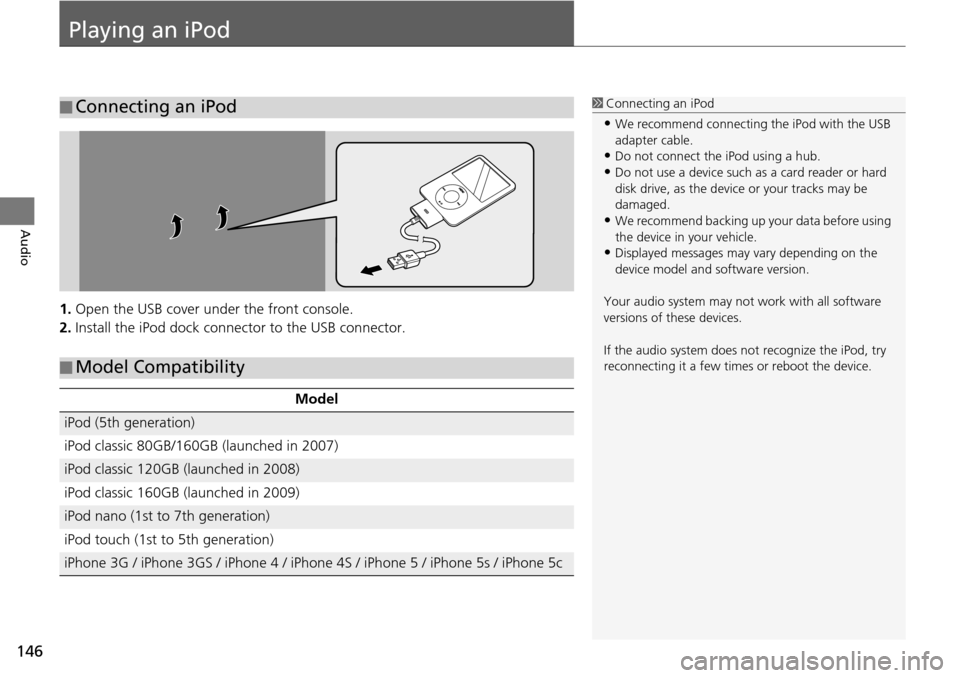
1.Open the USB cover under the front console.
2. Install the iPod dock connector to the USB connector.
■Connecting an iPod1
Connecting an iPod
•We recommend connecting the iPod with the USB
adapter cable.
•Do not connect the iPod using a hub.
•Do not use a device such as a card reader or hard
disk drive, as the device or your tracks may be
damaged.
•We recommend backing up yo ur data before using
the device in your vehicle.
•Displayed messages may vary depending on the
device model and software version.
Your audio system may not work with all software
versions of these devices.
If the audio system does not recognize the iPod, try
reconnecting it a few time s or reboot the device.
■Model Compatibility
Model
iPod (5th generation)
iPod classic 80GB/160GB (launched in 2007)
iPod classic 120GB (launched in 2008)
iPod classic 160GB (launched in 2009)
iPod nano (1st to 7th generation)
iPod touch (1st to 5th generation)
iPhone 3G / iPhone 3GS / iPhone 4 / iPhone 4S / iPhone 5 / iPhone 5s / iPhone 5c
Page 152 of 250
151
uu Playing an iPod u Song By VoiceTM (SBV)
Continued
Audio
Song By VoiceTM (SBV)
Use SBV to search for and play music from your iPod or USB flash drive using voice
commands.
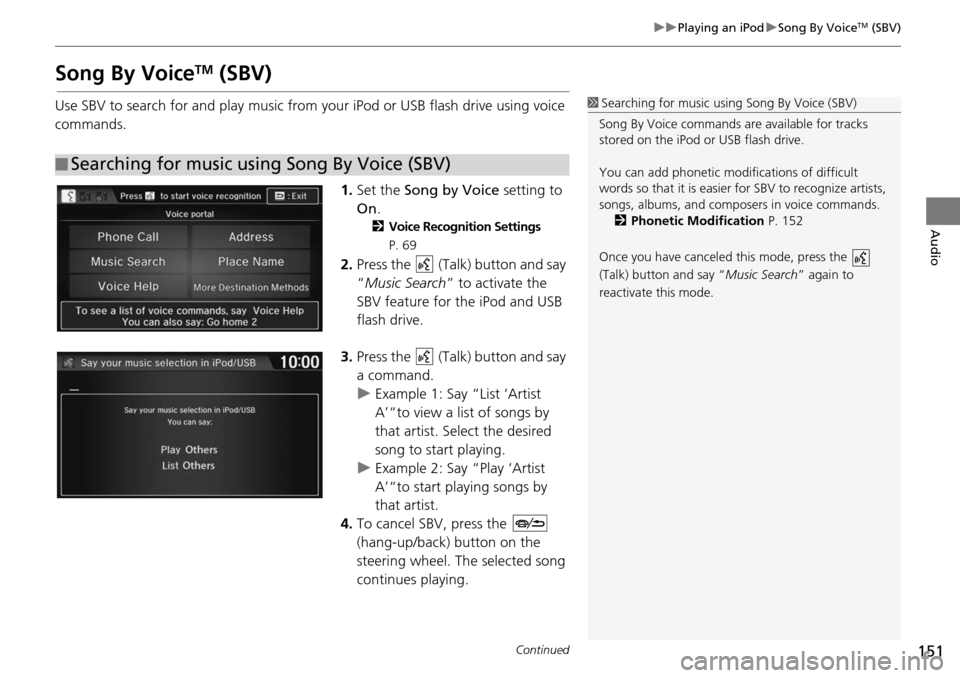
1.Set the So
ng
by Voice setting to
On .
2Voice Recognition Settings
P. 69
2. Press the (Talk) button and say
“ Music Search ” to activa
te the
SBV feature for the iPod and USB
flash drive.
3. Press the (Talk) button and say
a command.
u Example 1: Say “List ‘Artist
A’“
to view a list of songs by
that artist. Select the desired
song to start playing.
u Example 2: Say “Play ‘Artist
A’“
to start playing songs by
that artist.
4. To cancel SBV, press the
(hang-up/back) button on the
steering wheel. The select
ed song
continues playing.
■ Searching for music using Song By Voice (SBV)
1
Searching for music using Song By Voice (SBV)
Song By Voice commands are available for tracks
stored on the iPod or USB flash drive.
You can add phonetic modi fications of difficult
words so that it is easier for SBV to recognize artists,
songs, albums, and composers in voice commands.
2 Phonetic Modification P. 152
Once you have canceled this mode, press the
(Talk) button and say “Music Search ” again to
reactivate this mode.
Page 153 of 250
uu Playing an iPod u Song By VoiceTM (SBV)
152
Audio
H HOME u Settings u System u Voice Recog tab u Song By Voice Phonetic
Modi
fication
Add phonetic modifications of difficult or foreign words
so that it is easier for SBV
to recognize artists, songs, albums, and composers in voice commands when
searching for music on the iPod or USB flash drive.
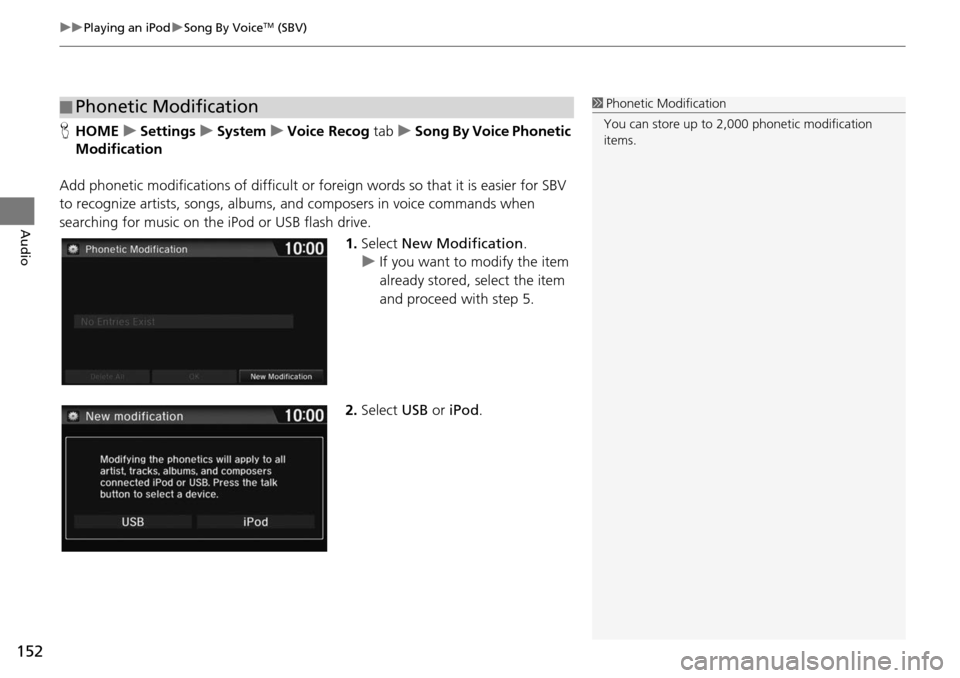
1.Select New Modification .
u If yo u want to modify the item
already stored, select
the item
and proceed with step 5.
2. Select USB or iPod .
■Phonetic Modification1
Phonetic Modification
You can store up to 2, 000 phonetic modification
items.
Page 154 of 250
153
uu Playing an iPod u Song By VoiceTM (SBV)
Audio
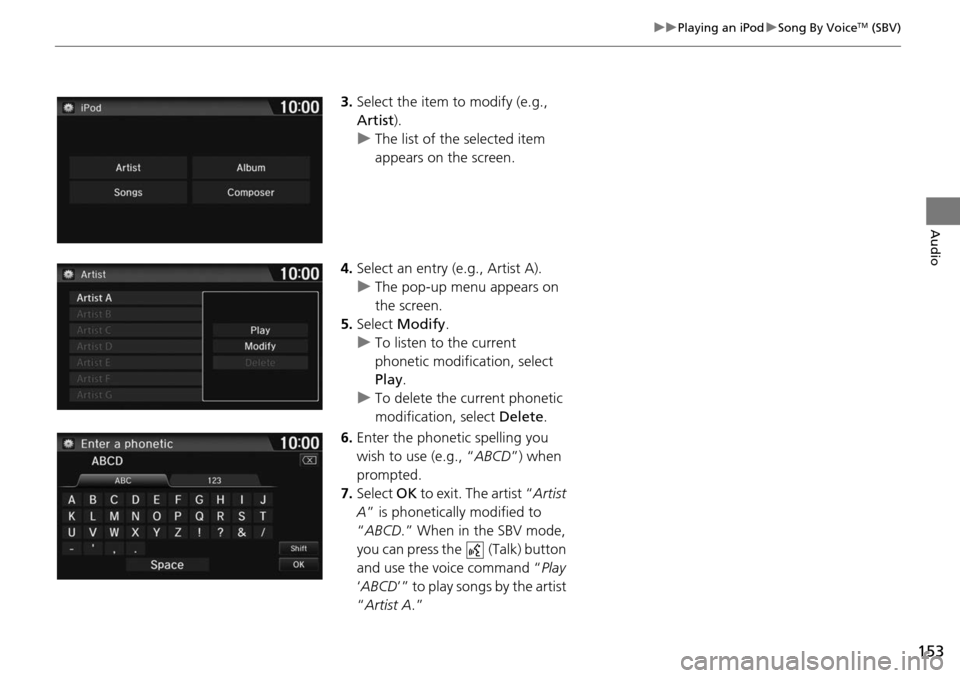
3. Select the item to modify (e.g.,
Artist ).
uThe list of the selected item
appears on the screen.
4. Select an entry (e.g., Artist A).
u The pop-u
p menu appears on
the screen.
5. Select Modi
fy.
u To listen to the current
pho
netic modification, select
Play .
u To delete t h
e current phonetic
modification, select Delete.
6. Enter the phonetic spelling you
w
ish to use (e.g., “ ABCD”) when
prompted.
7. Select OK to exit . The
artist “Artist
A” is phonetically modified to
“ ABCD .” When in the SBV mode,
you can press the (Talk) button
and use the voice command “ Pl
ay
‘ ABCD ’” to play songs by the artist
“ Artist A .”