lock HONDA HR-V 2016 2.G Owner's Manual
[x] Cancel search | Manufacturer: HONDA, Model Year: 2016, Model line: HR-V, Model: HONDA HR-V 2016 2.GPages: 489, PDF Size: 26.59 MB
Page 65 of 489
uuChild Safety uSafety of Infants and Small Children
64
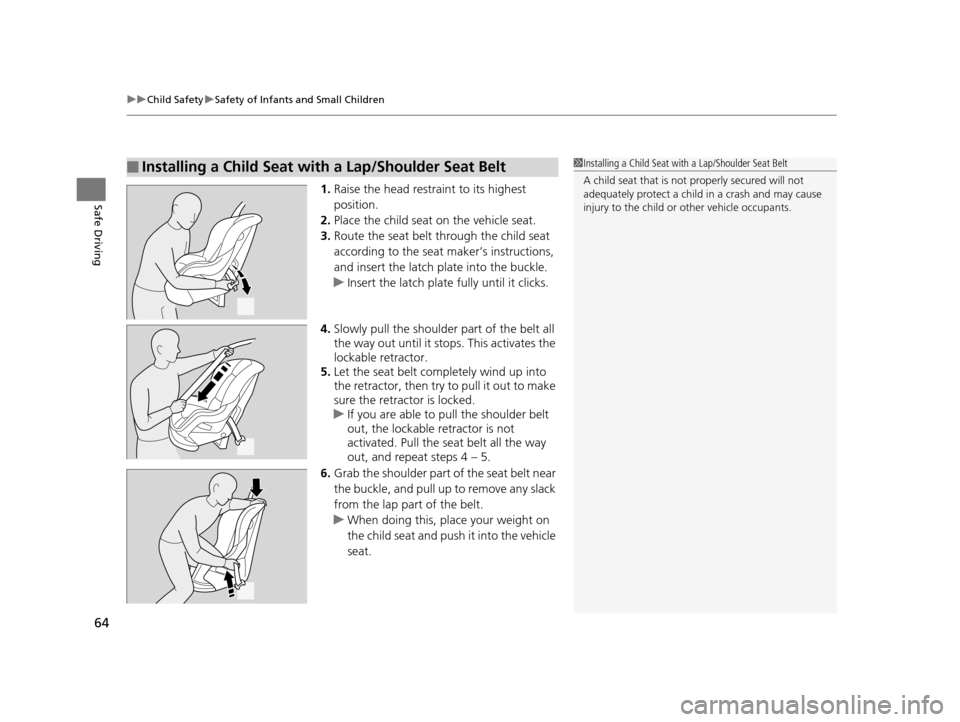
Safe Driving1. Raise the head restraint to its highest
position.
2. Place the child seat on the vehicle seat.
3. Route the seat belt through the child seat
according to the seat maker’s instructions,
and insert the latch plate into the buckle.
u Insert the latch plate fully until it clicks.
4. Slowly pull the shoulder part of the belt all
the way out until it stops. This activates the
lockable retractor.
5. Let the seat belt completely wind up into
the retractor, then try to pull it out to make
sure the retractor is locked.
u If you are able to pull the shoulder belt
out, the lockable retractor is not
activated. Pull the seat belt all the way
out, and repeat steps 4 – 5.
6. Grab the shoulder part of the seat belt near
the buckle, and pull up to remove any slack
from the lap part of the belt.
u When doing this, plac e your weight on
the child seat and push it into the vehicle
seat.
■Installing a Child Seat with a Lap/Shoulder Seat Belt1 Installing a Child Seat with a Lap/Shoulder Seat Belt
A child seat that is not properly secured will not
adequately protect a child in a crash and may cause
injury to the child or other vehicle occupants.
15 HR-V GAS-31T7A6000.book 64 ページ 2015年6月29日 月曜日 午前11時36分
Page 66 of 489
Continued65
uuChild Safety uSafety of Infants and Small Children
Safe Driving
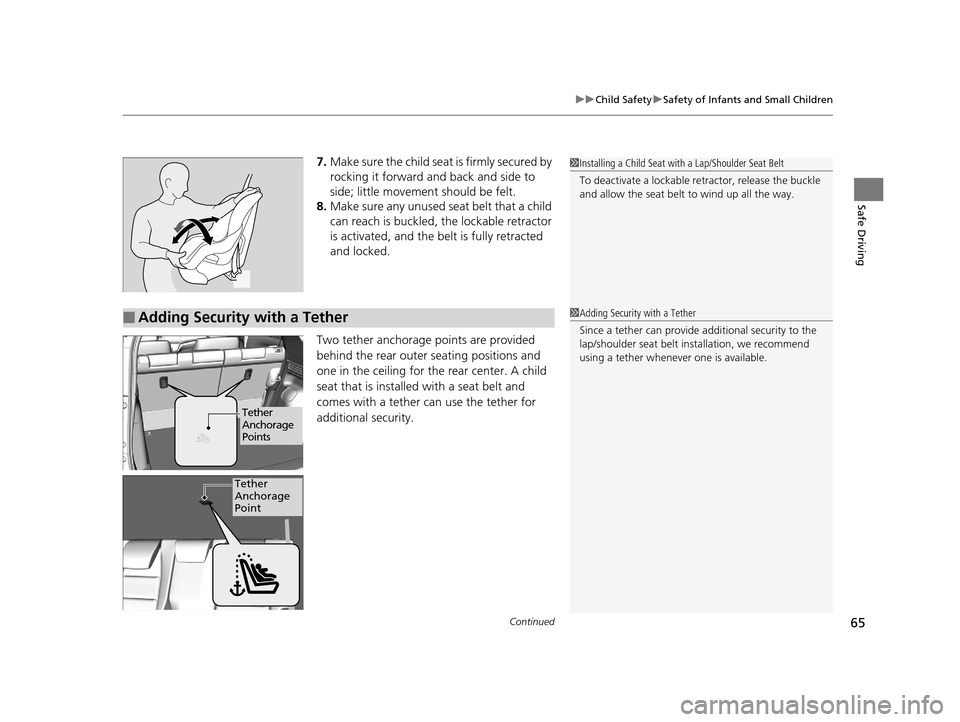
7. Make sure the child seat is firmly secured by
rocking it forward and back and side to
side; little movement should be felt.
8. Make sure any unused seat belt that a child
can reach is buckled, the lockable retractor
is activated, and the belt is fully retracted
and locked.
Two tether anchorage points are provided
behind the rear outer seating positions and
one in the ceiling for the rear center. A child
seat that is installed with a seat belt and
comes with a tether can use the tether for
additional security.1 Installing a Child Seat with a Lap/Shoulder Seat Belt
To deactivate a lockable retractor, release the buckle
and allow the seat belt to wind up all the way.
■Adding Security with a Tether1 Adding Security with a Tether
Since a tether can provide additional security to the
lap/shoulder seat belt in stallation, we recommend
using a tether whenever one is available.
Tether
Anchorage
Points
Tether
Anchorage
Point
15 HR-V GAS-31T7A6000.book 65 ページ 2015年6月29日 月曜日 午前11時36分
Page 74 of 489
73
uuIndicators u
Continued
Instrument Panel
*1:Models with the smart entry system have an ENGINE START/STOP button instead of an ignition switch.
IndicatorNameOn/BlinkingExplanation
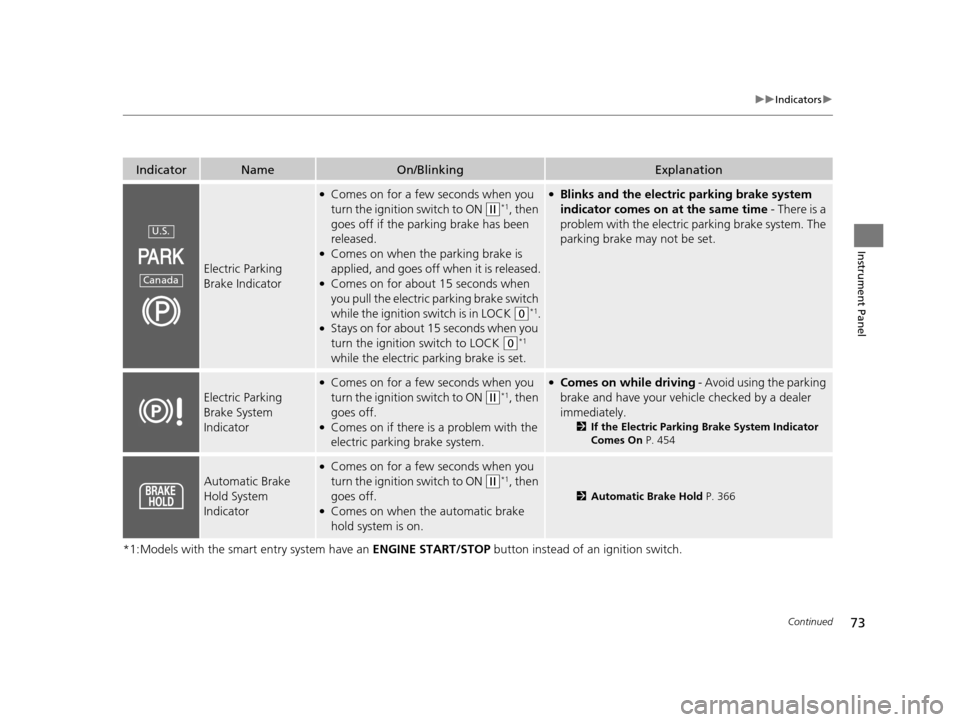
Electric Parking
Brake Indicator
●Comes on for a few seconds when you
turn the ignition switch to ON
(w*1, then
goes off if the parking brake has been
released.
●Comes on when the parking brake is
applied, and goes off when it is released.
●Comes on for about 15 seconds when
you pull the electric parking brake switch
while the ignition switch is in LOCK
(0*1.●Stays on for about 15 seconds when you
turn the ignition switch to LOCK
(0*1
while the electric parking brake is set.
●Blinks and the electric parking brake system
indicator comes on at the same time - There is a
problem with the electric parking brake system. The
parking brake may not be set.
Electric Parking
Brake System
Indicator
●Comes on for a few seconds when you
turn the ignition switch to ON
(w*1, then
goes off.
●Comes on if there is a problem with the
electric parking brake system.
●Comes on while driving - Avoid using the parking
brake and have your vehicl e checked by a dealer
immediately.
2 If the Electric Parking Brake System Indicator
Comes On P. 454
Automatic Brake
Hold System
Indicator
●Comes on for a few seconds when you
turn the ignition switch to ON
(w*1, then
goes off.
●Comes on when the automatic brake
hold system is on.
2 Automatic Brake Hold P. 366
U.S.
Canada
15 HR-V GAS-31T7A6000.book 73 ページ 2015年6月29日 月曜日 午前11時36分
Page 78 of 489
77
uuIndicators u
Continued
Instrument Panel
*1:Models with the smart entry system have an ENGINE START/STOP button instead of an ignition switch.
IndicatorNameOn/BlinkingExplanation
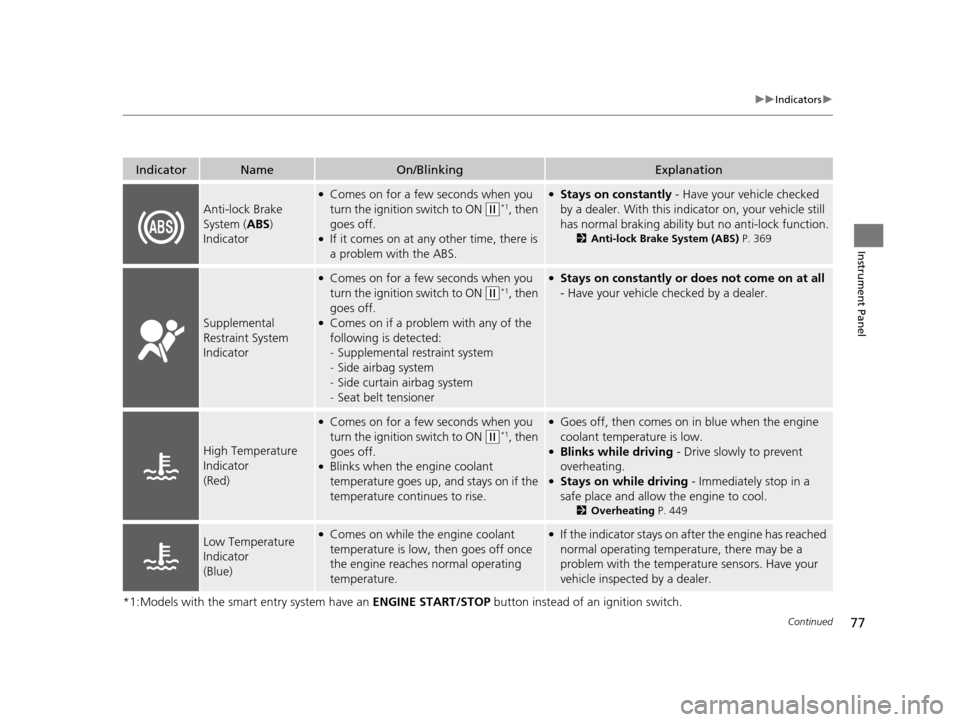
Anti-lock Brake
System (ABS)
Indicator
●Comes on for a few seconds when you
turn the ignition switch to ON
(w*1, then
goes off.
●If it comes on at any other time, there is
a problem with the ABS.
●Stays on constantly - Have your vehicle checked
by a dealer. With this indicator on, your vehicle still
has normal braking ability but no anti-lock function.
2 Anti-lock Brake System (ABS) P. 369
Supplemental
Restraint System
Indicator
●Comes on for a few seconds when you
turn the ignition switch to ON
(w*1, then
goes off.
●Comes on if a problem with any of the
following is detected:
- Supplemental restraint system
- Side airbag system
- Side curtain airbag system
- Seat belt tensioner
●Stays on constantly or does not come on at all
- Have your vehicle checked by a dealer.
High Temperature
Indicator
(Red)
●Comes on for a few seconds when you
turn the ignition switch to ON
(w*1, then
goes off.
●Blinks when the engine coolant
temperature goes up, and stays on if the
temperature continues to rise.
●Goes off, then comes on in blue when the engine
coolant temperature is low.
●Blinks while driving - Drive slowly to prevent
overheating.
●Stays on while driving - Immediately stop in a
safe place and allow the engine to cool.
2 Overheating P. 449
Low Temperature
Indicator
(Blue)●Comes on while the engine coolant
temperature is low, then goes off once
the engine reaches normal operating
temperature.●If the indicator stays on after the engine has reached
normal operating temperature, there may be a
problem with the temperature sensors. Have your
vehicle inspected by a dealer.
15 HR-V GAS-31T7A6000.book 77 ページ 2015年6月29日 月曜日 午前11時36分
Page 81 of 489
80
uuIndicators u
Instrument Panel
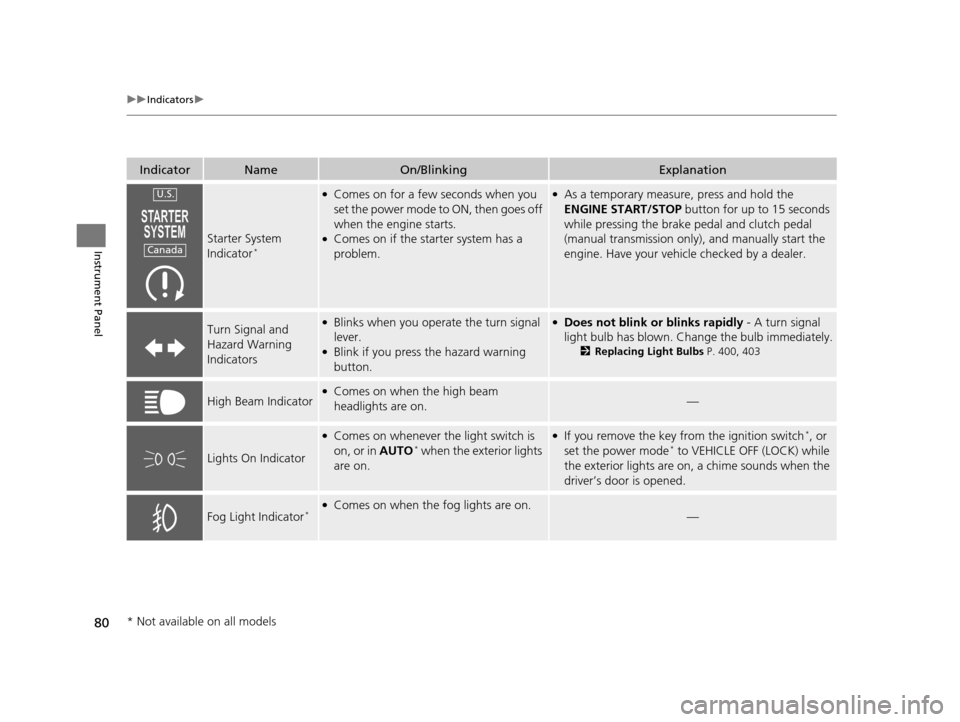
IndicatorNameOn/BlinkingExplanation
Starter System
Indicator*
●Comes on for a few seconds when you
set the power mode to ON, then goes off
when the engine starts.
●Comes on if the starter system has a
problem.
●As a temporary measure, press and hold the
ENGINE START/STOP button for up to 15 seconds
while pressing the brake pedal and clutch pedal
(manual transmission only), and manually start the
engine. Have your vehicle checked by a dealer.
Turn Signal and
Hazard Warning
Indicators●Blinks when you operate the turn signal
lever.
●Blink if you press the hazard warning
button.
●Does not blink or blinks rapidly - A turn signal
light bulb has blown. Change the bulb immediately.
2 Replacing Light Bulbs P. 400, 403
High Beam Indicator●Comes on when the high beam
headlights are on.—
Lights On Indicator
●Comes on whenever the light switch is
on, or in AUTO* when the exterior lights
are on.
●If you remove the key from the ignition switch*, or
set the power mode* to VEHICLE OFF (LOCK) while
the exterior lights are on, a chime sounds when the
driver’s door is opened.
Fog Light Indicator*●Comes on when the fog lights are on.—
U.S.
Canada
* Not available on all models
15 HR-V GAS-31T7A6000.book 80 ページ 2015年6月29日 月曜日 午前11時36分
Page 82 of 489
81
uuIndicators u
Continued
Instrument Panel
*1:Models with the smart entry system have an ENGINE START/STOP button instead of an ignition switch.
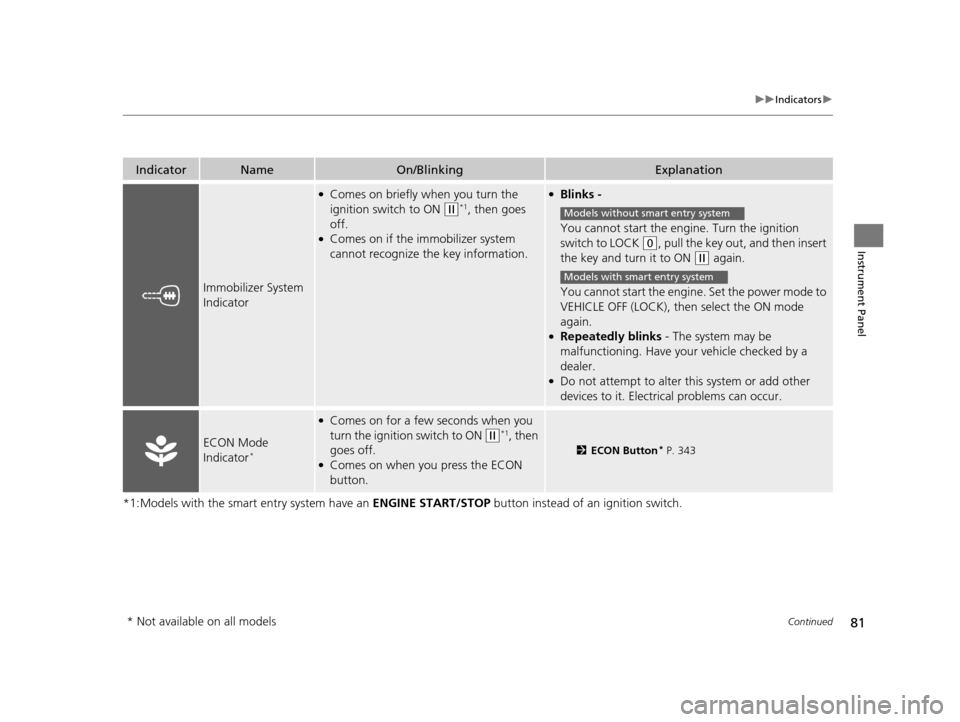
IndicatorNameOn/BlinkingExplanation
Immobilizer System
Indicator
●Comes on briefly when you turn the
ignition switch to ON
(w*1, then goes
off.
●Comes on if the immobilizer system
cannot recognize the key information.
●Blinks -
You cannot start the engine. Turn the ignition
switch to LOCK
(0, pull the key out, and then insert
the key and turn it to ON
(w again.
You cannot start the engine. Set the power mode to
VEHICLE OFF (LOCK), then select the ON mode
again.
●Repeatedly blinks - The system may be
malfunctioning. Have your vehicle checked by a
dealer.
●Do not attempt to alter this system or add other
devices to it. Electrica l problems can occur.
ECON Mode
Indicator*
●Comes on for a few seconds when you
turn the ignition switch to ON
(w*1, then
goes off.
●Comes on when you press the ECON
button.
2 ECON Button* P. 343
Models without smart entry system
Models with smart entry system
* Not available on all models
15 HR-V GAS-31T7A6000.book 81 ページ 2015年6月29日 月曜日 午前11時36分
Page 84 of 489
83
uuIndicators u
Continued
Instrument Panel
*1:Models with the smart entry system have an ENGINE START/STOP button instead of an ignition switch.
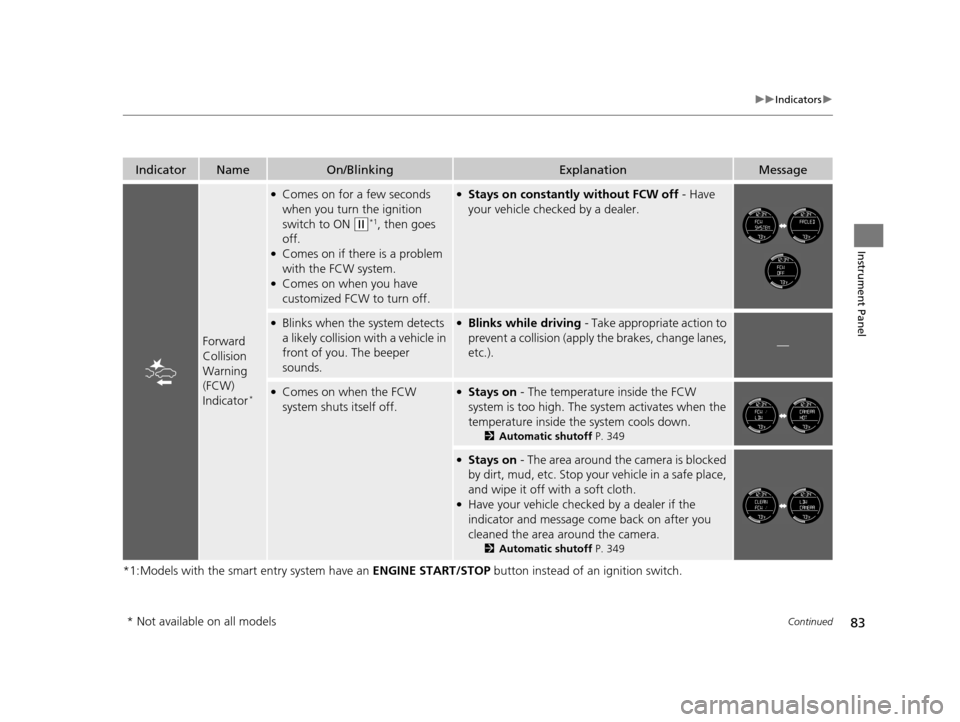
IndicatorNameOn/BlinkingExplanationMessage
Forward
Collision
Warning
(FCW)
Indicator
*
●Comes on for a few seconds
when you turn the ignition
switch to ON
(w*1, then goes
off.
●Comes on if there is a problem
with the FCW system.
●Comes on when you have
customized FCW to turn off.
●Stays on constantly without FCW off - Have
your vehicle checked by a dealer.
●Blinks when the system detects
a likely collision with a vehicle in
front of you. The beeper
sounds.●Blinks while driving - Take appropriate action to
prevent a collision (apply the brakes, change lanes,
etc.).
—
●Comes on when the FCW
system shuts itself off.●Stays on - The temperature inside the FCW
system is too high. The sy stem activates when the
temperature inside the system cools down.
2 Automatic shutoff P. 349
●Stays on - The area around the camera is blocked
by dirt, mud, etc. Stop your vehicle in a safe place,
and wipe it off with a soft cloth.
●Have your vehicle checked by a dealer if the
indicator and message come back on after you
cleaned the area around the camera.
2 Automatic shutoff P. 349
* Not available on all models
15 HR-V GAS-31T7A6000.book 83 ページ 2015年6月29日 月曜日 午前11時36分
Page 85 of 489
84
uuIndicators u
Instrument Panel
*1:Models with the smart entry system have an ENGINE START/STOP button instead of an ignition switch.
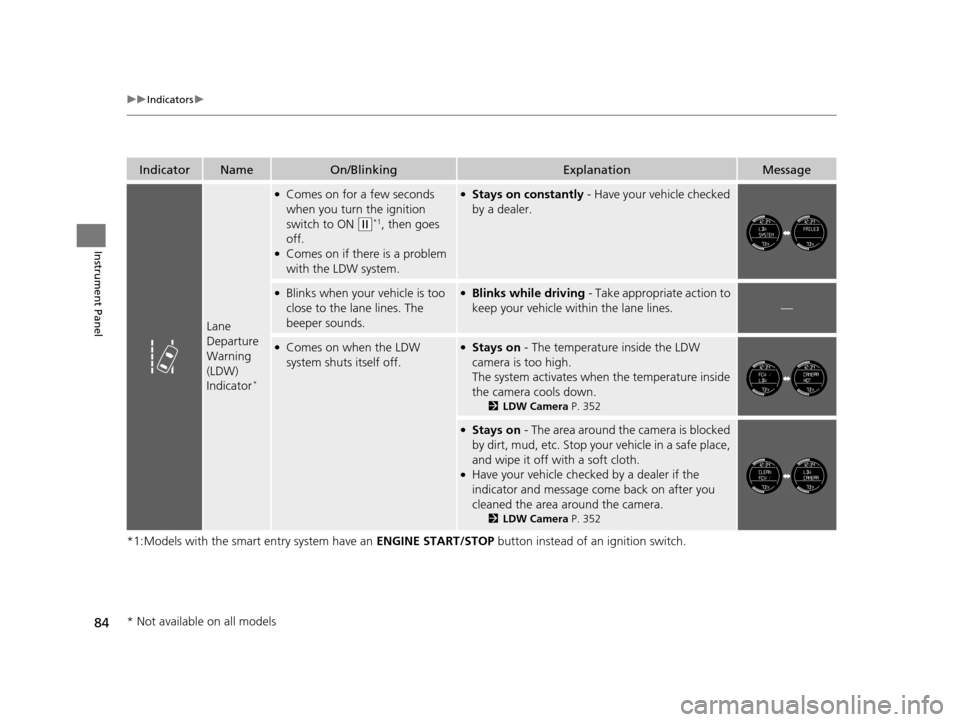
IndicatorNameOn/BlinkingExplanationMessage
Lane
Departure
Warning
(LDW)
Indicator
*
●Comes on for a few seconds
when you turn the ignition
switch to ON
(w*1, then goes
off.
●Comes on if there is a problem
with the LDW system.
●Stays on constantly - Have your vehicle checked
by a dealer.
●Blinks when your vehicle is too
close to the lane lines. The
beeper sounds.●Blinks while driving - Take appropriate action to
keep your vehicle within the lane lines.
—
●Comes on when the LDW
system shuts itself off.●Stays on - The temperature inside the LDW
camera is too high.
The system activates when the temperature inside
the camera cools down.
2 LDW Camera P. 352
●Stays on - The area around the camera is blocked
by dirt, mud, etc. Stop your vehicle in a safe place,
and wipe it off with a soft cloth.
●Have your vehicle checked by a dealer if the
indicator and message come back on after you
cleaned the area around the camera.
2 LDW Camera P. 352
* Not available on all models
15 HR-V GAS-31T7A6000.book 84 ページ 2015年6月29日 月曜日 午前11時36分
Page 87 of 489
86
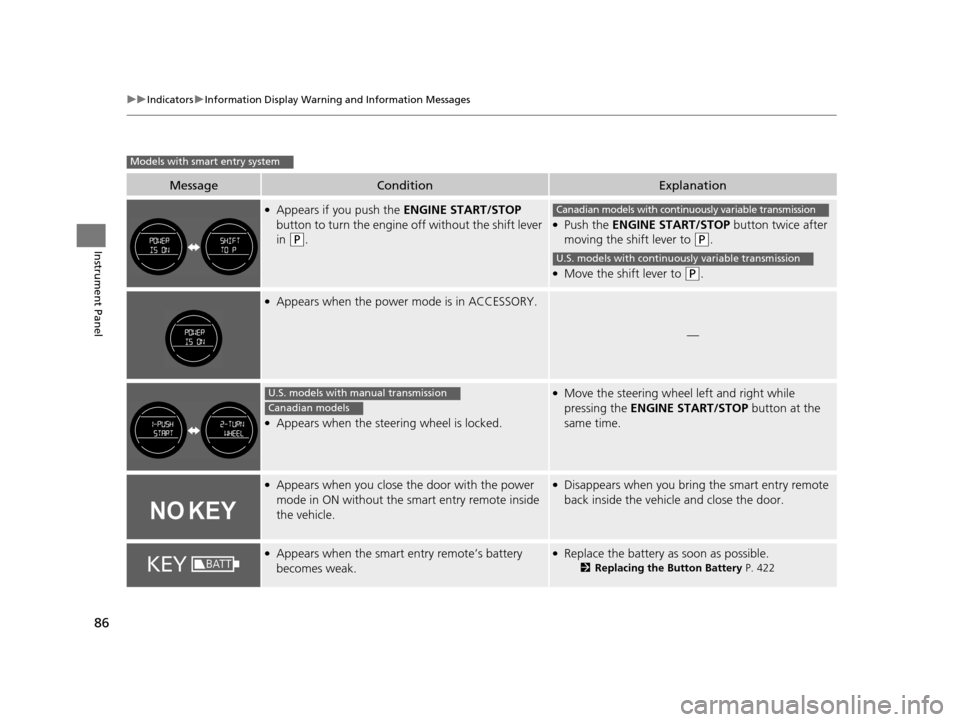
uuIndicators uInformation Display Warning and Information Messages
Instrument Panel
MessageConditionExplanation
●Appears if you push the ENGINE START/STOP
button to turn the engine off without the shift lever
in
(P.
●Push the ENGINE START/STOP button twice after
moving the shift lever to
(P.
●Move the shift lever to (P.
●Appears when the power mode is in ACCESSORY.
—
●Appears when the steering wheel is locked.
●Move the steering wheel left and right while
pressing the ENGINE START/STOP button at the
same time.
●Appears when you close the door with the power
mode in ON without the smart entry remote inside
the vehicle.●Disappears when you bring the smart entry remote
back inside the vehicle and close the door.
●Appears when the smart entry remote’s battery
becomes weak.●Replace the battery as soon as possible.
2 Replacing the Button Battery P. 422
Models with smart entry system
Canadian models with continuously variable transmission
U.S. models with continuously variable transmission
U.S. models with manual transmission
Canadian models
15 HR-V GAS-31T7A6000.book 86 ページ 2015年6月29日 月曜日 午前11時36分
Page 90 of 489
89
uuGauges and Displays uInformation Display
Continued
Instrument Panel
Information Display
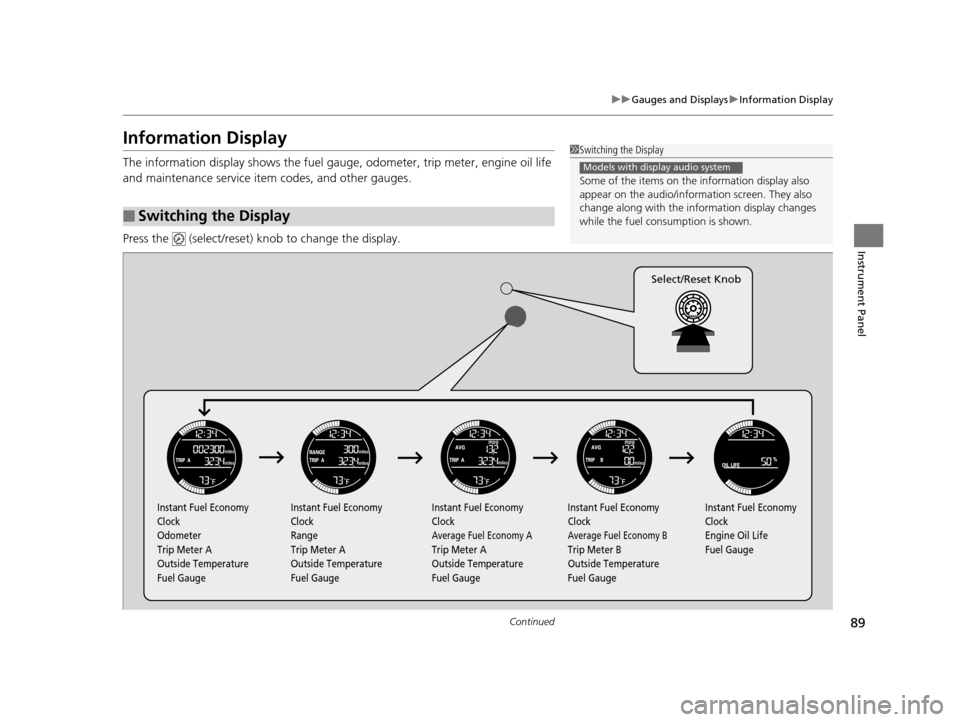
The information display shows the fuel gauge, odometer, trip meter, engine oil life
and maintenance service item codes, and other gauges.
Press the (select/reset) knob to change the display.
■Switching the Display
1Switching the Display
Some of the items on the information display also
appear on the audio/information screen. They also
change along with the info rmation display changes
while the fuel consumption is shown.
Models with display audio system
Instant Fuel Economy
Clock
Odometer
Trip Meter A
Outside Temperature
Fuel Gauge Instant Fuel Economy
Clock
Range
Trip Meter A
Outside Temperature
Fuel Gauge Instant Fuel Economy
Clock
Average Fuel Economy A
Trip Meter A
Outside Temperature
Fuel GaugeInstant Fuel Economy
Clock
Average Fuel Economy B
Trip Meter B
Outside Temperature
Fuel Gauge Instant Fuel Economy
Clock
Engine Oil Life
Fuel Gauge
Select/Reset Knob
15 HR-V GAS-31T7A6000.book 89 ページ 2015年6月29日 月曜日 午前11時36分