brake HONDA HR-V 2017 2.G User Guide
[x] Cancel search | Manufacturer: HONDA, Model Year: 2017, Model line: HR-V, Model: HONDA HR-V 2017 2.GPages: 489, PDF Size: 29.22 MB
Page 73 of 489
72
Instrument Panel
Indicators
*1:Models with the smart entry system have an ENGINE START/STOP button instead of an ignition switch.
IndicatorNameOn/BlinkingExplanation
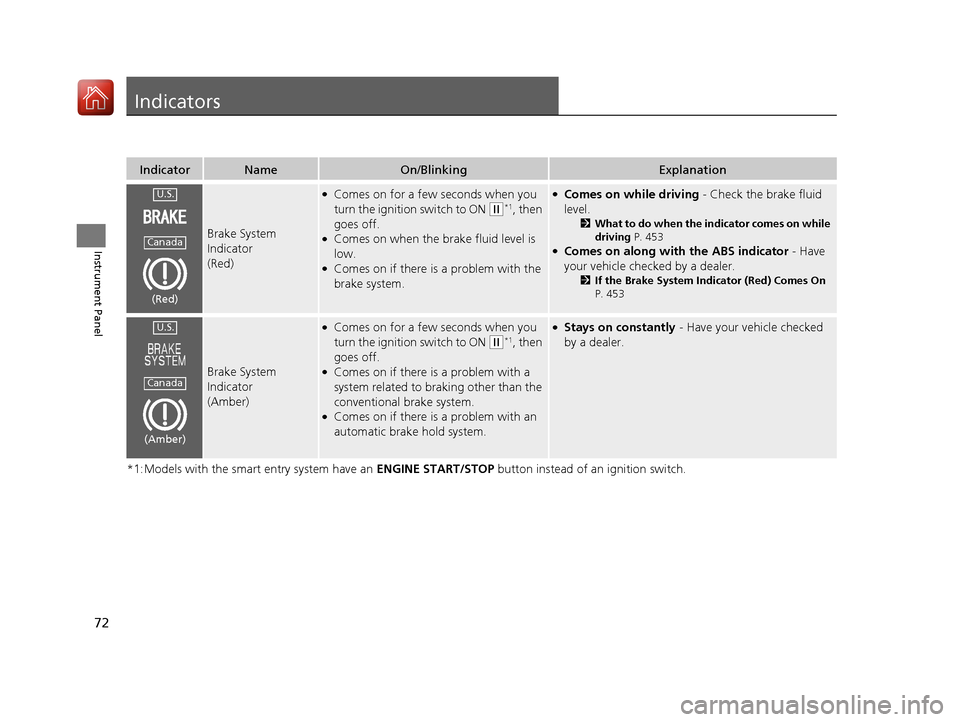
Brake System
Indicator
(Red)
●Comes on for a few seconds when you
turn the ignition switch to ON
(w*1, then
goes off.
●Comes on when the brake fluid level is
low.
●Comes on if there is a problem with the
brake system.
●Comes on while driving - Check the brake fluid
level.
2 What to do when the indicator comes on while
driving P. 453
●Comes on along with the ABS indicator - Have
your vehicle checked by a dealer.
2 If the Brake System Indicator (Red) Comes On
P. 453
Brake System
Indicator
(Amber)
●Comes on for a few seconds when you
turn the ignition switch to ON
(w*1, then
goes off.
●Comes on if there is a problem with a
system related to braking other than the
conventional brake system.
●Comes on if there is a problem with an
automatic brake hold system.
●Stays on constantly - Have your vehicle checked
by a dealer.
U.S.
Canada
(Red)
U.S.
Canada
(Amber)
17 HR-V HDMC-31T7A6100.book 72 ページ 2016年7月20日 水曜日 午前9時50分
Page 74 of 489
73
uuIndicators u
Continued
Instrument Panel
*1:Models with the smart entry system have an ENGINE START/STOP button instead of an ignition switch.
IndicatorNameOn/BlinkingExplanation
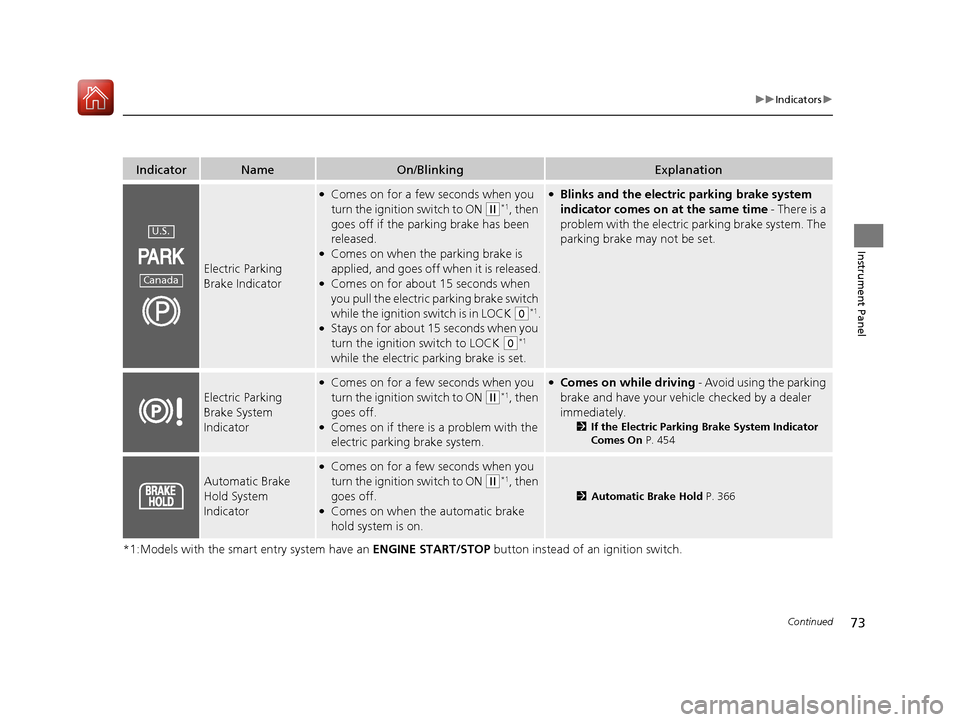
Electric Parking
Brake Indicator
●Comes on for a few seconds when you
turn the ignition switch to ON
(w*1, then
goes off if the parking brake has been
released.
●Comes on when the parking brake is
applied, and goes off when it is released.
●Comes on for about 15 seconds when
you pull the electric parking brake switch
while the ignition switch is in LOCK
(0*1.●Stays on for about 15 seconds when you
turn the ignition switch to LOCK
(0*1
while the electric parking brake is set.
●Blinks and the electric parking brake system
indicator comes on at the same time - There is a
problem with the electric parking brake system. The
parking brake may not be set.
Electric Parking
Brake System
Indicator
●Comes on for a few seconds when you
turn the ignition switch to ON
(w*1, then
goes off.
●Comes on if there is a problem with the
electric parking brake system.
●Comes on while driving - Avoid using the parking
brake and have your vehicl e checked by a dealer
immediately.
2 If the Electric Parking Brake System Indicator
Comes On P. 454
Automatic Brake
Hold System
Indicator
●Comes on for a few seconds when you
turn the ignition switch to ON
(w*1, then
goes off.
●Comes on when the automatic brake
hold system is on.
2 Automatic Brake Hold P. 366
U.S.
Canada
17 HR-V HDMC-31T7A6100.book 73 ページ 2016年7月20日 水曜日 午前9時50分
Page 75 of 489
74
uuIndicators u
Instrument Panel
*1:Models with the smart entry system have an ENGINE START/STOP button instead of an ignition switch.
IndicatorNameOn/BlinkingExplanation
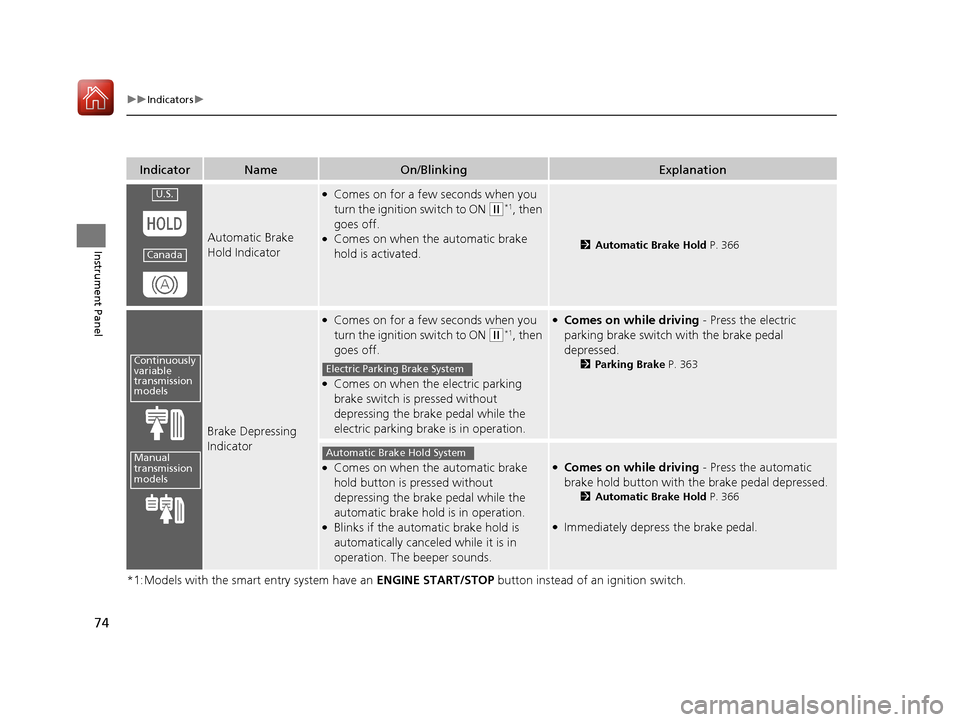
Automatic Brake
Hold Indicator
●Comes on for a few seconds when you
turn the ignition switch to ON
(w*1, then
goes off.
●Comes on when the automatic brake
hold is activated.2 Automatic Brake Hold P. 366
Brake Depressing
Indicator
●Comes on for a few seconds when you
turn the ignition switch to ON
(w*1, then
goes off.
●Comes on when the electric parking
brake switch is pressed without
depressing the brake pedal while the
electric parking brake is in operation.
●Comes on while driving - Press the electric
parking brake switch with the brake pedal
depressed.
2 Parking Brake P. 363
●Comes on when the automatic brake
hold button is pressed without
depressing the brake pedal while the
automatic brake hold is in operation.
●Blinks if the automatic brake hold is
automatically canceled while it is in
operation. The beeper sounds.
●Comes on while driving - Press the automatic
brake hold button with the brake pedal depressed.
2 Automatic Brake Hold P. 366
●Immediately depress the brake pedal.
U.S.
Canada
Continuously
variable
transmission
models
Manual
transmission
models
Electric Parking Brake System
Automatic Brake Hold System
17 HR-V HDMC-31T7A6100.book 74 ページ 2016年7月20日 水曜日 午前9時50分
Page 78 of 489
77
uuIndicators u
Continued
Instrument Panel
*1:Models with the smart entry system have an ENGINE START/STOP button instead of an ignition switch.
IndicatorNameOn/BlinkingExplanation
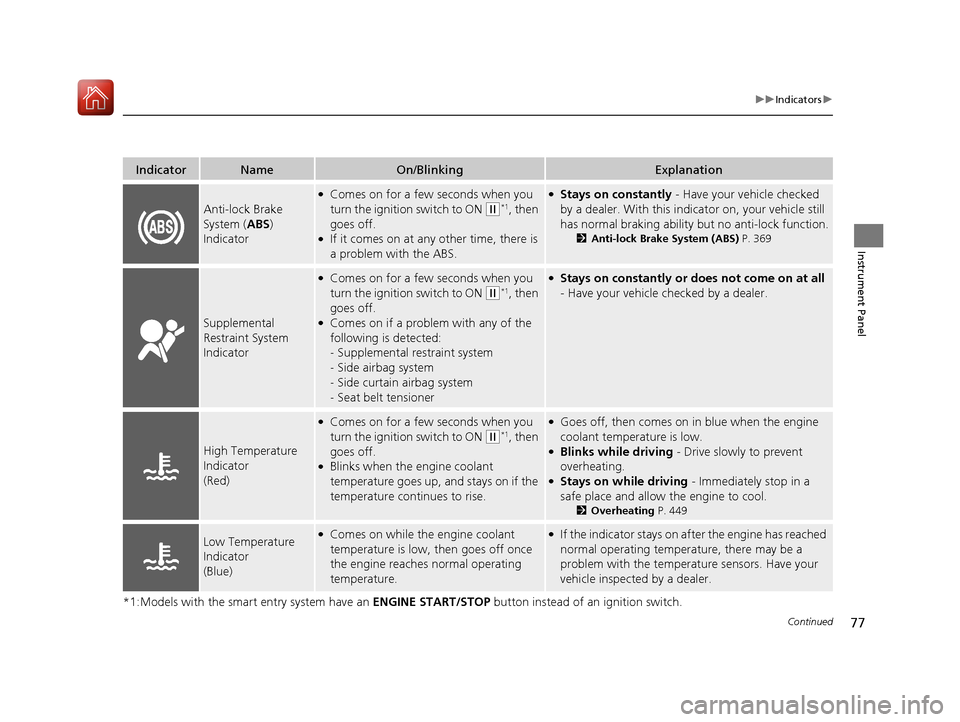
Anti-lock Brake
System (ABS)
Indicator
●Comes on for a few seconds when you
turn the ignition switch to ON
(w*1, then
goes off.
●If it comes on at any other time, there is
a problem with the ABS.
●Stays on constantly - Have your vehicle checked
by a dealer. With this indicator on, your vehicle still
has normal braking ability but no anti-lock function.
2 Anti-lock Brake System (ABS) P. 369
Supplemental
Restraint System
Indicator
●Comes on for a few seconds when you
turn the ignition switch to ON
(w*1, then
goes off.
●Comes on if a problem with any of the
following is detected:
- Supplemental restraint system
- Side airbag system
- Side curtain airbag system
- Seat belt tensioner
●Stays on constantly or does not come on at all
- Have your vehicle checked by a dealer.
High Temperature
Indicator
(Red)
●Comes on for a few seconds when you
turn the ignition switch to ON
(w*1, then
goes off.
●Blinks when the engine coolant
temperature goes up, and stays on if the
temperature continues to rise.
●Goes off, then comes on in blue when the engine
coolant temperature is low.
●Blinks while driving - Drive slowly to prevent
overheating.
●Stays on while driving - Immediately stop in a
safe place and allow the engine to cool.
2 Overheating P. 449
Low Temperature
Indicator
(Blue)●Comes on while the engine coolant
temperature is low, then goes off once
the engine reaches normal operating
temperature.●If the indicator stays on after the engine has reached
normal operating temperature, there may be a
problem with the temperature sensors. Have your
vehicle inspected by a dealer.
17 HR-V HDMC-31T7A6100.book 77 ページ 2016年7月20日 水曜日 午前9時50分
Page 81 of 489
80
uuIndicators u
Instrument Panel
IndicatorNameOn/BlinkingExplanation
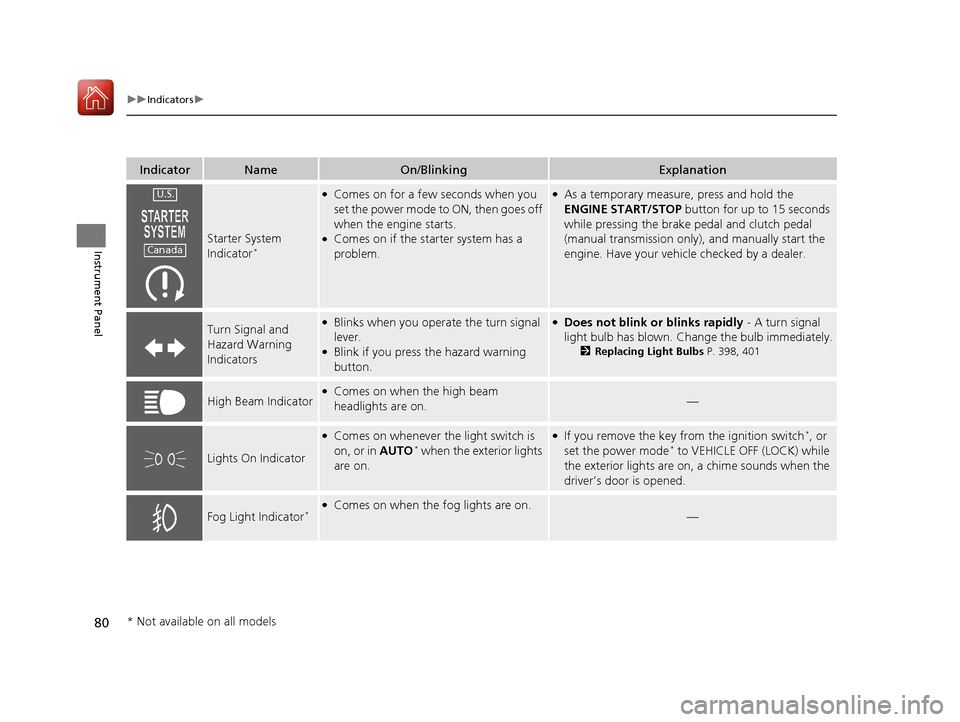
Starter System
Indicator*
●Comes on for a few seconds when you
set the power mode to ON, then goes off
when the engine starts.
●Comes on if the starter system has a
problem.
●As a temporary measure, press and hold the
ENGINE START/STOP button for up to 15 seconds
while pressing the brake pedal and clutch pedal
(manual transmission only), and manually start the
engine. Have your vehicle checked by a dealer.
Turn Signal and
Hazard Warning
Indicators●Blinks when you operate the turn signal
lever.
●Blink if you press the hazard warning
button.
●Does not blink or blinks rapidly - A turn signal
light bulb has blown. Change the bulb immediately.
2 Replacing Light Bulbs P. 398, 401
High Beam Indicator●Comes on when the high beam
headlights are on.—
Lights On Indicator
●Comes on whenever the light switch is
on, or in AUTO* when the exterior lights
are on.
●If you remove the key from the ignition switch*, or
set the power mode* to VEHICLE OFF (LOCK) while
the exterior lights are on, a chime sounds when the
driver’s door is opened.
Fog Light Indicator*●Comes on when the fog lights are on.—
U.S.
Canada
* Not available on all models
17 HR-V HDMC-31T7A6100.book 80 ページ 2016年7月20日 水曜日 午前9時50分
Page 84 of 489
83
uuIndicators u
Continued
Instrument Panel
*1:Models with the smart entry system have an ENGINE START/STOP button instead of an ignition switch.
IndicatorNameOn/BlinkingExplanationMessage
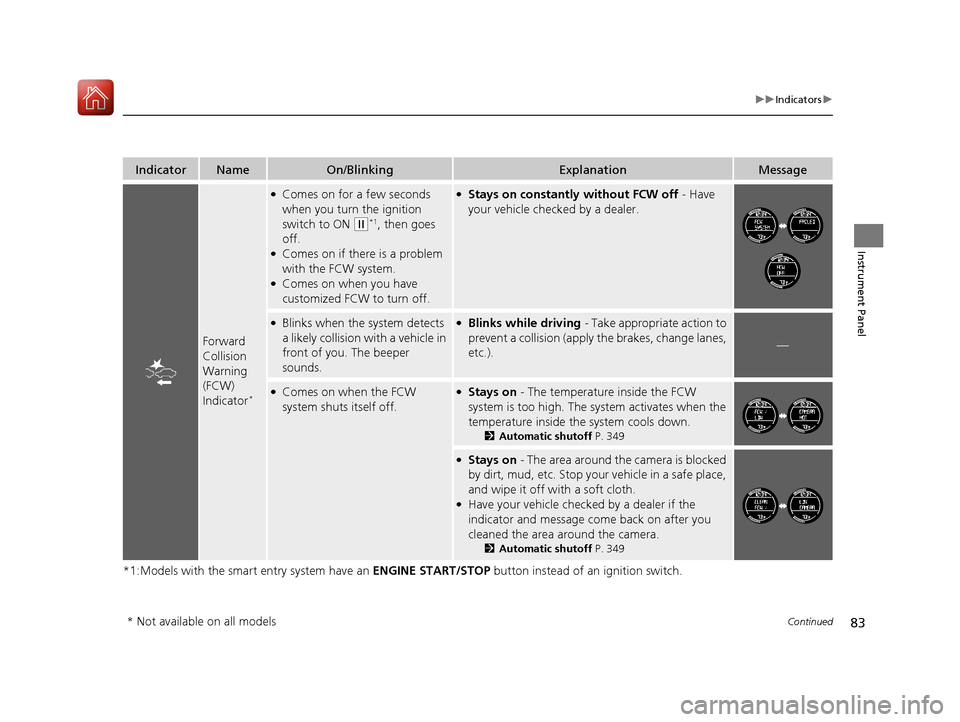
Forward
Collision
Warning
(FCW)
Indicator
*
●Comes on for a few seconds
when you turn the ignition
switch to ON
(w*1, then goes
off.
●Comes on if there is a problem
with the FCW system.
●Comes on when you have
customized FCW to turn off.
●Stays on constantly without FCW off - Have
your vehicle checked by a dealer.
●Blinks when the system detects
a likely collision with a vehicle in
front of you. The beeper
sounds.●Blinks while driving - Take appropriate action to
prevent a collisio n (apply the brakes, change lanes,
etc.).
—
●Comes on when the FCW
system shuts itself off.●Stays on - The temperature inside the FCW
system is too high. The sy stem activates when the
temperature inside the system cools down.
2 Automatic shutoff P. 349
●Stays on - The area around the camera is blocked
by dirt, mud, etc. Stop your vehicle in a safe place,
and wipe it off with a soft cloth.
●Have your vehicle checked by a dealer if the
indicator and message come back on after you
cleaned the area around the camera.
2 Automatic shutoff P. 349
* Not available on all models
17 HR-V HDMC-31T7A6100.book 83 ページ 2016年7月20日 水曜日 午前9時50分
Page 111 of 489
110
uuLocking and Unlocking the Doors uCustomizing the Auto Door Locking/Unlocking Setting
Controls
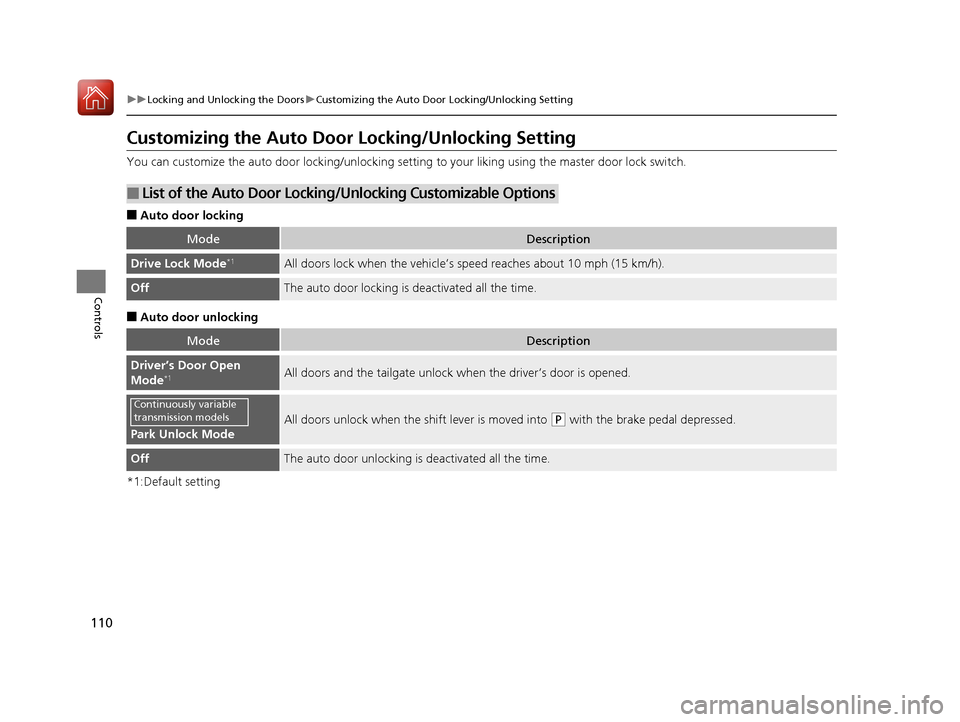
Customizing the Auto Door Locking/Unlocking Setting
You can customize the auto door locking/unlocking setting to your liking using the master door lock switch.
■Auto door locking
■Auto door unlocking
*1:Default setting
■List of the Auto Door Locking/Unlocking Customizable Options
ModeDescription
Drive Lock Mode*1All doors lock when the vehicle’s sp eed reaches about 10 mph (15 km/h).
OffThe auto door locking is deactivated all the time.
ModeDescription
Driver’s Door Open
Mode*1All doors and the tailgate unlock when the driver’s door is opened.
Park Unlock Mode
All doors unlock when the shift lever is moved into (P with the brake pedal depressed.
OffThe auto door unlocking is deactivated all the time.
Continuously variable
transmission models
17 HR-V HDMC-31T7A6100.book 110 ページ 2016年7月20日 水曜日 午前9時50分
Page 112 of 489
111
uuLocking and Unlocking the Doors uCustomizing the Auto Door Locking/Unlocking Setting
Continued
Controls
*1 : Default setting
*2 : Models without smart entry system
*3 : Models with smart entry system
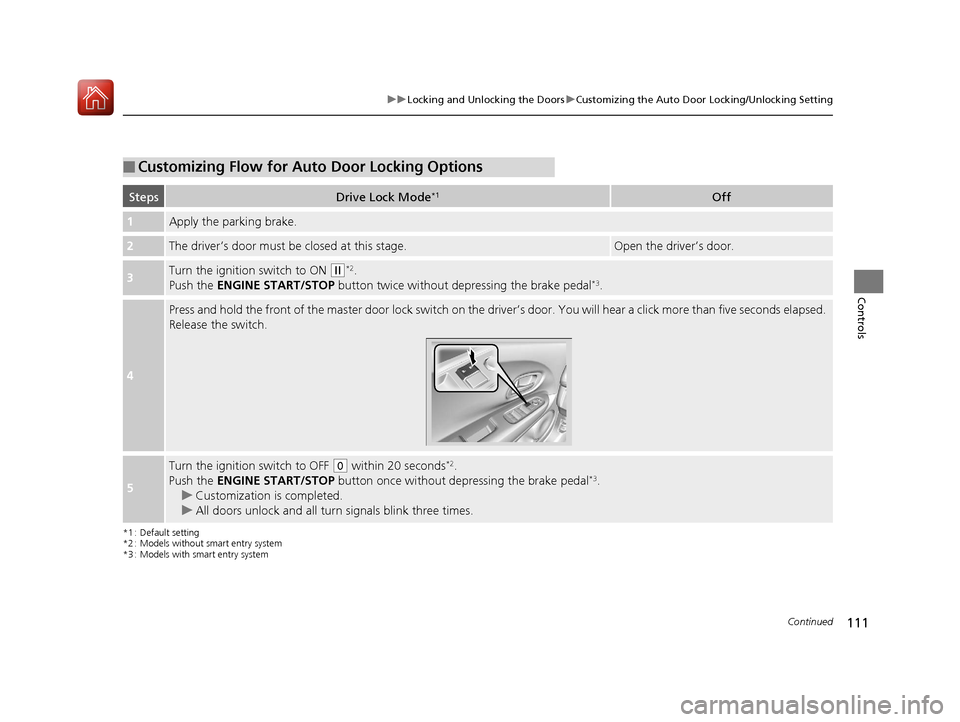
■Customizing Flow for Auto Door Locking Options
StepsDrive Lock Mode*1Off
1Apply the parking brake.
2The driver’s door must be closed at this stage.Open the driver’s door.
3Turn the ignition switch to ON (w*2.
Push the ENGINE START/STOP button twice without depressing the brake pedal*3.
4
Press and hold the front of the master door lock switch on the driver’s door. You will hear a click more than five seconds elapsed.
Release the switch.
5
Turn the ignition switch to OFF (0 within 20 seconds*2.
Push the ENGINE START/STOP button once without depressing the brake pedal*3.
u Customization is completed.
u All doors unlock and all turn signals blink three times.
17 HR-V HDMC-31T7A6100.book 111 ページ 2016年7月20日 水曜日 午前9時50分
Page 113 of 489
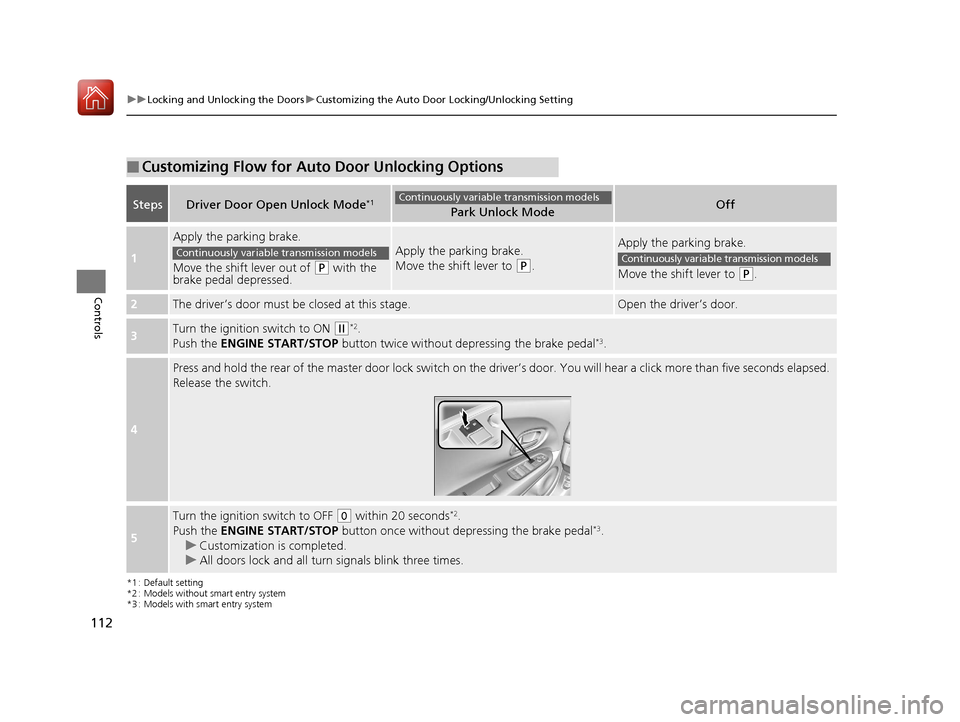
112
uuLocking and Unlocking the Doors uCustomizing the Auto Door Locking/Unlocking Setting
Controls
*1 : Default setting
*2 : Models without smart entry system
*3 : Models with smart entry system
■Customizing Flow for Auto Door Unlocking Options
StepsDriver Door Open Unlock Mode*1Park Unlock ModeOff
1
Apply the parking brake.
Move the shift lever out of
(P with the
brake pedal depressed.
Apply the parking brake.
Move the shift lever to
(P.
Apply the parking brake.
Move the shift lever to
(P.
2The driver’s door must be closed at this stage.Open the driver’s door.
3Turn the ignition switch to ON (w*2.
Push the ENGINE START/STOP button twice without de pressing the brake pedal*3.
4
Press and hold the rear of the master door lock switch on the driv er’s door. You will hear a click more than five seconds elapsed.
Release the switch.
5
Turn the ignition switch to OFF (0 within 20 seconds*2.
Push the ENGINE START/STOP button once without depressing the brake pedal*3.
u Customization is completed.
u All doors lock and all turn signals blink three times.
Continuously variable transmission models
Continuously variable transmission modelsContinuously variable transmission models
17 HR-V HDMC-31T7A6100.book 112 ページ 2016年7月20日 水曜日 午前9時50分
Page 124 of 489
123
uuOperating the Switches Around the Steering Wheel uENGINE START/STOP Button
Continued
Controls
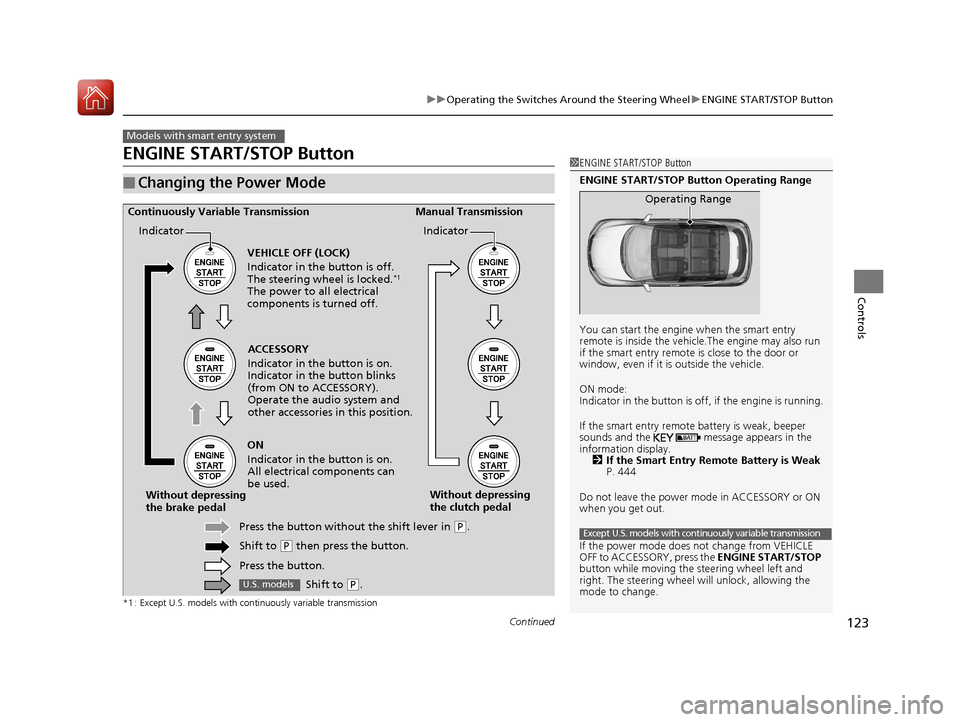
ENGINE START/STOP Button
*1 : Except U.S. models with continuously variable transmission
■Changing the Power Mode
Models with smart entry system
1ENGINE START/STOP Button
ENGINE START/STOP Button Operating Range
You can start the engine when the smart entry
remote is inside the vehicl e.The engine may also run
if the smart entry remote is close to the door or
window, even if it is outside the vehicle.
ON mode:
Indicator in the button is of f, if the engine is running.
If the smart entry remote battery is weak, beeper
sounds and the message appears in the
information display. 2 If the Smart Entry Remote Battery is Weak
P. 444
Do not leave the power mode in ACCESSORY or ON
when you get out.
If the power mode does not change from VEHICLE
OFF to ACCESSORY, press the ENGINE START/STOP
button while moving the st eering wheel left and
right. The steering wheel will unlock, allowing the
mode to change.
Operating Range
Except U.S. models with continuously variable transmission
ACCESSORY
Indicator in the button is on.
Indicator in th e button blinks
(from ON to ACCESSORY).
Operate the audio system and
other accessories in this position.
Continuously Variable Transmission Manual Transmission
VEHICLE OFF (LOCK)
Indicator in the button is off.
The steering wheel is locked.
*1
The power to all electrical
components is turned off.
ON
Indicator in the button is on.
All electrical components can
be used.
Press the button withou t the shift lever in
(P.
Shift to
( P then press the button.
Press the button.
Without depressing
the brake pedal
Without depressing
the clutch pedal
Indicator Indicator
Shift to (
P.U.S. models
17 HR-V HDMC-31T7A6100.book 123 ページ 2016年7月20日 水曜日 午前9時50分