door lock HONDA HR-V 2020 (in English) User Guide
[x] Cancel search | Manufacturer: HONDA, Model Year: 2020, Model line: HR-V, Model: HONDA HR-V 2020Pages: 639, PDF Size: 40.6 MB
Page 67 of 639
65
uuChild Safety uProtecting Child Passengers
Safe Driving
• Any child who is too small to wear a seat belt correctly must be restrained in an
approved child seat that is properly secu red to the vehicle using either the seat
belt or the lower anchors of the LATCH system.
• Never hold a child on your lap because it is impossible to protect them in the
event of a collision.
• Never put a seat belt over yourself and a child. During a crash, the belt would
likely press deep into the child and cause serious or fatal injuries.
• Never let two children use the same seat belt. Both children could be very
seriously injured in a crash.
• Do not allow children to operate the doors, windows or seat adjustments.
• Do not leave children in the vehicle unattended, especially in hot weather when
the inside of the vehicle can get hot enough to kill them. They could also activate
vehicle controls causing it to move unexpectedly.1Protecting Child Passengers
To deactivate a lockable retractor, release the buckle
and allow the seat belt to wind up all the way.
To remind you of the pa ssenger’s front airbag
hazards and child safety, your vehicle has warning
labels on the dashboard (U.S. models) and on the
front visors. Please read and follow the instructions
on these labels. 2 Safety Labels P. 78
3WARNING
Allowing a child to play with a seat belt or
wrap one around their neck can result in
serious injury or death.
Instruct children not to play with any seat
belt and make sure any unused seat belt a
child can reach is buckled, fully retracted,
and locked.
20 HR-V HDMC HDMG-31T7A6400.book 65 ページ 2019年8月8日 木曜日 午後3時52分
Page 94 of 639
92
uuIndicators u
Instrument Panel
*1:Models with the smart entry system have an ENGINE START/STOP button instead of an ignition switch.
IndicatorNameOn/BlinkingExplanationMessage*
Lights On
Indicator
•Comes on whenever the light
switch is on, or in AUTO* when
the exterior lights are on.
• If you remove the key from the ignition
switch*, or set the power mode* to
VEHICLE OFF (LOCK) while the exterior
lights are on, a chime sounds when the
driver’s door is opened.
Fog Light
Indicator*
• Comes on when the fog lights are
on.——
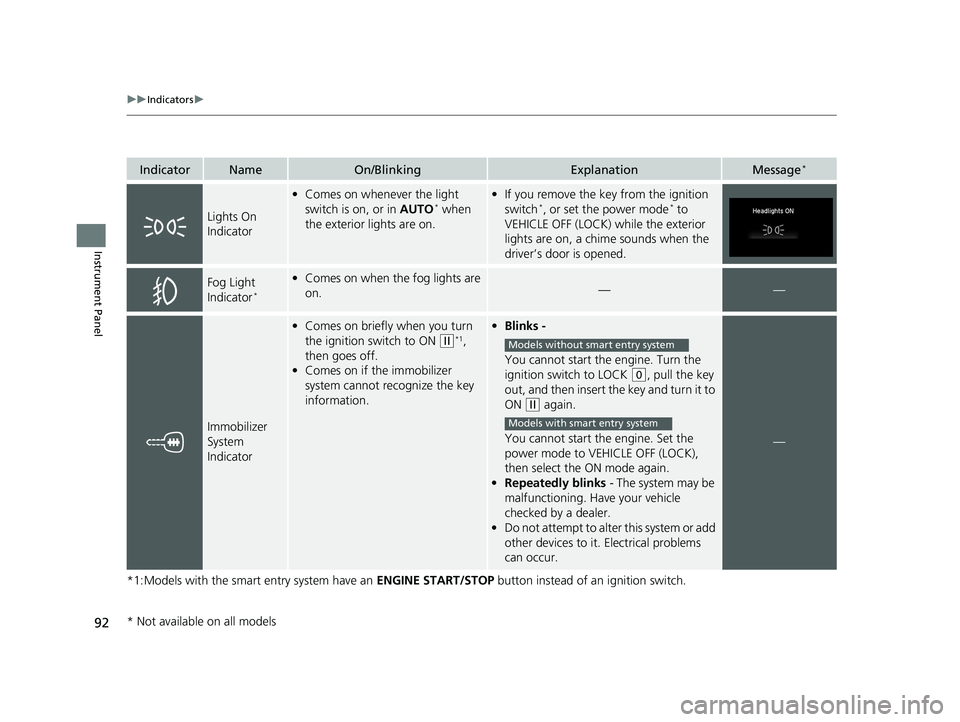
Immobilizer
System
Indicator
•Comes on briefly when you turn
the ignition switch to ON
(w*1,
then goes off.
• Comes on if the immobilizer
system cannot recognize the key
information.
• Blinks -
You cannot start the engine. Turn the
ignition switch to LOCK
(0, pull the key
out, and then insert the key and turn it to
ON
(w again.
You cannot start the engine. Set the
power mode to VEHICLE OFF (LOCK),
then select the ON mode again.
• Repeatedly blinks - The system may be
malfunctioning. Have your vehicle
checked by a dealer.
• Do not attempt to alter this system or add
other devices to it. Electrical problems
can occur.
—
Models without smart entry system
Models with smart entry system
* Not available on all models
20 HR-V HDMC HDMG-31T7A6400.book 92 ページ 2019年8月8日 木曜日 午後3時52分
Page 105 of 639
103
uuIndicators uMulti-Information Display Warn ing and Information Messages*
Continued
Instrument Panel
MessageConditionExplanation
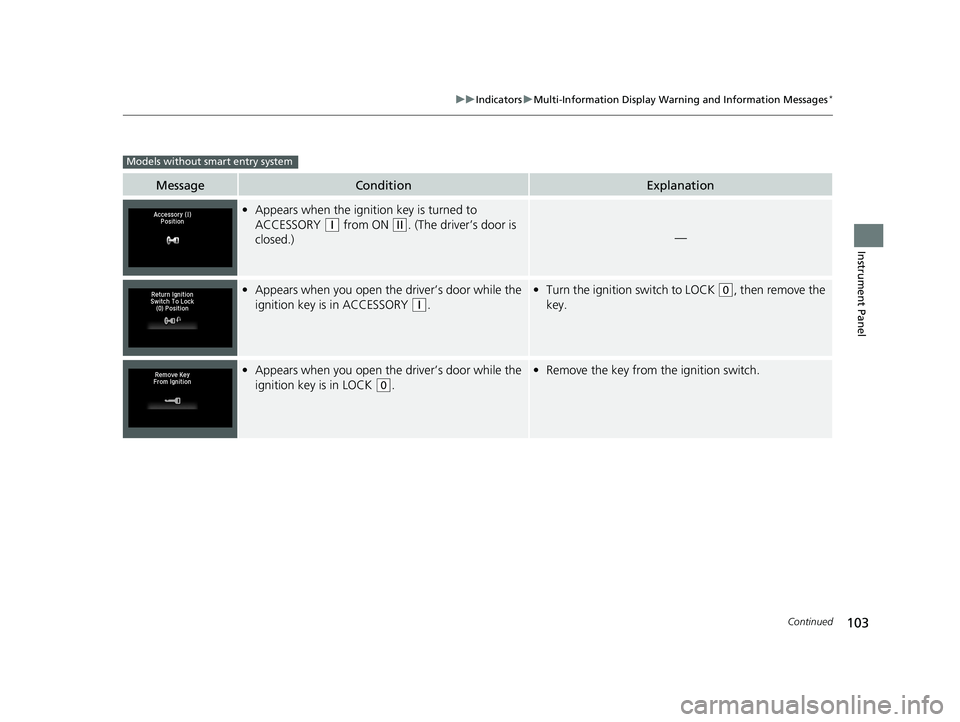
•Appears when the ignition key is turned to
ACCESSORY
(q from ON (w. (The driver’s door is
closed.)—
• Appears when you open the driver’s door while the
ignition key is in ACCESSORY
(q.
• Turn the ignition switch to LOCK (0, then remove the
key.
• Appears when you open the driver’s door while the
ignition key is in LOCK
(0.
• Remove the key from the ignition switch.
Models without smart entry system
20 HR-V HDMC HDMG-31T7A6400.book 103 ページ 2019年8月8日 木曜日 午後3時52分
Page 106 of 639
104
uuIndicators uMulti-Information Display Warn ing and Information Messages*
Instrument Panel
MessageConditionExplanation
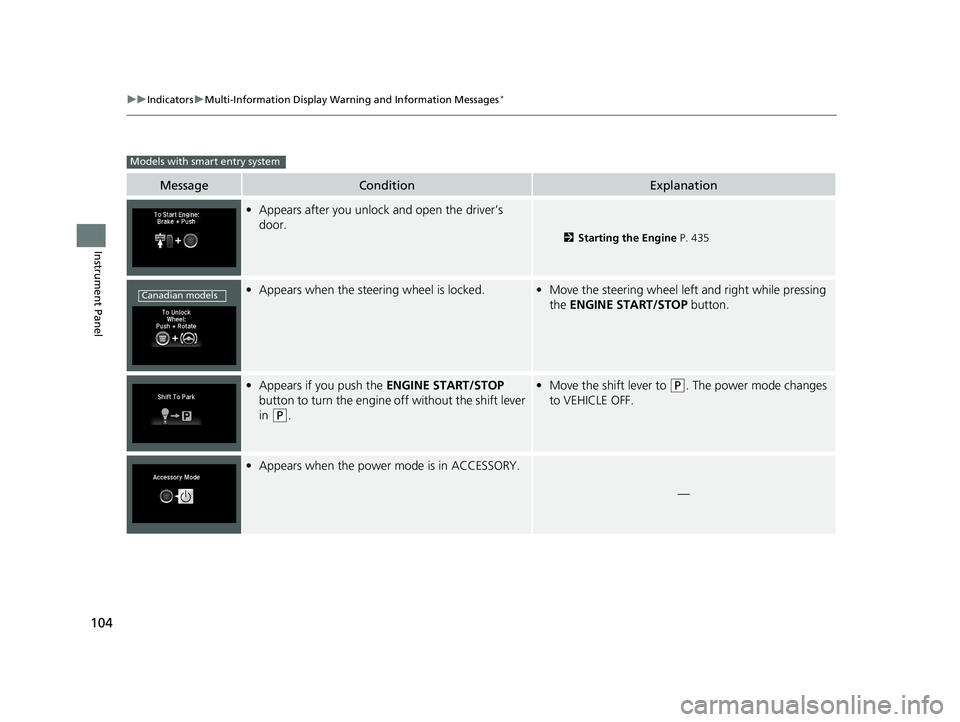
•Appears after you unlock and open the driver’s
door.
2 Starting the Engine P. 435
•Appears when the steering wheel is locked.•Move the steering wheel left and right while pressing
the ENGINE START/STOP button.
•Appears if you push the ENGINE START/STOP
button to turn the engine off without the shift lever
in
(P.
• Move the shift lever to (P. The power mode changes
to VEHICLE OFF.
• Appears when the power mode is in ACCESSORY.
—
Models with smart entry system
Canadian models
20 HR-V HDMC HDMG-31T7A6400.book 104 ページ 2019年8月8日 木曜日 午後3時52分
Page 126 of 639
124
uuGauges and Displays uMulti-Information Display*
Instrument Panel
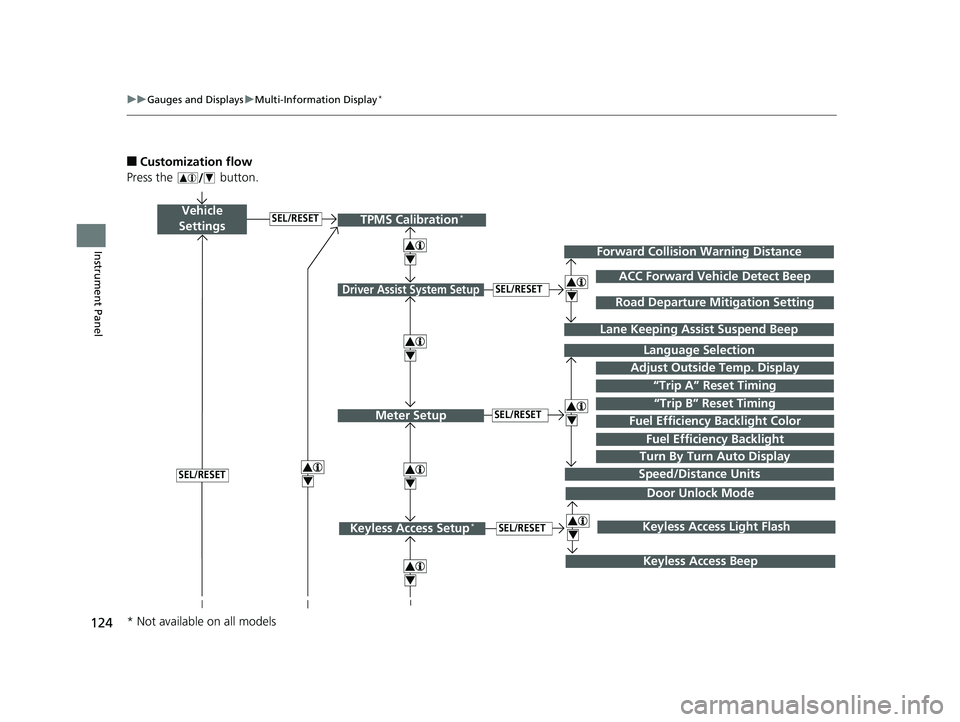
■Customization flow
Press the button.
Vehicle
Settings
Adjust Outside Temp. Display
Language Selection
Driver Assist System Setup
Meter Setup“Trip B” Reset TimingSEL/RESET
SEL/RESET
“Trip A” Reset Timing
4
ACC Forward Vehicle Detect Beep
Lane Keeping Assi st Suspend Beep
4
SEL/RESET
Forward Collision Warning Distance
4
SEL/RESET
Speed/Distance Units
Road Departure Mitigation Setting
Fuel Efficiency Backlight
Turn By Turn Auto Display
TPMS Calibration*
4
Fuel Efficiency Backlight Color
4
4
Door Unlock Mode
Keyless Access Setup*SEL/RESET
Keyless Access Beep
4Keyless Access Light Flash
4
* Not available on all models
20 HR-V HDMC HDMG-31T7A6400.book 124 ページ 2019年8月8日 木曜日 午後3時52分
Page 127 of 639
125
uuGauges and Displays uMulti-Information Display*
Continued
Instrument Panel
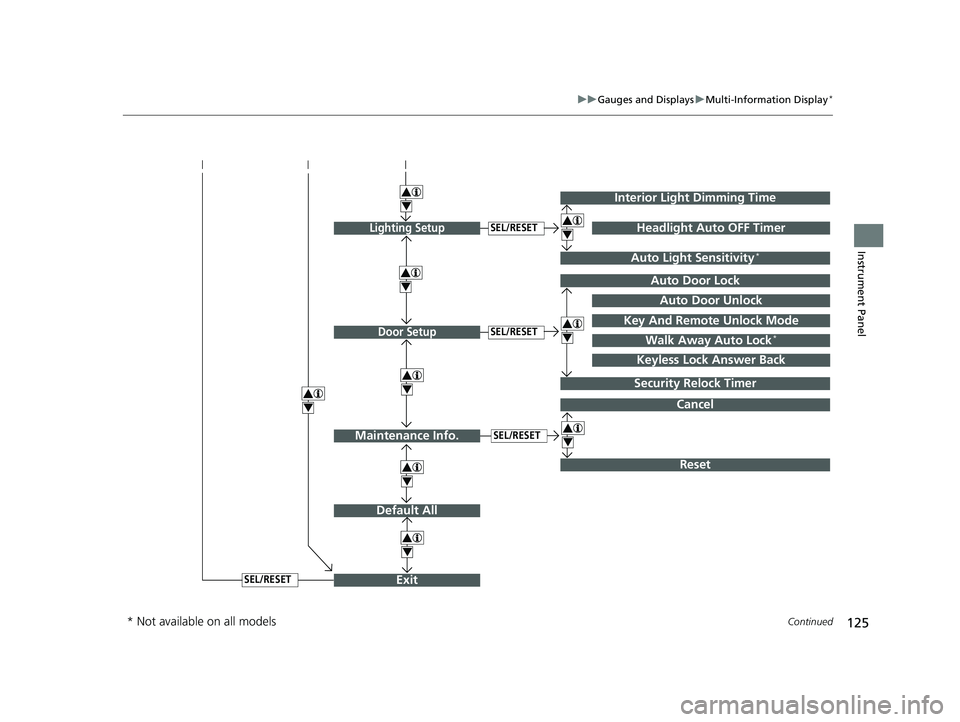
Exit
4
4
Door Setup
Default All
SEL/RESET
4
Lighting SetupSEL/RESET
4Auto Door Lock
Auto Door Unlock
Key And Remote Unlock Mode
Walk Away Auto Lock*
Interior Light Dimming Time
Headlight Auto OFF Timer
Auto Light Sensitivity*
4
4
Security Relock Timer
Keyless Lock Answer Back
Cancel
Maintenance Info.SEL/RESET
Reset
4
4
SEL/RESET
4
* Not available on all models
20 HR-V HDMC HDMG-31T7A6400.book 125 ページ 2019年8月8日 木曜日 午後3時52分
Page 130 of 639
128
uuGauges and Displays uMulti-Information Display*
Instrument Panel
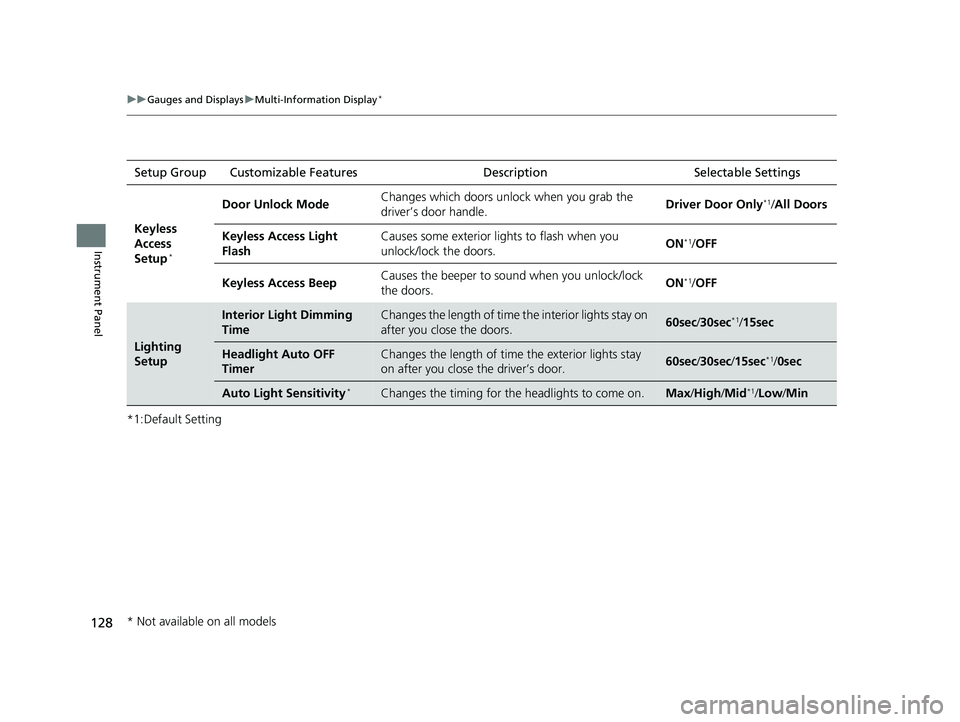
*1:Default SettingSetup Group Customizable Features Description Selectable Settings
Keyless
Access
Setup
*
Door Unlock Mode Changes which doors unlock when you grab the
driver’s door handle. Driver Door Only*1/
All Doors
Keyless Access Light
Flash Causes some exterior lights to flash when you
unlock/lock the doors.
ON
*1/
OFF
Keyless Access Beep Causes the beeper to sound when you unlock/lock
the doors.
ON
*1/
OFF
Lighting
Setup
Interior Light Dimming
TimeChanges the length of time the interior lights stay on
after you close the doors.60sec /30sec*1/15sec
Headlight Auto OFF
TimerChanges the length of time the exterior lights stay
on after you close the driver’s door.60sec /30sec /15sec*1/ 0sec
Auto Light Sensitivity*Changes the timing for the headlights to come on.Max/High /Mid*1/Low/ Min
* Not available on all models
20 HR-V HDMC HDMG-31T7A6400.book 128 ページ 2019年8月8日 木曜日 午後3時52分
Page 131 of 639
129
uuGauges and Displays uMulti-Information Display*
Continued
Instrument Panel
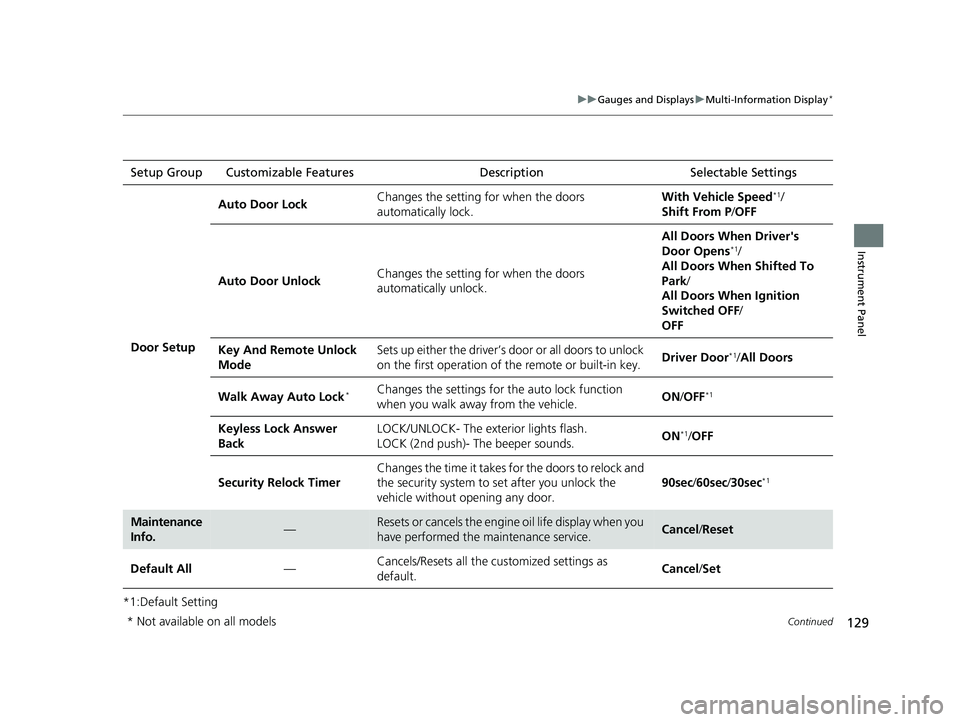
*1:Default SettingSetup Group Customizable Features
Description Selectable Settings
Door Setup Auto Door Lock
Changes the setting for when the doors
automatically lock. With Vehicle Speed
*1/
Shift From P /OFF
Auto Door Unlock Changes the setting for when the doors
automatically unlock. All Doors When Driver's
Door Opens
*1/
All Doors When Shifted To
Park /
All Doors When Ignition
Switched OFF /
OFF
Key And Remote Unlock
Mode Sets up either the driver’s door or all doors to unlock
on the first operation of the remote or built-in key.
Driver Door
*1/
All Doors
Walk Away Auto Lock
*Changes the settings for the auto lock function
when you walk away from the vehicle. ON
/OFF*1
Keyless Lock Answer
Back LOCK/UNLOCK- The exterior lights flash.
LOCK (2nd push)- The beeper sounds.
ON*1/
OFF
Security Relock Timer Changes the time it takes for the doors to relock and
the security system to set after you unlock the
vehicle without opening any door. 90sec
/60sec /30sec
*1
Maintenance
Info.—Resets or cancels the engine oil life display when you
have performed the maintenance service.Cancel /Reset
Default All —Cancels/Resets all the customized settings as
default.
Cancel
/Set
* Not available on all models
20 HR-V HDMC HDMG-31T7A6400.book 129 ページ 2019年8月8日 木曜日 午後3時52分
Page 135 of 639
133
Controls
This chapter explains how to operate the various controls necessary for driving.
Clock.................................................................. 134
Locking and Unlocking the Doors
Key................................................................. 136
Low Smart Entry Remote Signal Strength
*...... 138Locking/Unlocking the Doors from the Outside ... 139Locking/Unlocking the Doors from the Inside .. 148
Childproof Door Locks .................................... 151
Auto Door Locking/Unlocking ......................... 152
Customizing the Auto Door Locking/Unlocking Setting
*....................................................... 153
Tailgate ............................................................. 156
Opening/Closing the Tailgate.......................... 157
Security System Immobilizer System......................................... 159
Security System Alarm .................................... 159
Opening and Closing the Windows ................ 162
Moonroof
*........................................................ 164 Operating the Switches Around the Steering
Wheel
Ignition Switch ............................................... 165
ENGINE START/STOP Button ........................... 166
Ignition Switch and Power Mode Comparison .....169Turn Signals ................................................... 170
Light Switches ................................................ 171
Fog Lights
*..................................................... 174
Daytime Running Lights .................................. 175
Auto High-Beam
*........................................... 176
Wipers and Washers....................................... 179
Defogger/Heated Door Mirror*/Heated Windshield*..... 182Brightness Control.......................................... 184
Adjusting the Steering Wheel ......................... 186
Models without smart entry system
Models with smart entry system
Adjusting the Mirrors Interior Rearview Mirror.................................. 187
Power Door Mirrors ........................................ 189
Adjusting the Seats Front Seats ..................................................... 190
Rear Seats ...................................................... 193
Maintain a Proper Sitting Position ................... 196
Head Restraints .............................................. 197
Armrest .......................................................... 200
Interior Lights/Interior Convenience Items Interior Lights ................................................. 201
Interior Convenience Items ............................. 203
Heating and Cooling System
*Using Vents, Heating and A/C ........................ 212
Climate Control System*Using Automatic Climate Control ................... 216
Automatic Climate Control Sensors ................ 225
* Not available on all models
20 HR-V HDMC HDMG-31T7A6400.book 133 ページ 2019年8月8日 木曜日 午後3時52分
Page 138 of 639
136
Controls
Locking and Unlocking the Doors
Key
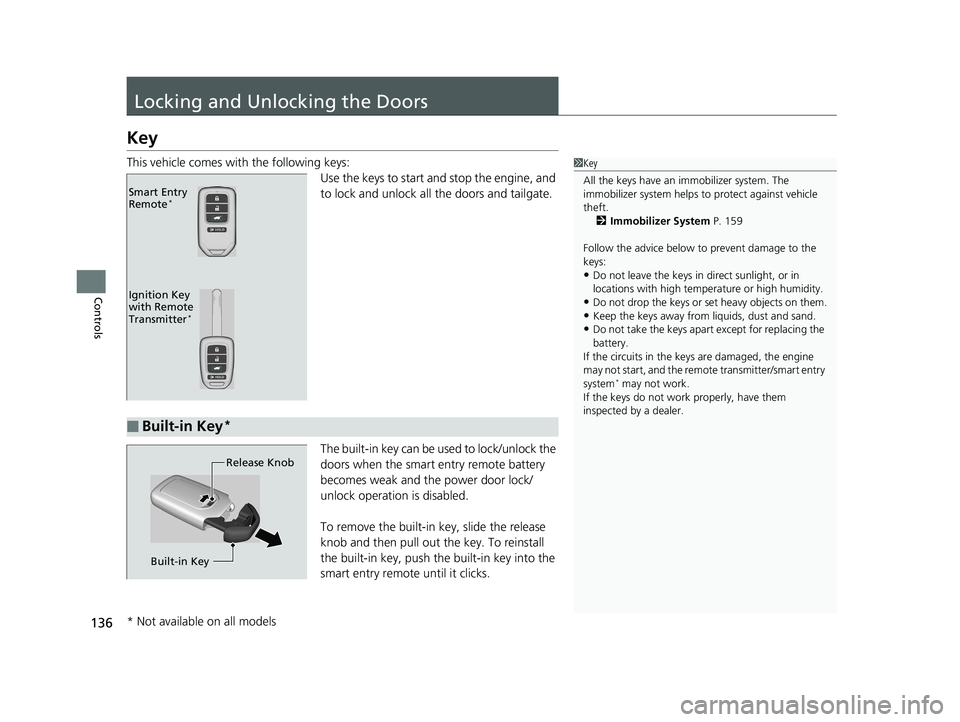
This vehicle comes with the following keys:Use the keys to start and stop the engine, and
to lock and unlock all the doors and tailgate.
The built-in key can be used to lock/unlock the
doors when the smart entry remote battery
becomes weak and th e power door lock/
unlock operation is disabled.
To remove the built-in key, slide the release
knob and then pull out the key. To reinstall
the built-in key, push th e built-in key into the
smart entry remote until it clicks.1 Key
All the keys have an immobilizer system. The
immobilizer system helps to protect against vehicle
theft. 2 Immobilizer System P. 159
Follow the advice below to prevent damage to the
keys:
•Do not leave the keys in direct sunlight, or in
locations with high temperature or high humidity.
•Do not drop the keys or set heavy objects on them.•Keep the keys away from liquids, dust and sand.
•Do not take the keys apart except for replacing the
battery.
If the circuits in the keys are damaged, the engine
may not start, and the remote transmitter/smart entry
system
* may not work.
If the keys do not work properly, have them
inspected by a dealer.
Ignition Key
with Remote
Transmitter
*
Smart Entry
Remote*
■Built-in Key*
Release Knob
Built-in Key
* Not available on all models
20 HR-V HDMC HDMG-31T7A6400.book 136 ページ 2019年8月8日 木曜日 午後3時52分