park assist HONDA HR-V 2020 Owner's Manual (in English)
[x] Cancel search | Manufacturer: HONDA, Model Year: 2020, Model line: HR-V, Model: HONDA HR-V 2020Pages: 639, PDF Size: 40.6 MB
Page 13 of 639
11
Quick Reference Guide
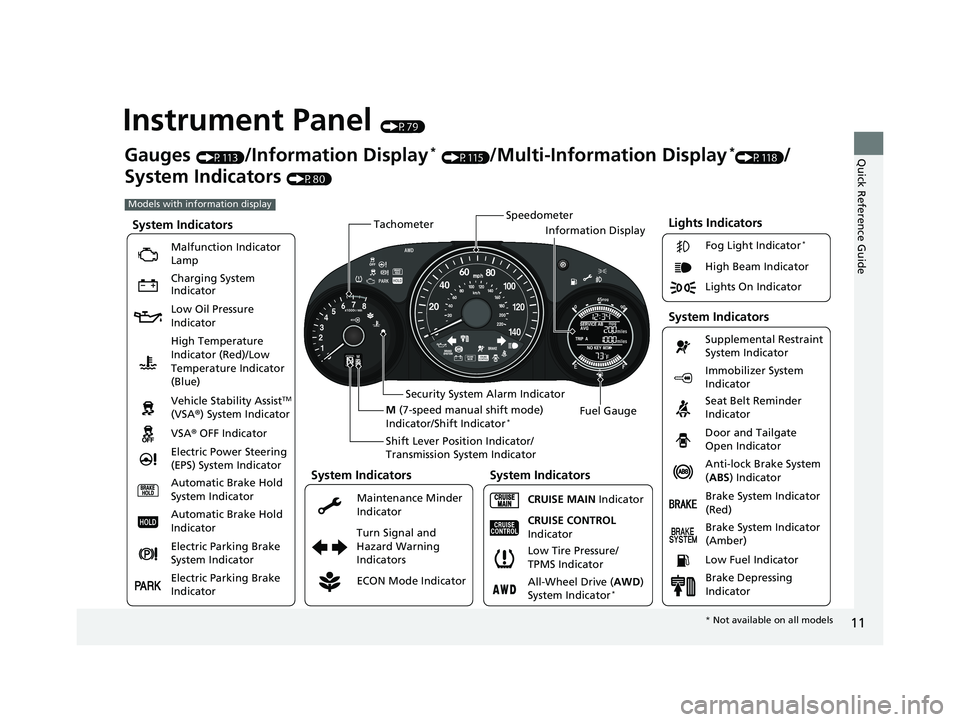
Instrument Panel (P79)
Lights Indicators
Malfunction Indicator
Lamp
Low Oil Pressure
IndicatorAnti-lock Brake System
(ABS ) Indicator
Vehicle Stability Assist
TM
(VSA® ) System Indicator
VSA ® OFF Indicator
Electric Power Steering
(EPS) System Indicator Lights On Indicator High Beam Indicator
Immobilizer System
Indicator
Seat Belt Reminder
Indicator
System Indicators
CRUISE MAIN
Indicator Supplemental Restraint
System Indicator
Door and Tailgate
Open Indicator
Tachometer
Speedometer
Fuel Gauge
Security System Alarm Indicator
Shift Lever Position Indicator/
Transmission System Indicator
Low Fuel Indicator
Gauges (P113)/Information Display* (P115)/Multi-Information Display*(P118)/
System Indicators
(P80)
Turn Signal and
Hazard Warning
Indicators
High Temperature
Indicator (Red)/Low
Temperature Indicator
(Blue)
System Indicators
System Indicators
Brake System Indicator
(Red)
CRUISE CONTROL
Indicator
System Indicators
Charging System
Indicator
ECON Mode Indicator Maintenance Minder
Indicator Fog Light Indicator
*
Brake System Indicator
(Amber)
M
(7-speed manual shift mode)
Indicator/Shift Indicator
*
Information Display
Automatic Brake Hold
System Indicator
Automatic Brake Hold
Indicator
Electric Parking Brake
System Indicator
Electric Parking Brake
Indicator All-Wheel Drive (
AWD)
System Indicator
*
Brake Depressing
Indicator
Models with information display
Low Tire Pressure/
TPMS Indicator
* Not available on all models
20 HR-V HDMC HDMG-31T7A6400.book 11 ページ 2019年8月8日 木曜日 午後3時52分
Page 14 of 639
12
Quick Reference Guide
002300
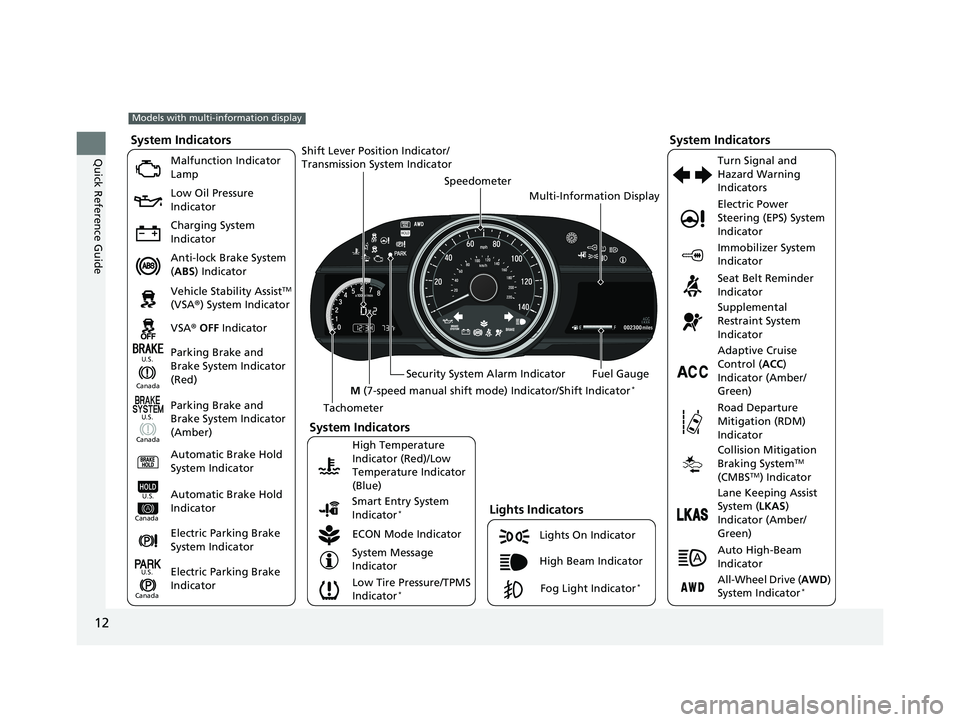
Lights On Indicator
System Indicators
Malfunction Indicator
Lamp
Low Oil Pressure
Indicator
Charging System
Indicator
Anti-lock Brake System
(ABS ) Indicator
Vehicle Stability Assist
TM
(VSA ®) System Indicator
VSA ® OFF Indicator
Low Tire Pressure/TPMS
Indicator
*
Electric Power
Steering (EPS) System
Indicator
Seat Belt Reminder
Indicator
System Indicators
Parking Brake and
Brake System Indicator
(Red) Supplemental
Restraint System
Indicator
Tachometer Speedometer
Fuel Gauge
Security System Alarm Indicator
Shift Lever Position Indicator/
Transmission Sy
stem Indicator
Immobilizer System
Indicator
ECON Mode Indicator Turn Signal and
Hazard Warning
Indicators
Models with multi-information display
Parking Brake and
Brake System Indicator
(Amber)
System Indicators
Lights Indicators
High Beam Indicator
Fog Light Indicator*
Adaptive Cruise
Control (
ACC)
Indicator (Amber/
Green)
System Message
Indicator Collision Mitigation
Braking System
TM
(CMBSTM) Indicator
Road Departure
Mitigation (RDM)
Indicator
Lane Keeping Assist
System (
LKAS)
Indicator (Amber/
Green)
Smart Entry System
Indicator
*
U.S.
Canada
Canada U.S.
High Temperature
Indicator (Red)/Low
Temperature Indicator
(Blue)Automatic Brake Hold
System Indicator
Automatic Brake Hold
IndicatorU.S.
Canada
Electric Parking Brake
System Indicator
Electric Parking Brake
IndicatorU.S.
Canada
Auto High-Beam
Indicator
All-Wheel Drive (
AWD)
System Indicator*
M (7-speed manual shift mode ) Indicator/Shift Indicator*
Multi-Information Display
20 HR-V HDMC HDMG-31T7A6400.book 12 ページ 2019年8月8日 木曜日 午後3時52分
Page 180 of 639
uuOperating the Switches Around the Steering Wheel uAuto High-Beam*
178
Controls
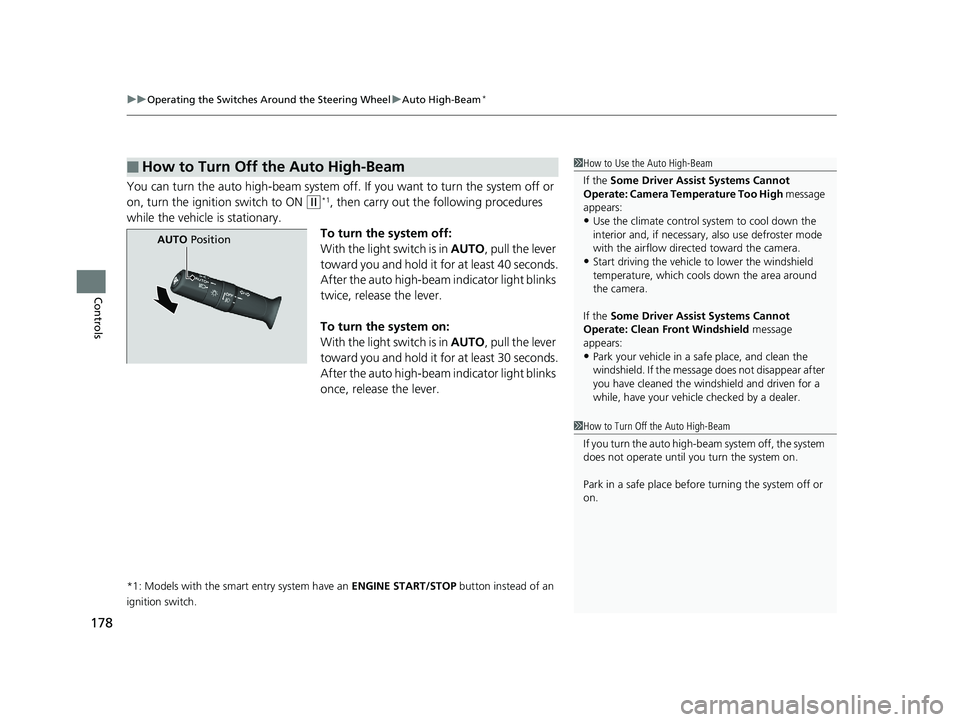
You can turn the auto high-beam system off. If you want to turn the system off or
on, turn the ignition switch to ON
(w*1, then carry out the following procedures
while the vehicle is stationary.
To turn the system off:
With the light switch is in AUTO, pull the lever
toward you and hold it for at least 40 seconds.
After the auto high-beam indicator light blinks
twice, release the lever.
To turn the system on:
With the light switch is in AUTO, pull the lever
toward you and hold it for at least 30 seconds.
After the auto high-beam indicator light blinks
once, release the lever.
*1: Models with the smart entry system have an ENGINE START/STOP button instead of an
ignition switch.
■How to Turn Off the Auto High-Beam1 How to Use the Auto High-Beam
If the Some Driver Assist Systems Cannot
Operate: Camera Temperature Too High message
appears:
•Use the climate control system to cool down the
interior and, if necessary, also use defroster mode
with the airflow directed toward the camera.
•Start driving the vehicle to lower the windshield
temperature, which cool s down the area around
the camera.
If the Some Driver Assist Systems Cannot
Operate: Clean Front Windshield message
appears:
•Park your vehicle in a sa fe place, and clean the
windshield. If the message does not disa ppear after
you have cleaned the windshield and driven for a
while, have your vehicle checked by a dealer.
1 How to Turn Off the Auto High-Beam
If you turn the auto high-beam system off, the system
does not operate until you turn the system on.
Park in a safe place before turning the system off or
on.
AUTO Position
20 HR-V HDMC HDMG-31T7A6400.book 178 ページ 2019年8月8日 木曜日 午後3時52分
Page 425 of 639
423
Driving
This chapter discusses driving and refueling.
Before DrivingDriving Preparation .......................... 424
Maximum Load Limit........................ 427
Towing a Trailer Towing Your Vehicle ........................ 429
Off-Highway Driving Guidelines ..... 430
When Driving Starting the Engine .................. 432, 435
Precautions While Driving................. 438
Continuously Variable Transmission ..... 439Shifting .................................... 440, 442
ECON Button ................................... 446
Cruise Control
*................................ 447
Vehicle Stability AssistTM (VSA®), aka Electronic
Stability Control (ESC), System .............. 450
LaneWatchTM*.................................. 452
Real Time AWD with Intelligent Control System
TM*...................................... 454Tire Pressure Monitoring System (TPMS) ...... 455Tire Pressure Monitoring System (TPMS) - Required Federal Explanation ......... 458
Honda Sensing ®
*.............................. 460
Collision Mitigati on Braking SystemTM
(CMBSTM) ....................................... 463
Adaptive Cruise Control (ACC)......... 473
Lane Keeping Assist System (LKAS)...... 486
Road Departure Mitigation (RDM) System.... 495Front Sensor Camera ....................... 500
Radar Sensor ................................... 502
Braking Brake System ................................... 503
Anti-lock Brake System (ABS) ........... 508
Brake Assist System ......................... 509
Parking Your Vehicle When Stopped ................................ 510
Multi-View Rear Camera .................. 511
Refueling Fuel Information .............................. 513
How to Refuel ................................. 514
Fuel Economy and CO
2 Emissions .... 515
* Not available on all models
20 HR-V HDMC HDMG-31T7A6400.book 423 ページ 2019年8月8日 木曜日 午後3時52分
Page 436 of 639
uuWhen Driving uStarting the Engine
434
Driving
■Hill start assist system
Hill start assist keeps the brake engaged br iefly to help prevent the vehicle from
rolling on inclines as you move your fo ot from the brake pedal to the accelerator.
Put the transmission into
(D, (S, or (L when facing uphill, or (R when facing
downhill, then release the brake pedal.
1 Hill start assist system
Hill start assist may not prevent the vehicle from
rolling downhill on a very st eep or slippery slope, and
will not operate on small inclines.
Hill start assist will operate even when VSA ® is
switched off.
Hill start assist is not a replacement for the parking
brake.
20 HR-V HDMC HDMG-31T7A6400.book 434 ページ 2019年8月8日 木曜日 午後3時52分
Page 439 of 639
437
uuWhen Driving uStarting the Engine
Driving
1. Keeping your right foot on the br ake pedal, put the transmission into (D. Select
(R when reversing.
2. With the parking brake applied, release the brake pedal and gently depress the
accelerator pedal.
u Make sure the electric parki ng brake indicator goes off.
2Parking Brake P. 503
■Hill start assist system
Hill start assist keeps the brake engaged br iefly to help prevent the vehicle from
rolling on inclines as you move your foot from the brake pedal to the accelerator.
Put the transmission into
(D or (S when facing uphill, or (R when facing downhill,
then release the brake pedal.
■Starting to Drive1 Starting to Drive
You can also release the parking brake by pressing
the electric parking brake sw itch while depressing the
brake pedal.
When facing downhill, you can start your vehicle
more smoothly by manually releasing it with the
electric parking brake switch than by releasing it with
the accelerator pedal.
1 Hill start assist system
Hill start assist may not prevent the vehicle from
rolling downhill on a very st eep or slippery slope, and
will not operate on small inclines.
Hill start assist will operate even when VSA ® is
switched off.
Hill start assist is not a replacement for the parking
brake.
20 HR-V HDMC HDMG-31T7A6400.book 437 ページ 2019年8月8日 木曜日 午後3時52分
Page 477 of 639
Continued475
uuHonda Sensing ®*uAdaptive Cruise Control (ACC)
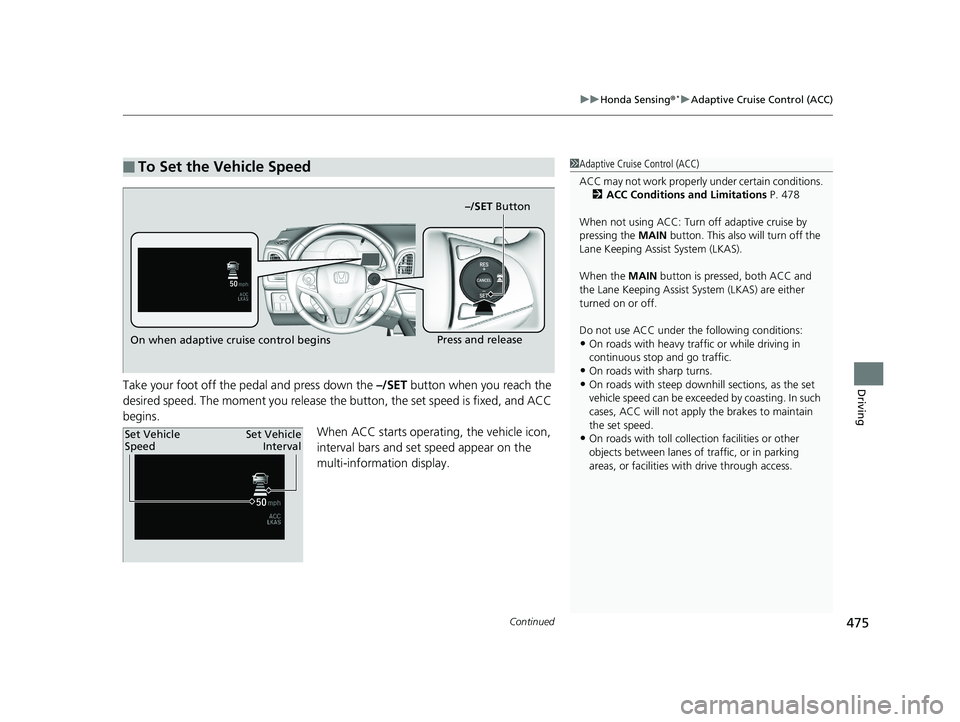
DrivingTake your foot off the pedal and press down the –/SET button when you reach the
desired speed. The moment you release the button, the set speed is fixed, and ACC
begins. When ACC starts operating, the vehicle icon,
interval bars and set speed appear on the
multi-information display.
■To Set the Vehicle Speed1Adaptive Cruise Control (ACC)
ACC may not work properly under certain conditions.
2 ACC Conditions and Limitations P. 478
When not using ACC: Turn off adaptive cruise by
pressing the MAIN button. This also will turn off the
Lane Keeping Assist System (LKAS).
When the MAIN button is pressed, both ACC and
the Lane Keeping Assist System (LKAS) are either
turned on or off.
Do not use ACC under the following conditions:
•On roads with heavy traf fic or while driving in
continuous stop and go traffic.
•On roads with sharp turns.•On roads with steep downhill sections, as the set
vehicle speed can be exceeded by coasting. In such
cases, ACC will not apply the brakes to maintain
the set speed.
•On roads with toll collection facilities or other
objects between lanes of traffic, or in parking
areas, or faci lities with driv e through access.
On when adaptive cruise control begins –/SET ButtonPress and release
Set Vehicle
Speed
Set Vehicle
Interval
20 HR-V HDMC HDMG-31T7A6400.book 475 ページ 2019年8月8日 木曜日 午後3時52分
Page 503 of 639
501
uuHonda Sensing ®*uFront Sensor Camera
Driving
1Front Sensor Camera
If the Some Driver Assist Systems Cannot
Operate: Camera Temperature Too High message
appears:
•Use the climate control system to cool down the
interior and, if necessary, also use defroster mode
with the airflow directed towards the camera.
•Start driving the vehicle to lower the windshield
temperature, which cool s down the area around
the camera.
If the Some Driver Assist Systems Cannot
Operate: Clean Front Windshield message
appears:
•Park your vehicle in a sa fe place, and clean the
windshield. If the message does not disappear after
you have cleaned the windshield and driven for a
while, have your vehicle checked by a dealer.
20 HR-V HDMC HDMG-31T7A6400.book 501 ページ 2019年8月8日 木曜日 午後3時52分
Page 507 of 639
Continued505
uuBraking uBrake System
Driving
You can release the parking brake automatically when:
• You are wearing the driver’s seat belt.
• The engine is running.
• The transmission is not in
(P or (N.
Your vehicle is equipped with disc brakes at all four wheels. A vacuum power assist
helps to reduce the effort needed on th e brake pedal. The brake assist system
increases the stopping force when you depress the brake pedal hard in an
emergency situation. The an ti-lock brake system (ABS) helps you retain steering
control when brak ing very hard.
2Brake Assist System P. 509
2 Anti-lock Brake System (ABS) P. 508
■Foot Brake
1Foot Brake
Check the brakes after driving through deep water,
or if there is a buildup of road surface water. If
necessary, dry the brakes by lightly depressing the
pedal several times.
If you hear a continuous me tallic friction sound when
applying the brakes, this is caused by the brake wear
indicator rubbing on the brake rotor and indicates
that the brake pads need to be replaced. Have the
vehicle checked by a deal er. If you hear only an
occasional squeak or squeal when you initially apply
the brake pedal, this may be normal and caused by
high frequency vibr ation of the brake pads against
the rotating brake disc.
Constantly using the brak e pedal while going down a
long hill builds up heat, which reduces the brake
effectiveness. Apply engine braking by taking your
foot off the accelerator pe dal and downshifting to a
lower speed position.
Do not rest your foot on the brake pedal while
driving, as it will lightly apply the brakes and cause
them to lose effectiveness over time and reduce pad
life. It will also conf use drivers behind you.
20 HR-V HDMC HDMG-31T7A6400.book 505 ページ 2019年8月8日 木曜日 午後3時52分
Page 596 of 639
594
Handling the Unexpected
Jump Starting
Turn off the power to electric devices, such as audio and lights. Turn off the engine,
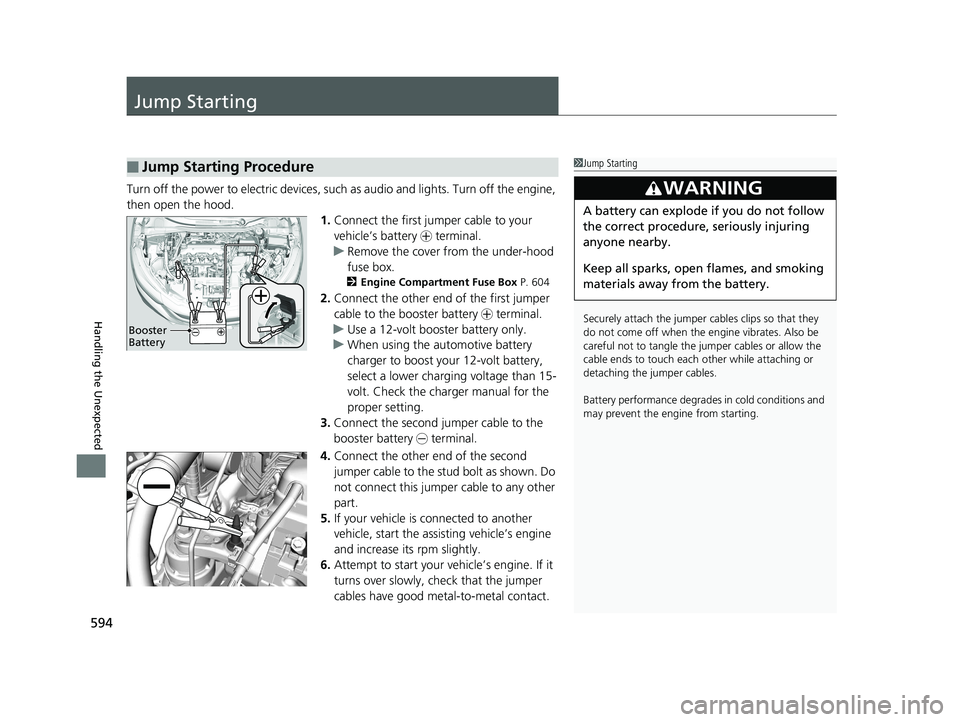
then open the hood. 1.Connect the first jump er cable to your
vehicle’s battery + terminal.
u Remove the cover from the under-hood
fuse box.
2 Engine Compartment Fuse Box P. 604
2.Connect the other end of the first jumper
cable to the booster battery + terminal.
u Use a 12-volt booster battery only.
u When using the automotive battery
charger to boost your 12-volt battery,
select a lower charging voltage than 15-
volt. Check the charger manual for the
proper setting.
3. Connect the second jumper cable to the
booster battery - terminal.
4. Connect the other end of the second
jumper cable to the stud bolt as shown. Do
not connect this jumper cable to any other
part.
5. If your vehicle is connected to another
vehicle, start the assisting vehicle’s engine
and increase its rpm slightly.
6. Attempt to start your vehicle’s engine. If it
turns over slowly, check that the jumper
cables have good metal-to-metal contact.
■Jump Starting Procedure1Jump Starting
Securely attach the jumper cables clips so that they
do not come off when the e ngine vibrates. Also be
careful not to tangle the jumper cables or allow the
cable ends to touch each other while attaching or
detaching the jumper cables.
Battery performance degrades in cold conditions and
may prevent the e ngine from starting.
3WARNING
A battery can explode if you do not follow
the correct procedure, seriously injuring
anyone nearby.
Keep all sparks, open flames, and smoking
materials away from the battery.
Booster
Battery
20 HR-V HDMC HDMG-31T7A6400.book 594 ページ 2019年8月8日 木曜日 午後3時52分