audio HONDA HRV 2022 Workshop Manual
[x] Cancel search | Manufacturer: HONDA, Model Year: 2022, Model line: HRV, Model: HONDA HRV 2022Pages: 641, PDF Size: 21.37 MB
Page 268 of 641
uuAudio System Basic Operation uAudio/Information Screen
266
Features
■Select wallpaper
1. Select Settings .
2. Select Clock/Info .
3. Select Clock/Wallpaper Type , then open the Wallpaper tab.
u The screen changes to the wallpaper list.
4. Select a desired wallpaper.
u The preview is displayed on the left side on the screen.
u The pop-up menu appears on the screen.
5. Select Set.
u The display will return to the wallpaper list.
■To view wallpaper once it is set
1. Select .
2. Select Info.
3. Select .
4. Select Clock/Wallpaper .
■Delete wallpaper
1. Select Settings .
2. Select Clock/Info .
3. Select Clock/Wallpaper Type , then open the Wallpaper tab.
u The screen changes to the wallpaper list.
4. Select a wallpaper that you want to delete.
u The preview is displayed on the left side on the screen.
u The pop-up menu appears on the screen.
5. Select Delete.
u A confirmation message appears on the screen.
6. Select Yes to delete completely.
u The display will return to the wallpaper list.
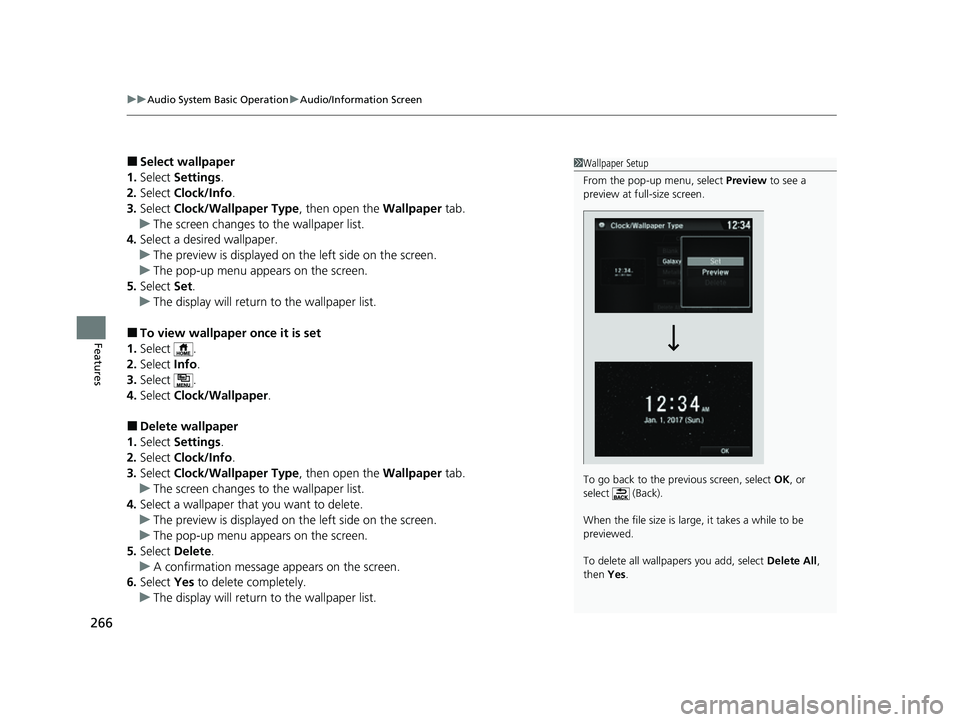
1Wallpaper Setup
From the pop-up menu, select Preview to see a
preview at full-size screen.
To go back to the previous screen, select OK, or
select (Back).
When the file size is large, it takes a while to be
previewed.
To delete all wallpapers you add, select Delete All,
then Yes.
22 HR-V HDMC-31T7A6600.book 266 ページ 2021年4月12日 月曜日 午前10時50分
Page 269 of 641
Continued267
uuAudio System Basic Operation uAudio/Information Screen
Features
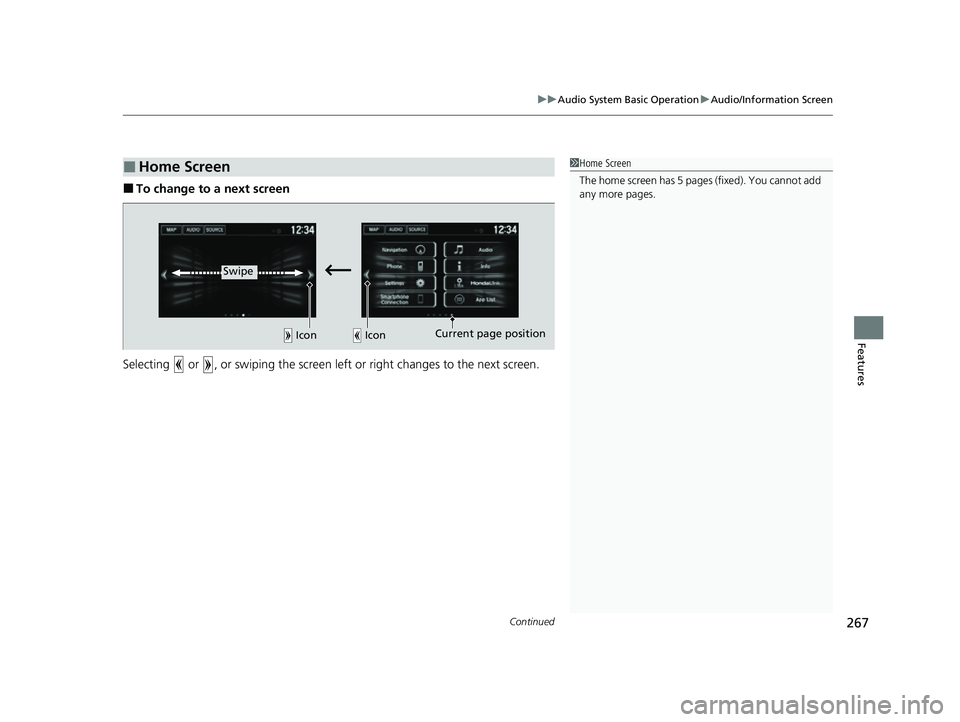
■To change to a next screen
Selecting or , or swiping the screen le ft or right changes to the next screen.
■Home Screen1Home Screen
The home screen has 5 pages (fixed). You cannot add
any more pages.
Icon Icon
Swipe
Current page position
22 HR-V HDMC-31T7A6600.book 267 ページ 2021年4月12日 月曜日 午前10時50分
Page 270 of 641
uuAudio System Basic Operation uAudio/Information Screen
268
Features
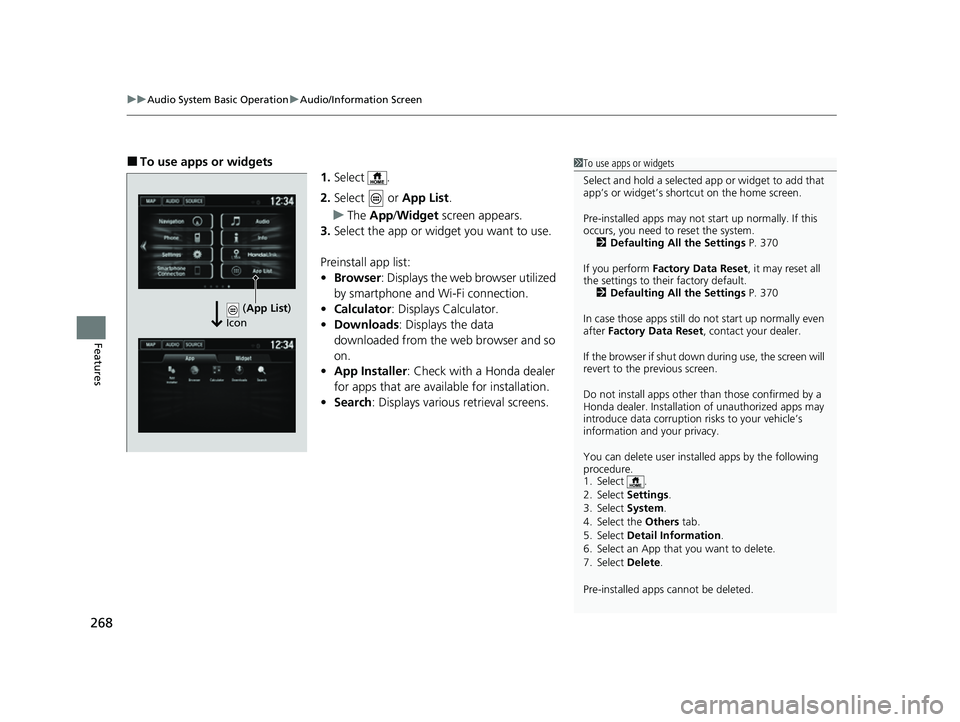
■To use apps or widgets
1.Select .
2. Select or App List.
u The App /Widget screen appears.
3. Select the app or widget you want to use.
Preinstall app list:
• Browser : Displays the web browser utilized
by smartphone and Wi-Fi connection.
• Calculator : Displays Calculator.
• Downloads : Displays the data
downloaded from the web browser and so
on.
• App Installer : Check with a Honda dealer
for apps that are available for installation.
• Search : Displays various retrieval screens.1To use apps or widgets
Select and hold a selected app or widget to add that
app’s or widget’s shortcut on the home screen.
Pre-installed apps may not start up normally. If this
occurs, you need to reset the system. 2 Defaulting All the Settings P. 370
If you perform Factory Data Reset , it may reset all
the settings to their factory default. 2 Defaulting All the Settings P. 370
In case those apps still do not start up normally even
after Factory Data Reset , contact your dealer.
If the browser if shut down during use, the screen will
revert to the previous screen.
Do not install apps other than those confirmed by a
Honda dealer. Installation of unauthorized apps may
introduce data corruption risks to your vehicle’s
information and your privacy.
You can delete user installed apps by the following
procedure.
1. Select .
2. Select Settings .
3. Select System .
4. Select the Others tab.
5. Select Detail Information .
6. Select an App that you want to delete.
7. Select Delete .
Pre-installed apps cannot be deleted.
(App List )
Icon
22 HR-V HDMC-31T7A6600.book 268 ページ 2021年4月12日 月曜日 午前10時50分
Page 271 of 641
269
uuAudio System Basic Operation uAudio/Information Screen
Continued
Features
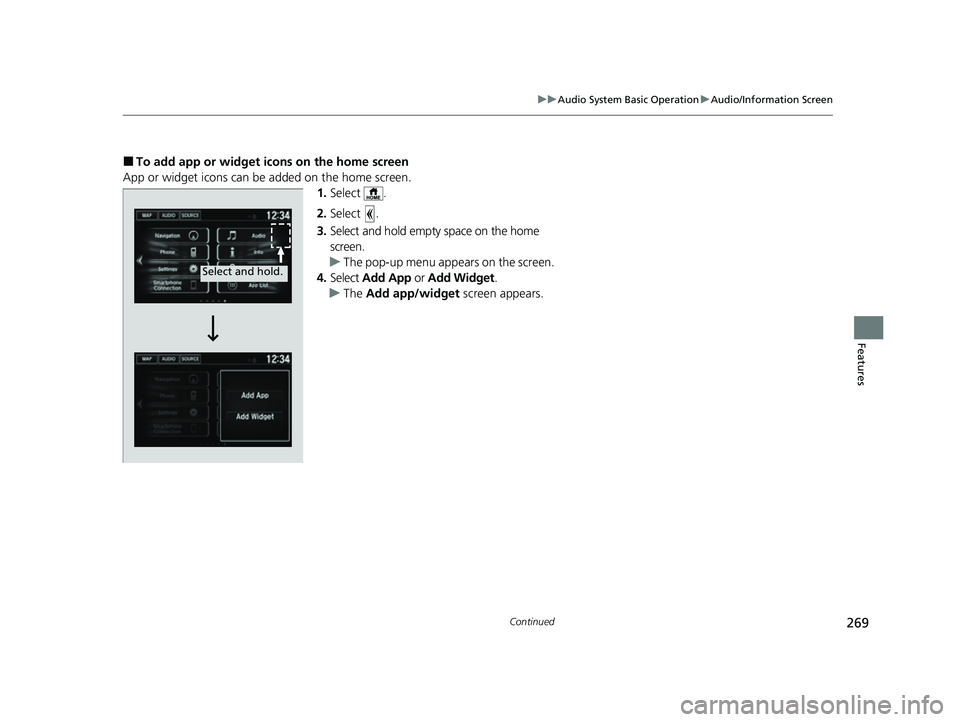
■To add app or widget icons on the home screen
App or widget icons can be added on the home screen. 1.Select .
2. Select .
3. Select and hold empty space on the home
screen.
u The pop-up menu appears on the screen.
4. Select Add App or Add Widget .
u The Add app/widget screen appears.
Select and hold.
22 HR-V HDMC-31T7A6600.book 269 ページ 2021年4月12日 月曜日 午前10時50分
Page 272 of 641
270
uuAudio System Basic Operation uAudio/Information Screen
Features
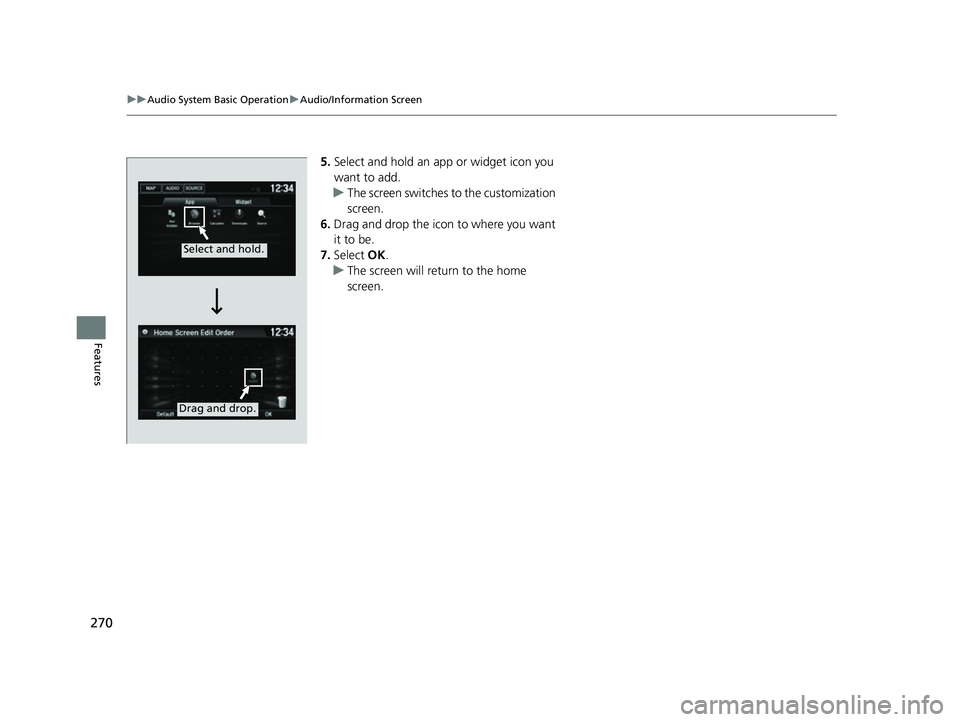
5. Select and hold an a pp or widget icon you
want to add.
u The screen switches to the customization
screen.
6. Drag and drop the icon to where you want
it to be.
7. Select OK.
u The screen will return to the home
screen.
Select and hold.
Drag and drop.
22 HR-V HDMC-31T7A6600.book 270 ページ 2021年4月12日 月曜日 午前10時50分
Page 273 of 641
Continued271
uuAudio System Basic Operation uAudio/Information Screen
Features
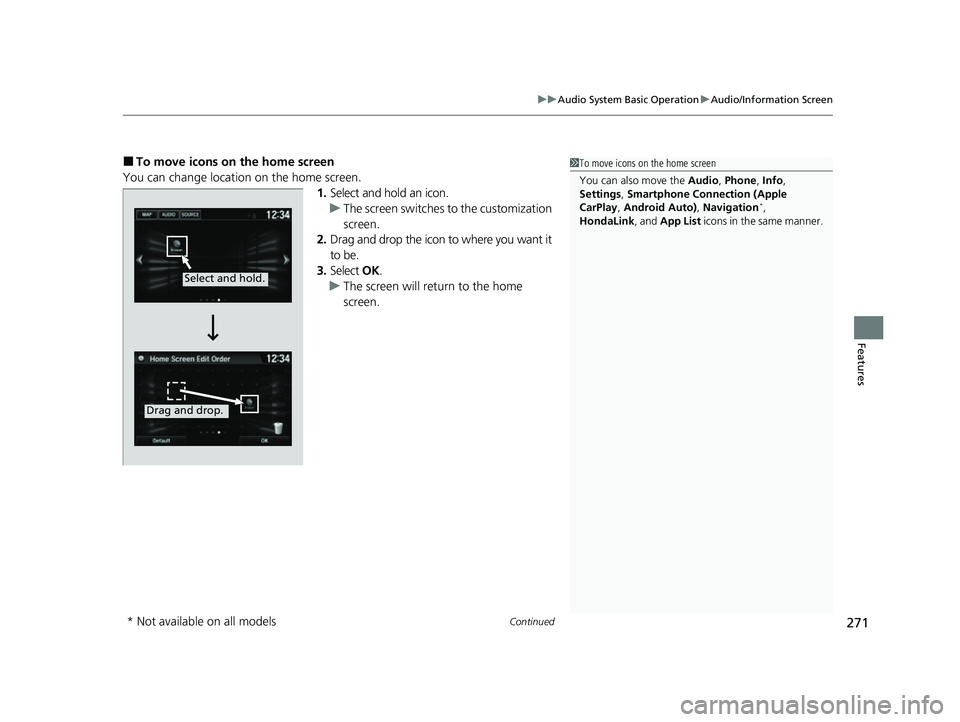
■To move icons on the home screen
You can change location on the home screen. 1.Select and hold an icon.
u The screen switches to the customization
screen.
2. Drag and drop the icon to where you want it
to be.
3. Select OK.
u The screen will return to the home
screen.1To move icons on the home screen
You can also move the Audio, Phone , Info,
Settings , Smartphone Connection (Apple
CarPlay , Android Auto) , Navigation
*,
HondaLink, and App List icons in the same manner.
Select and hold.
Drag and drop.
* Not available on all models
22 HR-V HDMC-31T7A6600.book 271 ページ 2021年4月12日 月曜日 午前10時50分
Page 274 of 641
uuAudio System Basic Operation uAudio/Information Screen
272
Features
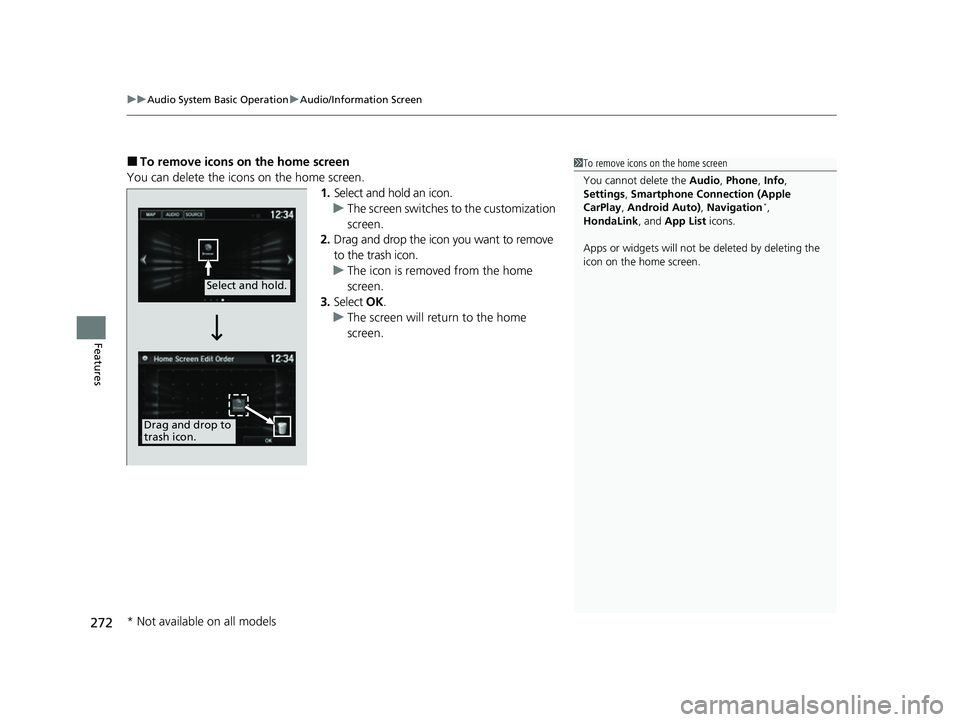
■To remove icons on the home screen
You can delete the icons on the home screen. 1.Select and hold an icon.
u The screen switches to the customization
screen.
2. Drag and drop the icon you want to remove
to the trash icon.
u The icon is removed from the home
screen.
3. Select OK.
u The screen will return to the home
screen.1To remove icons on the home screen
You cannot delete the Audio, Phone , Info,
Settings , Smartphone Connection (Apple
CarPlay , Android Auto) , Navigation
*,
HondaLink, and App List icons.
Apps or widgets will not be deleted by deleting the
icon on the home screen.
Select and hold.
Drag and drop to
trash icon.
* Not available on all models
22 HR-V HDMC-31T7A6600.book 272 ページ 2021年4月12日 月曜日 午前10時50分
Page 275 of 641
273
uuAudio System Basic Operation uAudio/Information Screen
Continued
Features
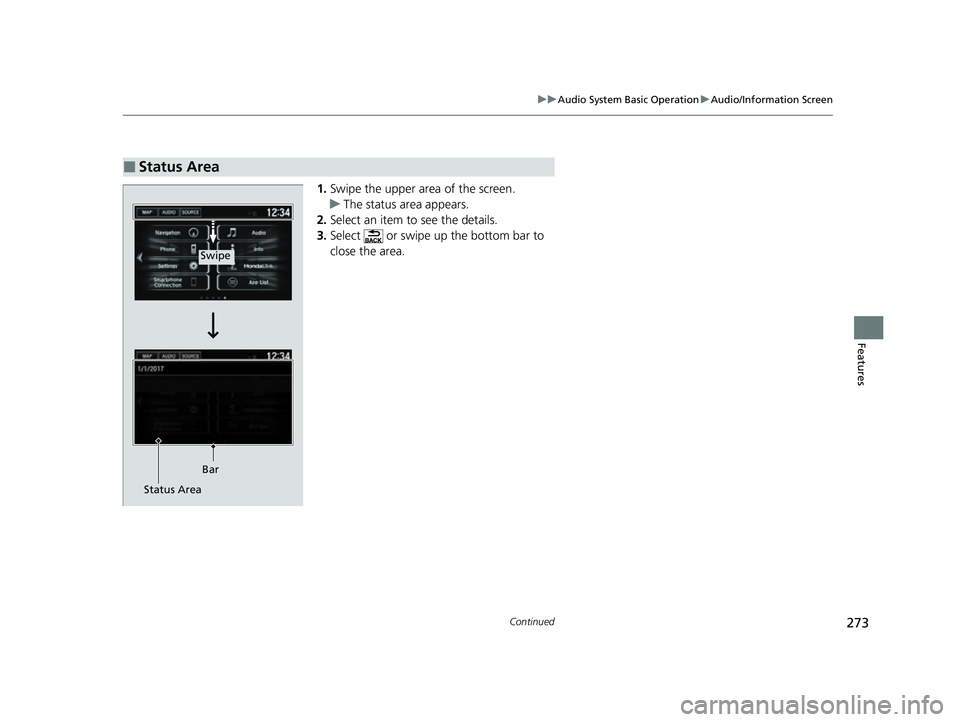
1. Swipe the upper area of the screen.
u The status area appears.
2. Select an item to see the details.
3. Select or swipe up the bottom bar to
close the area.
■Status Area
Swipe
Bar
Status Area
22 HR-V HDMC-31T7A6600.book 273 ページ 2021年4月12日 月曜日 午前10時50分
Page 276 of 641
uuAudio System Basic Operation uAudio/Information Screen
274
Features
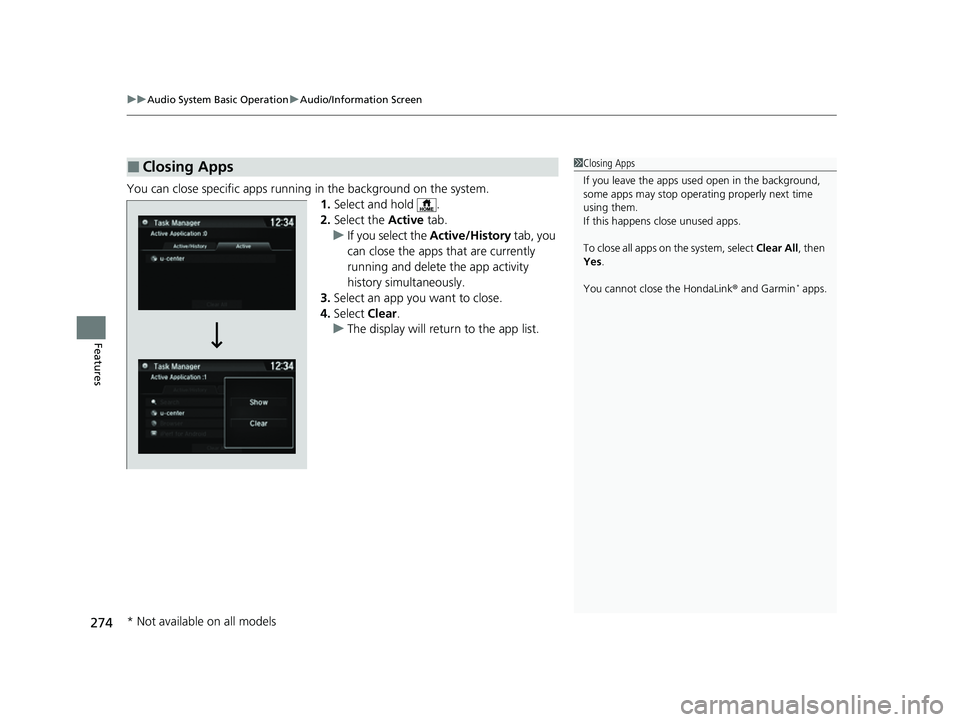
You can close specific apps running in the background on the system.
1.Select and hold .
2. Select the Active tab.
u If you select the Active/History tab, you
can close the apps that are currently
running and delete the app activity
history simultaneously.
3. Select an app you want to close.
4. Select Clear.
u The display will return to the app list.
■Closing Apps1Closing Apps
If you leave the apps used open in the background,
some apps may stop operati ng properly next time
using them.
If this happens close unused apps.
To close all apps on the system, select Clear All, then
Yes .
You cannot close the HondaLink ® and Garmin
* apps.
* Not available on all models
22 HR-V HDMC-31T7A6600.book 274 ページ 2021年4月12日 月曜日 午前10時50分
Page 277 of 641
275
uuAudio System Basic Operation uAdjusting the Sound
Features
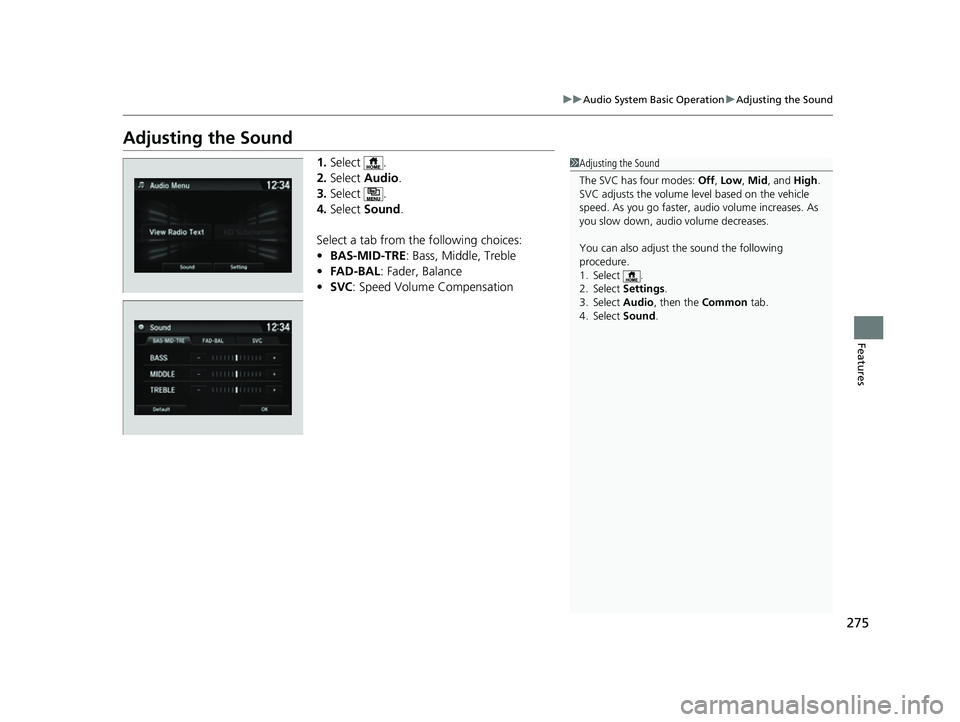
Adjusting the Sound
1. Select .
2. Select Audio .
3. Select .
4. Select Sound .
Select a tab from the following choices:
• BAS-MID-TRE: Bass, Middle, Treble
• FAD-BAL : Fader, Balance
• SVC : Speed Volume Compensation1Adjusting the Sound
The SVC has four modes: Off, Low , Mid , and High.
SVC adjusts the volume level based on the vehicle
speed. As you go faster, audio volume increases. As
you slow down, audi o volume decreases.
You can also adjust the sound the following
procedure.
1. Select .
2. Select Settings .
3. Select Audio , then the Common tab.
4. Select Sound .
22 HR-V HDMC-31T7A6600.book 275 ページ 2021年4月12日 月曜日 午前10時50分