multi HONDA HRV 2022 Workshop Manual
[x] Cancel search | Manufacturer: HONDA, Model Year: 2022, Model line: HRV, Model: HONDA HRV 2022Pages: 641, PDF Size: 21.37 MB
Page 171 of 641
169
Controls
Operating the Switches Around the Steering Wheel
Ignition Switch
Models without keyless access system
1Ignition Switch
You cannot take the key out unless the shift lever is
in
( P.
If you open the driver’s door when the key is in LOCK
(0 or ACCESSORY (q, a warning buzzer will sound
to remind you to take the key out.
When the warning buzzer sounds, the following
messages appear on the multi-information display:
•In LOCK ( 0: the symbol with an Remove
Key From Ignition
•In ACCESSORY ( q: the symbol with a
Return Ignition Switch To Lock (0) Position
If the key won’t turn from LOCK
( 0 to ACCESSORY
(q, turn the key while moving the steering wheel left
and right. The steering wh eel will unlock, allowing
the key to turn.
Models with multi-information display
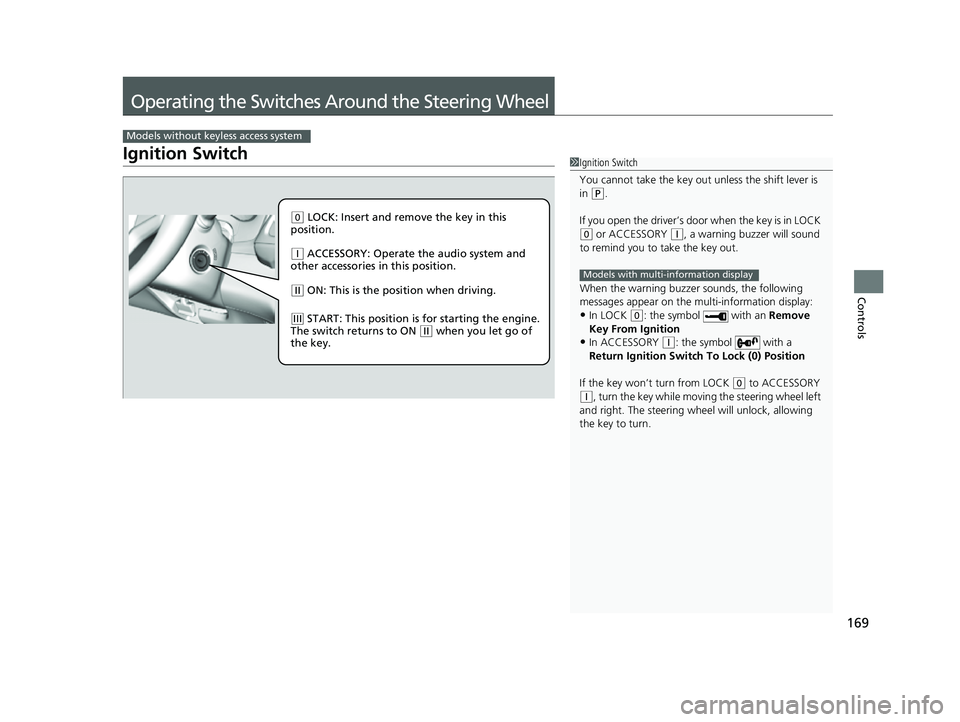
( 0 LOCK: Insert and remove the key in this
position.
( q ACCESSORY: Operate the audio system and
other accessories in this position.
( w ON: This is the position when driving.
(e START: This position is for starting the engine.
The switch returns to ON ( w when you let go of
the key.
22 HR-V HDMC-31T7A6600.book 169 ページ 2021年4月12日 月曜日 午前10時50分
Page 179 of 641
177
uuOperating the Switches Around the Steering Wheel uLight Switches
Controls
The headlights automatically come on when the wipers are used several times within
a number of certain intervals with the headlight switch in AUTO.
The headlights automatically go off a few minutes later if the wipers are stopped.
The headlights, all other exterior lights, a nd the instrument panel lights turn off 15
seconds after you remove the key or set the power mode to VEHICLE OFF (LOCK),
take the remote with you, and close the driver’s door.
If you turn the igniti on switch to LOCK
(0*1 with the headlight switch on, but do
not open the door, the lights tu rn off after 10 minutes (3 minutes, if the switch is in
the AUTO
* position).
The lights turn on again when you unlock or open the driver’s door. If you unlock
the door, but do not open it within 15 seconds, the lights go off. If you open the
driver’s door, you will hear a lights on reminder chime.
*1: Models with the keyless access system have an ENGINE START/STOP button instead of an
ignition switch.
■Headlight Integration with Wipers*
■Automatic Lighting Off Feature
1 Automatic Operation (aut omatic lighting control)*
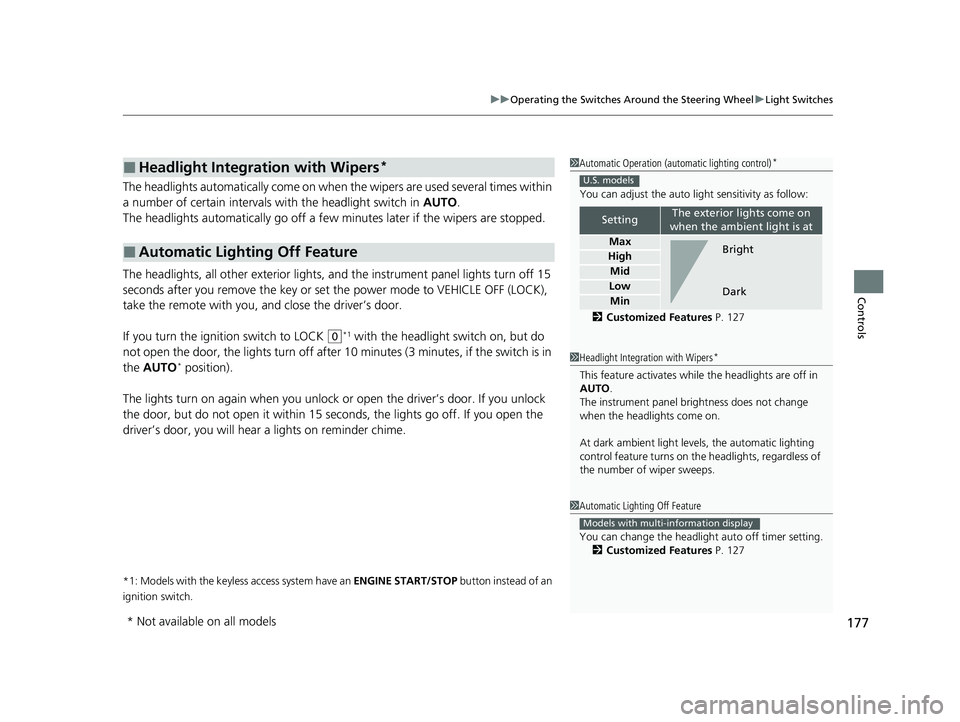
You can adjust the auto li ght sensitivity as follow:
2 Customized Features P. 127
SettingThe exterior lights come on
when the ambient light is at
Max
High
Mid
Low
Min
U.S. models
Bright
Dark
1 Headlight Integration with Wipers*
This feature activates while the headlights are off in
AUTO .
The instrument panel br ightness does not change
when the headlights come on.
At dark ambient light levels, the automatic lighting
control feature turns on the headlights, regardless of
the number of wiper sweeps.
1 Automatic Lighting Off Feature
You can change the headlight auto off timer setting.
2 Customized Features P. 127
Models with multi-information display
* Not available on all models
22 HR-V HDMC-31T7A6600.book 177 ページ 2021年4月12日 月曜日 午前10時50分
Page 191 of 641
189
uuOperating the Switches Around the Steering Wheel uBrightness Control
Controls
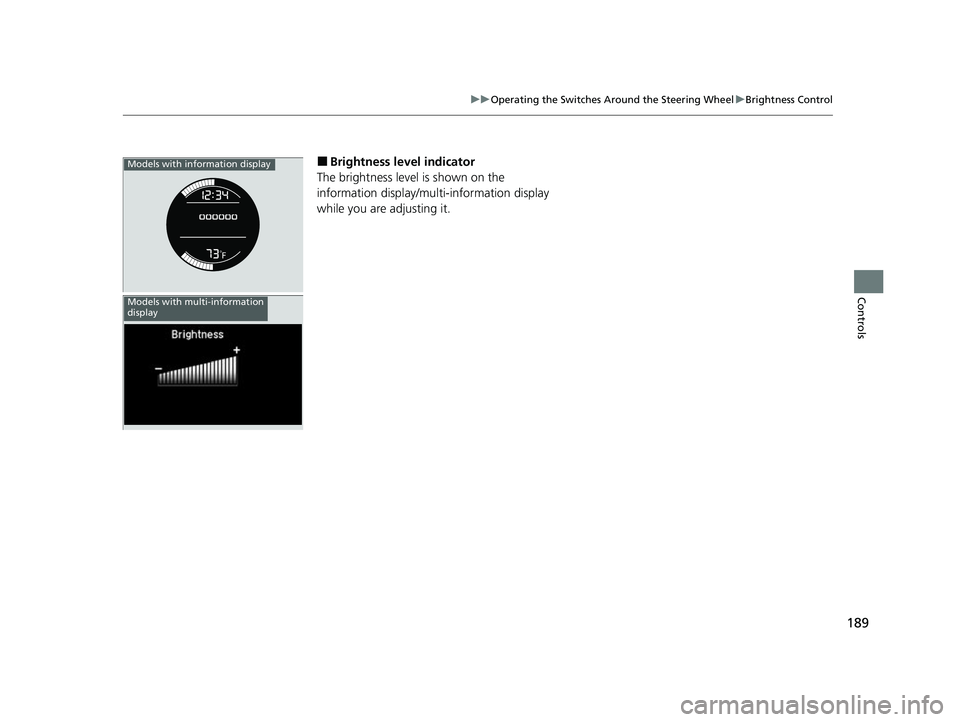
■Brightness level indicator
The brightness level is shown on the
information display/multi-information display
while you are adjusting it.Models with information display
Models with multi-information
display
22 HR-V HDMC-31T7A6600.book 189 ページ 2021年4月12日 月曜日 午前10時50分
Page 207 of 641
205Continued
Controls
Interior Lights/Interior Convenience Items
Interior Lights
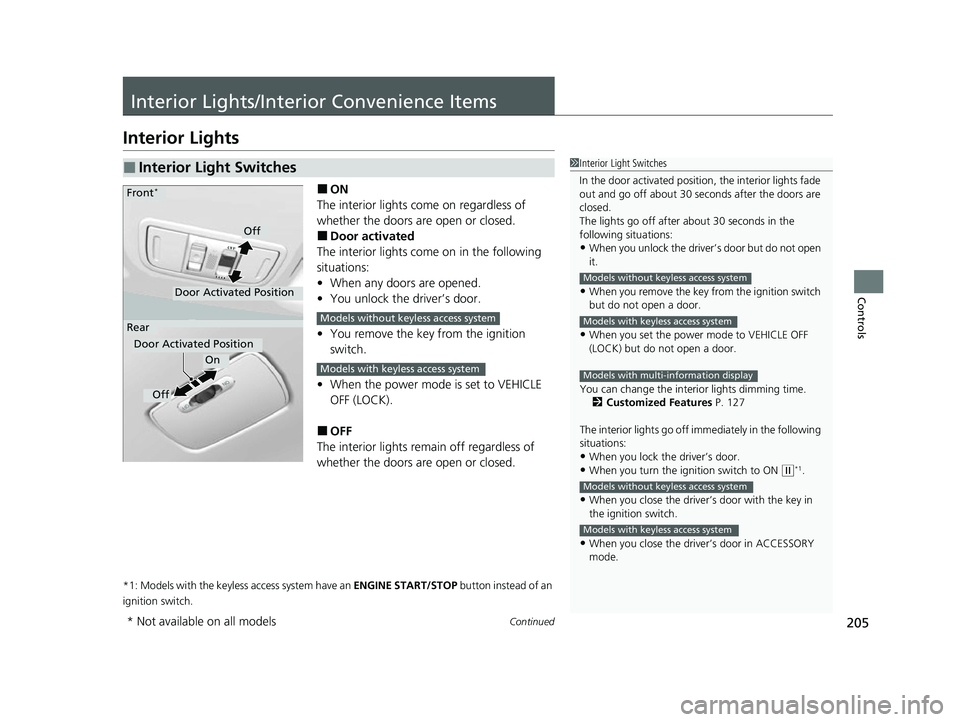
■ON
The interior lights come on regardless of
whether the doors are open or closed.
■Door activated
The interior lights come on in the following
situations:
• When any doors are opened.
• You unlock the driver’s door.
• You remove the key from the ignition
switch.
• When the power mode is set to VEHICLE
OFF (LOCK).
■OFF
The interior lights remain off regardless of
whether the doors are open or closed.
*1: Models with the keyless access system have an ENGINE START/STOP button instead of an
ignition switch.
■Interior Light Switches1 Interior Light Switches
In the door activated position, the interior lights fade
out and go off about 30 se conds after the doors are
closed.
The lights go off after about 30 seconds in the
following situations:
•When you unlock the driver’s door but do not open
it.
•When you remove the key from the ignition switch
but do not open a door.
•When you set the power mode to VEHICLE OFF
(LOCK) but do not open a door.
You can change the interi or lights dimming time.
2 Customized Features P. 127
The interior lights go off im mediately in the following
situations:
•When you lock the driver’s door.•When you turn the ignition switch to ON ( w*1.
•When you close the driver’s door with the key in
the ignition switch.
•When you close the driver’s door in ACCESSORY
mode.
Models without keyless access system
Models with keyless access system
Models with multi-information display
Models without keyless access system
Models with keyless access system
On
Off
Door Activated Position
Front*
Rear
Door Activated Position
Off
Models without keyless access system
Models with keyless access system
* Not available on all models
22 HR-V HDMC-31T7A6600.book 205 ページ 2021年4月12日 月曜日 午前10時50分
Page 290 of 641
uuAudio System Basic Operation uPlaying SiriusXM ® Radio*
288
Features
To store a channel:
1. Tune to the selected channel.
2. Select to hold the preset number for the station you want to store.
3. Select Replace .
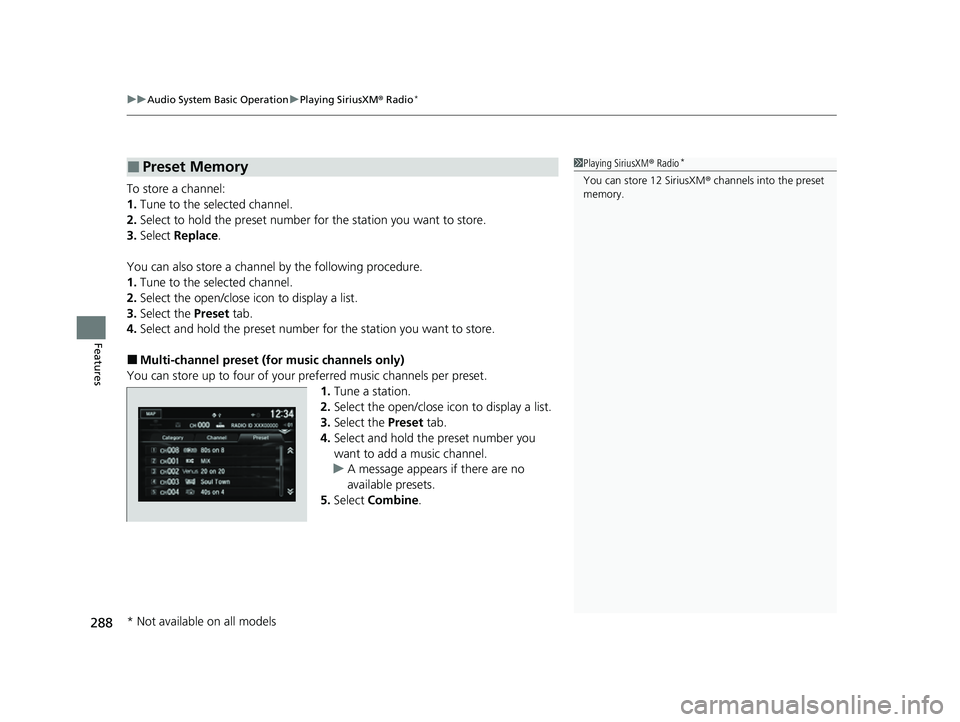
You can also store a channel by the following procedure.
1. Tune to the selected channel.
2. Select the open/close ic on to display a list.
3. Select the Preset tab.
4. Select and hold the preset number for the station you want to store.
■Multi-channel preset (for music channels only)
You can store up to four of your pr eferred music channels per preset.
1. Tune a station.
2. Select the open/close ic on to display a list.
3. Select the Preset tab.
4. Select and hold the preset number you
want to add a music channel.
u A message appears if there are no
available presets.
5. Select Combine .
■Preset Memory1Playing SiriusXM ® Radio*
You can store 12 SiriusXM ® channels into the preset
memory.
* Not available on all models
22 HR-V HDMC-31T7A6600.book 288 ページ 2021年4月12日 月曜日 午前10時50分
Page 335 of 641
333
Features
General Information on the Audio System
SiriusXM® Radio Service*
1.You need your radio ID ready before regist ering for subscription. To see the ID in
the display: Select Channel 000.
2. Have your radio ID and credit card numb er ready, and either call or visit the
SiriusXM ® website to subscribe.
Switch to the SiriusXM® mode by using the SOURCE button on the steering wheel,
or through the audio/informations screen, and stay in this mode for about 30
minutes until the service is activated. Make su re your vehicle is in an open area with
good reception.
Check antenna:
The SiriusXM ® antenna is disconnected or shorted. Contact a dealer.
No Signal:
The signal is too weak in the current location.
Channel Not Subscribed:
You are not subscribed to the channel selected.
Subscription Updated:
SiriusXM ® radio is receiving informat ion update from the network.
Replay Memory Almost Full:
The recording memory is nearly full.
Replay Memory Full:
The recording memory is full.
■Subscribing to SiriusXM ® Radio
■Receiving SiriusXM ® Radio
■SiriusXM ® Radio Display Messages
1 Subscribing to SiriusXM ® Radio
Contact Information for SiriusXM ® Radio:
•U.S.: SiriusXM ® Radio at www.siriusxm.com/
subscribenow , or 1-866-635-2349
•Canada: SiriusXM ® Canada at www.siriusxm.ca/
subscribe-now , or 1-877-209-0079
1Receiving SiriusXM ® Radio
The SiriusXM ® satellites are in orbit over the equator;
therefore, objects south of the vehicle may cause
satellite rece ption interruptions. Sa tellite signals are
more likely to be blocked by tall buildings and
mountains the farther north you travel from the
equator.
You may experience rece ption problems under the
following circumstances:
•In a location with an obstruction to the south of
your vehicle.
•In tunnels
•On the lower level of a multi-tiered road
•Large items carried on the roof rack
* Not available on all models
22 HR-V HDMC-31T7A6600.book 333 ページ 2021年4月12日 月曜日 午前10時50分
Page 345 of 641
343
uuGeneral Information on the Audio System uHonda App License Agreement
Continued
Features
E. Information Collection and Storage
1. Information Collection , Use, Transmission and Storage of Data. Consent to Use of Data:
You agree that HONDA and PROVIDERS may
collect and use your information gathered in any manner as part of product support services related to the SOFTWARE or related services.
HONDA may share such information with third parties, including, without limitation, PR OVIDERS, third party software and services
suppliers, their affiliates and/or their designated agents, solely to improve their products or to provide services or technolo gies to you.
HONDA, third party software and syst ems suppliers, their affiliates and/or their de signated agent may disclose this information to others,
but not in a form that pe rsonally identifies you.
2. Information Storage.
Depending on the type of mult imedia system you have in your VEHICLE, certain information may be stored for ease
of use of the SOFTWARE including, without limitation, search hi story, location history in certain applications, previous and saved
destinations, map locations within certain applications, and device numbers and contact information.
(a) Vehicle Health Information.
Your VEHICLE may remotely transmit information re garding the status and health of your VEHICLE
(“VEHICLE INFORMATION”) to HONDA without notification to you. VEHICLE INFORMATION may contain VEHICLE maintenance and
malfunction status that is derived from VEHICLE diagnostic data and includes, but is not limited to, status of powered doors and windows,
battery life data, battery charging data, VE HICLE speed, coolant temperature, air comp ressor revolution, output power, warning codes,
diagnostic trouble codes, fuel injection volume, and engine rotati ons per minute. VEHICLE HEALTH INFORMATION may be used by HON DA
for research and development, to deliver HONDA SERVICES and informat ion to you, and to contact you, and is retained only for a period
of time necessary to fulfill these goals.
(b) VEHICLE Geolocation Data (non-navigation/map based).
If you opt-in to geolocation-based SERVICES, your vehicle’s geolocation data
(latitude and longitude) will be automatically sent from your VEHICLE to HONDA and PROVIDERS.
(c) You understand that the inputting or uploading of information to your VEHICLE’s multimedia system or the SOFTWARE or SERVIC ES is
at your own risk and that HONDA is not responsible for unauthori zed access to or use of any personal or other information. All information
uploaded to the SOFTWARE and SERVICES may be stored on your VEHICLES’s multimedia system and you understand that the security and
safety of your VEHICLE’s multimedia system is your sole responsibility.
22 HR-V HDMC-31T7A6600.book 343 ページ 2021年4月12日 月曜日 午前10時50分
Page 346 of 641
344
uuGeneral Information on the Audio System uHonda App License Agreement
Features
F. NO WARRANTY. You understand and agree that your use of the SOFTWARE and SERVICES are solely at your own risk and that you
will be solely responsible for any damage to your VEHICLE’s multim edia system or any other equipment or any loss of data that may result
from your use of the SOFTWARE or SERVICES. THE SOFTWARE AND SERVICES ARE PROVIDED ON AN “AS IS” AND “AS AVAILABLE” BASIS
WITHOUT ANY WARRANTY OF ANY KIND, EXPRESSED, IMPLIED OR STATUTORY. WE SPECIFICALLY DISCLAIM ANY IMPLIED WARRANTIES
OF MERCHANTABILITY, FITNESS FOR A PA RTICULAR PURPOSE, AND NON-INFRINGEMENT . HONDA makes no warranties that the
SOFTWARE or SERVICES will meet your requirements, or that th e SOFTWARE or SERVICES will be uninterrupted, timely, secure, non-
infringing or error free. You understand and agree that you are responsible for any and all charges, costs or expenses associated with your
use of the SOFTWARE or SERVICES. Advice or information, whether oral or written, obtained by you from us or through the SOFTWAR E
or SERVICES are provided for informational purposes only and w ill not create any warranty not expressly made herein. You should not rely
on any such information or advice. We assume no liability or resp onsibility for any errors or omissions in the SOFTWARE or SERV ICES. We
do not make any warranty or representation th at your use of the material displayed on, or obtained through, the SOFTWARE or SER VICES
is non-infringing of any rights of any third party. Any decision or action taken by you on the basis of information or content provided via
the application is at your sole discretion and risk. HONDA and PROVIDERS are not respon sible or liable for any such decision, o r for the
accuracy, completeness, usefulness, or availa bility of any content or information displayed, transmitted, or otherwise made ava ilable via
the SOFTWARE or SERVICES. To the extent ju risdictions do not allow the exclusion of certain warranties, some of the above exclusions may
not apply to you.
G. LIMITATIONS ON LIABILITY. You and HONDA are each waiving important rights.
1. Limitations on YOUR liability.
HONDA cannot recover from you any cons equential, indirect, incidental, or special damages, or attorney’s
fees in connection with your use of the SOFTWARE or HONDA SERVICES. HONDA WAIVES TO THE FULLEST EXTENT ALLOWED BY LAW
ANY CLAIM FOR DAMAGES OTHER THAN DIRECT, COMPENSATORY DAMAGES AS LIMITED IN THIS AGREEMENT.
22 HR-V HDMC-31T7A6600.book 344 ページ 2021年4月12日 月曜日 午前10時50分
Page 348 of 641
346
uuGeneral Information on the Audio System uHonda App License Agreement
Features
I. Availability/Interruption. The SOFTWARE and certain SERVICES are made availa ble through your VEHICLE’s compatible multimedia
system when the VEHICLE is turned on. Certai n SERVICES may be available only through your compatible mobile device when it is w ithin
the operating range of the VEHICLE and a wireless carrier. The availability of the SOFTWARE and SERVICES may be subject to tran smission
limitation or interruption, including but not limited to technica l obsolesce or sunsetting of the hardware, software or firmware, inside of
or external to the Vehicle, required for data transmission or receipt. HONDA does not guarantee that the SOFTWARE, SERVICES, or any
portion thereof will be av ailable at all times or in all areas. You acknowle dge and agree that HONDA is not responsible for per formance
degradation, interruption or delays. You acknowledge that HONDA shall not be liable to you if the SOFTWARE or SERVICES in a given
location are not available. If the SOFTWARE or SERVICES are not available within your intended location, you agree that your so le remedy
shall be to cease using the SOFTWARE and SERVICES.
J. PRODUCT SUPPORT: Product support for the SOFTWARE is provided by HONDA. For product support, please refer to HONDA
instructions provided in the DOCUMENTATION. Should you have any que stions concerning this AGREEMENT, or if you desire to contact
HONDA for any other reason, please refer to the HONDA contact information provided in the DOCUMENTATION.
K. Termination and Transfer.
1. Termination. This AGREEMENT is effective until terminated by you or US. WE may term inate this AGREEMENT for any or no reason,
and with or without notice to you. Your rights under this AGRE EMENT will terminate automatically without notice from US if you fail to
comply with any term of this AGREEMENT. Upon termination of this AGREEMENT, you sh all cease all use of the SOFTWARE and SERVICE S.
2. Transfer: You may permanently transfer your rights under this AGREEMENT only as part of a sale or transfer of the VEHICLE, provided
you retain no copies, you transfer all of the SOFTWARE and HO NDA SERVICES (including all component parts, the media and printed
materials, and any upgrades), and the recipi ent agrees to the terms of this AGREEMENT. You agree to notify HONDA upon the sale or
transfer of the VEHICLE. To contact HONDA, please refer to the HONDA contact information provided in the DOCUMENTATION.
22 HR-V HDMC-31T7A6600.book 346 ページ 2021年4月12日 月曜日 午前10時50分
Page 360 of 641
358
uuCustomized Features u
Features
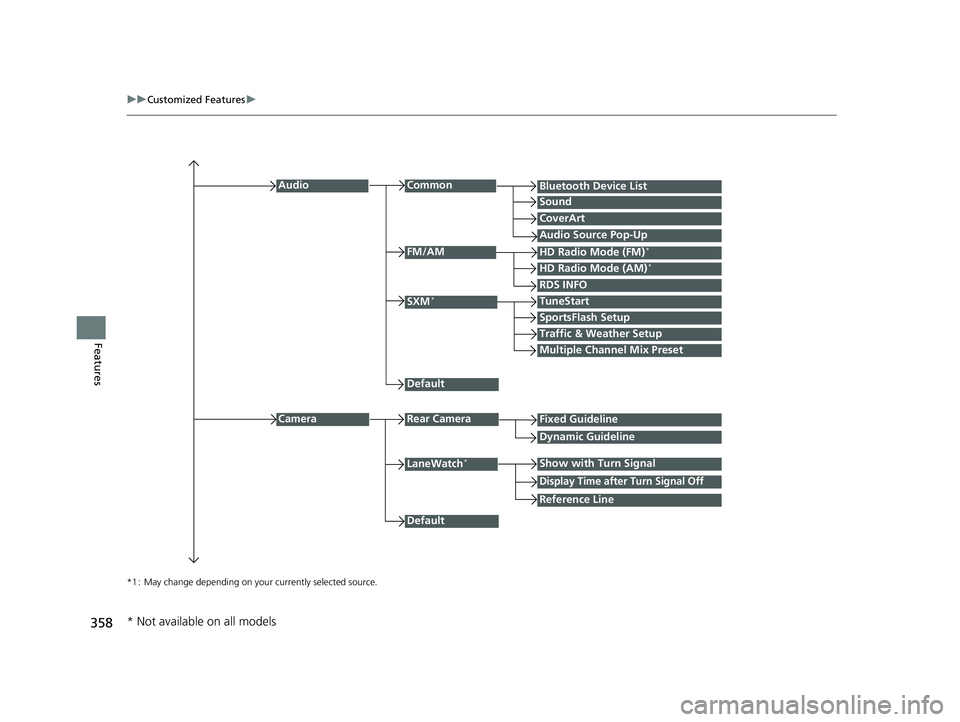
*1 : May change depending on your currently selected source.
Common
Multiple Channel Mix Preset
Audio
Sound
Audio Source Pop-Up
SXM*
HD Radio Mode (AM)*HD Radio Mode (FM)*
TuneStart
Traffic & Weather Setup
CameraRear Camera
LaneWatch*
Default
CoverArt
RDS INFO
Bluetooth Device List
FM/AM
Fixed Guideline
Dynamic Guideline
Show with Turn Signal
Default
Display Time after Turn Signal Off
Reference Line
SportsFlash Setup
* Not available on all models
22 HR-V HDMC-31T7A6600.book 358 ページ 2021年4月12日 月曜日 午前10時50分