audio HONDA HRV 2023 User Guide
[x] Cancel search | Manufacturer: HONDA, Model Year: 2023, Model line: HRV, Model: HONDA HRV 2023Pages: 664, PDF Size: 20.2 MB
Page 114 of 664
uuGauges and Driver Information Interface uDriver Information Interface
112
Instrument Panel
■Trip meter
2 Trip meter P. 110
■Elapsed time
Shows the time elapsed since Trip A or Trip B was reset.
■Average speed
Shows the average speed in mph or km/h since Trip A or Trip B was reset.
Shows the current audio information.
2 Audio System Basic Operation P. 244
Shows the current phone information.
2Bluetooth ® HandsFreeLink ® P. 389
■Audio*
■Phone*
1 Elapsed time
You can change when to reset the elapsed time.
2 Settings
* P. 123
2 Customized Features P. 345
1Average speed
You can change when to reset the average speed.
2 Settings
* P. 123
2 Customized Features P. 345
* Not available on all models
23 HR-V-313V06000_01.book 112 ページ 2022年4月4日 月曜日 午前10時49分
Page 124 of 664
uuGauges and Driver Information Interface uDriver Information Interface
122
Instrument Panel
2 Tachometer P. 104
■Speed/Distance Units
Enables you to show another unit on th e driver information interface and audio/
information screen and set the displayed m easurements to read in either miles and
mph or km and km/h.
Press and hold the left selector wheel when you select No content on the driver
information interface. Each ti me you do this, the unit will change from miles and
mph to km and km/h or vice versa. After this, a confirmation screen will appear for
a few seconds.
You can check if there are any active warning messages.
■No Content
■Warnings
1 No Content
The tachometer can be tu rned on and off using the
driver information interf ace or audio/information
screen. 2 Settings
* P. 123
2 Customized Features P. 345
Even if you have turned off the tachometer on the
driver information interf ace or audio/information
screen, if No content is selected on the driver
information interface, it will change to a tachometer-
only display. 2 Switching the Display P. 107
1Warnings
If there are multiple warnings, you can roll the left
selector wheel to see other warnings.
* Not available on all models
23 HR-V-313V06000_01.book 122 ページ 2022年4月4日 月曜日 午前10時49分
Page 136 of 664
134
Controls
Clock
Adjusting the Clock
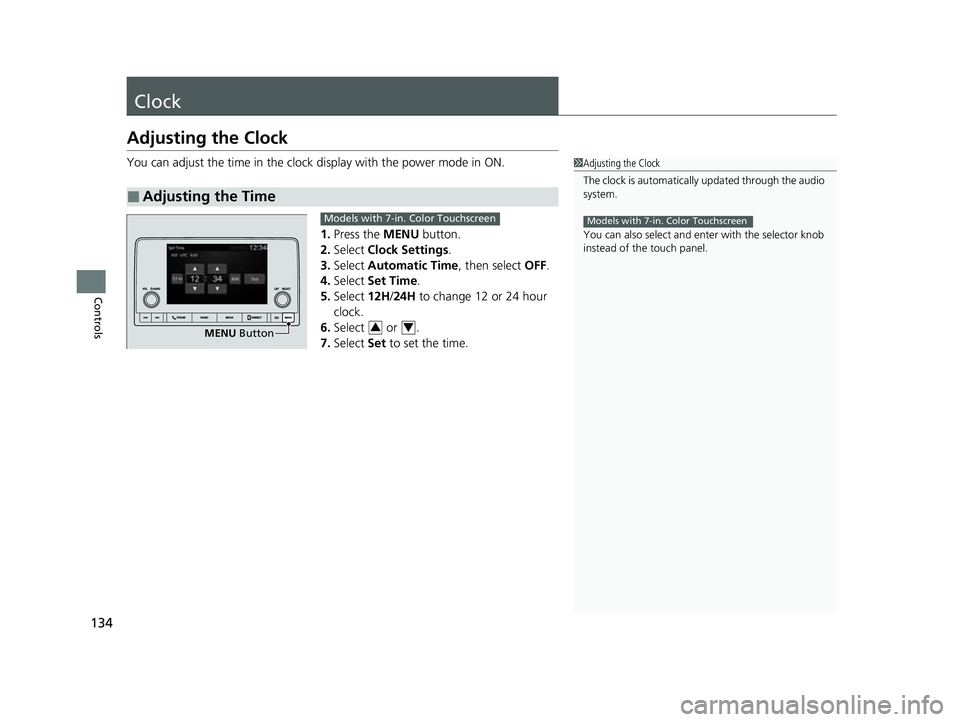
You can adjust the time in the clock display with the power mode in ON.
1. Press the MENU button.
2. Select Clock Settings .
3. Select Automatic Time , then select OFF.
4. Select Set Time.
5. Select 12H/24H to change 12 or 24 hour
clock.
6. Select or .
7. Select Set to set the time.
■Adjusting the Time
1Adjusting the Clock
The clock is automatically updated through the audio
system.
You can also select and en ter with the selector knob
instead of the touch panel.
Models with 7-in. Color Touchscreen
MENU Button
Models with 7-in. Color Touchscreen
34
23 HR-V-313V06000_01.book 134 ページ 2022年4月4日 月曜日 午前10時49分
Page 137 of 664
135
uuClock uAdjusting the Clock
Controls
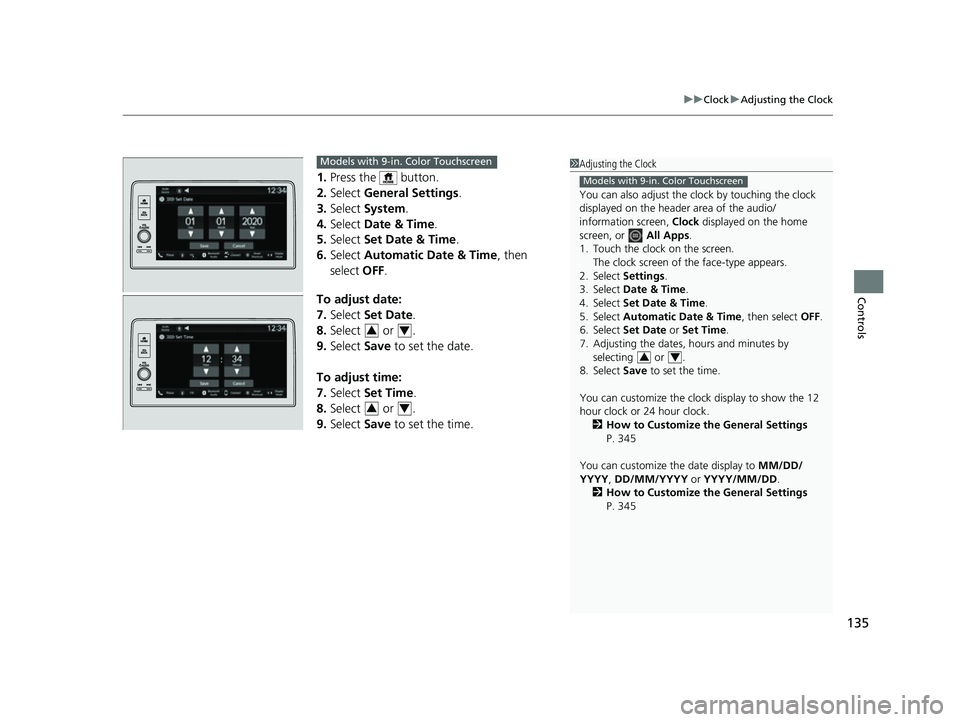
1. Press the button.
2. Select General Settings .
3. Select System.
4. Select Date & Time .
5. Select Set Date & Time .
6. Select Automatic Date & Time , then
select OFF.
To adjust date:
7. Select Set Date.
8. Select or .
9. Select Save to set the date.
To adjust time:
7. Select Set Time.
8. Select or .
9. Select Save to set the time.
1Adjusting the Clock
You can also adjust the clock by touching the clock
displayed on the header area of the audio/
information screen, Clock displayed on the home
screen, or All Apps.
1. Touch the clock on the screen. The clock screen of the face-type appears.
2. Select Settings .
3. Select Date & Time .
4. Select Set Date & Time .
5. Select Automatic Date & Time , then select OFF.
6. Select Set Date or Set Time.
7. Adjusting the dates, hours and minutes by selecting or .
8. Select Save to set the time.
You can customize the clock display to show the 12
hour clock or 24 hour clock. 2 How to Customize the General Settings
P. 345
You can customize the date display to MM/DD/
YYYY , DD/MM/YYYY or YYYY/MM/DD .
2 How to Customize the General Settings
P. 345
Models with 9-in. Color Touchscreen
34
Models with 9-in. Color Touchscreen
34
34
23 HR-V-313V06000_01.book 135 ページ 2022年4月4日 月曜日 午前10時49分
Page 142 of 664
uuLocking and Unlocking the Doors uLocking/Unlocking the Doors from the Outside
140
Controls
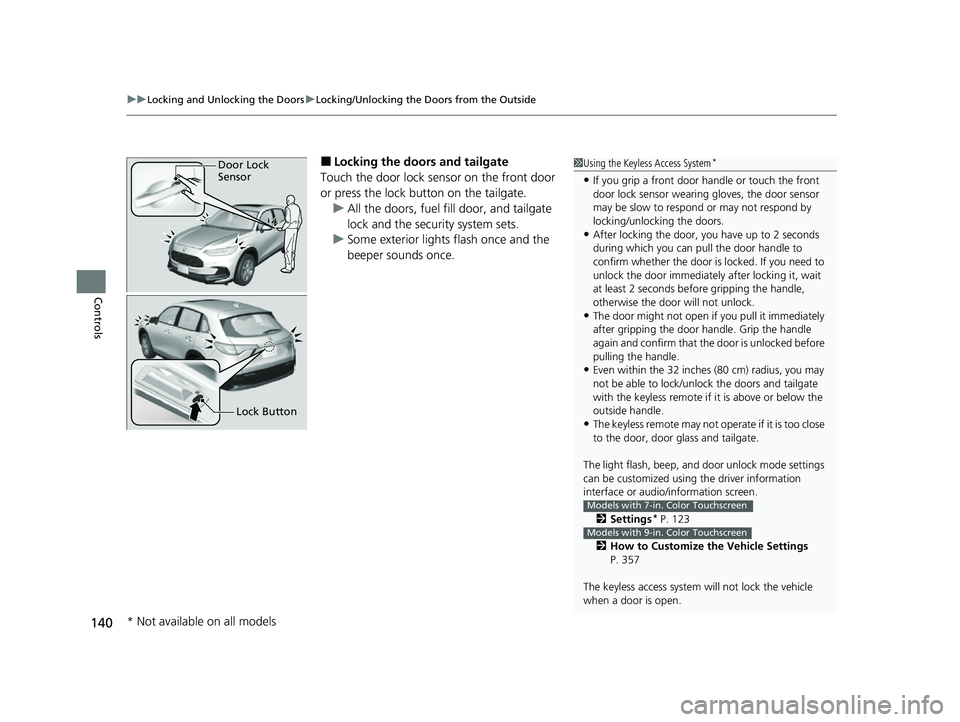
■Locking the doors and tailgate
Touch the door lock sensor on the front door
or press the lock button on the tailgate. u All the doors, fuel fill door, and tailgate
lock and the security system sets.
u Some exterior lights flash once and the
beeper sounds once.1Using the Keyless Access System*
•If you grip a front door handle or touch the front
door lock sensor wearing gloves, the door sensor
may be slow to respon d or may not respond by
locking/unlocking the doors.
•After locking the door, you have up to 2 seconds
during which you can pull the door handle to
confirm whether the door is locked. If you need to
unlock the door immediately after locking it, wait
at least 2 seconds befo re gripping the handle,
otherwise the door will not unlock.
•The door might not open if you pull it immediately
after gripping the door handle. Grip the handle
again and confirm that th e door is unlocked before
pulling the handle.
•Even within the 32 inches (80 cm) radius, you may
not be able to lock/unloc k the doors and tailgate
with the keyless remote if it is above or below the
outside handle.
•The keyless remote may not operate if it is too close
to the door, door glass and tailgate.
The light flash, beep, a nd door unlock mode settings
can be customized using the driver information
interface or audio/ information screen.
2 Settings
* P. 123
2 How to Customize the Vehicle Settings
P. 357
The keyless access system will not lock the vehicle
when a door is open.
Models with 7-in. Color Touchscreen
Models with 9-in. Color Touchscreen
Door Lock
Sensor
Lock Button
* Not available on all models
23 HR-V-313V06000_01.book 140 ページ 2022年4月4日 月曜日 午前10時49分
Page 144 of 664
uuLocking and Unlocking the Doors uLocking/Unlocking the Doors from the Outside
142
Controls
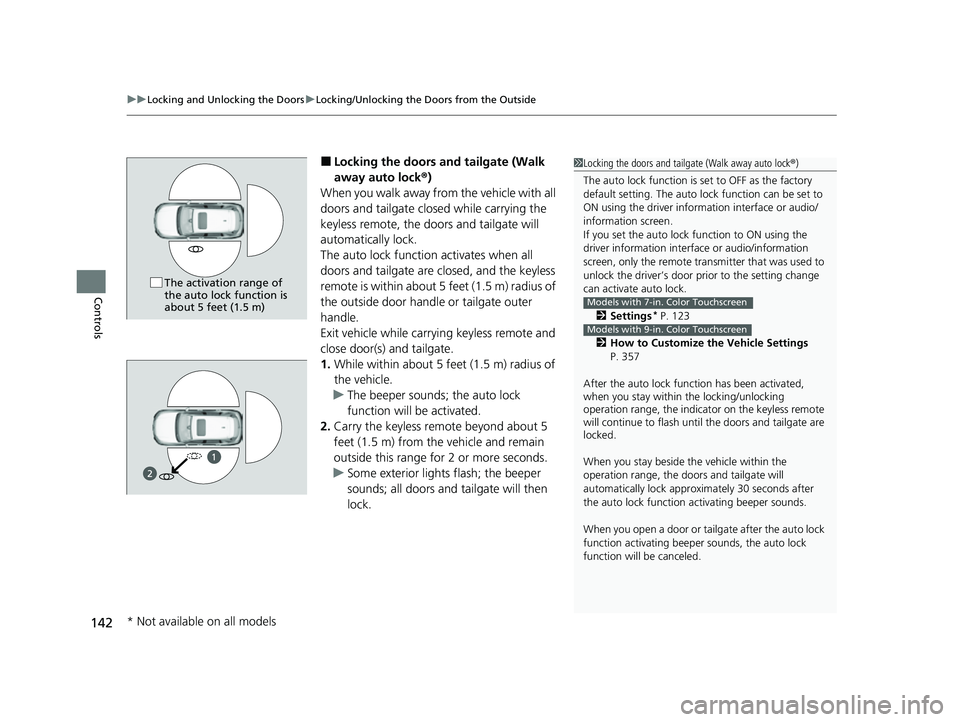
■Locking the doors an d tailgate (Walk
away auto lock ®)
When you walk away from the vehicle with all
doors and tailgate closed while carrying the
keyless remote, the doors and tailgate will
automatically lock.
The auto lock function activates when all
doors and tailgate are closed, and the keyless
remote is within about 5 feet (1.5 m) radius of
the outside door handle or tailgate outer
handle.
Exit vehicle while carrying keyless remote and
close door(s) and tailgate.
1. While within about 5 feet (1.5 m) radius of
the vehicle.
u The beeper sounds; the auto lock
function will be activated.
2. Carry the keyless remote beyond about 5
feet (1.5 m) from the vehicle and remain
outside this range fo r 2 or more seconds.
u Some exterior lights flash; the beeper
sounds; all doors and tailgate will then
lock.1Locking the doors and tailg ate (Walk away auto lock®)
The auto lock function is set to OFF as the factory
default setting. The auto lo ck function can be set to
ON using the driver inform ation interface or audio/
information screen.
If you set the auto lock function to ON using the
driver information interf ace or audio/information
screen, only the remote transmitter that was used to
unlock the driver’s door prio r to the setting change
can activate auto lock.
2 Settings
* P. 123
2 How to Customize the Vehicle Settings
P. 357
After the auto lock function has been activated,
when you stay within the locking/unlocking
operation range, the indicato r on the keyless remote
will continue to flash until the doors and tailgate are
locked.
When you stay beside the vehicle within the
operation range, the door s and tailgate will
automatically lock approx imately 30 seconds after
the auto lock function activating beeper sounds.
When you open a door or tailgate after the auto lock
function activating beeper sounds, the auto lock
function will be canceled.
Models with 7-in. Color Touchscreen
Models with 9-in. Color Touchscreen
The activation range of
the auto lock function is
about 5 feet (1.5 m)
1
* Not available on all models
23 HR-V-313V06000_01.book 142 ページ 2022年4月4日 月曜日 午前10時49分
Page 152 of 664
uuLocking and Unlocking the Doors uLocking/Unlocking the Doors from the Inside
150
Controls
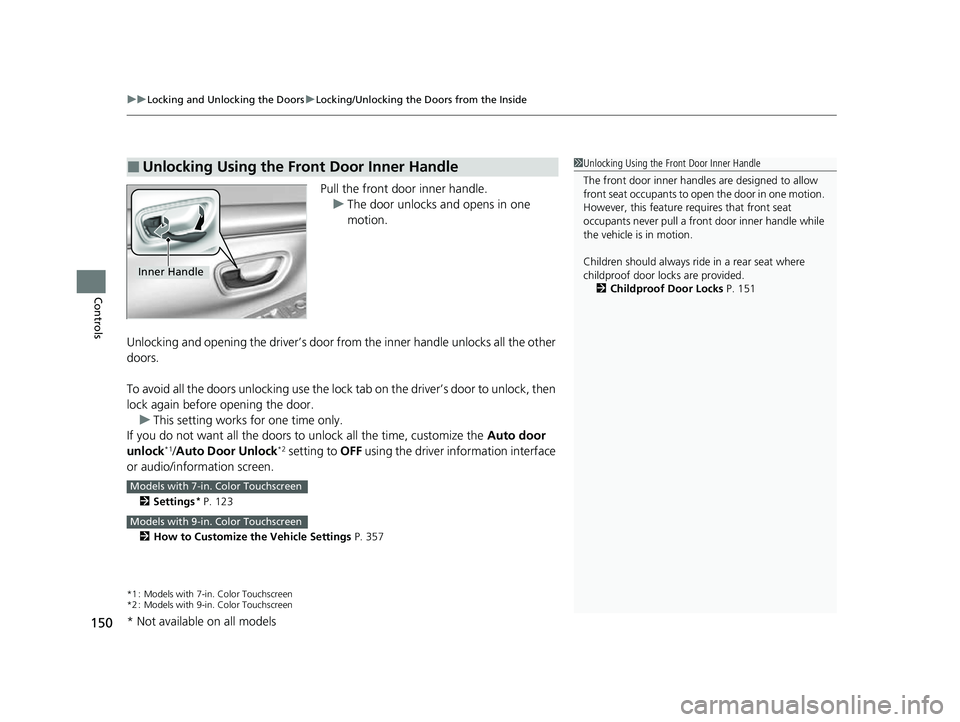
Pull the front door inner handle.
u The door unlocks and opens in one
motion.
Unlocking and opening the driver’s door from the inner handle unlocks all the other
doors.
To avoid all the doors unlocking use the lock tab on the driver’s door to unlock, then
lock again before opening the door. u This setting works for one time only.
If you do not want all the doors to unlock all the time, customize the Auto door
unlock
*1/ Auto Door Unlock*2 setting to OFF using the driver information interface
or audio/information screen.
2 Settings* P. 123
2 How to Customize the Vehicle Settings P. 357
*1 : Models with 7-in. Color Touchscreen
*2 : Models with 9-in. Color Touchscreen
■Unlocking Using the Front Door Inner Handle1Unlocking Using the Front Door Inner Handle
The front door inne r handles are designed to allow
front seat occupants to ope n the door in one motion.
However, this feature requires that front seat
occupants never pull a front door inner handle while
the vehicle is in motion.
Children should always ride in a rear seat where
childproof door locks are provided.
2 Childproof Door Locks P. 151
Inner Handle
Models with 7-in. Color Touchscreen
Models with 9-in. Color Touchscreen
* Not available on all models
23 HR-V-313V06000_01.book 150 ページ 2022年4月4日 月曜日 午前10時49分
Page 154 of 664
152
uuLocking and Unlocking the Doors uAuto Door Locking/Unlocking
Controls
Auto Door Locking/Unlocking
Your vehicle locks or unlocks all doors auto matically when a certain condition is met.
■Drive lock mode
All doors lock when the vehicle’s speed reaches about 10 mph (15 km/h).
■Driver’s door open mode
All doors and the tailgate unlock when the driver’s door is opened.
■Auto Door Locking
■Auto Door Unlocking
1 Auto Door Locking/Unlocking
You can turn off or cha nge to another auto door
locking/unlocking sett ing using the driver
information interface or audio/information screen.
2 Settings
* P. 123
2 How to Customize the Vehicle Settings
P. 357
Models with 7-in. Color Touchscreen
Models with 9-in. Color Touchscreen
* Not available on all models
23 HR-V-313V06000_01.book 152 ページ 2022年4月4日 月曜日 午前10時49分
Page 158 of 664
156
Controls
Security System
Immobilizer System
This system prevents a key that has not been pre-registered from starting the
engine.
Pay attention to the follo wing when pressing the ENGINE START/STOP button:
• Do not allow objects that emit strong radio waves near the ENGINE START/
STOP button.
• Make sure the key is not covered by or touching a metal object.
• Do not bring a key from another vehi cle’s immobilizer system near the ENGINE
START/STOP button.
• Do not put the key near magnetic items. El ectronic device, such as televisions and
audio systems emit strong magnetic fields. Note that even a key chain can
become magnetic.
Security System Alarm
The security system alarm activates when the tailgate, hood or doors are forcibly
opened. The alarm does not activate if the tailgate or doors are opened with the key,
remote transmitter or keyless access system
*.
However, the alarm activates if a door is opened with the key and then the
transmission is taken out of
(P or the hood is opened before the power mode is in
ON.
■When the security sy stem alarm activates
The horn sounds intermittently, and some exterior lights flash.
1 Immobilizer System
NOTICE
Leaving the key in the vehicl e can result in theft or
accidental movement of the vehicle.
Always take the key with you whenever you leave the
vehicle unattendedM
Do not alter the system or add other devices to itM
Doing so may damage the system and make your
vehicle inoperableM
Apply and hold the brake pedal before turning the
vehicle on the first time after the battery has been
disconnectedM
Canadian models
1 Security System Alarm
Do not alter the system or add other devices to it.
Doing so may damage the system and make your
vehicle inoperable.
The security system alarm continues for a maximum
of two minutes until the security system alarm
deactivates.
* Not available on all models
23 HR-V-313V06000_01.book 156 ページ 2022年4月4日 月曜日 午前10時49分
Page 163 of 664
161
uuWindows uOpening/Closing the Power Windows
Controls
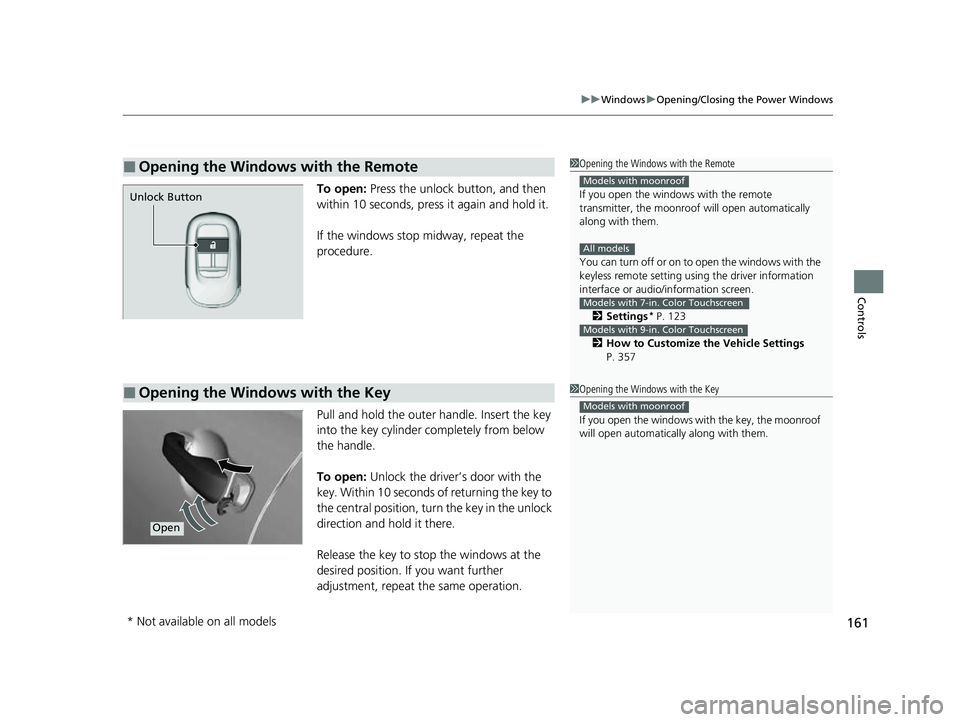
To open: Press the unlock button, and then
within 10 seconds, press it again and hold it.
If the windows stop midway, repeat the
procedure.
Pull and hold the outer handle. Insert the key
into the key cylinder completely from below
the handle.
To open: Unlock the driver’s door with the
key. Within 10 seconds of returning the key to
the central position, turn the key in the unlock
direction and hold it there.
Release the key to stop the windows at the
desired position. If you want further
adjustment, repeat the same operation.
■Opening the Windows with the Remote1 Opening the Windows with the Remote
If you open the window s with the remote
transmitter, the moonroo f will open automatically
along with them.
You can turn off or on to open the windows with the
keyless remote setting usi ng the driver information
interface or audio/ information screen.
2 Settings
* P. 123
2 How to Customize the Vehicle Settings
P. 357
Models with moonroof
All models
Models with 7-in. Color Touchscreen
Models with 9-in. Color Touchscreen
Unlock Button
■Opening the Windows with the Key1 Opening the Windows with the Key
If you open the windows wi th the key, the moonroof
will open automatica lly along with them.
Models with moonroof
Open
* Not available on all models
23 HR-V-313V06000_01.book 161 ページ 2022年4月4日 月曜日 午前10時49分