audio HONDA HRV 2023 Workshop Manual
[x] Cancel search | Manufacturer: HONDA, Model Year: 2023, Model line: HRV, Model: HONDA HRV 2023Pages: 664, PDF Size: 20.2 MB
Page 242 of 664
240
uuAudio System Basic Operation uAndroid AutoTM
Features
Android AutoTM
When you connect an Android phone to the audio system via the USB port, Android
Auto is automatically initia ted. When connected via Android Auto, you can use the
audio/information screen to access th e Phone, Google Maps (Navigation), and
Google Now functions. When you first use Android Auto, a tutorial will appear on
the screen.
We recommend that you complete this tuto rial while safely parked before using
Android Auto.
2 USB Ports P. 213
2 Auto Pairing Connection P. 242
1Android AutoTM
We recommend that you upda te Android OS to the
latest version when using Android Auto.
Bluetooth A2DP cannot be used while your phone is
connected to Android Auto.
To use Android Auto on a smartphone with Android
9.0 (Pie) or earl ier, you need to download the
Android Auto app from Google Play to your
smartphone.
Park in a safe place befo re connecting your Android
phone to Android Auto and when launching any
compatible apps.
When your Android phone is connected to Android
Auto, it is not possible to use the Bluetooth® Audio.
However, other previously paired phones can stream
audio via Bluetooth ® while Android Auto is
connected. 2 Phone Setup P. 374
Apple CarPlay and Android Auto cannot run at the
same time.
Android Auto is a trademark of Google LLC.
23 HR-V-313V06000_01.book 240 ページ 2022年4月4日 月曜日 午前10時49分
Page 243 of 664
Continued241
uuAudio System Basic Operation uAndroid AutoTM
Features
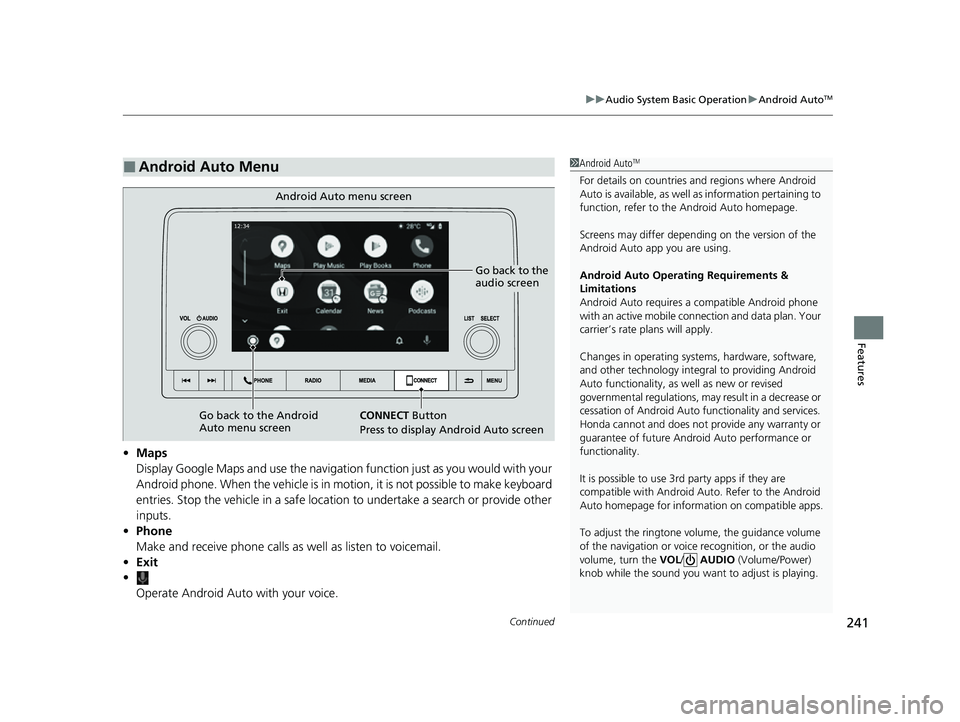
• Maps
Display Google Maps and use the navigation function just as you would with your
Android phone. When the vehicle is in motion, it is not possible to make keyboard
entries. Stop the vehicle in a safe location to undertake a search or provide other
inputs.
• Phone
Make and receive phone calls as well as listen to voicemail.
• Exit
•
Operate Android Auto with your voice.
■Android Auto Menu1Android AutoTM
For details on c ountries and regions where Android
Auto is available, as well as information pertaining to
function, refer to the Android Auto homepage.
Screens may differ depending on the version of the
Android Auto app you are using.
Android Auto Operating Requirements &
Limitations
Android Auto requires a compatible Android phone
with an active mobile connection and data plan. Your
carrier’s rate plans will apply.
Changes in operating systems, hardware, software,
and other technology integral to providing Android
Auto functionality, as well as new or revised
governmental regulations, may result in a decrease or
cessation of Android Auto functionality and services.
Honda cannot and does not pr ovide any warranty or
guarantee of future Android Auto performance or
functionality.
It is possible to use 3r d party apps if they are
compatible with Android Auto. Refer to the Android
Auto homepage for informat ion on compatible apps.
To adjust the ringtone volume, the guidance volume
of the navigation or voice recognition, or the audio
volume, turn the VOL / AUDIO (Volume/Power)
knob while the sound you want to adjust is playing.
Go back to the
audio screen
CONNECT Button
P
ress to display Android Auto screen
Android Auto menu screen
Go back to the Android
Auto menu screen
23 HR-V-313V06000_01.book 241 ページ 2022年4月4日 月曜日 午前10時49分
Page 244 of 664
uuAudio System Basic Operation uAndroid AutoTM
242
Features
•
You can check Android notifications.
• (Android Auto Home)
Display useful information organized by Android Auto into simple cards that
appear just when they’re needed.
When you connect an Android phone to the unit via the USB port, Android Auto is
automatically initiated.
To enable Android Auto after connecting an Android phone to the system, select
Yes on the screen.
You may change the consent settings under the Smartphone Settings menu.
■Auto Pairing Connection
■Connecting Android Auto Using the USB Cable to the USB Port1Connecting Android Auto Using the USB Cable to the USB Port
Only initialize Android Auto when you are safely
parked. When Android Auto first detects your phone,
you will need to set up your phone so that auto
pairing is possibl e. Refer to the instruction manual
that came with your phone.
You can use the following procedure to disconnect or
delete the devices connecting Android Auto after you
have completed the initial setup:
Press the MENU button
Select Smartphone Settings Android Auto
Select device
Use of user and vehicle information
The use and handling of user and vehicle information
transmitted to/from your phone by Android Auto is
governed by the Google’s Privacy Policy.
23 HR-V-313V06000_01.book 242 ページ 2022年4月4日 月曜日 午前10時49分
Page 245 of 664
243
uuAudio System Basic Operation uAndroid AutoTM
Features
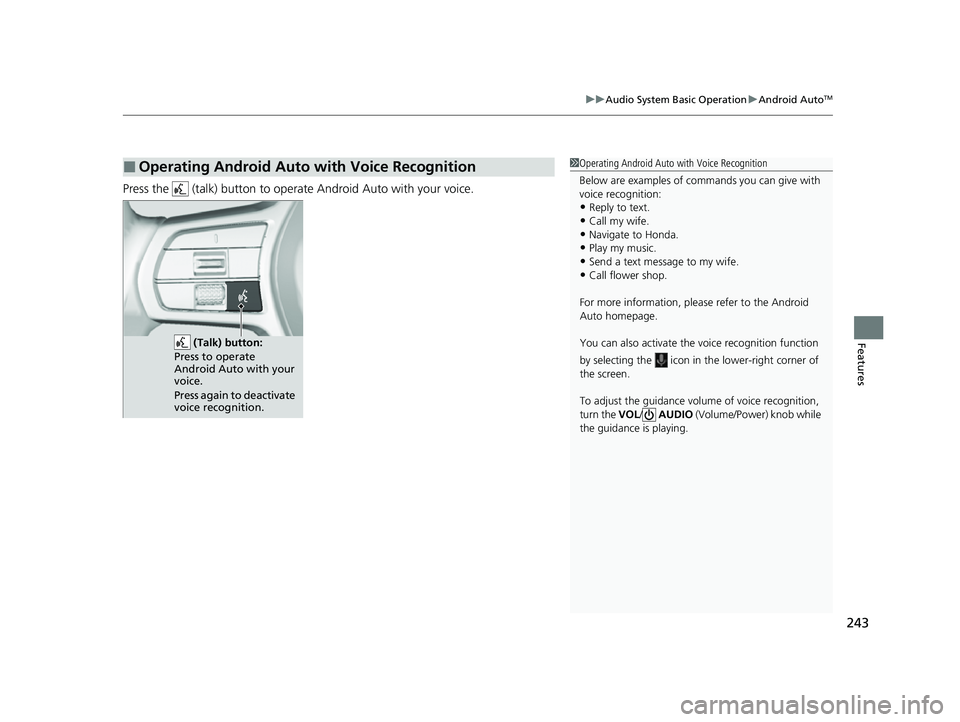
Press the (talk) button to operate Android Auto with your voice.
■Operating Android Auto with Voice Recognition1Operating Android Auto with Voice Recognition
Below are examples of co mmands you can give with
voice recognition:
•Reply to text.
•Call my wife.•Navigate to Honda.
•Play my music.
•Send a text message to my wife.•Call flower shop.
For more information, please refer to the Android
Auto homepage.
You can also activate the voice recognition function
by selecting the icon in the lower-right corner of
the screen.
To adjust the guidance volume of voice recognition,
turn the VOL/ AUDIO (Volume/Power) knob while
the guidance is playing.
(Talk) button:
Press to operate
Android Auto with your
voice.
Press again to deactivate
voice recognition.
23 HR-V-313V06000_01.book 243 ページ 2022年4月4日 月曜日 午前10時49分
Page 246 of 664
244
Features
Audio System Basic Operation
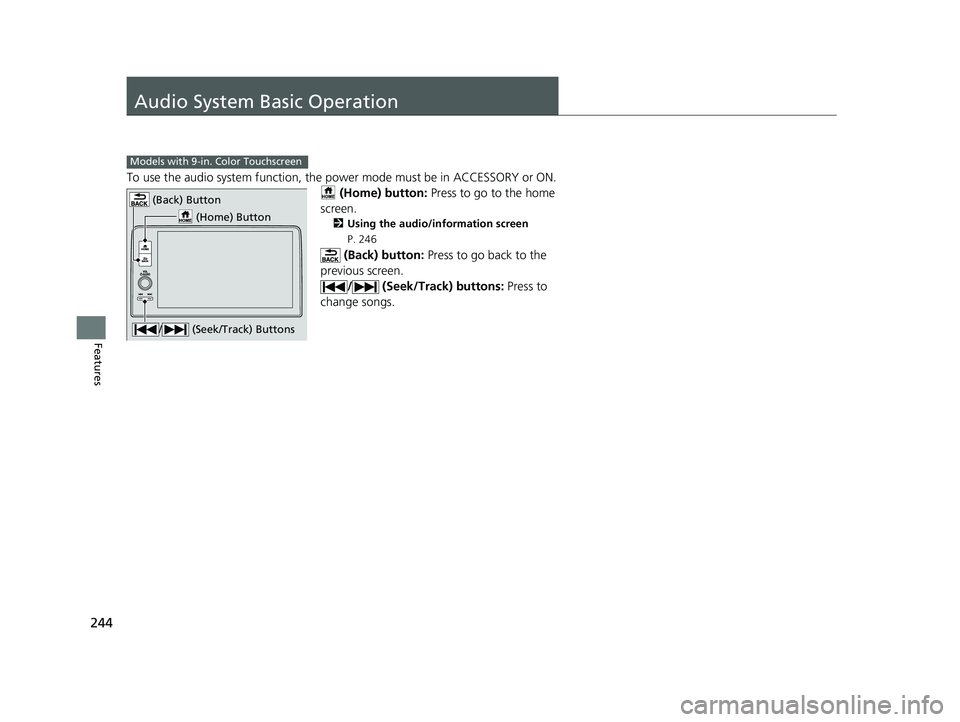
To use the audio system function, the power mode must be in ACCESSORY or ON.
(Home) button: Press to go to the home
screen.
2 Using the audio/information screen
P. 246
(Back) button: Press to go back to the
previous screen. / (Seek/Track) buttons: Press to
change songs.
Models with 9-in. Color Touchscreen
(Home) Button
(Back) Button
/ (Seek/Track) Buttons
23 HR-V-313V06000_01.book 244 ページ 2022年4月4日 月曜日 午前10時49分
Page 247 of 664
245
uuAudio System Basic Operation uStart Up
Features
Start Up
The 9-in. Color Touchscreen starts automa tically when you set the power mode to
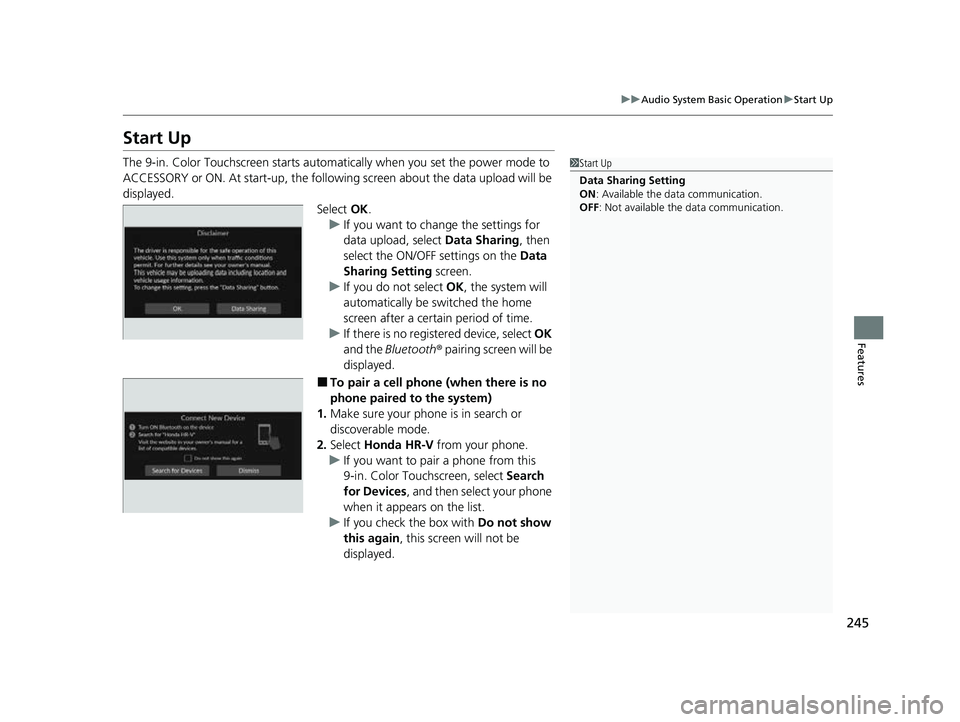
ACCESSORY or ON. At start-up, the followi ng screen about the data upload will be
displayed.
Select OK.
u If you want to change the settings for
data upload, select Data Sharing, then
select the ON/OFF settings on the Data
Sharing Setting screen.
u If you do not select OK, the system will
automatically be switched the home
screen after a certain period of time.
u If there is no registered device, select OK
and the Bluetooth® pairing screen will be
displayed.
■To pair a cell phone (when there is no
phone paired to the system)
1. Make sure your phone is in search or
discoverable mode.
2. Select Honda HR-V from your phone.
u If you want to pair a phone from this
9-in. Color Touchscreen, select Search
for Devices , and then select your phone
when it appears on the list.
u If you check the box with Do not show
this again , this screen will not be
displayed.
1 Start Up
Data Sharing Setting
ON : Available the data communication.
OFF: Not available the data communication.
23 HR-V-313V06000_01.book 245 ページ 2022年4月4日 月曜日 午前10時49分
Page 248 of 664
246
uuAudio System Basic Operation uAudio/Information Screen
Features
Audio/Information Screen
Displays the audio status and wallpaper. From this display, you can go to various
setup options.
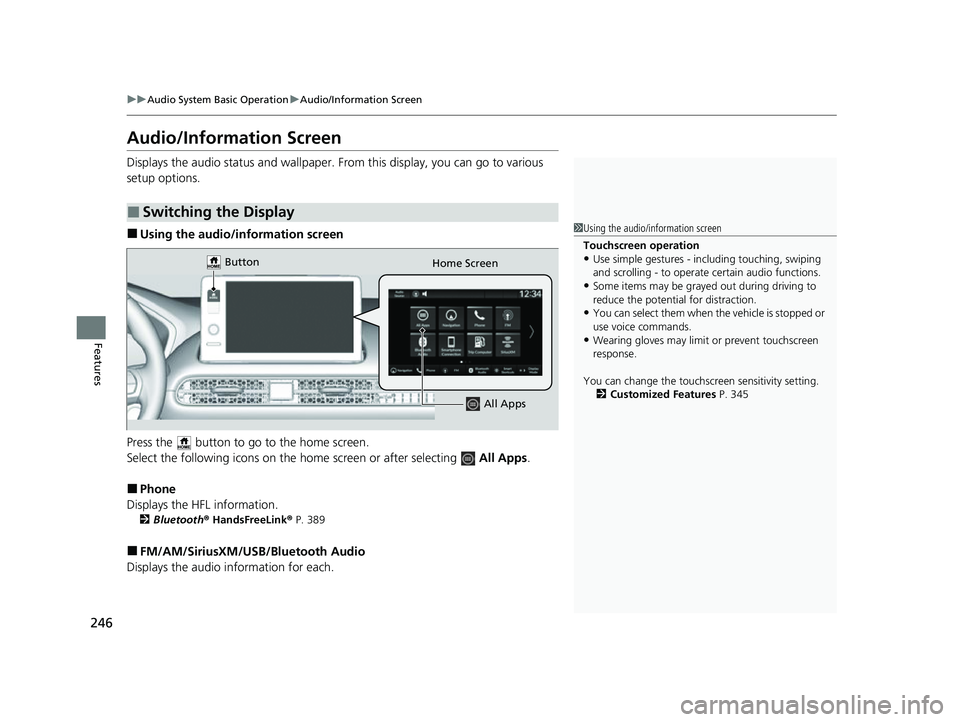
■Using the audio/information screen
Press the button to go to the home screen.
Select the following icons on the hom e screen or after selecting All Apps.
■Phone
Displays the HFL information.
2 Bluetooth ® HandsFreeLink ® P. 389
■FM/AM/SiriusXM/USB /Bluetooth Audio
Displays the audio information for each.
■Switching the Display
1Using the audio/in formation screen
Touchscreen operation
•Use simple gestures - in cluding touching, swiping
and scrolling - to operate certain audio functions.
•Some items may be grayed out during driving to
reduce the potential for distraction.
•You can select them when the vehicle is stopped or
use voice commands.
•Wearing gloves may limit or prevent touchscreen
response.
You can change the touchs creen sensitivity setting.
2 Customized Features P. 345
Home Screen
Button
All Apps
23 HR-V-313V06000_01.book 246 ページ 2022年4月4日 月曜日 午前10時49分
Page 249 of 664
247
uuAudio System Basic Operation uAudio/Information Screen
Continued
Features
■General Settings
Enters the customizing menu screen.
2 Customized Features P. 345
■Navigation*
Displays the navigation screen.
2Refer to the Navigation System Manual
■HondaLink ®
Displays the HondaLink screen.
2 HondaLink ® P. 293
■Apple CarPlay/Android Auto
Displays the Apple CarPlay or Android Auto.
2 Apple CarPlay P. 301
2 Android AutoTM P. 308
■Vehicle Settings
Displays the vehicle settings screen.
2 Customized Features P. 345
* Not available on all models
23 HR-V-313V06000_01.book 247 ページ 2022年4月4日 月曜日 午前10時49分
Page 250 of 664
248
uuAudio System Basic Operation uAudio/Information Screen
Features
■Trip Computer
Displays the trip computer information.
• Current Drive tab: Displays the current trip information.
• Trip A /Trip B tab: Displays information for the current and three previous drives.
The information is stored ever y time you reset Trip A/B.
To reset the Trip A/B, select Settings, then select Delete Trip History .
To change the setting of how to reset Trip A/B, select Settings, then select “Trip A”
Reset Timing or “Trip B” Reset Timing .
■System Updates
Updates the software versi on of the audio system.
2System Updates P. 257
■Clock
Displays the clock.
■Smart Shortcuts
Displays the Smart Shortcuts screen.
2Smart Shortcuts P. 297
■Display Mode
Displays the brightness bar.
■Compass*
Displays the compass screen.
* Not available on all models
23 HR-V-313V06000_01.book 248 ページ 2022年4月4日 月曜日 午前10時49分
Page 251 of 664
Continued249
uuAudio System Basic Operation uAudio/Information Screen
Features
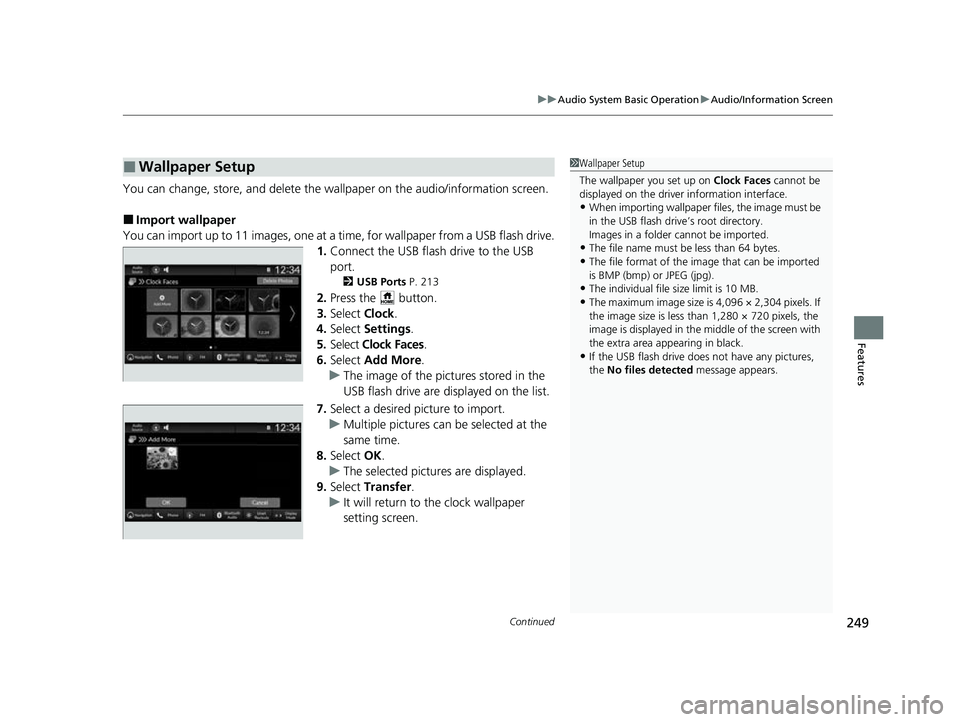
You can change, store, and delete the wallpaper on the audio/ information screen.
■Import wallpaper
You can import up to 11 images, one at a ti me, for wallpaper from a USB flash drive.
1. Connect the USB flash drive to the USB
port.
2 USB Ports P. 213
2.Press the button.
3. Select Clock.
4. Select Settings .
5. Select Clock Faces .
6. Select Add More .
u The image of the pictures stored in the
USB flash drive are displayed on the list.
7. Select a desired picture to import.
u Multiple pictures can be selected at the
same time.
8. Select OK.
u The selected pictures are displayed.
9. Select Transfer .
u It will return to the clock wallpaper
setting screen.
■Wallpaper Setup1Wallpaper Setup
The wallpaper you set up on Clock Faces cannot be
displayed on the driver information interface.
•When importing wallpaper f iles, the image must be
in the USB flash drive’s root directory.
Images in a folder cannot be imported.
•The file name must be less than 64 bytes.
•The file format of the im age that can be imported
is BMP (bmp) or JPEG (jpg).
•The individual file size limit is 10 MB.
•The maximum image size is 4,096 × 2,304 pixels. If
the image size is less than 1,280 × 720 pixels, the
image is displayed in the middle of the screen with
the extra area appearing in black.
•If the USB flash drive doe s not have any pictures,
the No files detected message appears.
23 HR-V-313V06000_01.book 249 ページ 2022年4月4日 月曜日 午前10時49分