display HONDA HRV 2023 User Guide
[x] Cancel search | Manufacturer: HONDA, Model Year: 2023, Model line: HRV, Model: HONDA HRV 2023Pages: 664, PDF Size: 20.2 MB
Page 112 of 664
uuGauges and Driver Information Interface uDriver Information Interface
110
Instrument Panel
■Trip meter
Shows the total number of miles or kilomete rs driven since the last reset. Meters A
and B can be used to measure two separate trips.
Resetting a trip meter
To reset the trip meter, display it, press the left selector wheel and then select Reset.
u The trip meter is reset to 0.0.
■Average Fuel Economy
Shows the estimated average fuel economy of each trip meter in mpg or l/100 km.
The display is updated at set intervals. When a trip meter is reset, the average fuel
economy is also reset.
■Instant Fuel Economy
Shows the instant fuel economy as a bar graph in mpg or l/100 km.
■Range
Shows the estimated distance you can trave l on the remaining fuel. This estimated
distance is based on the vehicle’s current fuel economy.
1 Average Fuel Economy
You can change when to reset the average fuel
economy.
2 Settings
* P. 123
2 Customized Features P. 345
1Range
The driving range displayed is only an estimate and
may differ to the actual distance the vehicle can
travel.
* Not available on all models
23 HR-V-313V06000_01.book 110 ページ 2022年4月4日 月曜日 午前10時49分
Page 115 of 664
Continued113
uuGauges and Driver Information Interface uDriver Information Interface
Instrument Panel
■Compass
Shows the compass screen.
■Turn-by-Turn Directions
When driving guidance is provided by the navigation system*, Android Auto or
Apple CarPlay, turn-by-turn direct ions to your destination appear.
2Refer to the Navigation System Manual
2 Android AutoTM P. 308
2 Apple CarPlay P. 301
■Navigation*1Navigation*
You can select whether to have the turn-by-turn
display come on or not dur ing the route guidance.
2 Customized Features P. 345
Turn-by-turn directions may not be available for all
apps.
When the compass or turn-by-turn directions are
displayed, you can contro l some navigation system
functions on the driver information interface by
scrolling the left selector wheel.
2 Refer to the Navigation System Manual
Models with navigation system
* Not available on all models
23 HR-V-313V06000_01.book 113 ページ 2022年4月4日 月曜日 午前10時49分
Page 116 of 664
uuGauges and Driver Information Interface uDriver Information Interface
114
Instrument Panel
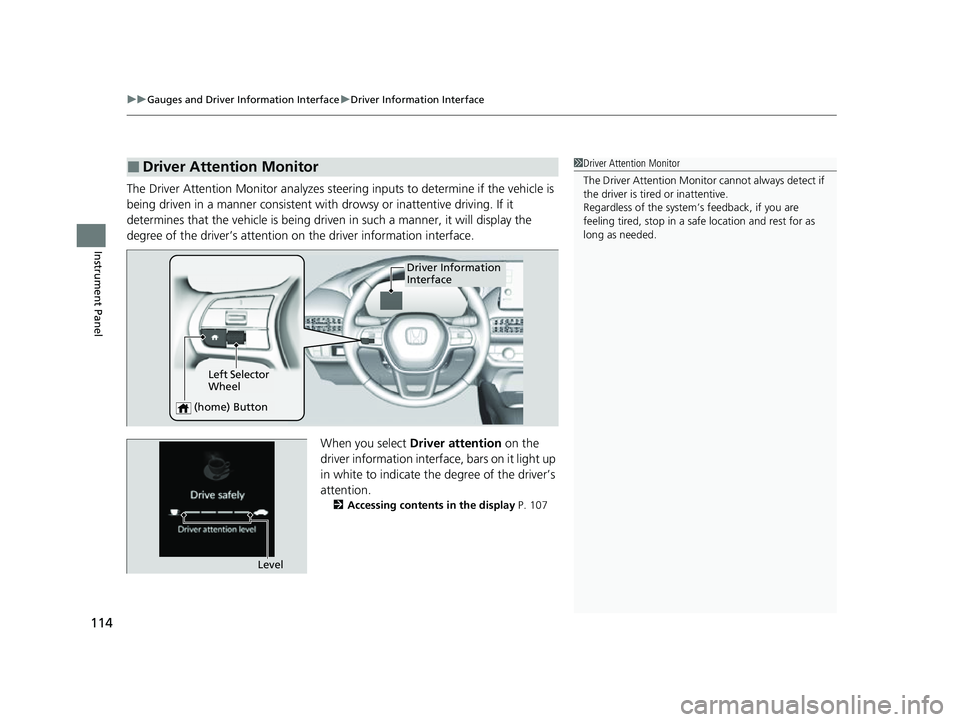
The Driver Attention Monitor analyzes steer ing inputs to determine if the vehicle is
being driven in a manner consistent with drowsy or inattentive driving. If it
determines that the vehicle is being driven in such a manner, it will display the
degree of the driver’s attention on the driver information interface.
When you select Driver attention on the
driver information interface, bars on it light up
in white to indicate the degree of the driver’s
attention.
2 Accessing contents in the display P. 107
■Driver Attention Monitor1Driver Attention Monitor
The Driver Attenti on Monitor cannot always detect if
the driver is tired or inattentive.
Regardless of the system’s feedback, if you are
feeling tired, stop in a safe location and rest for as
long as needed.
Driver Information
Interface
Left Selector
Wheel
(home) Button
Level
23 HR-V-313V06000_01.book 114 ページ 2022年4月4日 月曜日 午前10時49分
Page 119 of 664
117
uuGauges and Driver Information Interface uDriver Information Interface
Continued
Instrument Panel
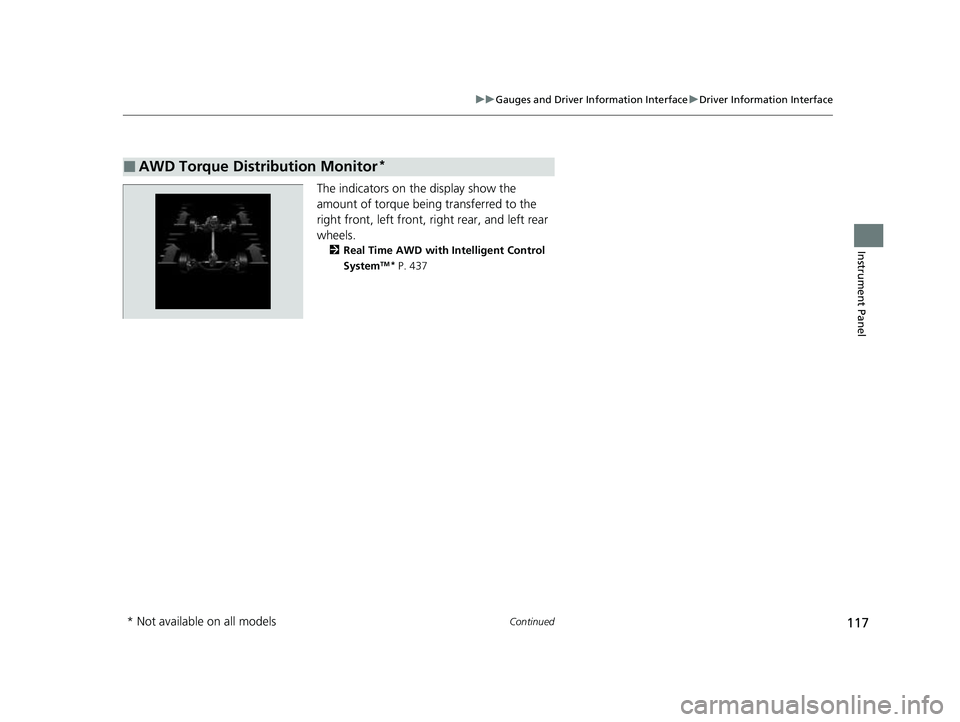
The indicators on the display show the
amount of torque being transferred to the
right front, left front, right rear, and left rear
wheels.
2 Real Time AWD with Intelligent Control
SystemTM* P. 437
■AWD Torque Distribution Monitor*
* Not available on all models
23 HR-V-313V06000_01.book 117 ページ 2022年4月4日 月曜日 午前10時49分
Page 120 of 664
uuGauges and Driver Information Interface uDriver Information Interface
118
Instrument Panel
Appears, under specified conditions, when seat belts are latched or unlatched.
2Seat Belt Reminder P. 41
Shows the remaining oil life and Maintenance MinderTM.
2Maintenance MinderTM P. 555
Indicates the status of the Road Departure Mitigation system, CMBSTM, Low Speed
Braking Control*, Parking Sensor System*, and blind spot information system*, such
as On, Off, or Failure, by color and letters.
The following colors indica te the status of any of the above mentioned systems:
• Green: The system is on.
• Gray: The system is off.
• Amber: There is a probl em with the system.
■Seat Belts
■Maintenance
■Safety Support1Safety Support
If a system is indicated by the color amber, have your
vehicle checked by a dealer immediately.
To turn on or off each system, first rotate the left
selector wheel to switch displays. From the next
display you can select which system to turn on or off. 2 Road Departure Mitigation System P. 511
2 Blind Spot Information System
* P. 445
2 Collision Mitigation Braking SystemTM
(CMBSTM) P. 453
2 Low Speed Braking Control* P. 465
2 Parking Sensor System* P. 538
You can also confirm the st atus of each function by
the color of the safe ty support indicator.
2 Safety Support Indicator (Amber) P. 101
2 Safety Support Indicator (Green/Gray)
P. 103
* Not available on all models
23 HR-V-313V06000_01.book 118 ページ 2022年4月4日 月曜日 午前10時49分
Page 122 of 664
uuGauges and Driver Information Interface uDriver Information Interface
120
Instrument Panel
Display the adjustment for instrument panel brightness.
When the power mode is in ON, you can use the left selector wheel to adjust
instrument panel brightness.
Brighten: Roll the left selector wheel up.
Dim: Roll the left selector wheel down.
Press the left selector wheel to exit.
■Brightness1 Brightness
The brightness of the gauge is automatically adjusted
depending on the ambient brightness.
•The brightness dims when the ambient light is
dark.
•The brightness brightens when the ambient light is
bright.
You can change the setting even when the ambient
lighting is bright, but the brightness of the gauge
won’t change.
23 HR-V-313V06000_01.book 120 ページ 2022年4月4日 月曜日 午前10時49分
Page 123 of 664
Continued121
uuGauges and Driver Information Interface uDriver Information Interface
Instrument Panel
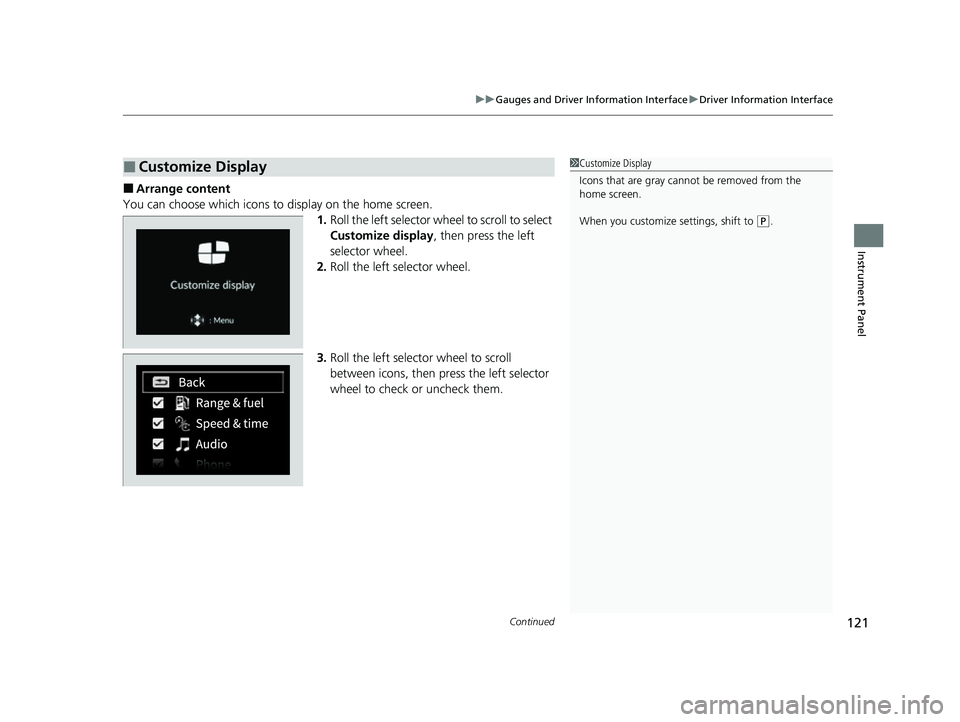
■Arrange content
You can choose which icons to display on the home screen. 1.Roll the left selector wheel to scroll to select
Customize display , then press the left
selector wheel.
2. Roll the left selector wheel.
3. Roll the left selector wheel to scroll
between icons, then press the left selector
wheel to check or uncheck them.
■Customize Display1Customize Display
Icons that are gray cannot be removed from the
home screen.
When you customize settings, shift to
(P.
23 HR-V-313V06000_01.book 121 ページ 2022年4月4日 月曜日 午前10時49分
Page 124 of 664
uuGauges and Driver Information Interface uDriver Information Interface
122
Instrument Panel
2 Tachometer P. 104
■Speed/Distance Units
Enables you to show another unit on th e driver information interface and audio/
information screen and set the displayed m easurements to read in either miles and
mph or km and km/h.
Press and hold the left selector wheel when you select No content on the driver
information interface. Each ti me you do this, the unit will change from miles and
mph to km and km/h or vice versa. After this, a confirmation screen will appear for
a few seconds.
You can check if there are any active warning messages.
■No Content
■Warnings
1 No Content
The tachometer can be tu rned on and off using the
driver information interf ace or audio/information
screen. 2 Settings
* P. 123
2 Customized Features P. 345
Even if you have turned off the tachometer on the
driver information interf ace or audio/information
screen, if No content is selected on the driver
information interface, it will change to a tachometer-
only display. 2 Switching the Display P. 107
1Warnings
If there are multiple warnings, you can roll the left
selector wheel to see other warnings.
* Not available on all models
23 HR-V-313V06000_01.book 122 ページ 2022年4月4日 月曜日 午前10時49分
Page 127 of 664
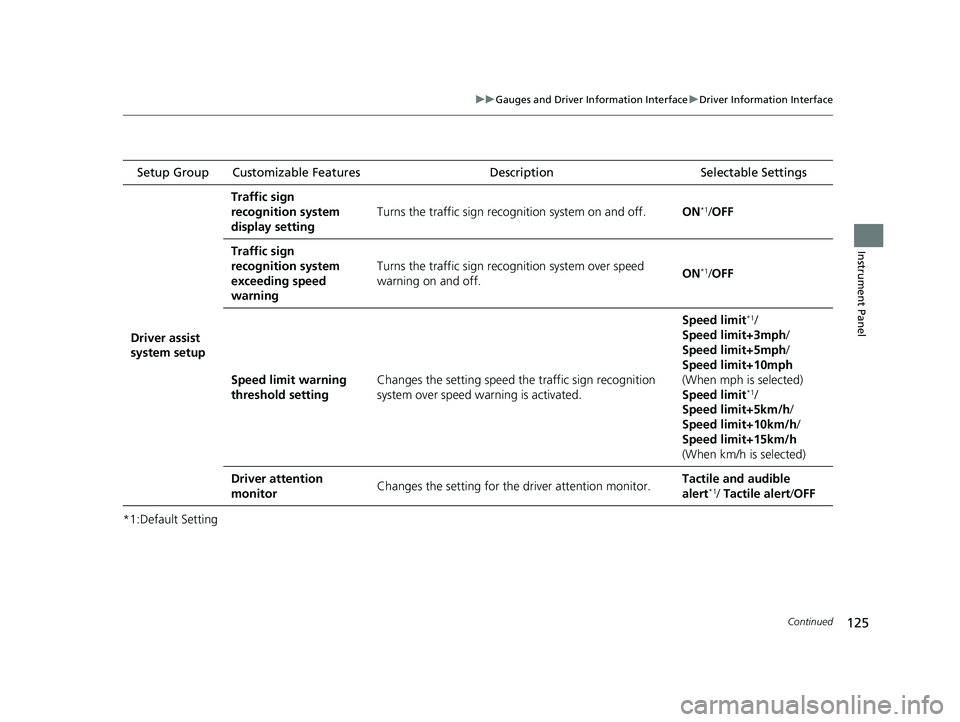
125
uuGauges and Driver Information Interface uDriver Information Interface
Continued
Instrument Panel
*1:Default Setting Setup Group Customizable Features
Description Selectable Settings
Driver assist
system setup
Traffic sign
recognition system
display setting
Turns the traffic sign recognition system on and off.ON*1/OFF
Traffic sign
recognition system
exceeding speed
warning
Turns the traffic sign rec ognition system over speed
warning on and off.ON*1/ OFF
Speed limit warning
threshold settingChanges the setting speed the traffic sign recognition
system over speed warning is activated.
Speed limit*1/
Speed limit+3mph/
Speed limit+5mph/
Speed limit+10mph
(When mph is selected)
Speed limit
*1/
Speed limit+5km/h /
Speed limit+10km/h /
Speed limit+15km/h
(When km/h is selected)
Driver attention
monitorChanges the setting for the driver attention monitor.Tactile and audible
alert*1/ Tactile alert /OFF
23 HR-V-313V06000_01.book 125 ページ 2022年4月4日 月曜日 午前10時49分
Page 128 of 664
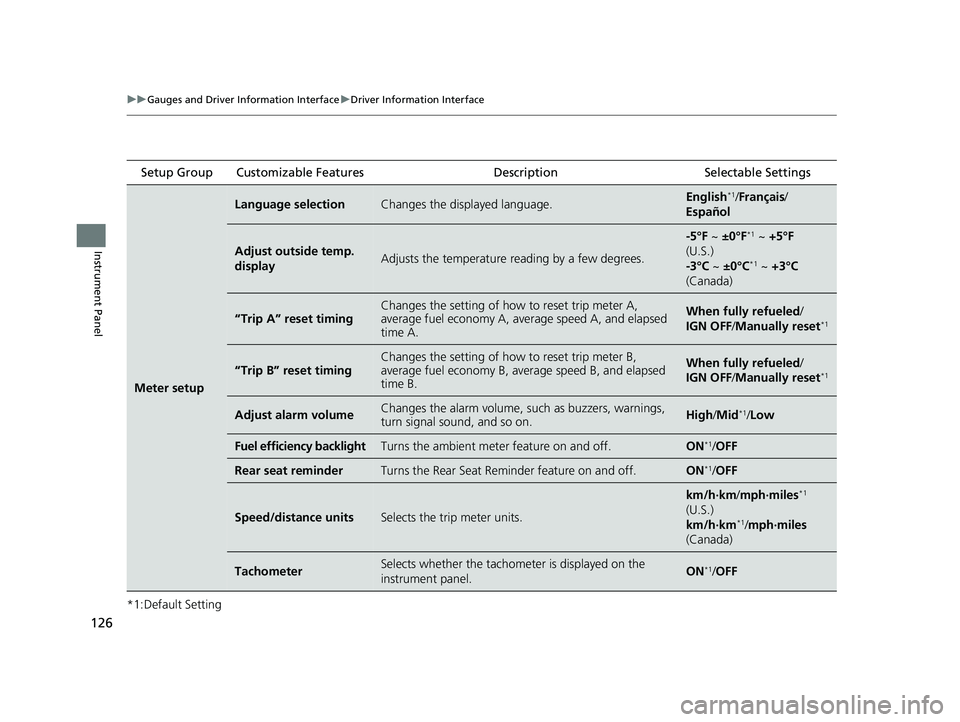
126
uuGauges and Driver Information Interface uDriver Information Interface
Instrument Panel
*1:Default Setting Setup Group Customizable Features
Description Selectable Settings
Meter setup
Language selectionChanges the displayed language.English*1/Français /
Español
Adjust outside temp.
displayAdjusts the temperature reading by a few degrees.
-5°F ~ ±0°F*1 ~ +5°F
(U.S.)
-3°C ~ ±0°C
*1 ~ +3°C
(Canada)
“Trip A” reset timingChanges the setting of how to reset trip meter A,
average fuel economy A, average speed A, and elapsed
time A.When fully refueled /
IGN OFF /Manually reset*1
“Trip B” reset timing
Changes the setting of how to reset trip meter B,
average fuel economy B, av erage speed B, and elapsed
time B.When fully refueled /
IGN OFF /Manually reset*1
Adjust alarm volumeChanges the alarm volume, su ch as buzzers, warnings,
turn signal sound, and so on.High /Mid*1/Low
Fuel efficiency backlightTurns the ambient meter feature on and off.ON*1/OFF
Rear seat reminderTurns the Rear Seat Reminder feature on and off.ON*1/OFF
Speed/distance unitsSelects the trip meter units.
km/h∙km/ mph∙miles*1
(U.S.)
km/h∙km
*1/ mph∙miles
(Canada)
TachometerSelects whether the tachomet er is displayed on the
instrument panel.ON*1/ OFF
23 HR-V-313V06000_01.book 126 ページ 2022年4月4日 月曜日 午前10時49分