high HONDA HRV 2023 Owner's Guide
[x] Cancel search | Manufacturer: HONDA, Model Year: 2023, Model line: HRV, Model: HONDA HRV 2023Pages: 664, PDF Size: 20.2 MB
Page 215 of 664
213
uuAudio System uUSB Ports
Features
USB Ports
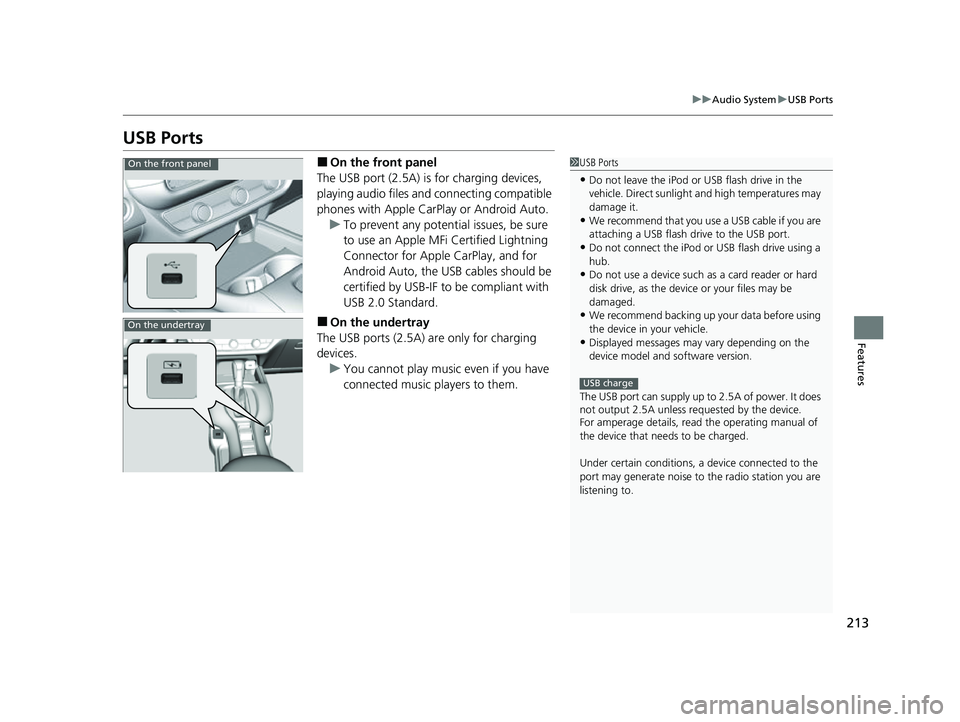
■On the front panel
The USB port (2.5A) is for charging devices,
playing audio files and connecting compatible
phones with Apple CarPlay or Android Auto. u To prevent any potenti al issues, be sure
to use an Apple MFi Certified Lightning
Connector for Apple CarPlay, and for
Android Auto, the USB cables should be
certified by USB-IF to be compliant with
USB 2.0 Standard.
■On the undertray
The USB ports (2.5A) are only for charging
devices. u You cannot play music even if you have
connected music players to them.
1USB Ports
•Do not leave the iPod or USB flash drive in the
vehicle. Direct sunlight and high temperatures may
damage it.
•We recommend that you us e a USB cable if you are
attaching a USB flash drive to the USB port.
•Do not connect the iPod or USB flash drive using a
hub.
•Do not use a device such as a card reader or hard
disk drive, as the device or your files may be
damaged.
•We recommend backing up yo ur data before using
the device in your vehicle.
•Displayed messages may vary depending on the
device model and software version.
The USB port can supply up to 2.5A of power. It does
not output 2.5A unless requested by the device.
For amperage details, read the operating manual of
the device that ne eds to be charged.
Under certain condi tions, a device connected to the
port may generate noise to the radio station you are
listening to.
USB charge
On the front panel
On the undertray
23 HR-V-313V06000_01.book 213 ページ 2022年4月4日 月曜日 午前10時49分
Page 319 of 664
317
uuGeneral Information on the Audio System uCompatible iPod, iPhone, and USB Flash Drives
Features
Compatible iPod, iPhone , and USB Flash Drives
•A USB flash drive of 256 MB or higher is recommended.
• Some digital audio players may not be compatible.
• Some USB flash drives (e.g., a device with security lockout) may not work.
• Some software files may not allow for audio play or text data display.
• Some versions of MP3, WMA, AAC, FLAC, or WAV formats may be unsupported.
*1 : Models with 9-in. Color Touchscreen
*2 : Models with 7-in. Color Touchscreen
■iPod and iPhone Model Compatibility
Model
Made for iPod touch (6th to 7th generation) released between 2015 and 2019
Made for iPhone 5/iPhone 5s/iPhone 5c/iPhone 6/iPhone 6 Plus/iPhone 6S/iPhone 6S
Plus/iPhone SE/iPhone 7/iPhone 7 Plus/iPhon e 8/iPhone 8 Plus/iPhone X/iPhone XS/
iPhone XS Max/iPhone XR/iP hone 11/iPhone 11 Pro/iPhone 11 Pro Max/iPhone SE
(2nd generation)/iPhone 12/iPhone 12 Pro/iPhone 12 Pro Max/iPhone 12 mini
Model
Made for iPod touch (5th to 6th generation) released between 2012 and 2015
Made for iPhone 4s/iPhone 5/iPhone 5s/iPhone 5c/iPhone 6/iPhone 6 Plus/iPhone 6S/
iPhone 6S Plus/iPhone SE/i Phone 7/iPhone 7 Plus/iPhone 8/iPhone 8 Plus/iPhone X/
iPhone XS/iPhone XS Max/iP hone XR/iPhone 11/iPhone 11 Pro/iPhone 11 Pro Max/
iPhone SE (2nd generation)/iPhone 12/iPhone 12 Pro/iPhone 12 Pro Max/
iPhone 12 mini
1 iPod and iPhone Model Compatibility
This system may not work with all software versions
of these devices.
The Lightning connector work s with iPhone 5, iPhone
5s, iPhone 5c, iPhone 6, iPhone 6 Plus, iPhone 6S,
iPhone 6S Plus, iPhone SE, iPhone 7, iPhone 7 Plus,
iPhone 8, iPhone 8 Plus, iP hone X, iPhone XS, iPhone
XS Max, iPhone XR, iPhone 11, iPhone 11 Pro, iPhone
11 Pro Max, iPhone SE (2nd generation), iPhone 12,
iPhone 12 Pro, iPhone 12 Pro Max, iPhone 12 mini,
iPod touch (5th
*1, 6th, 7th*2 generation).
The 30-pin connector works with iPhone 4s
*1.
USB works with iPhone 4s
*1, iPhone 5, iPhone 5s,
iPhone 5c, iPhone 6, iPhone 6 Plus, iPhone 6S, iPhone
6S Plus, iPhone SE, iPhone 7, iPhone 7 Plus, iPhone 8,
iPhone 8 Plus, iPhone X, iP hone XS, iPhone XS Max,
iPhone XR, iPhone 11, iPhone 11 Pro, iPhone 11 Pro
Max, iPhone SE (2nd gene ration), iPhone 12, iPhone
12 Pro, iPhone 12 Pro Max, iPhone 12 mini, iPod
touch (5th
*1, 6th, 7th*2 generation).
Models with 7-in. Color Touchscreen
Models with 9-in. Color Touchscreen
■USB Flash Drives1 USB Flash Drives
Files on the USB flash drive are played in their stored
order. This order may be different from the order
displayed on your PC or device.
23 HR-V-313V06000_01.book 317 ページ 2022年4月4日 月曜日 午前10時49分
Page 344 of 664
342
uuCustomized Features u
Features
*1:Default Setting
Customizable FeaturesDescriptionSelectable Settings
Display Adjustment Brightness
Changes the brightness of the audio/
information screen.
—
Contrast
Changes the contrast of the audio/
information screen.
Black Level Changes the black level of the audio/
information screen.
Day Changes between the daytime mode,
nighttime mode and display off mode.
Night
Display OFF
Touch Panel SensitivitySets the sensitivity of
the touch panel screen.Normal*1/High
Rear Camera Setting Fixed Guideline
Shows the guideline that does not move with
the steering wheel.
2
Multi-View Rear Camera P. 545
ON*1/OFF
Dynamic Guideline Shows the guideline that moves with the
steering wheel.
2
Multi-View Rear Camera P. 545
ON*1/OFF
Cross Traffic Monitor*Shows arrows on the rear camera image to
indicate vehicles approaching from the sides.
2 Cross Traffic Monitor* P. 542
ON*1/OFF
Language Changes the display language.English
*1/Español /Français
LicenseShows the legal information.—
Factory Data Reset Resets all the settings to their factory default.
2
Defaulting All the Settings P. 344—
* Not available on all models
23 HR-V-313V06000_01.book 342 ページ 2022年4月4日 月曜日 午前10時49分
Page 353 of 664
351
uuCustomized Features u
Continued
Features
*1:Default SettingCustomizable Features
DescriptionSelectable Settings
LanguageChanges the driver information interface and audio/
information screen language separately.English*1/Español /
Français
Touch Panel
SensitivitySets the sensitivity of the touch panel screen.High /Normal*1
System Volumes
System SoundsSets the system sound volume level.—
Text-to-SpeechSets the text-to-speech volume level.—
Navigation
GuidanceSets the navigation guidance volume level.—
Phone CallsSets the phone call volume level.—
DefaultResets all System Volumes settings to default values.
Data Sharing
SettingTurns the data sharing setting on and off.
2Start Up P. 245ON*1/OFF
Refuel Recommend*Turns the refuel recommend function on and off.
2 Refuel Recommend P. 408ON*1/OFF
* Not available on all models
23 HR-V-313V06000_01.book 351 ページ 2022年4月4日 月曜日 午前10時49分
Page 362 of 664
360
uuCustomized Features u
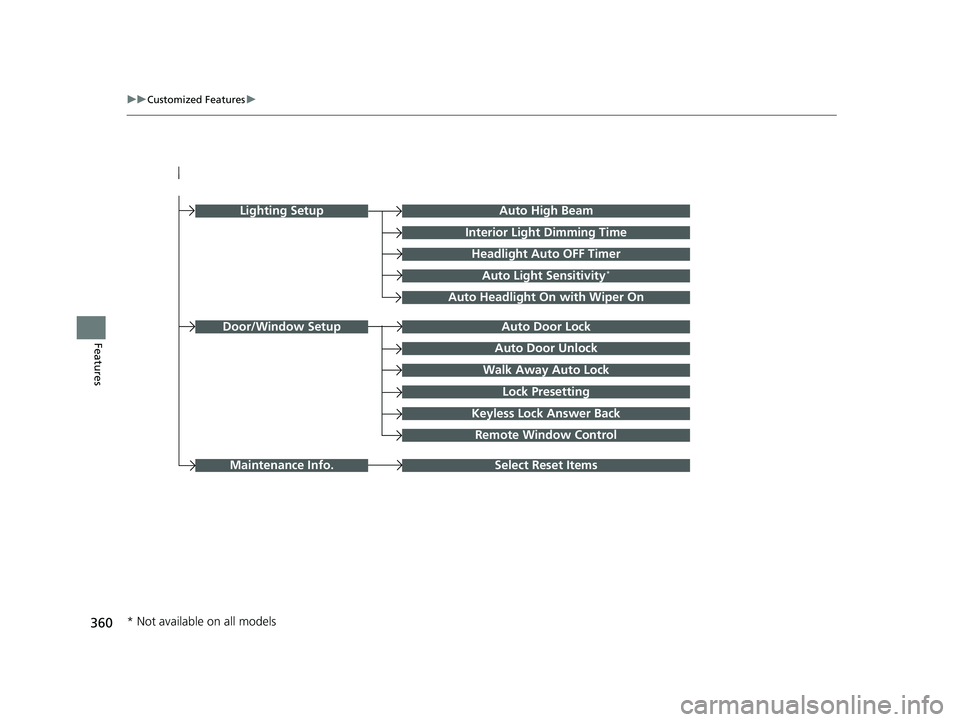
FeaturesAuto Door Unlock
Auto Door Lock
Walk Away Auto Lock
Lock Presetting
Keyless Lock Answer Back
Door/Window Setup
Lighting SetupAuto High Beam
Interior Light Dimming Time
Headlight Auto OFF Timer
Auto Light Sensitivity*
Auto Headlight On with Wiper On
Remote Window Control
Select Reset ItemsMaintenance Info.
* Not available on all models
23 HR-V-313V06000_01.book 360 ページ 2022年4月4日 月曜日 午前10時49分
Page 365 of 664

363
uuCustomized Features u
Continued
Features
■Meter Setup
*1:Default Setting
Customizable Features Description Selectable Settings
Adjust Outside Temp.
DisplaySelects to adjust outside temperature reading by a few degrees.2Outside Temperature P. 105
-5°F ~ ±0°F*1 ~ +5°F (U.S.)
-3°C ~ ±0°C*1 ~ +3°C (Canada)
"Trip A" Reset Timing Selects the timing
to reset Trip A.
2Range/Fuel/Trip Meter P. 109
2 Speed/Time/Trip Meter P. 111When Fully Refueled/IGN OFF /
Manually Reset*1
"Trip B" Reset TimingSelects the timing to reset Trip B.
2 Range/Fuel/Trip Meter P. 109
2 Speed/Time/Trip Meter P. 111When Fully Refueled/IGN OFF /
Manually Reset*1
Adjust Alarm Volume Changes volume level of all system warnings, door opening
warning and indicator. High
/Mid*1/Low
Fuel Efficien cy BacklightTurns the ambient meter feature on and off.ON*1/OFF
Turn By Turn Auto Display Turns on/off the pop-up warning in
the turn-by-turn navigation
in the driver information interface.
2 Turn-by-Turn Directions P. 113ON*1/OFF
Speed/Distance UnitsSelects the trip computer units.
2 Speed/Distance Units P. 122
km/h · km/mph · miles*1 (U.S.)
km/h · km*1/ mph · miles (Canada)
Tachometer Selects whether the tachometer
come on the driver information
interface. ON
*1/
OFF
Rear Seat ReminderTurns the Rear Seat Reminder feature on and off.ON*1/OFF
23 HR-V-313V06000_01.book 363 ページ 2022年4月4日 月曜日 午前10時49分
Page 367 of 664

365
uuCustomized Features u
Continued
Features
■Lighting Setup
*1:Default Setting
Customizable Features Description Selectable Settings
Auto High BeamTurns on/off auto high beam function.ON*1/OFF
Interior Ligh t Dimming Time Selects the length of time the interior lights stay on after doors are
closed.
2
Interior Lights P. 189
60sec/30sec*1/ 15sec
Headlight Auto OFF Timer
Selects the length of time the exterior lights stay on after you close
the driver's door.
2 Automatic Lighting Off Feature P. 169
60sec/30sec /15sec*1/0sec
Auto Light Sensitivity
*Changes the timing for th e headlights to come on. Min/Low/Mid*1/High /Max
Auto Headligh t On with
Wiper OnSelects On/Off headlight function and wiper operation when the
headlight is in AUTO setting.
2Headlight Integration with Wipers P. 169
ON*1/OFF
* Not available on all models
23 HR-V-313V06000_01.book 365 ページ 2022年4月4日 月曜日 午前10時49分
Page 411 of 664
409
Driving
This chapter discusses driving and refueling.
Before Driving
Driving Preparation .............................. 410
Maximum Load Limit............................ 413
Towing a TrailerTowing Behind a Motorhome............... 415Off-Highway Driving Guidelines..... 416
When Driving
Starting the Engine .............................. 418
Precautions While Driving..................... 425
Continuously Variable Transmission ......... 426Shifting ................................................ 427
Drive Mode Switch ............................... 429
Hill Descent Control System ................. 432
Vehicle Stability AssistTM (VSA®), aka Electronic
Stability Control (ESC), System ................... 434
Real Time AWD with Intelligent Control SystemTM*.. 437Tire Pressure Monitoring System (TPMS) ........... 438Tire Pressure Monitoring System (TPMS) - Required Federal Explanation ............. 443
Blind Spot Information System
*........... 445Honda Sensing ®................................ 449Collision Mitigation Braking SystemTM
(CMBSTM) ........................................... 453
Low Speed Braking Control*................ 465
Adaptive Cruise Control (ACC) with Low Speed Follow ..................................... 471 Lane Keeping Assist System (LKAS) ....... 491
Traffic Jam Assist
*................................ 502
Road Departure Mitigation System ....... 511
Traffic Sign Recognition System ............ 519
Front Wide View Camera...................... 525
Sonar Sensors
*..................................... 527BrakingBrake System ........................................ 528
Anti-lock Brake System (ABS) ................ 535
Brake Assist System .............................. 536
Parking Your Vehicle
Multi-View Rear Camera .................. 545
Refueling
Fuel Economy and CO
2 Emissions .... 550
* Not available on all models
23 HR-V-313V06000_01.book 409 ページ 2022年4月4日 月曜日 午前10時49分
Page 413 of 664
Continued411
uuBefore Driving uDriving Preparation
Driving
• Store or secure all items on board properly.
u Carrying too much cargo, or improperly storing it, can affect your vehicle’s
handling, stability, sto pping distance, and tires, and make it unsafe.
2Maximum Load Limit P. 413
•Do not pile items higher than the seat height.
u They can block your view and may be thrown forward in the event of sudden
braking.
• Do not place anything in the front seat footwells. Make sure to secure the floor
mat.
u An object or unsecured floor mat can in terfere with your brake and accelerator
pedal operation while driving.
• If you have any animals on board, do not let them move around in the vehicle.
u They may interfere with driving and a crash could occur.
• Securely close and lock al l doors and the tailgate.
2Locking/Unlocking the Doors from the Inside P. 149
•Adjust your seating position properly.
u Adjust the head restraint, too.
2Seats P. 180
2 Adjusting the front head restraint positions P. 186
•Adjust the mirrors and steering wheel properly.
u Adjust them while sitting in the proper driving position.
2 Mirrors P. 178
2 Adjusting the Steering Wheel P. 177
■Interior Checks1Interior Checks
The headlight aim is set by the factory, and does not
need to be adjusted. Howeve r, if you regularly carry
heavy items in the cargo area, have the aiming
readjusted at a dealer or by a qualified technician.
23 HR-V-313V06000_01.book 411 ページ 2022年4月4日 月曜日 午前10時49分
Page 418 of 664
416
Driving
Off-Highway Driving Guidelines
General Information
Your vehicle has been designed primarily for use on pavement, however, its higher
ground clearance allows you to occasionally travel on unpaved roads. It is not
designed for trail-blazing, or other challenging off-highway activities.
If you decide to drive on unpaved roads, you will find that it requires somewhat
different driving skills and that your vehicle will handle somewhat differently than it
does on pavement. Pay attention to the precautions and tips in this section, and get
acquainted with your vehicle before leaving the pavement.
Important Safety Precautions
To avoid loss of control or rollover, be sure to follow all precautions and
recommendations:
• Be sure to store cargo properly and do not exceed your cargo load limits.
2 Maximum Load Limit P. 413
•Whenever you drive, make sure you and your passengers always wear seat belts.
• Keep your speed low, and never go faster than the conditions allow.
• It’s up to you to continually assess the situation and drive within the limits.
1Off-Highway Driving Guidelines
Failure to operate your vehicle correctly might result
in a crash or a rollover.
2 Important Handling Information P. 36
2 Precautions While Driving P. 425
3WARNING
Improperly operating this vehicle on or off-
pavement can cause a crash or rollover in
which you and your passengers could be
seriously injured or killed.
•Follow all instructions and guidelines in
this owner’s manual.
• Keep your speed low, and don’t drive
faster than conditions permit.
23 HR-V-313V06000_01.book 416 ページ 2022年4月4日 月曜日 午前10時49分