high HONDA HRV 2023 Workshop Manual
[x] Cancel search | Manufacturer: HONDA, Model Year: 2023, Model line: HRV, Model: HONDA HRV 2023Pages: 664, PDF Size: 20.2 MB
Page 499 of 664
497
uuHonda Sensing ®u Lane Keeping Assist System (LKAS)
Continued
Driving
■The LKAS may be automa tically suspended when:
• The system fails to detect lane lines.
• The steering wheel is turned quickly.
• You fail to steer the vehicle.
• Driving through a sharp curve.
• Driving at a speed in excess of approximately 94 mph (150 km/h).
Once these conditions no longer exist, the LKAS automatically resumes.
■The LKAS may be automatically canceled when:
In the following cases, traffic lane lines may disappear on the gauge, the beeper may
sound, and the LKAS may automatically be canceled:
• The camera temperature gets extremely high.
• The camera behind the rearview mirror, or the area around the camera, including
the windshield, gets dirty.
• The ABS or VSA ® system engages.
23 HR-V-313V06000_01.book 497 ページ 2022年4月4日 月曜日 午前10時49分
Page 508 of 664
uuHonda Sensing ®u Traffic Jam Assist*
506
Driving
Press the LKAS button to cancel Traffic Jam Assist.
■Traffic Jam Assist may be au tomatically suspended when:
The system is automatically temporarily ca nceled under the following circumstances.
• The system fails to detect lane lines.
• The steering wheel is turned sharply.
• You fail to steer the vehicle.
• You are driving through a sharp curve.
• The brake pedal is depressed.
Once these conditions no longer exist, Traffic Jam Assist automatically resumes.
■Traffic Jam Assist may be automatically canceled when:
The traffic lane lines will disappear from the screen, the beeper may sound, and
Traffic Jam Assist will be canceled under the following circumstances:
• The temperature of the camera is too high.
• The camera behind the rearview mirror, or the area around the camera, including
the windshield, is dirty.
■Canceling Traffic Jam Assist
1Traffic Jam Assist may be au tomatically suspended when:
You are traveling over 45 mph (72 km/h).
u When the speed of the vehicle reaches 45 mph
(72 km/h), Traffic Jam Assi st is deactivated and
LKAS is activated instead. Once the speed of the
vehicle drops to under 40 mph (64 km/h), Traffic
Jam Assist is reactivated.
23 HR-V-313V06000_01.book 506 ページ 2022年4月4日 月曜日 午前10時49分
Page 522 of 664
uuHonda Sensing ®u Traffic Sign Recognition System
520
Driving
1Traffic Sign Recognition System
To help reduce the likel ihood that high interior
temperatures will cause the camera’s sensing system
to shut off, when parking, find a shady area or face
the front of the vehicle away from the sun. If you use
a reflective sun shade, do not allow it to cover the
camera housing.
Covering the camera can concentrate heat on it.
If your vehicle exceeds the detected speed limit, an
icon representing the speed limit sign for the current
area will blink in the display. 2 Settings
* P. 123
2 Customized Features P. 345
The system’s ability to accurately notify the driver of
the speed limit is depend ent on certain conditions
such as the units displayed on the traffic sign as well
as the speed and direction of travel of the vehicle. In
some cases, the system may display false warnings or
other inaccurate information. 2 Traffic Sign Recognition System Conditions
and Limitations P. 521
The unit for speed limits (mph or km/h) varies from
country to country. Just after entering a country
whose unit differs to the one of the country from
which you came, Traffic Sign Recognition System
may not work correctly. 2 Settings
* P. 123
2 Speed/Distance Units P. 122
2 Customized Features P. 345
* Not available on all models
23 HR-V-313V06000_01.book 520 ページ 2022年4月4日 月曜日 午前10時49分
Page 524 of 664
522
uuHonda Sensing ®u Traffic Sign Recognition System
Driving
■The position or the cond ition of the traffic sign
• The sign is in a place that makes it hard to find.
• The sign is located far away from your vehicle.
• The sign is located where it is hard for headlight beams to reach.
• The sign is on a corner or bend in the road.
• The sign is faded or bent.
• The sign is rotated or damaged signs.
• The sign is covered with mud, snow, or frost.
• Part of the sign is hidden by the trees, or is in the shadow of a vehicle or other
object.
• Light (such as a streetlight) is reflected on the surface of the sign, or it is hidden
in shadow.
• The sign is too bright or too dark (electric signs).
• Small signs (auxiliary signs, etc.).
■Other conditions
• When you are driving at a high speed.
23 HR-V-313V06000_01.book 522 ページ 2022年4月4日 月曜日 午前10時49分
Page 525 of 664
523
uuHonda Sensing ®u Traffic Sign Recognition System
Continued
Driving
The traffic sign recognition system may not operate correctly, such as displaying
signs that do not adhere to the actual regu lations for the roadway or do not exist at
all in the following cases.
u A speed limit sign may display at a higher or lower speed than the actual speed
limit.
• There is a supplementary sign with furth er information such as weather, time,
vehicle type, school zone, etc.
• Figures on the sign are hard to read (electric signs, numbers on the sign are
blurred, etc.).
• The sign is in the vicinity of the lane you are driving in, even though it is not for
the lane, such as a speed limit sign situat ed at an exit or an intersection between
the side road an d the main road.
• There are things that look similar in co lor or shape to recognized objects (similar
sign, electric sign, signboard, structure, etc.).
23 HR-V-313V06000_01.book 523 ページ 2022年4月4日 月曜日 午前10時49分
Page 527 of 664
525
uuHonda Sensing ®u Front Wide View Camera
Continued
Driving
Front Wide View Camera
The camera, used in systems such as Lane Keeping Assist System (LKAS), Road
Departure Mitigation system, Adaptive Cruise Control (ACC) with Low Speed
Follow, Traffic Sign Recognition system, CMBS
TM, and Traffic Jam Assist*, is designed
to detect an object that triggers any of the systems to operate their functions.
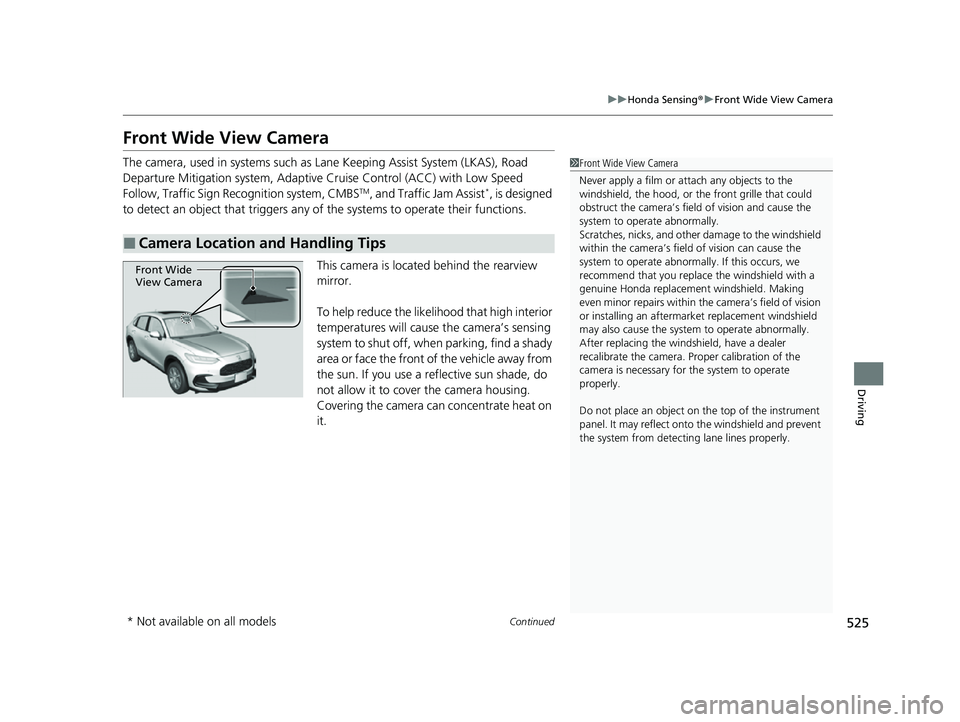
This camera is located behind the rearview
mirror.
To help reduce the likelihood that high interior
temperatures will cause the camera’s sensing
system to shut off, when parking, find a shady
area or face the front of the vehicle away from
the sun. If you use a reflective sun shade, do
not allow it to cover the camera housing.
Covering the camera can concentrate heat on
it.
■Camera Location and Handling Tips
1 Front Wide View Camera
Never apply a film or attach any objects to the
windshield, the hood, or th e front grille that could
obstruct the camera’s fiel d of vision and cause the
system to operate abnormally.
Scratches, nicks, and othe r damage to the windshield
within the camera’s fiel d of vision can cause the
system to operate abnormall y. If this occurs, we
recommend that you replac e the windshield with a
genuine Honda replacem ent windshield. Making
even minor repairs within th e camera’s field of vision
or installing an aftermarket replacement windshield
may also cause the system to operate abnormally.
After replacing the winds hield, have a dealer
recalibrate the camera. Pr oper calibration of the
camera is necessary for the system to operate
properly.
Do not place an object on the top of the instrument
panel. It may reflect onto the windshield and prevent
the system from detecting lane lines properly.
Front Wide
View Camera
* Not available on all models
23 HR-V-313V06000_01.book 525 ページ 2022年4月4日 月曜日 午前10時49分
Page 528 of 664
uuHonda Sensing ®u Front Wide View Camera
526
Driving
1Front Wide View Camera
If the Some driver assist systems cannot
operate: Camera temperature too high message
appears:
•Use the climate control system to cool down the
interior and, if necessary, also use defroster mode
with the airflow directed towards the camera.
•Start driving the vehicle to lower the windshield
temperature, which cool s down the area around
the camera.
If the Some driver assist systems cannot
operate: Clean front windshield or poor viewing
condition. message appears:
•Park your vehicle in a safe place, and make sure the
windshield is clean.
Clean the windshield if it is dirty. If the message
does not disappear after dr iven for a while, have
your vehicle checked by a dealer.
23 HR-V-313V06000_01.book 526 ページ 2022年4月4日 月曜日 午前10時49分
Page 533 of 664
Continued531
uuBraking uBrake System
Driving
Your vehicle is equipped with disc brakes at all four wheels. The brake assist system
increases the stopping force when you depress the brake pedal hard in an
emergency situation. The an ti-lock brake system (ABS) helps you retain steering
control when brak ing very hard.
2Brake Assist System P. 536
2 Anti-lock Brake System (ABS) P. 535
■Foot Brake1Foot Brake
Check the brakes after driving through deep water,
or if there is a buildup of road surface water. If
necessary, dry the brakes by lightly depressing the
pedal several times.
If you hear a continuous me tallic friction sound when
applying the brakes, this is caused by the brake wear
indicator rubbing on the brake rotor and indicates
that the brake pads need to be replaced. Have the
vehicle checked by a deal er. If you hear only an
occasional squeak or squeal when you initially apply
the brake pedal, this may be normal and caused by
high frequency vibr ation of the brake pads against
the rotating brake disc.
Constantly using the brake pedal while going down a
long hill builds up heat, which reduces the brake
effectiveness. Apply engine braking by taking your
foot off the accelerator pe dal and downshifting to a
lower speed position.
Do not rest your foot on the brake pedal while
driving, as it will lightly apply the brakes and cause
them to lose effectiveness over time and reduce pad
life. It will also conf use drivers behind you.
Whenever the brakes are activated by CMBS
TM or
another system that automa tically controls braking,
the brake pedal is depressed and released in
accordance with braking function.
23 HR-V-313V06000_01.book 531 ページ 2022年4月4日 月曜日 午前10時49分
Page 540 of 664
538
uuParking Your Vehicle uParking Sensor System*
Driving
Parking Sensor System*
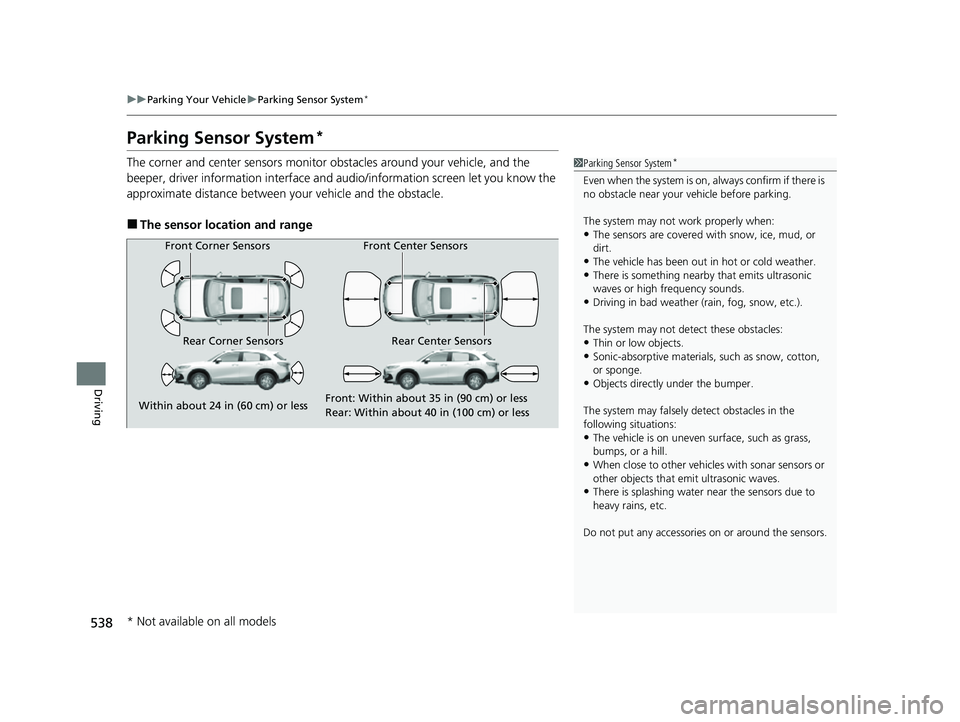
The corner and center sensors monitor obstacles around your vehicle, and the
beeper, driver information interface and audio/informatio n screen let you know the
approximate distance between your vehicle and the obstacle.
■The sensor location and range
1 Parking Sensor System*
Even when the system is on, always confirm if there is
no obstacle near your ve hicle before parking.
The system may not work properly when:
•The sensors are covered with snow, ice, mud, or
dirt.
•The vehicle has been out in hot or cold weather.•There is something nearby that emits ultrasonic
waves or high frequency sounds.
•Driving in bad weather (rain, fog, snow, etc.).
The system may not de tect these obstacles:
•Thin or low objects.•Sonic-absorptive materials, such as snow, cotton,
or sponge.
•Objects directly under the bumper.
The system may falsely de tect obstacles in the
following situations:
•The vehicle is on uneven su rface, such as grass,
bumps, or a hill.
•When close to other vehicl es with sonar sensors or
other objects that em it ultrasonic waves.
•There is splashing water near the sensors due to
heavy rains, etc.
Do not put any accessories on or around the sensors.
Front Corner Sensors
Rear Corner Sensors Rear Center Sensors Front Center Sensors
Within about 24 in (60 cm) or less Front: Within about 35 in (90 cm) or less
Rear: Within abo
u
t 40 in (100 cm) or less
* Not available on all models
23 HR-V-313V06000_01.book 538 ページ 2022年4月4日 月曜日 午前10時49分
Page 543 of 664
541
uuParking Your Vehicle uParking Sensor System*
Driving
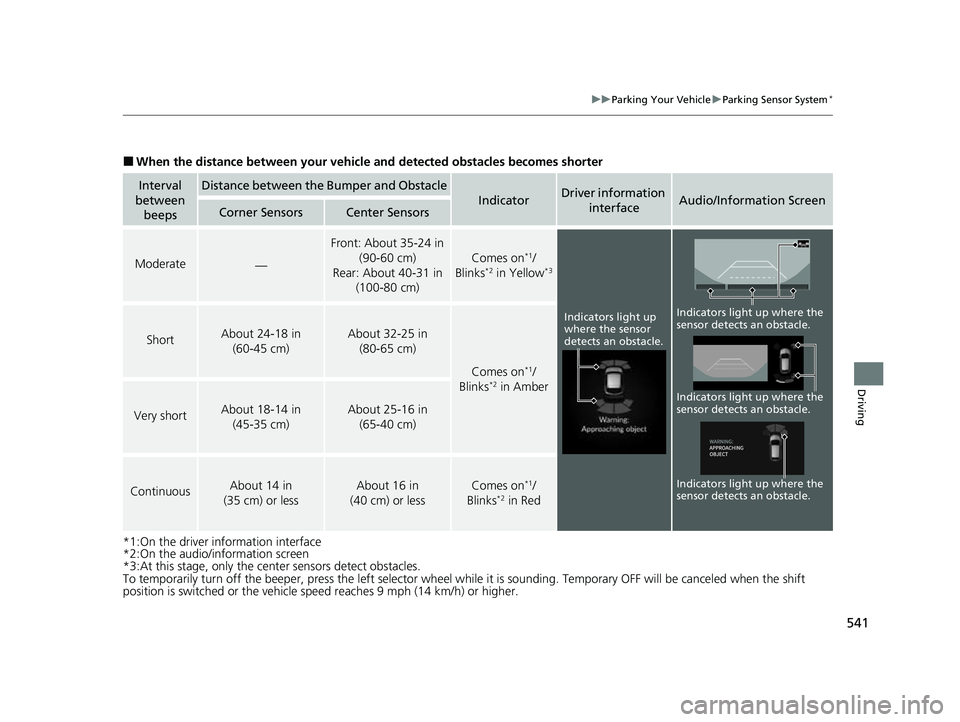
■When the distance between your vehicle and detected obstacles becomes shorter
*1:On the driver information interface
*2:On the audio/information screen
*3:At this stage, only the center sensors detect obstacles.
To temporarily turn off the beeper, press the left selector wheel while it is sounding. Temporary OFF will be canceled when the shift
position is switched or the vehicle sp eed reaches 9 mph (14 km/h) or higher.
Interval
between beepsDistance between the Bumper and Obstacle
IndicatorDriver information
interfaceAudio/Information ScreenCorner SensorsCenter Sensors
Moderate—
Front: About 35-24 in (90-60 cm)
Rear: About 40-31 in (100-80 cm)
Comes on*1/
Blinks*2 in Yellow*3
ShortAbout 24-18 in (60-45 cm) About 32-25 in (80-65 cm)
Comes on*1/
Blinks*2 in Amber
Very shortAbout 18-14 in (45-35 cm) About 25-16 in (65-40 cm)
ContinuousAbout 14 in
(35 cm) or lessAbout 16 in
(40 cm) or lessComes on*1/
Blinks*2 in Red
Indicators light up
where the sensor
detects an obstacle.
Indicators light up where the
sensor detects an obstacle.
Indicators light up where the
sensor detects an obstacle. Indicators light up where the
sensor detects an obstacle.
23 HR-V-313V06000_01.book 541 ページ 2022年4月4日 月曜日 午前10時49分