light HONDA INSIGHT 2000 1.G User Guide
[x] Cancel search | Manufacturer: HONDA, Model Year: 2000, Model line: INSIGHT, Model: HONDA INSIGHT 2000 1.GPages: 262, PDF Size: 3.73 MB
Page 63 of 262
Controls Nea r th e Steerin g Whee l
Daytim e Runnin g Light s
Canadian models only
With th e headligh t switc h off , th e
hig h bea m headlight s com e o n wit h
reduce d brightnes s whe n yo u tur n
th e ignitio n switc h t o O N (II ) an d
releas e th e parkin g brake . The y
remai n o n unti l yo u tur n th e ignitio n
off , eve n if yo u se t th e parkin g brake .
Th e headlight s rever t t o norma l
operatio n whe n yo u tur n the m o n
wit h th e switch . Instrumen
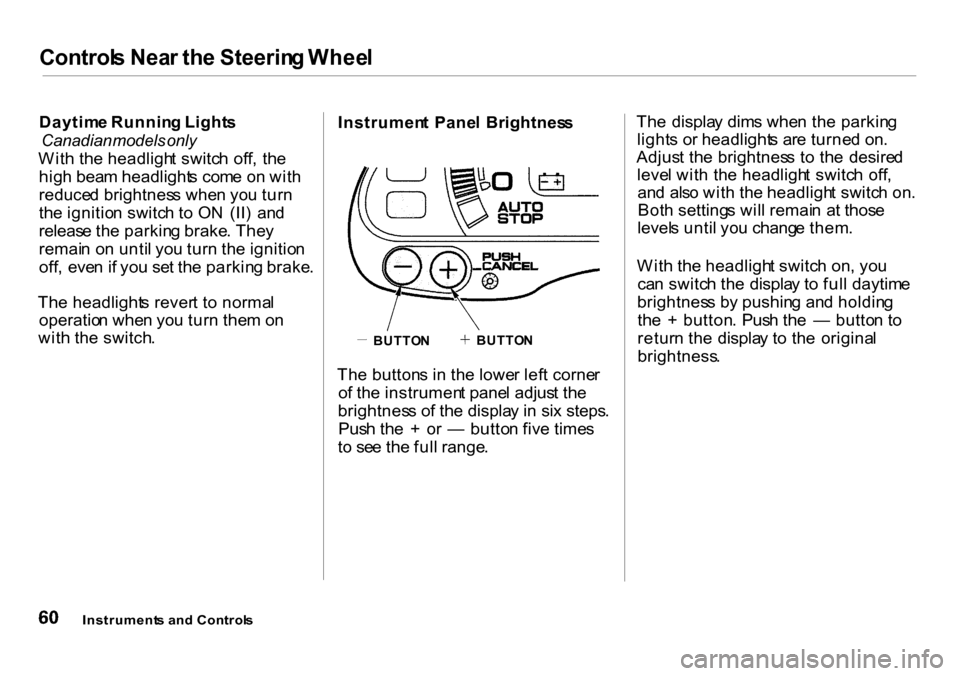
t Pane l Brightnes s
Th e button s i n th e lowe r lef t corne r
o f th e instrumen t pane l adjus t th e
brightnes s o f th e displa y i n si x steps .
Pus h th e + or — butto n fiv e time s
t o se e th e ful l range . Th
e displa y dim s whe n th e parkin g
light s o r headlight s ar e turne d on .
Adjus t th e brightnes s t o th e desire d
leve l wit h th e headligh t switc h off ,
an d als o wit h th e headligh t switc h on .
Bot h setting s wil l remai n a t thos e
level s unti l yo u chang e them .
Wit h th e headligh t switc h on , yo u
ca n switc h th e displa y t o ful l daytim e
brightnes s b y pushin g an d holdin g
th e + button . Pus h th e — butto n t o
retur n th e displa y t o th e origina l
brightness .
Instrument s an d Control s
BUTTON BUTTO
N
Page 64 of 262
Controls Nea r th e Steerin g Whee l
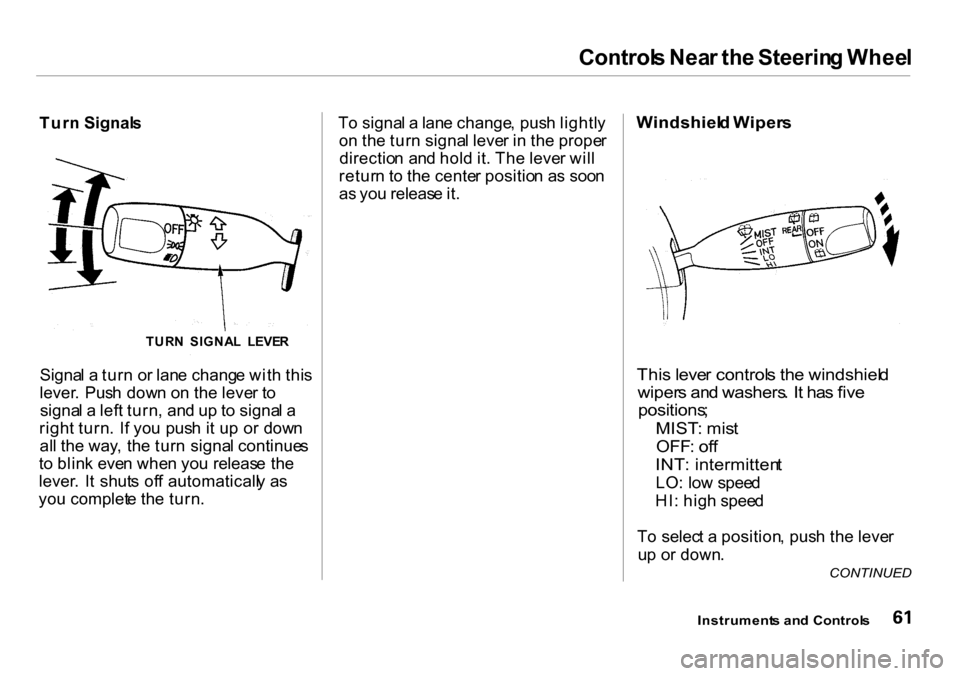
Turn Signal s
Signa l a tur n o r lan e chang e wit h thi s
lever . Pus h dow n o n th e leve r t o
signa l a lef t turn , an d u p t o signa l a
righ t turn . I f yo u pus h i t u p o r dow n
al l th e way , th e tur n signa l continue s
t o blin k eve n whe n yo u releas e th e
lever . I t shut s of f automaticall y a s
yo u complet e th e turn . T
o signa l a lan e change , pus h lightl y
o n th e tur n signa l leve r i n th e prope r
directio n an d hol d it . Th e leve r wil l
retur n t o th e cente r positio n a s soo n
as yo u releas e it .Windshiel d Wiper s
This leve r control s th e windshiel d
wiper s an d washers . I t ha s fiv e
positions ;
MIST: mis t
OFF : of f
INT : intermitten t
LO: lo w spee d
HI : hig h spee d
T o selec t a position , pus h th e leve r
u p o r down .
Instrument s an d Control s
CONTINUED
TUR
N SIGNA L LEVE R
Page 66 of 262
Controls Nea r th e Steerin g Whee l
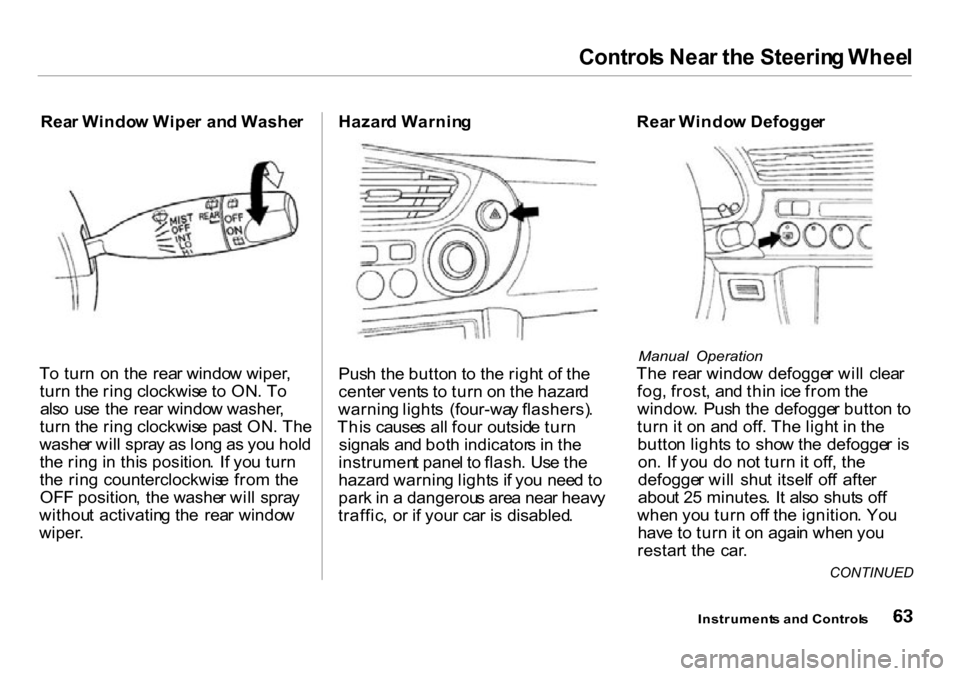
Rear Windo w Wipe r an d Washe r
T o tur n o n th e rea r windo w wiper ,
tur n th e rin g clockwis e t o ON . T o
als o us e th e rea r windo w washer ,
tur n th e rin g clockwis e pas t ON . Th e
washe r wil l spra y a s lon g a s yo u hol d
th e rin g in thi s position . I f yo u tur n
th e rin g counterclockwis e fro m th e
OF F position , th e washe r wil l spra y
withou t activatin g th e rea r windo w
wiper . Hazar
d Warnin g
Pus h th e butto n t o th e righ t o f th e
cente r vent s t o tur n o n th e hazar d
warnin g light s (four-wa y flashers) .
Thi s cause s al l fou r outsid e tur n
signal s an d bot h indicator s i n th e
instrumen t pane l t o flash . Us e th e
hazar d warnin g light s i f yo u nee d t o
par k in a dangerou s are a nea r heav y
traffic , o r i f you r ca r i s disabled . Rea
r Windo w Defogge r
Manual Operation
The rea r windo w defogge r wil l clea r
fog , frost , an d thi n ic e fro m th e
window . Pus h th e defogge r butto n t o
tur n it o n an d off . Th e ligh t i n th e
butto n light s t o sho w th e defogge r i s
on . I f yo u d o no t tur n it off , th e
defogge r wil l shu t itsel f of f afte r
abou t 2 5 minutes . I t als o shut s of f
whe n yo u tur n of f th e ignition . Yo u
hav e t o tur n it o n agai n whe n yo u
restar t th e car .
Instrument s an d Control s
CONTINUED
Page 67 of 262

Controls Nea r th e Steerin g Whee l
Automatic Operation
The rea r windo w defogge r turn s o n
automaticall y whe n yo u tur n th e
ignitio n switc h O N (II ) i f th e outsid e
temperatur e is belo w 32° F (0°C) , o r
i f th e engin e is a t ambien t
temperature . Th e ligh t i n th e butto n
doe s no t light .
I t wil l als o tur n of f automaticall y
afte r 2 5 minutes .
Mak e sur e th e rea r windo w is clea r
an d yo u hav e good visibilit y befor e
startin g to drive .
Th e defogge r wire s o n th e insid e o f
th e rea r windo w ca n b e accidentall y
damaged . Whe n cleanin g th e glass ,
alway s wip e sid e to side .
Instrument s an d Control s
Page 68 of 262
Keys an d Lock s
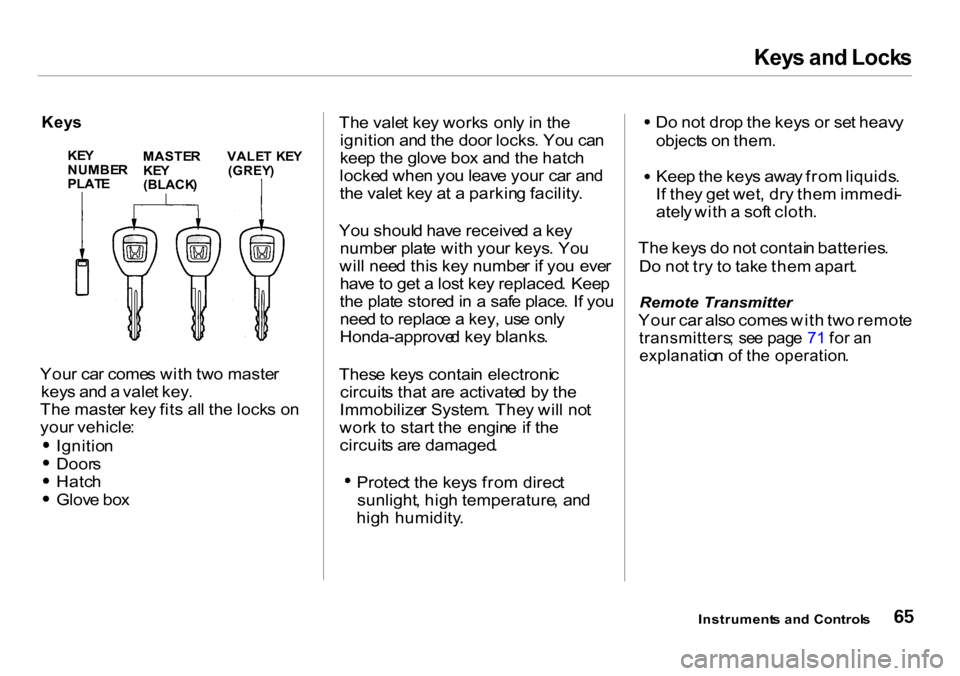
Keys
Your ca r come s wit h tw o maste r
key s an d a vale t key .
Th e maste r ke y fit s al l th e lock s o n
you r vehicle :
Ignitio n
Doors
Hatch
Glov e bo x Th
e vale t ke y work s onl y i n th e
ignitio n an d th e doo r locks . Yo u ca n
kee p th e glov e bo x an d th e hatc h
locke d whe n yo u leav e you r ca r an d
th e vale t ke y a t a parkin g facility .
Yo u shoul d hav e receive d a ke y
numbe r plat e wit h you r keys . Yo u
wil l nee d thi s ke y numbe r i f yo u eve r
hav e to ge t a los t ke y replaced . Kee p
th e plat e store d in a saf e place . I f yo u
nee d to replac e a key , us e onl y
Honda-approve d ke y blanks .
Thes e key s contai n electroni c
circuit s tha t ar e activate d b y th e
Immobilize r System . The y wil l no t
wor k t o start the engin e i f th e
circuit s ar e damaged .
Protec t th e key s fro m direc t
sunlight , hig h temperature , an d
hig h humidity . D
o no t dro p th e key s o r se t heav y
object s o n them .
Keep th e key s awa y fro m liquids .
I f the y ge t wet , dr y the m immedi -
atel y wit h a sof t cloth .
Th e key s d o no t contai n batteries .
D o no t tr y t o tak e the m apart .
Remote Transmitter
Your ca r als o come s wit h tw o remot e
transmitters ; se e pag e 7 1 fo r a n
explanatio n o f th e operation .
Instrument s an d Control s
KEYNUMBE RPLATE
MASTE RKEY(BLACK )
VALET KE Y(GREY )
Page 70 of 262
Keys an d Lock s
Ignitio n Switc h
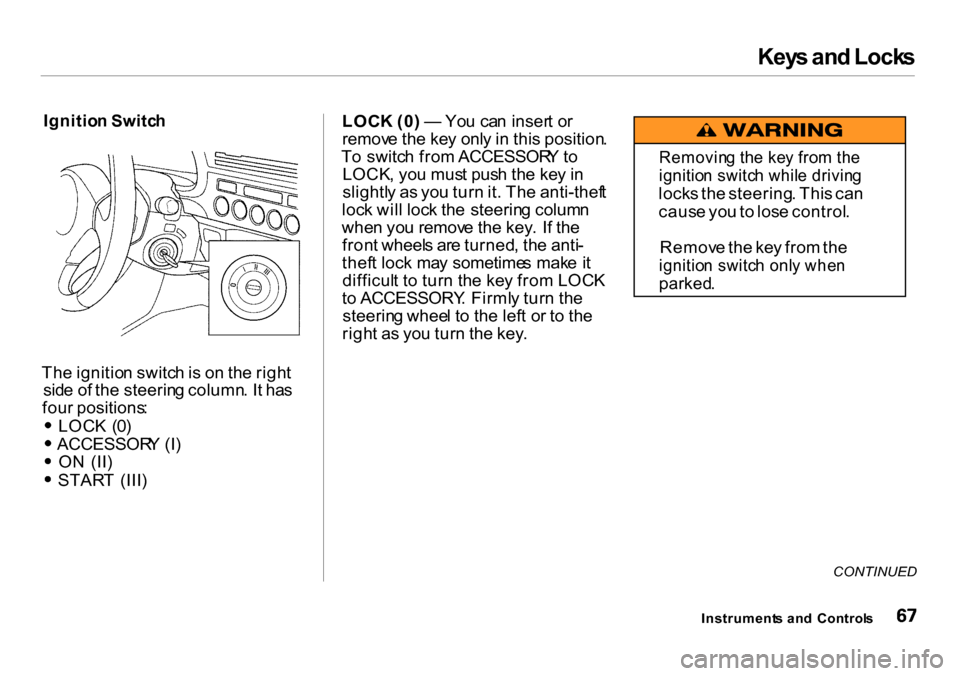
The ignitio n switc h is o n th e righ t
sid e o f th e steerin g column . I t ha s
fou r positions :
LOC K (0 )
ACCESSOR Y (I )
O N (II )
STAR T (III ) LOC
K (0 ) — Yo u ca n inser t o r
remov e th e ke y onl y in thi s position .
T o switc h fro m ACCESSOR Y to
LOCK , yo u mus t pus h th e ke y in
slightl y a s yo u tur n it . Th e anti-thef t
loc k wil l loc k th e steerin g colum n
whe n yo u remov e th e key . I f th e
fron t wheel s ar e turned , th e anti -
thef t loc k ma y sometime s mak e i t
difficul t t o tur n th e ke y fro m LOC K
t o ACCESSORY . Firml y tur n th e
steerin g whee l t o th e lef t o r t o th e
righ t a s yo u tur n th e key .
CONTINUED
Instrument s an d Control s
Removin g th e ke y fro m th e
ignitio n switc h whil e drivin g
locks th e steering . Thi s ca n
caus e yo u to los e control .
Remov e th e ke y fro m th e
ignitio n switc h onl y whe n
parked .
Page 71 of 262
Keys an d Lock s
ACCESSOR Y (I ) — In thi s position ,
yo u ca n operat e th e audi o syste m
an d th e accessor y powe r socket .
O N (II ) — Thi s i s th e norma l ke y
positio n whe n driving . Al l feature s
an d accessorie s o n th e ca r ar e usable .
Severa l o f th e light s o n th e instru -
men t pane l com e o n a s a tes t whe n
yo u tur n th e ignitio n switc h fro m
ACCESSOR Y to ON .
STAR T (III ) — Us e thi s positio n
onl y t o star t th e engine . Th e switc h
return s t o O N (II ) whe n yo u le t g o o f
th e key .
Th e engin e wil l no t star t i f th e
Immobilize r Syste m doe s no t
recogniz e th e key' s codin g (se e pag e
66 ). Yo
u wil l hea r a reminde r beepe r i f
yo u leav e th e ke y in th e ignitio n
switc h in th e LOC K (0 ) o r
ACCESSOR Y (I ) positio n an d ope n
th e driver' s door . Remov e th e ke y t o
tur n of f th e beeper .
Instrument s an d Control s
Page 74 of 262
Keys an d Lock s
Remot e Transmitte r
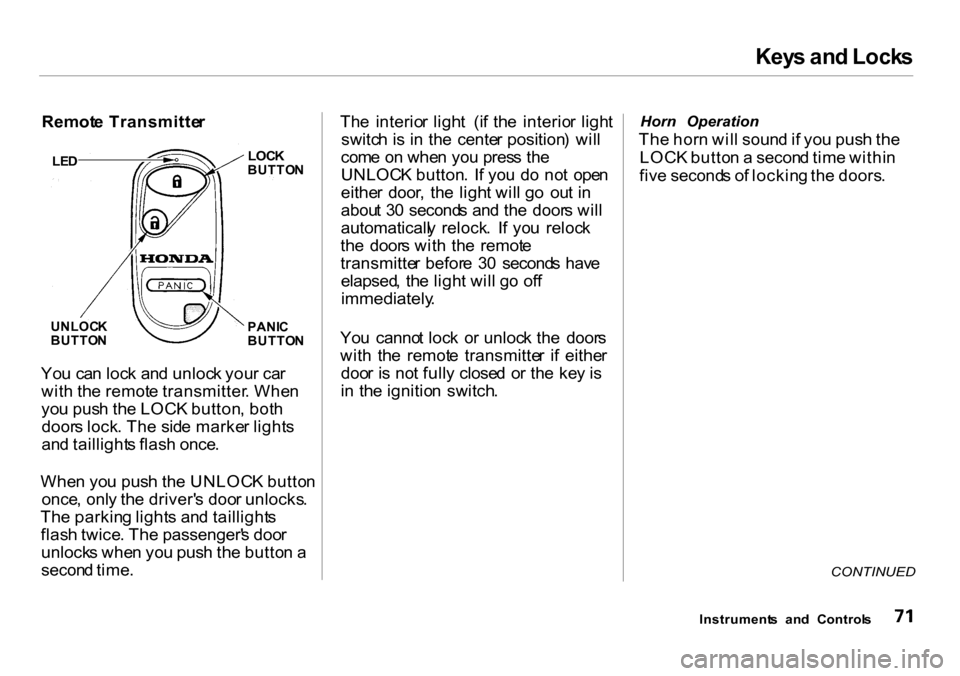
Yo u ca n loc k an d unloc k you r ca r
wit h th e remot e transmitter . Whe n
yo u pus h th e LOC K button , bot h
door s lock . Th e sid e marke r light s
an d taillight s flas h once .
Whe n yo u pus h th e UNLOC K butto n
once , onl y th e driver' s doo r unlocks .
Th e parkin g light s an d taillight s
flas h twice . Th e passenger' s doo r
unlock s whe n yo u pus h th e butto n a
secon d time . Th
e interio r ligh t (i f th e interio r ligh t
switc h i s i n th e cente r position ) wil l
com e o n whe n yo u pres s th e
UNLOC K button . I f yo u d o no t ope n
eithe r door , th e ligh t wil l g o ou t i n
abou t 3 0 second s an d th e door s wil l
automaticall y relock . I f yo u reloc k
th e door s wit h th e remot e
transmitte r befor e 3 0 second s hav e
elapsed , th e ligh t wil l g o of f
immediately .
You canno t loc k o r unloc k th e door s
wit h th e remot e transmitte r i f eithe r
doo r i s no t full y close d o r th e ke y i s
i n th e ignitio n switch .
Horn Operation
The hor n wil l soun d if yo u pus h th e
LOC K butto n a secon d tim e withi n
fiv e second s o f lockin g th e doors .
CONTINUED
Instrument s an d Control s
LE
D
LOC KBUTTO N
PANI C
BUTTO N
UNLOC
K
BUTTO N
Page 75 of 262
Keys an d Lock s
Panic Mode
Panic mod e allow s yo u t o remotel y
activat e you r car' s securit y syste m to
attrac t attention . Whe n activated , th e
hor n wil l sound , an d th e exterio r
light s wil l flas h fo r abou t 3 0 seconds .
T o activat e pani c mode , pres s an d
hol d th e PANI C butto n fo r abou t on e
second .
To cance l Pani c mod e befor e 3 0
seconds , pres s an y butto n o n th e
remot e transmitter . Yo u ca n als o
tur n th e ignitio n switc h t o O N (II) .
Replacing the Battery
Whe n th e remot e transmitter' s
batter y begin s t o ge t weak , i t ma y
tak e severa l pushe s o n th e butto n to
loc k o r unloc k th e doors , an d th e
LE D wil l ge t dim . Replac e th e
batter y a s soo n a s possible .
Batter y type : CR202 5
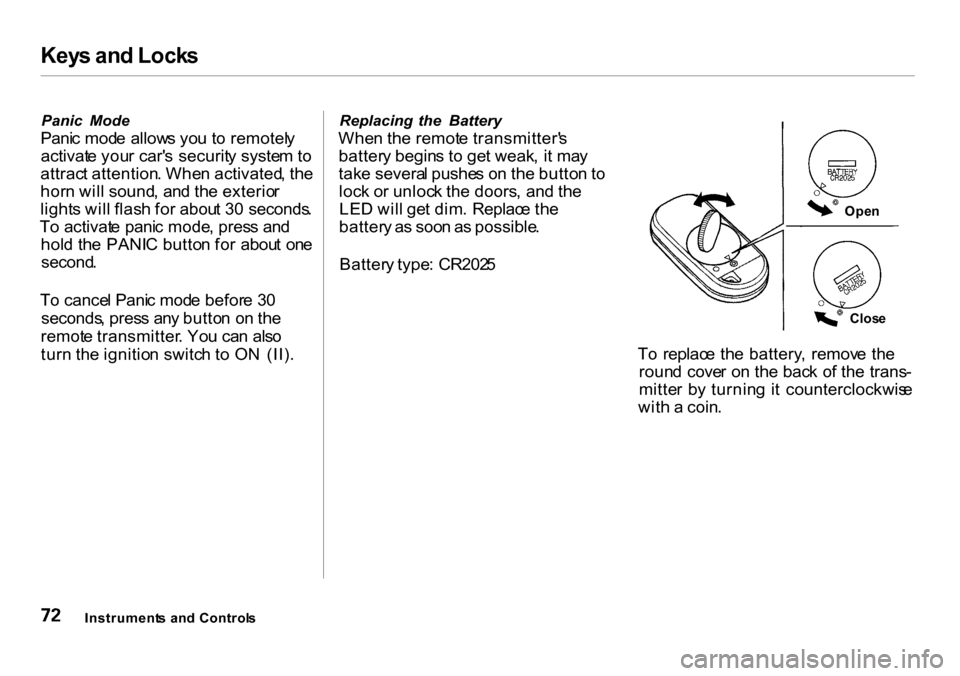
To replac e th e battery , remov e th e
roun d cove r o n th e bac k o f th e trans -
mitte r b y turnin g i t counterclockwis e
wit h a coin .
Instrument s an d Control s
Open
Clos e
Page 78 of 262
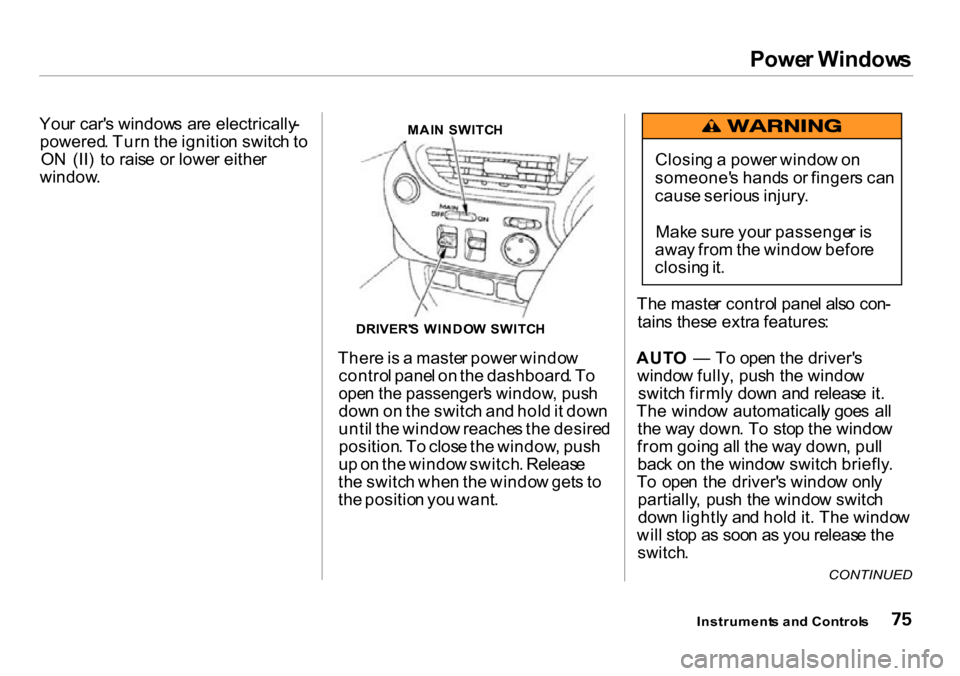
Power Window s
Your car' s window s ar e electrically -
powered . Tur n th e ignitio n switc h to
O N (II ) t o rais e o r lowe r eithe r
window .MAIN SWITC H
There is a maste r powe r windo w
contro l pane l o n th e dashboard . T o
ope n th e passenger' s window , pus h
down o n th e switc h an d hol d it dow n
unti l th e windo w reache s th e desire d
position . T o clos e th e window , pus h
u p o n th e windo w switch . Releas e
th e switc h whe n th e windo w get s t o
th e positio n yo u want . Th
e maste r contro l pane l als o con -
tain s thes e extr a features :
AUT O — To ope n th e driver' s
windo w fully , pus h th e windo w
switc h firml y dow n an d releas e it .
Th e windo w automaticall y goe s al l
th e wa y down . T o sto p th e windo w
fro m goin g al l th e wa y down , pul l
bac k o n th e windo w switc h briefly .
T o ope n th e driver' s windo w onl y
partially , pus h th e windo w switc h
dow n lightl y an d hol d it . Th e windo w
wil l sto p a s soo n a s yo u releas e th e
switch .
Instrument s an d Control s
CONTINUED
Closing a powe r windo w o n
someone' s hand s o r finger s ca n
caus e seriou s injury .
Mak e sur e you r passenge r i s
awa y fro m th e windo w befor e
closin g it .
DRIVER' S WINDO W SWITC H