light HONDA INSIGHT 2000 1.G Owner's Manual
[x] Cancel search | Manufacturer: HONDA, Model Year: 2000, Model line: INSIGHT, Model: HONDA INSIGHT 2000 1.GPages: 262, PDF Size: 3.73 MB
Page 80 of 262
Mirrors, Parkin g Brake , Storag e Bo x
Mirror s
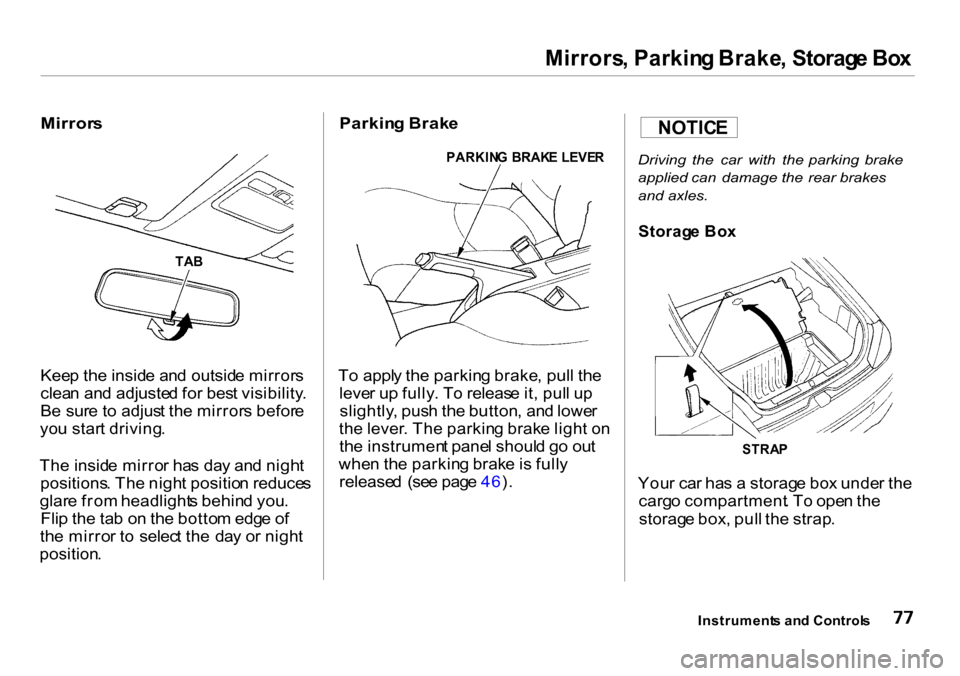
Keep th e insid e an d outsid e mirror s
clea n an d adjuste d fo r bes t visibility .
B e sur e t o adjus t th e mirror s befor e
yo u star t driving .
Th e insid e mirro r ha s da y an d nigh t
positions . Th e nigh t positio n reduce s
glar e fro m headlight s behin d you .
Fli p th e ta b o n th e botto m edg e o f
th e mirro r t o selec t th e da y o r nigh t
position .
Parking Brak e
To appl y th e parkin g brake , pul l th e
leve r u p fully . T o releas e it , pul l u p
slightly , pus h th e button , an d lowe r
th e lever . Th e parkin g brak e ligh t o n
th e instrumen t pane l shoul d g o ou t
whe n th e parkin g brak e is full y
release d (se e pag e 46 ).
Driving the car with the parking brake
applied can damage the rear brakes
and axles.
You r ca r ha s a storag e bo x unde r th e
carg o compartment . T o ope n th e
storag e box , pul l th e strap .
Instrument s an d Control s
TAB PARKIN
G BRAK E LEVE R
STRAP
Storag e Bo x
NOTIC E
Page 82 of 262
Accessory Powe r Socke t
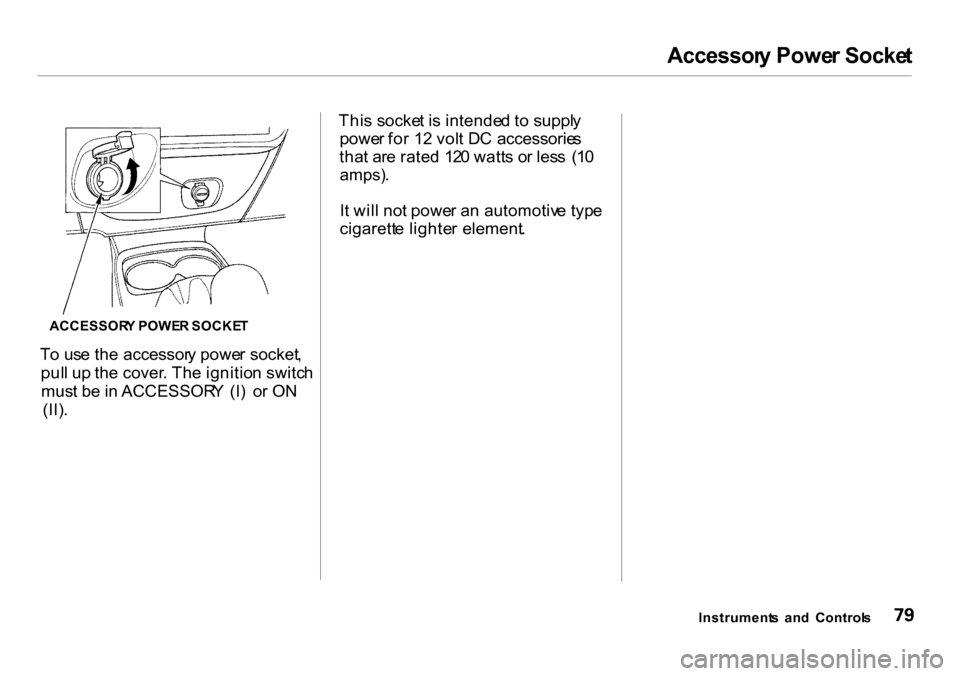
To us e th e accessor y powe r socket ,
pul l u p th e cover . Th e ignitio n switc h
mus t b e in ACCESSOR Y (I ) o r O N
(II) . Thi
s socke t i s intende d t o suppl y
powe r fo r 1 2 vol t D C accessorie s
tha t ar e rate d 12 0 watt s o r les s (1 0
amps) .
It wil l no t powe r a n automotiv e typ e
cigarett e lighte r element .
Instrument s an d Control s
ACCESSOR
Y POWE R SOCKE T
Page 83 of 262
Interior Ligh t
Ceilin g Light s
DOOR ACTIVATE D
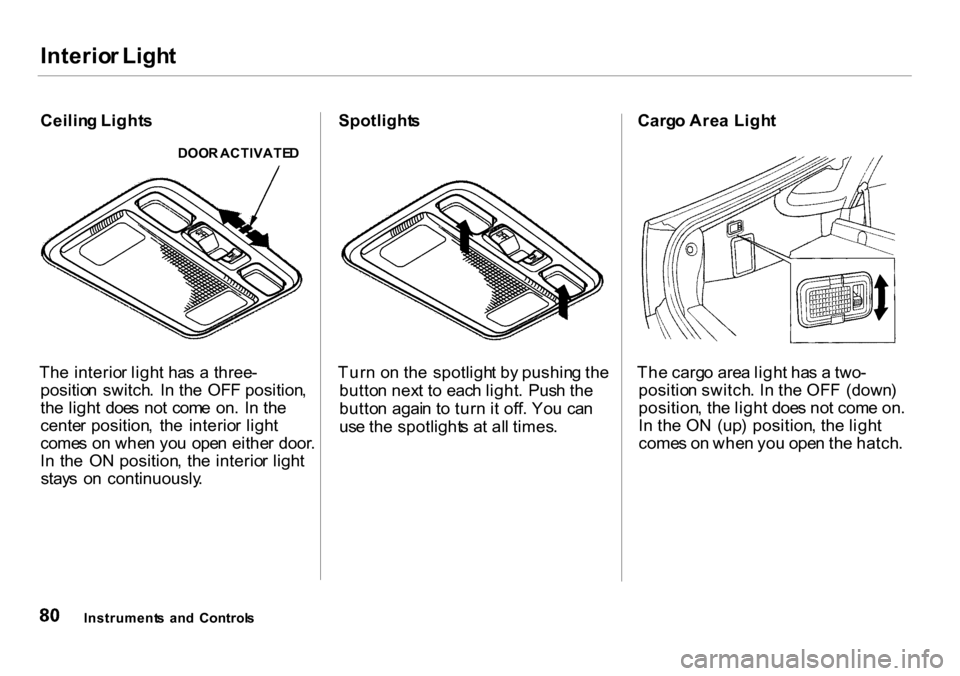
The interio r ligh t ha s a three -
positio n switch . I n th e OF F position ,
th e ligh t doe s no t com e on . I n th e
cente r position , th e interio r ligh t
come s o n whe n yo u ope n eithe r door .
I n th e O N position , th e interio r ligh t
stay s o n continuously .
Spotlights
Turn o n th e spotligh t b y pushin g th e
butto n nex t t o eac h light . Pus h th e
butto n agai n t o tur n i t off . Yo u ca n
us e th e spotlight s a t al l times . Carg
o Are a Ligh t
Th e carg o are a ligh t ha s a two -
positio n switch . I n th e OF F (down )
position , th e ligh t doe s no t com e on .
I n th e O N (up ) position , th e ligh t
come s o n whe n yo u ope n th e hatch .
Instrument s an d Control s
Page 103 of 262
Audi
o Syste m
Adjustin g th e Soun d
Balance/Fade r — Thes e tw o
control s adjus t th e strengt h o f th e
soun d comin g fro m eac h speaker .
Th e Balanc e contro l adjust s th e side -
to-sid e strength , whil e th e Fade r
contro l adjust s th e front-to-bac k
strength .
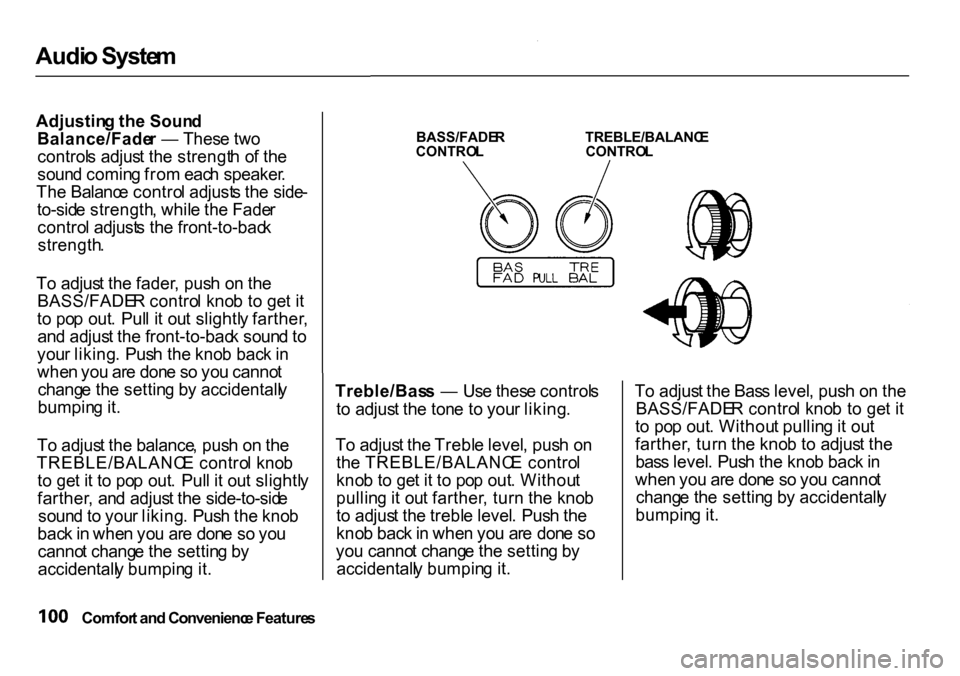
T o adjus t th e fader , pus h o n th e
BASS/FADE R contro l kno b t o ge t i t
t o po p out . Pul l i t ou t slightl y farther ,
an d adjus t th e front-to-bac k soun d to
you r liking . Pus h th e kno b bac k in
whe n yo u ar e don e s o yo u canno t
chang e th e settin g b y accidentall y
bumpin g it .
T o adjus t th e balance , pus h o n th e
TREBLE/BALANC E contro l kno b
t o ge t i t t o po p out . Pul l i t ou t slightl y
farther , an d adjus t th e side-to-sid e
soun d to you r liking . Pus h th e kno b
bac k in whe n yo u ar e don e s o yo u
canno t chang e th e settin g b y
accidentall y bumpin g it .
BASS/FADE
R
CONTRO L TREBLE/BALANC
E
CONTRO L
Treble/Bas s — Us e thes e control s
t o adjus t th e ton e t o you r liking .
T o adjus t th e Trebl e level , pus h o n
th e TREBLE/BALANC E contro l
kno b t o ge t i t t o po p out . Withou t
pullin g it ou t farther , tur n th e kno b
t o adjus t th e trebl e level . Pus h th e
kno b bac k in whe n yo u ar e don e s o
yo u canno t chang e th e settin g b y
accidentall y bumpin g it . T
o adjus t th e Bas s level , pus h o n th e
BASS/FADE R contro l kno b t o ge t i t
t o po p out . Withou t pullin g it ou t
farther , tur n th e kno b t o adjus t th e
bas s level . Pus h th e kno b bac k in
whe n yo u ar e don e s o yo u canno t
chang e th e settin g b y accidentall y
bumpin g it .
Comfor t an d Convenienc e Feature s
Page 104 of 262
Audi
o Syste m
Radi o Frequencie s an d Receptio n
Fo r information , Se e pag e 11 0 .
Audi o Syste m Lightin g
Yo u ca n us e th e instrumen t pane l
brightnes s contro l button s t o adjus t
th e illuminatio n o f th e audi o syste m
(se e pag e 6 0 ). Th e audi o syste m
illuminate s whe n th e parkin g light s
ar e on , eve n if th e radi o is turne d off .
Digita l Cloc k
Th e audi o syste m usuall y show s th e
tim e whe n th e ignitio n switc h is in
ACCESSOR Y (0 o r O N (II) . I t
show s th e operatio n mod e o f th e
radio , cassett e player , o r optiona l C D
change r whe n yo u operat e them ,
the n goe s bac k to th e tim e displa y
afte r fiv e seconds .
I f a n erro r occur s whil e operatin g
th e optiona l C D changer , th e displa y
wil l kee p showin g th e erro r cod e an d
wil l no t switc h to th e tim e displa y
unti l th e erro r i s correcte d (se e pag e
114 ). T
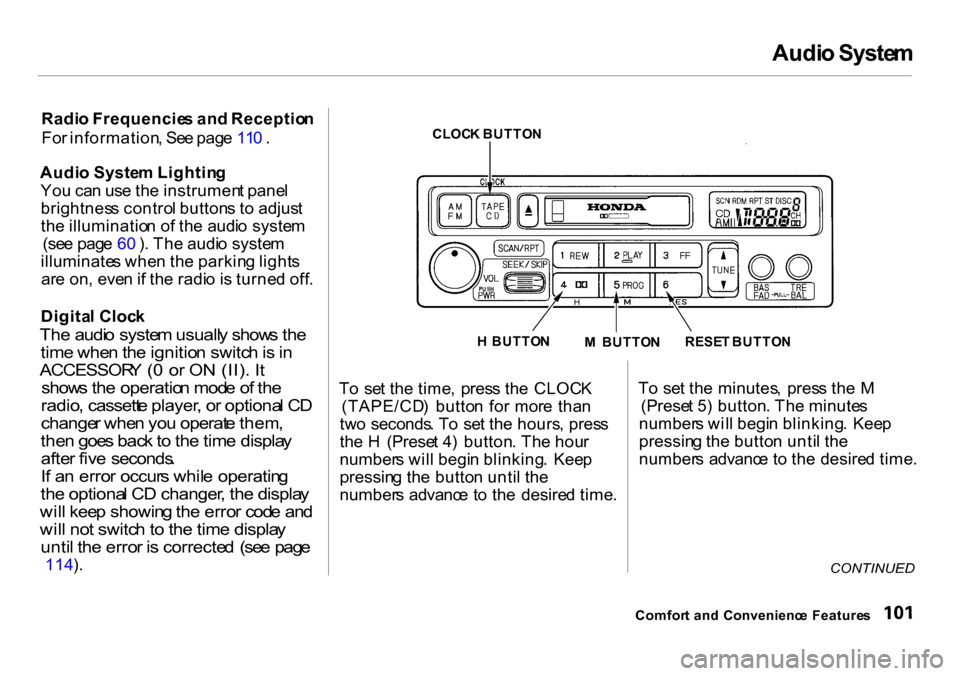
o se t th e time , pres s th e CLOC K
(TAPE/CD ) butto n fo r mor e tha n
tw o seconds . T o se t th e hours , pres s
th e H (Prese t 4 ) button . Th e hou r
number s wil l begi n blinking . Kee p
pressin g th e butto n unti l th e
number s advanc e t o th e desire d time .T
o se t th e minutes , pres s th e M
(Prese t 5 ) button . Th e minute s
number s wil l begi n blinking . Kee p
pressin g th e butto n unti l th e
number s advanc e t o th e desire d time .
CONTINUED
Comfor t an d Convenienc e Feature s
CLOC
K BUTTO N
H BUTTO N
M BUTTO N
RESE
T BUTTO N
Page 119 of 262
Audi
o Syste m
Carin g fo r th e Cassett e Playe r
Th e cassett e playe r pick s u p dir t an d
oxide s fro m th e tape . Thi s contami-
natio n build s u p ove r tim e an d
cause s th e soun d qualit y to degrade .
T o preven t this , yo u shoul d clea n th e
playe r afte r ever y 3 0 hour s o f use .
You r deale r ha s a cleanin g ki t
available .
I f yo u d o no t clea n th e cassett e
playe r regularly , i t ma y eventuall y
becom e impossibl e to remov e th e
contaminatio n wit h a norma l
cleanin g kit .
Us e 100-minut e o r shorte r cassettes .
Cassette s longe r tha n tha t us e
thinne r tap e tha t ma y brea k o r ja m
th e drive . Loo
k a t th e cassett e befor e yo u
inser t it . I f th e tap e is loose , tighte n
i t b y turnin g a hu b wit h a penci l o r
you r finger .
I f th e labe l i s peelin g off , remov e i t
fro m th e cassett e o r i t coul d caus e
th e cassett e t o ja m in th e player .
Neve r tr y t o inser t a warpe d o r
damage d cassett e in th e player .
Whe n the y ar e no t i n use , stor e
cassette s i n thei r case s t o protec t
the m fro m dus t an d moisture . Neve r
plac e cassette s wher e the y wil l b e
expose d t o direc t sunlight , hig h heat ,
o r hig h humidity . I f a cassett e is
expose d to extrem e hea t o r cold , le t
i t reac h a moderat e temperatur e
befor e insertin g it i n th e player .
Neve r tr y t o inser t foreig n object s
int o th e cassett e player . I
f yo u se e th e erro r indicatio n o
n th e display , pres s th e
EJEC T butto n an d remov e th e
cassett e fro m th e unit . Mak e sur e
th e tap e is no t damaged . I f th e
cassett e wil l no t ejec t o r th e erro r
indicatio n stay s o n afte r th e cassett e
ejects , tak e th e vehicl e to you r
Hond a dealer .
I f a proble m develop s in th e connec -
tio n betwee n th e cassett e playe r an d th
e radio , yo u wil l se e i n
th e display . Tak e th e vehicl e to you r
Hond a dealer .
Comfor t an d Convenienc e Feature s
Page 123 of 262
Servic
e Statio n Procedure s
5 . Scre w th e fue l fil l ca p bac k on ,
tighte n i t unti l i t click s severa l
times . I f yo u d o no t properl y
tighte n th e cap , th e Malfunctio n
Indicato r Lam p ma y com e o n (se e
pag e 220 ).
6 . Pus h th e fue l fil l doo r close d unti l
i t latches . Openin
g th e Hoo d
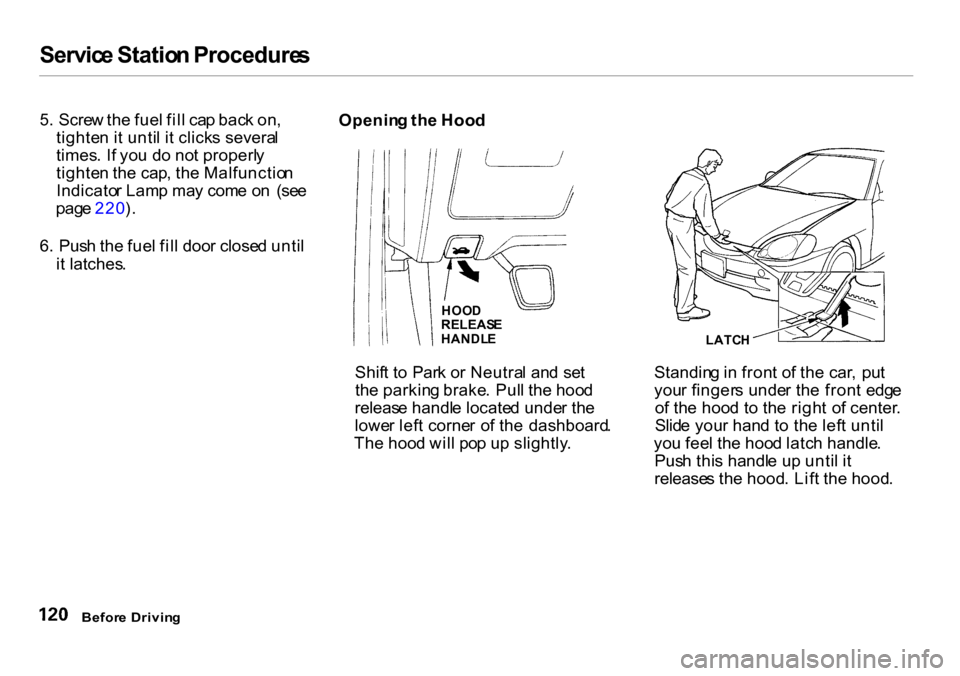
Shif t t o Par k o r Neutra l an d se t
th e parkin g brake . Pul l th e hoo d
releas e handl e locate d unde r th e
lowe r lef t corne r o f th e dashboard .
Th e hoo d wil l po p u p slightly . Standin
g in fron t o f th e car , pu t
you r finger s unde r th e fron t edg e
o f th e hoo d t o th e righ t o f center .
Slid e you r han d t o th e lef t unti l
yo u fee l th e hoo d latc h handle .
Pus h thi s handl e u p unti l i t
release s th e hood . Lif t th e hood .
Befor e Drivin g
LATC
H
HOO
D
RELEAS E
HANDL E
Page 124 of 262
Servic
e Statio n Procedure s
I f yo u ca n ope n th e hoo d withou t
liftin g th e hoo d latc h handle , o r th e
hoo d latc h handl e move s stiffl y o r
doe s no t sprin g bac k a s before , th e
mechanis m shoul d b e cleane d an d
lubricate d (se e pag e 174 ).
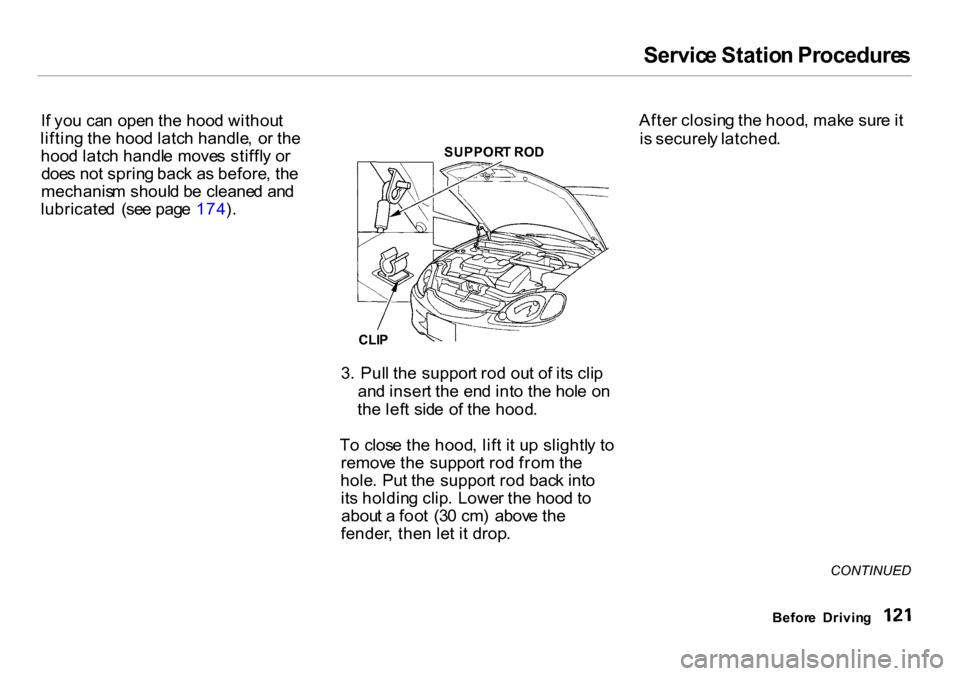
3. Pul l th e suppor t ro d ou t o f it s cli p
an d inser t th e en d int o th e hol e o n
th e lef t sid e o f th e hood .
T o clos e th e hood , lif t i t u p slightl y t o
remov e th e suppor t ro d fro m th e
hole . Pu t th e suppor t ro d bac k int o
it s holdin g clip . Lowe r th e hoo d t o
abou t a foo t (3 0 cm ) abov e th e
fender , the n le t i t drop . Afte
r closin g th e hood , mak e sur e it
i s securel y latched .
CONTINUED
Befor e Drivin g
SUPPOR
T RO D
CLI P
Page 129 of 262
Accessorie
s an d Modification s
Modifyin g you r car , o r installin g
som e non-Hond a accessories , ca n
mak e you r ca r unsafe . Befor e yo u
mak e an y modification s o r ad d an y
accessories , b e sur e t o rea d th e
followin g information .
Accessorie s
You r deale r ha s Genuin e Hond a
accessorie s tha t allo w yo u t o
personaliz e you r car . Thes e
accessorie s hav e bee n designe d an d
approve d fo r you r car , an d ar e
covere d b y warranty .
Non-Hond a accessorie s ar e usuall y
designe d fo r universa l applications .
Althoug h aftermarke t accessorie s
ma y fi t o n you r car , the y ma y no t
mee t factor y specifications , an d
coul d adversel y affec t you r car' s
handlin g an d stability . (Se e
"Modifications " o n th e pag e 12 7 fo r
additiona l information. ) Whe
n properl y installed , cellula r
phones , alarms , two-wa y radios , an d
low-powere d audi o system s shoul d
no t interfer e wit h you r car' s
computer-controlle d systems , suc h
a s th e SRS .
However
, i f electroni c accessorie s
ar e improperl y installed , o r excee d
you r car' s electrica l syste m capacity ,
the y ca n interfer e wit h th e operatio n
o f you r car , o r eve n caus e th e
airbag s t o deploy .
Befor e installin g an y accessory :
Mak e sur e th e accessor y doe s no t
obscur e an y lights , o r interfer e
wit h prope r ca r operatio n o r
performance .
B e sur e electroni c accessorie s d o
no t overloa d electrica l circuit s
(se e pag e 222 ).
Hav e th e installe r contac t you r
Hond a deale r fo r assistanc e befor e
installin g an y electroni c accessory .
I f possible , hav e you r deale r inspec t
th e fina l installation .
Befor e Drivin g
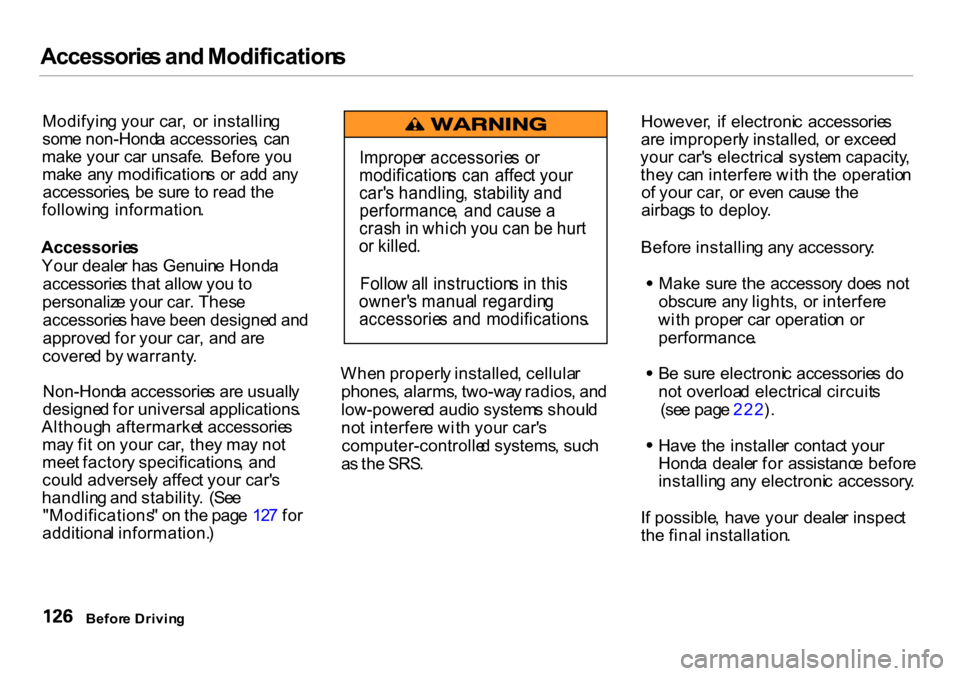
Imprope
r accessorie s o r
modification s ca n affec t you r
car' s handling , stabilit y an d
performance , an d caus e a
cras h in whic h yo u ca n b e hur t
o r killed .
Follo w al l instruction s i n thi s
owner' s manua l regardin g
accessorie s an d modifications .
Page 131 of 262
Carryin
g Carg o
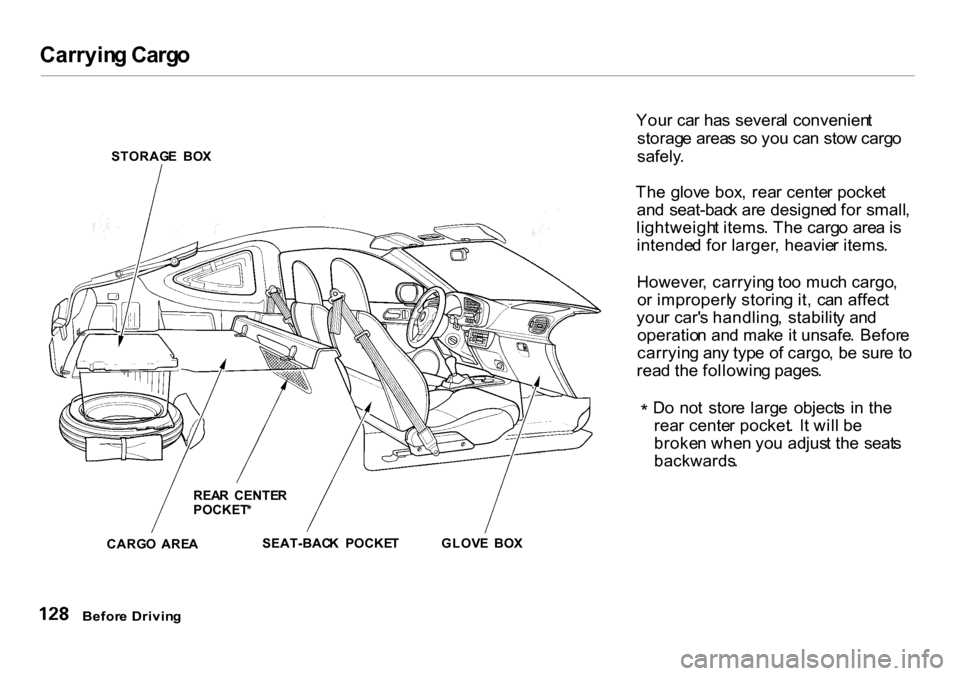
STORAG E BO X
REA R CENTE R
POCKET *
CARG O ARE A SEAT-BAC
K POCKE TGLOVE BO X You
r ca r ha s severa l convenien t
storag e area s s o yo u ca n sto w carg o
safely .
Th e glov e box , rea r cente r pocke t
an d seat-bac k ar e designe d fo r small ,
lightweigh t items . Th e carg o are a is
intende d fo r larger , heavie r items .
However , carryin g to o muc h cargo ,
o r improperl y storin g it , ca n affec t
you r car' s handling , stabilit y an d
operatio n an d mak e it unsafe . Befor e
carryin g an y typ e o f cargo , b e sur e t o
rea d th e followin g pages .
* D
o no t stor e larg e object s i n th e
rea r cente r pocket . I t wil l b e
broke n whe n yo u adjus t th e seat s
backwards .
Befor e Drivin g