ad blue HONDA INSIGHT 2013 2.G Navigation Manual
[x] Cancel search | Manufacturer: HONDA, Model Year: 2013, Model line: INSIGHT, Model: HONDA INSIGHT 2013 2.GPages: 202, PDF Size: 11.63 MB
Page 136 of 202
135
XXPlaying Bluetooth ® AudioXAudio Screen Control
Audio Screen Control
HAUDIO button (in BT mode)
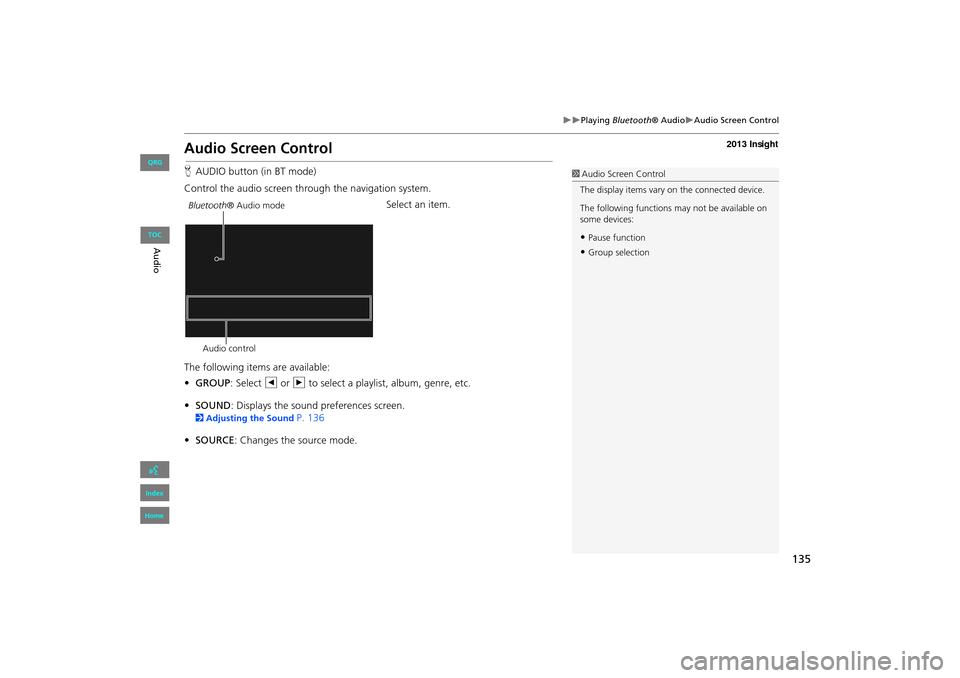
Control the audio screen through the navigation system. Select an item.
The following items are available:
• GROUP : Select b or n to select a playlist, album, genre, etc.
• SOUND : Displays the sound preferences screen.
2Adjusting the Sound P. 136
• SOURCE : Changes the source mode.
1Audio Screen Control
The display items vary on the connected device.
The following functions may not be available on
some devices:
•Pause function
•Group selection
Bluetooth ® Audio mode
Audio control
INSIGHT_KA-31TM8820.book 135 ページ 2011年8月9日 火曜日 午後1時26分
QRG
Index
Home
Au dioTOC
Page 138 of 202
137
Audio Remote Controls
Steering Wheel Controls
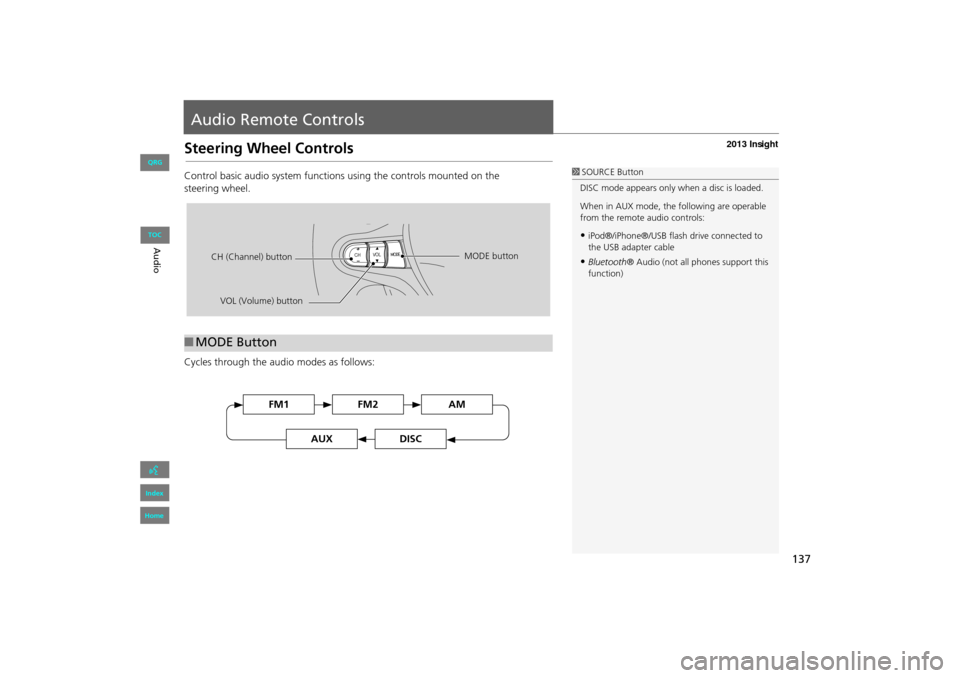
Control basic audio system functions using the controls mounted on the
steering wheel.
Cycles through the audio modes as follows:
■MODE Button
1 SOURCE Button
DISC mode appears only when a disc is loaded.
When in AUX mode, the following are operable
from the remote audio controls:
•iPod®/iPhone®/USB flas h drive connected to
the USB adapter cable
•Bluetooth ® Audio (not all phones support this
function)
VOL (Volume) button
CH (Channel) button
MODE button
FM2FM1AM
DISCAUX
INSIGHT_KA-31TM8820.book 137 ページ 2011年8月9日 火曜日 午後1時26分
QRG
Index
Home
Au
dioTOC
Page 139 of 202
138
XXAudio Remote ControlsXSteering Wheel Controls
Adjusts the volume.
•Press the R (Volume) button to increase the volume.
• Press the U (Volume) button to decrease the volume.
FM/AM
• Press the N (Channel) button to select the next preset station (channel).
• Press the B (Channel) button to select the previous preset station (channel).
• Press and hold the N or B button to skip to the next or previous station
(channel) in the frequency.
DISC, iPod®, USB, or Bluetooth® Audio
• Press the N button to skip to the next track.
• Press the B button to skip to the beginning of the current track. Press the B
button again to go to the beginning of the previous track.
• Press and hold the N or B button to skip up or down a folder (DISC/USB).
■VOL (Volume) Button
■CH (Channel) Button
INSIGHT_KA-31TM8820.book 138 ページ 2011年8月9日 火曜日 午後1時26分
QRG
Index
Home
Au dioTOC
Page 140 of 202
139
Bluetooth® HandsFreeLink®
This section describes how to operate Bluetooth® HandsFreeLink®. You
can place and receive phone calls using your vehicle’s audio system without handling your cell phone.
Bluetooth® HandsFreeLink®............... 140
Pairing a Phone .................................... 142
Setting Up Speed Dialing...................... 147
Editing Phone Information.................... 150
Phone Setup ........................................ 151
Making a Call....................................... 152
Receiving a Call .................................... 155
HFL Menus ........................................... 156
INSIGHT_KA-31TM8820.book 139 ページ 2011年8月9日 火曜日 午後1時26分
QRG
Index
Home2013 Insight
Page 141 of 202
140
Bluetooth® HandsFreeLink®
Bluetooth® HandsFreeLink®
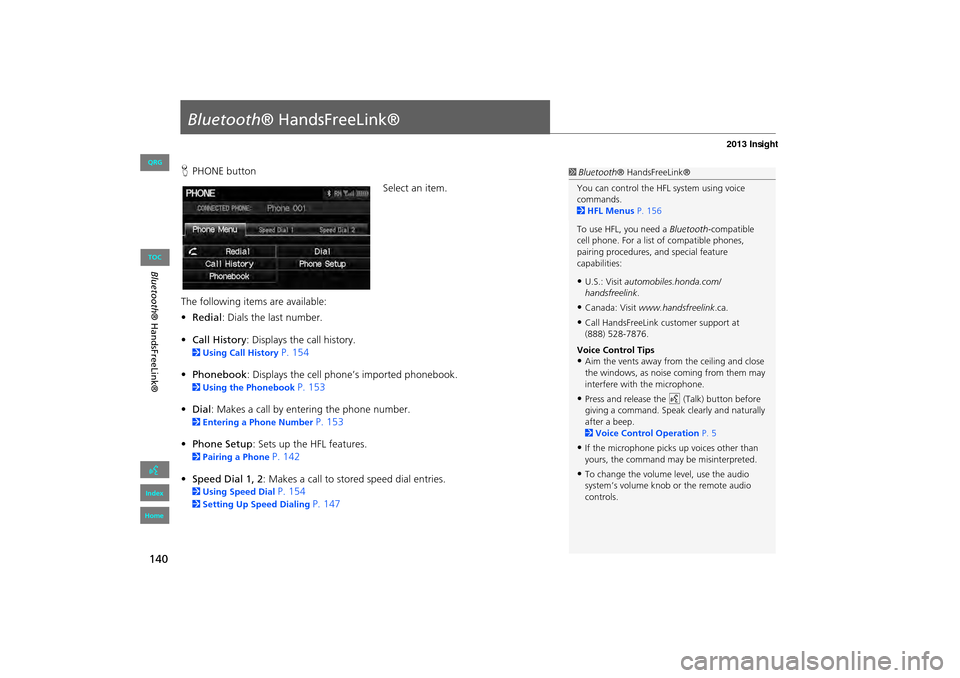
HPHONE button
Select an item.
The following item s are available:
• Redial : Dials the last number.
• Call History : Displays the call history.
2Using Call History P. 154
• Phonebook : Displays the cell phone’s imported phonebook.
2Using the Phonebook P. 153
• Dial: Makes a call by entering the phone number.
2 Entering a Phone Number P. 153
• Phone Setup : Sets up the HFL features.
2Pairing a Phone P. 142
• Speed Dial 1, 2 : Makes a call to stored speed dial entries.
2Using Speed Dial P. 154
2Setting Up Speed Dialing P. 147
1Bluetooth ® HandsFreeLink®
You can control the HFL system using voice
commands.
2 HFL Menus P. 156
To use HFL, you need a Bluetooth-compatible
cell phone. For a list of compatible phones,
pairing procedures, and special feature
capabilities:
•U.S.: Visit automobiles.honda.com/
handsfreelink .
•Canada: Visit www.handsfreelink .ca.
•Call HandsFreeLink customer support at
(888) 528-7876.
Voice Control Tips
•Aim the vents away from the ceiling and close
the windows, as noise coming from them may
interfere with the microphone.
•Press and release the d (Talk) button before
giving a command. Speak clearly and naturally
after a beep.
2 Voice Control Operation P. 5
•If the microphone picks up voices other than
yours, the command may be misinterpreted.
•To change the volume level, use the audio
system’s volume knob or the remote audio
controls.
INSIGHT_KA-31TM8820.book 140 ページ 2011年8月9日 火曜日 午後1時26分
QRG
Index
Home
TOC
Page 142 of 202
141
XXBluetooth® HandsFreeLink®X
Say d “Phone command help” or d “Help” any time to get help or hear a list of
commands.
2 Voice Help P. 13
■Help Features1 Bluetooth ® HandsFreeLink®
Bluetooth ® Wireless Technology
Bluetooth ® name and logos are registered
trademarks owned by Bluetooth SIG, Inc., and
any use of such marks by Honda Motor Co., Ltd.,
is under license. Othe r trademarks and trade
names are those of thei r respective owners.
HFL Limitations
An incoming call on HFL will interrupt
Bluetooth ® Audio when it is playing. Audio will
resume when the call is ended.
Certain touchscreen functi ons are disabled while
the vehicle is moving.
2 Limitations for Manual Operation P. 19
INSIGHT_KA-31TM8820.book 141 ページ 2011年8月9日 火曜日 午後1時26分
QRG
Index
Home
Blueto oth® H and sF reeLink®
TOC
Page 143 of 202
142
XXBluetooth® HandsFreeLink®XPairing a Phone
Pairing a Phone
HPHONE button
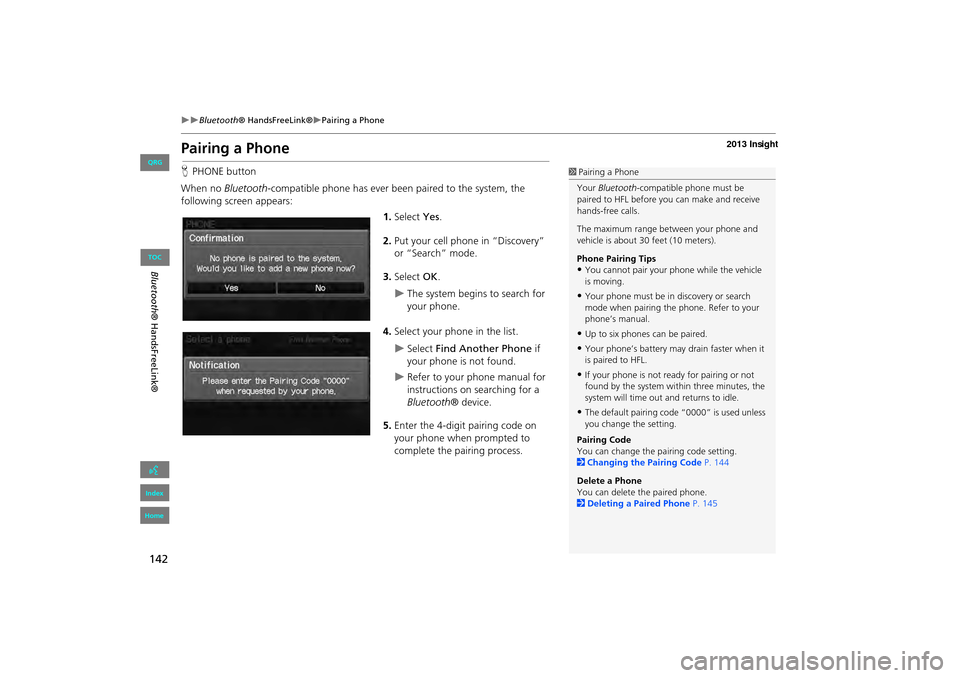
When no Bluetooth-compatible phone has ever been paired to the system, the
following screen appears:
1.Select Yes.
2. Put your cell phone in “Discovery”
or “Search” mode.
3. Select OK.
XThe system begins to search for
your phone.
4. Select your phone in the list.
XSelect Find Another Phone if
your phone is not found.
XRefer to your phone manual for
instructions on searching for a
Bluetooth ® device.
5. Enter the 4-digit pairing code on
your phone when prompted to
complete the pairing process.
1Pairing a Phone
Your Bluetooth -compatible phone must be
paired to HFL before you can make and receive
hands-free calls.
The maximum range be tween your phone and
vehicle is about 30 feet (10 meters).
Phone Pairing Tips
•You cannot pair your phone while the vehicle
is moving.
•Your phone must be in discovery or search
mode when pairing the phone. Refer to your
phone’s manual.
•Up to six phones can be paired.
•Your phone’s battery may drain faster when it
is paired to HFL.
•If your phone is not r eady for pairing or not
found by the system within three minutes, the
system will time out and returns to idle.
•The default pairing code “0000” is used unless
you change the setting.
Pairing Code
You can change the pairing code setting.
2 Changing the Pairing Code P. 144
Delete a Phone
You can delete the paired phone.
2 Deleting a Paired Phone P. 145
INSIGHT_KA-31TM8820.book 142 ページ 2011年8月9日 火曜日 午後1時26分
QRG
Index
Home
Blueto oth® H and sF reeLink®
TOC
Page 144 of 202
143
XXBluetooth® HandsFreeLink®XPairing a Phone
HPHONE button X Phone Setup
Use the Phone setup screen to pair an additional Bluetooth -compatible phone if a
phone has been previously paired to the system.
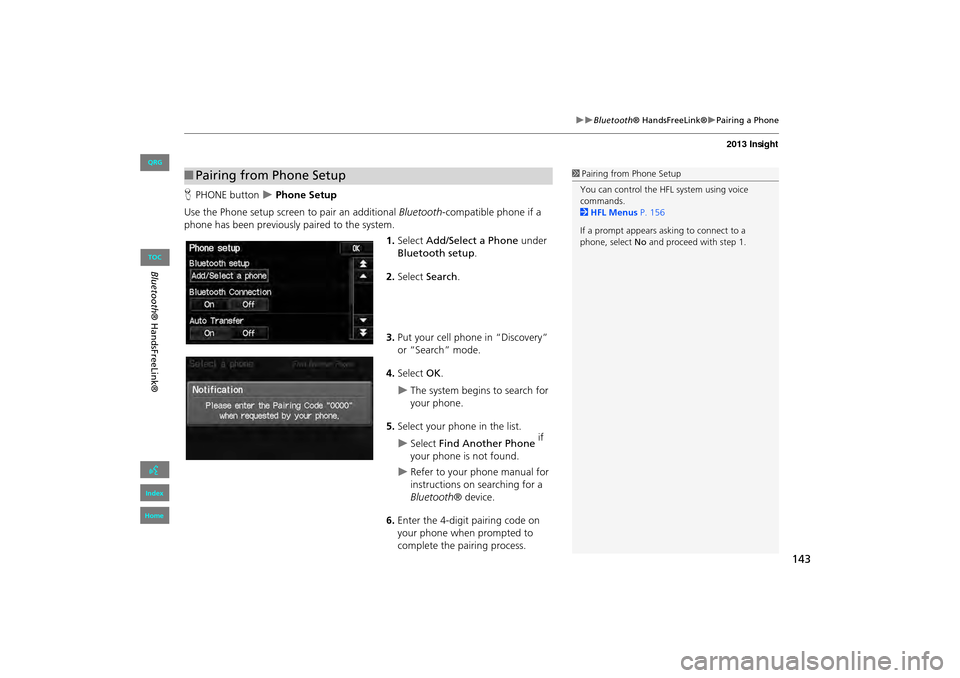
1.Select Add/Select a Phone under
Bluetooth setup.
2. Select Search.
3. Put your cell phone in “Discovery”
or “Search” mode.
4. Select OK.
XThe system begins to search for
your phone.
5. Select your phon e in the list.
XSelect Find Another Phone if
your phone is not found.
XRefer to your phone manual for
instructions on searching for a
Bluetooth ® device.
6. Enter the 4-digit pairing code on
your phone when prompted to
complete the pairing process.
■Pairing from Phone Setup1 Pairing from Phone Setup
You can control the HFL system using voice
commands.
2 HFL Menus P. 156
If a prompt appears asking to connect to a
phone, select No and proceed with step 1.
INSIGHT_KA-31TM8820.book 143 ページ 2011年8月9日 火曜日 午後1時26分
QRG
Index
Home
Blueto oth® H and sF reeLink®
TOC
Page 145 of 202
144
XXBluetooth® HandsFreeLink®XPairing a Phone
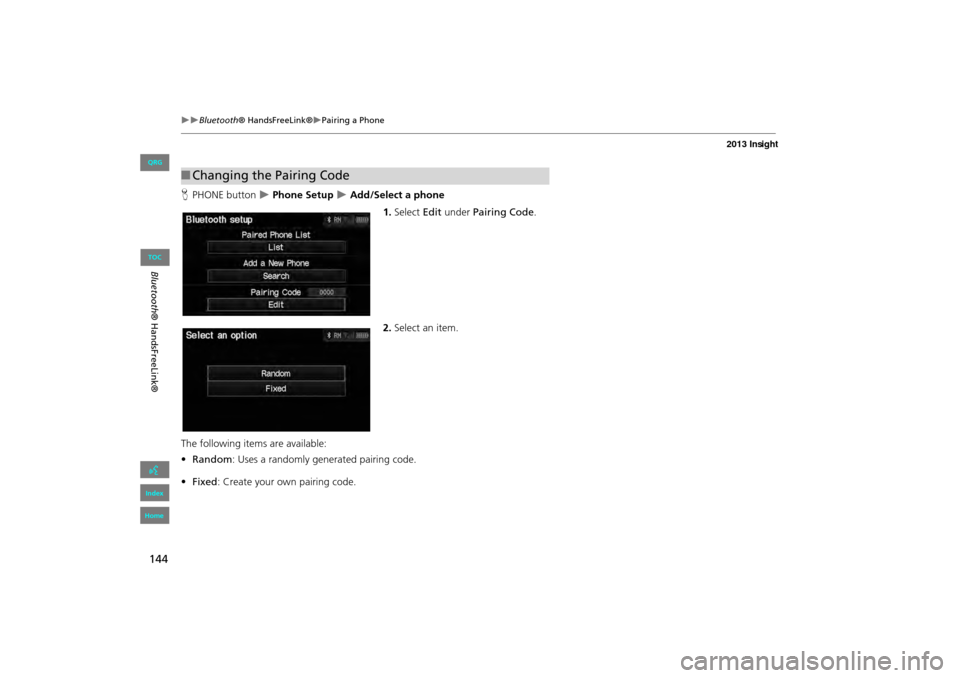
HPHONE button X Phone Setup X Add/Select a phone
1.Select Edit under Pairing Code .
2. Select an item.
The following item s are available:
• Random : Uses a randomly generated pairing code.
• Fixed : Create your own pairing code.
■Changing the Pairing Code
INSIGHT_KA-31TM8820.book 144 ページ 2011年8月9日 火曜日 午後1時26分
QRG
Index
Home
Blueto oth® H and sF reeLink®
TOC
Page 146 of 202
145
XXBluetooth® HandsFreeLink®XPairing a Phone
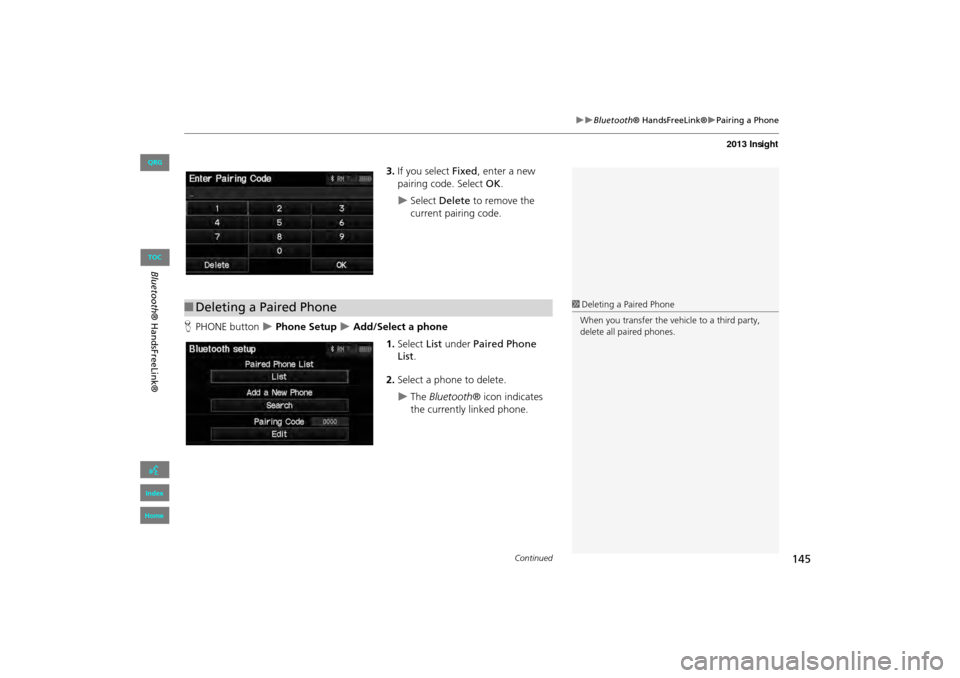
3.If you select Fixed , enter a new
pairing code. Select OK.
XSelect Delete to remove the
current pairing code.
H PHONE button
X Phone Setup X Add/Select a phone
1.Select List under Paired Phone
List .
2. Select a phone to delete.
XThe Bluetooth ® icon indicates
the currently linked phone.
■ Deleting a Paired Phone1Deleting a Paired Phone
When you transfer the vehicle to a third party,
delete all paired phones.
Continued
INSIGHT_KA-31TM8820.book 145 ページ 2011年8月9日 火曜日 午後1時26分
QRG
Index
Home
Bl ueto oth® H and sF reeLink®
TOC