phone HONDA INSIGHT 2013 2.G Navigation Manual
[x] Cancel search | Manufacturer: HONDA, Model Year: 2013, Model line: INSIGHT, Model: HONDA INSIGHT 2013 2.GPages: 202, PDF Size: 11.63 MB
Page 2 of 202

Contents
2System Setup P. 17
Start-up18 Voice Control System20Interface Settings 22 Personal Information 30
Routing & Guidance 40Clock Adjustment 47Vehicle50 Data Reset53
2Navigation P. 55
Entering a Destination 56Calculating the Route 77Driving to Your Destination 80Map Menu 85
Changing Your Route 101Changing Your Destination 108Resuming Your Trip 112
2Audio P. 113
Audio System 114 Playing FM/AM Radio 116Playing a Disc 121 Playing an iPod®125
Playing a USB Flash Drive 129Playing Bluetooth ® Audio133Adjusting the Sound 136Audio Remote Controls 137
2Bluetooth® HandsFreeLink® P. 139
Bluetooth ®
HandsFreeLink® 140Pairing a Phone
142 Setting Up Speed Dialing 147Editing Phone
Information 150
Phone Setup 151 Making a Call152 Receiving a Call155 HFL Menus156
2Other Features P. 159
Trip Computer160 Information Functions 161Rearview Camera 162
2Troubleshooting P. 163
Troubleshooting164Error Messages171
2Reference Information P. 175
System Initialization176System Limitations 178Customer Assistance 180Legal Information 183
2Voice Commands P. 187
Voice Commands188List of Categories 197
Quick Reference GuideP.2
System SetupP.17
NavigationP.55
AudioP.113
Bluetooth® HandsFreeLink®P.139
Other FeaturesP.159
TroubleshootingP.163
Reference InformationP.175
Voice CommandsP.187
IndexP.198
INSIGHT_KA-31TM8820.book 1 ページ 2011年8月9日 火曜日 午後1時26分
QRGQuick Reference Guide
IndexIndex
HomeBook Table of Contents
TOCChapter Table of Contents
Navigation Key
Voice
Commands
2013 I n sig ht
Page 4 of 202
Quick Reference Guide - 2013 Insight
3
Other Features
Rearview Camera (P162)
Helps you check for obstacles around the rear of your vehicle on the navigation screen when reversing.
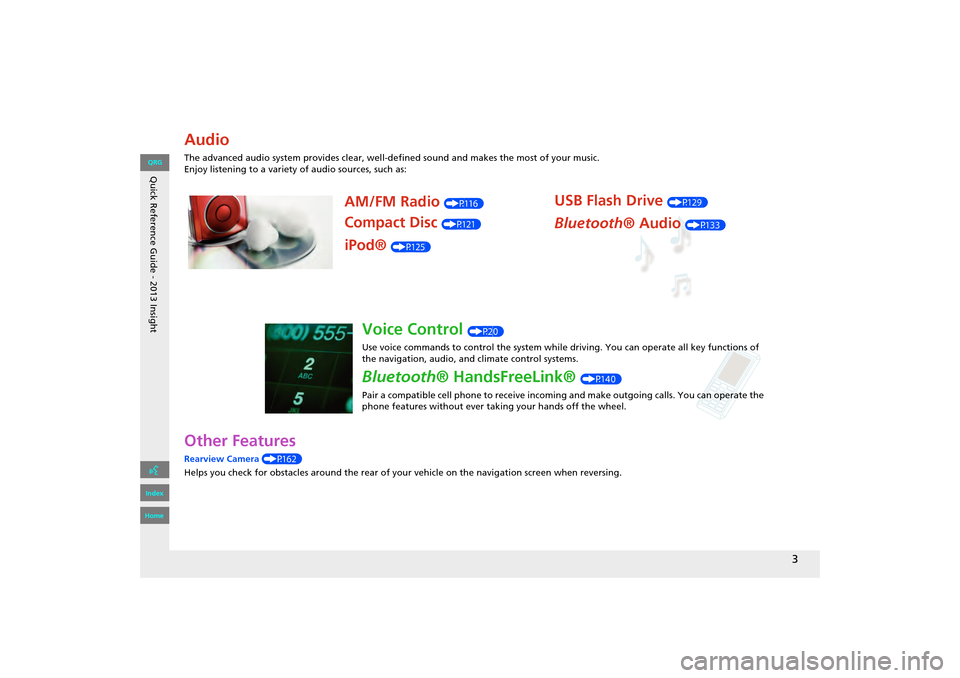
Audio
The advanced audio system provides clear, well-defined sound and makes the most of your music.
Enjoy listening to a variety of audio sources, such as:
AM/FM Radio (P116)
Compact Disc (P121)
iPod® (P125)
USB Flash Drive (P129)
Bluetooth® Audio (P133)
Voice Control (P20)
Use voice commands to control the system while driving. You can operate all key functions of
the navigation, audio, an d climate control systems.
Bluetooth® HandsFreeLink® (P140)
Pair a compatible cell phone to receive incoming and make outgoing calls. You can operate the
phone features without ever taking your hands off the wheel.
INSIGHT_KA-31TM8820.book 3 ページ 2011年8月9日 火曜日 午後1時26分
QRG
Index
Home
Page 5 of 202
Quick Reference Guide - 2013 Insight
4
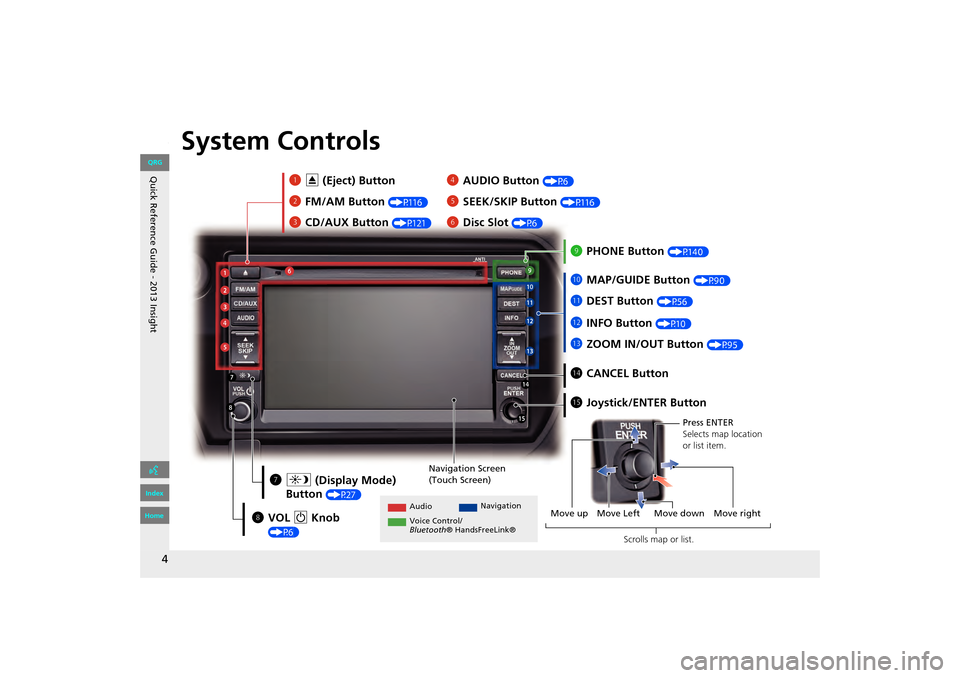
System Controls
3CD/AUX Button (P121)
1E (Eject) Button
2 FM/AM Button
(P116)
Navigation Screen
(Touch Screen)
Audio Navigation
Voice Control/
Bluetooth ® HandsFreeLink®
6Disc Slot (P6)
4AUDIO Button (P6)
5SEEK/SKIP Button (P116)
7a (Display Mode)
Button
(P27)
lb DEST Button (P56)
9PHONE Button (P140)
laMAP/GUIDE Button (P90)
leCANCEL Button
lc
INFO Button
(P10)
ldZOOM IN/OUT Button (P95)
lfJoystick/ENTER Button
8 VOL 9 Knob
(P6) Press ENTER
Selects map location
or list item.
Move up Move Left Move down Move right Scrolls map or list.
INSIGHT_KA-31TM8820.book 4 ページ 2011年8月9日 火曜日 午後1時26分
QRG
Index
Home
Page 6 of 202
Quick Reference Guide - 2013 Insight
5
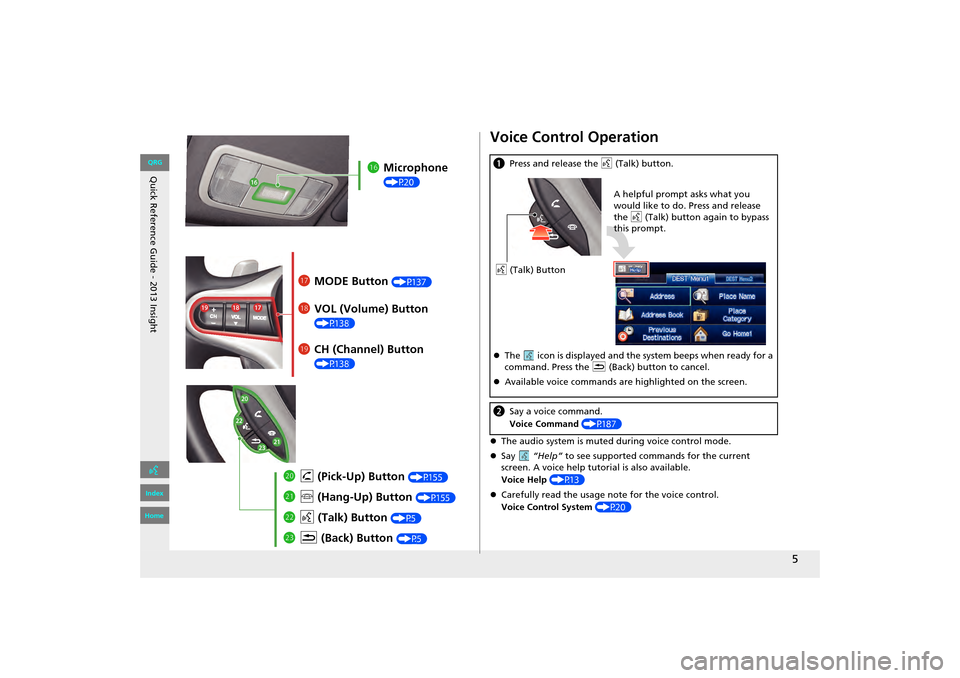
lgMicrophone
(P20)
lh MODE Button (P137)
liVOL (Volume) Button
(P138)
mah (Pick-Up) Button (P155)
md K (Back) Button (P5)
mcd (Talk) Button (P5)
mb j (Hang-Up) Button (P155)
lj CH (Channel) Button
(P138)
Voice Control Operation
zThe audio system is muted during voice control mode.
z Say “Help” to see supported comm ands for the current
screen. A voice help tutorial is also available.
Voice Help (P13)
z Carefully read the usage note for the voice control.
Voice Control System (P20)
a Press and release the d (Talk) button.
z The icon is displayed and the system beeps when ready for a
command. Press the K (Back) button to cancel.
z Available voice commands are highlighted on the screen.
b Say a voice command.
Voice Command (P187)
d (Talk) Button A helpful prompt asks what you
would like to do. Press and release
the
d (Talk) button again to bypass
this prompt.
INSIGHT_KA-31TM8820.book 5 ページ 2011年8月9日 火曜日 午後1時26分
QRG
Index
Home
Page 11 of 202
10
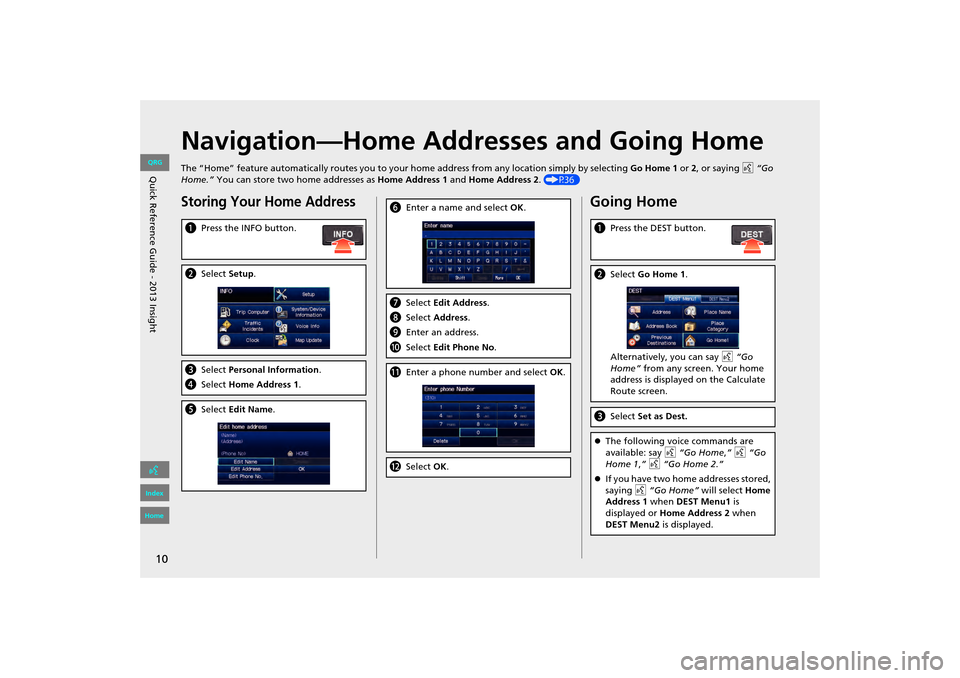
Navigation—Home Addresses and Going Home
The “Home” feature automatically routes you to your home address from any location simply by selecting Go Home 1 or 2, or saying d “Go
Home.” You can store two home addresses as Home Address 1 and Home Address 2. (P36)
Storing Your Home Address
aPress the INFO button.
bSelect Setup.
cSelect Personal Information.
d Select Home Address 1.
eSelect Edit Name .
fEnter a name and select OK .
gSelect Edit Address.
h Select Address.
i Enter an address.
j Select Edit Phone No .
kEnter a phone number and select OK.
l Select OK.
Going Home
a Press the DEST button.
bSelect Go Home 1 .
Alternatively, you can say d “Go
Home” from any screen. Your home
address is displayed on the Calculate
Route screen.
c Select Set as Dest.
zThe following voice commands are
available: say d “Go Home ,” d “Go
Home 1 ,” d “Go Home 2.”
z If you have two home addresses stored,
saying d “Go Home” will select Home
Address 1 when DEST Menu1 is
displayed or Home Address 2 when
DEST Menu2 is displayed.
INSIGHT_KA-31TM8820.book 10 ページ 2011年8月9日 火曜日 午後1時26分
QRG
Index
Home
Quic k R efer en ce G uid e - 2013 Insight
Page 21 of 202
20
Voice Control System
Your vehicle has a voice control system that allows hands-free operation of most of
the navigation system functions. You can also control the audio and climate control
system, and make and rece ive phone calls using Bluetooth ® HandsFreeLink®.
The voice control system uses the d (Talk) and K (Back) buttons on the steering
wheel and a microphone near the map lights on the ceiling.
A “Voice Info” feature provides a tutorial that explains how to use the voice control
system.
2 Voice Help P. 13
Command Input
If the system does not understand a command or you wait too long to give a
command, it responds with “Pardon? No co mmand was heard. Please press the talk
button and say a command.”
When you give a command, the system ge nerally either repeats the command as a
confirmation or asks you for further information. If you do not wish to hear this
feedback, you can turn it off. However, list ening to the feedback will help familiarize
you with the way the system expe cts commands to be phrased.
2Basic Settings P. 24
If the system cannot perform a command or the command is not appropriate for the
screen you are on, the system beeps.
If the system responds with prompts such as “Please use the touch screen to…” or
“Please use the joystick to…,” the system is asking for input that cannot be
performed using the voice control system.
On character input screens, a list of possi ble characters is displayed if the system
does not recognize your command.
You can find out which voice commands are available for a particular screen using
the d Help command. The system will disp lay and read the list of available
commands to you.
1 d (Talk) Button
When you press the d (Talk) button, a helpful
prompt asks what you would like to do. Press
and release the d (Talk) button again to bypass
this prompt and give a command.
1 Command Input
The audio system is muted while using the voice
control system.
INSIGHT_KA-31TM8820.book 20 ページ 2011年8月9日 火曜日 午後1時26分
QRG
Index
Home
Sy stem S etup
TOC
Page 22 of 202
21
XXVoice Control SystemXVoice Recognition
Voice Recognition
To achieve optimum voice recognition when using either the navigation voice control system or Bluetooth® HandsFreeLink®:
• Make sure the correct screen is displayed for the voice command that you are using.
2 Voice Commands P. 188
• Close the windows and moonroof.
• Adjust the dashboard and side vents so air does not blow onto the microphone on the ceiling.
• Speak clearly in a clear, natural speaking voice without pausing between words.
• Reduce any background noise if possible. The system may misinterpret your command if more than one person is speaking
• Refer to the Voic e Info tutorial.
2Voice Help P. 13
INSIGHT_KA-31TM8820.book 21 ページ 2011年8月9日 火曜日 午後1時26分
QRG
Index
Home
System S etup
TOC
at the same time.
Page 33 of 202
32
XXPersonal InformationXAddress Book
HINFO button X Setup X Personal Information X Address Book
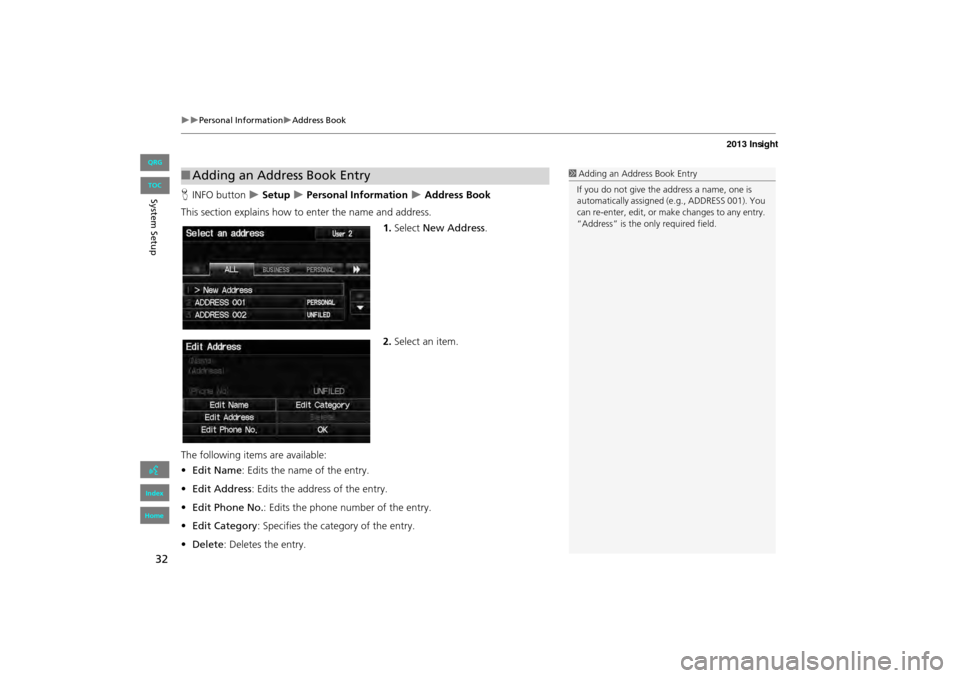
This section explains how to enter the name and address.
1.Select New Address .
2. Select an item.
The following item s are available:
• Edit Name : Edits the name of the entry.
• Edit Address : Edits the address of the entry.
• Edit Phone No. : Edits the phone number of the entry.
• Edit Category : Specifies the category of the entry.
• Delete : Deletes the entry.
■Adding an Address Book Entry1 Adding an Address Book Entry
If you do not give the address a name, one is
automatically assigned (e.g., ADDRESS 001). You
can re-enter, edit, or make changes to any entry.
“Address” is the only required field.
INSIGHT_KA-31TM8820.book 32 ページ 2011年8月9日 火曜日 午後1時26分
QRG
Index
Home
System S etup
TOC
Page 34 of 202
33
XXPersonal InformationXAddress Book
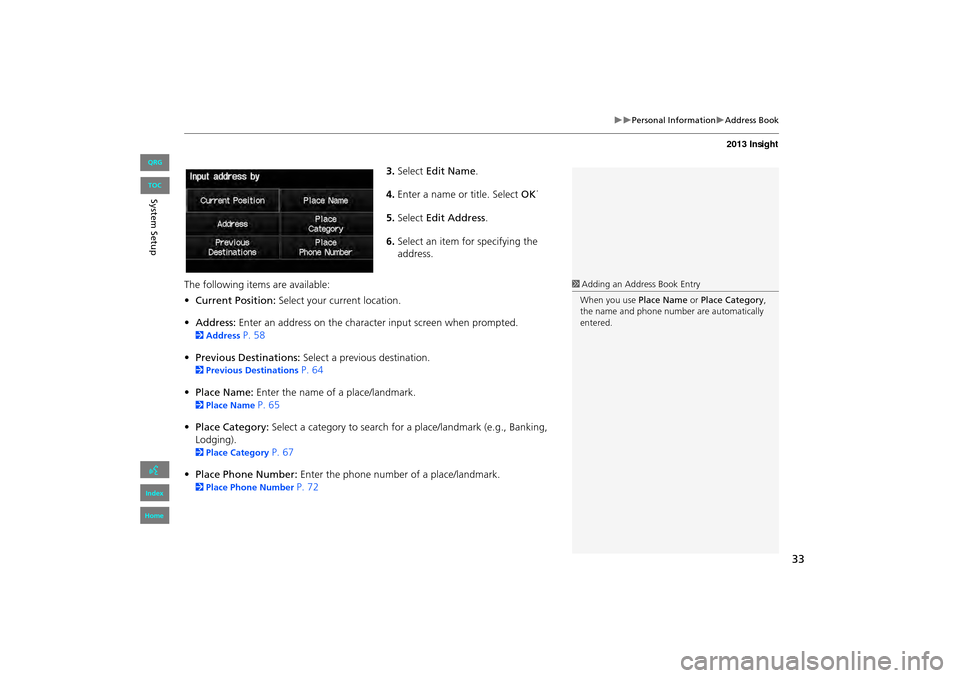
3.Select Edit Name .
4. Enter a name or title. Select OK.
5. Select Edit Address .
6. Select an item for specifying the
address.
The following items are available:
• Current Position: Select your current location.
• Address: Enter an address on the character input screen when prompted.
2Address P. 58
• Previous Destinations: Select a previous destination.
2Previous Destinations P. 64
• Place Name: Enter the name of a place/landmark.
2Place Name P. 65
• Place Category: Select a category to search for a place/landmark (e.g., Banking,
Lodging).
2 Place Category P. 67
• Place Phone Number: Enter the phone number of a place/landmark.
2Place Phone Number P. 72
1Adding an Address Book Entry
When you use Place Name or Place Category ,
the name and phone numb er are automatically
entered.
INSIGHT_KA-31TM8820.book 33 ページ 2011年8月9日 火曜日 午後1時26分
QRG
Index
Home
Sy stem S etup
TOC
Page 35 of 202
34
XXPersonal InformationXAddress Book
HINFO button X Setup X Personal Information X Address Book
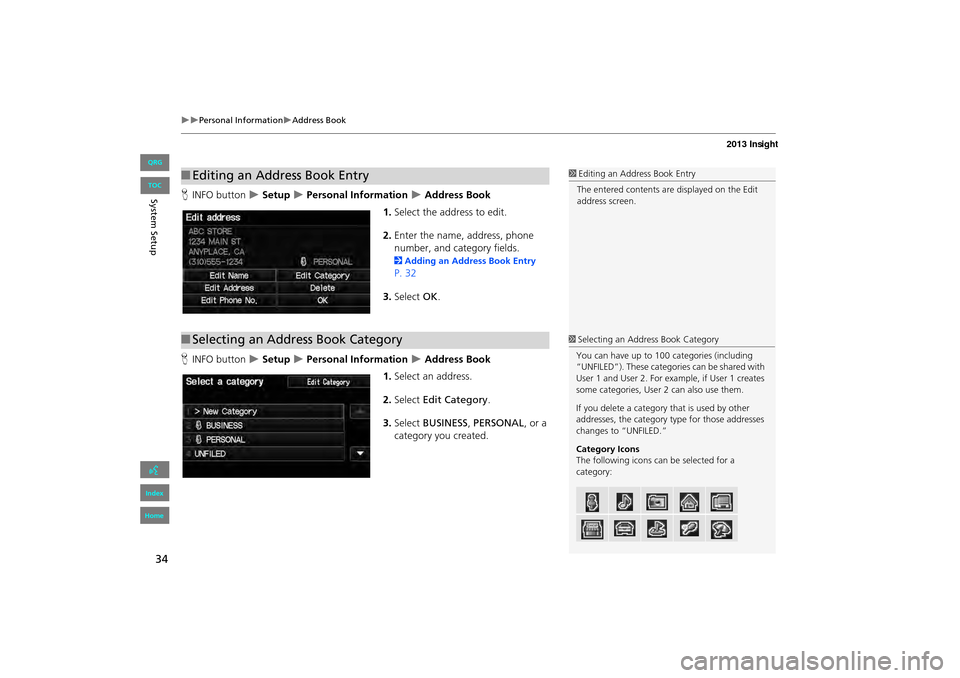
1. Select the address to edit.
2. Enter the name, address, phone
number, and category fields.
2 Adding an Address Book Entry
P. 32
3. Select OK.
H INFO button
X Setup X Personal Information X Address Book
1. Select an address.
2. Select Edit Category .
3. Select BUSINESS, PERSONAL , or a
category you created.
■ Editing an Address Book Entry1 Editing an Address Book Entry
The entered contents are displayed on the Edit
address screen.
■ Selecting an Address Book Category1Selecting an Address Book Category
You can have up to 100 categories (including
“UNFILED”). These categories can be shared with
User 1 and User 2. For ex ample, if User 1 creates
some categories, User 2 can also use them.
If you delete a category that is used by other
addresses, the category type for those addresses
changes to “UNFILED.”
Category Icons
The following icons can be selected for a
category:
INSIGHT_KA-31TM8820.book 34 ページ 2011年8月9日 火曜日 午後1時26分
QRG
Index
Home
Sy stem S etup
TOC