headlights HONDA INSIGHT 2019 (in English) User Guide
[x] Cancel search | Manufacturer: HONDA, Model Year: 2019, Model line: INSIGHT, Model: HONDA INSIGHT 2019Pages: 675, PDF Size: 36.97 MB
Page 199 of 675
197
uuOperating the Switches Around the Steering Wheel uAuto High-Beam
Continued
Controls
Auto High-Beam
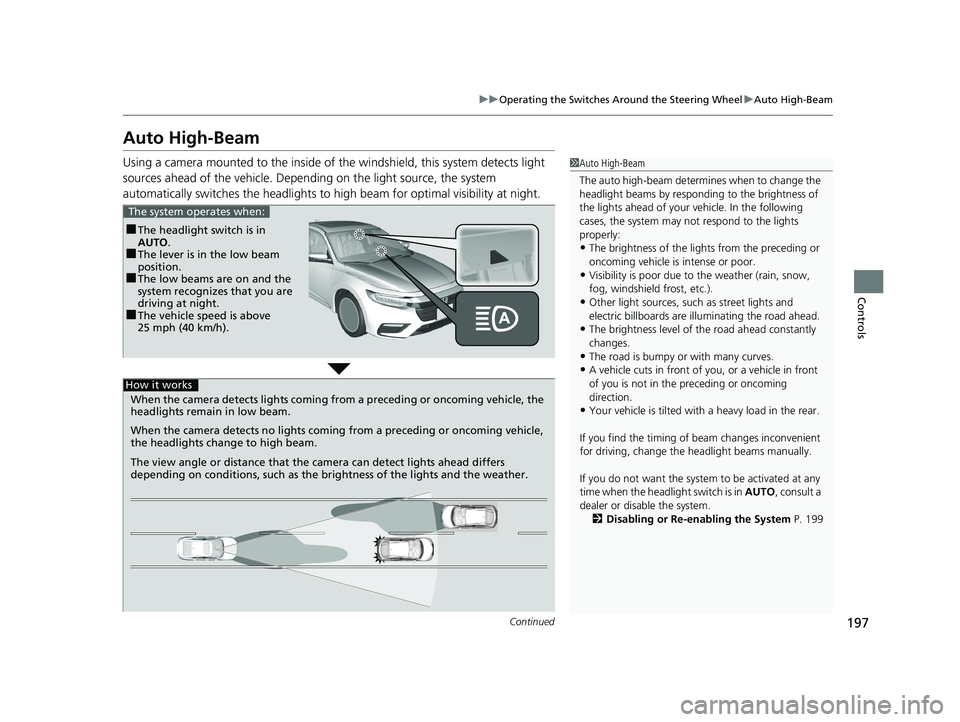
Using a camera mounted to the inside of the windshield, this system detects light
sources ahead of the vehicle. Depending on the light source, the system
automatically switches the headlights to hi gh beam for optimal visibility at night.1Auto High-Beam
The auto high-beam determines when to change the
headlight beams by responding to the brightness of
the lights ahead of your vehicle. In the following
cases, the system may not respond to the lights
properly:
•The brightness of the lights from the preceding or
oncoming vehicle is intense or poor.
•Visibility is poor due to the weather (rain, snow,
fog, windshield frost, etc.).
•Other light sources, such as street lights and
electric billboards are illuminating the road ahead.
•The brightness level of th e road ahead constantly
changes.
•The road is bumpy or with many curves.
•A vehicle cuts in front of you, or a vehicle in front
of you is not in the preceding or oncoming
direction.
•Your vehicle is tilted with a heavy load in the rear.
If you find the timing of beam changes inconvenient
for driving, change the headlight beams manually.
If you do not want the system to be activated at any
time when the headlight switch is in AUTO, consult a
dealer or disable the system. 2 Disabling or Re-enabling the System P. 199
■The headlight switch is in
AUTO.
■The lever is in the low beam
position.
■The low beams are on and the
system recognizes that you are
driving at night.
■The vehicle speed is above
25 mph (40 km/h).
The system operates when:
When the camera detects lig hts coming from a preceding or oncoming vehicle, the
headlights remain in low beam.
When the camera detects no lights coming from a preceding or oncoming vehicle,
the headlights change to high beam.
The view angle or distance that the camera can detect lights ahead differs
depending on conditions, such as the brightness of the lights and the weather.
How it works
19 INSIGHT HMIN-31TXM6000.book 197 ページ 2018年4月20日 金曜日 午後4時22分
Page 200 of 675

uuOperating the Switches Around the Steering Wheel uAuto High-Beam
198
Controls
To activate the system, turn the headlight
switch to AUTO and then set the headlights
to low beam. The auto high-beam indicator
will come on.
2 Light Switches P. 193
The high beams remain on unless:
•You have been driving below 15 mph (24 km/h) for an extended amount of time.
• The speed of the vehicle drops below 6 mph (10 km/h).
• The windshield wipers have been running at a high speed for more than a few
seconds.
• You enter a well lit location.
The high beams come back on once the condition that caused them to turn off no
longer exists.
If needed, you can temporar ily turn the system off manually. Turn on the high
beams by pushing the lever forward until yo u hear a click, or flash the high beams
once by pulling the lever toward you while driving. To turn the system back on,
repeat one of the procedures.
■Operating the System1 Operating the System
For the auto high-beam to work properly:
•Do not place an object that reflects light on the
dashboard.
•Keep the windshield around the camera clean.
When cleaning the windshield, be careful not to
apply the windshield cleans er to the camera lens.
•Do not attach an object, sticker or film to the area
around the camera.
•Do not touch the camera lens.
If the camera receives a st rong impact, or repairing of
the area near the camera is required, consult a dealer.
If the Some Driver Assist Systems Cannot
Operate: Camera Temperature Too High message
appears:
•Use the climate control system to cool down the
interior and, if necessary, also use defroster mode
with the airflow directed toward the camera.
•Start driving the vehicle to lower the windshield
temperature, which cool s down the area around
the camera.
If the Some Driver Assist Systems Cannot
Operate: Clean Front Windshield message
appears:
•Park your vehicle in a sa fe place, and clean the
windshield. If the message does not disappear after
you have cleaned the windshield and driven for a
while, have your vehicle checked by a dealer.
Headlight Switch
19 INSIGHT HMIN-31TXM6000.book 198 ページ 2018年4月20日 金曜日 午後4時22分
Page 207 of 675
205
Controls
Adjusting the Mirrors
Interior Rearview Mirror
Adjust the angle of the rearview mirror when you are sitting in the correct driving
position.
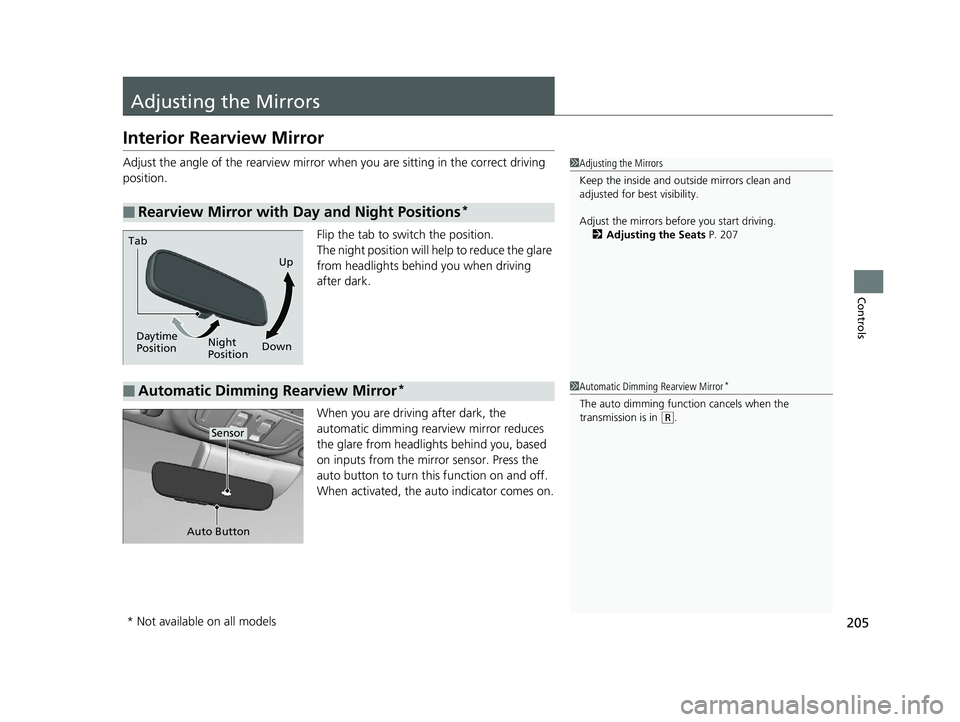
Flip the tab to switch the position.
The night position will help to reduce the glare
from headlights behind you when driving
after dark.
When you are driving after dark, the
automatic dimming rearview mirror reduces
the glare from headlights behind you, based
on inputs from the mirror sensor. Press the
auto button to turn this function on and off.
When activated, the au to indicator comes on.
■Rearview Mirror with Day and Night Positions*
1Adjusting the Mirrors
Keep the inside and out side mirrors clean and
adjusted for best visibility.
Adjust the mirrors before you start driving. 2 Adjusting the Seats P. 207
Daytime
Position Night
Position
Tab
Up
Down
■Automatic Dimming Rearview Mirror*1 Automatic Dimming Rearview Mirror*
The auto dimming function cancels when the
transmission is in
(R.
Auto Button
Sensor
* Not available on all models
19 INSIGHT HMIN-31TXM6000.book 205 ページ 2018年4月20日 金曜日 午後4時22分
Page 384 of 675
382
uuCustomized Features u
Features
*1:Default SettingSetup
Group Customizable Features Description Selectable Settings
VehicleLighting
Setup
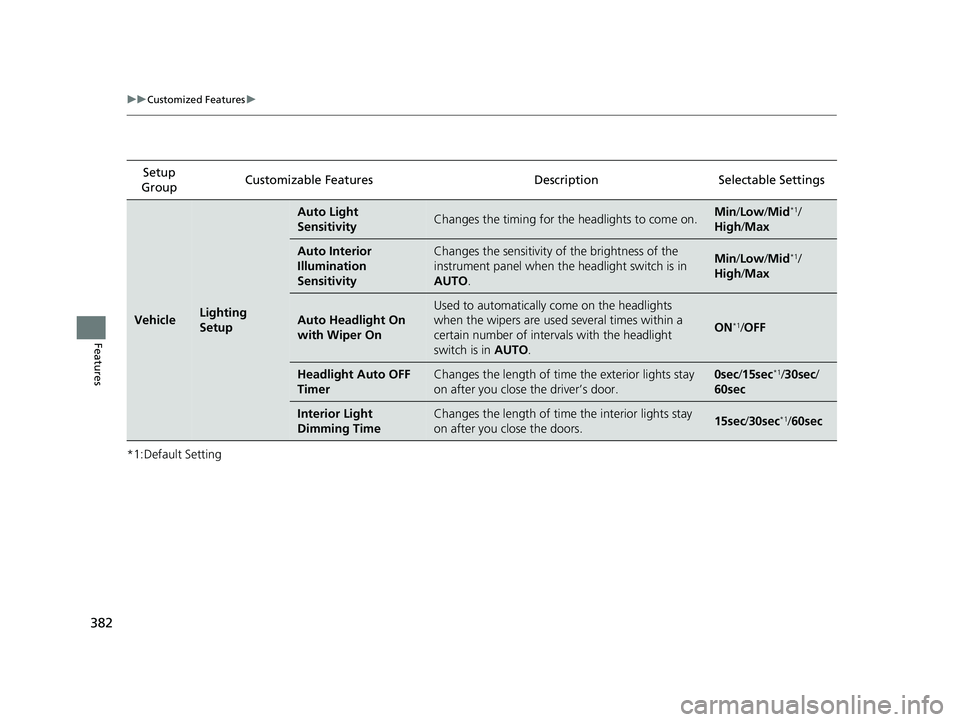
Auto Light
SensitivityChanges the timing for the
headlights to come on.Min/Low/Mid*1/
High /Max
Auto Interior
Illumination
SensitivityChanges the sensitivity of the brightness of the
instrument panel when the headlight switch is in
AUTO .Min/Low/Mid*1/
High /Max
Auto Headlight On
with Wiper On
Used to automatically come on the headlights
when the wipers are used several times within a
certain number of interv als with the headlight
switch is in AUTO.
ON*1/OFF
Headlight Auto OFF
TimerChanges the length of time the exterior lights stay
on after you close the driver’s door.0sec /15sec*1/ 30sec /
60sec
Interior Light
Dimming TimeChanges the length of time the interior lights stay
on after you close the doors.15sec /30sec*1/60sec
19 INSIGHT HMIN-31TXM6000.book 382 ページ 2018年4月20日 金曜日 午後4時22分
Page 490 of 675
488
uuHonda Sensing ®u Collision Mitigation Braking SystemTM (CMBSTM)
Driving
■Vehicle conditions
• Headlight lenses are dirty or the headlights are not properly adjusted.
• The outside of the windshie ld is blocked by dirt, mud, leaves, wet snow, etc.
• The inside of the windshield is fogged.
• An abnormal tire or wheel condition (wrong sized, varied size or construction,
improperly inflated, compact spare tire
*, etc.).
• When tire chains are installed.
• The vehicle is tilted due to a heav y load or suspension modifications.
• The camera temperature gets too high.
• Driving with the parking brake applied.
• When the radar sensor at the lower part of the front bumper gets dirty.
• Driving at night or in a dark place (e .g., a tunnel) with the headlights off.
■Detection limitations
• A vehicle or pedestrian suddenly crosses in front of you.
• The distance between your vehicle and the vehicle or pedestrian ahead of you is
too short.
• A vehicle cuts in front of you at a slow speed, and it brakes suddenly.
• When you accelerate rapidly and approach the vehicle or pedestrian ahead of you
at high speed.
• The vehicle ahead of you is a motorcycle, bicycle, mobility scooter or other small
vehicle.
• When there are animals in front of your vehicle.
• When you drive on a curved, wi nding or undulating road that makes it difficult for
the sensor to properly detect a vehicle in front of you.
• The speed difference between your vehicle an d a vehicle or pedestrian in front of
you is significantly large.
• An oncoming vehicle suddenly comes in front of you.
• Another vehicle suddenly comes in front of you at an intersection, etc.
• Your vehicle abruptly crosses over in front of an oncoming vehicle.
• When driving through a narrow iron bridge.
• When the lead vehicle suddenly slows down.
* Not available on all models
19 INSIGHT HMIN-31TXM6000.book 488 ページ 2018年4月20日 金曜日 午後4時22分
Page 518 of 675
516
uuHonda Sensing ®u Lane Keeping Assist System (LKAS)
Driving
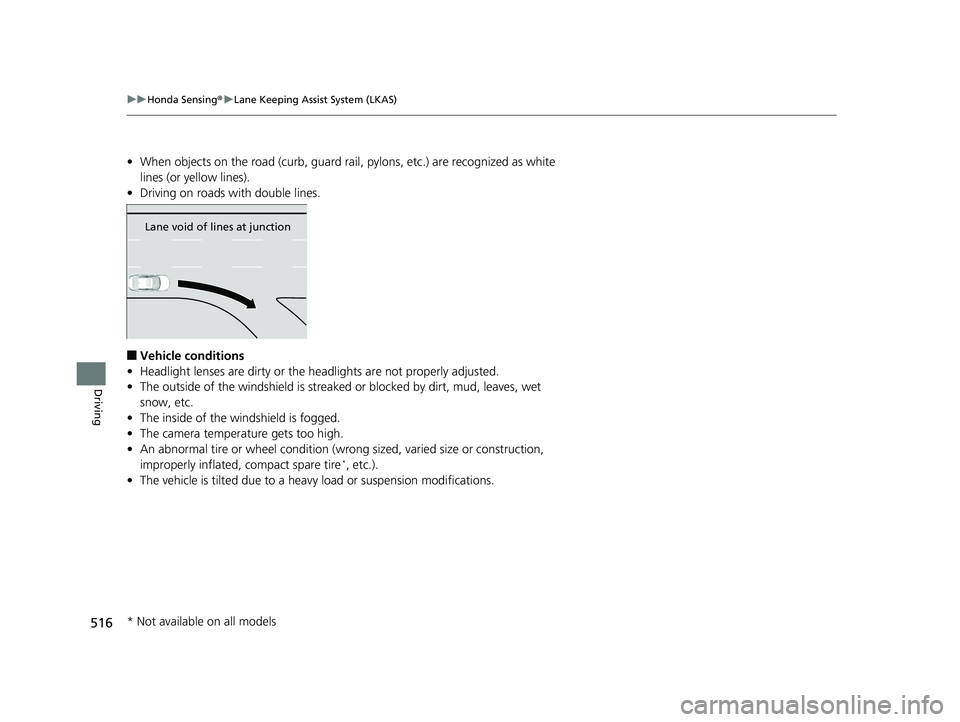
• When objects on the road (curb, guard rail, pylons, etc.) are recognized as white
lines (or yellow lines).
• Driving on roads with double lines.
■Vehicle conditions
• Headlight lenses are dirty or the headlights are not properly adjusted.
• The outside of the windshield is streake d or blocked by dirt, mud, leaves, wet
snow, etc.
• The inside of the windshield is fogged.
• The camera temperature gets too high.
• An abnormal tire or wheel condition (wrong sized, varied size or construction,
improperly inflated, compact spare tire
*, etc.).
• The vehicle is tilted due to a heav y load or suspension modifications.
Lane void of lines at junction
* Not available on all models
19 INSIGHT HMIN-31TXM6000.book 516 ページ 2018年4月20日 金曜日 午後4時22分
Page 526 of 675
uuHonda Sensing ®u Traffic Sign Recognition System
524
Driving
The traffic sign recognition system may not be able to recognize the traffic sign in
the following cases.
■Vehicle conditions
• Headlight lenses are dirty or the headlights are not properly adjusted.
• The outside of the windshie ld is blocked by dirt, mud, leaves, wet snow, etc.
• The inside of the windshield is fogged.
• There are portions remaining to be wiped.
• An abnormal tire or wheel condition (wrong sized, varied size or construction,
improperly inflated, compact spare tire
*, etc.).
• The vehicle is tilted due to a heav y load or suspension modifications.
■Environmental conditions
• Driving into low sunlight (e.g., at dawn or dusk).
• Strong light is reflected onto the roadway.
• Sudden changes between light and dark, such as an entrance or exit of a tunnel.
• When you drive in the shad ows of trees, buildings, etc.
• Driving at night, in dark areas such as long tunnels.
• Driving in bad weather (rain, fog, snow, etc.).
• A vehicle in front of you is traveling flying up spray or snow.
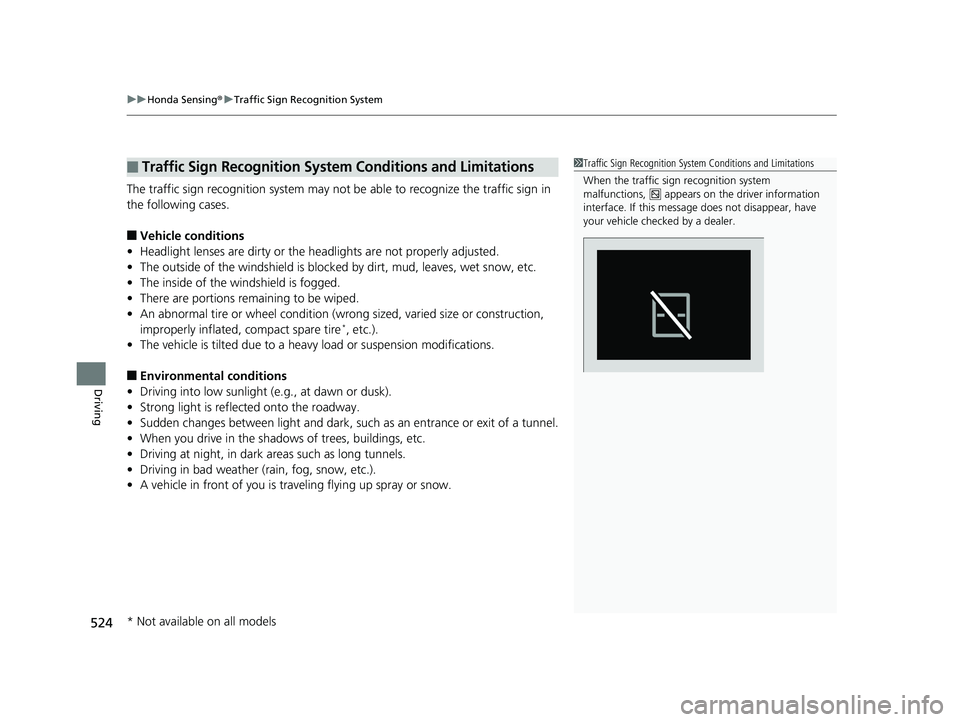
■Traffic Sign Recognition System Conditions and Limitations1Traffic Sign Recognition System Conditions and Limitations
When the traffic sign recognition system
malfunctions, appears on the driver information
interface. If this message does not disappear, have
your vehicle checked by a dealer.
* Not available on all models
19 INSIGHT HMIN-31TXM6000.book 524 ページ 2018年4月20日 金曜日 午後4時22分
Page 577 of 675
575
Maintenance
Replacing Light Bulbs
Headlights
Headlights are LED type. Have an authorized Honda dealer inspect and replace the
light assembly.
Fog Lights*
Fog lights are LED type. Have an authoriz ed Honda dealer inspect and replace the
light assembly.
Front Turn Signal, Park ing/Daytime Running and
Front Side Marker Lights
Front turn signal, parking/daytime running and front side marker lights are LED type.
Have an authorized Honda dealer in spect and replace the light assembly.
Side Turn Signal/Emergency Indicator Lights*
Door mirror side turn lights are LED type. Have an authorized Honda dealer inspect
and replace the light assembly.
1 Headlights
The headlight aim is set by the factory, and does not
need to be adjusted. Howeve r, if you regularly carry
heavy items in the trunk, have the aiming readjusted
at a dealer or by a qualified technician.
* Not available on all models
19 INSIGHT HMIN-31TXM6000.book 575 ページ 2018年4月20日 金曜日 午後4時22分
Page 601 of 675
599
uuCleaning uExterior Care
Continued
Maintenance
The inside lenses of exterior lights (headlights, brake light s, etc.) may fog temporarily
if you have driven in the rain, or after the vehicle has been run through a car wash.
Dew condensation also may build up inside the lenses when there is a significant
enough difference between the ambient and inside lens temperatures (similar to
vehicle windows fogging up in rainy conditions). These conditions are natural
processes, not structural design problems in the exterior lights.
Lens design characteristics ma y result in moisture developing on the light lens frame
surfaces. This also is not a malfunction.
However, if you see large amounts of wa ter accumulation, or large water drops
building up inside the lenses, have your vehicle inspected by a dealer.
■Fogged Exterior Light Lenses
19 INSIGHT HMIN-31TXM6000.book 599 ページ 2018年4月20日 金曜日 午後4時22分
Page 649 of 675
647
uuFusesuInspecting and Changing Fuses
Handling the Unexpected
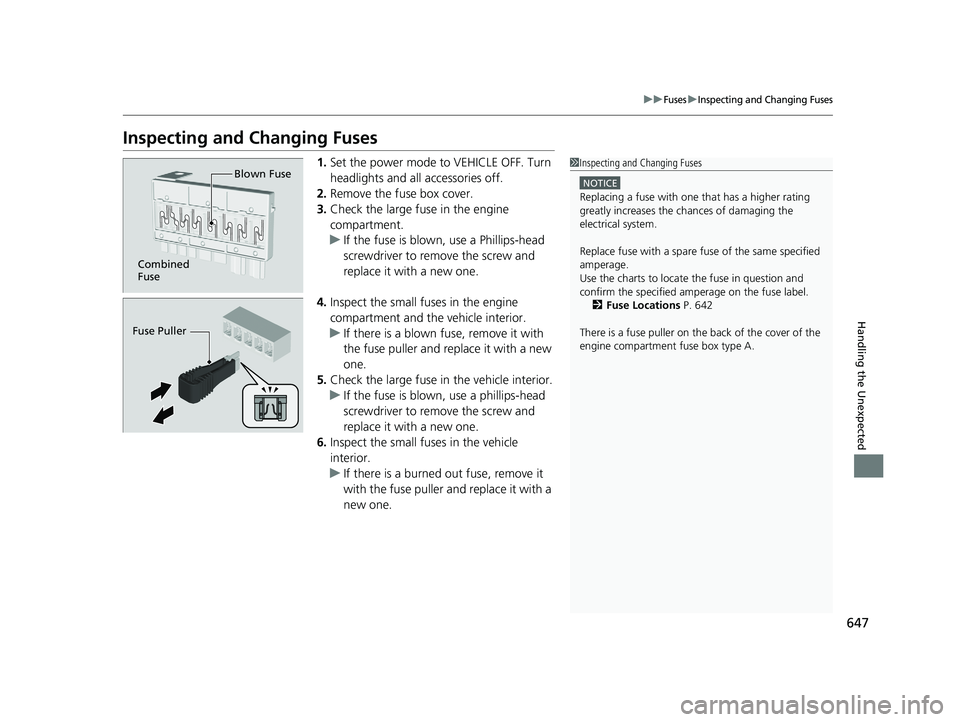
Inspecting and Changing Fuses
1.Set the power mode to VEHICLE OFF. Turn
headlights and all accessories off.
2. Remove the fuse box cover.
3. Check the large fuse in the engine
compartment.
u If the fuse is blown, use a Phillips-head
screwdriver to remove the screw and
replace it with a new one.
4. Inspect the small fu ses in the engine
compartment and the vehicle interior.
u If there is a blown fuse, remove it with
the fuse puller and replace it with a new
one.
5. Check the large fuse in the vehicle interior.
u If the fuse is blown, use a phillips-head
screwdriver to remove the screw and
replace it with a new one.
6. Inspect the small fuses in the vehicle
interior.
u If there is a burned out fuse, remove it
with the fuse puller and replace it with a
new one.1Inspecting and Changing Fuses
NOTICE
Replacing a fuse with on e that has a higher rating
greatly increases the chances of damaging the
electrical system.
Replace fuse with a spare fuse of the same specified
amperage.
Use the charts to locate the fuse in question and
confirm the specified amperage on the fuse label. 2 Fuse Locations P. 642
There is a fuse puller on the back of the cover of the
engine compartment fuse box type A.
Combined
Fuse Blown Fuse
Fuse Puller
19 INSIGHT HMIN-31TXM6000.book 647 ページ 2018年4月20日 金曜日 午後4時22分