reset HONDA INSIGHT 2019 (in English) Owner's Guide
[x] Cancel search | Manufacturer: HONDA, Model Year: 2019, Model line: INSIGHT, Model: HONDA INSIGHT 2019Pages: 675, PDF Size: 36.97 MB
Page 260 of 675
258
uuAudio System Basic Operation uPlaying Bluetooth ® Audio
Features
Playing Bluetooth ® Audio
Your audio system allows you to listen to music from your Bluetooth-compatible
phone.
This function is available when the phone is paired and connected to the vehicle’s
Bluetooth ® HandsFreeLink ® (HFL) system.
2 Phone Setup P. 395
1Playing Bluetooth ® Audio
Not all Bluetooth -enabled phones with streaming
audio capabilities are comp atible with the system.
For a list of compatible phones:
•U.S.: Visit automobiles.honda.com /handsfreelink/,
or call 1-888-528-7876.
•Canada: For more info rmation on smartphone
compatibility, call 1-888-528-7876.
In some states, it may be il legal to perform some data
device functions while driving.
Only one phone can be used with HFL at a time.
When there are more than two paired phones in the
vehicle, the first paired phone the system finds is
automatically connected.
If more than one phone is paired to the HFL system,
there will be a delay before the system begins to play.
In some cases, the name of the artist, album, or track
may not appear correctly.
Some functions may not be available on some
devices.
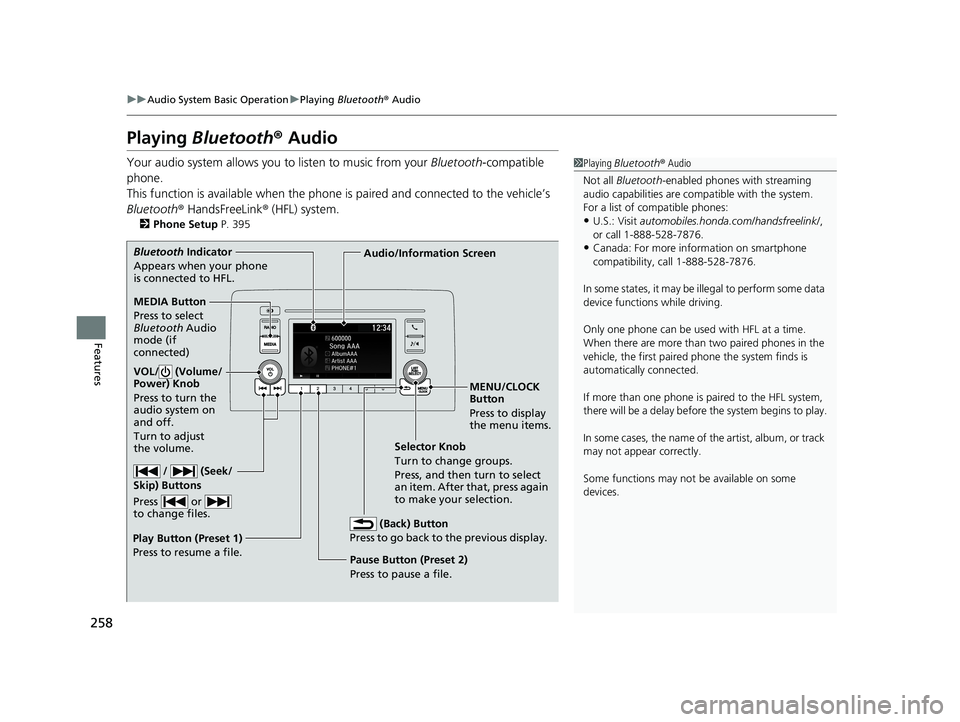
MEDIA Button
Press to select
Bluetooth Audio
mode (if
connected)
VOL/ (Volume/
Power) Knob
Press to turn the
audio system on
and off.
Turn to adjust
the volume.
MENU/CLOCK
Button
Press to display
the menu items.
Audio/Information Screen
Bluetooth
Indicator
Appears when your phone
is connected to HFL.
/ (Seek/
Skip) Buttons
Press or
to change files.
Play Button (Preset 1)
Press to resume a file. Pause Button (Preset 2)
Press to pause a file.Selector Knob
Turn to change groups.
Press, and then turn to select
an item. After that, press again
to make your selection.
(Back) Button
Press to go back to the previous display.
19 INSIGHT HMIN-31TXM6000.book 258 ページ 2018年4月20日 金曜日 午後4時22分
Page 261 of 675
Continued259
uuAudio System Basic Operation uPlaying Bluetooth ® Audio
Features
1. Make sure that your phone is paired and
connected to HFL.
2. Press the MEDIA button until the
Bluetooth ® Audio mode is selected.
If the phone is not recognized, another HFL-
compatible phone, which is not compatible
for Bluetooth ® Audio, may already be
connected.
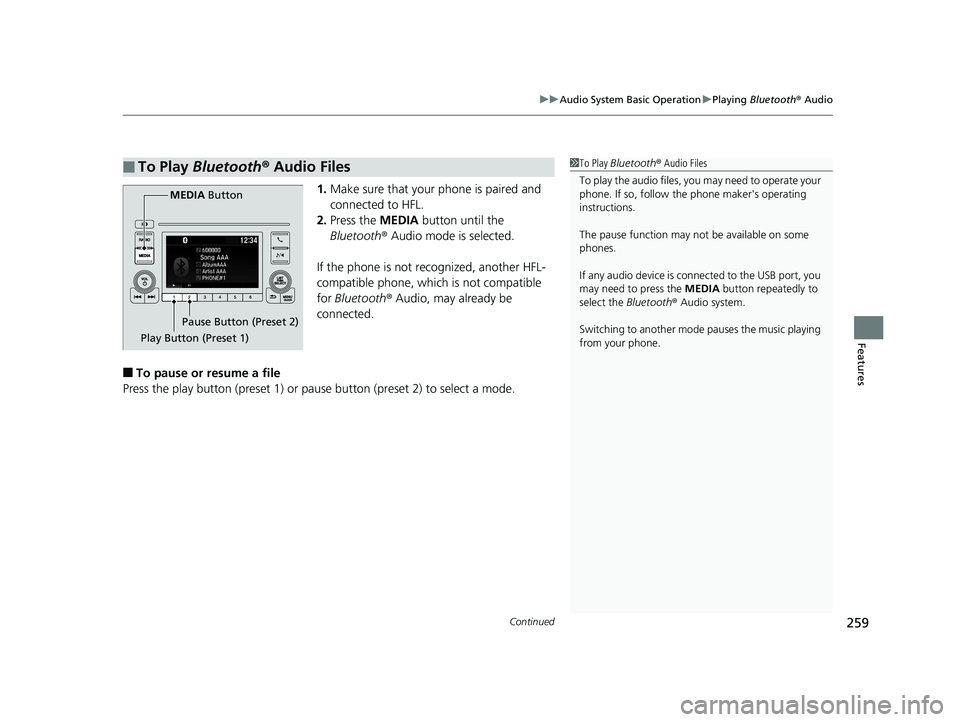
■To pause or resume a file
Press the play button (preset 1) or paus e button (preset 2) to select a mode.
■To Play Bluetooth ® Audio Files1 To Play Bluetooth ® Audio Files
To play the audio files, y ou may need to operate your
phone. If so, follow the phone maker's operating
instructions.
The pause function may no t be available on some
phones.
If any audio device is connected to the USB port, you
may need to press the MEDIA button repeatedly to
select the Bluetooth® Audio system.
Switching to another mode pauses the music playing
from your phone.
Play Button (Preset 1) Pause Button (Preset 2)
MEDIA
Button
19 INSIGHT HMIN-31TXM6000.book 259 ページ 2018年4月20日 金曜日 午後4時22分
Page 266 of 675
264
uuAudio System Basic Operation uAudio/Information Screen
Features
■Trip Computer
Displays the trip computer information.
• Current Drive tab: Displays the current trip information.
• Trip A /Trip B tab: Displays information for the current and three previous drives.
The information is stored every time you reset Trip A/B.
To reset the Trip A/B, select Settings, then select Delete Trip History .
To change the setting of how to reset Trip A/B, select Trip A Reset Method or
Trip B Reset Method .
■Clock
Displays the clock.
■System Updates
Updates the software versi on of the audio system.
2System Updates P. 278
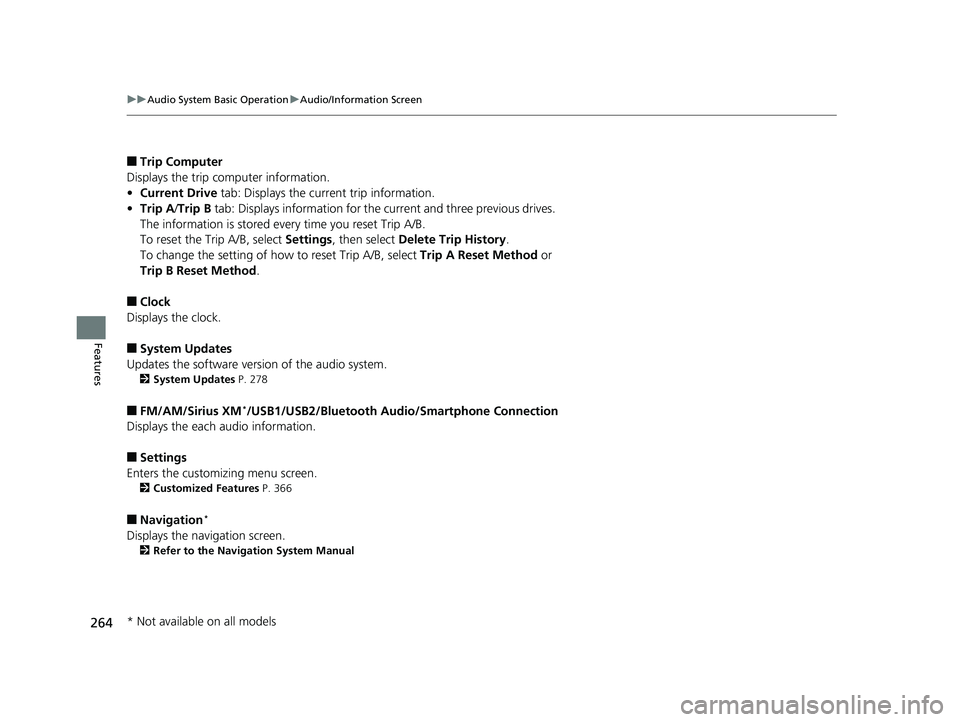
■FM/AM/Sirius XM*/USB1/USB2/Bluetooth Audio/Smartphone Connection
Displays the each audio information.
■Settings
Enters the customiz ing menu screen.
2Customized Features P. 366
■Navigation*
Displays the navigation screen.
2Refer to the Navigation System Manual
* Not available on all models
19 INSIGHT HMIN-31TXM6000.book 264 ページ 2018年4月20日 金曜日 午後4時22分
Page 274 of 675
uuAudio System Basic Operation uAudio/Information Screen
272
Features
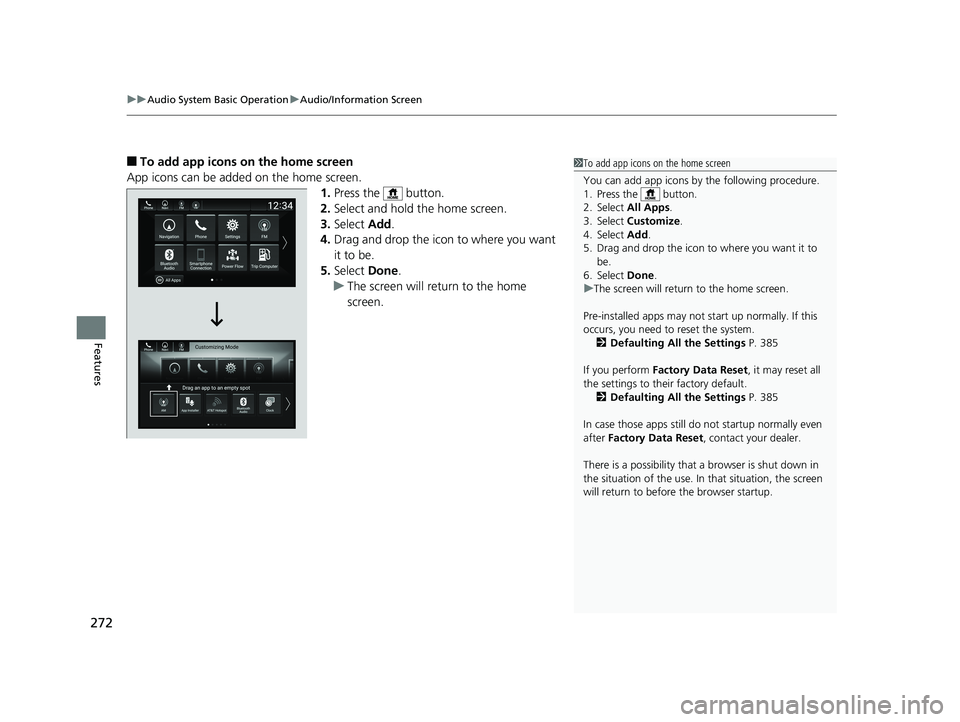
■To add app icons on the home screen
App icons can be added on the home screen. 1.Press the button.
2. Select and hold the home screen.
3. Select Add.
4. Drag and drop the icon to where you want
it to be.
5. Select Done.
u The screen will return to the home
screen.1To add app icons on the home screen
You can add app icons by the following procedure.
1. Press the button.
2. Select All Apps .
3. Select Customize .
4. Select Add .
5. Drag and drop the icon to where you want it to be.
6. Select Done .
u The screen will return to the home screen.
Pre-installed apps may not start up normally. If this
occurs, you need to reset the system. 2 Defaulting All the Settings P. 385
If you perform Factory Data Reset , it may reset all
the settings to their factory default. 2 Defaulting All the Settings P. 385
In case those apps still do not startup normally even
after Factory Data Reset , contact your dealer.
There is a possibility that a browser is shut down in
the situation of the use. In that situation, the screen
will return to before the browser startup.
19 INSIGHT HMIN-31TXM6000.book 272 ページ 2018年4月20日 金曜日 午後4時22分
Page 277 of 675
Continued275
uuAudio System Basic Operation uAudio/Information Screen
Features
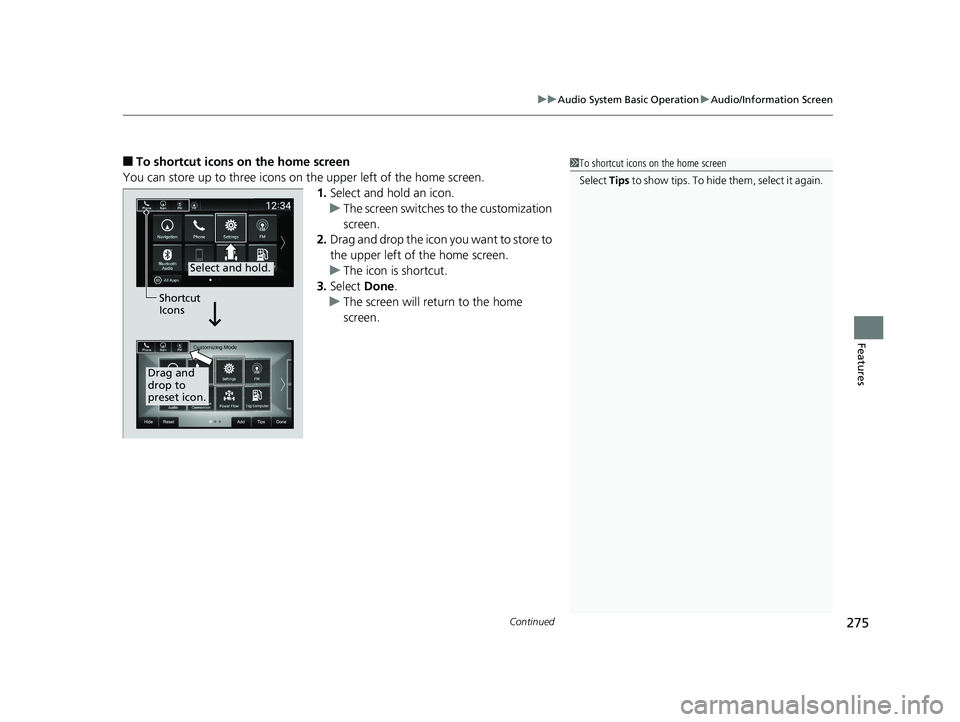
■To shortcut icons on the home screen
You can store up to three icons on the upper left of the home screen. 1.Select and hold an icon.
u The screen switches to the customization
screen.
2. Drag and drop the icon you want to store to
the upper left of the home screen.
u The icon is shortcut.
3. Select Done.
u The screen will return to the home
screen.1To shortcut icons on the home screen
Select Tips to show tips. To hide them, select it again.
Select and hold.
Drag and
drop to
preset icon.Shortcut
Icons
19 INSIGHT HMIN-31TXM6000.book 275 ページ 2018年4月20日 金曜日 午後4時22分
Page 286 of 675
284
uuAudio System Basic Operation uAdjusting the Sound
Features
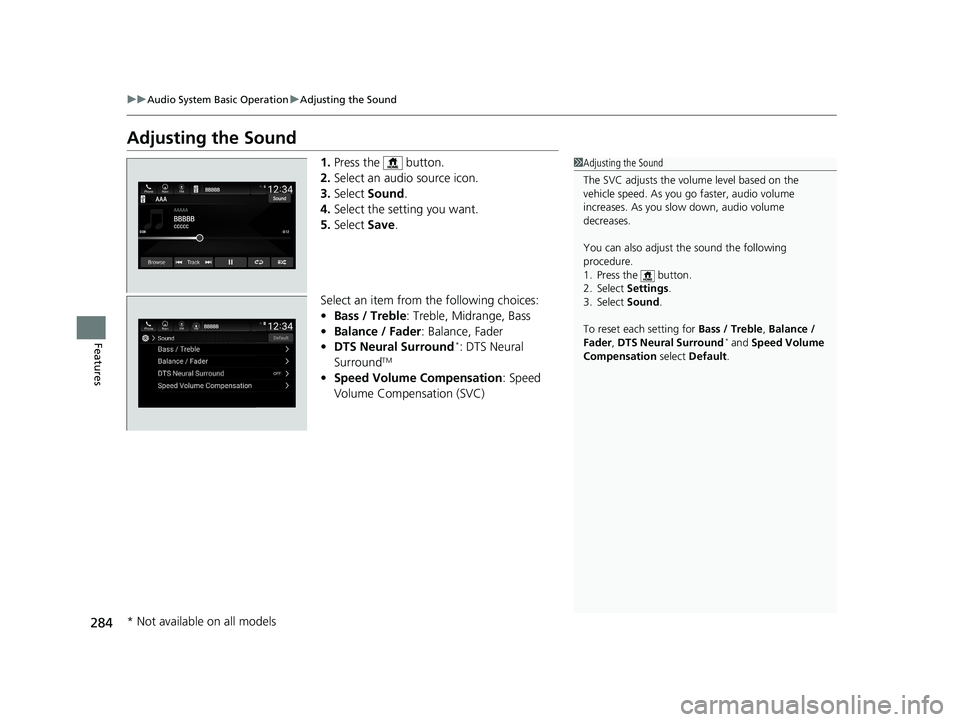
Adjusting the Sound
1. Press the button.
2. Select an audio source icon.
3. Select Sound.
4. Select the setting you want.
5. Select Save.
Select an item from the following choices:
• Bass / Treble : Treble, Midrange, Bass
• Balance / Fader : Balance, Fader
• DTS Neural Surround
*: DTS Neural
SurroundTM
• Speed Volume Compensation : Speed
Volume Compensation (SVC)
1 Adjusting the Sound
The SVC adjusts the volume level based on the
vehicle speed. As you go faster, audio volume
increases. As you slow down, audio volume
decreases.
You can also adjust the sound the following
procedure.
1. Press the button.
2. Select Settings .
3. Select Sound .
To reset each setting for Bass / Treble , Balance /
Fader , DTS Neural Surround
* and Speed Volume
Compensation select Default .
* Not available on all models
19 INSIGHT HMIN-31TXM6000.book 284 ページ 2018年4月20日 金曜日 午後4時22分
Page 287 of 675
285
uuAudio System Basic Operation uDisplay Setup
Continued
Features
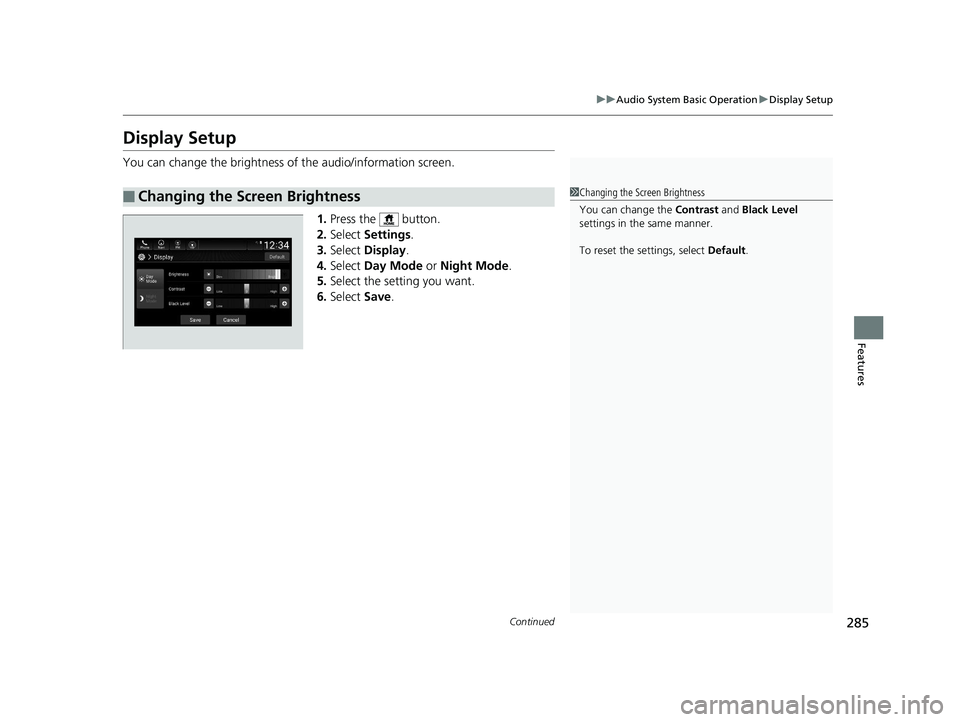
Display Setup
You can change the brightness of the audio/information screen.
1.Press the button.
2. Select Settings .
3. Select Display .
4. Select Day Mode or Night Mode .
5. Select the setting you want.
6. Select Save.
■Changing the Screen Brightness1Changing the Screen Brightness
You can change the Contrast and Black Level
settings in the same manner.
To reset the settings, select Default.
19 INSIGHT HMIN-31TXM6000.book 285 ページ 2018年4月20日 金曜日 午後4時22分
Page 292 of 675
290
uuAudio System Basic Operation uPlaying AM/FM Radio
Features
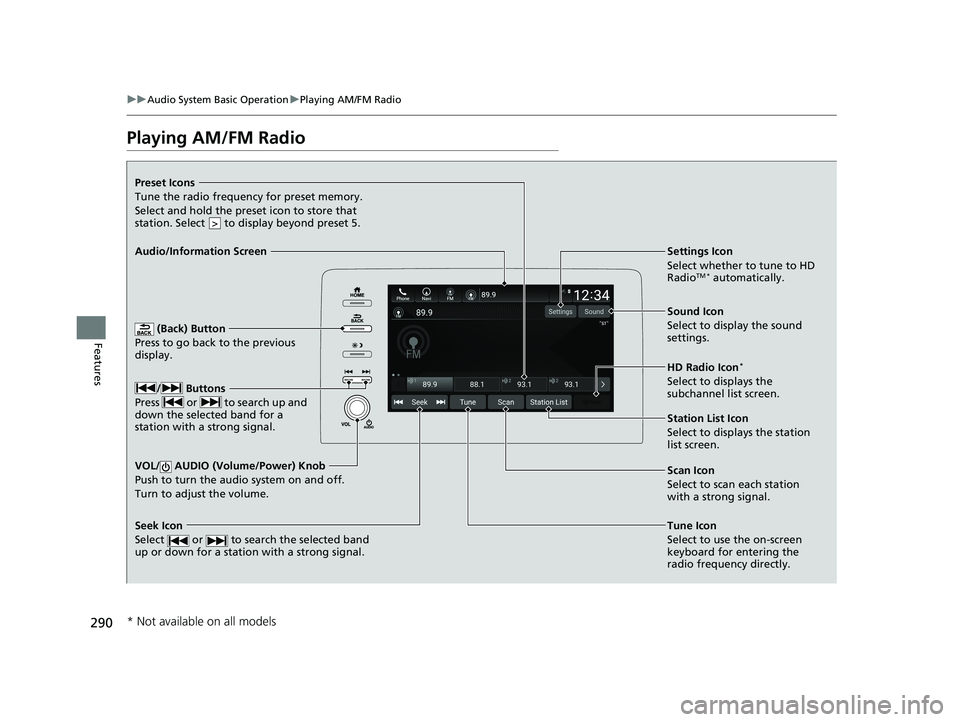
Playing AM/FM Radio
(Back) Button
Press to go back to the previous
display.
/ Buttons
Press or to search up and
down the selected band for a
station with a strong signal.
VOL/ AUDIO (Volume/Power) Knob
Push to turn the audi o system on and off.
Turn to adjust the volume.
Tune Icon
Select to use the on-screen
keyboard for entering the
radio frequency directly.
Audio/Information Screen
Scan Icon
Select to scan each station
with a strong signal.
Preset Icons
Tune the radio frequency for preset memory.
Select and hold the preset icon to store that
station. Select to display beyond preset 5.
>
Settings Icon
Select whether to tune to HD
Radio
TM * automatically.
Seek Icon
Select or to search the selected band
up or down for a station with a strong signal.
Sound Icon
Select to display the sound
settings.
HD Radio Icon
*
Select to displays the
subchannel list screen.
Station List Icon
Select to displays the station
list screen.
* Not available on all models
19 INSIGHT HMIN-31TXM6000.book 290 ページ 2018年4月20日 金曜日 午後4時22分
Page 293 of 675
Continued291
uuAudio System Basic Operation uPlaying AM/FM Radio
Features
To store a station:
1. Tune to the selected station.
2. Select and hold the preset number for the station you want to store.
Lists the strongest stations on the selected band.
1. Select Station List to display a list.
2. Select the station.
■Manual update
Updates your available st ation list at any time.
1. Select Station List to display a list.
2. Select Refresh .
■Preset Memory
■Station List
1Preset Memory
The ST indicator appears on the display indicating
stereo FM broadcasts.
Stereo reproduction in AM is not available.
Switching the Audio Mode
Roll up or down to select Audio on the left selector
wheel or select the audio source icon on the screen.
2 Audio Remote Controls P. 237
You can store 12 AM/FM st ations into preset
memory.
HD Radio Technology manufactured under license
from iBiquity Digi tal Corporation. U.S. and Foreign
Patents. HD Radio
TM and the HD, HD Radio, and
“Arc” logos are proprietary trademarks of iBiquity
Digital Corp.
Models with HD RadioTM feature
19 INSIGHT HMIN-31TXM6000.book 291 ページ 2018年4月20日 金曜日 午後4時22分
Page 296 of 675
294
uuAudio System Basic Operation uPlaying SiriusXM ® Radio*
Features
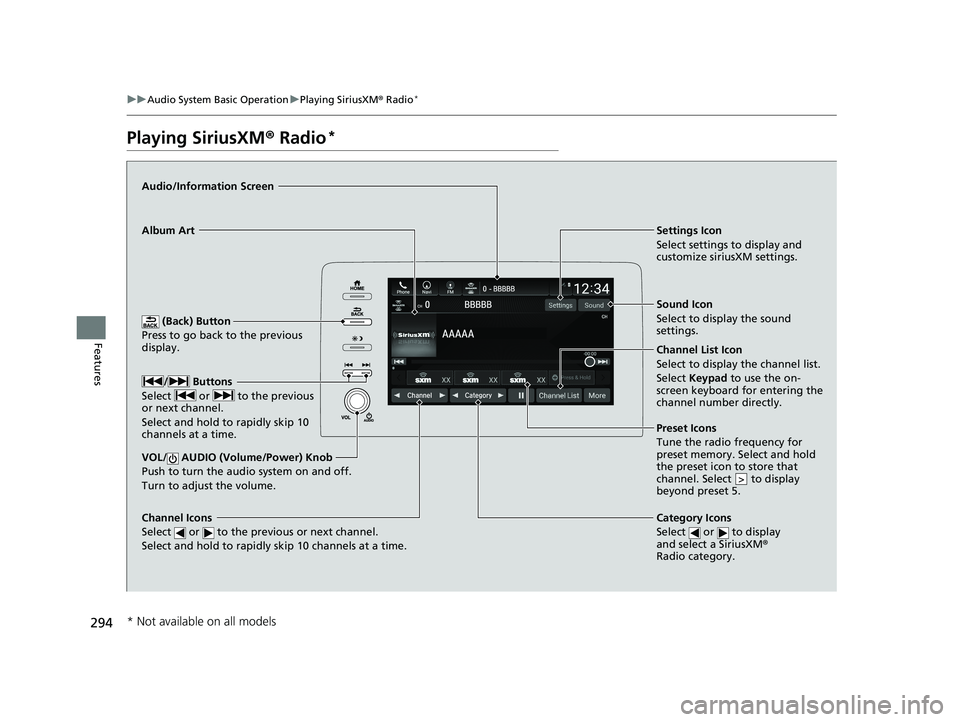
Playing SiriusXM ® Radio*
(Back) Button
Press to go back to the previous
display.
Channel Icons
Select or to the previous or next channel.
Select and hold to rapidly skip 10 channels at a time.
VOL/ AUDIO (Volume/Power) Knob
Push to turn the a udio system on and off.
Turn to adjust the volume.
Category Icons
Select or to display
and select a SiriusXM ®
Radio category.
Audio/Information Screen
Preset Icons
Tune the radio frequency for
preset memory. Select and hold
the preset icon to store that
channel. Select to display
beyond preset 5.
>
Album ArtSettings Icon
Select settings to display and
customize siriusXM settings.
/ Buttons
Select or to the previous
or next channel.
Select and hold to rapidly skip 10
channels at a time.
Sound Icon
Select to display the sound
settings.
Channel List Icon
Select to display the channel list.
Select Keypad to use the on-
screen keyboard for entering the
channel number directly.
* Not available on all models
19 INSIGHT HMIN-31TXM6000.book 294 ページ 2018年4月20日 金曜日 午後4時22分