battery HONDA INSIGHT 2019 (in English) Service Manual
[x] Cancel search | Manufacturer: HONDA, Model Year: 2019, Model line: INSIGHT, Model: HONDA INSIGHT 2019Pages: 675, PDF Size: 36.97 MB
Page 217 of 675
215Continued
Controls
Interior Lights/Interior Convenience Items
Interior Lights
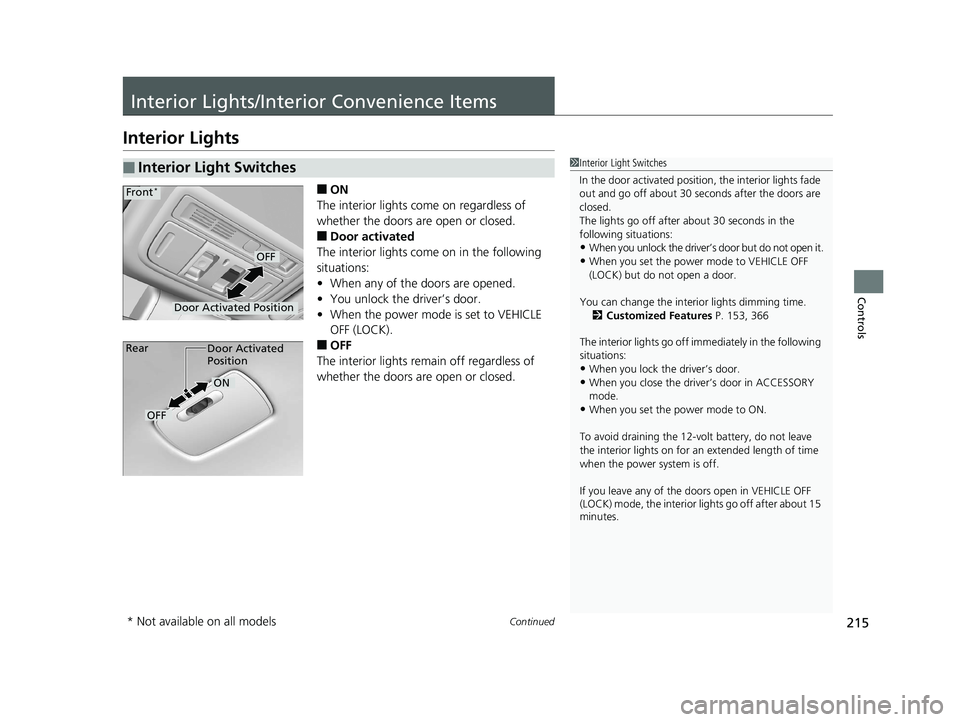
■ON
The interior lights come on regardless of
whether the doors are open or closed.
■Door activated
The interior lights come on in the following
situations:
• When any of the doors are opened.
• You unlock the driver’s door.
• When the power mode is set to VEHICLE
OFF (LOCK).
■OFF
The interior lights remain off regardless of
whether the doors are open or closed.
■Interior Light Switches1 Interior Light Switches
In the door activated position, the interior lights fade
out and go off about 30 se conds after the doors are
closed.
The lights go off after about 30 seconds in the
following situations:
•When you unlock the driver’s door but do not open it.
•When you set the power mode to VEHICLE OFF
(LOCK) but do not open a door.
You can change the interi or lights dimming time.
2 Customized Features P. 153, 366
The interior lights go off i mmediately in the following
situations:
•When you lock the driver’s door.
•When you close the driver’s door in ACCESSORY
mode.
•When you set the power mode to ON.
To avoid draining the 12-vo lt battery, do not leave
the interior lights on for an extended length of time
when the power system is off.
If you leave any of the doors open in VEHICLE OFF
(LOCK) mode, the interior lights go off after about 15
minutes.
Door Activated Position
OFF
Front*
Door Activated
Position
ON
OFF
Rear
* Not available on all models
19 INSIGHT HMIN-31TXM6000.book 215 ページ 2018年4月20日 金曜日 午後4時22分
Page 223 of 675
Continued221
uuInterior Lights/Interior Convenience Items uInterior Convenience Items
Controls
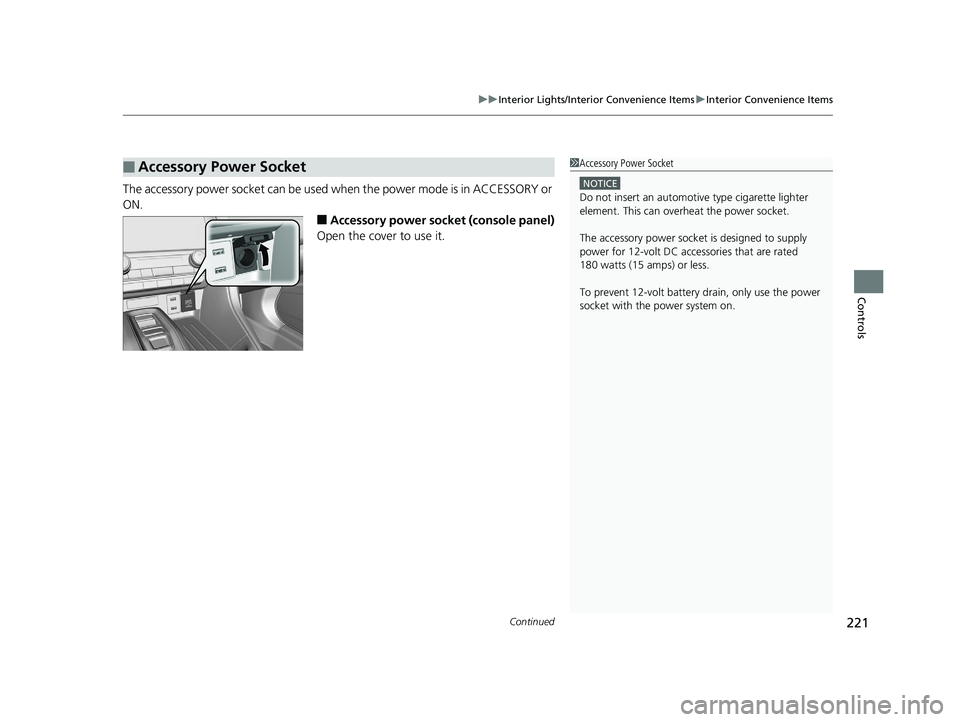
The accessory power socket can be used when the power mode is in ACCESSORY or
ON.
■Accessory power socket (console panel)
Open the cover to use it.
■Accessory Power Socket1 Accessory Power Socket
NOTICE
Do not insert an automotive type cigarette lighter
element. This can overheat the power socket.
The accessory power socket is designed to supply
power for 12-volt DC accessories that are rated
180 watts (15 amps) or less.
To prevent 12-volt battery drain, only use the power
socket with the power system on.
19 INSIGHT HMIN-31TXM6000.book 221 ページ 2018年4月20日 金曜日 午後4時22分
Page 225 of 675
Continued223
uuInterior Lights/Interior Convenience Items uInterior Convenience Items
Controls
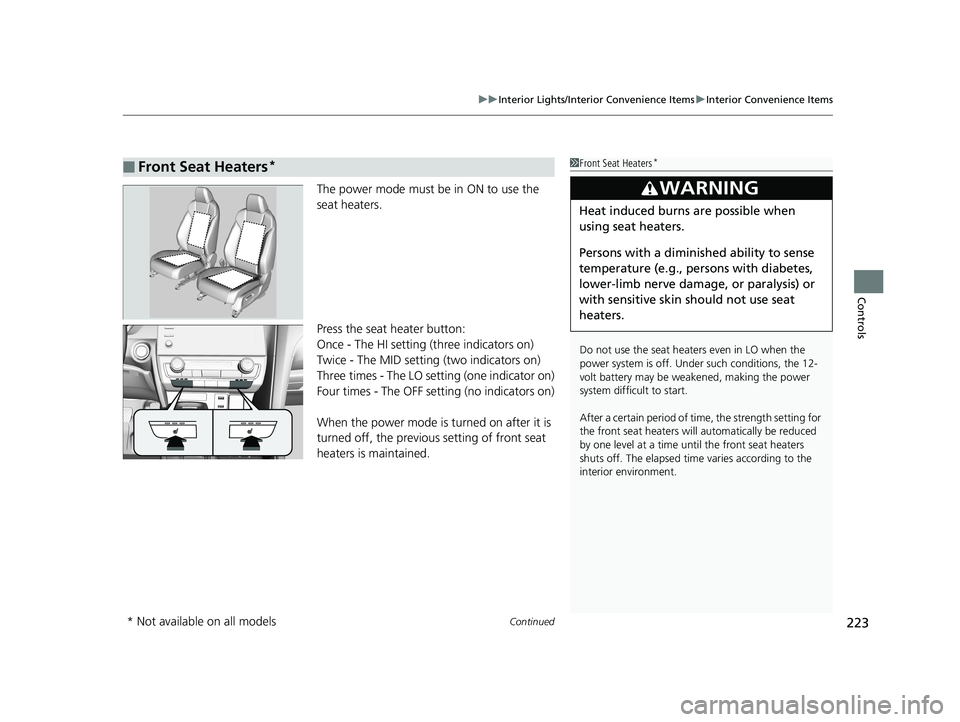
The power mode must be in ON to use the
seat heaters.
Press the seat heater button:
Once - The HI setting (three indicators on)
Twice - The MID setting (two indicators on)
Three times - The LO se tting (one indicator on)
Four times - The OFF setting (no indicators on)
When the power mode is turned on after it is
turned off, the previous setting of front seat
heaters is maintained.
■Front Seat Heaters*1 Front Seat Heaters*
Do not use the seat heaters even in LO when the
power system is off. U nder such conditions, the 12-
volt battery may be weakened, making the power
system difficult to start.
After a certain period of time, the strength setting for
the front seat heaters will automatically be reduced
by one level at a time unt il the front seat heaters
shuts off. The elapsed time varies according to the
interior environment.
3WARNING
Heat induced burns are possible when
using seat heaters.
Persons with a diminished ability to sense
temperature (e.g., persons with diabetes,
lower-limb nerve damage, or paralysis) or
with sensitive skin should not use seat
heaters.
* Not available on all models
19 INSIGHT HMIN-31TXM6000.book 223 ページ 2018年4月20日 金曜日 午後4時22分
Page 226 of 675
uuInterior Lights/Interior Convenience Items uInterior Convenience Items
224
Controls
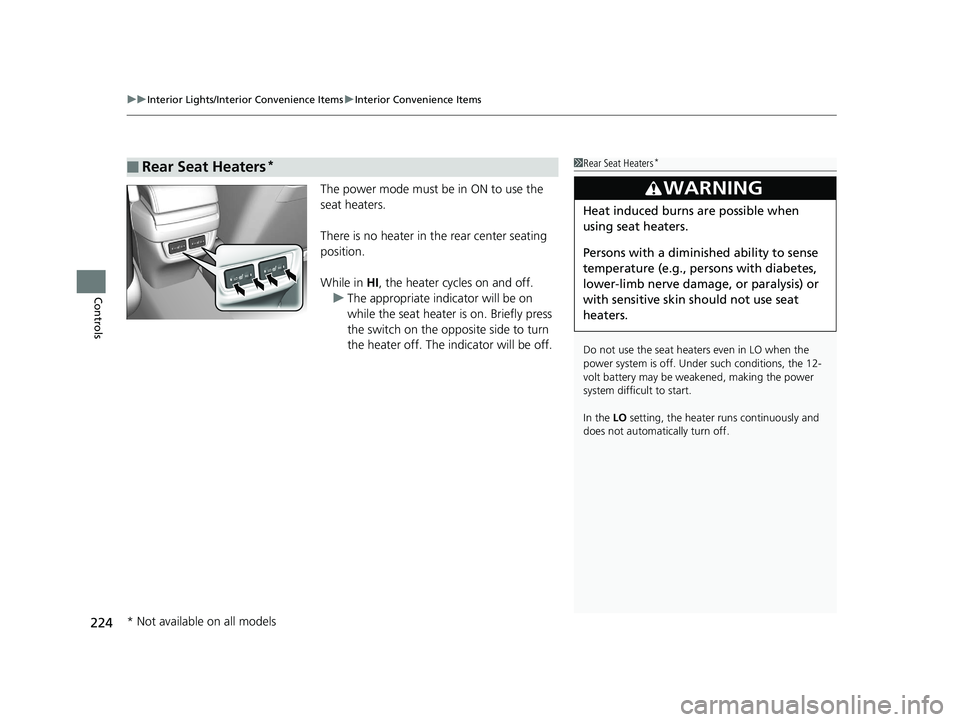
The power mode must be in ON to use the
seat heaters.
There is no heater in the rear center seating
position.
While in HI, the heater cycles on and off.
u The appropriate indicator will be on
while the seat heater is on. Briefly press
the switch on the opposite side to turn
the heater off. The indicator will be off.
■Rear Seat Heaters*1Rear Seat Heaters*
Do not use the seat heaters even in LO when the
power system is off. U nder such conditions, the 12-
volt battery may be weakened, making the power
system difficult to start.
In the LO setting, the heater runs continuously and
does not automatically turn off.
3WARNING
Heat induced burns are possible when
using seat heaters.
Persons with a diminished ability to sense
temperature (e.g., persons with diabetes,
lower-limb nerve damage, or paralysis) or
with sensitive skin should not use seat
heaters.
* Not available on all models
19 INSIGHT HMIN-31TXM6000.book 224 ページ 2018年4月20日 金曜日 午後4時22分
Page 238 of 675
236
uuAudio System uAudio System Theft Protection
Features
Audio System Theft Protection
The audio system is disabled when it is di sconnected from the power source, such as
when the 12-volt battery is disconnected or goes dead. In certain conditions, the
system may display a code entry screen. If this occurs, reactivate the audio system.
■Reactivating th e audio system
1. Set the power mode to ON.
2. Turn on the audio system.
3. Press and hold the audio system power knob for more than two seconds.
u The audio system is reac tivated when the audio co ntrol unit establishes a
connection with the vehicle control unit. If the control unit fails to recognize
the audio unit, you must go to a dealer and have the audio unit checked.
19 INSIGHT HMIN-31TXM6000.book 236 ページ 2018年4月20日 金曜日 午後4時22分
Page 268 of 675
uuAudio System Basic Operation uAudio/Information Screen
266
Features
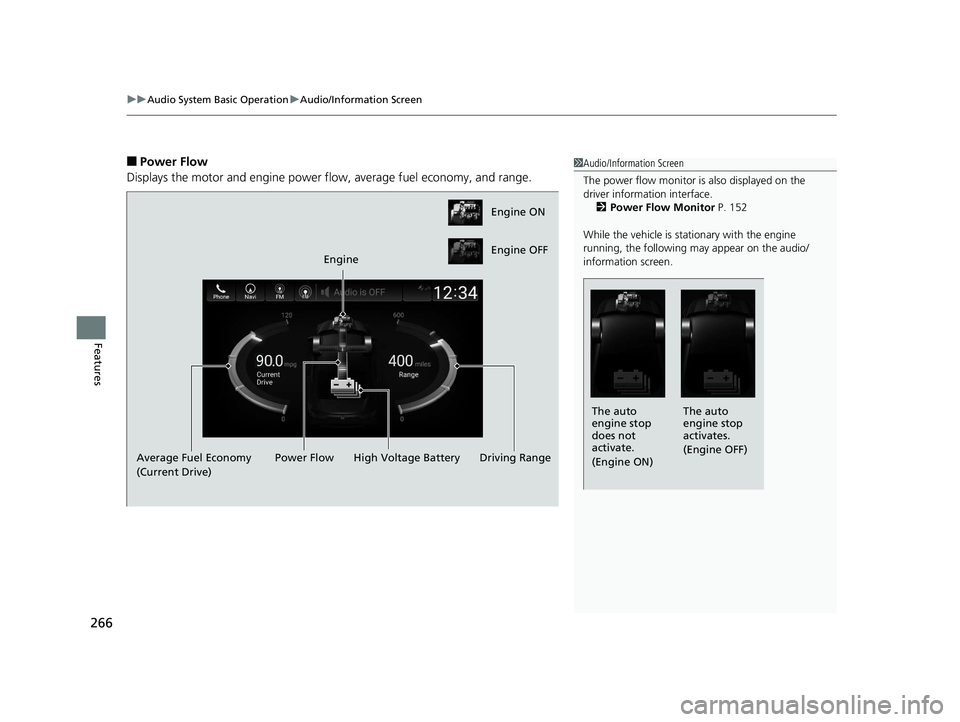
■Power Flow
Displays the motor and engine power flow, average fuel economy, and range.1 Audio/Information Screen
The power flow monitor is also displayed on the
driver information interface.
2 Power Flow Monitor P. 152
While the vehicle is stat ionary with the engine
running, the following may appear on the audio/
information screen.
The auto
engine stop
activates.
(Engine OFF)
The auto
engine stop
does not
activate.
(Engine ON)
Engine ON
Engine OFF
Engine
Average Fuel Economy
(Current Drive) High Voltage Battery
Power Flow Driving Range
19 INSIGHT HMIN-31TXM6000.book 266 ページ 2018年4月20日 金曜日 午後4時22分
Page 269 of 675
Continued267
uuAudio System Basic Operation uAudio/Information Screen
Features
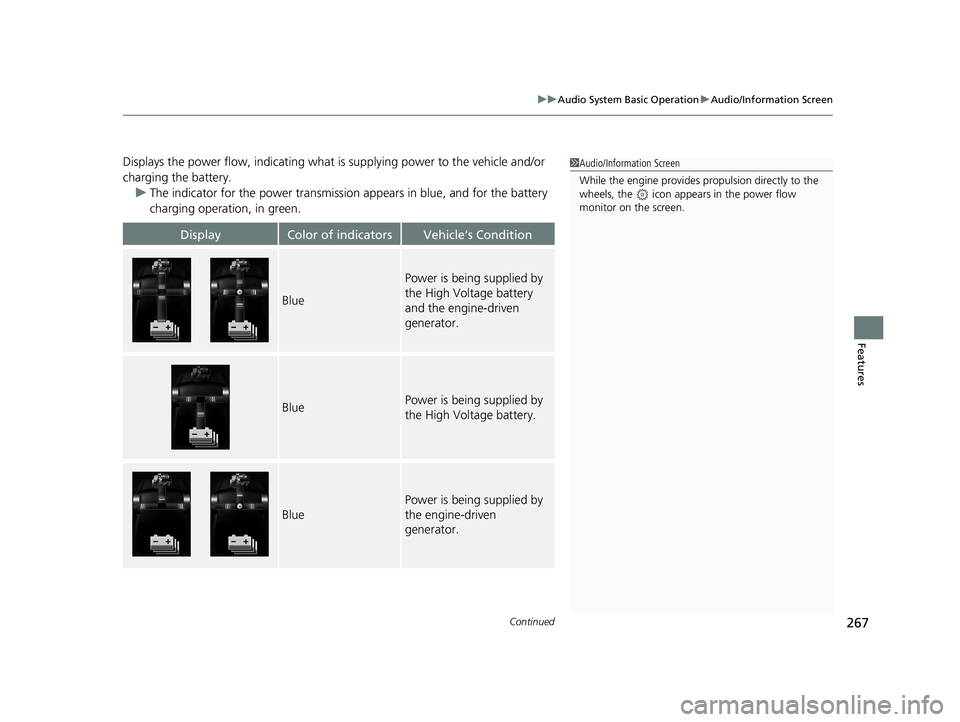
Displays the power flow, indicating what is supplying power to the vehicle and/or
charging the battery.
u The indicator for the power transmission appears in blue, and for the battery
charging operation, in green.
DisplayColor of indicatorsVehicle’s Condition
Blue
Power is being supplied by
the High Voltage battery
and the engine-driven
generator.
BluePower is being supplied by
the High Voltage battery.
Blue
Power is being supplied by
the engine-driven
generator.
1 Audio/Information Screen
While the engine provides propulsion directly to the
wheels, the icon appears in the power flow
monitor on the screen.
19 INSIGHT HMIN-31TXM6000.book 267 ページ 2018年4月20日 金曜日 午後4時22分
Page 270 of 675
268
uuAudio System Basic Operation uAudio/Information Screen
Features
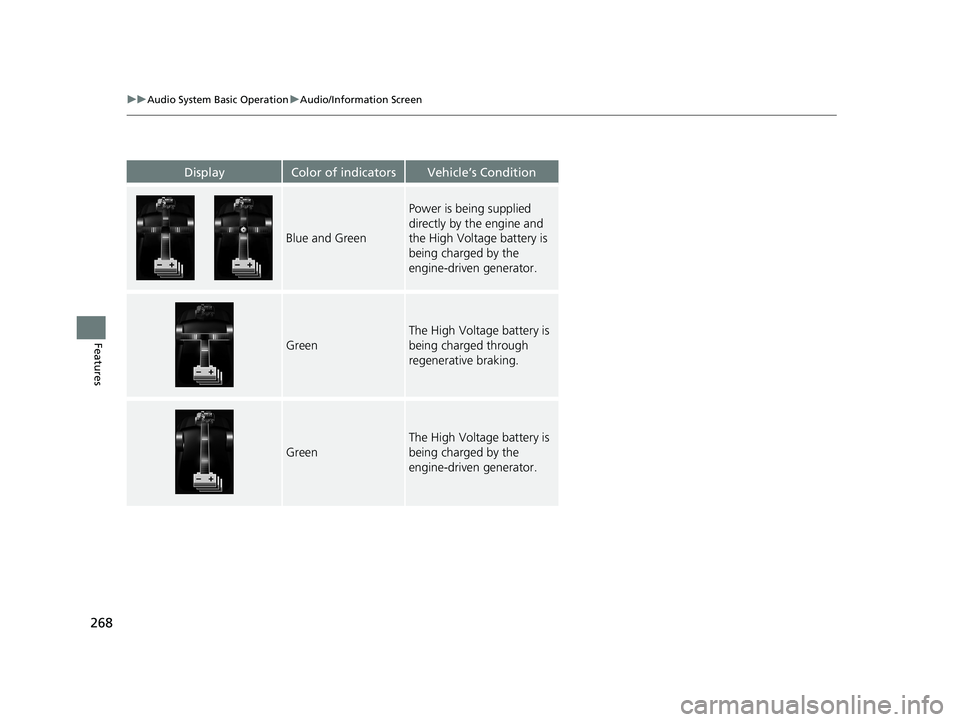
DisplayColor of indicatorsVehicle’s Condition
Blue and Green
Power is being supplied
directly by the engine and
the High Voltage battery is
being charged by the
engine-driven generator.
Green
The High Voltage battery is
being charged through
regenerative braking.
Green
The High Voltage battery is
being charged by the
engine-driven generator.
19 INSIGHT HMIN-31TXM6000.book 268 ページ 2018年4月20日 金曜日 午後4時22分
Page 281 of 675
Continued279
uuAudio System Basic Operation uSystem Updates
Features
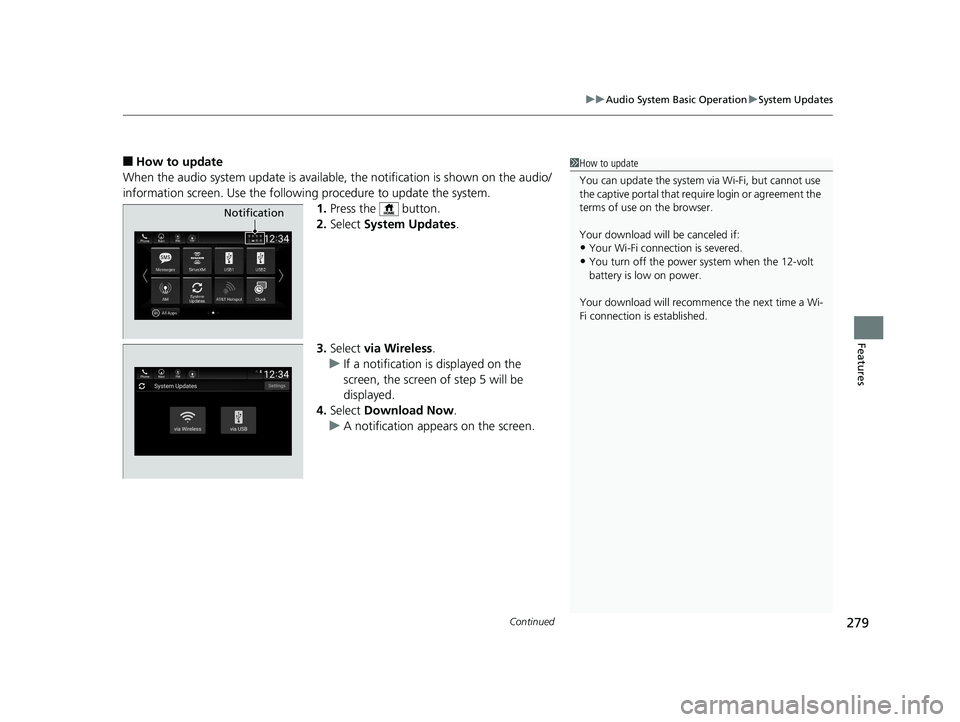
■How to update
When the audio system update is available, the notification is shown on the audio/
information screen. Use the following procedure to update the system.
1.Press the button.
2. Select System Updates .
3. Select via Wireless .
u If a notification is displayed on the
screen, the screen of step 5 will be
displayed.
4. Select Download Now .
u A notification appears on the screen.1How to update
You can update the system vi a Wi-Fi, but cannot use
the captive portal that requi re login or agreement the
terms of use on the browser.
Your download will be canceled if:
•Your Wi-Fi connection is severed.
•You turn off the power system when the 12-volt
battery is low on power.
Your download will recomme nce the next time a Wi-
Fi connection is established.
Notification
19 INSIGHT HMIN-31TXM6000.book 279 ページ 2018年4月20日 金曜日 午後4時22分
Page 282 of 675
uuAudio System Basic Operation uSystem Updates
280
Features
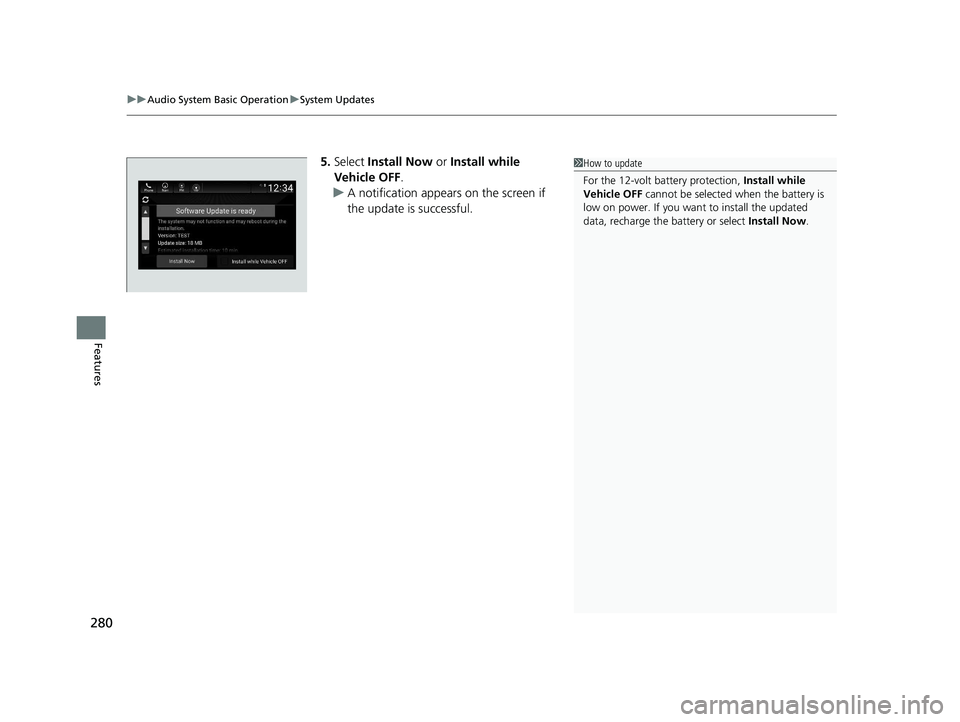
5. Select Install Now or Install while
Vehicle OFF .
u A notification appears on the screen if
the update is successful.1How to update
For the 12-volt battery protection, Install while
Vehicle OFF cannot be selected when the battery is
low on power. If you want to install the updated
data, recharge the battery or select Install Now.
19 INSIGHT HMIN-31TXM6000.book 280 ページ 2018年4月20日 金曜日 午後4時22分