keyless HONDA INSIGHT 2022 User Guide
[x] Cancel search | Manufacturer: HONDA, Model Year: 2022, Model line: INSIGHT, Model: HONDA INSIGHT 2022Pages: 609, PDF Size: 18.48 MB
Page 173 of 609
172
uuOpening and Closing the Trunk uUsing the Trunk Release Button
Controls
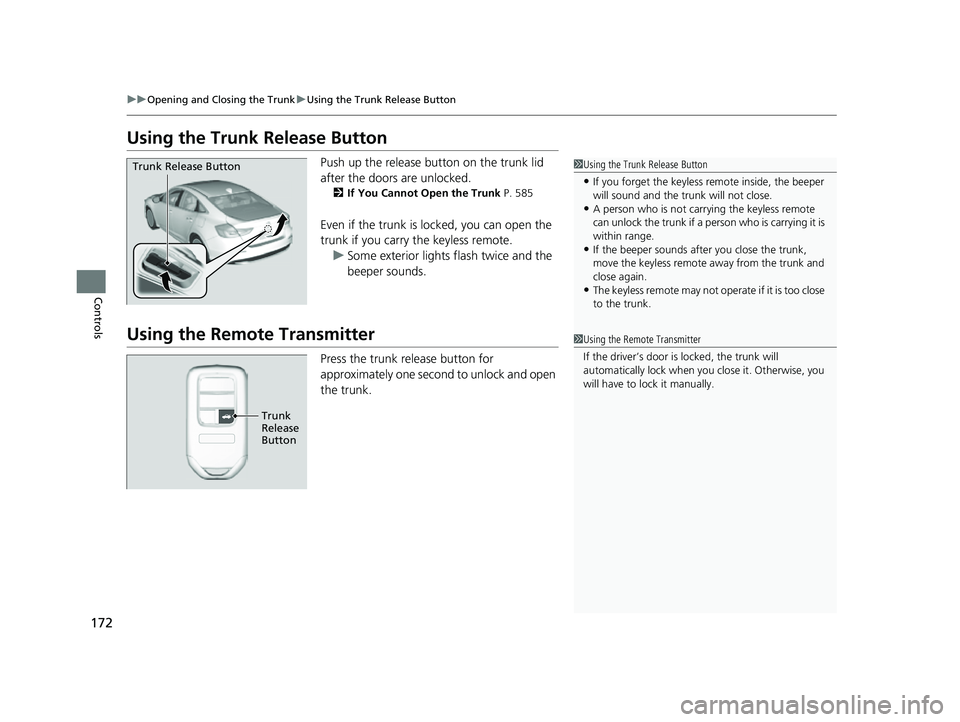
Using the Trunk Release Button
Push up the release button on the trunk lid
after the doors are unlocked.
2If You Cannot Open the Trunk P. 585
Even if the trunk is locked, you can open the
trunk if you carry the keyless remote.
u Some exterior lights flash twice and the
beeper sounds.
Using the Remote Transmitter
Press the trunk release button for
approximately one second to unlock and open
the trunk.
1Using the Trunk Release Button
•If you forget the keyless remote inside, the beeper
will sound and the trunk will not close.
•A person who is not carryi ng the keyless remote
can unlock the trunk if a pe rson who is carrying it is
within range.
•If the beeper sounds after you close the trunk,
move the keyless remote away from the trunk and
close again.
•The keyless remote may not operate if it is too close
to the trunk.
Trunk Release Button
1 Using the Remote Transmitter
If the driver’s door is locked, the trunk will
automatically lock when yo u close it. Otherwise, you
will have to lock it manually.
Trunk
Release
Button
22 INSIGHT HMIN-31TXM6300.book 172 ページ 2021年2月24日 水曜日 午後3時45分
Page 176 of 609
175
uuSecurity System uSecurity System Alarm
Continued
Controls
Security System Alarm
The security system alarm activates when the trunk, hood or doors are forcibly
opened. The alarm does not activate if the trunk or doors are opened with the key,
remote transmitter or keyless access system.
However, the alarm activates if a door is op ened with the key and then the hood is
opened before the power mode is set to ON.
■When the security system alarm activates
The horn sounds intermittently and some exterior lights flash.
■To deactivate the security system alarm
Unlock the vehicle using the key, remote tra nsmitter or keyless access system, or set
the power mode to ON. The system, along with the horn and flashing lights, is
deactivated.
■Setting the security system alarm
The security system alarm automatically sets when the following conditions have
been met:
• The power mode is set to VEHICLE OFF (LOCK).
• The hood is closed.
• All doors and the trunk are locked from ou tside with the key, remote transmitter
or keyless access system.
■When the security system alarm sets
The security system alarm in dicator in the instrument panel blinks and the blinking
interval changes after about 15 seconds.
■To cancel the security system alarm
The security system alarm is canceled when the vehicle is unlocked using the remote
transmitter or keyless access system, or when the power mode is set to ON. The
security system alarm indicato r goes off at the same time.
1Security System Alarm
Do not alter the system or add other devices to it.
Doing so may damage the system and make your
vehicle inoperable.
The security system alarm continues for a maximum
of two minutes until the security system alarm
deactivates.
Do not set the security system alarm when someone
is in the vehicle or a window is open. The system can
accidentally activate when:
•Unlocking the door with the lock tab.
•Opening the trunk with the trunk opener or the
emergency trunk opener.
•Opening the hood with the hood release.
If the 12-volt battery goes dead after you have set the
security system alarm, the security alarm may go off
once the 12-volt battery is recharged or replaced.
If this occurs, deactivate the security system alarm by
unlocking a door using the ke y, remote transmitter,
or keyless access system.
22 INSIGHT HMIN-31TXM6300.book 175 ページ 2021年2月24日 水曜日 午後3時45分
Page 182 of 609
181Continued
Controls
Operating the Switches Around the Steering Wheel
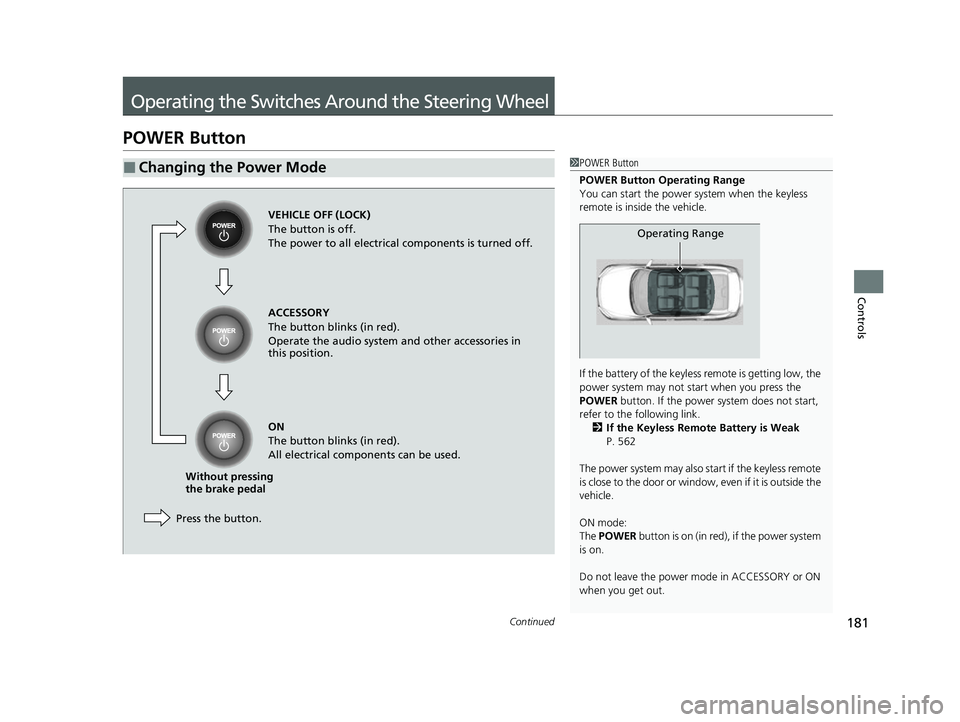
POWER Button
■Changing the Power Mode1POWER Button
POWER Button Operating Range
You can start the power system when the keyless
remote is inside the vehicle.
If the battery of the keyless remote is getting low, the
power system may not st art when you press the
POWER button. If the power system does not start,
refer to the following link. 2 If the Keyless Remote Battery is Weak
P. 562
The power system may also start if the keyless remote
is close to the door or window, even if it is outside the
vehicle.
ON mode:
The POWER button is on (in red), if the power system
is on.
Do not leave the power mode in ACCESSORY or ON
when you get out.
Operating Range
VEHICLE OFF (LOCK)
The button is off.
The power to all electrical components is turned off.
Press the button. Without pressing
the brake pedal ACCESSORY
The button blinks (in red).
Operate the audio system and other accessories in
this position.
ON
The button blinks (in red).
All electrical components can be used.
22 INSIGHT HMIN-31TXM6300.book 181 ページ 2021年2月24日 水曜日 午後3時45分
Page 184 of 609
183
uuOperating the Switches Around the Steering Wheel uPOWER Button
Controls
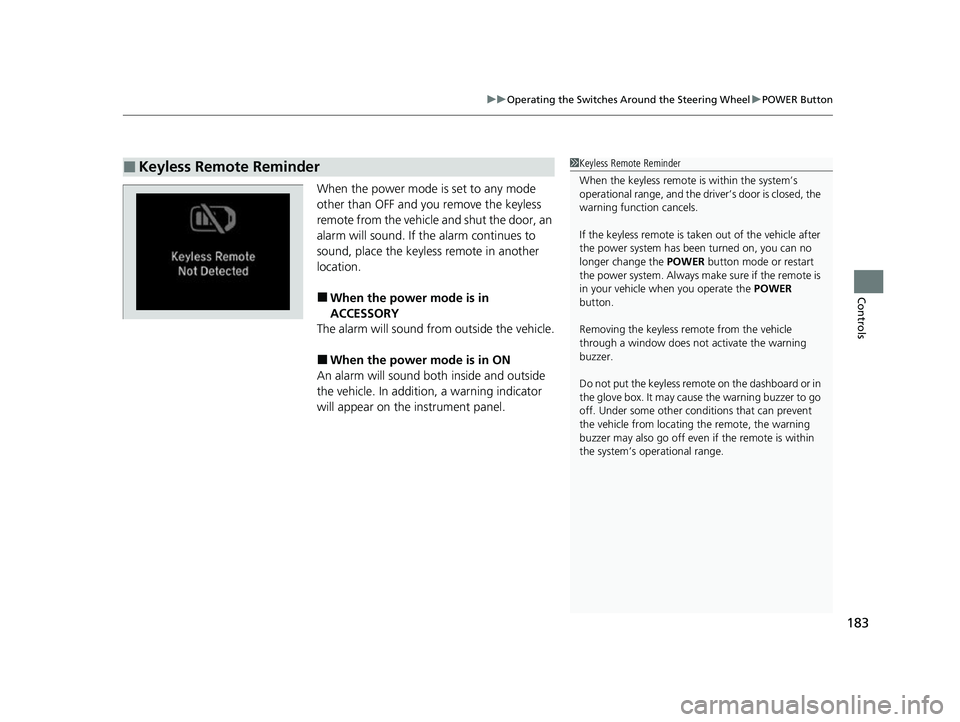
When the power mode is set to any mode
other than OFF and yo u remove the keyless
remote from the vehicle and shut the door, an
alarm will sound. If the alarm continues to
sound, place the keyless remote in another
location.
■When the power mode is in
ACCESSORY
The alarm will sound from outside the vehicle.
■When the power mode is in ON
An alarm will sound both inside and outside
the vehicle. In additi on, a warning indicator
will appear on the instrument panel.
■Keyless Remote Reminder1 Keyless Remote Reminder
When the keyless remote is within the system’s
operational range, and the driv er’s door is closed, the
warning function cancels.
If the keyless remote is taken out of the vehicle after
the power system has been turned on, you can no
longer change the POWER button mode or restart
the power system. Always make sure if the remote is
in your vehicle when you operate the POWER
button.
Removing the keyless remote from the vehicle
through a window does not activate the warning
buzzer.
Do not put the keyless remo te on the dashboard or in
the glove box. It may cause the warning buzzer to go
off. Under some other cond itions that can prevent
the vehicle from locating the remote, the warning
buzzer may also go off even if the remote is within
the system’s operational range.
22 INSIGHT HMIN-31TXM6300.book 183 ページ 2021年2月24日 水曜日 午後3時45分
Page 332 of 609
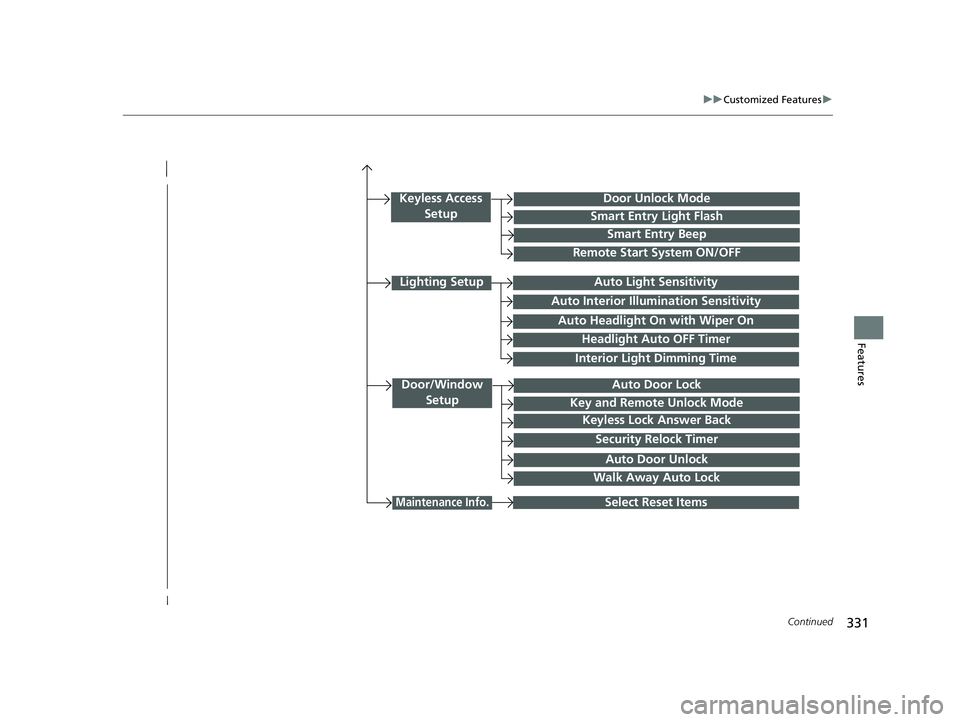
331
uuCustomized Features u
Continued
Features
Interior Light Dimming Time
Headlight Auto OFF Timer
Auto Light Sensitivity
Door/Window
SetupAuto Door Lock
Auto Door Unlock
Key and Remote Unlock Mode
Keyless Lock Answer Back
Security Relock Timer
Select Reset Items
Walk Away Auto Lock
Keyless Access SetupDoor Unlock Mode
Smart Entry Light Flash
Smart Entry Beep
Remote Start System ON/OFF
Auto Headlight On with Wiper On
Auto Interior Illumi nation Sensitivity
Maintenance Info.
Lighting Setup
22 INSIGHT HMIN-31TXM6300.book 331 ページ 2021年2月24日 水曜日 午後3時45分
Page 342 of 609
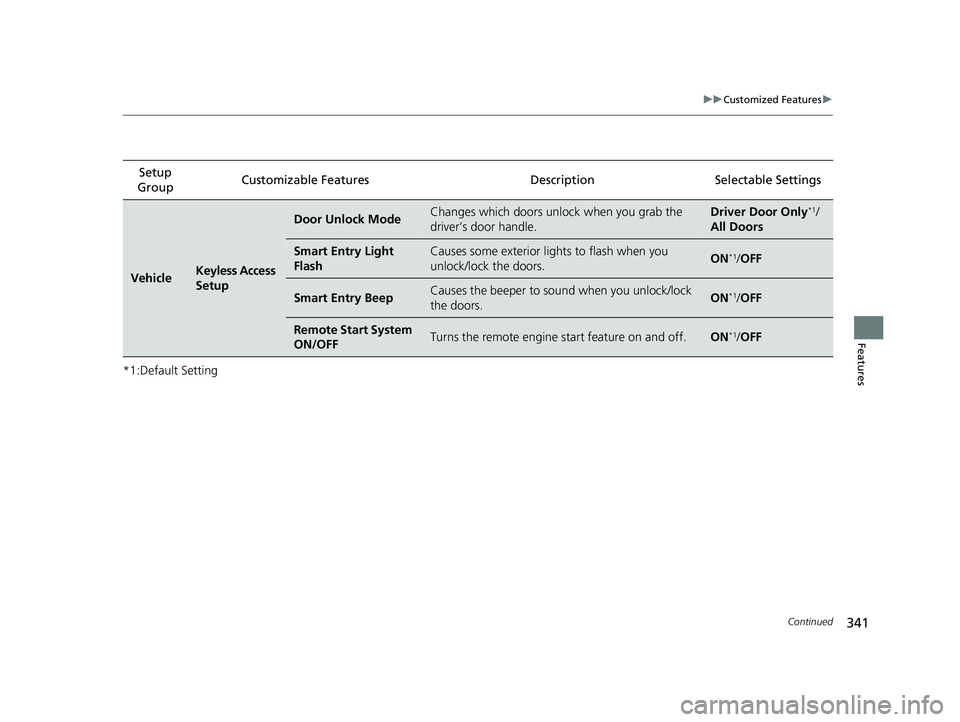
341
uuCustomized Features u
Continued
Features
*1:Default SettingSetup
Group Customizable Features
DescriptionSelectable Settings
VehicleKeyless Access
Setup
Door Unlock ModeChanges which doors unlock when you grab the
driver’s door handle.Driver Door Only*1/
All Doors
Smart Entry Light
FlashCauses some exterior lights to flash when you
unlock/lock the doors.ON*1/ OFF
Smart Entry BeepCauses the beeper to so und when you unlock/lock
the doors.ON*1/ OFF
Remote Start System
ON/OFFTurns the remote engine start feature on and off.ON*1/OFF
22 INSIGHT HMIN-31TXM6300.book 341 ページ 2021年2月24日 水曜日 午後3時45分
Page 344 of 609
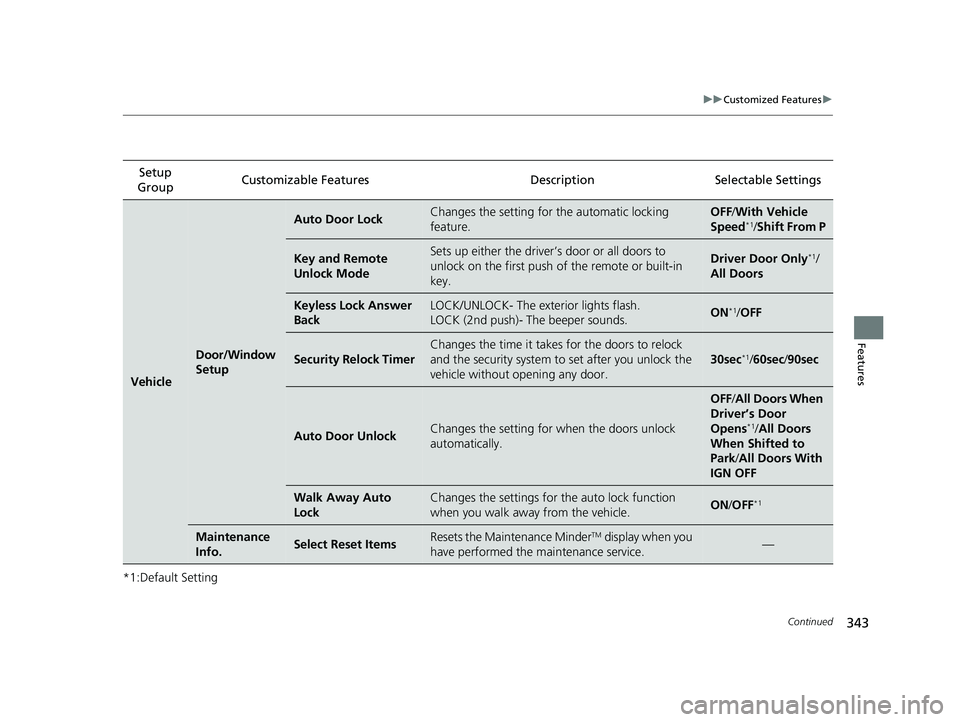
343
uuCustomized Features u
Continued
Features
*1:Default SettingSetup
Group Customizable Features
DescriptionSelectable Settings
Vehicle
Door/Window
Setup
Auto Door LockChanges the setting for the automatic locking
feature.OFF /With Ve hicle
Speed*1/ Shift From P
Key and Remote
Unlock ModeSets up either the driver’s door or all doors to
unlock on the first push of the remote or built-in
key.Driver Door Only*1/
All Doors
Keyless Lock Answer
BackLOCK/UNLOCK- The exterior lights flash.
LOCK (2nd push)- The beeper sounds.ON*1/ OFF
Security Relock Timer
Changes the time it takes for the doors to relock
and the security system to set after you unlock the
vehicle without opening any door.
30sec*1/ 60sec /90sec
Auto Door UnlockChanges the setting for when the doors unlock
automatically.
OFF /All Doors When
Driver’s Door
Opens
*1/ All Doors
When Shifted to
Park/ All Doors With
IGN OFF
Walk Away Auto
LockChanges the settings for th e auto lock function
when you walk away from the vehicle.ON /OFF*1
Maintenance
Info.Select Reset ItemsResets the Maintenance MinderTM display when you
have performed the maintenance service.—
22 INSIGHT HMIN-31TXM6300.book 343 ページ 2021年2月24日 水曜日 午後3時45分
Page 384 of 609
Continued383
uuWhen Driving uTurning on the Power
Driving
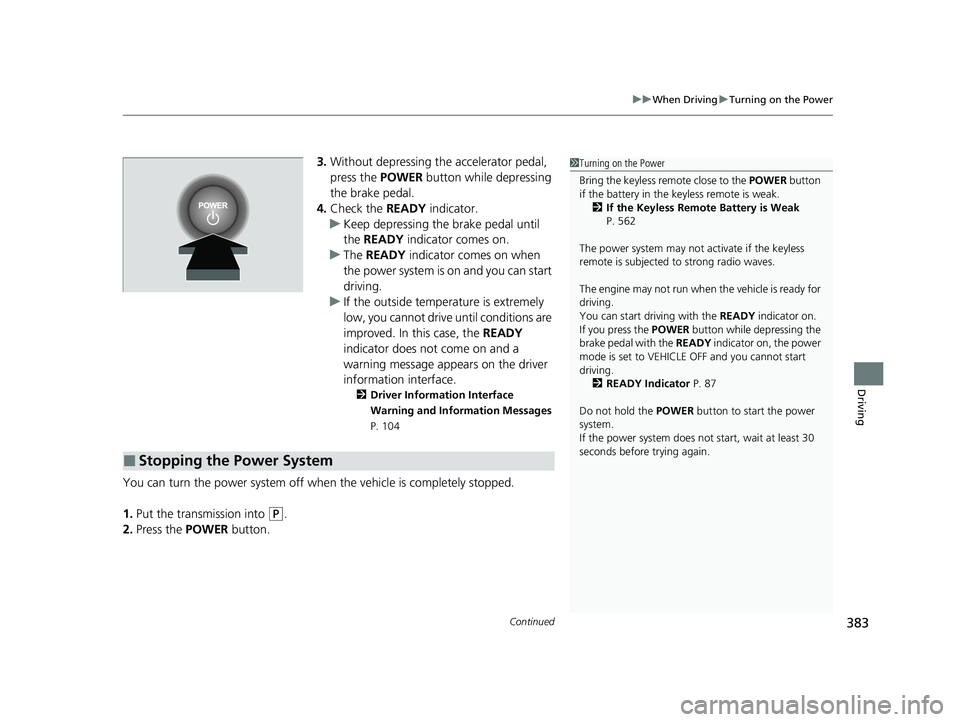
3. Without depressing the accelerator pedal,
press the POWER button while depressing
the brake pedal.
4. Check the READY indicator.
u Keep depressing the brake pedal until
the READY indicator comes on.
u The READY indicator comes on when
the power system is on and you can start
driving.
u If the outside temperature is extremely
low, you cannot drive until conditions are
improved. In this case, the READY
indicator does not come on and a
warning message appears on the driver
information interface.
2 Driver Information Interface
Warning and Information Messages
P. 104
You can turn the power system off when the vehicle is completely stopped.
1. Put the transmission into
(P.
2. Press the POWER button.
■Stopping the Power System
1Turning on the Power
Bring the keyless remote close to the POWER button
if the battery in the keyless remote is weak. 2 If the Keyless Remote Battery is Weak
P. 562
The power system may not activate if the keyless
remote is subjected to strong radio waves.
The engine may not run when the vehicle is ready for
driving.
You can start driving with the READY indicator on.
If you press the POWER button while depressing the
brake pedal with the READY indicator on, the power
mode is set to VEHICLE OFF and you cannot start
driving.
2 READY Indicator P. 87
Do not hold the POWER button to start the power
system.
If the power system does not start, wait at least 30
seconds before trying again.
22 INSIGHT HMIN-31TXM6300.book 383 ページ 2021年2月24日 水曜日 午後3時45分
Page 385 of 609
uuWhen Driving uTurning on the Power
384
Driving
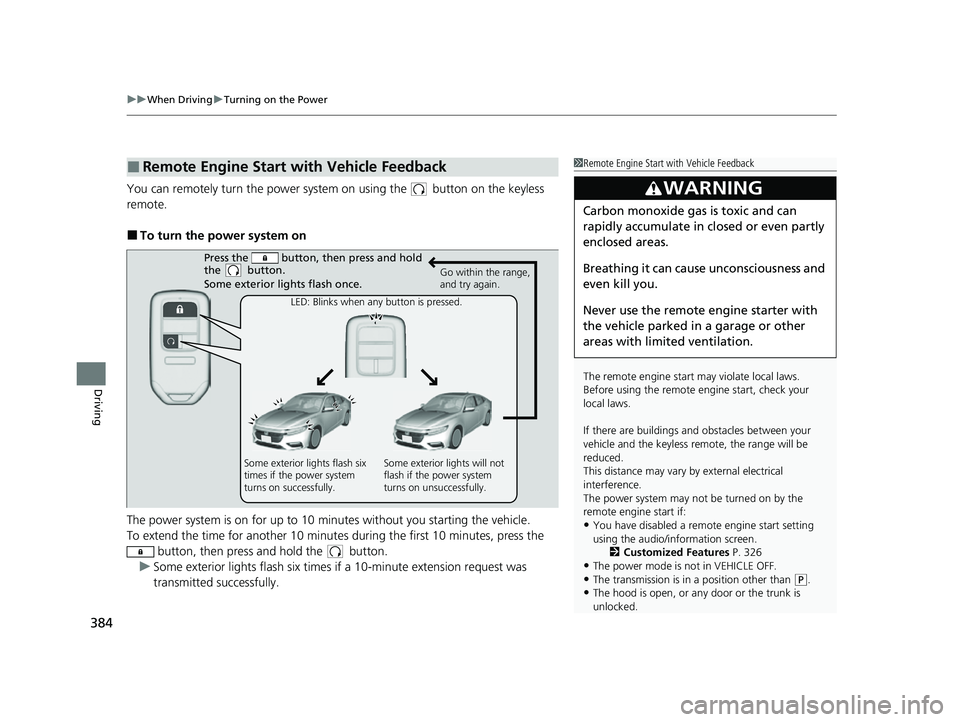
You can remotely turn the power system on using the button on the keyless
remote.
■To turn the power system on
The power system is on for up to 10 minutes without you starting the vehicle.
To extend the time for another 10 minute s during the first 10 minutes, press the
button, then press and hold the button.
u Some exterior lights flash six times if a 10-minute extension request was
transmitted successfully.
■Remote Engine Start with Vehicle Feedback1Remote Engine Start with Vehicle Feedback
The remote engine start may violate local laws.
Before using the remote e ngine start, check your
local laws.
If there are buildings an d obstacles between your
vehicle and the keyless re mote, the range will be
reduced.
This distance may vary by external electrical
interference.
The power system may not be turned on by the
remote engine start if:
•You have disabled a remo te engine start setting
using the audio/information screen. 2Customized Features P. 326
•The power mode is not in VEHICLE OFF.
•The transmission is in a position other than (P.•The hood is open, or any door or the trunk is
unlocked.
3WARNING
Carbon monoxide ga s is toxic and can
rapidly accumulate in closed or even partly
enclosed areas.
Breathing it can cause unconsciousness and
even kill you.
Never use the remote engine starter with
the vehicle parked in a garage or other
areas with limited ventilation.
Press the button, th en press and hold
the button.
Some exterior lights flash once.
Go within the range,
and try again.
LED: Blinks when any button is pressed.
Some exterior lights flash six
times if the power system
turns on successfully. Some exterior lights will not
flash if the power system
turns on unsuccessfully.
22 INSIGHT HMIN-31TXM6300.book 384 ページ 2021年2月24日 水曜日 午後3時45分
Page 386 of 609
Continued385
uuWhen Driving uTurning on the Power
Driving
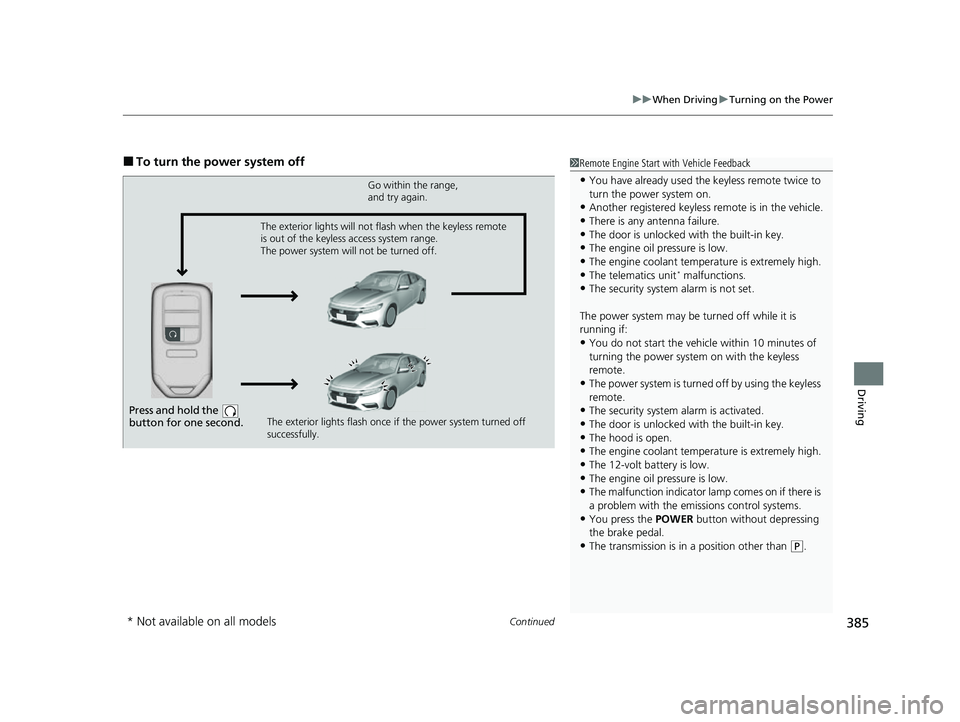
■To turn the power system off1Remote Engine Start with Vehicle Feedback
•You have already used the keyless remote twice to
turn the power system on.
•Another registered keyless remote is in the vehicle.
•There is any antenna failure.•The door is unlocked with the built-in key.
•The engine oil pressure is low.
•The engine coolant temper ature is extremely high.•The telematics unit* malfunctions.
•The security system alarm is not set.
The power system may be turned off while it is
running if:
•You do not start the vehicl e within 10 minutes of
turning the power system on with the keyless
remote.
•The power system is turned off by using the keyless
remote.
•The security system alarm is activated.
•The door is unlocked with the built-in key.
•The hood is open.•The engine coolant temper ature is extremely high.
•The 12-volt battery is low.
•The engine oil pressure is low.•The malfunction indicator la mp comes on if there is
a problem with the emissions control systems.
•You press the POWER button without depressing
the brake pedal.
•The transmission is in a position other than ( P.
Press and hold the
button for one second.
Go within the range,
and try again.
The exterior lights flash once if the power system turned off
successfully.
The exterior lights will not flash when the keyless remote
is out of the keyless access system range.
The power system will not be turned off.
* Not available on all models
22 INSIGHT HMIN-31TXM6300.book 385 ページ 2021年2月24日 水曜日 午後3時45分