door lock HONDA INSIGHT 2022 Owner's Manual
[x] Cancel search | Manufacturer: HONDA, Model Year: 2022, Model line: INSIGHT, Model: HONDA INSIGHT 2022Pages: 609, PDF Size: 18.48 MB
Page 166 of 609
Continued165
uuLocking and Unlocking the Doors uLocking/Unlocking the Doors from the Outside
Controls
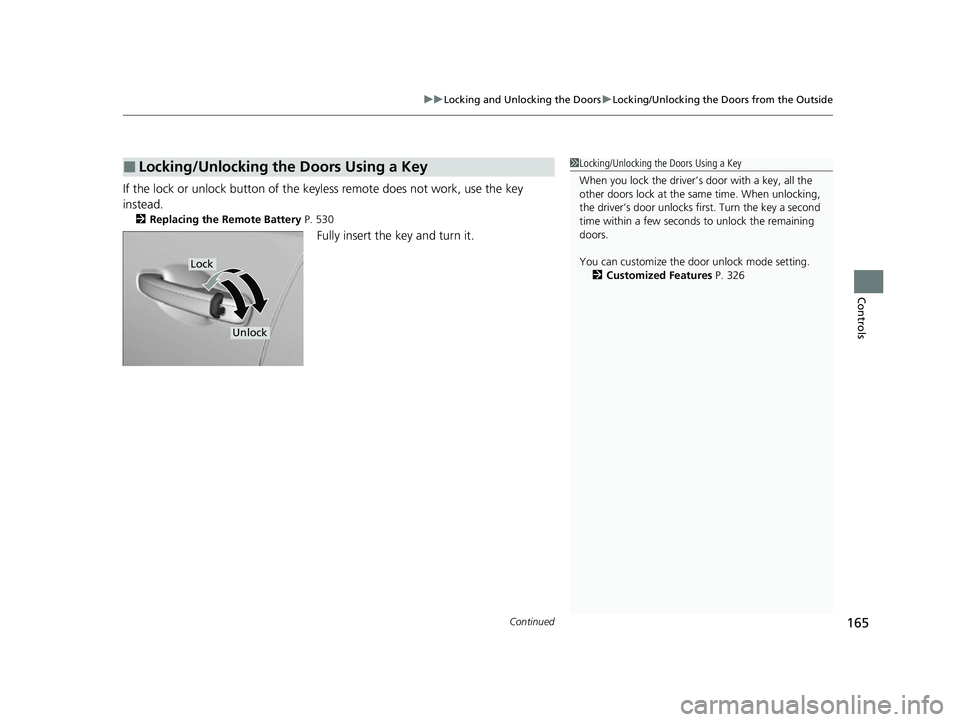
If the lock or unlock button of the key less remote does not work, use the key
instead.
2 Replacing the Remote Battery P. 530
Fully insert the key and turn it.
■Locking/Unlocking the Doors Using a Key1Locking/Unlocking the Doors Using a Key
When you lock the driver’s door with a key, all the
other doors lock at the sa me time. When unlocking,
the driver’s door unlocks first. Turn the key a second
time within a few seconds to unlock the remaining
doors.
You can customize the door unlock mode setting. 2 Customized Features P. 326
Lock
Unlock
22 INSIGHT HMIN-31TXM6300.book 165 ページ 2021年2月24日 水曜日 午後3時45分
Page 167 of 609
uuLocking and Unlocking the Doors uLocking/Unlocking the Doors from the Outside
166
Controls
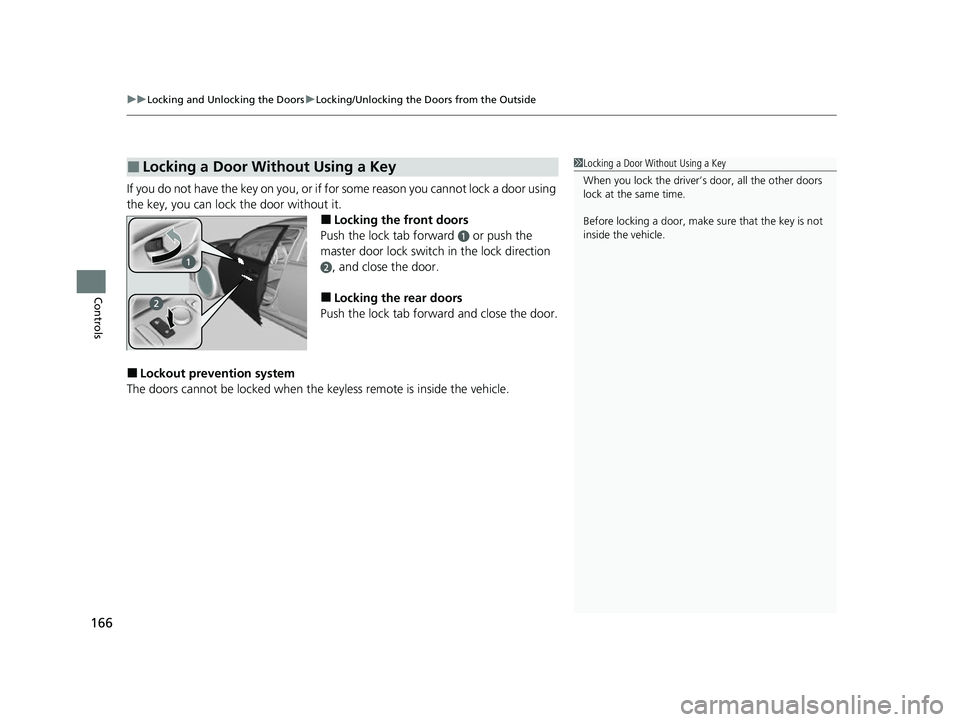
If you do not have the key on you, or if fo r some reason you cannot lock a door using
the key, you can lock the door without it.
■Locking the front doors
Push the lock tab forward
a or push the
master door lock switch in the lock direction
b, and close the door.
■Locking the rear doors
Push the lock tab forward and close the door.
■Lockout prevention system
The doors cannot be locked when the keyless remote is inside the vehicle.
■Locking a Door Without Using a Key1Locking a Door Without Using a Key
When you lock the driver’s door, all the other doors
lock at the same time.
Before locking a door, make sure that the key is not
inside the vehicle.
22 INSIGHT HMIN-31TXM6300.book 166 ページ 2021年2月24日 水曜日 午後3時45分
Page 168 of 609
167
uuLocking and Unlocking the Doors uLocking/Unlocking the Doors from the Inside
Continued
Controls
Locking/Unlocking the Doors from the Inside
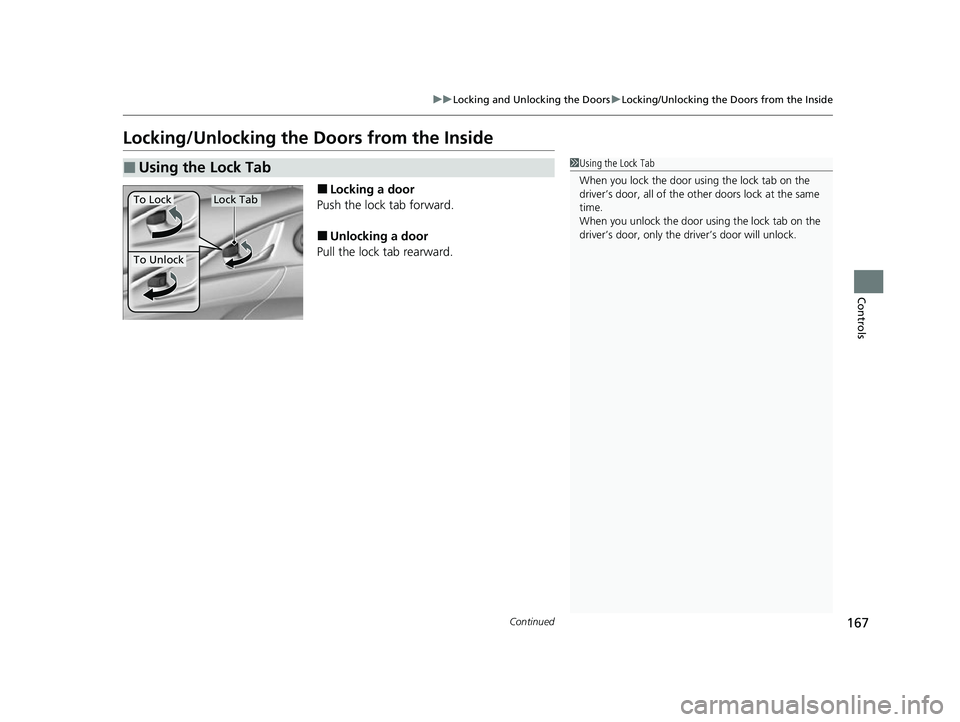
■Locking a door
Push the lock tab forward.
■Unlocking a door
Pull the lock tab rearward.
■Using the Lock Tab1 Using the Lock Tab
When you lock the door using the lock tab on the
driver’s door, all of the ot her doors lock at the same
time.
When you unlock the door using the lock tab on the
driver’s door, only the driv er’s door will unlock.
To Unlock
Lock TabTo Lock
22 INSIGHT HMIN-31TXM6300.book 167 ページ 2021年2月24日 水曜日 午後3時45分
Page 169 of 609
uuLocking and Unlocking the Doors uLocking/Unlocking the Doors from the Inside
168
Controls
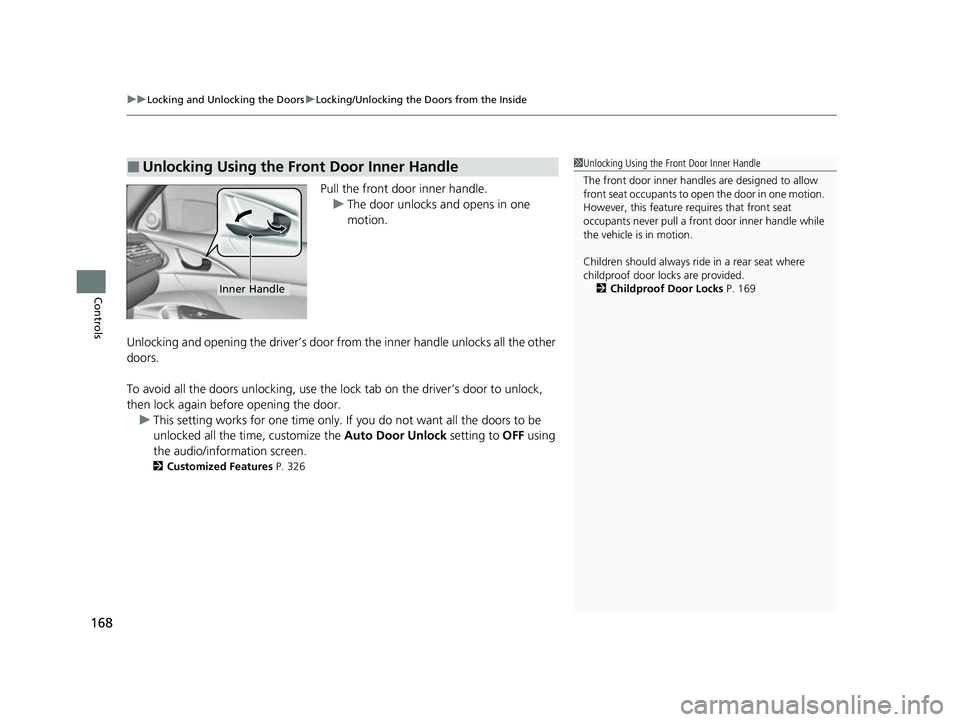
Pull the front door inner handle.
u The door unlocks and opens in one
motion.
Unlocking and opening the driver’s door from the inner handle unlocks all the other
doors.
To avoid all the doors unlocking, use the lock tab on the driver’s door to unlock,
then lock again before opening the door. u This setting works for one time only. If you do not want all the doors to be
unlocked all the time, customize the Auto Door Unlock setting to OFF using
the audio/information screen.
2 Customized Features P. 326
■Unlocking Using the Front Door Inner Handle1Unlocking Using the Front Door Inner Handle
The front door inne r handles are designed to allow
front seat occupants to ope n the door in one motion.
However, this feature requires that front seat
occupants never pull a front door inner handle while
the vehicle is in motion.
Children should always ride in a rear seat where
childproof door locks are provided.
2 Childproof Door Locks P. 169
Inner Handle
22 INSIGHT HMIN-31TXM6300.book 168 ページ 2021年2月24日 水曜日 午後3時45分
Page 170 of 609
169
uuLocking and Unlocking the Doors uChildproof Door Locks
Controls
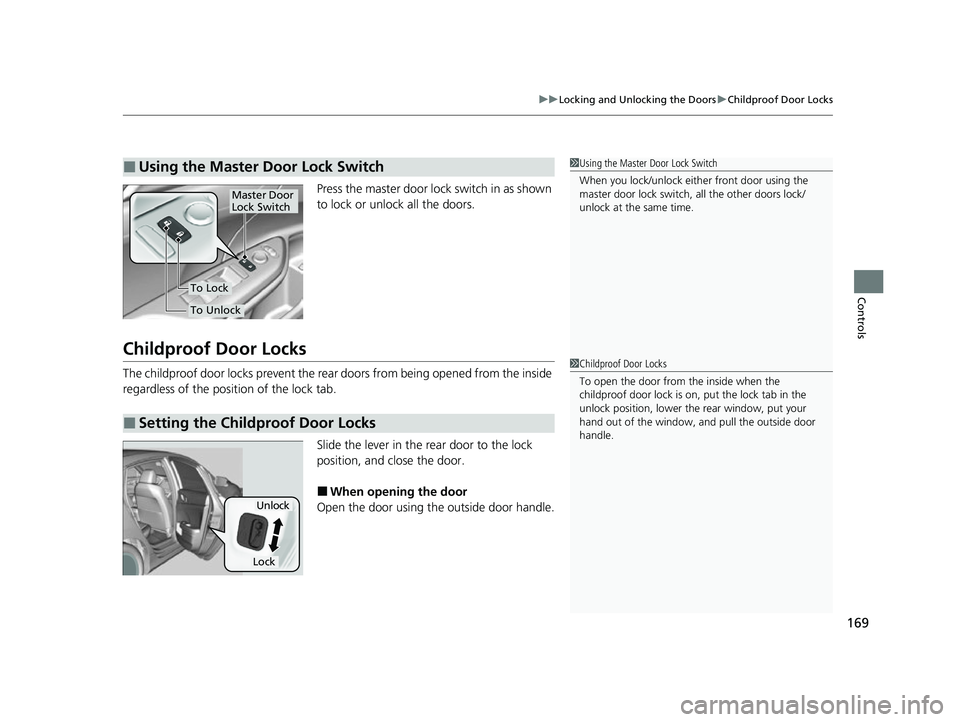
Press the master door lo ck switch in as shown
to lock or unlock all the doors.
Childproof Door Locks
The childproof door locks prevent the rear doors from being opened from the inside
regardless of the position of the lock tab.
Slide the lever in the rear door to the lock
position, and close the door.
■When opening the door
Open the door using the outside door handle.
■Using the Master Door Lock Switch1 Using the Master Door Lock Switch
When you lock/unlock eith er front door using the
master door lock switch, all the other doors lock/
unlock at the same time.
To Unlock
Master Door
Lock Switch
To Lock
■Setting the Childproof Door Locks
1 Childproof Door Locks
To open the door from the inside when the
childproof door lock is on, put the lock tab in the
unlock position, lower the rear window, put your
hand out of the window, and pull the outside door
handle.
Unlock
Lock
22 INSIGHT HMIN-31TXM6300.book 169 ページ 2021年2月24日 水曜日 午後3時45分
Page 171 of 609
170
uuLocking and Unlocking the Doors uAuto Door Locking/Unlocking
Controls
Auto Door Locking/Unlocking
Your vehicle locks or unlocks all doors auto matically when a certain condition is met.
■Drive lock mode
All doors lock when the vehicle’s speed reaches about 10 mph (15 km/h).
■Driver’s door open mode
All doors unlock when the driver’s door is opened.
■Auto Door Locking
■Auto Door Unlocking
1 Auto Door Locking/Unlocking
You can turn off or cha nge to another auto door
locking/unlocking sett ing using the audio/
information screen. 2 Customized Features P. 326
22 INSIGHT HMIN-31TXM6300.book 170 ページ 2021年2月24日 水曜日 午後3時45分
Page 172 of 609
171
Controls
Opening and Closing the Trunk
Precautions for Opening/Closing the Trunk
■Opening the trunk
Open the trunk all the way. u If it is not fully opened, the trunk lid may begin to close under its own weight.
■Closing the trunk
Keep the trunk lid closed while driving to:
u Avoid possible damage.
u Prevent exhaust gas from leaking into the vehicle.
2 Exhaust Gas Hazard P. 79
Using the Trunk Opener
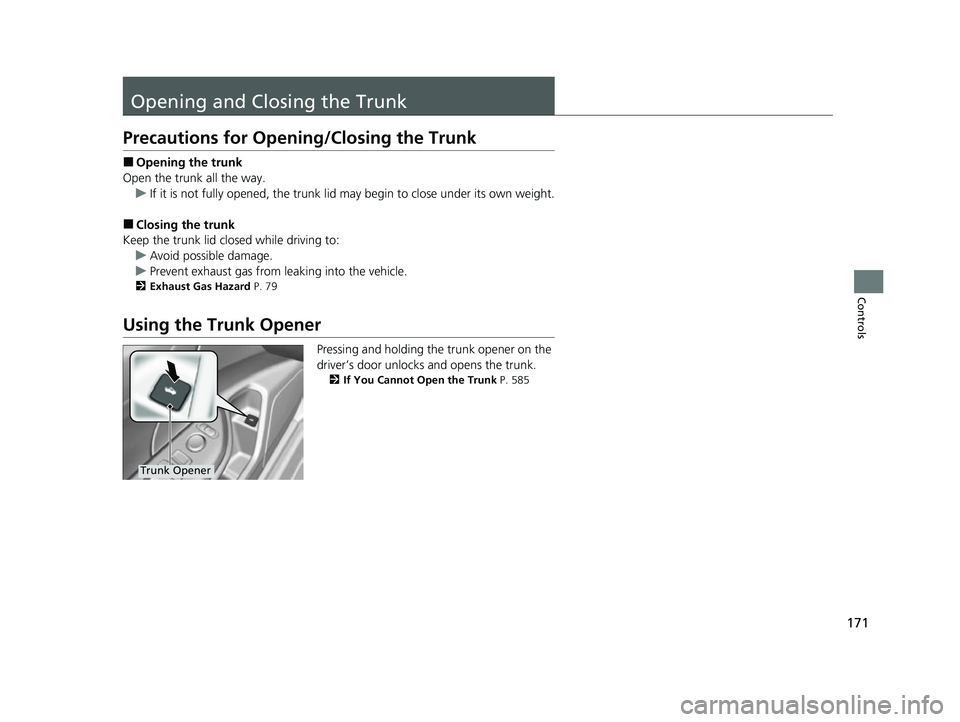
Pressing and holding the trunk opener on the
driver’s door unlocks and opens the trunk.
2If You Cannot Open the Trunk P. 585
Trunk Opener
22 INSIGHT HMIN-31TXM6300.book 171 ページ 2021年2月24日 水曜日 午後3時45分
Page 173 of 609
172
uuOpening and Closing the Trunk uUsing the Trunk Release Button
Controls
Using the Trunk Release Button
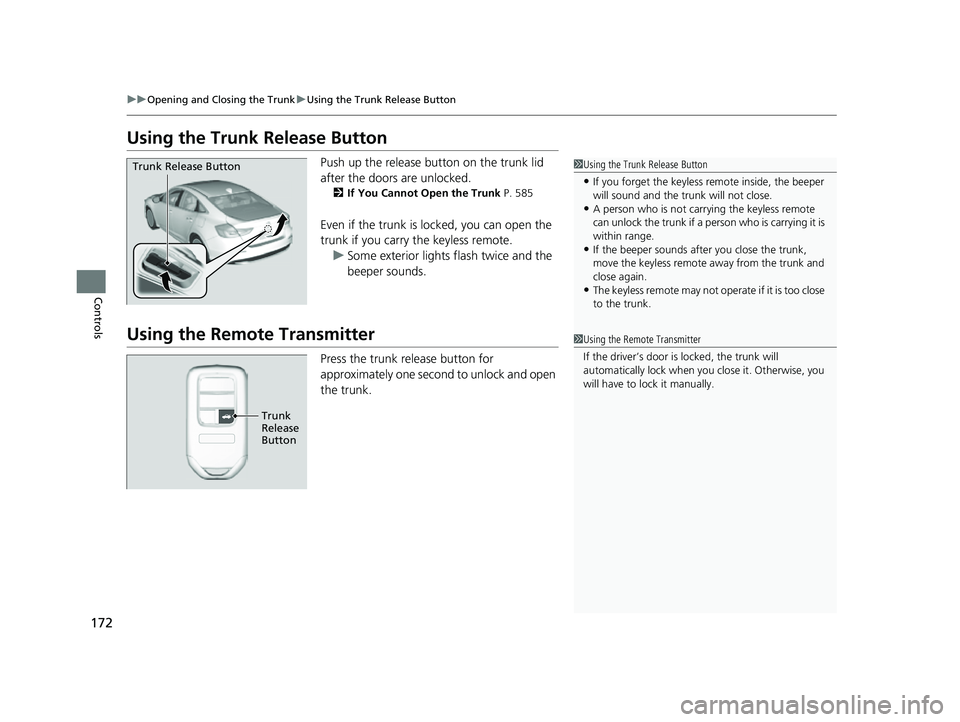
Push up the release button on the trunk lid
after the doors are unlocked.
2If You Cannot Open the Trunk P. 585
Even if the trunk is locked, you can open the
trunk if you carry the keyless remote.
u Some exterior lights flash twice and the
beeper sounds.
Using the Remote Transmitter
Press the trunk release button for
approximately one second to unlock and open
the trunk.
1Using the Trunk Release Button
•If you forget the keyless remote inside, the beeper
will sound and the trunk will not close.
•A person who is not carryi ng the keyless remote
can unlock the trunk if a pe rson who is carrying it is
within range.
•If the beeper sounds after you close the trunk,
move the keyless remote away from the trunk and
close again.
•The keyless remote may not operate if it is too close
to the trunk.
Trunk Release Button
1 Using the Remote Transmitter
If the driver’s door is locked, the trunk will
automatically lock when yo u close it. Otherwise, you
will have to lock it manually.
Trunk
Release
Button
22 INSIGHT HMIN-31TXM6300.book 172 ページ 2021年2月24日 水曜日 午後3時45分
Page 176 of 609
175
uuSecurity System uSecurity System Alarm
Continued
Controls
Security System Alarm
The security system alarm activates when the trunk, hood or doors are forcibly
opened. The alarm does not activate if the trunk or doors are opened with the key,
remote transmitter or keyless access system.
However, the alarm activates if a door is op ened with the key and then the hood is
opened before the power mode is set to ON.
■When the security system alarm activates
The horn sounds intermittently and some exterior lights flash.
■To deactivate the security system alarm
Unlock the vehicle using the key, remote tra nsmitter or keyless access system, or set
the power mode to ON. The system, along with the horn and flashing lights, is
deactivated.
■Setting the security system alarm
The security system alarm automatically sets when the following conditions have
been met:
• The power mode is set to VEHICLE OFF (LOCK).
• The hood is closed.
• All doors and the trunk are locked from ou tside with the key, remote transmitter
or keyless access system.
■When the security system alarm sets
The security system alarm in dicator in the instrument panel blinks and the blinking
interval changes after about 15 seconds.
■To cancel the security system alarm
The security system alarm is canceled when the vehicle is unlocked using the remote
transmitter or keyless access system, or when the power mode is set to ON. The
security system alarm indicato r goes off at the same time.
1Security System Alarm
Do not alter the system or add other devices to it.
Doing so may damage the system and make your
vehicle inoperable.
The security system alarm continues for a maximum
of two minutes until the security system alarm
deactivates.
Do not set the security system alarm when someone
is in the vehicle or a window is open. The system can
accidentally activate when:
•Unlocking the door with the lock tab.
•Opening the trunk with the trunk opener or the
emergency trunk opener.
•Opening the hood with the hood release.
If the 12-volt battery goes dead after you have set the
security system alarm, the security alarm may go off
once the 12-volt battery is recharged or replaced.
If this occurs, deactivate the security system alarm by
unlocking a door using the ke y, remote transmitter,
or keyless access system.
22 INSIGHT HMIN-31TXM6300.book 175 ページ 2021年2月24日 水曜日 午後3時45分
Page 178 of 609
177Continued
Controls
Opening and Closing the Windows
Opening/Closing the Power Windows
The power windows can be opened and closed when the power mode is in ON,
using the switches on the doors.
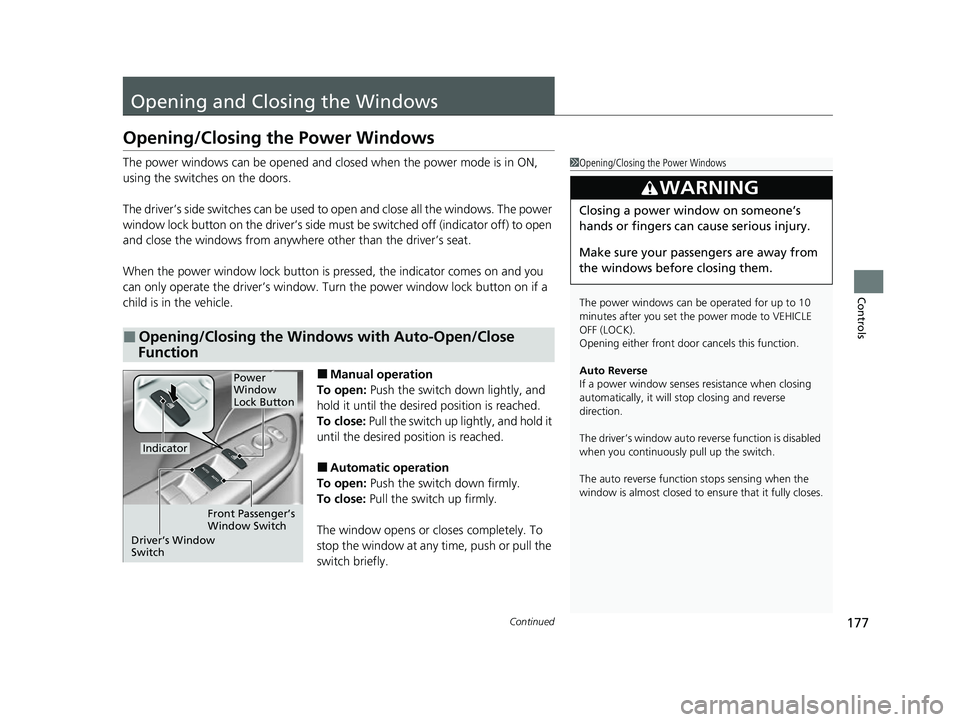
The driver’s side switches can be used to open and close all the windows. The power
window lock button on the driver’s side must be switched off (indicator off) to open
and close the windows from anywhere other than the driver’s seat.
When the power window lock button is pressed, the indicator comes on and you
can only operate the driver’s window. Turn the power window lock button on if a
child is in the vehicle.
■Manual operation
To open: Push the switch down lightly, and
hold it until the desired position is reached.
To close: Pull the switch up lightly, and hold it
until the desired position is reached.
■Automatic operation
To open: Push the switch down firmly.
To close: Pull the switch up firmly.
The window opens or closes completely. To
stop the window at any time, push or pull the
switch briefly.
■Opening/Closing the Windows with Auto-Open/Close
Function
1 Opening/Closing the Power Windows
The power windows can be operated for up to 10
minutes after you set the power mode to VEHICLE
OFF (LOCK).
Opening either front door cancels this function.
Auto Reverse
If a power window senses resistance when closing
automatically, it will stop closing and reverse
direction.
The driver’s window auto re verse function is disabled
when you continuously pull up the switch.
The auto reverse function stops sensing when the
window is almost closed to en sure that it fully closes.
3WARNING
Closing a power window on someone’s
hands or fingers can cause serious injury.
Make sure your passengers are away from
the windows before closing them.
Power
Window
Lock Button
Indicator
Driver’s Window
Switch Front Passenger’s
Window Switch
22 INSIGHT HMIN-31TXM6300.book 177 ページ 2021年2月24日 水曜日 午後3時45分