phone HONDA INSIGHT 2022 Owner's Guide
[x] Cancel search | Manufacturer: HONDA, Model Year: 2022, Model line: INSIGHT, Model: HONDA INSIGHT 2022Pages: 609, PDF Size: 18.48 MB
Page 324 of 609
323
uuGeneral Information on the Audio System uLicense Information*
Continued
Features
“Made for iPod,” and “Made for iPhone,” mean that an electronic accessory has
been designed to connect specifically to iP od, or iPhone, respectively, and has been
certified by the developer to meet Appl e performance standards. Apple is not
responsible for the operation of this devi ce or its compliance with safety and
regulatory standards. Please no te that the use of this accessory with iPod, or iPhone,
may affect wireless performance.
Apple, the Apple Logo, iPhone, iPod touch are trademarks of Apple Inc., registered
in the U.S. and other countries. Apple CarPlay, and Lightning are trademarks of
Apple Inc. App Store is a service mark of Apple Inc.
■Apple
22 INSIGHT HMIN-31TXM6300.book 323 ページ 2021年2月24日 水曜日 午後3時45分
Page 330 of 609
329
uuCustomized Features u
Continued
Features
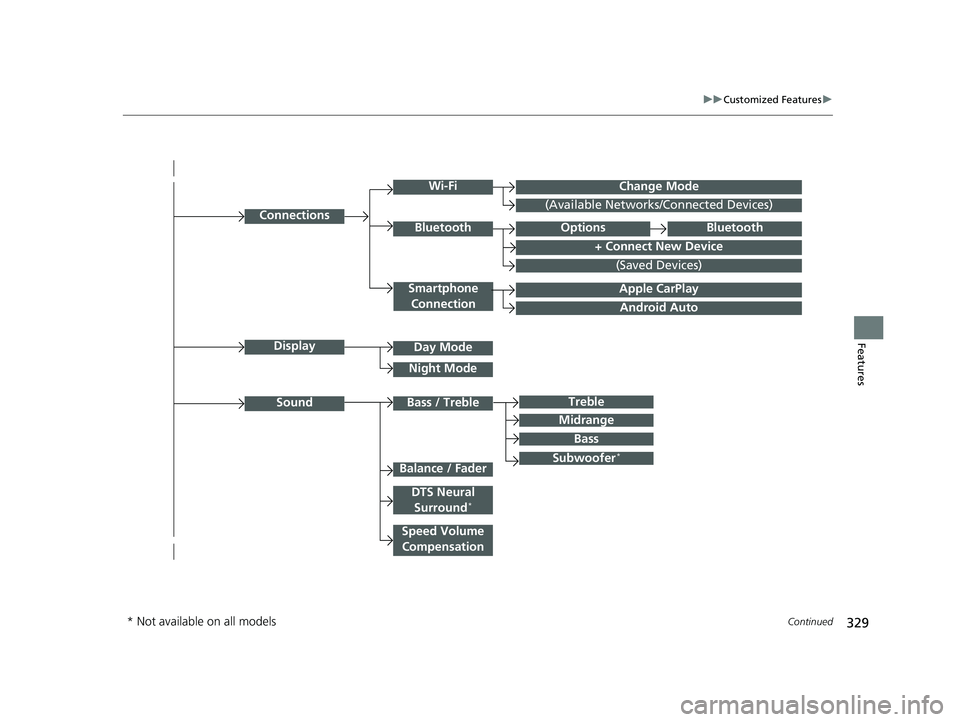
Android Auto
Connections
+ Connect New Device
(Saved Devices)
Change Mode
Smartphone
Connection
Bluetooth
Wi-Fi
(Available Networks/Connected Devices)
Apple CarPlay
Display
Sound
Day Mode
Night Mode
Treble
Subwoofer*
Bass / Treble
Speed Volume Compensation
Balance / Fader
DTS Neural Surround*
Midrange
Bass
OptionsBluetooth
* Not available on all models
22 INSIGHT HMIN-31TXM6300.book 329 ページ 2021年2月24日 水曜日 午後3時45分
Page 338 of 609
337
uuCustomized Features u
Continued
Features
*1:Default SettingSetup
Group Customizable Features Desc
ription Selectable Settings
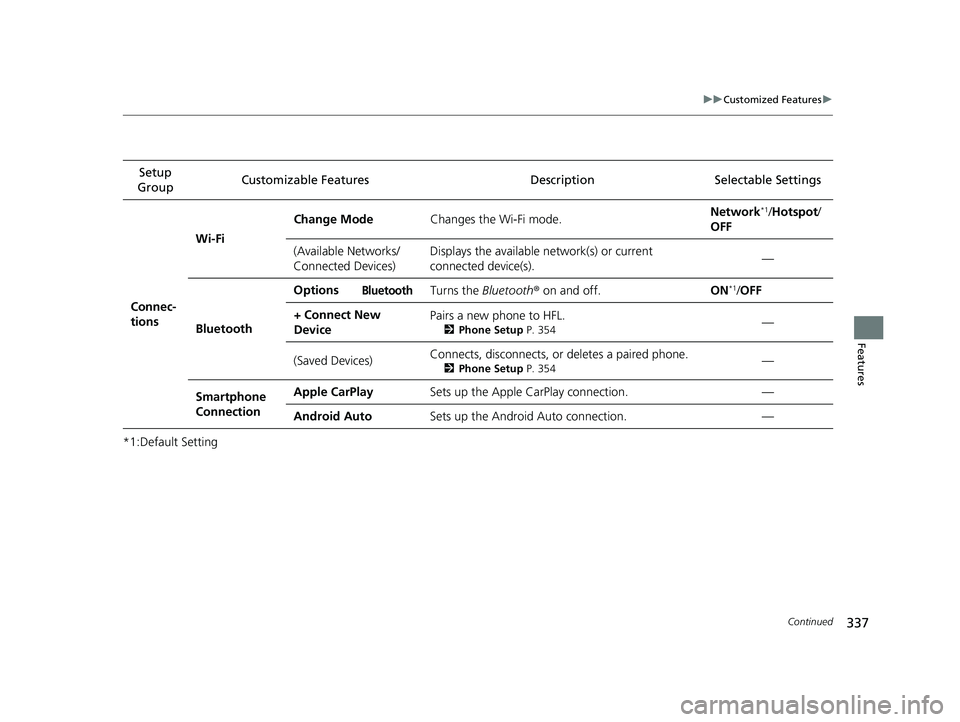
Connec-
tions Wi-Fi
Change Mode
Changes the Wi-Fi mode. Network
*1/
Hotspot /
OFF
(Available Networks/
Connected Devices) Displays the available network(s) or current
connected device(s).
—
Bluetooth Options
Bluetooth Turns the
Bluetooth® on and off. ON*1/OFF
+ Connect New
Device Pairs a new phone to HFL.
2
Phone Setup P. 354—
(Saved Devices) Connects, disconnects, or deletes a paired phone.
2
Phone Setup P. 354—
Smartphone
Connection Apple CarPlay
Sets up the Apple CarPlay connection. —
Android Auto Sets up the Android Auto connection. —
22 INSIGHT HMIN-31TXM6300.book 337 ページ 2021年2月24日 水曜日 午後3時45分
Page 350 of 609
349Continued
Features
Bluetooth® HandsFreeLink ®
Bluetooth® HandsFreeLink ® (HFL) allows you to place and receive phone calls using
your vehicle’s audio system, without handling your cell phone.
Using HFL
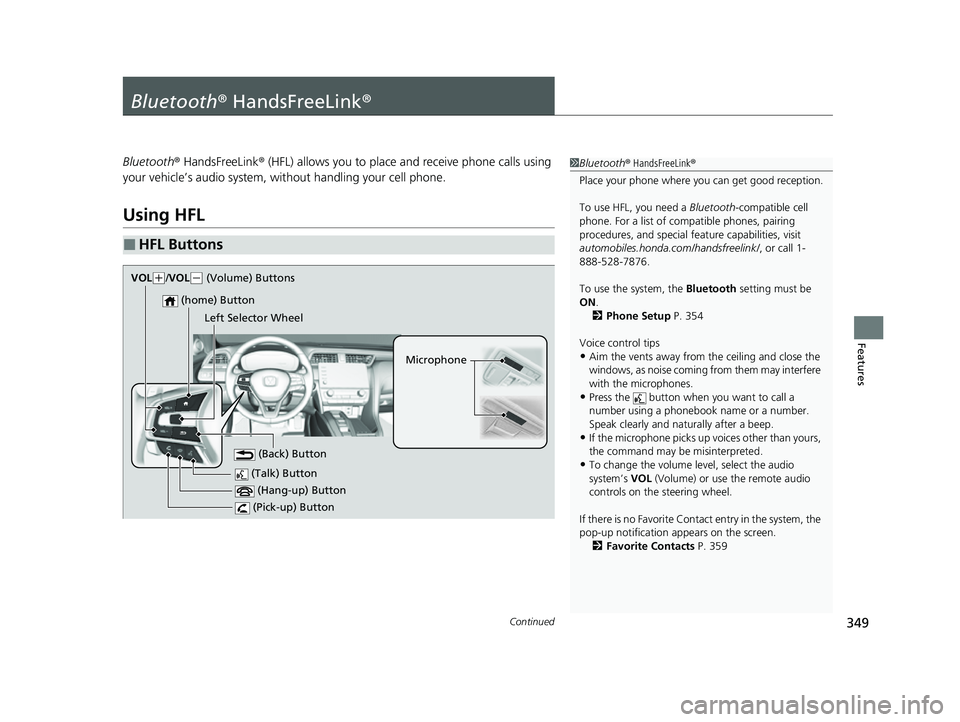
■HFL Buttons
1 Bluetooth ® HandsFreeLink ®
Place your phone where y ou can get good reception.
To use HFL, you need a Bluetooth-compatible cell
phone. For a list of compatible phones, pairing
procedures, and special fe ature capabilities, visit
automobiles.honda.com /handsfreelink/, or call 1-
888-528-7876.
To use the system, the Bluetooth setting must be
ON .
2 Phone Setup P. 354
Voice control tips
•Aim the vents away from the ceiling and close the
windows, as noise coming from them may interfere
with the microphones.
•Press the button when you want to call a
number using a phonebook name or a number.
Speak clearly and naturally after a beep.
•If the microphone picks up vo ices other than yours,
the command may be misinterpreted.
•To change the volume level, select the audio
system’s VOL (Volume) or use the remote audio
controls on the steering wheel.
If there is no Favorite Contact entry in the system, the
pop-up notification appears on the screen. 2 Favorite Contacts P. 359 (Talk) Button
Microphone
(Hang-up) Button
(Pick-up) Button
(Back) Button
(home) Button
VOk( +/VOL( - (Volume) Buttons
Left Selector Wheel
22 INSIGHT HMIN-31TXM6300.book 349 ページ 2021年2月24日 水曜日 午後3時45分
Page 351 of 609
uuBluetooth ® HandsFreeLink ®u Using HFL
350
Features
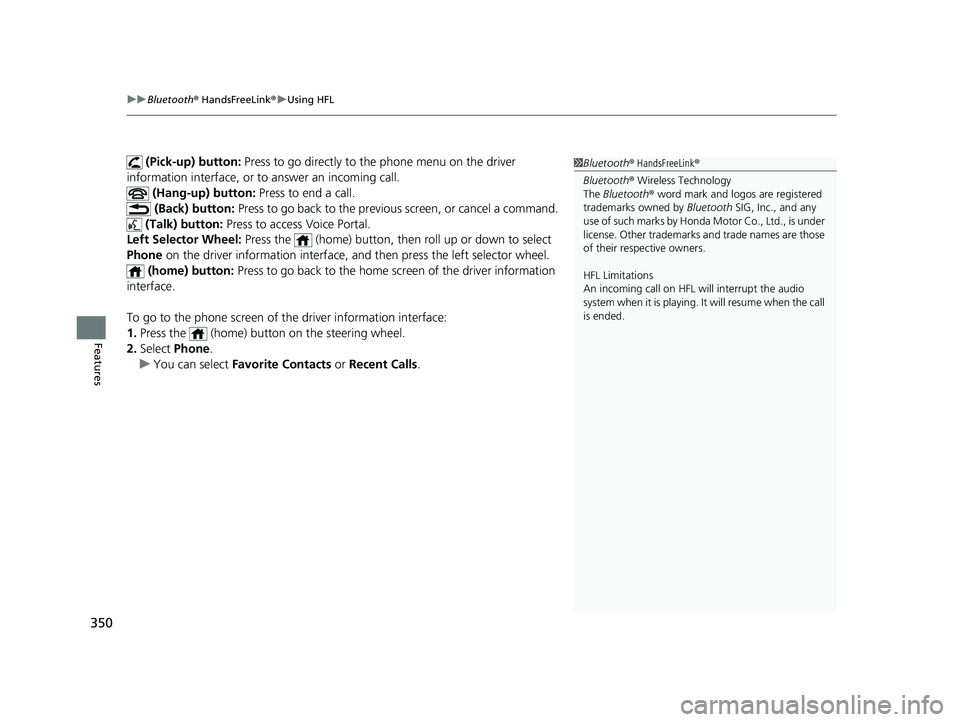
(Pick-up) button: Press to go directly to th e phone menu on the driver
information interface, or to answer an incoming call.
(Hang-up) button: Press to end a call.
(Back) button: Press to go back to the previo us screen, or cancel a command.
(Talk) button: Press to access Voice Portal.
Left Selector Wheel: Press the (home) button, then roll up or down to select
Phone on the driver information interface, an d then press the left selector wheel.
(home) button: Press to go back to the home screen of the driver information
interface.
To go to the phone screen of the driver information interface:
1. Press the (home) button on the steering wheel.
2. Select Phone .
u You can select Favorite Contacts or Recent Calls .1Bluetooth ® HandsFreeLink ®
Bluetooth ® Wireless Technology
The Bluetooth ® word mark and logos are registered
trademarks owned by Bluetooth SIG, Inc., and any
use of such marks by Honda Motor Co., Ltd., is under
license. Other trademarks and trade names are those
of their respective owners.
HFL Limitations
An incoming call on HFL will interrupt the audio
s y s t e m wh e n it is p la y i n g . It wi ll r e s u m e w h en t h e c a l l
is ended.
22 INSIGHT HMIN-31TXM6300.book 350 ページ 2021年2月24日 水曜日 午後3時45分
Page 352 of 609
351
uuBluetooth ® HandsFreeLink ®u Using HFL
Features
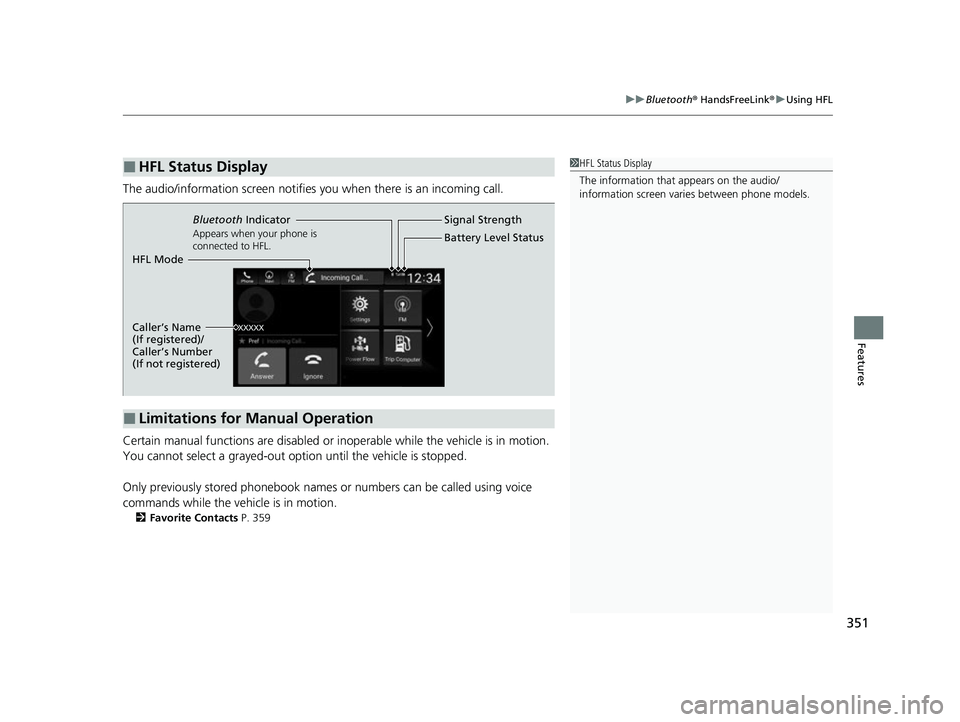
The audio/information scr een notifies you when there is an incoming call.
Certain manual functions are disabled or inoperable while the vehicle is in motion.
You cannot select a grayed-out option until the vehicle is stopped.
Only previously stored phonebook names or numbers can be called using voice
commands while the vehicle is in motion.
2 Favorite Contacts P. 359
■HFL Status Display1HFL Status Display
The information that appears on the audio/
information screen vari es between phone models.
■Limitations for Manual Operation
Bluetooth Indicator
Appears when your phone is
connected to HFL.
Signal Strength
HFL Mode Battery Level Status
Caller’s Name
(If registered)/
Caller’s Number
(If not registered)
22 INSIGHT HMIN-31TXM6300.book 351 ページ 2021年2月24日 水曜日 午後3時45分
Page 353 of 609
352
uuBluetooth ® HandsFreeLink ®u HFL Menus
Features
HFL Menus
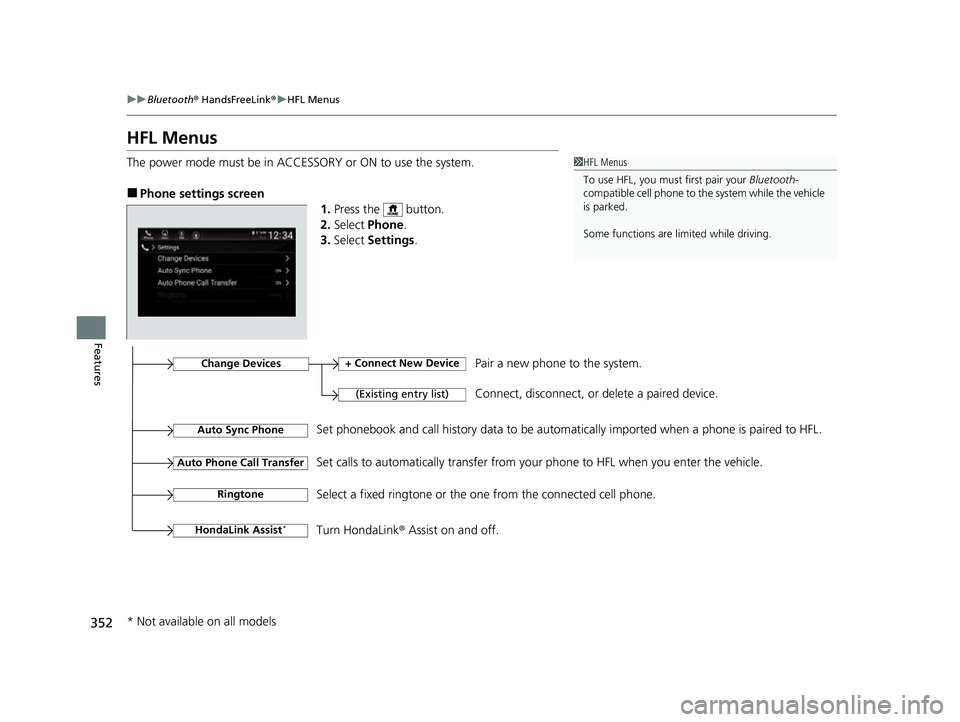
The power mode must be in ACCESSORY or ON to use the system.
■Phone settings screen
1.Press the button.
2. Select Phone .
3. Select Settings .
1HFL Menus
To use HFL, you must first pair your Bluetooth-
compatible cell phone to th e system while the vehicle
is parked.
Some functions are li mited while driving.
Change Devices
(Existing entry list)
+ Connect New DevicePair a new phone to the system.
Connect, disconnect, or delete a paired device.
RingtoneSelect a fixed ringtone or the on e from the connected cell phone.
Auto Sync PhoneSet phonebook and call history data to be automa tically imported when a phone is paired to HFL.
Auto Phone Call TransferSet calls to automatically transfer from your phone to HFL when you enter the vehicle.
HondaLink Assist*Turn HondaLink® Assist on and off.
* Not available on all models
22 INSIGHT HMIN-31TXM6300.book 352 ページ 2021年2月24日 水曜日 午後3時45分
Page 354 of 609
353
uuBluetooth ® HandsFreeLink ®u HFL Menus
Continued
Features
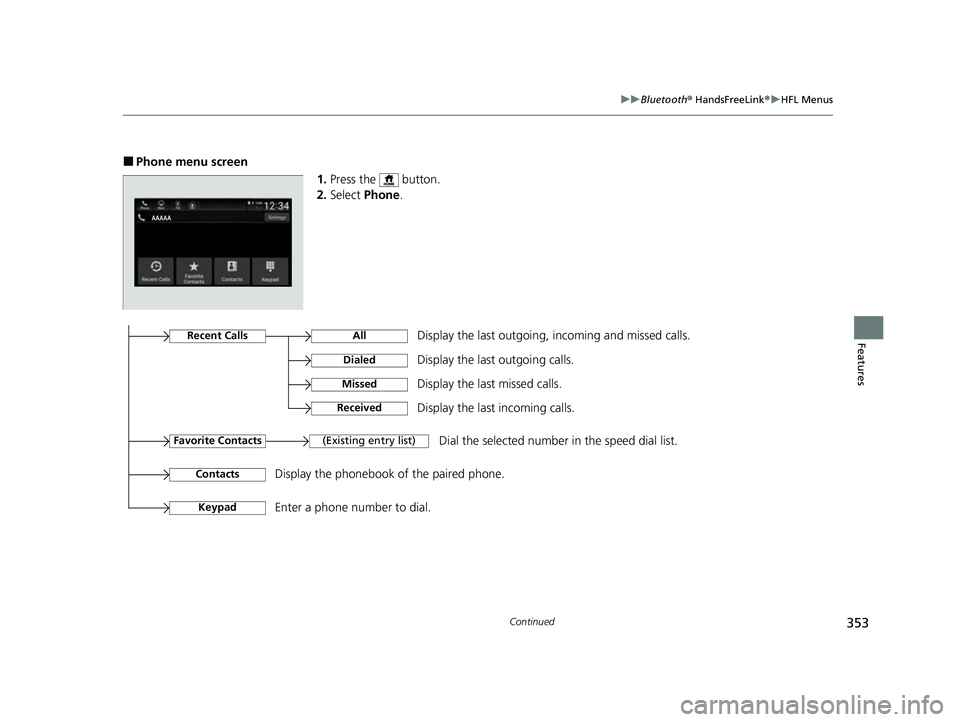
■Phone menu screen
1.Press the button.
2. Select Phone.
Display the last outgoing, incoming and missed calls.Recent Calls
Favorite Contacts
All
Dialed
Received
Display the last outgoing calls.
Display the last incoming calls.
MissedDisplay the last missed calls.
KeypadEnter a phone number to dial.
(Existing entry list)Dial the selected number in the speed dial list.
ContactsDisplay the phonebook of the paired phone.
22 INSIGHT HMIN-31TXM6300.book 353 ページ 2021年2月24日 水曜日 午後3時45分
Page 355 of 609
354
uuBluetooth ® HandsFreeLink ®u HFL Menus
Features
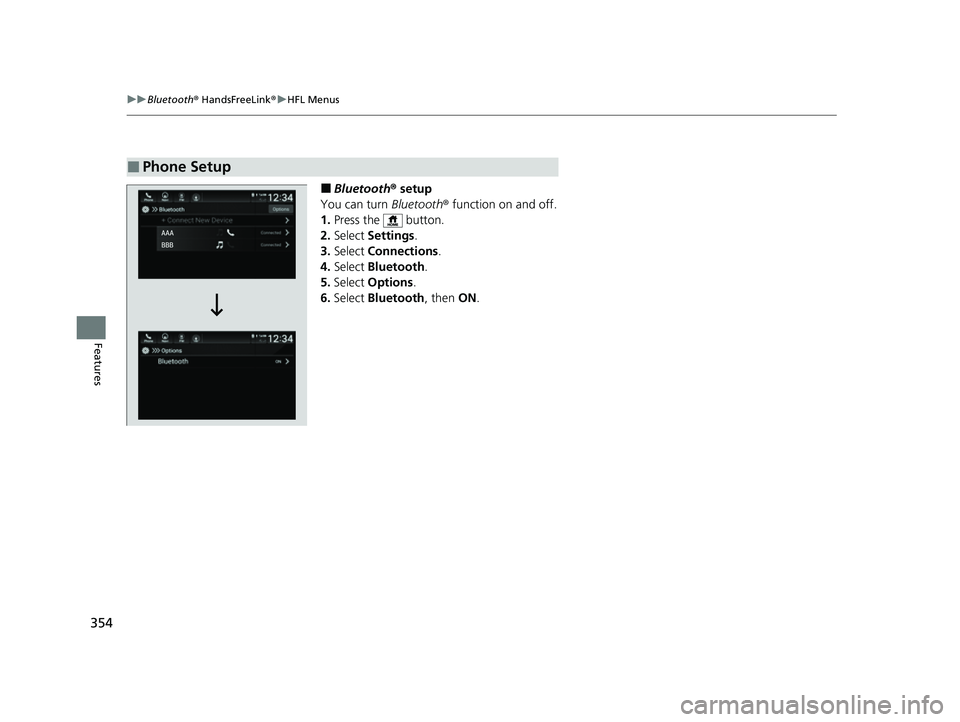
■Bluetooth ® setup
You can turn Bluetooth® function on and off.
1. Press the button.
2. Select Settings .
3. Select Connections .
4. Select Bluetooth .
5. Select Options.
6. Select Bluetooth , then ON.
■Phone Setup
22 INSIGHT HMIN-31TXM6300.book 354 ページ 2021年2月24日 水曜日 午後3時45分
Page 356 of 609
Continued355
uuBluetooth ® HandsFreeLink ®u HFL Menus
Features
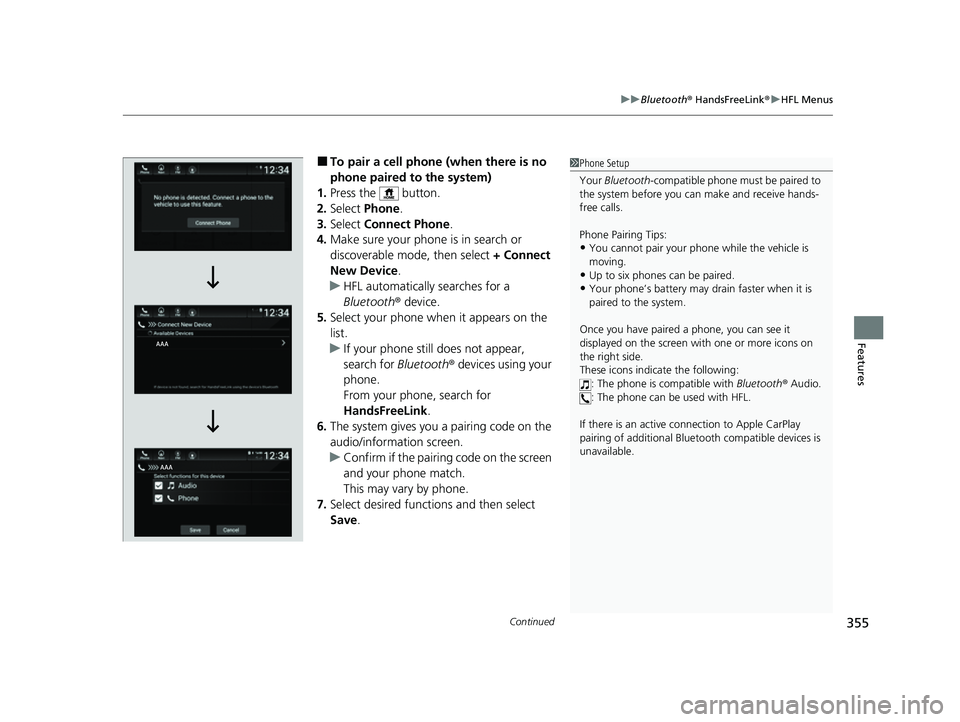
■To pair a cell phone (when there is no
phone paired to the system)
1. Press the button.
2. Select Phone.
3. Select Connect Phone .
4. Make sure your phone is in search or
discoverable mode, then select + Connect
New Device .
u HFL automatically searches for a
Bluetooth ® device.
5. Select your phone when it appears on the
list.
u If your phone still does not appear,
search for Bluetooth® devices using your
phone.
From your phone, search for
HandsFreeLink .
6. The system gives you a pairing code on the
audio/information screen.
u Confirm if the pairing code on the screen
and your phone match.
This may vary by phone.
7. Select desired functions and then select
Save.1Phone Setup
Your Bluetooth -compatible phone must be paired to
the system before you ca n make and receive hands-
free calls.
Phone Pairing Tips:
•You cannot pair your phone while the vehicle is
moving.
•Up to six phones can be paired.
•Your phone’s battery may dr ain faster when it is
paired to the system.
Once you have paired a phone, you can see it
displayed on the screen with one or more icons on
the right side.
These icons indicate the following: : The phone is compatible with Bluetooth ® Audio.
: The phone can be used with HFL.
If there is an active c onnection to Apple CarPlay
pairing of addition al Bluetooth compat ible devices is
unavailable.
22 INSIGHT HMIN-31TXM6300.book 355 ページ 2021年2月24日 水曜日 午後3時45分