display HONDA INSIGHT 2022 Repair Manual
[x] Cancel search | Manufacturer: HONDA, Model Year: 2022, Model line: INSIGHT, Model: HONDA INSIGHT 2022Pages: 609, PDF Size: 18.48 MB
Page 301 of 609
uuAudio System Basic Operation uAndroid AutoTM
300
Features
•
Operate Android Auto with your voice.
•
You can check Android notifications.
• (Android Auto Home)
Display useful information organized by Android Auto into simple cards that
appear just when they’re needed.
When you connect an Android phone to the unit via the USB port, Android Auto is
automatically initiated.
■Enabling Android Auto
To enable Android Auto after connecting an Android phone to the system, select
Enable on the screen.
You may change the consent settings under the Connections settings menu.
■Auto Pairing Connection
1Enabling Android Auto
Only initialize Android Au to when you are safely
parked. When Android Auto first detects your phone,
you will need to set up your phone so that auto
pairing is possibl e. Refer to the instruction manual
that came with your phone.
You can use the method below to change Android
Auto settings after you have completed the initial
setup:
Press the HOME Select Settings Connections
Smartphone Connection Android Auto Select
device Edit Device Permissions
Use of user and vehicle information
The use and handling of user and vehicle information
transmitted to/from your phone by Android Auto is
governed by the Google’s Privacy Policy.
22 INSIGHT HMIN-31TXM6300.book 300 ページ 2021年2月24日 水曜日 午後3時45分
Page 305 of 609
304
Features
General Information on the Audio System
SiriusXM® Radio Service
1. You need your radio ID ready before regist ering for subscription. To see the ID in
the screen, select Channel to 0.
2. Have your radio ID ready, and either call or visit the SiriusXM® website to
subscribe.
Switch to the SiriusXM ® mode by using the audio remote controls on the steering
wheel, or through the audio/information screen, and stay in this mode for about 30
minutes until the service is activated. Make sure your vehicle is in an open area with
good reception.
Channel **** is not subscribed. Call SiriusXM to subscribe.
*1
You are not subscribed to the channel selected.
Subscription Updated:
SiriusXM ® radio is receiving information update from the network.
Channel Not Available:
No such channel exits, or the artist or title information is unavailable.
No Signal:
The signal is too weak in the current location.
Check Tuner:
There is a problem with the SiriusXM ® tuner. Contact a dealer.
Antenna Disconnected, Antenna Shorted:
There is a problem with the SiriusXM ® antenna. Contact a dealer.
*1 : ****part is variable characters, and w ill change depending upon where an subscribe.
■Subscribing to SiriusXM® Radio
■Receiving SiriusXM ® Radio
■SiriusXM ® Radio Display Messages
1 Subscribing to SiriusXM ® Radio
Contact Information for SiriusXM ® Radio:
SiriusXM ® Radio at
www.siriusxm.com/subscribenow , or 1-866-635-
2349
1 Receiving SiriusXM ® Radio
The SiriusXM ® satellites are in orbit over the equator;
therefore, objects south of the vehicle may cause
satellite rece ption interruptions. Sa tellite signals are
more likely to be blocked by tall buildings and
mountains the farther north you travel from the
equator.
You may experience rece ption problems under the
following circumstances:
•In a location with an obstruction to the south of
your vehicle.
•In tunnels•On the lower level of a multi-tiered road
•Large items carried on the roof rack
22 INSIGHT HMIN-31TXM6300.book 304 ページ 2021年2月24日 水曜日 午後3時45分
Page 306 of 609
305
uuGeneral Information on the Audio System uCompatible iPod, iPhone, and USB Flash Drives
Features
Compatible iPod, iPhone , and USB Flash Drives
•A USB flash drive of 256 MB or higher is recommended.
• Some digital audio players may not be compatible.
• Some USB flash drives (e.g., a device with security lockout) may not work.
• Some software files may not allow for audio play or text data display.
• Some versions of MP3, WMA, AAC, FLAC, or WAV formats may be unsupported.
■iPod, and iPhone Model Compatibility
Model
Made for iPod touch (6th generation), iPod touch (5th generation)
Made for iPhone 7 Plus/iPhone 7/iPhone SE/iPhone 6s Plus/iPhone 6s/iPhone 6 Plus/
iPhone 6/iPhone 5c/iPhone 5s/iPhone 5/iPhone 4s
1iPod, and iPhone Model Compatibility
This system may not work with all software versions
of these devices.
The Lightning connector work s with iPhone 7 Plus,
iPhone 7, iPhone SE, iPhone 6s Plus, iPhone 6s,
iPhone 6 Plus, iPhone 6, iP hone 5c, iPhone 5s, iPhone
5, iPod touch (6th generation), iPod touch (5th
generation).
The 30-pin connector wo rks with iPhone 4s.
USB works with iPhone 7 Pl us, iPhone 7, iPhone SE,
iPhone 6s Plus, iPhone 6s, iPhone 6 Plus, iPhone 6,
iPhone 5c, iPhone 5s, iPhone 5, iPhone 4s, iPod touch
(6th generation), iPod t ouch (5th generation).
■USB Flash Drives1USB Flash Drives
Files on the USB flash drive are played in their stored
order. This order may be different from the order
displayed on your PC or device.
22 INSIGHT HMIN-31TXM6300.book 305 ページ 2021年2月24日 水曜日 午後3時45分
Page 314 of 609
313
uuGeneral Information on the Audio System uHonda App License Agreement
Continued
Features
F. NO WARRANTY. You understand and agree that your use of the SOFTWARE and SERVICES are solely at your own risk and that you
will be solely responsible for any damage to your VEHICLE’s multimedia system or any other equipment or any loss of data that m ay result
from your use of the SOFTWARE or SERVIC ES. THE SOFTWARE AND SERVICES ARE PROVIDED ON AN “AS IS” AND “AS AVAILABLE” BASIS
WITHOUT ANY WARRANTY OF ANY KIND, EXPRESSED, IMPLIED OR STAT UTORY. WE SPECIFICALLY DISCLAIM ANY IMPLIED WARRANTIES
OF MERCHANTABILITY, FITNESS FOR A PARTICULAR PURPOSE, A ND NON-INFRINGEMENT. HONDA makes no warranties that the
SOFTWARE or SERVICES will meet your requirements, or that the SOFTWARE or SERVICES will be uninterrupted, timely, secure, non-
infringing or error free. You understand a nd agree that you are responsible for any an d all charges, costs or expenses associated with your
use of the SOFTWARE or SERVICES. Advice or information, whether oral or written, obtained by you from us or through the SOFTWAR E
or SERVICES are provided for informational purposes only and will not create any warranty not expressly made herein. You should not rely
on any such information or advice. We assume no liability or res ponsibility for any errors or omissions in the SOFTWARE or SERV ICES. We
do not make any warranty or representation that your use of the material displayed on, or obtained through, the SOFTWARE or SER VICES
is non-infringing of any rights of any third party. Any decision or action taken by you on the basis of information or content provided via
the application is at your sole discreti on and risk. HONDA and PROVIDERS are not res ponsible or liable for any such decision, or for the
accuracy, completeness, usefulness, or availability of any conten t or information displayed, transmitted, or otherwise made available via
the SOFTWARE or SERVICES. To the extent jurisdictions do not allow the exclusion of certain warranties, some of the above exclu sions may
not apply to you.
G. LIMITATIONS ON LIABILITY. You and HONDA are each waiving important rights.
1. Limitations on YOUR liability.
HONDA cannot recover from you any consequential, indirect, in cidental, or special damages, or attorney’s
fees in connection with your use of the SOFTWARE or HONDA SERVICES. HONDA WAIV ES TO THE FULLEST EXTENT ALLOWED BY LAW
ANY CLAIM FOR DAMAGES OTHER THAN DIRECT, COMPENSA TORY DAMAGES AS LIMITED IN THIS AGREEMENT.
22 INSIGHT HMIN-31TXM6300.book 313 ページ 2021年2月24日 水曜日 午後3時45分
Page 330 of 609
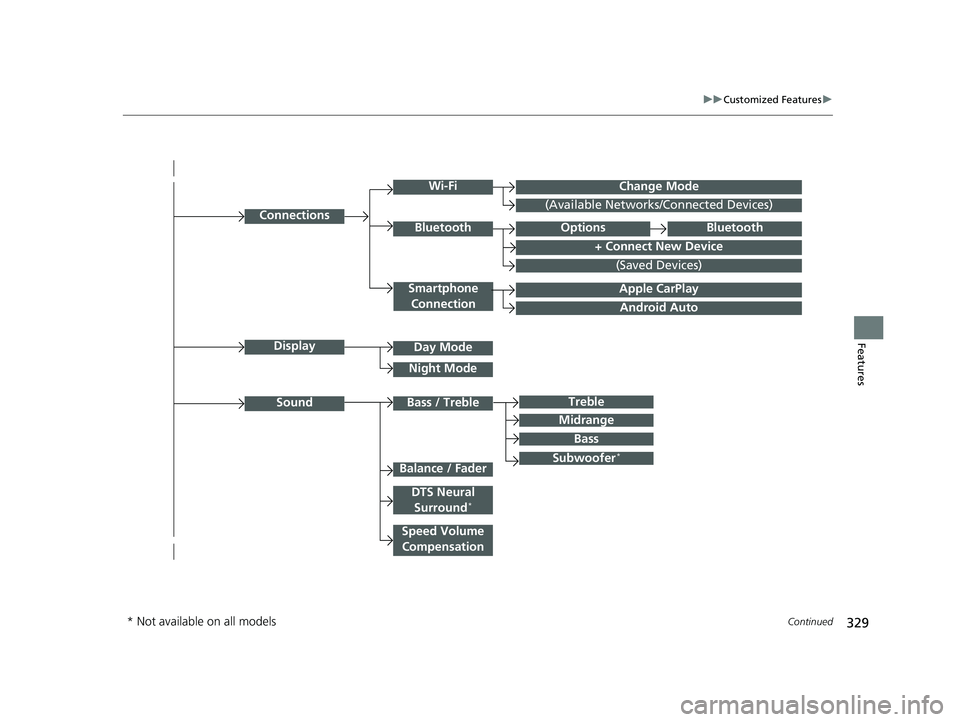
329
uuCustomized Features u
Continued
Features
Android Auto
Connections
+ Connect New Device
(Saved Devices)
Change Mode
Smartphone
Connection
Bluetooth
Wi-Fi
(Available Networks/Connected Devices)
Apple CarPlay
Display
Sound
Day Mode
Night Mode
Treble
Subwoofer*
Bass / Treble
Speed Volume Compensation
Balance / Fader
DTS Neural Surround*
Midrange
Bass
OptionsBluetooth
* Not available on all models
22 INSIGHT HMIN-31TXM6300.book 329 ページ 2021年2月24日 水曜日 午後3時45分
Page 331 of 609
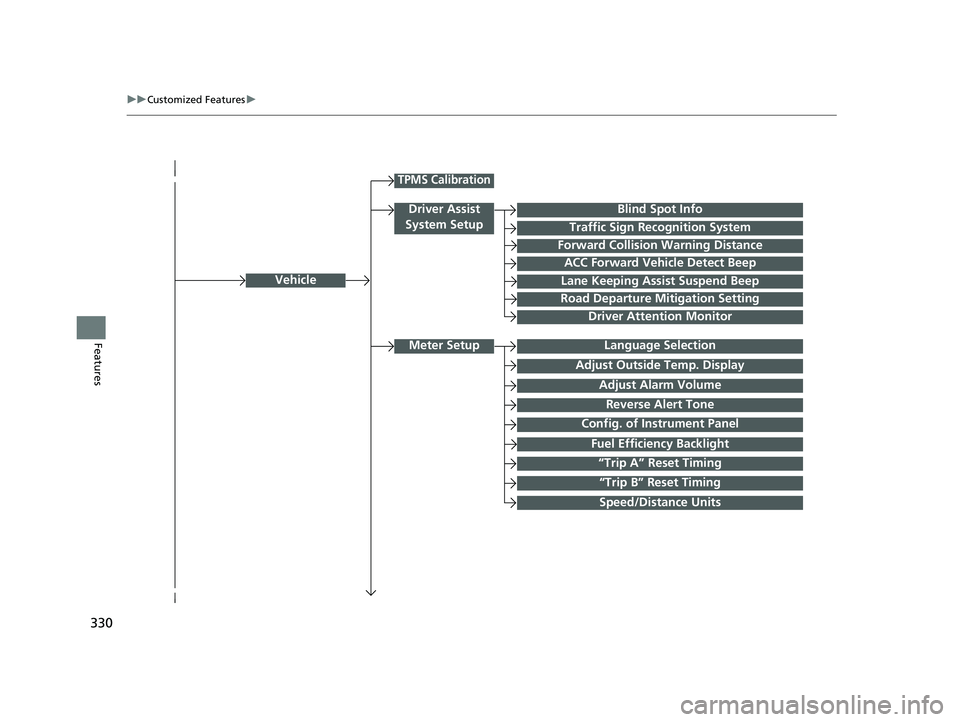
330
uuCustomized Features u
FeaturesLanguage Selection
Vehicle
Meter Setup
Adjust Outside Temp. Display
“Trip A” Reset Timing
“Trip B” Reset Timing
Reverse Alert Tone
Config. of Instrument Panel
Adjust Alarm Volume
Fuel Efficiency Backlight
TPMS Calibration
Driver Assist
System Setup
Traffic Sign Recognition System
Forward Collision Warning Distance
ACC Forward Vehicle Detect Beep
Lane Keeping Assist Suspend Beep
Road Departure Mitigation Setting
Driver Attention Monitor
Speed/Distance Units
Blind Spot Info
22 INSIGHT HMIN-31TXM6300.book 330 ページ 2021年2月24日 水曜日 午後3時45分
Page 335 of 609
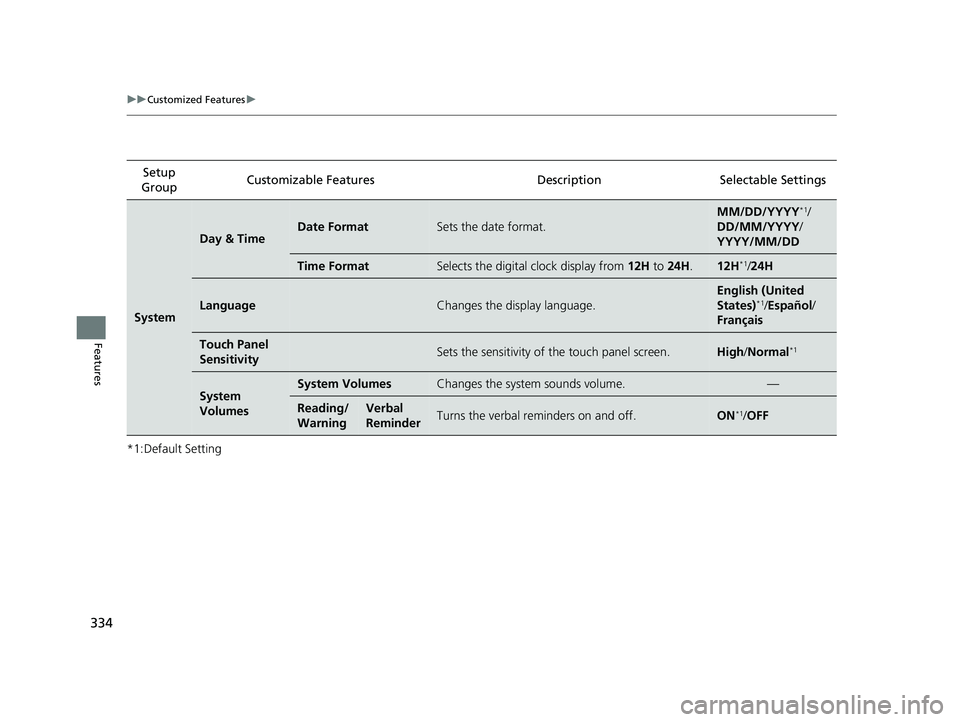
334
uuCustomized Features u
Features
*1:Default SettingSetup
Group Customizable Features Desc
ription Selectable Settings
System
Day & TimeDate FormatSets the date format.
MM/DD/YYYY*1/
DD/MM/YYYY/
YYYY/MM/DD
Time FormatSelects the digital clock display from 12H to 24H .12H*1/24H
LanguageChanges the display language.
English (United
States)*1/Español /
Français
Touch Panel
SensitivitySets the sensitivity of the touch panel screen.High /Normal*1
System
VolumesSystem VolumesChanges the system sounds volume.—
Reading/
WarningVerbal
ReminderTurns the verbal reminders on and off.ON*1/ OFF
22 INSIGHT HMIN-31TXM6300.book 334 ページ 2021年2月24日 水曜日 午後3時45分
Page 336 of 609
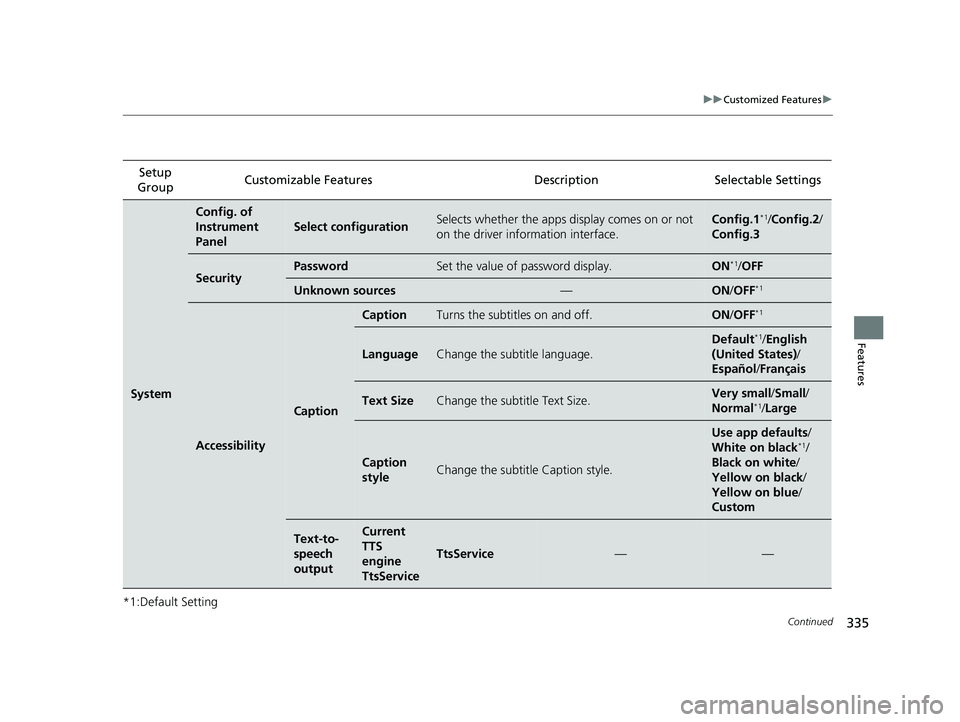
335
uuCustomized Features u
Continued
Features
*1:Default SettingSetup
Group Customizable Features
Description Selectable Settings
System
Config. of
Instrument
Panel
Select configurationSelects whether the apps display comes on or not
on the driver information interface.Config.1*1/Config.2 /
Config.3
SecurityPasswordSet the value of password display.ON*1/ OFF
Unknown sources—ON /OFF*1
Accessibility
Caption
CaptionTurns the subtitles on and off.ON /OFF*1
LanguageChange the subtitle language.
Default*1/English
(United States) /
Español /Français
Text SizeChange the subtitle Text Size.Very small/ Small/
Normal*1/ Large
Caption
styleChange the subtitle Caption style.
Use app defaults /
White on black*1/
Black on white /
Yellow on black /
Yellow on blue /
Custom
Text-to-
speech
outputCurrent
TTS
engine
TtsService
TtsService——
22 INSIGHT HMIN-31TXM6300.book 335 ページ 2021年2月24日 水曜日 午後3時45分
Page 337 of 609

336
uuCustomized Features u
Features
*1:Default SettingSetup
Group Customizable Features Description Selectable Settings
System
Refuel
recommend*Turns the refuel recommend function on and off.
2
Refuel Recommend P. 374ON*1/OFF
AboutStatusDisplays the Android setting items.—Legal Information
Factory Data
ResetResets all the settings to their factory default.2 Defaulting All the Settings P. 345Continue /Cancel
Detail
InformationApp ManagerDisplays the Android sy stem memory and apps
information.—
Recent Location
Requests AppsDisplays the recent loca tion requests from apps.—
* Not available on all models
22 INSIGHT HMIN-31TXM6300.book 336 ページ 2021年2月24日 水曜日 午後3時45分
Page 338 of 609
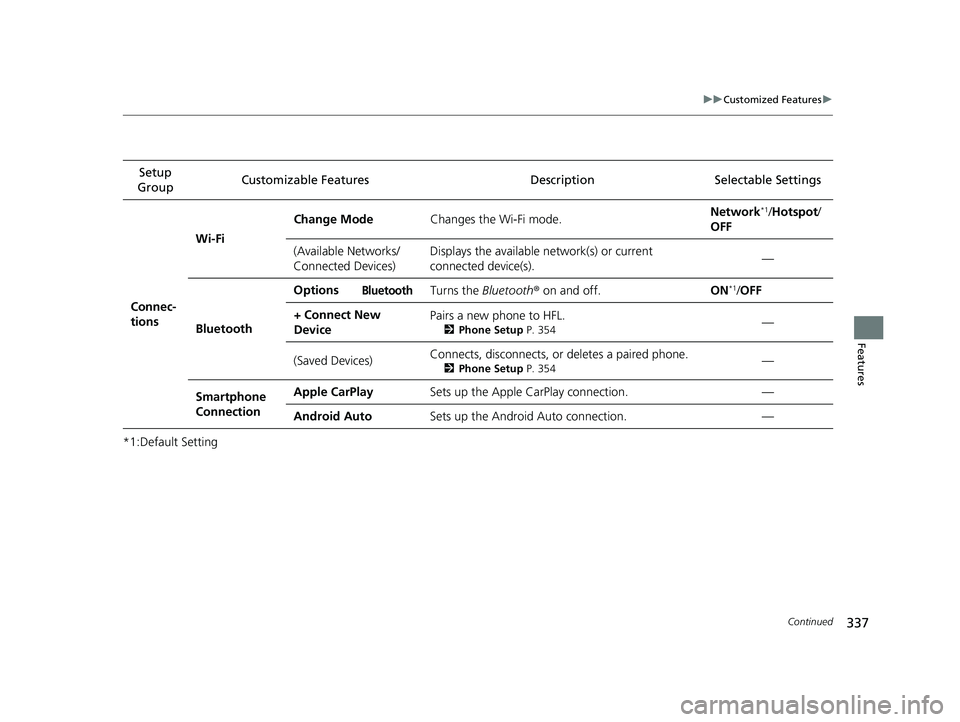
337
uuCustomized Features u
Continued
Features
*1:Default SettingSetup
Group Customizable Features Desc
ription Selectable Settings
Connec-
tions Wi-Fi
Change Mode
Changes the Wi-Fi mode. Network
*1/
Hotspot /
OFF
(Available Networks/
Connected Devices) Displays the available network(s) or current
connected device(s).
—
Bluetooth Options
Bluetooth Turns the
Bluetooth® on and off. ON*1/OFF
+ Connect New
Device Pairs a new phone to HFL.
2
Phone Setup P. 354—
(Saved Devices) Connects, disconnects, or deletes a paired phone.
2
Phone Setup P. 354—
Smartphone
Connection Apple CarPlay
Sets up the Apple CarPlay connection. —
Android Auto Sets up the Android Auto connection. —
22 INSIGHT HMIN-31TXM6300.book 337 ページ 2021年2月24日 水曜日 午後3時45分