seats HONDA INTEGRA 1998 4.G User Guide
[x] Cancel search | Manufacturer: HONDA, Model Year: 1998, Model line: INTEGRA, Model: HONDA INTEGRA 1998 4.GPages: 1681, PDF Size: 54.22 MB
Page 918 of 1681
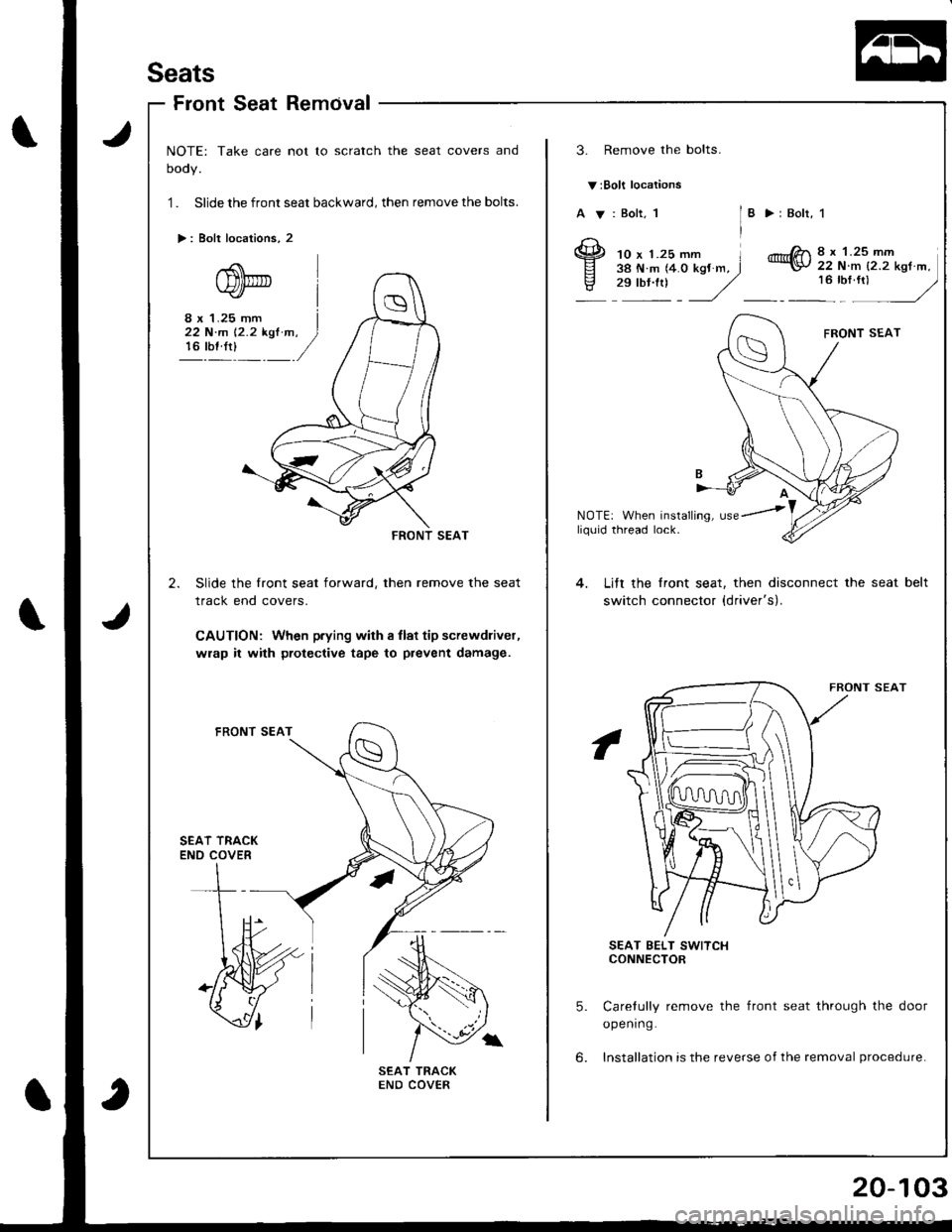
Seats
FrontSeatRemcival
NOTE: Take care not to scratch the seat covers and
oooy.
1 . Slide the front seat backward, then remove the bolts.
>: Bolt locations, 2
3. Remove the bolts.
v:Bolt locations
A V: Bolt, 1I >:Bolr, 1
10 x 1.25 mm l38 N.m (4.0 kgJ m, J,":: J
8 x 1.25 mm22 N.m {2.2 kgt m,
:u",: -/
8 x 1.25 mm I22 N'm 12.2 kst m. )16 rbf.rt)_ /
NOTE: When installing, usey'
--RONT SEAT
2. Slide the front seat forward, then remove the seat
track end covers.
CAUTION: When p.ying with I llat tip screwdliver,
wrap it with protective tape to prevent damage.
liq0id thread lock.
Lift the lront seat, then disconnect the seat
switch connector {driver's).
belt
SEAT TRACKENO COVER
SEAT BELT SWITCHCONNECTOR
5. Carelully remove the front seat through the door
opening.
6. Installation is the reverse of the removal procedure.
Page 919 of 1681
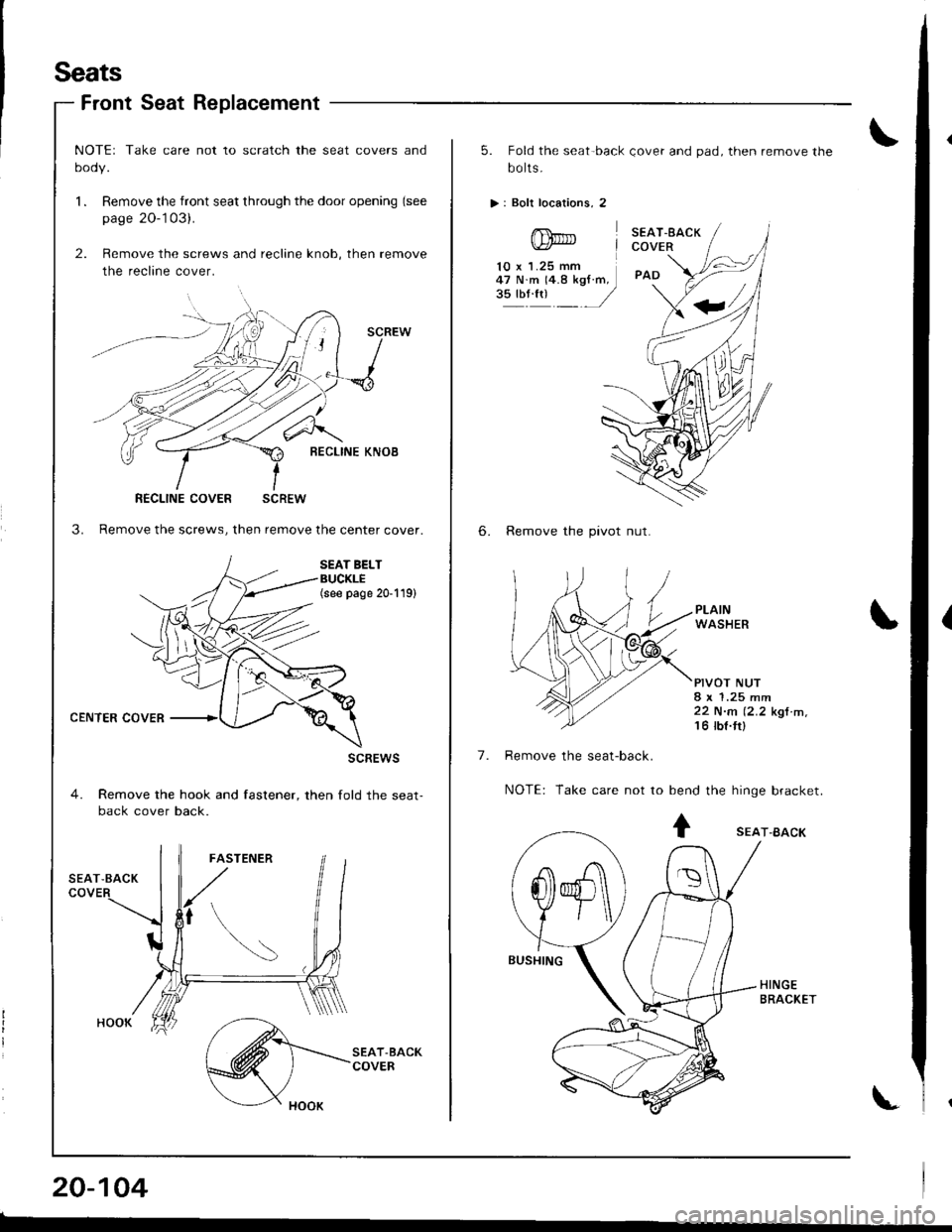
Seats
Front Seat Replacement
CENTER COVER
NOTEr Take care not to scratch the seat covers and
oooy.
l. Remove the front seat through the door opening (see
page 20-'103).
2. Remove the screws and recline knob, then remove
the recline cover.
SCREW
l-{O
BECLINE KNOB
3. Remove the screws, then remove the center cover.
SEAT BELTBUCKLE(see page 20-119)
scREws
4. Remove the hook and fastener, then fold the seat-back cover back.
RECLINE COVER SCREW
20-104
5. Fold the seat-back Qover and pad, then remove the
bo lts.
>: Boli locations, 2
SEAT.EACKCOVER
PAD
6. Remove the pivot nut.
PLAINWASHER
PIVOT NUT8 x 1.25 mm22 N.n (2.2 kgt m,'t 6 tbt.ttl
Remove the seat-back.
NOTE: Take care not to bend the hinge bracket.
10 x 1.25 mm47 N.m 14.8 kgf.m,3!'oli1 /
7.
+ sEAr-BAcK
-A\
@ )\
f\
Page 921 of 1681
Seats
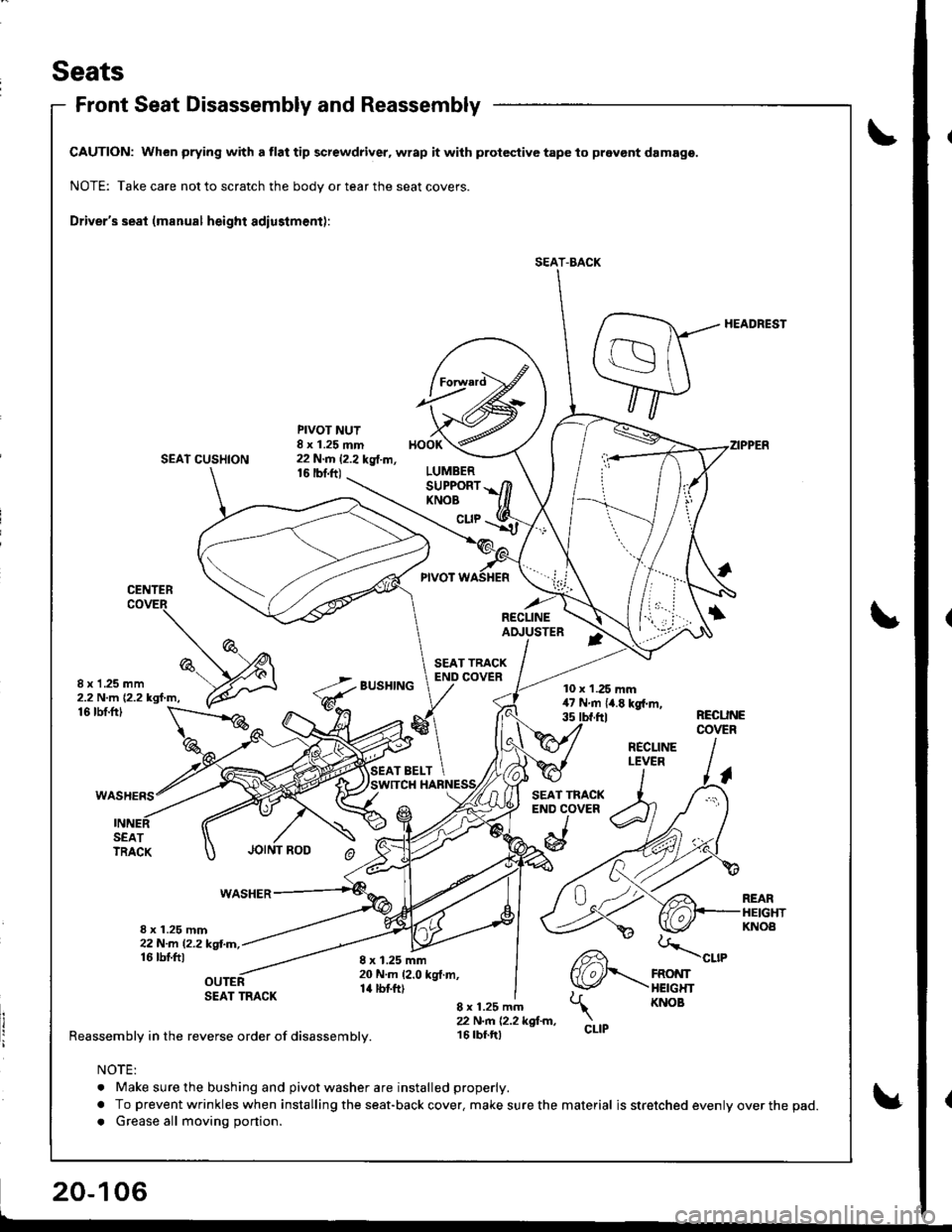
Front Seat Disassembly and Reassembly
CAUTION: When prying with a tlat tip screwdriver, wrap it with protective tape to pravont damage.
NOTE: Take care not to scratch the body or tear the seat covers.
Driver's seat (manual height adiustment):
HEADREST
SEAT CUSHION
PIVOT NUT8 x 1.25 mm22 N.m 12.2 kg{.m,16 |bnft)
BUSHING
HOOK
LUMBERSUPPORTKNOB
cuP
CENTER
RECLINEAI!USTER
8 x 1 .25 mm2.2 N.m {2.2 kgf.m,10 x 1.25 mm47Nm{4.Ekgl.m,35 tbt.ftl
CLIP
16 tbf.ftlRECUNECOVER
SEATTRACK
WASHER
8 x 1.25 mm22N-m l2.2kgl.m,16 tbtftl
SEAT TRACK
Reassembly in the reverse order of disassembly.
REARHEIGHTKNOA
8 x 1.25 mm20 N.m 12.0 kgt.m,14 tbtft)
CLIP
8 x 1.25 mm22 N.n 12.2 kgl.m,16 tbf.tt)
NOTE:
. Make sure the bushing and pivot washer are installed properly.
a To prevent wrinkles when installing the seat-back cover. make sure the material is stretched evenly over the pad.
a Grease all moving portion.
SEAT-BACK
RECLINELEVER
Page 923 of 1681
Seats
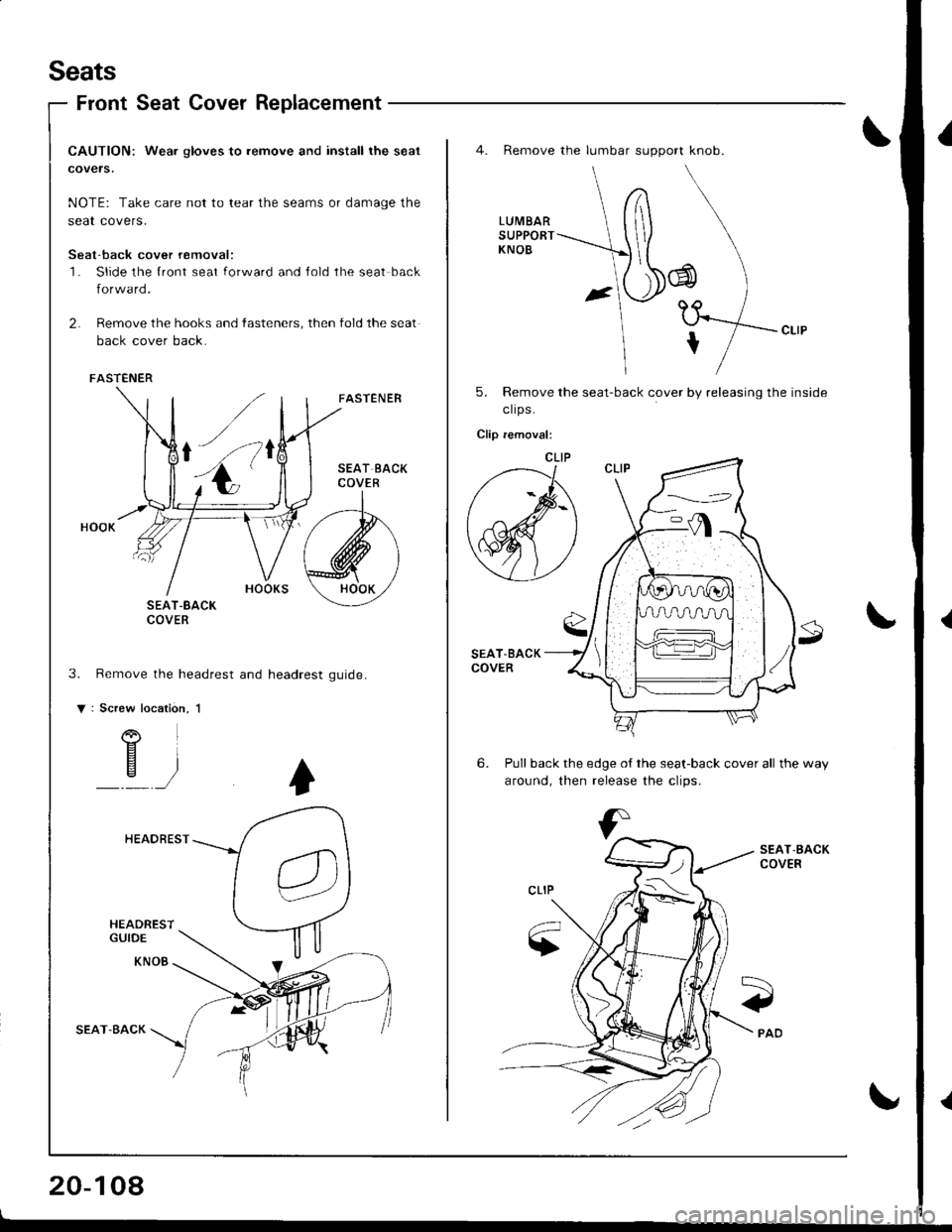
Front Seat Cover Replacement
CAUTION: Wea. gloves to remove and install the seat
covers.
NOTE: Take care not to tear the seams or damage the
seat covers.
Seat-back cover removal:'l- Slide the {ront seat forward and Jold the seat back
forward.
2. Remove the hooks and fasteners, then fold the seat
back cover back.
FASTENER
SEAT-8ACKCOVER
Remove the headrest and headrest
Screw
o
FASTENER
gu rd e.
location, 1
)
HEADREST
HEADRESTGUIDE
KNOB
SEAT.BACK
20-108
o
4. Remove the lumbar support knob.
LUMBARSUPPORTKNOB
J
tf*,,
5. Remove the seat-back cover by releasing the inside
clrps -
Clip removal:
SEAT-BACKCOVER
6. Pull back the edge of the seat-back cover all the way
around. then release the clios.
SEAT,BACKCOVER
Page 925 of 1681
Seats
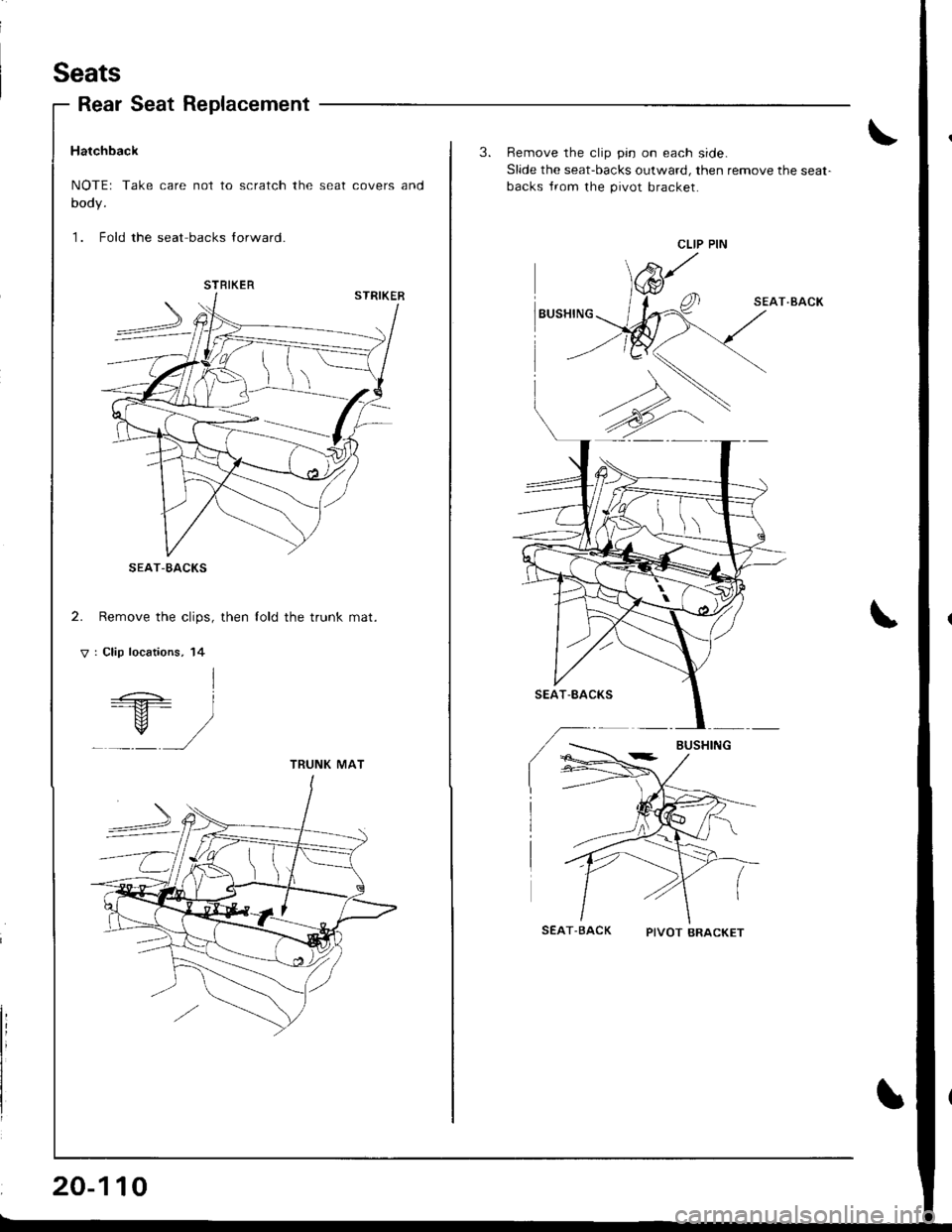
Rear Seat Replacement
Hatchback
NOTEr Take care not to scratch the seat covers and
body.
1. Fold the seat backs lorward.
2. Remove the clips, then lold the trunk mat.
V : Clip locations, 14
I=+ i---M- l
_Y/
STRIKER
I\.
TRUNK MAT
20-110
3. Remove the clip pin on each side.
Slide the seat-backs outward, then remove the seat-
backs Jrom the pivot bracket.
SEAT.BACK
SEAT-BACK PTVOTBRACKET
\
CLIP PIN
Page 927 of 1681
Seats
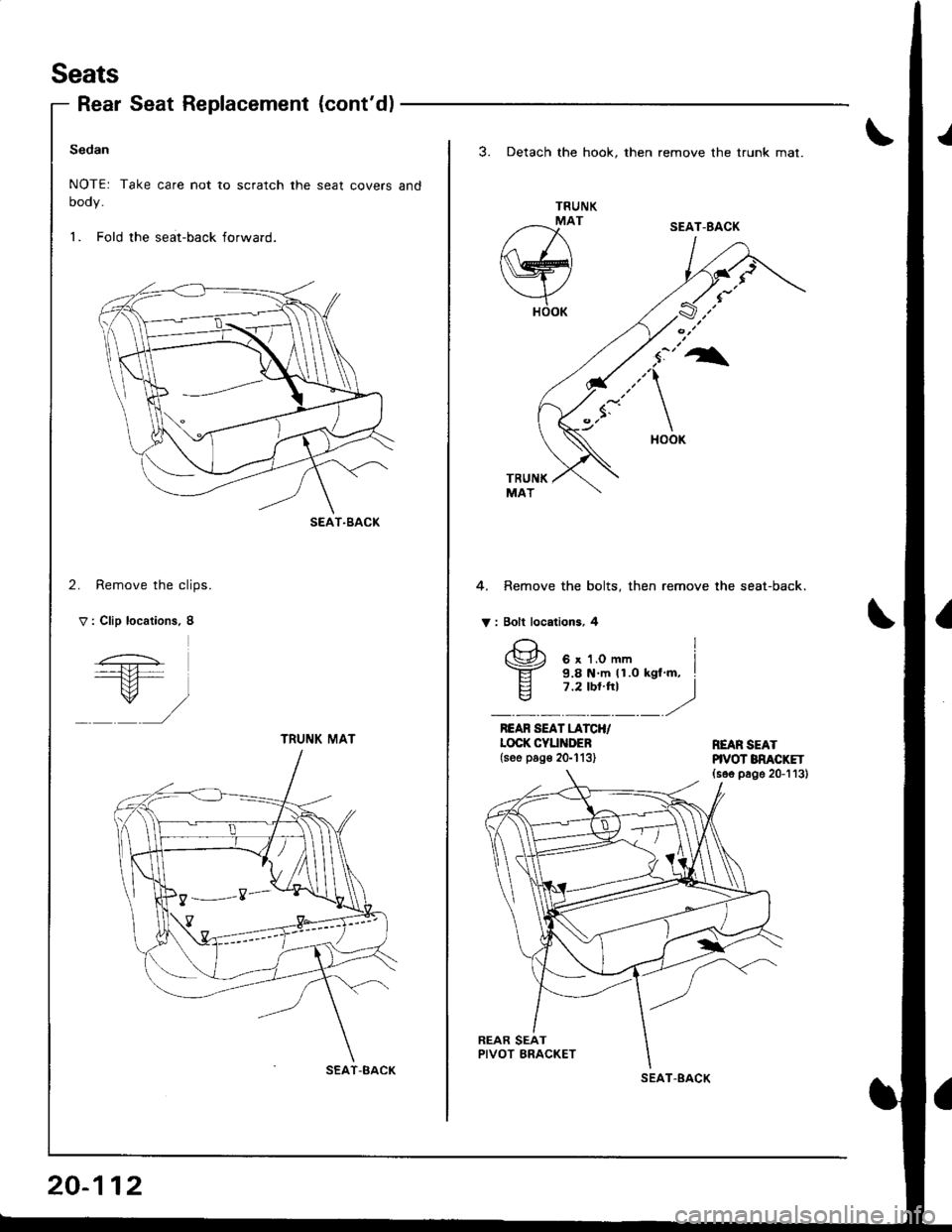
Rear Seat Replacement {cont'd)
Sedan
NOTE: Take care not to scratch the seat covers and
oooy.
1. Fold the seat-back forward.
2. Remove the clips.
V : Clip locations. 8
SEAT-BACK
TRUNI( MAT
SEAT-BACK
20-112
3. Detach the hook. then remove the trunk mat.
TRUNK
/--x'
w
YHOOK
4. Remove the bolts, then remove the seat-back.
V : Bolt locations, 4
REAR SEAT LATCH/LOCK CYUiIDEB(see pog€ 2G113)REAR SEATHVOT BNACKET(s6e page 20-113)
SEAT-BACK
I
(\Jr', 6 x 1.0 mm I-ET- 9.8 N m (1.0 kgl'm, I
E 7.2 tbt.ht Iq7 ,2'/.
SEAT.BACK
Page 929 of 1681
Seats
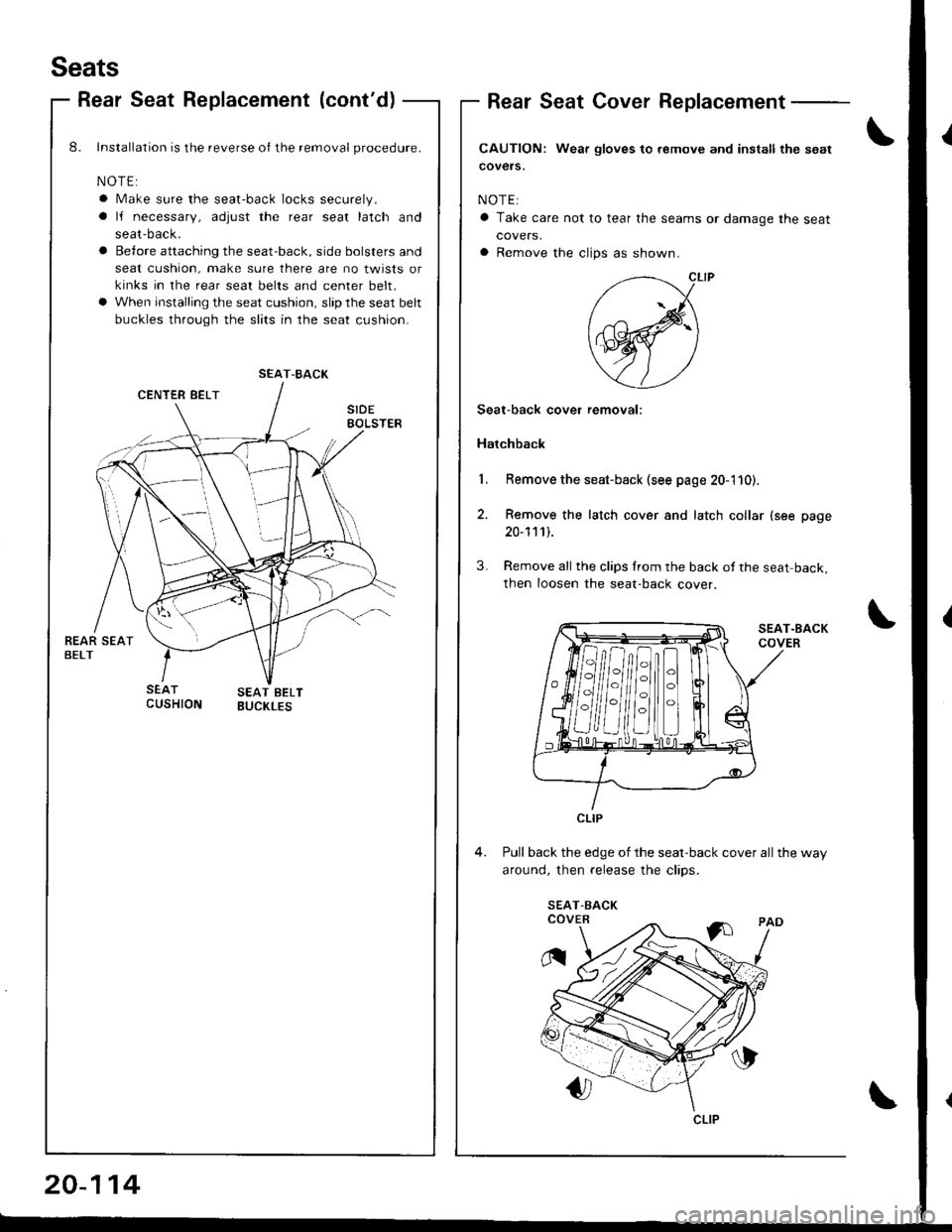
Rear Seat Replacement (cont'd)Rear Seat Cover Replacement
CAUTION: Wear gloves to.emove and install the sgat
covers.
NOTE:
a Take care not to tear the seams or damage the seat
covers,
a Remove the clips as shown.
8. Installalion is the reverse oI the removal procedure.
NOTE:
a Make sure the seat-back locks securely.
a lJ necessary, adjust the rear seat latch and
seat-back.
a Betore attaching the seat-back, side bolsters and
seat cushion, make sure there are no twists or
kinks in the rear seat belts and center belt.
a When installing the seat cushion, slip the seat belt
buckles through the slits in the seat cushion.
Remove the seat-back (see page 20-110).
Remove the latch cover and latch collar (see page
20-111).
Remove all the clips from rhe back of the seat back,
then Ioosen the seat-back cover.
Pull back the edge of the seat-back cover all the way
around. then release the clios.
Seat-back cover removal:
Hatchback
SEAT-BACK
H/HilflH
CLIP
CLIP
20-114
Page 931 of 1681
Seats
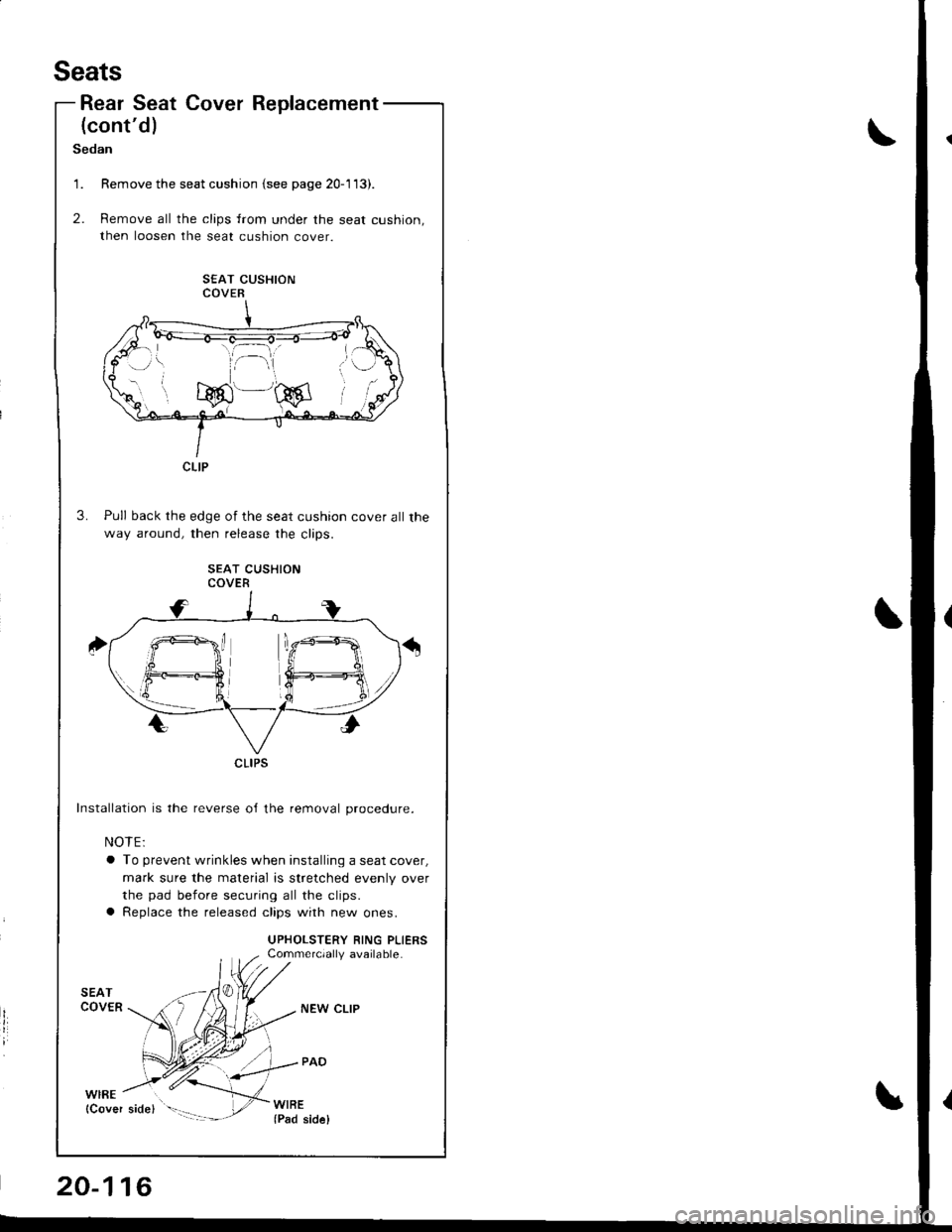
Rear Seat Cover
(cont'd)
Replacement
Sedan
Remove the seat cushion {see page 20-113).
Remove all the clips from under the seat cushion,
then loosen the seat cushion cove
SEAT CUSHIONCOVER
Pull back the edge of the seat cushion cover all the
way around, then release the clios
SEAT CUSHIONCOVER
Installation is the reverse o,f the removal procedure.
NOTE:
a To prevent wrinkles when installing a seat cover,
mark sure the material is stretched evenly over
the pad before securing all the clips.
a Replace the released clips with new ones.
UPHOLSTERY RING PLIERSCommercially available.
't.
2.
CLIP
CLIPS
20-116
NEW CLIP
Page 954 of 1681
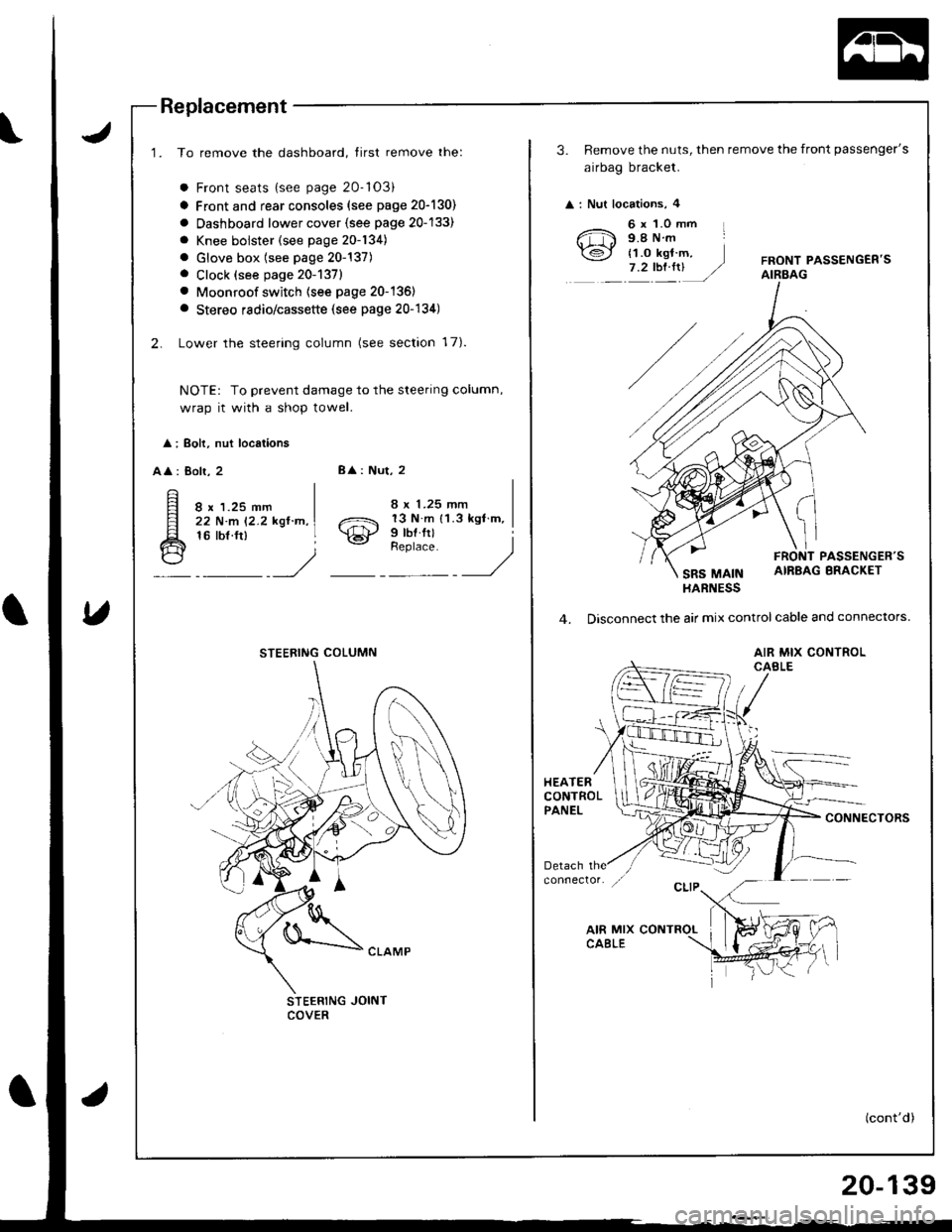
Replacement
1. To remove the dashboard, tirst remove the:
a Front seats {see page 20-'103)
a Front and rear consoles (see page 20-130)
a Oashboard lower cover {see page 20-133)
a Knee bolster (see page 20-134)
. Glove box (see page 20-137). Clock (see page 20-1371
. Moonroof switch (see page 20-136)
a Stereo radio/cassette (see page 20-134)
2. Lower the steering column (see section 17).
NOTE: To prevent damage to the steering column,
wrap it with a shop towel.
l ; Boh, nut locations
AA : Bolr, 28
: Nut, 2
8 x 1.25 mm22 N.m 12.2 kgl.n,16 tbf.ft)o21 13 N m 11.3 kgl m,
\€J' Prbl rll
_Urr'rr,t __)
STEERING JOINTCOVER
STEERING COLUMN
3. Remove the nuts, then remove the front passenger's
airbag bracket.
: Nut locations, 4
6 x 1.0 mm L9.8Nm
{1.o kgt m,7.2tbt.rrUFRONT PASSENGEB'SAIRBAG
PASSENGER'S
SRS MAINAIRBAG BRACKET
HARNESS
4. Disconnect the air mix control cable and connectors.
AIR MIX CONTROLCABLE
HEATERCONTROLPANELCONNECTORS
(cont'd)
20-139
Page 1143 of 1681
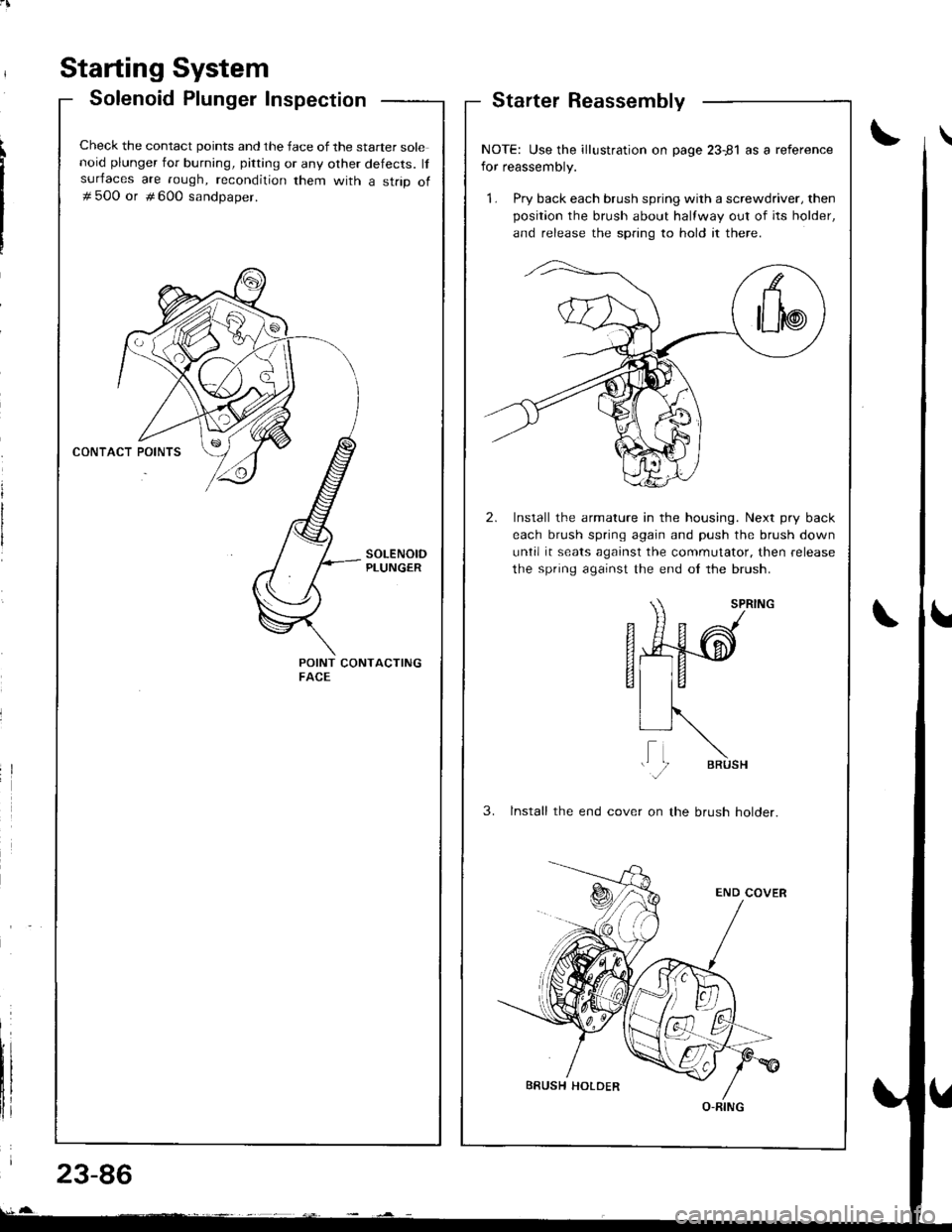
Starter Reassembly
Starting System
Solenoid Plunger Inspection
Check the contact points and the face of the starter solenoid plunger for burning, pitting or any other defects. lfsurfaces are rough, recondition them with a strip of# 500 or # 600 sandoaoer.
POINT CONTACTINGFACE
NOTE: Use the illustration on page 23-81 as a reference
for reassembly.
1. Pry back each brush spring with a screwdriver, then
position the brush about halfway out of its holder,
and release the spnng to hold it there.
2. Install the armature in the housing. Next pry back
each brush spring again and push the brush down
until it seats against the commutator. then release
the spring against the end ol the brush.
SPRTNG
fi49-d
EI
VIR, ,\
li N,."
3. lnstall the end cover on the brush holder.
O-RING
23-86