light HONDA INTEGRA 1998 4.G Workshop Manual
[x] Cancel search | Manufacturer: HONDA, Model Year: 1998, Model line: INTEGRA, Model: HONDA INTEGRA 1998 4.GPages: 1681, PDF Size: 54.22 MB
Page 1355 of 1681
)
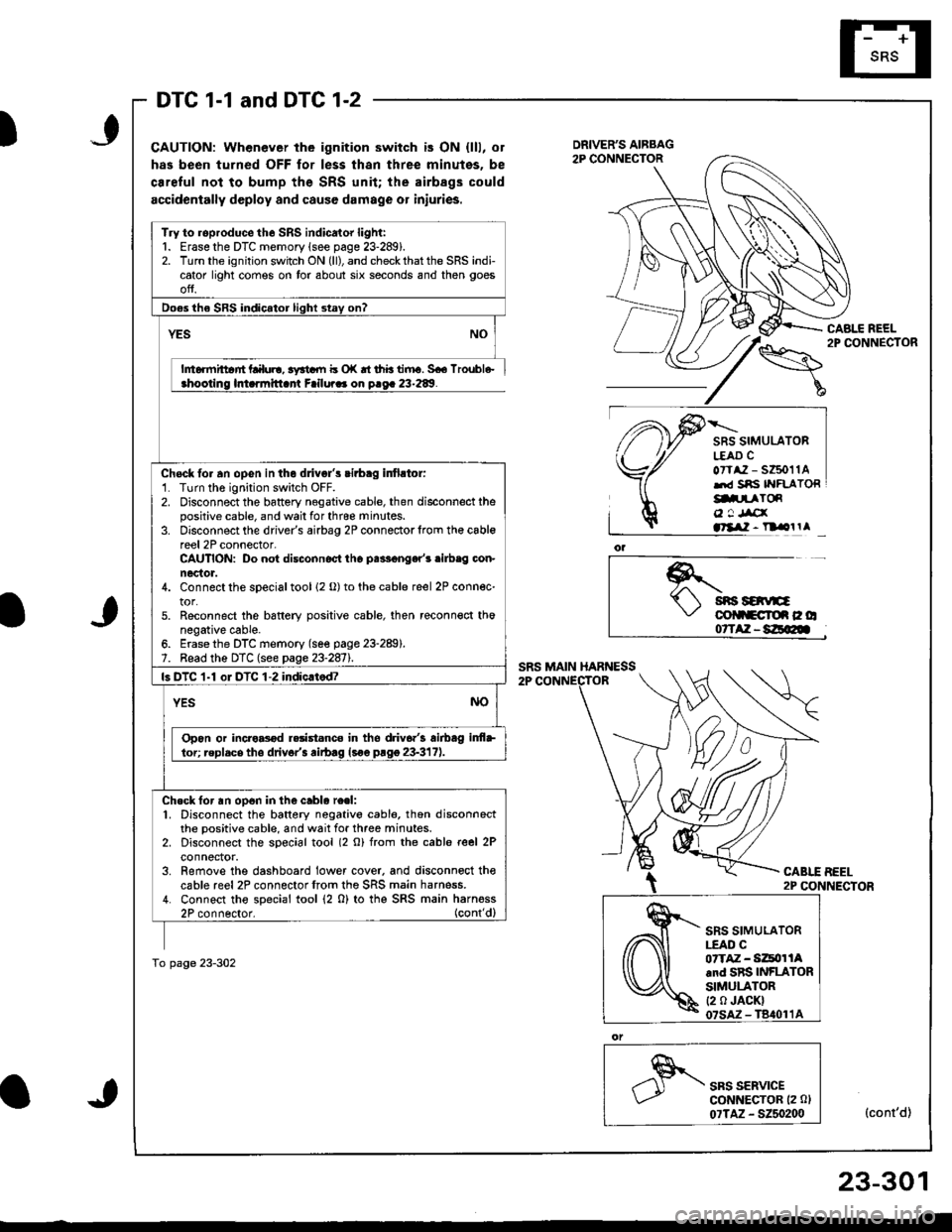
DTC 1-1 and DTC 1-2
CAUTION: Whenever the ignition switch is ON {lll, or
has been turned OFF for less thsn three minutes, be
ca.eful not to bump the SRS unit; the airbags could
accidentally deploy and cause damage or iniuries.
CABLE REEL2P CONNECTOR
SRS SIMULATORL€AD CoTtaz - s6011Alrd Sns IYFLATORg.prToR
o ! Jrcxatllil - n olrl
*.t sns savE\,' colltcroe c o07TAZ-8E@
CABLE BEEL2P CONNECTOR
SRS SERVICEGoNNECTOR (2 0l
07TAZ - 5250200(cont'd)
Try to roproduce the SRS indicator light:1. Erase the DTC memory lsee page 23-289).2. Turn the ignition switch ON (ll), and check that the SRS indicator light comes on tor about six seconds and then goes
ofJ.
Do€s the SRS indicator light stay on?
YES
h6rmittar'rt Lalul!, 3yrtdll b o|( rt thb tiiru. 5€6 lroubl6-ahootino lmarmitlant Failura. on o.oa 23-289.
Chock fo. an opGn in the dlivgl's cirbag infirtor:'1. Turn the ignition switch OFF.2. Disconnect the battery negative cable, then disconnect thepositive cable, and wail for thrce minutes.3. Disconnect the driver's airbag 2P connectorlrom th€ cablereel 2P connector-CAUTION: Do not disconnoct tho palF€nger'r .ilb.g con-nector.4. Connect the sDecial tool 12 o) to the cable reel 2P connec-tor.5. Reconnect the bsftery positive cable, then reconn€ct thonegative cable.6. Erase the DTC memory (se€ page 23-289).7. Bead the DTC (see page 23-2811.
ls DTC 1-1 oI DTC 1-2 indic.tod?
YESNO
Opon or incro8od r.rist.nco in tho driv6.'3 airbag inf+
lor; replacs tho drivor'3 rirb.g lsoe prgg 23-317).
Ch.ck for an op6n in the cablo re.l:1. Disconnect the battery negativo cabl6, thon disconnectthe positive cable, and wait for three minutes.2. Disconnect the soecial tool (2 o) from rhe cable reel 2Pconnector.3. Remove the dashboard lower cover. and disconnoct thecable reel2P connectorfrom the SRS main harness.4. Connect tho special tool (2 0) to thg SRS main harness2P connector. (cont'dl
To page 23-302
SRS SIMULATOR|.EAO C07TAZ - Si4tor lAand SRS INFLATORSIMULATOR(2 0 JACK)
23-301
Page 1357 of 1681

DTC 1-3
)
CAUTION: When€ver the ignition 3witch is ON (ll), or
has been turned OFF for le3s lhan three minute3, be
careful not to bump the SRS unit; the airbags could
accidontally d€ploy and cause damage or iniuries.
Chcck for a short to anothor wiro in the driver's airbag inlla-tor:1. Turn the ignition switch OFF.2. Disconnect the battery negative cable, then disconnectthe positive cable, and wait tor three minutes.3. Disconnect the driver's airbag 2P connector from thecable reel 2P connector.CAUTION: Do not diaconnocl the p.sseng.r'5 !irbaOconnoctor.4. Connect the special tool {2 o} to the cable reel 2P connec'tor,5. Reconnect the battery positive cable, then reconnect thenegative cable.
SRS SIMULATORLEAD C0?TAZ - SZ5011Aand SRS INFLATORSIMULATORt2 0 JACKI07SAZ - T8,(}11A
)
Erase the DTC memory (see page 23-2891.Road the DTC (see page 23-287).
o1
,"" rr*u,".GoNNECTOR 12 0)
07TAZ - S250200(cont'd)
SRS SIMULATORI.EAD CorTAZ - SZ5011A.nd SRS INFLATORSIMULATOR12 0 JACKI07SAZ-TBrl011A
TrVto reproduce the SRS indicator light:1. Erase the DTC memory (see page 23-289).2. Turn the ignition switch ON (ll), and checkthatthe SRS indicator light comes on for about six seconds and then goesoff.
Doss tho SRS indicato. liqht stav on?
Intormittent failure, 3yitom i3 OK at thk timo. S€a TrouH€-
Short in tho drivar's sirblg inflstor; replace the driv-
Chock for s shon in tho cablo rool:'1. Disconnect the battery negative cable, then disconnectthe positive cable, and wait tor three minutes.2. Disconnect the special tool (2 0) from the cable re€l 2Pconnector,3. Remove the dashboard lower cover, and disconnect lhecable reel 2P connector from the SRS main harness.4. Connect the special tool (2 O) to the SRS main harness
To page 23-304
)
23-303
Page 1359 of 1681
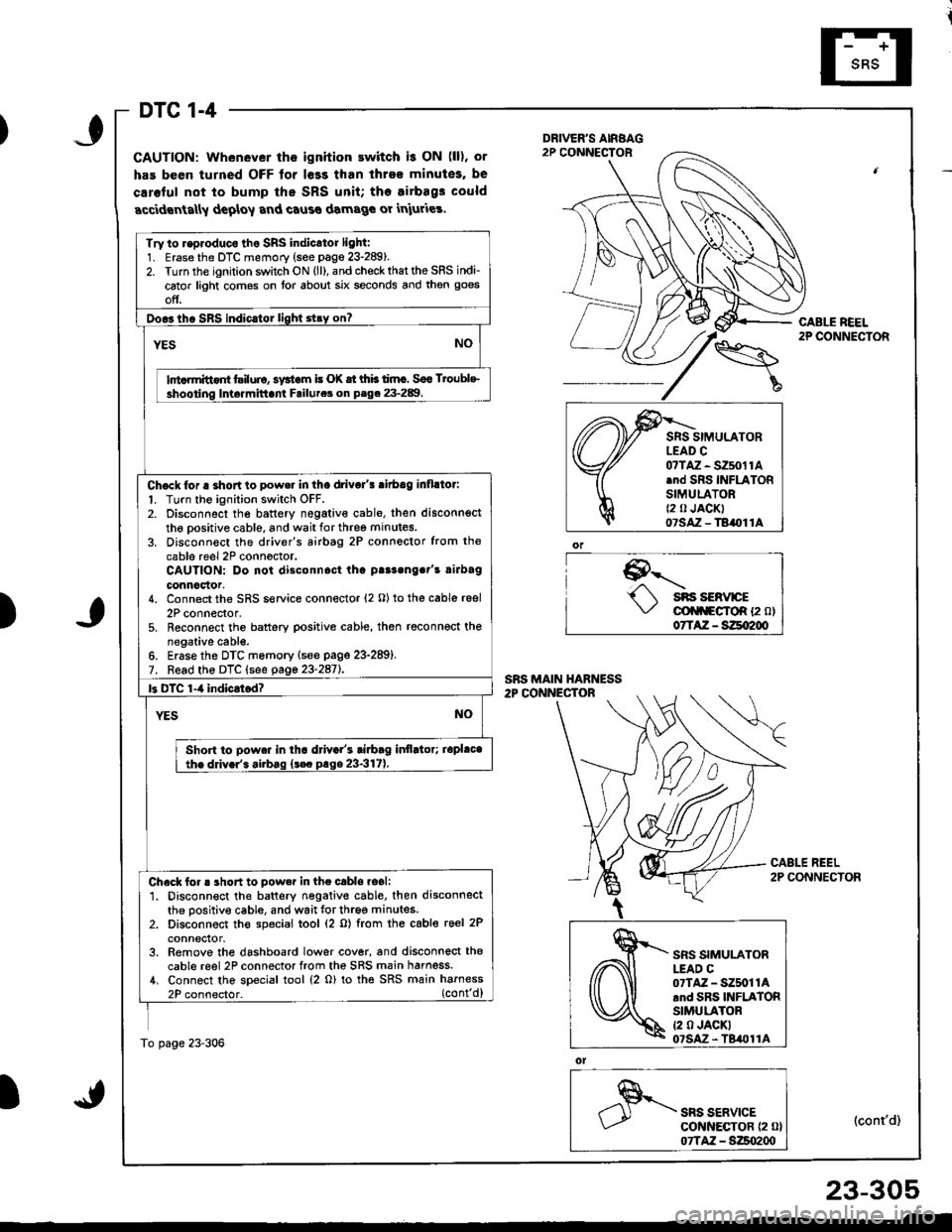
DTC 1-4
GAUTION: Whenever the ignition ewitch i! ON (ll), or
has been turned OFF tor l€ss than ihre€ minutes, be
caroful not to bump the SRS unit; tho airbag3 could
accidrnta[y deploy and caus€ damage or iniuries.
9--'-.- sns sERvrcE\,/ cli|f\FgfoR {2 ol07TAZ - SZqI200
ol
SRS SERVICEcot{ltEcToR {2 0}07TAZ - S:Zso2qt
CABLE REEL2P CONNECTOR
(cont'd)
Try to r.p.oduco tho SRS indicator light:1. Erase the DTC memory (see page 23-289).2. Turn the ignition switch ON (ll), and check that the SRS indi-
cator light comes on lor about six seconds and then goes
off.
Doo3tho SBS indic.tor light stry on?
YESNO
lnt rmittont tsiluio, systom i! (X tt thb timc. Soo Troublc
shooting Inte.mittani Failutca on P.g. 23-289.
Chock tor a shortto power in tha drivo/! ritbag inflllor:
l. Turn the ignition switch OFF.2. Disconnect the battery negativ€ cable, then disconnsct
th6 oositive cable, and wait for three minutes.
3. Disconn€ct the driver's airbtg 2P connector from the
cable reel 2P conn6ctor.CAUTION: Do not disconnost tha p!r3ong.t's rirbag
connoclor.4. Connect the SRS service connector (2 O) to the cable reel
2P connector,5. Reconnect the battery positive cable, then reconnect thenegative cabl€.6. Erase the DTC memory lsee page 23-289).7. Read the DTC (see gage 23-2aiL
|3 DTC 1-4 indicrtod?
YESNO
Shon to powa. in tha d val's tiabag itlflltor; iopl.cathe ddv.r'. airbag {t€c prge 23-317).
Check for ! short to pow.r in the cabls.oali1. Disconnect the battery negative cable. then disconnectthe positive cable, and wait for three minutes.2. Disconnect th€ special tool (2 o) from the cable reel 2P
conneclor.3. Remove the dashboard lower cover, and disconnect the
cable reel 2P connector from the SRS main harness./t. Connect the special tool (2 o) to tha SRS main harness
2P connector. (cont'd)
To page 23-306
)
,\fr)d
cffi
SRS SIMULATORLEAD C07TAZ - SZ5011Arnd SRS INFLATORSIMULATORt2 0 JACKI07SAz - TBil011A
23-305
Page 1361 of 1681
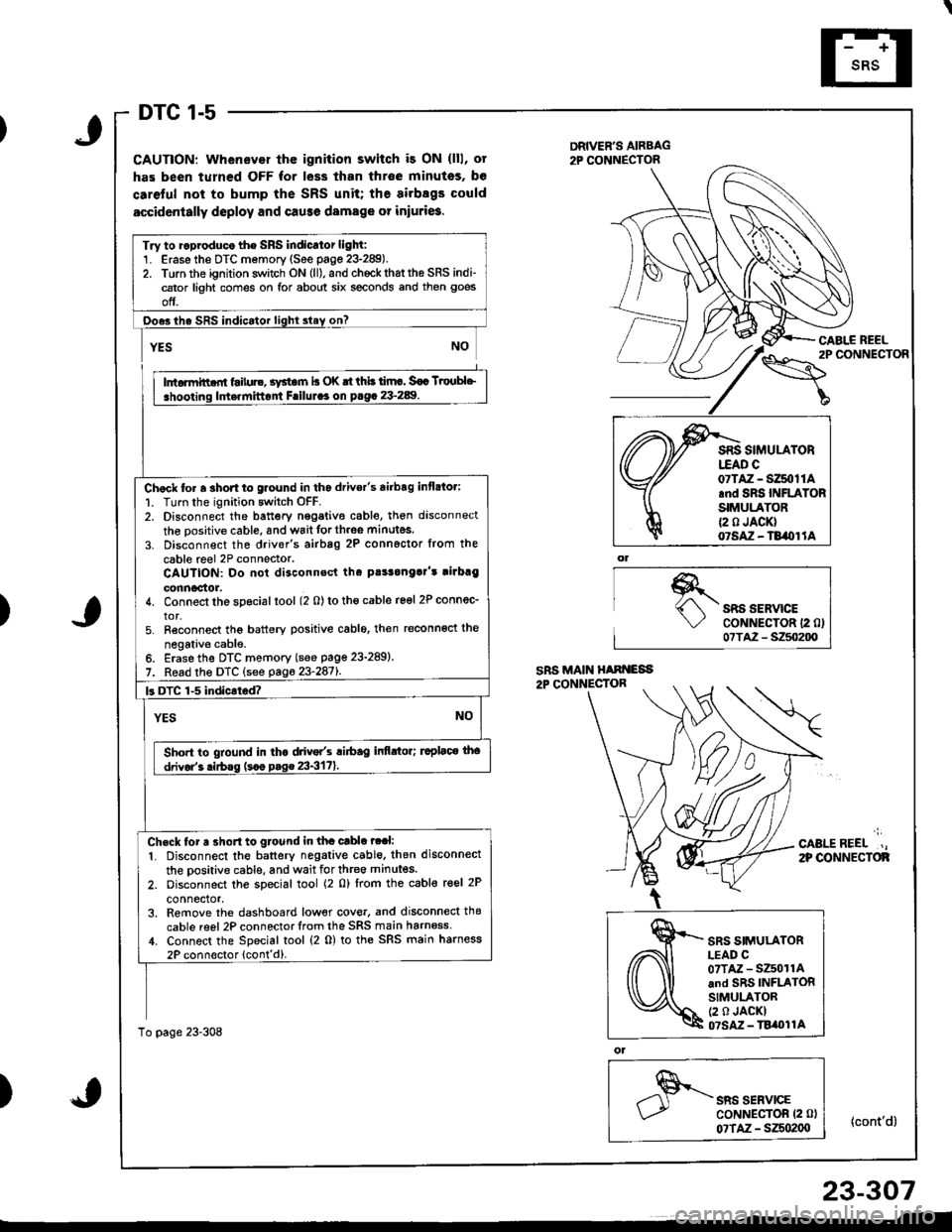
DTC 1-5
CAUTION: Whenever thc ignition switch i3 ON (lll, ot
has been turned OFF for less than throe minutss, bo
caretul not to bump the SRS unit; the airbsgs could
accidcntally deploy and cause damage or iniuri6.
DRIVER'S AIRBAG2P CONNECTOR
\"o""'"o'
CABI.E REEL
{cont'd}
)SRS SERVICECoNNECTOR 12 0)07TA2 - S250200
';
CABLEREEL.,2P OONNECTOF
)
ol
SRS SERVICECoNNECTOR (2 0l
07TAZ - SZSo2(xt
Try to ..produco the SRS indicator light:1. Erase the DTC memory (See page 23-289).2. Torn the ignition switch ON (ll), and chockrhattho SRS indi-cator light comes on for about six seconds and then goes
off.
Ooes ihe SRS indicator lighl slay on?
rffit
i .hooting ldt.rnittont Frilul.. on p.g. 23-289. I
Chock to. a 3hort to glound in tho drivor's airbag inflato.:
1. Turn the ignition switch OFF.2. Disconnect the battery nggative cable, then disconnect
the oositive cable, and wait forth.oe minutes.
3. Disconnect the driver's airbag 2P connoctor from the
cable reel 2P connector.CAUTION: Do not disconnsct tha pt!3onga]'t rirbrg
connoctor.4. Connect the special tool (2 0) to tho cable reel 2P connec_
tor,5. Reconnect tho battery positive cablo, then reconnoct the
negativ€ cable.6. Erase the DTC memory (see page 23-289)
7. Read the DTC (see pag623-2871.
k DTC 1-5 indicated?
YESNO
Sho.t to gtound in tha drive/s ri6ag infi.tor; ruplaco tho
drivor'3 .irbss (s.o p.g€ 23-3171.
Ch.ck tor a 3ho.t to gtound in tha cable ?ral:
1. Disconnect the battery negative cable. then disconnect
the oositive cable, and wait for three minutes.
2. oisconnect the special tool (2 0) lrom the cable reel 2P
connector,3. Remove the dashboard low€r cove., and disconnecl thg
cable reel 2P connector lrom the SRS main harn6ss,1. Connect the Special tool (2 0) to the SRS main harness
2P connoctor lcont'd).
To page 23-308
07TAZ - SZ50t1A.nd SRS INFLATORSIMULATOR{2 0 JACK}07SAZ - TB/OI lA
SRS SIMULATORLEAD C07TAZ - SZ501rAand SRS INFLATORSIMULATOR(2 0 JACKI07SM - TBi|t}l1A
23-307
Page 1363 of 1681
)
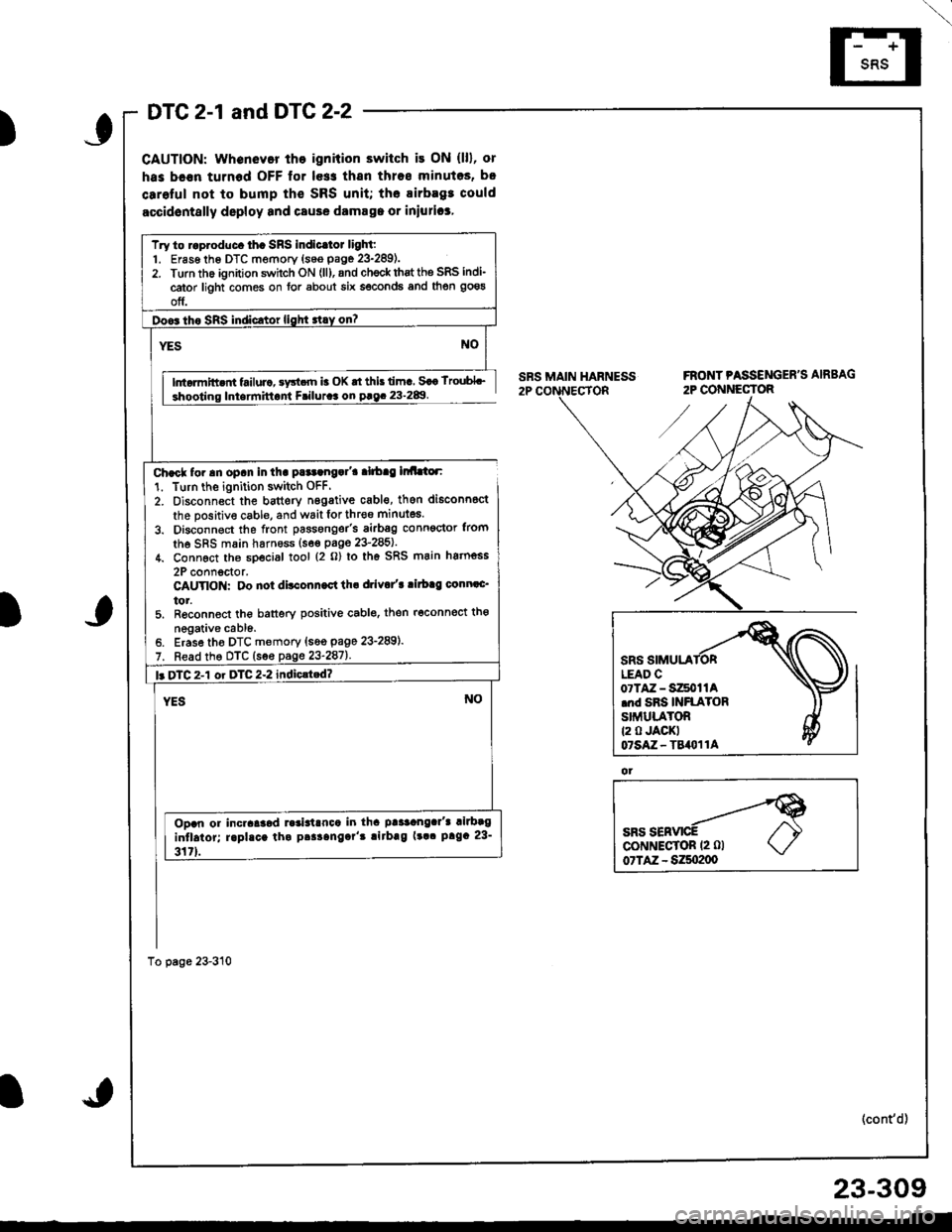
DTC 2-1 and DTG 2-2
CAUTION: whenevor tho ignition switch it ON (lll, or
has bc€n turnod OFF lor le$ thsn thros minutos, b.
carolul not to bump th€ SRS unit; the airbagt could
accidontslly deploy and csuse damsga or iniurica,
lntormitt nt failurc, sy3t.rn b OK rt this lima Saa lroubL_
Iniarmittant Friluraa on paq. 23-2&l
Char* for an opan in tha pataangal'a alrbag lr Llor:
1. Turn the ignition switch OFF.
2. Oisconnect the bauery n6gative cabl€, then di6conn6ct
the positive cable, and wait lor thr€o minutes.
3. Disconnect the front passonger's airbsg conn€ctor trom
the SRS main harness (s6€ paoe 23'285).
4. Connect th6 sDecial tool {2 o} lo th6 SRS main hatnoss
2P connoctor.CAUYIO : Oo not ditconn.ct th. drivo/t ritb.g conn.c'
tor.5. R6conned the banery positive cablo. then r6connect tho
negative cabl6.Erase tho DTC memory {s6o page 23-289).
Read the DTC (see page 23-287).
Try to raproduc. th. SRS indicltot light:1. Er6s6 th6 DTC memory {seo page 23-289).2. Turn the ignition swhch ON (ll), and ch€ck thst the SRS indi-
cator light comes on for about six seconds and then goeg
off.
l. DTC 2-1 or DTC 2-2 indiclted?
Ooan or incraaaod ].3ialrnca in tha paaaangar'a rilbag
intlaior; raphca tha paaaangar't !irbag (!a. prga 23-
317).
ot
(cont'd)
23-309
Page 1365 of 1681
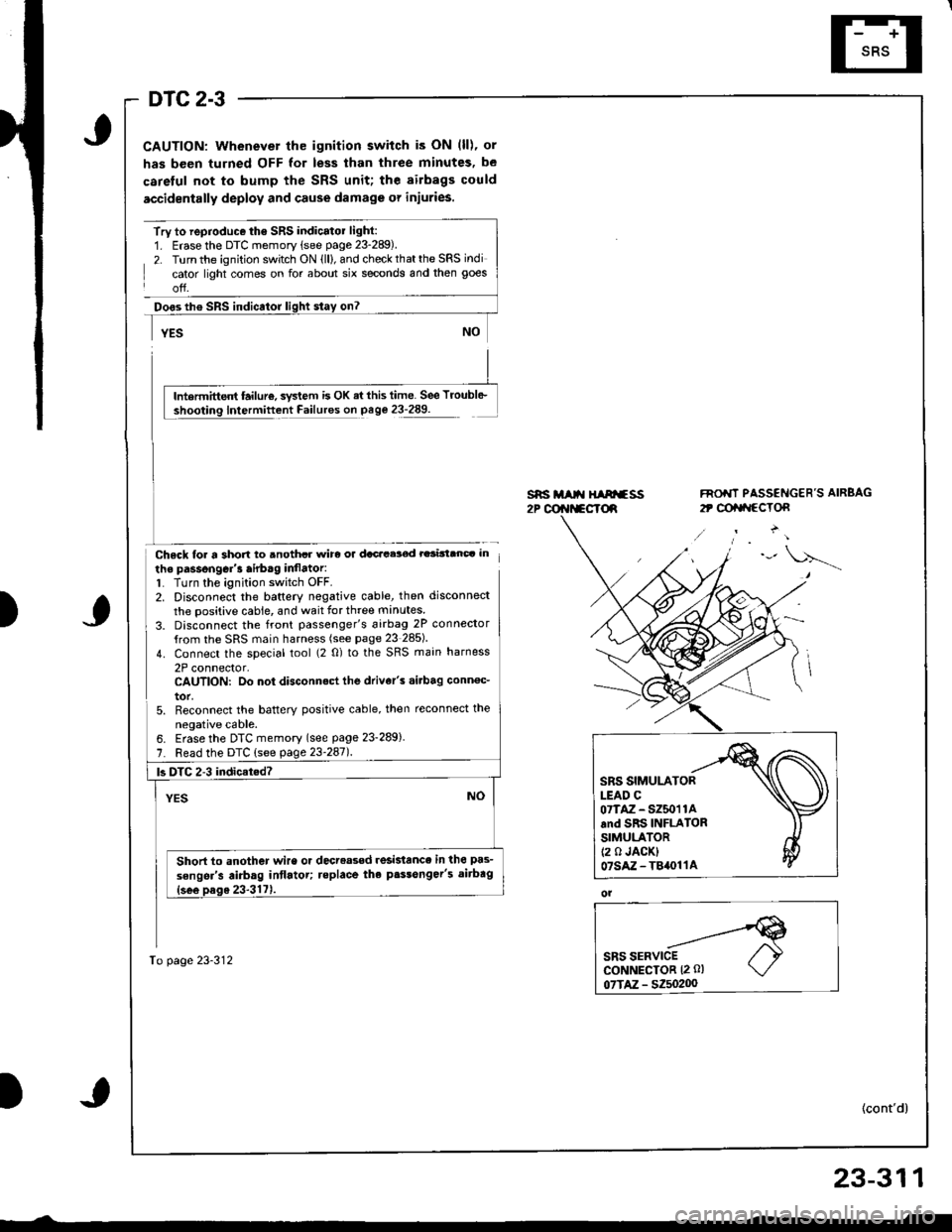
DTC 2-3
CAUTION: Whenever the ignition switch is ON (ll), or
has been turned OFF for less than three minutes, be
careful not to bump the SRS unit; the airbags could
accidentally deploy and cause damage or injuries.
Try to reproduce the SRS indicatol light:1. Erase the DTC memory (see page 23-289).
2. Turn the ignition switch ON (ll), and check that the SRS indi
cator light comes on for about six seconds and then goes
off.
Doos th€ SRS indicator
Chsck loa a short to anothcr wirc or dacacelod rarinanc. in
the passongGr'3 airb.g inflator:1. Turn the ignition switch OFF.2. Disconnect the baftery negative cable, then disconnect
the positive cable, and wait for three manutes
3. Disconnect the front passenger's 6irbag 2P connector
{rom the SRS main harness (see page 23 285)
4. Connect the special tool (2 0) to the SRS main harness
2P connector,CAUTION: Do not disconnect the drive/s .i.bag conn€c_
tor,5. Reconnect the batterY positive cable, then reconnect the
neoative cable.
s*i M t{ HIArfss2P @r{t*cTd
FNO'IT PASSENGER'S AIRBAG
2t @tat{ccTon
)
lntermittent failur€, svstem is OK ai this time. See Troubl6-
Intermittent Failures on page 23-289.
6. Erase the DTC memory (see page 23-289)
7. Read the DTC (see page 23'247l.
To page 23-312
|3 DTC 2-3 indicat.d?
Short to another wire or decreased resislance in the pas-
sengsr's airbag intlatot; teplace the p.$onger's aitbag
SRS SIMULATORLEAD C07TAZ - SZ50'r 1Aand SRS INFLATORSIMULATOR(2 0 JACK)07sAz-T84011A
ol
23-311
Page 1367 of 1681
, or
has been turned OFF for less than threo minutcs, be
car€ful not to bump lhe SRS unit; the airbEgs could
accidontslly dcploy and cause d")
\
DTC 2-4
CAUTION: Whenevor th6 ignition switch is ON (ll), or
has been turned OFF for less than threo minutcs, be
car€ful not to bump lhe SRS unit; the airbEgs could
accidontslly dcploy and cause damag€ 01 iniuries.
SRS MAIN HABNESS2P CONNECTORFRONT PASSENGER'S AIRBAG
2P CONNECTOR
ot
SBS SERVICEcoNNECTOR {2 0l07TAZ - SZ5o200
(cont'd)
23-313
_-t
)
Try to roproduce th. SRS indicrtor lighl:1. Erase the DTC memory (see page 23-289).2. Turn the ignition switch ON (ll), and chock that the SRS indi-
cator light comes on for about six seconds and then goes
off.
Do.3 th. SRS indicator lighi stay on?
NOYES
Ini.rmitt.nt t iluro, !y*em b OK .t thb timo. Soe Ttoubl+,
shooting lmormittent Failuraa on P.ge 23.289
Ch6ck tor a 3hon to powol in tha pa3tonga/t lirbag infla_
to.:1. Turn the ignition switch OFF.2. Disconnect the battory negative cable, then disconnect
the oositive cable, and wait tor three manutes
3. Disconnect the front passenger's airbag 2P conn€ctorIrom the SRS main harnoss (see page 23-285).
4. Connect the soecial tool (2 0) to the SRS main harness
2P connector.CAUTION: Do not dilconn.ct tho driv.l'! .irb.g conn.c'
tor.5. Reconnect the battery positive cable, then reconnoct the
negative cable.6. Erase the DTC memory (see page 23-289).7. Read the DTC (see page 23-2861.
b DTC 2-4 indicatcd?
YESNO
Short to powor in th. pa$anoar'3 airbrg infldtor; tepl&t
the Dass6nqor'3 .irbaq {sco prgc 23-3171
To page 23-314
07TAZ-SZ50t1A.nd SRS INFLATORSIMULA'OR(2 0 JACKT07sAz - TB()11A
Page 1369 of 1681
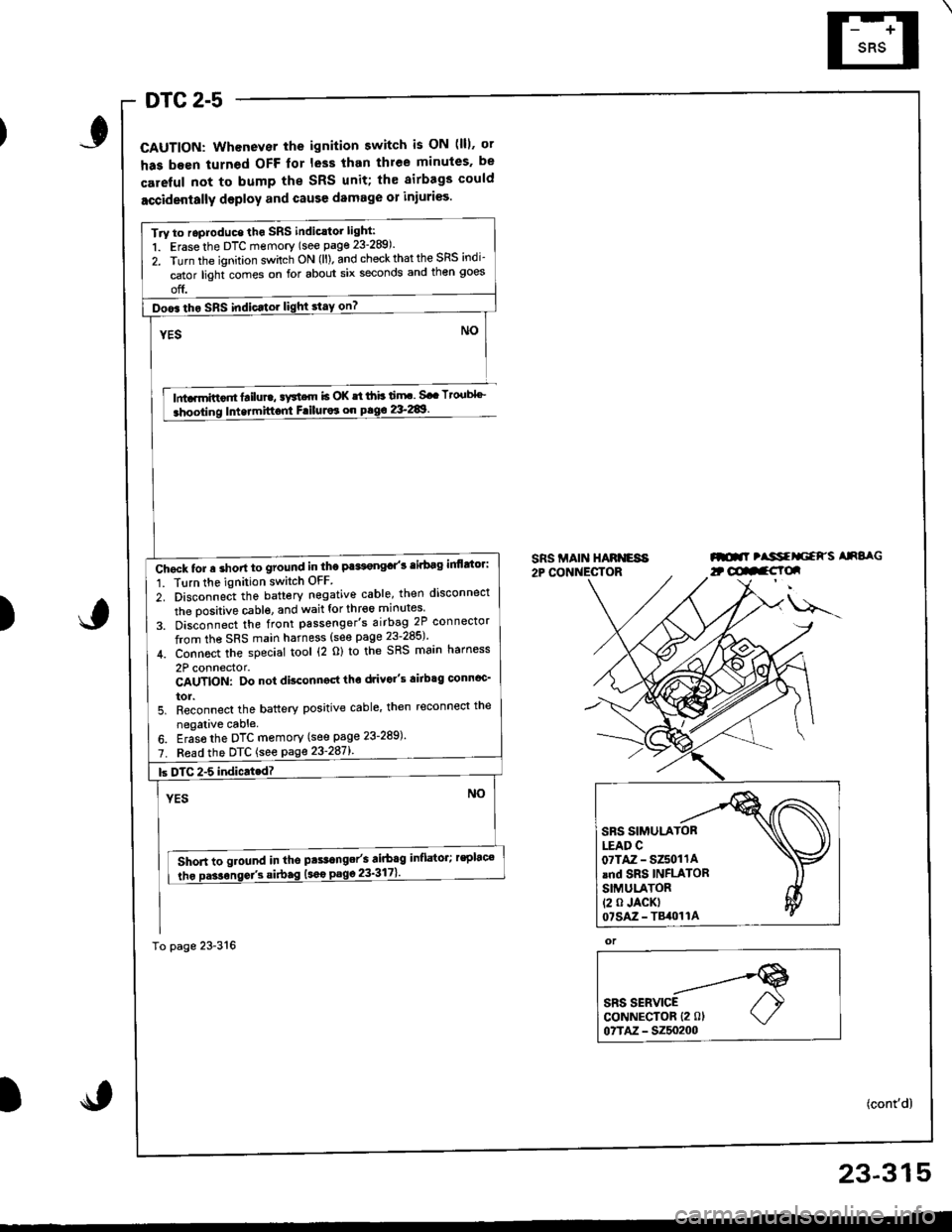
DTC 2-5
CAUTION: Whenever the ignition switch is ON (lll. ot
has been turned OFF lor less than thlee minules. be
careful not to bump the SRS unit; th€ airbags could
accidentally deploy and cause damage 01 injuri€s.
lnta.mittor tailure, aFtcrn b OK st ihb ti.rF. Sa. Tto.tbl''_
Intermittont FriluJor on pag€ 2&289.
SRS MAIN HARNESA2P CONNECTORml tlssfrliaFs AnSaG
)
u---
or
SRS SERVICECoNNECTOR {2 0lo?TM - 5250200
(cont'd)
Try to roproduce tho SRS indic.tor light:
1. Erase the DTC memory (see page 23-289).
2. Turn the ignition sv/itch ON (ll). and check that the SRS indi-
cator light comes on for about six seconds and then goes
off.
Doo6 tho SRS indic.tor light stay on?
Chgck tor a short to ground in the Pa*t€ngd'3 tirbag inflttor:
1. Tlrn the ignition switch OFF
2. Disconnect the battery negative cable, then disconnect
the oositive cable. and wait for thr€6 minutes
3. Dis;onnect the front passenger's airbag 2P connector
from the SRS main harness (see page 23-285)'
4. Connoct the special tool (2 o) to the SRS main harness
2P connector.CAUTION: Do not disconngd tho drivo"s airbtg connoc'
tor.5. Reconnect the battery positive cable' then reconnect the
negalive cable.
6. Eras6 the DTC memory (see page 23-289)'
7. Fead the DTC {see page 23'287l'.
Short to ground in tho pts.range/s airbag inflator; rsplac€
tho Da3sonse/3 si.bag (sao
23-315
Page 1373 of 1681
I
I
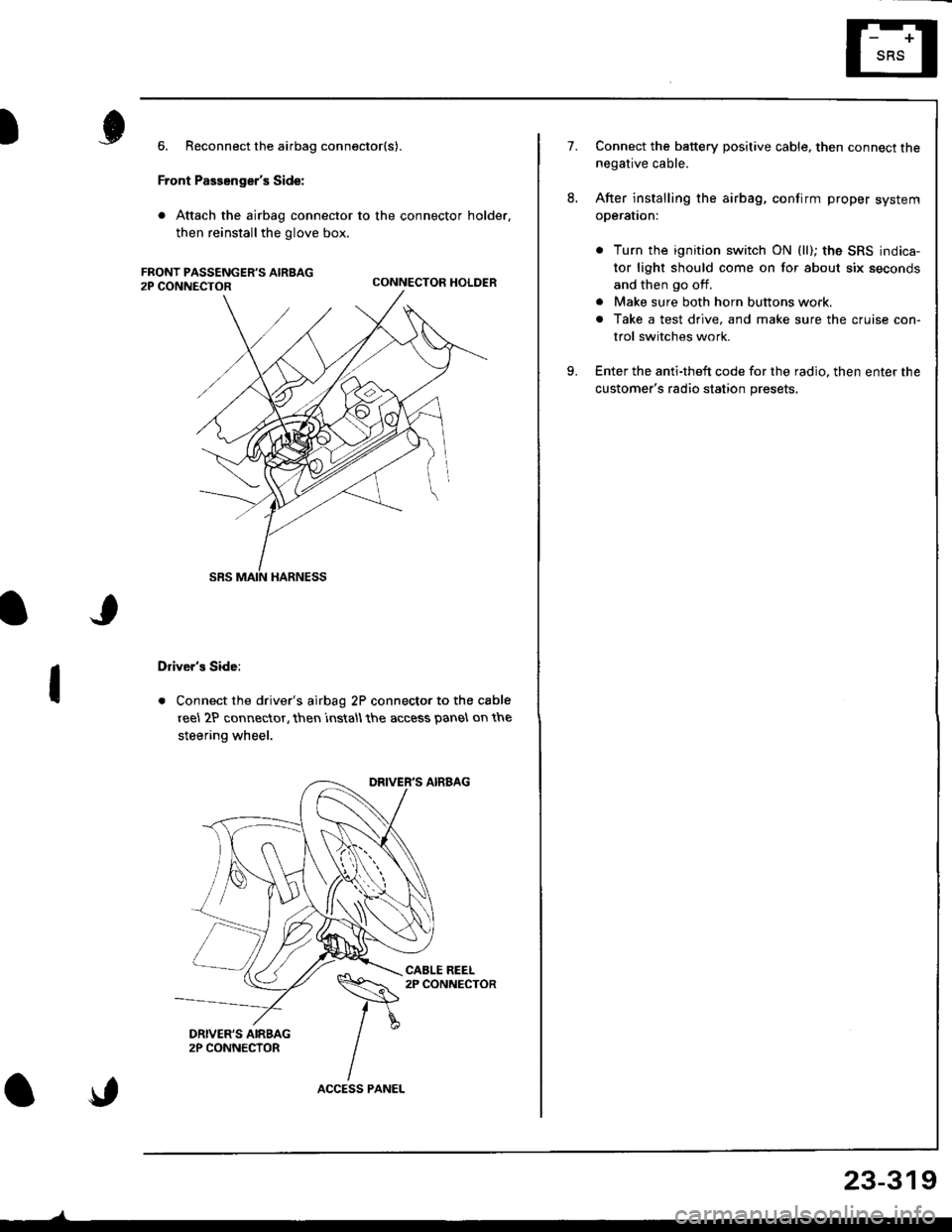
6. Reconnect the airbag connector(s).
Front Passenger's Side:
. Attach the airbag connector to the connector holder.
then reinstallthe glove box.
CONNECTOR HOLDER
Driver's Side:
. Connect the driver's airbag 2P connector to the cable
reel 2P connector, then rnstall the access panel on the
steering wheel.
\,
23-319
7.Connect the baftery positive cable, then connect thenegative cable.
After installing the airbag, confirm proper system
operal|on:
. Turn the ignition switch ON (ll); the SRS indica-
tor light should come on for about six seconds
and then go off.
. Make sure both horn buttons work.
. Take a test drive, and make sure the cruise con-
trol switches work.
Enter the anti-theft code for the radio. then enter the
customer's radio station presets,
9.
Page 1375 of 1681
)6.
7.
8.
Connect a 12 volt battery to the tool:
. lf the green light on the tool comes on, the alr-
bag igniter circuit is defective and cannot deploy
the airbag. Go to Damaged Airbag Specia I
Procedure.
. lfthe red light on the tool comes on, the airbag is
ready to be deployed.
Push the tool's deployment switch The airbag
should deploy (deployment is both highly audible
and visible; a loud noise and rapid inflation of the
bag, followed by slow deflation).
. lf the airbags deploy and the green light on the
tool comes on, continue with this procedure
. lf an airbag doesn't deploy. yet the green light
comes ON, its igniter is defective. Go to Dam-
aged Airbag Special Procedure.
!!@ During deployment, the airbag c8n
become hot enough to burn you Wait thirtY min-
ut€s after d€ployment befote touching the assem-
blv.
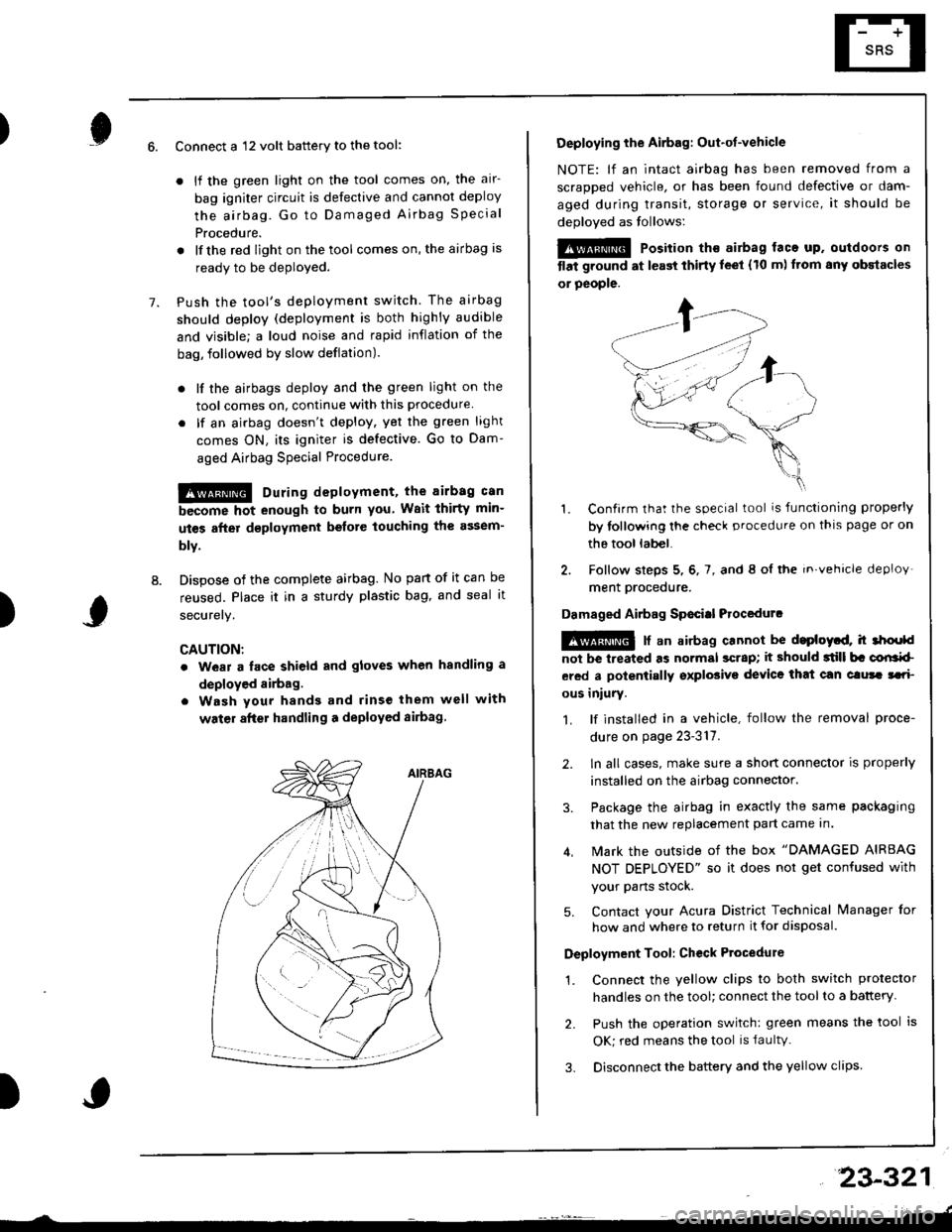
Dispose of the complete airbag. No part of it can be
reused. Place it in a sturdy plastic bag, and seal it
securery.
CAUTION:
. wear a lace shield and gloves when handling a
deployed airbag.
. Wash your hands and rinse them well with
water after handling a deployed sirbag
)
Deploying the Airbag: Out-ot-vehicle
NOTE: lf an intact airbag has been removed from a
scraDDed vehicle, or has been found defective or dam-
aged during transit, storage or service, it should be
deoloved as follows:
@@ Position th€ airbag laca up. outdoors on
tlat ground at l€ast thirty leet (10 m) ftom any obstacles
or people.
1. Confirm that the special tool is functioning properly
by tollowing the check procedure on thls page or on
the tool lab€|.
2. Follow steps 5, 6, 7, and 8 ol the in.vehicle deploy'
ment orocedure.
Damaged Airbag Sp€citl Procedurc
!@ [ an airbag cannot be d.ploytd, h 3hoold
not be lreated as normal scrap; it should 3till b. corlrkl
ered a polentially sxplosive device that can clura tari
ous iniury.
1. lf installed in a vehicle, follow the removal proce-
dure on page 23-317.
2. ln all cases, make sure a short connector is properly
installed on the airbag connector.
3. Package the airbag in exactly the same packaging
that the new replacement part came In.
4. Mark the outside of the box "DAMAGED AIRBAG
NOT DEPLOYED" so it does not get confused with
your Parts stock.
5. Contact your Acura District Technical lvanager for
how and where to return it for disposal.
Deployment Tool: Ch€ck Ptocedure
1. Connect the yellow clips to both switch protector
handles on the tool; connect the tool to a battery
2. Push the operation switch: green means the tool is
OK; red means the tool is faultv.
3. Disconnect the battery and the yellow clips
23-321