buttons HONDA ODYSSEY 1998 User Guide
[x] Cancel search | Manufacturer: HONDA, Model Year: 1998, Model line: ODYSSEY, Model: HONDA ODYSSEY 1998Pages: 272, PDF Size: 2.67 MB
Page 107 of 272
Audio System
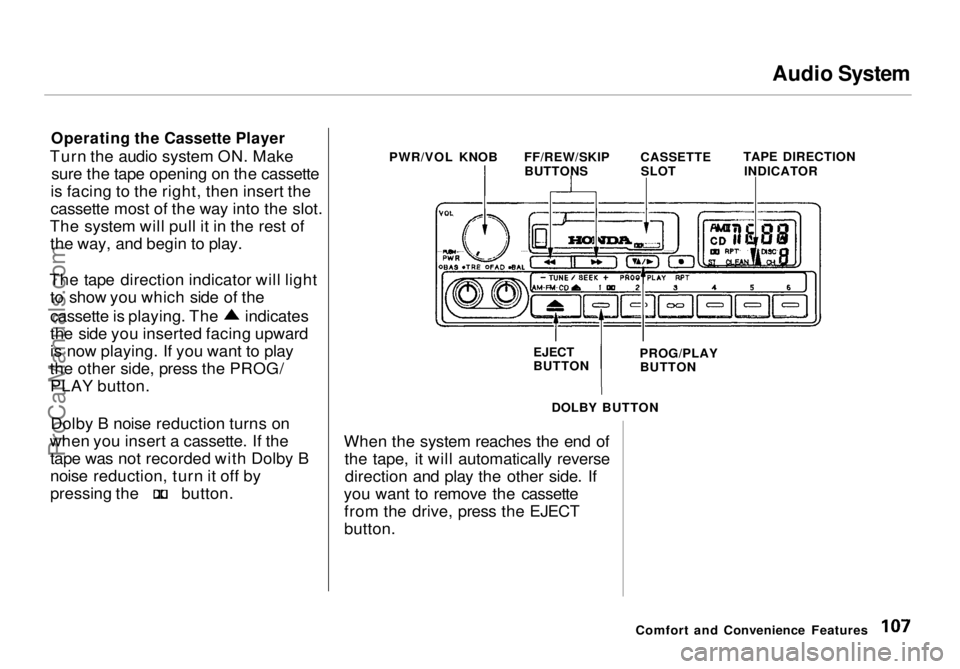
Operating the Cassette Player
Turn the audio system ON. Make sure the tape opening on the cassette
is facing to the right, then insert the
cassette most of the way into the slot.
The system will pull it in the rest of the way, and begin to play.
The tape direction indicator will light to show you which side of the cassette is playing. The indicates
the side you inserted facing upward
is now playing. If you want to play
the other side, press the PROG/ PLAY button.
Dolby B noise reduction turns on
when you insert a cassette. If the tape was not recorded with Dolby B
noise reduction, turn it off by pressing the button.
When the system reaches the end of
the tape, it will automatically reversedirection and play the other side. If
you want to remove the cassette from the drive, press the EJECT
button.
Comfort and Convenience Features
PWR/VOL KNOB
FF/REW/SKIP
BUTTONS CASSETTE
SLOT TAPE DIRECTION
INDICATOR
EJECT
BUTTON PROG/PLAY
BUTTON
DOLBY BUTTONProCarManuals.comMain Menu Table of Contents s t
Page 108 of 272
Audio System
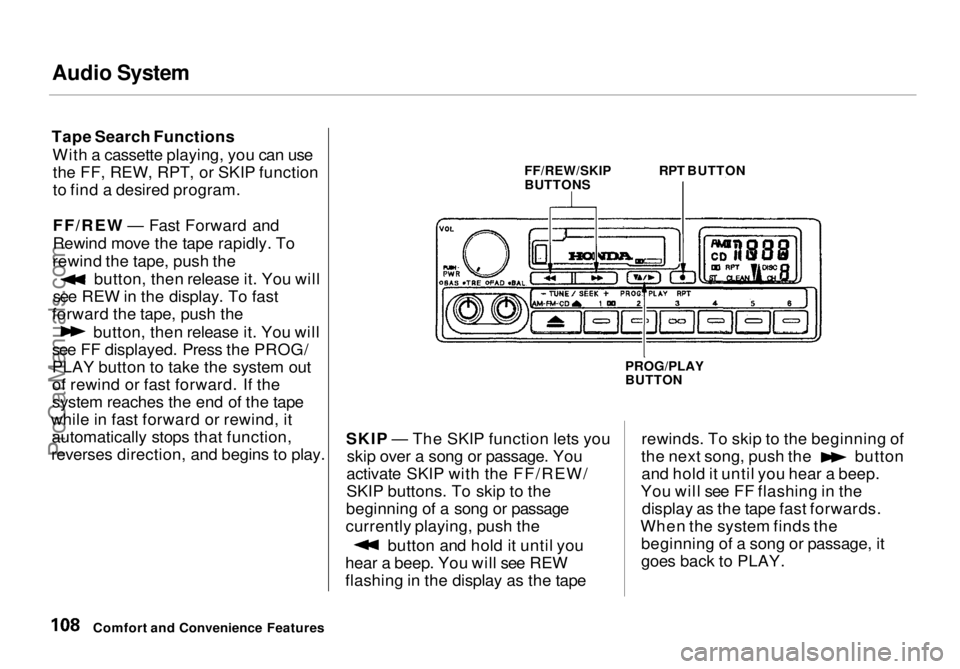
Tape Search Functions With a cassette playing, you can usethe FF, REW, RPT, or SKIP function
to find a desired program.
FF/REW — Fast Forward and
Rewind move the tape rapidly. To
rewind the tape, push the button, then release it. You will
see REW in the display. To fast
forward the tape, push the button, then release it. You will
see FF displayed. Press the PROG/
PLAY button to take the system out
of rewind or fast forward. If the
system reaches the end of the tape
while in fast forward or rewind, it automatically stops that function,
reverses direction, and begins to play. SKIP — The SKIP function lets you
skip over a song or passage. You
activate SKIP with the FF/REW/
SKIP buttons. To skip to the
beginning of a song or passage
currently playing, push the button and hold it until you
hear a beep. You will see REW
flashing in the display as the tape rewinds. To skip to the beginning of the next song, push the button
and hold it until you hear a beep.
You will see FF flashing in the display as the tape fast forwards.
When the system finds the beginning of a song or passage, it
goes back to PLAY.
Comfort and Convenience Features PROG/PLAY
BUTTON
FF/REW/SKIP
BUTTONS
RPT BUTTONProCarManuals.comMain Menu Table of Contents s t
Page 109 of 272
Audio System
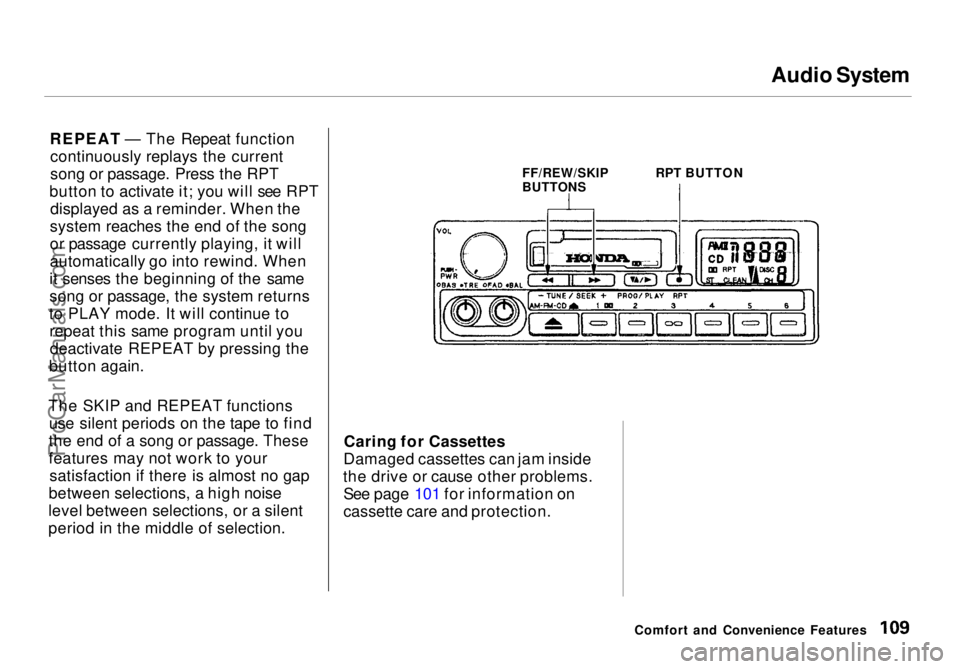
REPEAT — The Repeat function continuously replays the current
song or passage. Press the RPT
button to activate it; you will see RPT displayed as a reminder. When the
system reaches the end of the song
or passage currently playing, it will
automatically go into rewind. When
it senses the beginning of the same
song or passage, the system returns
to PLAY mode. It will continue to repeat this same program until youdeactivate REPEAT by pressing the
button again.
The SKIP and REPEAT functions use silent periods on the tape to find
the end of a song or passage. These
features may not work to your satisfaction if there is almost no gap
between selections, a high noise
level between selections, or a silent
period in the middle of selection. Caring for Cassettes
Damaged cassettes can jam inside
the drive or cause other problems. See page 101 for information on
cassette care and protection.
Comfort and Convenience Features
FF/REW/SKIP
BUTTONS
RPT BUTTONProCarManuals.comMain Menu Table of Contents s t
Page 110 of 272
Audio System
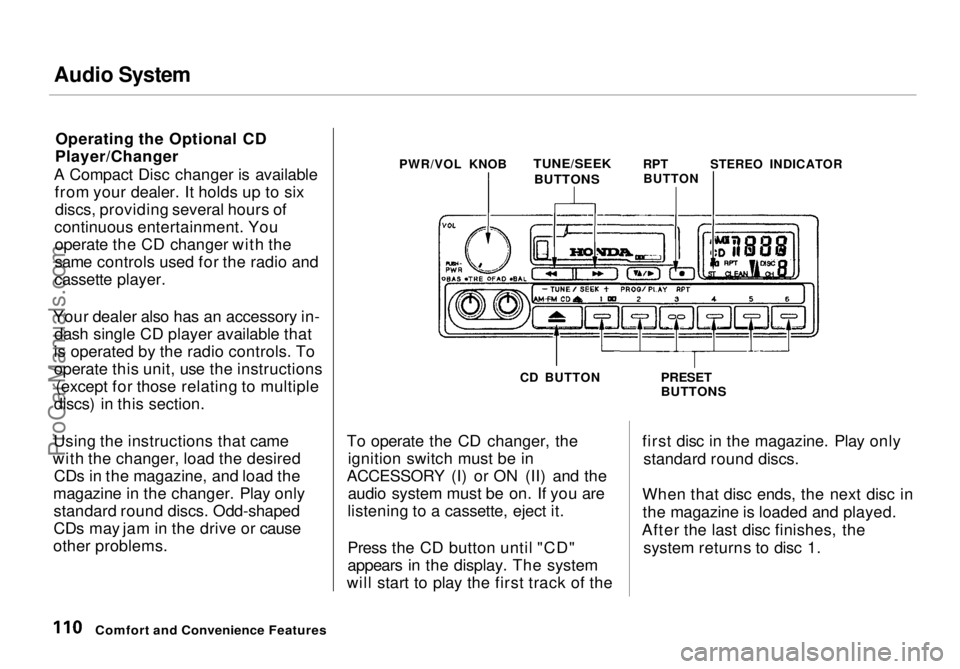
Operating the Optional CD
Player/Changer
A Compact Disc changer is available from your dealer. It holds up to sixdiscs, providing several hours of
continuous entertainment. You operate the CD changer with the
same controls used for the radio and
cassette player.
Your dealer also has an accessory in- dash single CD player available that
is operated by the radio controls. To
operate this unit, use the instructions (except for those relating to multiple
discs) in this section.
Using the instructions that came
with the changer, load the desired CDs in the magazine, and load the
magazine in the changer. Play only standard round discs. Odd-shaped
CDs may jam in the drive or cause
other problems. PWR/VOL KNOB
TUNE/SEEK
RPTSTEREO INDICATOR
CD BUTTON
To operate the CD changer, the ignition switch must be in
ACCESSORY (I) or ON (II) and the audio system must be on. If you are
listening to a cassette, eject it.
Press the CD button until "CD"
appears in the display. The system
will start to play the first track of the
PRESET
BUTTONS
first disc in the magazine. Play only standard round discs.
When that disc ends, the next disc in the magazine is loaded and played.
After the last disc finishes, the system returns to disc 1.
Comfort and Convenience Features
BUTTONS
BUTTONProCarManuals.comMain Menu Table of Contents s t
Page 111 of 272
Audio System
To select a different disc, press the appropriate preset button (1 — 6). If
you select an empty slot in the magazine, the changer will, after
finding that slot empty, try to load
the CD in the next slot. Thiscontinues until it finds a CD to load
and play.
You can use the TUNE/SEEK buttons to select tracks within a disc. Push and release the appropriate
TUNE/SEEK button, the system will move to the beginning of a track. Press the button to move to the
beginning of the next track, and press the button to move to the
beginning of the current track.
If you press and hold the TUNE/
SEEK button, you will hear a beep
and the system will continue to move
across tracks. Release the button
when you think it has reached the desired place on the disc. REPEAT — When you activate the
Repeat feature by pressing the RPT
button, the system continuously
replays the current track. You will see RPT in the display as a reminder.
Press the RPT button again to turn it
off.
To take the system out of CD mode, press the AM or FM button, or inserta cassette in the player. When you
return to CD mode, play will contin-
ue at the same disc and track.
If you turn the system off while a CD
is playing, either with the PWR/VOL
knob or the ignition switch, play will continue at the same disc and track
when you turn it back on.
Protecting Compact Discs
For information on how to handle
and protect compact discs, see page
104.
CD Changer Error Indications
For information on the meaning of
the CD Error Indications and what to do when you see those indications,
refer to page 125 .
Comfort and Convenience FeaturesProCarManuals.comMain Menu Table of Contents s t
Page 112 of 272
Audio System
AM/FM/Cassette Stereo Audio
System
For U.S. EX model
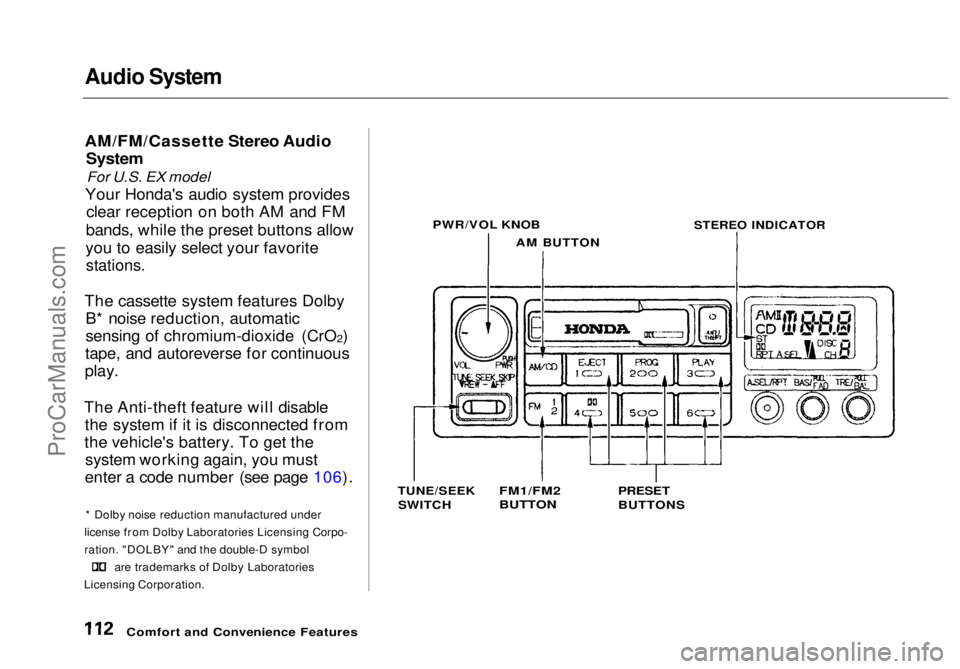
Your Honda's audio system provides clear reception on both AM and FM
bands, while the preset buttons allow
you to easily select your favorite
stations.
The cassette system features Dolby B* noise reduction, automatic
sensing of chromium-dioxide (CrO 2)
tape, and autoreverse for continuous
play.
The Anti-theft feature will disable the system if it is disconnected from
the vehicle's battery. To get the system working again, you must
enter a code number (see page 106).
* Dolby noise reduction manufactured under
license from Dolby Laboratories Licensing Corpo-
ration. "DOLBY" and the double-D symbol are trademarks of Dolby Laboratories
Licensing Corporation.
Comfort and Convenience Features PWR/VOL KNOB
AM BUTTON
STEREO INDICATOR
TUNE/SEEK SWITCH
FM1/FM2
BUTTON
PRESET
BUTTONSProCarManuals.comMain Menu Table of Contents s t
Page 113 of 272
Audio System
Operating the Radio
The ignition switch must be in
ACCESSORY (I) or ON (II) to operate the audio system. Turn thesystem on by pushing the PWR/
VOL knob.
Adjust the volume by turning the PWR/VOL knob.
The band and frequency that the radio was last tuned to is displayed.
To change bands, press the AM/FM 1-2 button. On the FM band, ST will
be displayed if the station is broad- casting in stereo. Stereo reproduc-
tion on AM is not available.
You can use any of three methods to find radio stations on the selected
band: TUNE, SEEK, or the Preset
buttons.
TUNE — Use the TUNE/SEEK
switch to tune the radio to a desired
frequency. Push the switch up to tune to a higher frequency, and push
the switch down to tune to a lower
frequency. The frequency numbers
will start to change rapidly. Release the switch when the display reaches
the desired frequency. To change
the frequency in small increments,
push and release the TUNE/SEEK switch quickly. SEEK — The SEEK function
searches the band for a station with
a strong signal. To activate it, push
the TUNE/SEEK switch until you
hear a beep, then release it.
Depending on which way you pushed
the switch, the system scans upward or downward from the current
frequency. It stops when it finds a station with a strong signal.
Preset — You can store the fre-
quencies of your favorite radiostations in the six preset buttons.
Each button will store one frequency on the AM band, and two on the FM
band.
CONTINUED
Comfort and Convenience FeaturesProCarManuals.comMain Menu Table of Contents s t
Page 114 of 272
Audio System
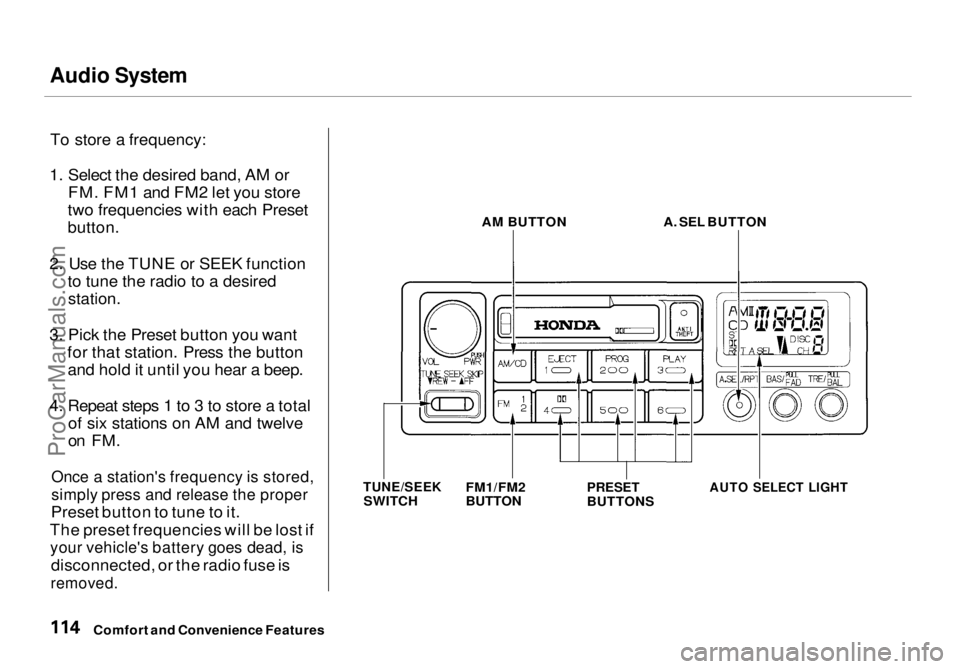
To store a frequency:
1. Select the desired band, AM or FM. FM1 and FM2 let you store
two frequencies with each Preset
button.
2. Use the TUNE or SEEK function to tune the radio to a desired
station.
3. Pick the Preset button you want for that station. Press the buttonand hold it until you hear a beep.
4. Repeat steps 1 to 3 to store a total of six stations on AM and twelve
on FM.
Once a station's frequency is stored,
simply press and release the proper
Preset button to tune to it.
The preset frequencies will be lost if
your vehicle's battery goes dead, is
disconnected, or the radio fuse is
removed.
AM BUTTON
A. SEL BUTTON
PRESET
BUTTONS
AUTO SELECT LIGHT
Comfort and Convenience Features
TUNE/SEEK
SWITCH FM1/FM2
BUTTONProCarManuals.comMain Menu Table of Contents s t
Page 115 of 272
Audio System
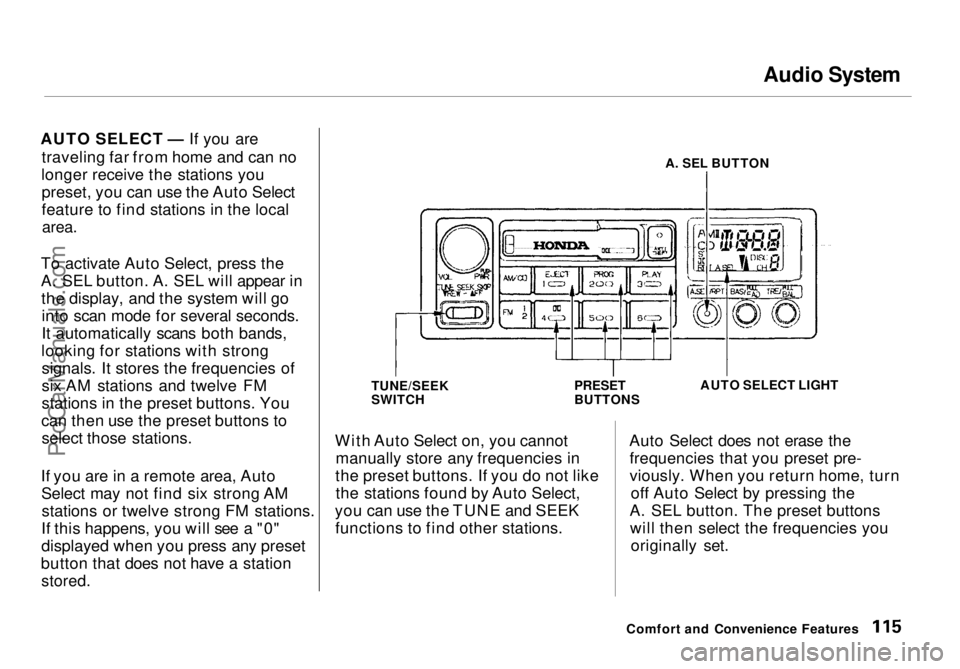
AUTO SELECT — If you are traveling far from home and can no
longer receive the stations you preset, you can use the Auto Select
feature to find stations in the local
area.
To activate Auto Select, press the
A. SEL button. A. SEL will appear in the display, and the system will gointo scan mode for several seconds.
It automatically scans both bands,
looking for stations with strong signals. It stores the frequencies of
six AM stations and twelve FM
stations in the preset buttons. You
can then use the preset buttons to select those stations.
If you are in a remote area, Auto Select may not find six strong AMstations or twelve strong FM stations.
If this happens, you will see a "0"
displayed when you press any preset
button that does not have a station
stored.
A. SEL BUTTON
TUNE/SEEK
SWITCH PRESET
BUTTONSAUTO SELECT LIGHT
With Auto Select on, you cannot manually store any frequencies in
the preset buttons. If you do not like the stations found by Auto Select,
you can use the TUNE and SEEK functions to find other stations. Auto Select does not erase the
frequencies that you preset pre-
viously. When you return home, turn off Auto Select by pressing the
A. SEL button. The preset buttons will then select the frequencies you originally set.
Comfort and Convenience FeaturesProCarManuals.comMain Menu Table of Contents s t
Page 126 of 272
Audio System
Theft Protection
On U.S. EX model
Your vehicle's audio system will disable itself if it is disconnected
from electrical power for any reason.
To make it work again, the user must enter a specific five-digit code
in the Preset buttons. Because thereare hundreds of number
combinations possible from five digits, making the system work
without knowing the exact code is nearly impossible.
You should have received a card that lists your audio system's code
number and serial number. It is best
to store this card in a safe place at
home. In addition, you should write
the audio system's serial number in
this Owner's Manual. If you should
happen to lose the card, you must obtain the code number from your
Honda dealer. To do this, you will
need the system's serial number. If your vehicle's battery is discon-
nected or goes dead, the audio
system will disable itself. If this
happens, you will see "Code" in the
frequency display the next time you
turn on the system. Use the Preset
buttons to enter the five-digit code. If it is entered correctly, the radio willstart playing.
If you make a mistake entering the
code, do not start over or try to
correct your mistake. Complete the
five-digit sequence, then enter the correct code. You have three tries toenter the correct code. If you are
unsuccessful in three attempts, you
must then leave the system on for
one hour before trying again. You will have to store your favorite
stations in the Preset buttons after
the system begins working. Your original settings were lost when
power was disconnected.
Comfort and Convenience FeaturesProCarManuals.comMain Menu Table of Contents s t