ignition HONDA ODYSSEY 1998 Owner's Guide
[x] Cancel search | Manufacturer: HONDA, Model Year: 1998, Model line: ODYSSEY, Model: HONDA ODYSSEY 1998Pages: 272, PDF Size: 2.67 MB
Page 141 of 272

Starting the Engine
1. Apply the parking brake.
2. In cold weather, turn off all electrical accessories to reduce
the drain on the battery.
3. Make sure the shift lever is in Park. Press on the brake pedal.
4. Without touching the accelerator pedal, turn the ignition key to theSTART (III) position. If the enginedoes not start right away, do not
hold the key in START (III) for
more than 15 seconds at a time.
Pause for at least 10 seconds
before trying again.
5. If the engine does not start within 15 seconds, or starts but stalls
right away, repeat step 4 with the accelerator pedal pressed half-way
down. If the engine starts, release
pressure on the accelerator pedal so the engine does not race. 6. If the engine still does not start,
press the accelerator pedal all the
way down and hold it there while starting in order to clear flooding.
As before, keep the ignition key in the START (III) position for no
more than 15 seconds. Return tostep 5 if the engine does not start.
If it starts, lift your foot off the
accelerator pedal so the engine
does not race.
Starting in Cold Weather at High
Altitude (Above 8,000 feet/ 2,400 meters)
An engine is harder to start in cold weather. The thinner air found at
high altitude above 8,000 feet (2,400meters) adds to the problem.
Use the following procedure:
1. Turn off all electrical accessories to reduce the drain on the battery. 2. Push the accelerator pedal half-
way to the floor and hold it there
while starting the engine. Do nothold the ignition key in START (III) for more than 15 seconds.
When the engine starts, release the accelerator pedal gradually as
the engine speeds up and smooths out.
3. If the engine fails to start in step 2, push the accelerator pedal to the
floor and hold it there while you
try to start the engine for no more
than 15 seconds. If the enginedoes not start, return to step 2.
DrivingProCarManuals.comMain Menu Table of Contents s t
Page 142 of 272
Automatic Transmission
Your Honda's transmission has four forward speeds, and is electronicallycontrolled for smoother shifting. It
also has a "lock-up" torque converter
for better fuel economy. You may
feel what seems like another shift
when the converter locks. Shift Lever Position Indicator
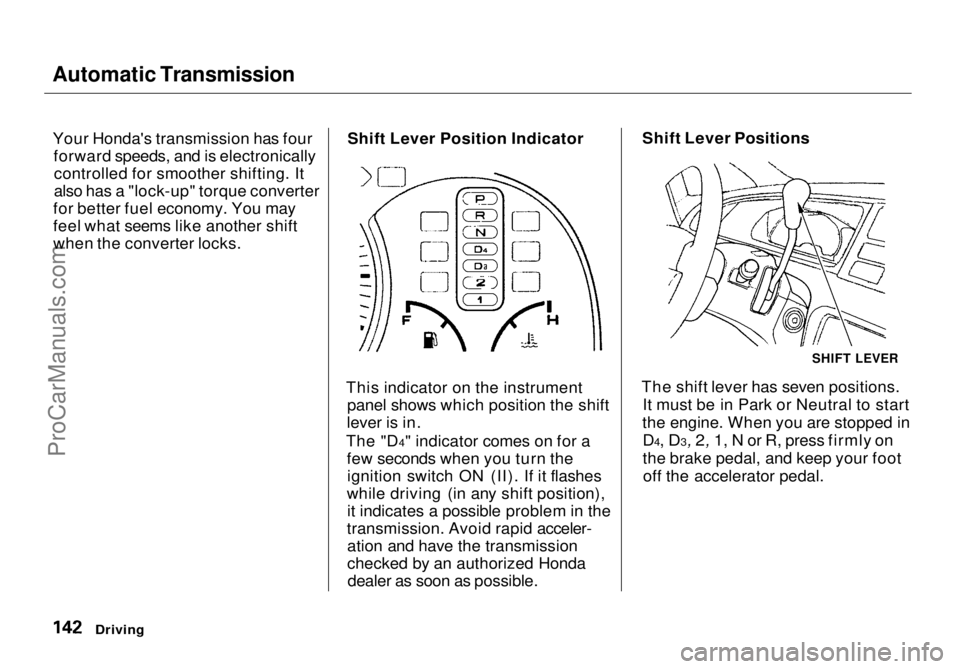
This indicator on the instrument panel shows which position the shift
lever is in.
The "D4" indicator comes on for a few seconds when you turn theignition switch ON (II). If it flashes
while driving (in any shift position), it indicates a possible problem in the
transmission. Avoid rapid acceler- ation and have the transmission
checked by an authorized Hondadealer as soon as possible. Shift Lever Positions
The shift lever has seven positions. It must be in Park or Neutral to start
the engine. When you are stopped in D4, D3, 2, 1, N or R, press firmly on
the brake
pedal, and keep your foot
off the accelerator pedal.
Driving
SHIFT LEVERProCarManuals.comMain Menu Table of Contents s t
Page 143 of 272
Automatic Transmission
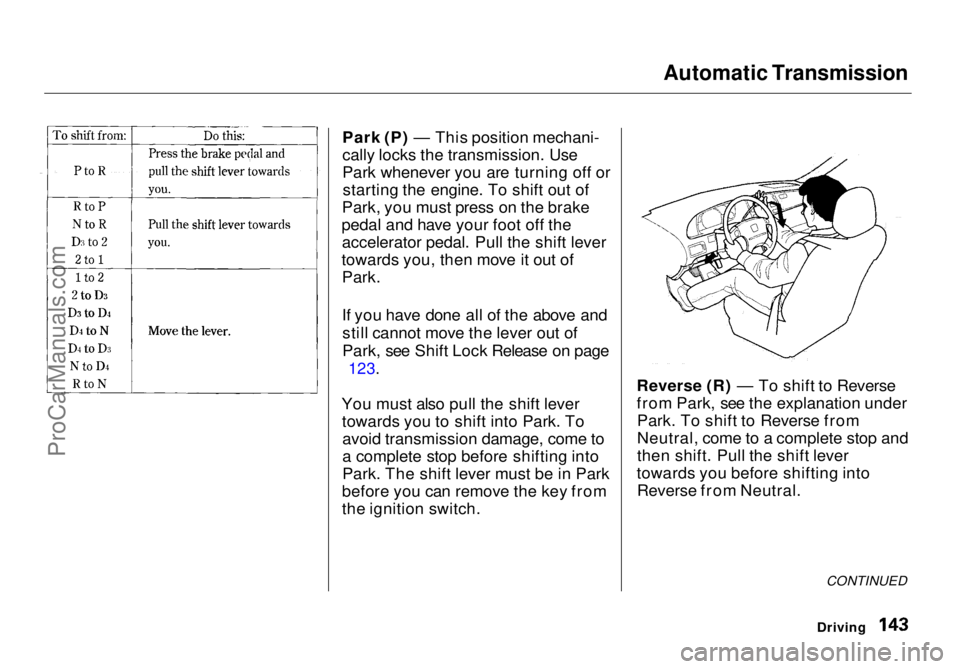
Park (P) — This position mechani-
cally locks the transmission. Use
Park whenever you are turning off or starting the engine. To shift out of
Park, you must press on the brake
pedal and have your foot off the accelerator pedal. Pull the shift lever
towards you, then move it out of Park.
If you have done all of the above and
still cannot move the lever out of
Park, see Shift Lock Release on page
123.
You must also pull the shift lever towards you to shift into Park. Toavoid transmission damage, come to
a complete stop before shifting into
Park. The shift lever must be in Park
before you can remove the key from
the ignition switch. Reverse (R) — To shift to Reverse
from Park, see the explanation under
Park. To shift to Reverse from
Neutral, come to a complete stop and
then shift. Pull the shift lever
towards you before shifting into Reverse from Neutral.
CONTINUED
DrivingProCarManuals.comMain Menu Table of Contents s t
Page 145 of 272
Automatic Transmission
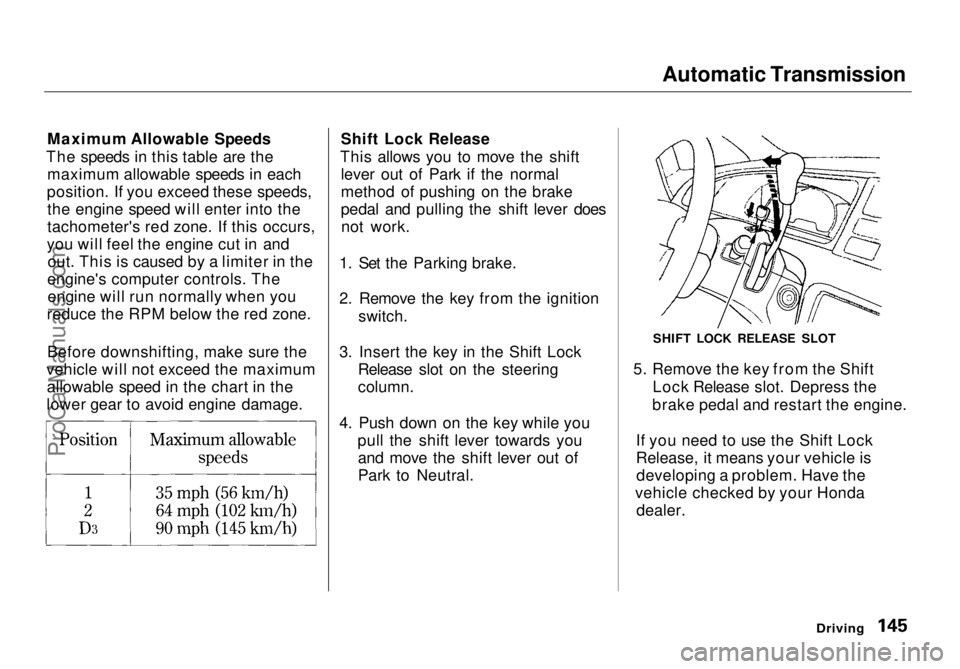
Maximum Allowable Speeds
The speeds in this table are the maximum allowable speeds in each
position. If you exceed these speeds, the engine speed will enter into the
tachometer's red zone. If this occurs,
you will feel the engine cut in and out. This is caused by a limiter in the
engine's computer controls. The engine will run normally when you
reduce the RPM below the red zone.
Before downshifting, make sure the
vehicle will not exceed the maximum allowable speed in the chart in the
lower gear to avoid engine damage. Shift Lock Release
This allows you to move the shift lever out of Park if the normal
method of pushing on the brake
pedal and pulling the shift lever doesnot work.
1. Set the Parking brake.
2. Remove the key from the ignition switch.
3. Insert the key in the Shift Lock Release slot on the steering
column.
4. Push down on the key while you pull the shift lever towards youand move the shift lever out of
Park to Neutral. 5. Remove the key from the Shift
Lock Release slot. Depress the
brake pedal and restart the engine.
If you need to use the Shift Lock
Release, it means your vehicle is developing a problem. Have the
vehicle checked by your Honda dealer.
Driving
SHIFT LOCK RELEASE SLOTProCarManuals.comMain Menu Table of Contents s t
Page 220 of 272
Changing a Flat Tire
If you have a flat tire while driving,
stop in a safe place to change it.
Stopping in traffic or on the shoulder of a busy road is dangerous. Drive
slowly along the shoulder until you
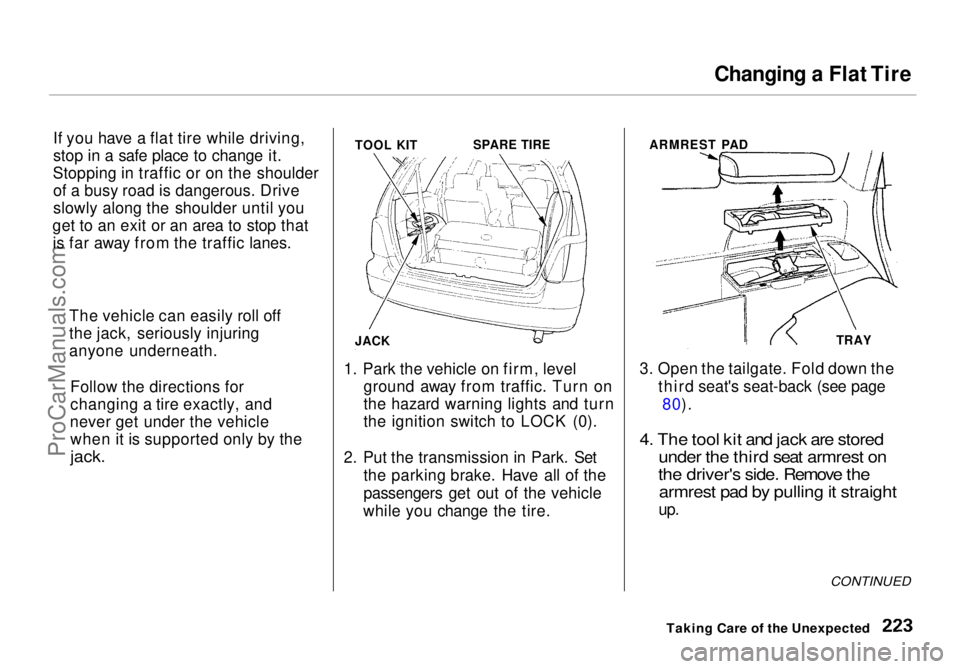
get to an exit or an area to stop that is far away from the traffic lanes. TOOL KIT
SPARE TIRE
JACK
1. Park the vehicle on firm, level ground away from traffic. Turn on
the hazard warning lights and turn
the ignition
switch to LOCK (0).
2. Put the transmission in Park. Set the parking brake. Have all of the
passengers get out of the vehicle
while you change the tire. ARMREST PAD
TRAY
3. Open the tailgate. Fold down the third seat's seat-back (see page80).
4. The tool kit and jack are stored under the third seat armrest on
the driver's side. Remove the armrest pad by pulling it straight
up.
CONTINUED
Taking Care of the Unexpected
The vehicle can easily roll off
the jack, seriously injuring
anyone underneath.
Follow the directions for
changing a tire exactly, and
never get under the vehicle when it is supported only by the
jack.ProCarManuals.comMain Menu Table of Contents s t
Page 226 of 272
If Your Engine Won't Start
Diagnosing why your engine won't start falls into two areas, depending
on what you hear when you turn the
key to START (III):
You hear nothing, or almostnothing. The engine's starter
motor does not operate at all, or
operates very slowly.
You can hear the starter motor operating normally, or the starter
motor sounds like it is spinning
faster than normal, but the engine does not start up and run.
Nothing Happens or the Starter
Motor Operates Very Slowly
When you turn the ignition switch to START (III), you do not hear the
normal noise of the engine trying tostart. You may hear a clicking sound
or series of clicks, or nothing at all.
Check these things: Your vehicle has the Immobilizer
System. You should use a
properly-coded master or valet key
to start the engine (see page 67).
A key that is not properly coded will cause the immobilizer systemindicator in the dash panel to blink
rapidly.
Check the transmission interlock.
The transmission must be in Park or Neutral or the starter will not
operate.
Turn the ignition switch to ON (II).
Turn on the headlights and check their brightness. If the headlightsare very dim or don't light at all,
the battery is discharged. See
Jump Starting on page 230.
Turn the ignition switch to START
(III). If the headlights do not dim,
check the condition of the fuses. If
the fuses are OK, there is proba-
bly something wrong with the electrical circuit for the ignitionswitch or starter motor. You will
need a qualified technician to determine the problem. (See
Towing on page 244.)
If the headlights dim noticeably or
go out when you try to start theengine, either the battery is dis-
charged or the connections are
corroded. Check the condition of
the battery and terminal connec-
tions (see page 189). You can
then try jump starting the vehicle
from a booster battery (see page
231).
Taking Care of the UnexpectedProCarManuals.comMain Menu Table of Contents s t
Page 227 of 272
If Your Engine Won't Start, Jump Starting
The Starter
Operates Normally
In this case, the starter motor's
speed sounds normal, or even faster
than normal, when you turn the
ignition switch to START (III), but
the engine does not run. Are you using the proper startingprocedure? Refer to Starting the
Engine on page 141.
Do you have fuel? Turn the
ignition switch to ON (II) for a
minute and watch the fuel gauge.
The low fuel level warning light may not be working, so you were
not reminded to fill the tank.
There may be an electrical problem, such as no power to the
fuel pump. Check all the fuses (see page 242).
If you find nothing wrong, you will
need a qualified technician to find
the problem. See Towing on page
244.
Jump Starting
If your vehicle's battery has rundown, you may be able to start the
engine by using a booster battery.
Although this seems like a simple procedure, you should take several
precautions.
You cannot start a Honda by pushing or pulling it. To jump start your vehicle, follow
these directions closely:
1. Open the hood and check the physical condition of the battery(see page 189 ). In very cold
weather, check the condition of the electrolyte. If it seems slushyor like ice, do not try jump starting
until it thaws.
If a battery sits in extreme cold, the electrolyte inside can freeze.
Attempting to jump start with a frozen battery can cause it to rupture.
2. Turn off all the electrical acces- sories: heater, A/C, stereo system,
lights, etc.
Put the transmission in Neutral or
Park and set the parking brake.
Taking Care of the Unexpected
A battery can explode if you do
not follow the correct procedure,
seriously injuring anyone nearby.
Keep all sparks, open flames,
and smoking materials away
from the battery.
NOTICEProCarManuals.comMain Menu Table of Contents s t
Page 231 of 272
Low Oil Pressure Indicator
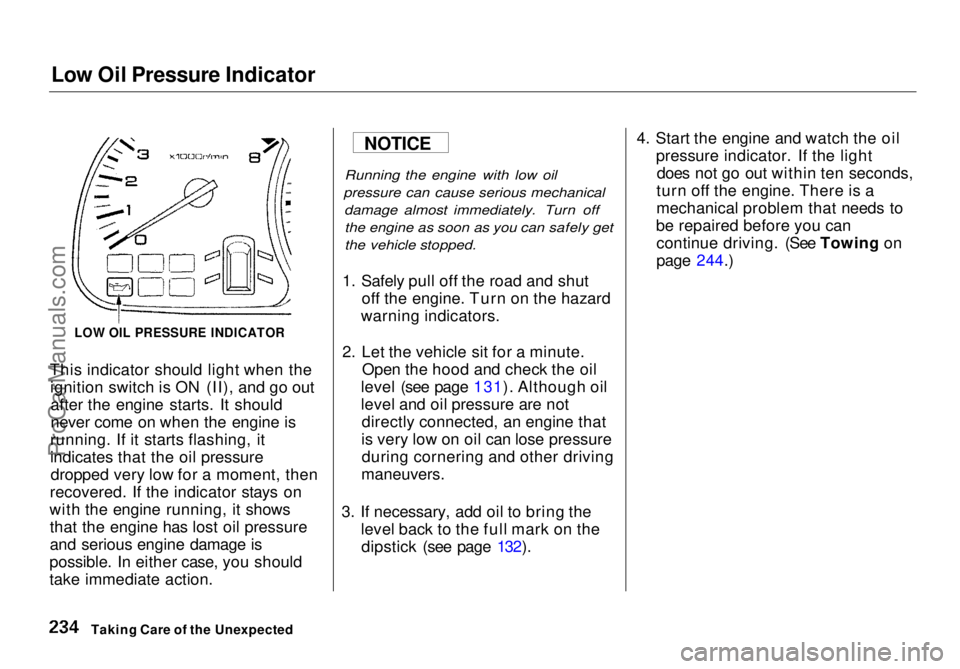
This indicator should light when the ignition switch is ON (II), and go outafter the engine starts. It should
never come on when the engine is
running. If it starts flashing, it
indicates that the oil pressure dropped very low for a moment, then
recovered. If the indicator stays on
with the engine running, it shows that the engine has lost oil pressure
and serious engine damage is
possible. In either case, you should
take immediate action.
Running the engine with low oil
pressure can cause serious mechanical damage almost immediately. Turn offthe engine as soon as you can safely get
the vehicle stopped.
1. Safely pull off the road and shut off the engine. Turn on the hazard
warning indicators.
2. Let the vehicle sit for a minute. Open the hood and check the oil
level (see page 131). Although oil
level and oil pressure are not directly connected, an engine that
is very low on oil can lose pressure during cornering and other driving
maneuvers.
3. If necessary, add oil to bring the level back to the full mark on thedipstick (see page 132). 4. Start the engine and watch the oil
pressure indicator. If the lightdoes not go out within ten seconds,
turn off the engine. There is a
mechanical problem that needs to
be repaired before you can continue driving. (See Towing on
page 244.)
Taking Care of the Unexpected
LOW OIL PRESSURE INDICATOR
NOTICEProCarManuals.comMain Menu Table of Contents s t
Page 232 of 272
Charging System Indicator
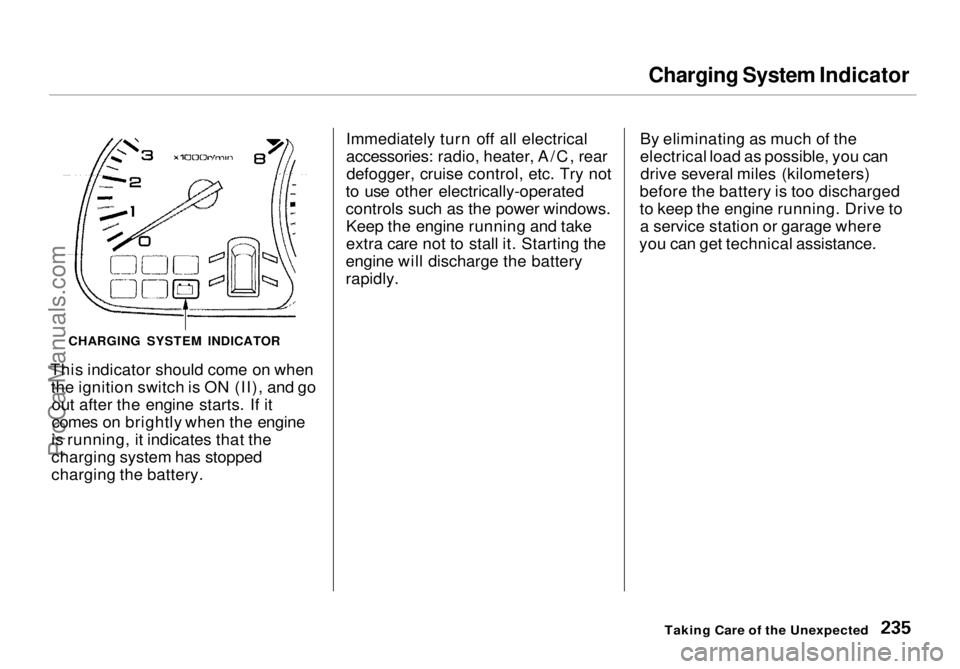
This indicator should come on when the ignition switch is ON (II), and goout after the engine starts. If it
comes on brightly when the engine
is running, it indicates that the
charging system has stopped
charging the battery. Immediately turn off all electrical
accessories: radio, heater, A/C, rear
defogger, cruise control, etc. Try not
to use other electrically-operated
controls such as the power windows. Keep the engine running and take
extra care not to stall it. Starting the
engine will discharge the battery
rapidly. By eliminating as much of the
electrical load as possible, you can
drive several miles (kilometers)
before the battery is too discharged
to keep the engine running. Drive to a service station or garage where
you can get technical assistance.
Taking Care of the Unexpected
CHARGING SYSTEM INDICATORProCarManuals.comMain Menu Table of Contents s t
Page 233 of 272
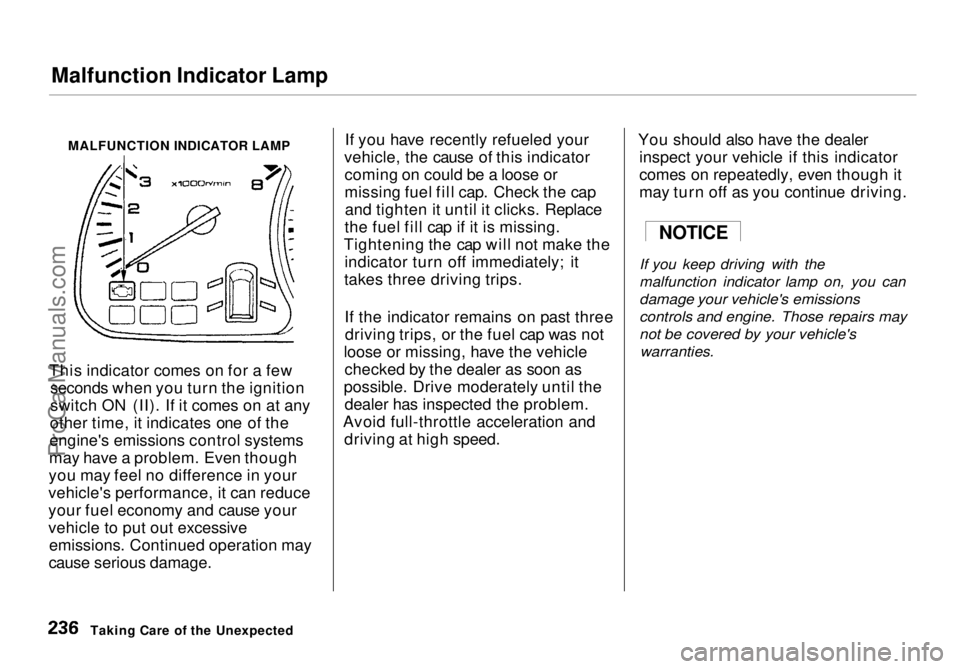
Malfunction Indicator Lamp
MALFUNCTION INDICATOR LAMP
This indicator comes on for a few seconds when you turn the ignition
switch ON (II). If it comes on at any
other time, it indicates one of the
engine's emissions control systems
may have a problem. Even though
you may feel no difference in your
vehicle's performance, it can reduce
your fuel economy and cause your
vehicle to put out excessive emissions. Continued operation may
cause serious damage. If you have recently refueled your
vehicle, the cause of this indicator coming on could be a loose or
missing fuel fill cap. Check the capand tighten it until it clicks. Replace
the fuel fill cap if it is missing.
Tightening the cap will not make the indicator turn off immediately; it
takes three driving trips.
If the indicator remains on past threedriving trips, or the fuel cap was not
loose or missing, have the vehicle checked by the dealer as soon as
possible. Drive moderately until the dealer has inspected the problem.
Avoid full-throttle acceleration and driving at high speed. You should also have the dealer
inspect your vehicle if this indicator
comes on repeatedly, even though it
may turn off as you continue driving.
If you keep driving with the
malfunction indicator lamp on, you can
damage your vehicle's emissions
controls and engine. Those repairs may
not be covered by your vehicle's
warranties.
Taking Care of the Unexpected
NOTICEProCarManuals.comMain Menu Table of Contents s t