lock HONDA ODYSSEY 1998 Owner's Guide
[x] Cancel search | Manufacturer: HONDA, Model Year: 1998, Model line: ODYSSEY, Model: HONDA ODYSSEY 1998Pages: 272, PDF Size: 2.67 MB
Page 74 of 272
Keys and Locks
Glove Box
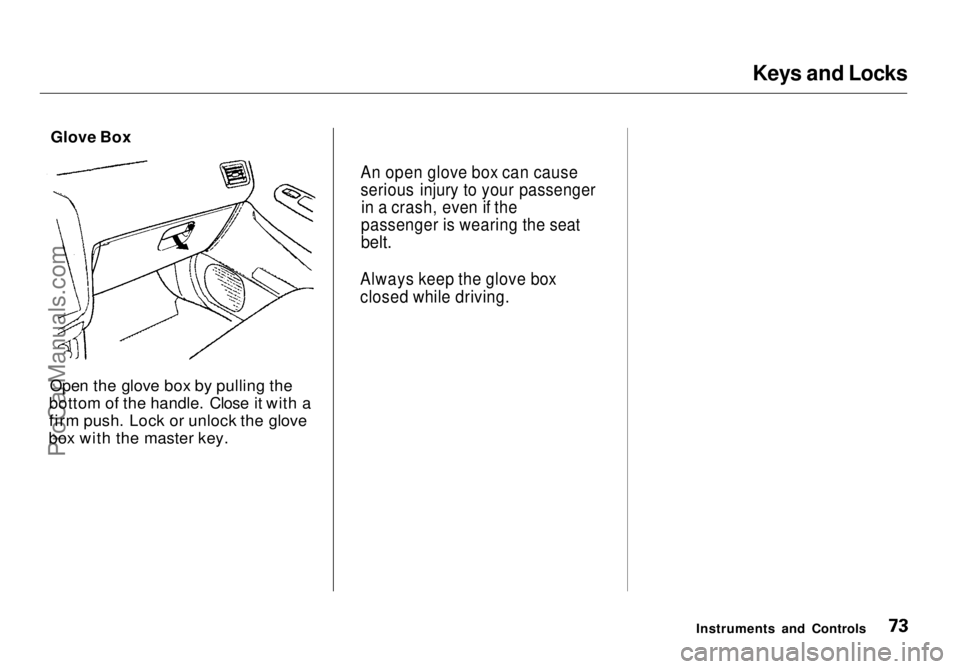
Open the glove box by pulling the
bottom of the handle. Close it with a
firm push. Lock or unlock the glove
box with the master key.
Instruments and Controls
An open glove box can cause
serious injury to your passenger
in a crash, even if the
passenger is wearing the seat
belt.
Always keep the glove box
closed while driving.ProCarManuals.comMain Menu Table of Contents s t
Page 75 of 272
Seats
Passenger Seating
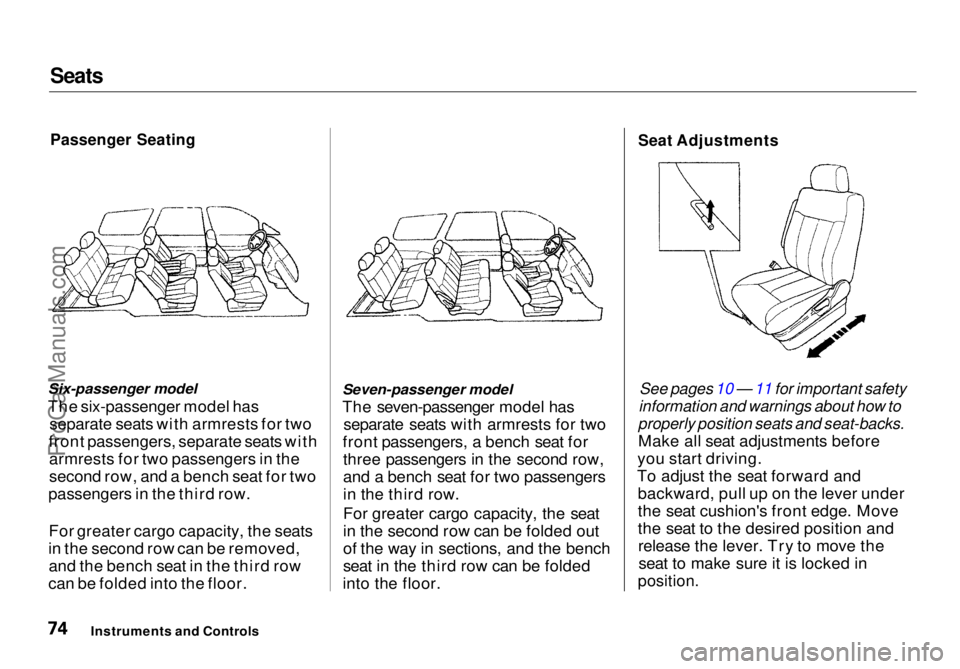
Six-passenger model
The six-passenger model has separate seats with armrests for two
front passengers, separate seats with armrests for two passengers in the
second row, and a bench seat for two
passengers in the third row.
For greater cargo capacity, the seats
in the second row can be removed, and the bench seat in the third row
can be folded into the floor. Seven-passenger model
The seven-passenger model has separate seats with armrests for two
front passengers, a bench seat for three passengers in the second row,
and a bench seat for two passengers
in the third row.
For greater cargo capacity, the seat
in the second row can be folded out
of the way in sections, and the bench
seat in the third row can be folded
into the floor.
Seat Adjustments
See pages 10 — 11 for important safety
information and warnings about how to
properly position seats and seat-backs.
Make all seat adjustments before
you start driving.
To adjust the seat forward and backward, pull up on the lever under
the seat cushion's front edge. Move
the seat to the desired position andrelease the lever. Try to move theseat to make sure it is locked in
position.
Instruments and ControlsProCarManuals.comMain Menu Table of Contents s t
Page 78 of 272
Seats
Third Seat Access Six-passenger model
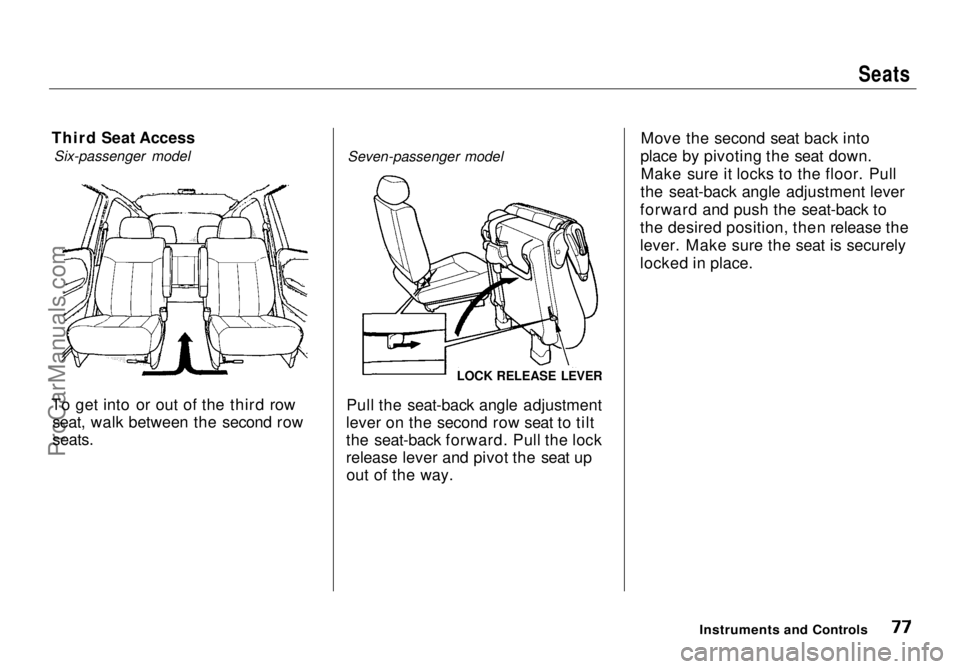
To get into or out of the third row seat, walk between the second row
seats.
Seven-passenger model
Pull the seat-back angle adjustment
lever on the second row seat to tilt
the seat-back forward. Pull the lock
release lever and pivot the seat up out of the way. Move the second seat back into
place by pivoting the seat down. Make sure it locks to the floor. Pull
the seat-back angle adjustment lever
forward and push the seat-back to
the desired position, then release the
lever. Make sure the seat is securely
locked in place.
Instruments and Controls
LOCK RELEASE LEVERProCarManuals.comMain Menu Table of Contents s t
Page 79 of 272
Seats
Removing the Second Seats in the
Six-Passenger Model
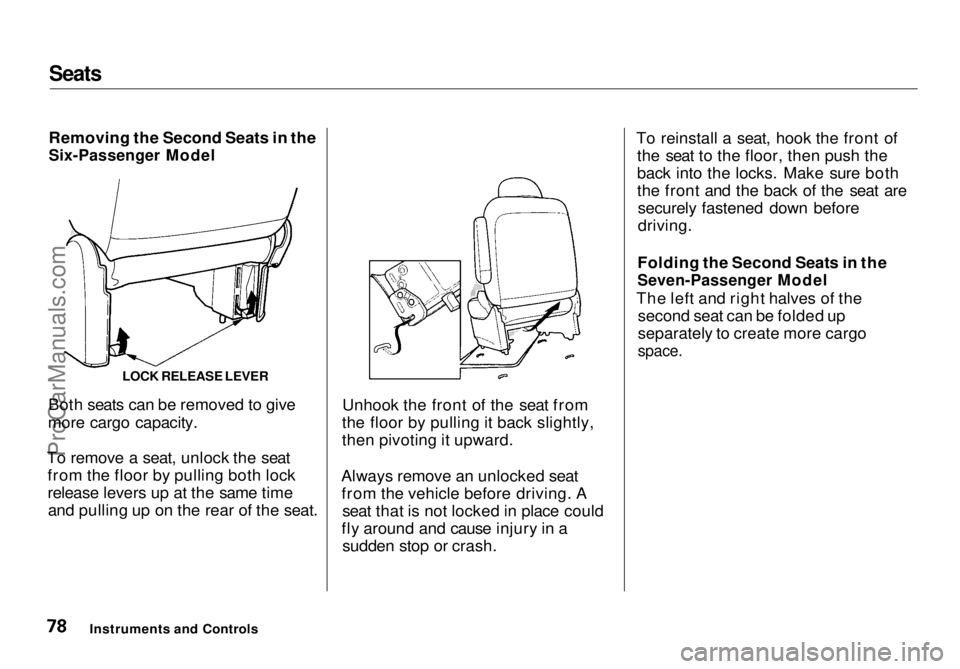
Both seats can be removed to give
more cargo capacity.
To remove a seat, unlock the seat from the floor by pulling both lock
release levers up at the same timeand pulling up on the rear of the seat. Unhook the front of the seat from
the floor by pulling it back slightly,
then pivoting it upward.
Always remove an unlocked seat from the vehicle before driving. A seat that is not locked in place could
fly around and cause injury in a sudden stop or crash. To reinstall a seat, hook the front of
the seat to the floor, then push the
back into the locks. Make sure both
the front and the back of the seat aresecurely fastened down before
driving.
Folding the Second Seats in the
Seven-Passenger Model
The left and right halves of the second seat can be folded up
separately to create more cargo
space.
Instruments and Controls LOCK RELEASE LEVERProCarManuals.comMain Menu Table of Contents s t
Page 80 of 272
Seats
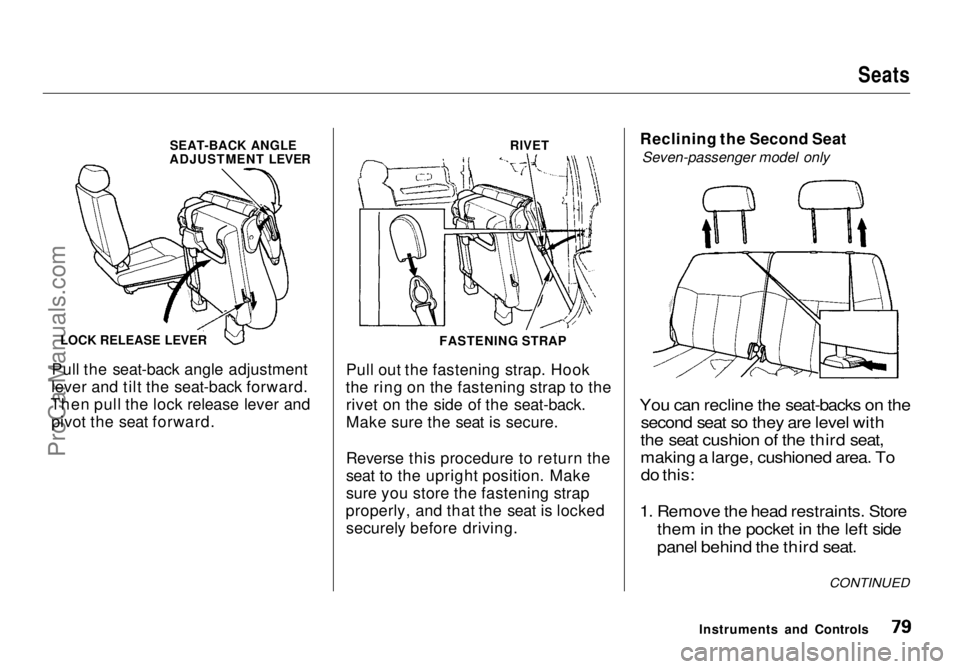
Pull the seat-back angle adjustment
lever and tilt the seat-back forward.
Then pull the lock release lever and pivot the seat forward. Pull out the fastening strap. Hook
the ring on the fastening strap to the rivet on the side of the seat-back.
Make sure the seat is secure.
Reverse this procedure to return the
seat to the upright position. Make
sure you store the fastening strap
properly, and that the seat is locked securely before driving. Reclining the Second Seat
Seven-passenger model only
You can recline the seat-backs on the second seat so they are level with
the seat cushion of the third seat,
making a large, cushioned area. To
do this:
1. Remove the hea d restraints. Store
them in
the pocket in the left side
panel behind the third seat.
Instruments and Controls
LOCK RELEASE LEVER
SEAT-BACK ANGLE
ADJUSTMENT LEVER
FASTENING STRAPRIVET
CONTINUEDProCarManuals.comMain Menu Table of Contents s t
Page 81 of 272
Seats
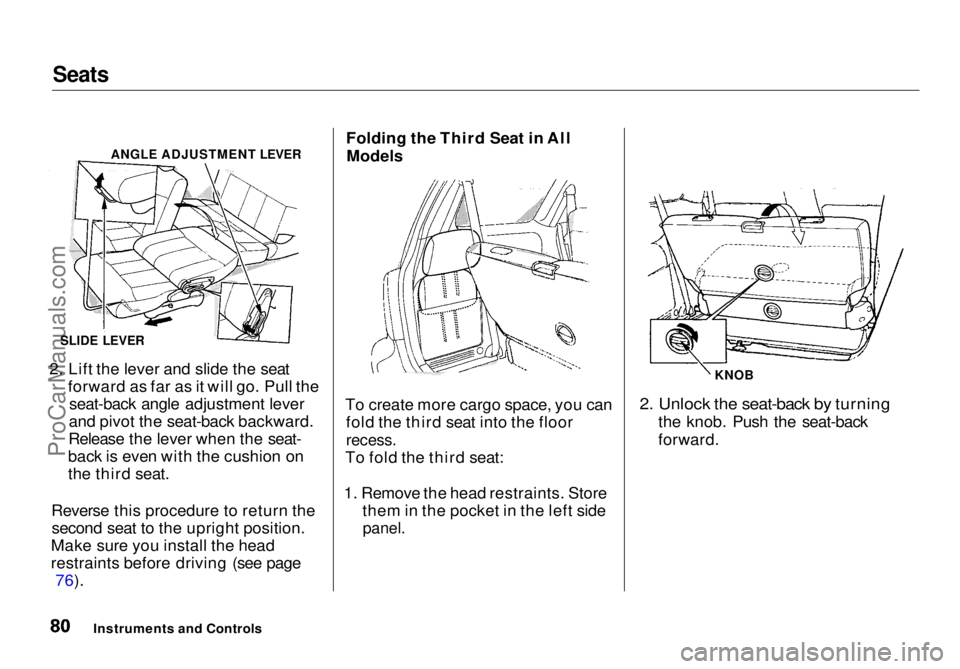
2. Lift the lever and slide the seat forward as far as it will go. Pull theseat-back angle adjustment lever
and pivot the seat-back backward.
Release the lever when the seat-
back is even with the cushion on
the third seat.
Reverse this procedure to return the second seat to the upright position.
Make sure you install the head
restraints before driving (see page 76). Folding the Third Seat in All
Models
To create more cargo space, you can fold the third seat into the floor
recess.
To fold the third seat:
1. Remove the head restraints. Store them in the pocket in the left side
panel.
2. Unlock the seat-back by turning
the knob. Push the seat-back
forward.
Instruments and Controls
ANGLE ADJUSTMENT LEVER
SLIDE LEVER KNOBProCarManuals.comMain Menu Table of Contents s t
Page 82 of 272
Seats
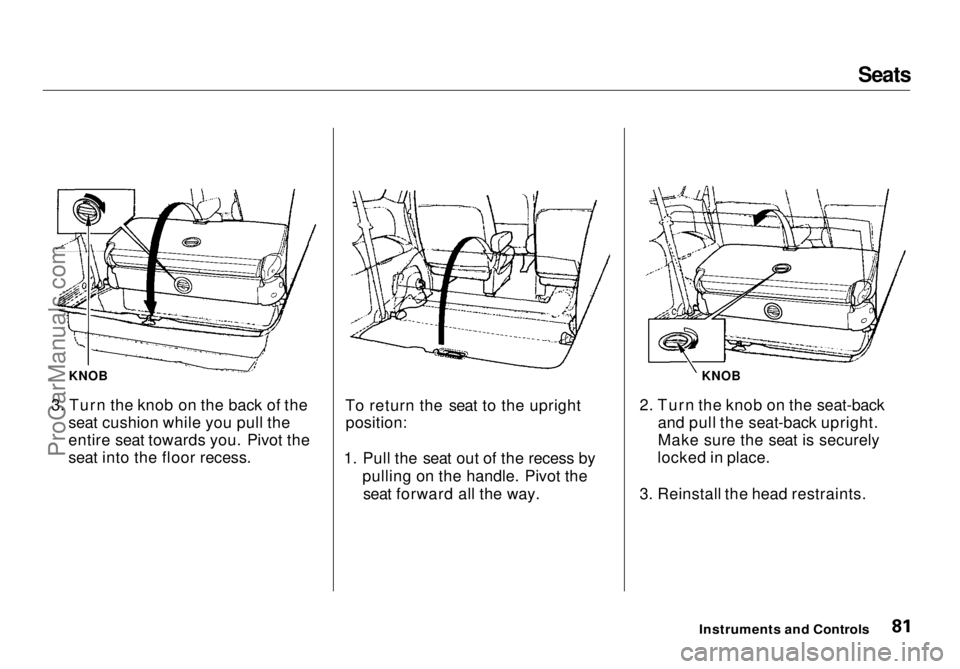
3. Turn the knob on the back of the seat cushion while you pull the
entire seat towards you. Pivot the
seat into the floor recess. To return the seat to the upright
position:
1. Pull the seat out of the recess by pulling on the handle. Pivot theseat forward all the way. 2. Turn the knob on the seat-back
and pull the seat-back upright.
Make sure the seat is securely
locked in place.
3. Reinstall the head restraints.
Instruments and Controls
KNOB
KNOBProCarManuals.comMain Menu Table of Contents s t
Page 87 of 272
Digital Clock, Beverage Holder
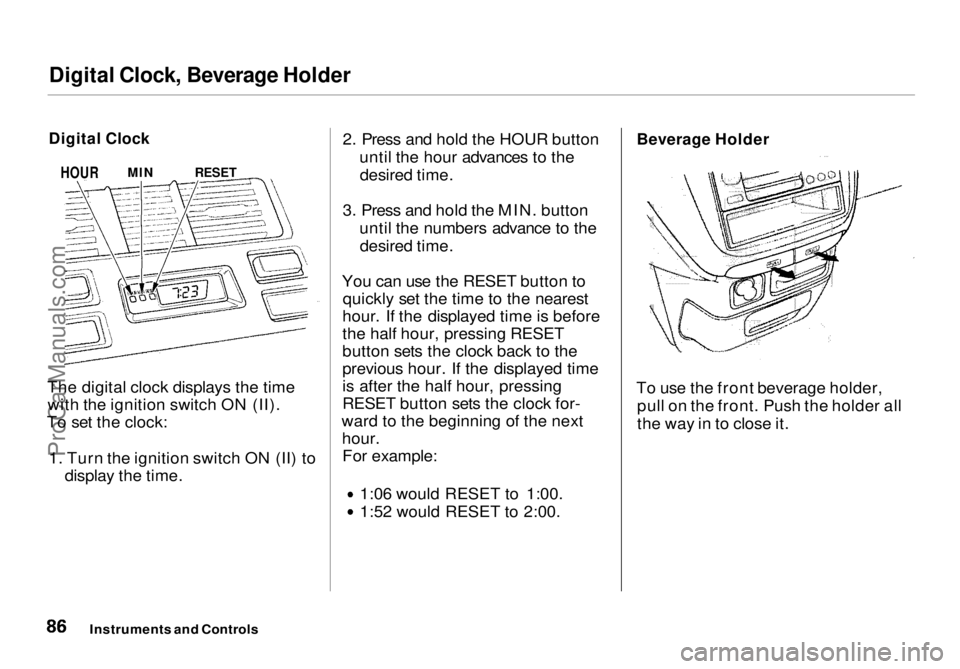
The digital clock displays the time with the ignition switch ON (II).
To set the clock:
1. Turn the ignition switch ON (II) to display the time. 2. Press and hold the HOUR button
until the hour advances to thedesired time.
3. Press and hold the MIN. button until the numbers advance to thedesired time.
You can use the RESET button to quickly set the time to the nearest
hour. If the displayed time is before
the half hour, pressing RESET
button sets the clock back to the
previous hour. If the displayed time
is after the half hour, pressing
RESET button sets the clock for-
ward to the beginning of the next hour.For example: 1:06 would RESET to 1:00.
1:52 would RESET to 2:00.
Beverage Holder
To use the front beverage holder, pull on the front. Push the holder all
the way in to close it.
Instruments and Controls
Digital Clock
HOUR
MIN
RESETProCarManuals.comMain Menu Table of Contents s t
Page 134 of 272
Accessories and Modifications
Modifying your vehicle, or installing
some non-Honda accessories, can
make your vehicle unsafe. Before
you make any modifications or add any accessories, be sure to read the
following information.
Accessories
Your dealer has Genuine Hondaaccessories that allow you to
personalize your vehicle. These accessories have been designed and
approved for your vehicle, and are
covered by warranty.
Non-Honda accessories are usually
designed for universal applications.
Although aftermarket accessories may fit on your vehicle, they may not
meet factory specifications, and
could adversely affect your vehicle's
handling and stability. (See "Modifications" on the page 135 for
additional information.) When properly installed, car phones,
alarms, two-way radios, and low-
powered audio systems should not interfere with your vehicle's
computer-controlled systems, such
as the SRS and anti-lock brake
system.
However, if electronic accessories are improperly installed, or exceed
your vehicle's electrical system capacity, they can interfere with the operation of your vehicle, or even
cause the airbags to deploy.
Before installing any accessory:
Make sure the accessory does notobscure any lights, or interfere
with proper vehicle operation or
performance. Be sure electronic accessories do
not overload electrical circuits
(see page 242).
Have the installer contact your Honda dealer for assistance before
installing any electronic accessory.
If possible, have your dealer inspect
the final installation.
Before Driving
Improper accessories or
modifications can affect your
vehicle's handling, stability and performance, and cause a
crash in which you can be hurt
or killed.
Follow all instructions in this
owner's manual regarding accessories and modifications.ProCarManuals.comMain Menu Table of Contents s t
Page 135 of 272
Accessories and Modifications
Modifications
Do not remove any original
equipment or modify your vehicle in
any way that would alter its design or
operation. This could make your
vehicle unsafe and illegal to drive.
For example, do not make any
modifications that would change the
ride height of your vehicle, or install
wheels and tires with a different overall diameter.
Such modifications can adversely
affect handling, and interfere with
the operation of the vehicle's anti-
lock brakes and other systems. In addition, any modifications that
decrease ground clearance increase
the chance of undercarriage parts striking a curb, speed bump, or other
raised object, which could cause
your airbags to deploy.
Do not modify your steering wheel
or any other part of your
Supplemental Restraint System. Modifications could make the
system ineffective. Additional Safety Precaution
Do not attach or place objects on theairbag covers. Any object attached to
or placed on the covers marked "SRS,"
in the center of the steering wheel and on top of the dashboard, could
interfere with the proper operation of the airbags. Or, if the airbags
inflate, the objects could be
propelled inside the vehicle and hurt
someone.
Before DrivingProCarManuals.comMain Menu Table of Contents s t