maintenance HONDA ODYSSEY 1998 Service Manual
[x] Cancel search | Manufacturer: HONDA, Model Year: 1998, Model line: ODYSSEY, Model: HONDA ODYSSEY 1998Pages: 272, PDF Size: 2.67 MB
Page 186 of 272
Spark Plugs
The spark plugs in your vehicle need to be replaced every 2 years or
30,000 miles (48,000 km), whichever
comes first. Replacement
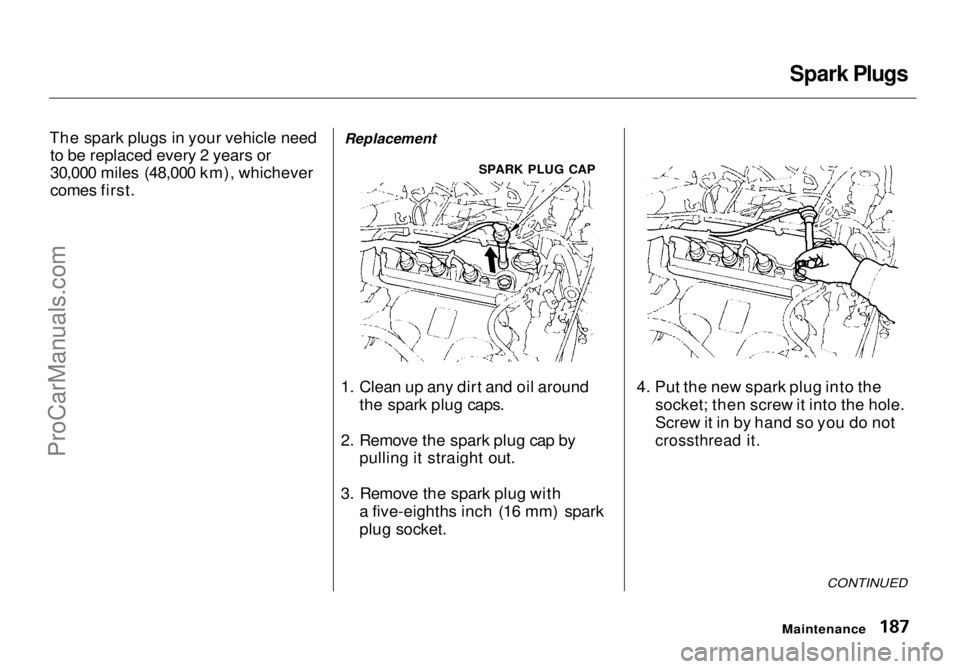
1. Clean up any dirt and oil around the spark plug caps.
2. Remove the spark plug cap by pulling it straight out.
3. Remove the spark plug with a five-eighths inch (16 mm) spark
plug socket. 4. Put the new spark plug into the
socket; then screw it into the hole.
Screw it in by hand so you do not
crossthread it.
CONTINUED
Maintenance
SPARK PLUG CAPProCarManuals.comMain Menu Table of Contents s t
Page 187 of 272
Spark Plugs
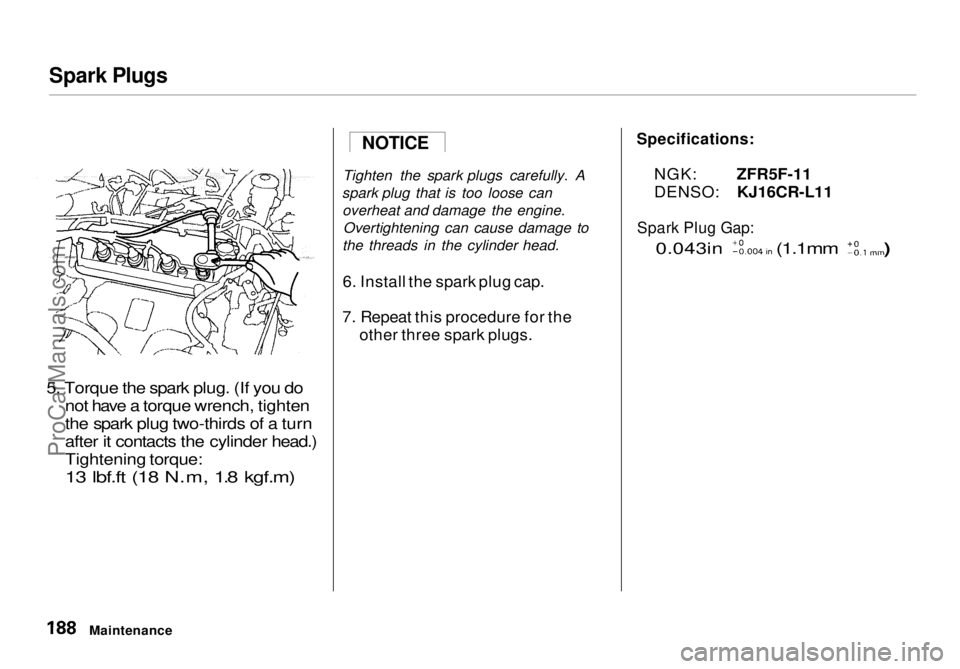
5. Torque the spark plug. (If you do not have a torque wrench, tighten
the spark plug two-thirds of a turn
after it contacts the cylinder head.)
Tightening torque:13 lbf.ft (18 N.m, 1.8 kgf.m)
Tighten the spark plugs
carefully. A
spark plug that is too loose can overheat and damage the engine. Overtightening can cause damage to
the threads in the cylinder head.
6. Install the spark plug cap.
7. Repeat this procedure for the other three spark plugs.
Maintenance
NOTICE
Specifications:
NGK: ZFR5F-11
DENSO: KJ16CR-L11
Spark Plug Gap:
0.043in
(1.1mm )ProCarManuals.comMain Menu Table of Contents s t
Page 188 of 272
Battery
Check the condition of your vehicle's
battery monthly. You should check
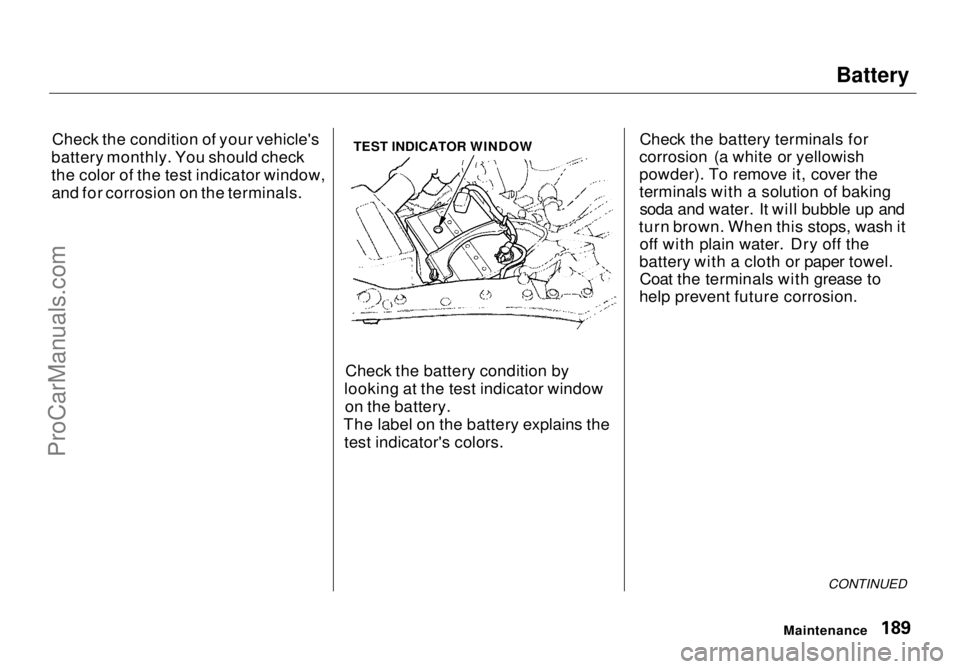
the color of the test indicator window, and for corrosion on the terminals. TEST INDICATOR WINDOW
Check the battery condition by
looking at the test indicator window on the battery.
The label on the battery explains the test indicator's colors. Check the battery terminals for
corrosion (a white or yellowish
powder). To remove it, cover the
terminals with a solution of baking soda and water. It will bubble up and
turn brown. When this stops, wash it off with plain water. Dry off the
battery with a cloth or paper towel. Coat the terminals with grease to
help prevent future corrosion.
CONTINUED
MaintenanceProCarManuals.comMain Menu Table of Contents s t
Page 189 of 272
Battery
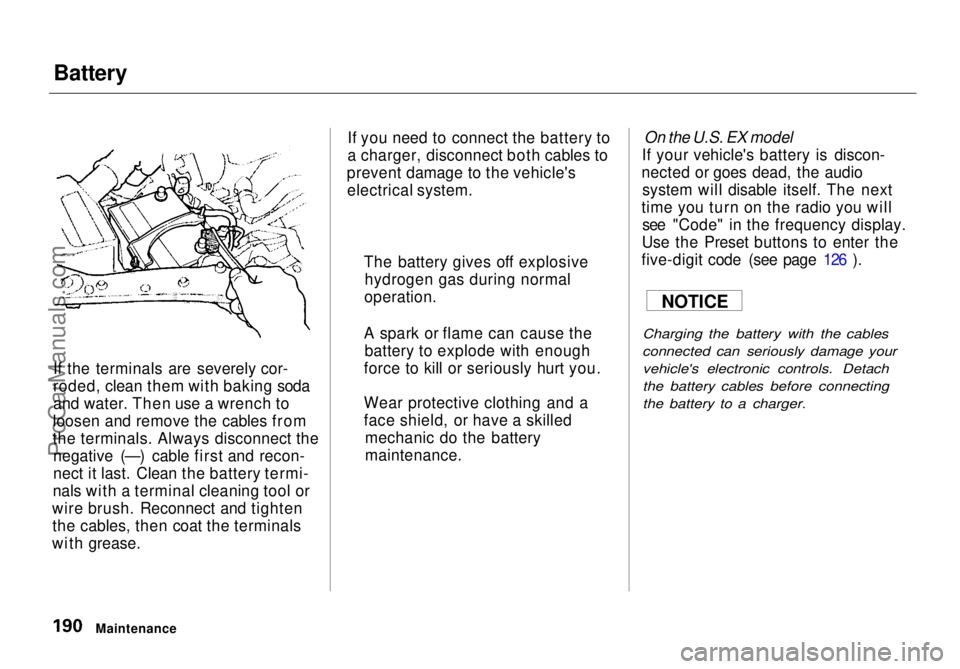
If the terminals are severely cor-
roded, clean them with baking soda
and water. Then use a wrench to
loosen and remove the cables from
the terminals. Always disconnect the negative (—) cable first and recon-
nect it last. Clean the battery termi-
nals with a terminal cleaning tool or
wire brush. Reconnect and tighten the cables, then coat the terminals
with grease. If you need to connect the battery to
a charger, disconnect both cables to
prevent damage to the vehicle's electrical system.
On the U.S. EX model
If your vehicle's battery is discon-
nected or goes dead, the audio system will disable itself. The next
time you turn on the radio you will see "Code" in the frequency display.
Use the Preset buttons to enter the
five-digit code (see page 126 ).
Charging the battery with the cables
connected can seriously damage your vehicle's electronic controls. Detach
the battery cables before connecting
the battery to a charger.
Maintenance The battery gives off explosive
hydrogen gas during normal
operation.
A spark or flame can cause the battery to explode with enough
force to kill or seriously hurt you.
Wear protective clothing and a
face shield, or have a skilled mechanic do the battery
maintenance. NOTICEProCarManuals.comMain Menu Table of Contents s t
Page 190 of 272
Wiper Blades
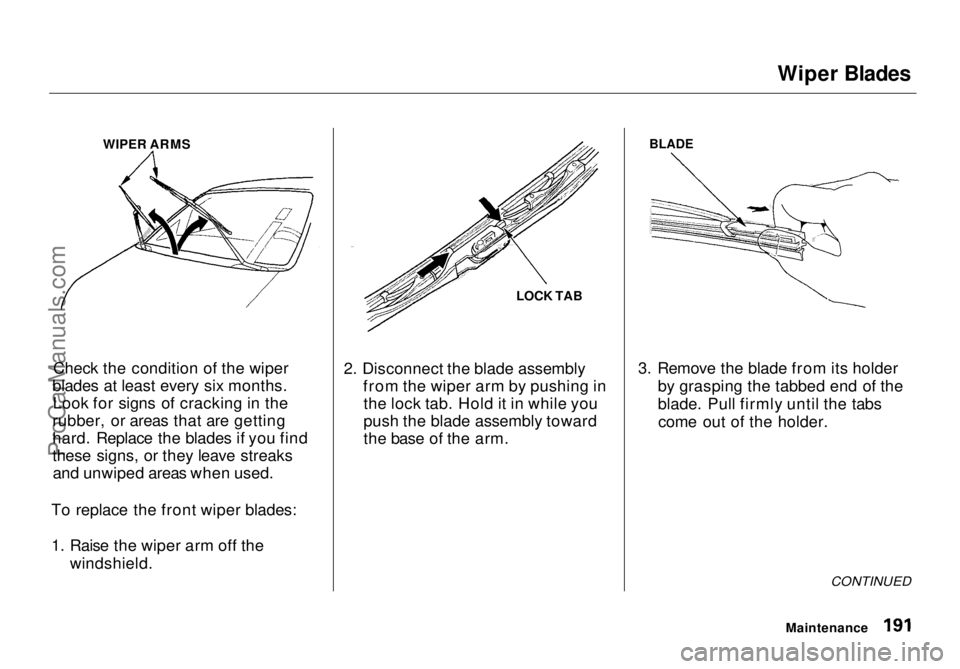
WIPER ARMS
Check the condition of the wiper
blades at least every six months. Look for signs of cracking in the
rubber, or areas that are getting
hard. Replace the blades if you find
these signs, or they leave streaks and unwiped areas when used.
To replace the front wiper blades:
1. Raise the wiper arm off the windshield. LOCK TAB
2. Disconnect the blade assembly from the wiper arm by pushing inthe lock tab. Hold it in while you
push the blade assembly toward
the base of the arm.
BLADE
3. Remove the blade from its holder by grasping the tabbed end of the
blade. Pull firmly until the tabscome out of the holder.
CONTINUED
MaintenanceProCarManuals.comMain Menu Table of Contents s t
Page 191 of 272
Wiper Blades
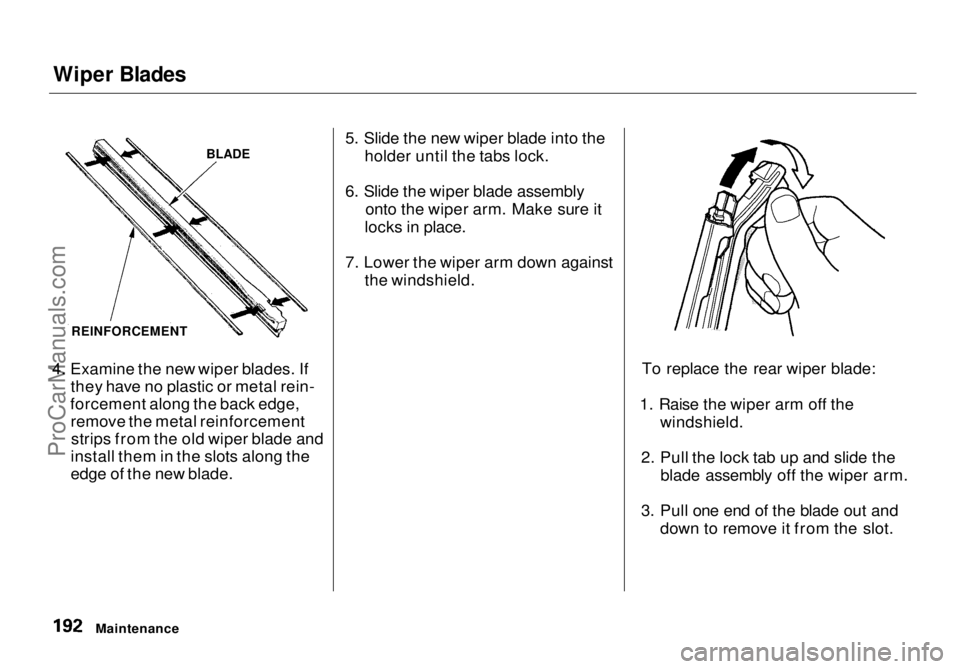
4. Examine the new wiper blades. If they have no plastic or metal rein-
forcement along the back edge, remove the metal reinforcementstrips from the old wiper blade and
install them in the slots along the
edge of the new blade. 5. Slide the new wiper blade into the
holder until the tabs lock.
6. Slide the wiper blade assembly onto the wiper arm. Make sure it
locks in place.
7. Lower the wiper arm down against the windshield.
To replace the rear wiper blade:
1. Raise the wiper arm off the windshield.
2. Pull the lock tab up and slide the blade assembly off the wiper arm.
3. Pull one end of the blade out and down to remove it from the slot.
Maintenance
BLADE
REINFORCEMENTProCarManuals.comMain Menu Table of Contents s t
Page 192 of 272
Wiper Blades
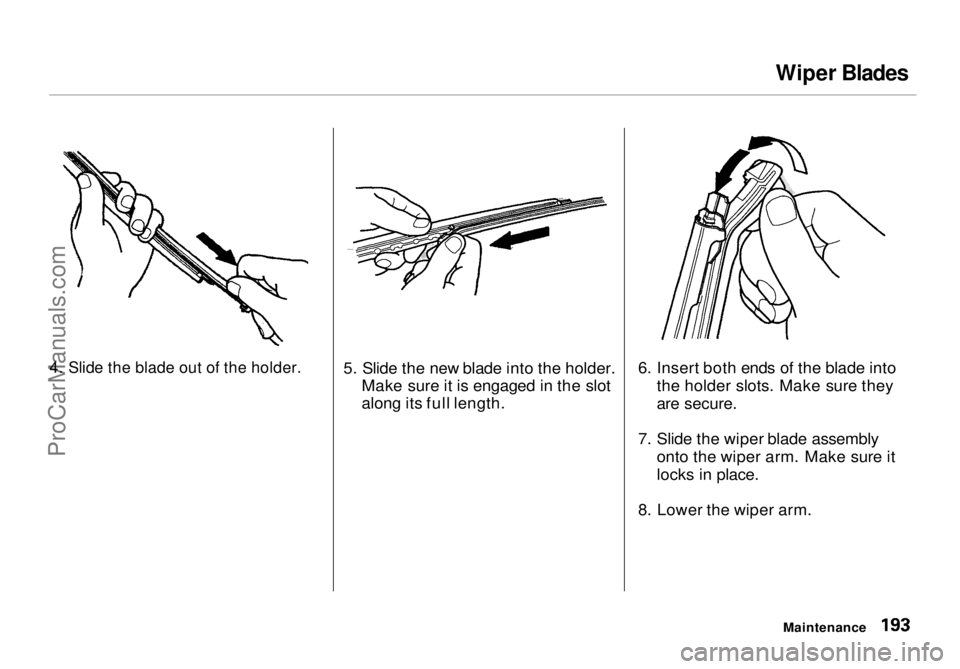
4. Slide the blade out of the holder.
5. Slide the new blade into the holder.
Make sure it is engaged in the slot
along its full length. 6. Insert both ends of the blade into
the holder slots. Make sure they
are secure.
7. Slide the wiper blade assembly onto the wiper arm. Make sure it
locks in place.
8. Lower the wiper arm.
MaintenanceProCarManuals.comMain Menu Table of Contents s t
Page 193 of 272
Air Conditioning System
Your vehicle's air conditioning is a sealed system. Any major mainte-
nance, such as recharging, should be done by a qualified mechanic. You
can do a couple of things to make sure the air conditioning works
efficiently.
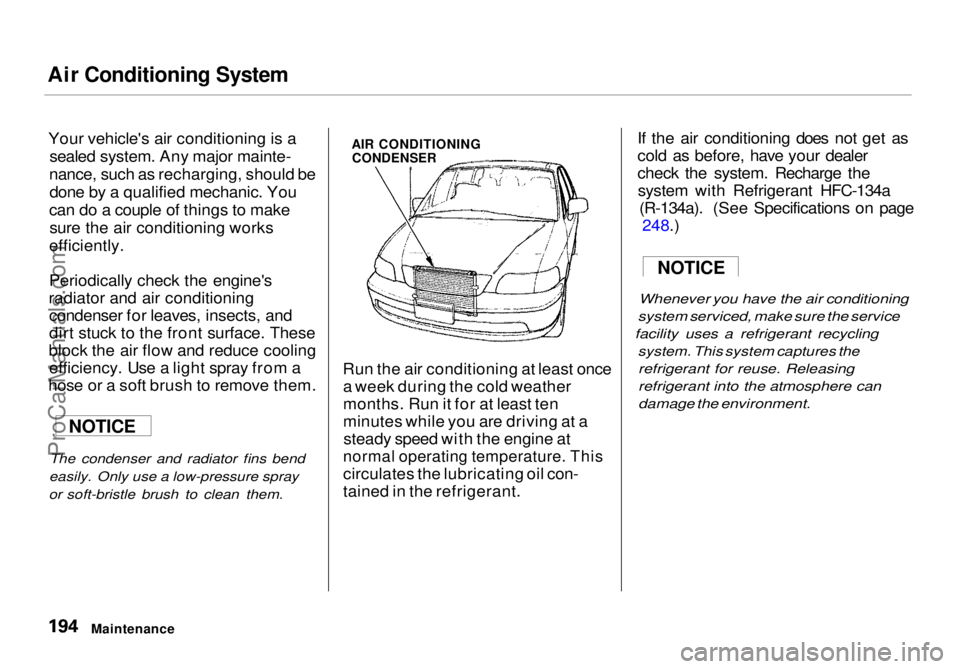
Periodically check the engine's
radiator and air conditioning condenser for leaves, insects, and
dirt stuck to the front surface. These
block the air flow and reduce cooling efficiency. Use a light spray from a
hose or a soft brush to remove them.
The condenser and radiator fins bend
easily. Only use a low-pressure spray
or soft-bristle brush to clean them.
AIR CONDITIONING
CONDENSER
Run the air conditioning at least once a week during the cold weather
months. Run it for at least ten
minutes while you are driving at asteady speed with the engine at
normal operating temperature. This
circulates the lubricating oil con-
tained in the refrigerant. If the air conditioning does not get as
cold as before, have your dealer
check the system. Recharge the
system with Refrigerant HFC-134a (R-134a). (See Specifications on page 248.
)
Whenever you
have the air conditioning
system serviced, make sure the service
facility uses a refrigerant recycling
system. This system captures the
refrigerant for reuse. Releasing
refrigerant into the atmosphere can
damage the environment.
Maintenance
NOTICE
NOTICEProCarManuals.comMain Menu Table of Contents s t
Page 194 of 272
Drive Belts, Timing Belt
Drive Belts
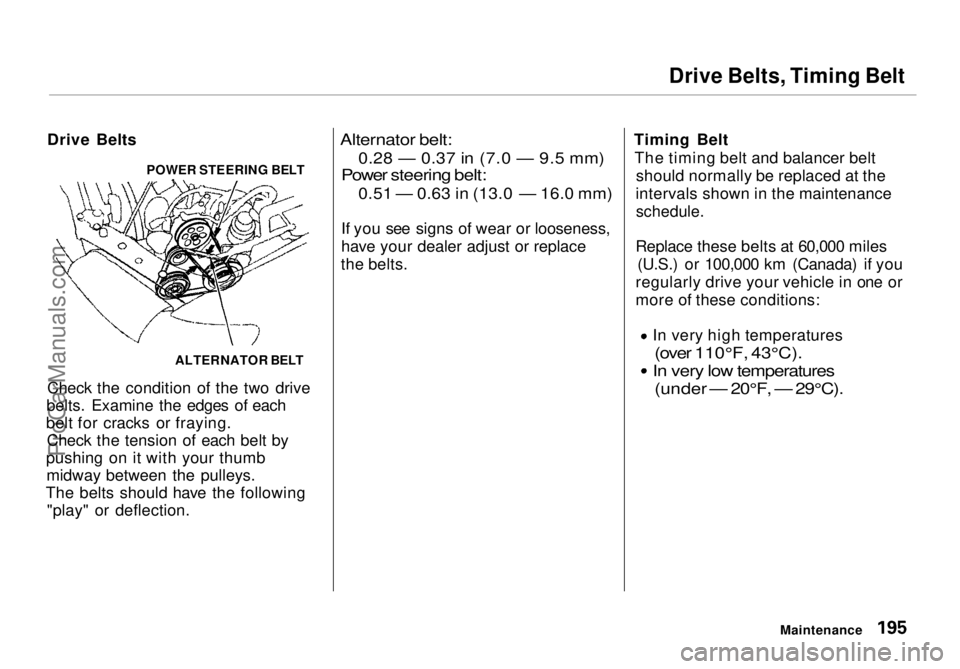
Check the condition of the two drive
belts. Examine the edges of each
belt for cracks or fraying. Check the tension of each belt by
pushing on it with your thumb midway between the pulleys.
The belts should have the following "play" or deflection.
Alternator belt:0.28 — 0.37 in (7.0 — 9.5 mm)
Power steering
belt:
0.51 — 0.63 in (13.0 —
16.0
mm)
If you
see signs of wear or looseness,
have your dealer adjust or replace
the belts. Timing Belt
The timing belt and balancer belt should normally be replaced at the
intervals shown in the maintenance
schedule.
Replace these belts at 60,000 miles (U.S.) or 100,000 km (Canada) if you
regularly drive your vehicle in one or
more of these conditions: In very high temperatures
(over 110°F, 43°C).
In very low temperatures
(under — 20°F, — 29°C).
Maintenance
ALTERNATOR BELT
POWER STEERING BELTProCarManuals.comMain Menu Table of Contents s t
Page 195 of 272
Tires
To safely operate your vehicle, your
tires must be the proper type and
size, in good condition with adequate
tread, and correctly inflated. The
following pages give more detailed
information on how and when tocheck air pressure, how to inspect
your tires for damage and wear, and
what to do when your tires need to
be replaced.
Inflation
Keeping the tires properly inflated
provides the best combination of
handling, tread life and riding comfort. Underinflated tires wear
unevenly, adversely affect handling and fuel economy, and are more
likely to fail from being overheated. Overinflated tires can make your
vehicle ride more harshly, are more prone to damage from road hazards,
and wear unevenly.
We recommend that you visually check your tires every day. If you
think a tire might be low, check it
immediately with a tire gauge. Use a gauge to measure the air
pressure at least once a month. Even
tires that are in good condition may lose one to two psi (10 to 20 kPa, 0.1
to 0.2 kgf/cm2) per month.
Remember to check the spare tire at
the same time you check all theother tires.
Check the pressure in the tires when
they are cold. This means the vehicle
has been parked for at least three
hours. If you have to drive the
vehicle before checking the tire pressure, the tires can still be
considered "cold" if you drive less
than 1 mile (1.6 km).
Maintenance
Using tires that are excessively
worn or improperly inflated can
cause a crash in which you can be seriously hurt or killed.
Follow all instructions in this
owner's manual regarding tire inflation and maintenance.ProCarManuals.comMain Menu Table of Contents s t