cooling HONDA ODYSSEY 1998 Owners Manual
[x] Cancel search | Manufacturer: HONDA, Model Year: 1998, Model line: ODYSSEY, Model: HONDA ODYSSEY 1998Pages: 272, PDF Size: 2.67 MB
Page 48 of 272
Carbon Monoxide Hazard
Your vehicle's exhaust contains carbon monoxide gas. You should
have no problem with carbon monoxide entering the vehicle in
normal driving if you maintain your
vehicle properly.
Have the exhaust system inspected
for leaks whenever: The vehicle is raised for an oil
change.
You notice a change in the sound
of the exhaust. The vehicle was in an accident
that may have damaged the under-
side.
High levels of carbon monoxide can
collect rapidly in enclosed areas,
such as a garage. Do not run the
engine with the garage door closed.
Even with the door open, run the
engine only long enough to move the
vehicle out of the garage. With the tailgate open, air flow can
pull exhaust gas into your vehicle's
interior and create a hazardouscondition. If you must drive with the
tailgate open, open all the windows and set the heating and coolingsystem as shown below.
If you must sit in your parked vehicle,
even in an unconfined area, with the engine running, adjust the heating
and cooling system as follows:
1. Select the Fresh Air mode. 2. Select the mode.
3. Turn the fan on high speed.
4. Set the temperature control to a
comfortable setting.
Driver and Passenger Safety
Carbon monoxide gas is toxic.
Breathing it can cause
unconsciousness and even kill
you.
Avoid any enclosed areas or
activities that expose you to
carbon monoxide.ProCarManuals.comMain Menu Table of Contents s t
Page 51 of 272
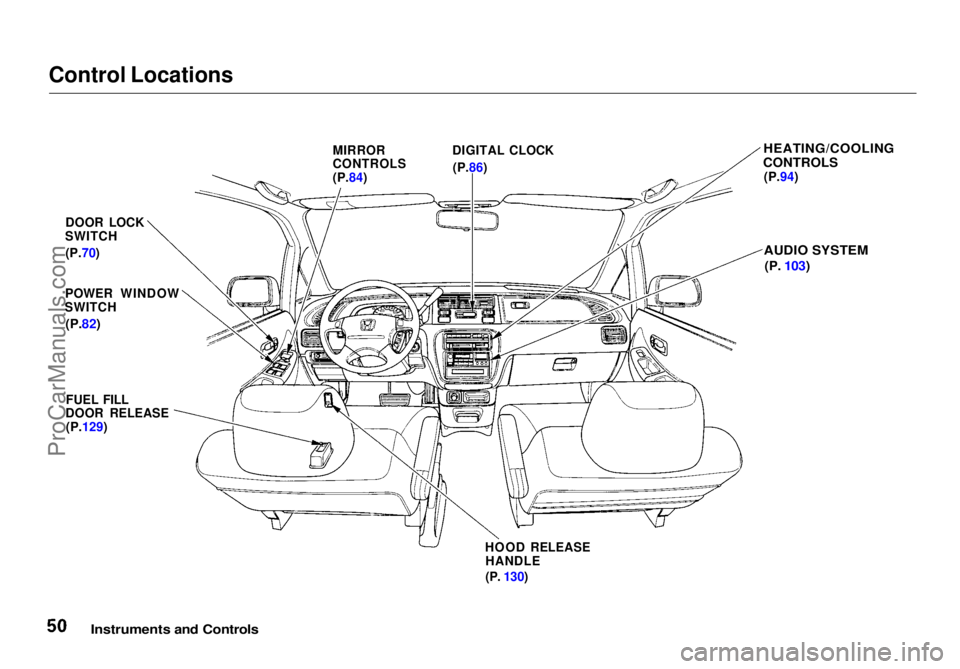
Control Locations
Instruments and Controls
MIRROR
CONTROLS
(P.84)
DIGITAL CLOCK
(P.86)
HEATING/COOLING
CONTROLS
(P.94)
AUDIO SYSTEM
(P.
103)
DOOR LOCK
SWITCH
(P.70)
POWER WINDOW
SWITCH
(P.82)
FUEL FILL
DOOR RELEASE
(P.129)
HOOD RELEASEHANDLE
(P.
130)ProCarManuals.comMain Menu Table of Contents s t
Page 56 of 272
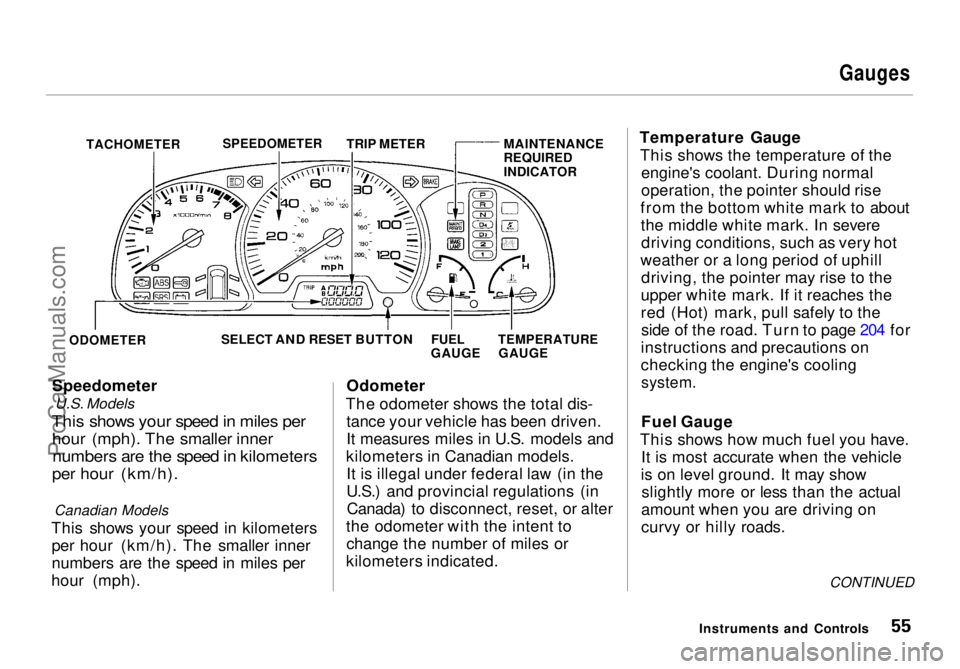
Gauges
TACHOMETER
Speedometer
U.S. Models
This shows your speed in miles per
hour (mph). The smaller inner
numbers are the speed in kilometers
per hour (km/h).
Canadian Models
This shows your speed in kilometers per hour (km/h). The smaller inner
numbers are the speed in miles per
hour (mph). Odometer
The odometer shows the total dis- tance your vehicle has been driven.
It measures miles in U.S. models and
kilometers in Canadian models. It is illegal under federal law (in the
U.S.) and provincial regulations (inCanada) to disconnect, reset, or alter
the odometer with the intent to change the number of miles or
kilometers indicated. Temperature Gauge
This shows the temperature of the engine's coolant. During normal
operation, the pointer should rise
from the bottom white mark to about the middle white mark. In severedriving conditions, such as very hot
weather or a long period of uphill driving, the pointer may rise to the
upper white mark. If it reaches the
red (Hot) mark, pull safely to the side of the road. Turn to page 204 for
instructions and precautions on
checking the engine's cooling
system.
Fuel Gauge
This shows how much fuel you have. It is most accurate when the vehicle
is on level ground. It may show slightly more or less than the actual
amount when you are driving on
curvy or hilly roads.
CONTINUED
Instruments and Controls
SPEEDOMETER
TRIP METER MAINTENANCE
REQUIRED
INDICATOR
ODOMETER
SELECT AND RESET BUTTON
FUEL
GAUGE
TEMPERATURE
GAUGEProCarManuals.comMain Menu Table of Contents s t
Page 93 of 272
Comfort and Convenience Features
The heating and air conditioning systems in your Honda provide a
comfortable driving environment in all weather conditions.
The standard audio system has
many features. This section de-
scribes those features and how to
use them. (If you selected an optional audio system, refer to the
operating instructions that came
with it.)
Some models have an anti-theft
audio system that requires a code
number to enable it.
Heating and Cooling........................ 94
What Each Control Does............ 94How to Use the System............... 96
To Turn Everything Off........... 101
Rear A/C Unit............................ 102
Audio System (U.S. LX and
Canadian EX)......................... 103
Operating the Radio.................. 104
Adjusting the Sound.................. 106
Audio System Lighting............. 106
Radio Frequencies and Reception................................ 106
Operating the Cassette Player...................................... 107
Tape Search Functions............. 108 Caring for Cassettes.................. 109
Operating the Optional CD Player/Changer..................... 110
Audio System (U.S. EX)................ 112 Operating the Radio.................. 113
Adjusting the Sound.................. 116 Radio Frequencies..................... 117
Radio Reception......................... 117
Operating the Cassette Player...................................... 119
Tape Search Functions............. 120 Caring for the Cassette
Player...................................... 121
Operating the Optional CD Player/Changer..................... 122
Protecting Compact Discs........ 124 CD Changer Error
Indications.............................. 125
Theft Protection........................ 126
Comfort and Convenience FeaturesProCarManuals.comMain Menu s t
Page 94 of 272
Heating and Cooling
Proper use of the Heating and
Cooling system can make the
interior dry and comfortable, and
keep the windows clear for best
visibility.
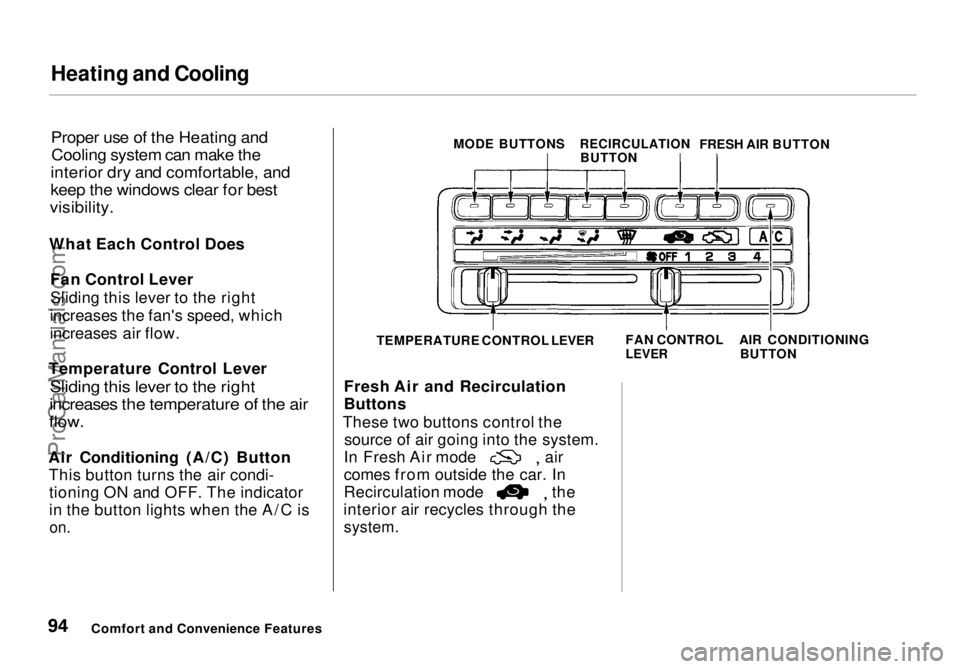
What Each Control Does Fan Control Lever
Sliding this lever to the right
increases the fan's speed, which
increases air flow.
Temperature Control Lever
Sliding this lever to the right
increases the temperature of the air
flow.
Air Conditioning (A/C) Button This button turns the air condi-tioning ON and OFF. The indicator
in the button lights when the A/C is
on.
Fresh Air and Recirculation
Buttons
These two buttons control the source of air going into the system. In Fresh Air mode air
comes from outside the car. In
Recirculation mode the
interior air recycles through the
system.
Comfort and Convenience Features MODE BUTTONS
RECIRCULATION
BUTTON FRESH AIR BUTTON
TEMPERATURE CONTROL LEVER FAN CONTROL
LEVER
AIR CONDITIONING
BUTTONProCarManuals.comMain Menu Table of Contents s t
Page 95 of 272
Heating and Cooling
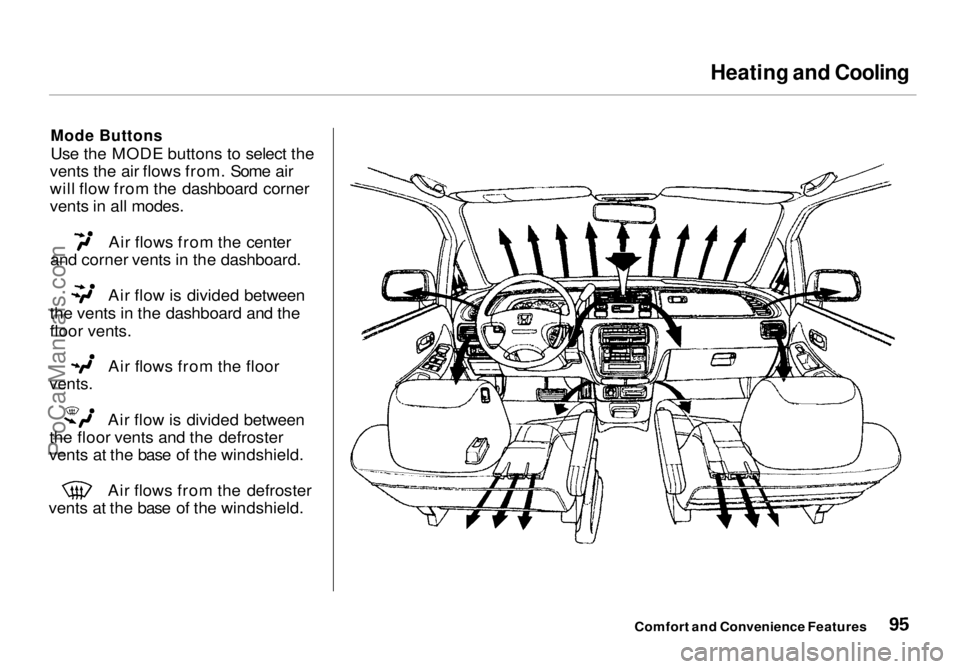
Mode Buttons
Use the MODE buttons to select the
vents the air flows from. Some air
will flow from the dashboard corner
vents in all modes. Air flows from the center
and corner vents in the dashboard. Air flow is divided between
the vents in the dashboard and the
floor vents. Air flows from the floor
vents.
Air flow is divided between
the floor vents and the defroster
vents at the base of the windshield. Air flows from the defroster
vents at the base of the windshield.
Comfort and Convenience FeaturesProCarManuals.comMain Menu Table of Contents s t
Page 96 of 272
Heating and Cooling
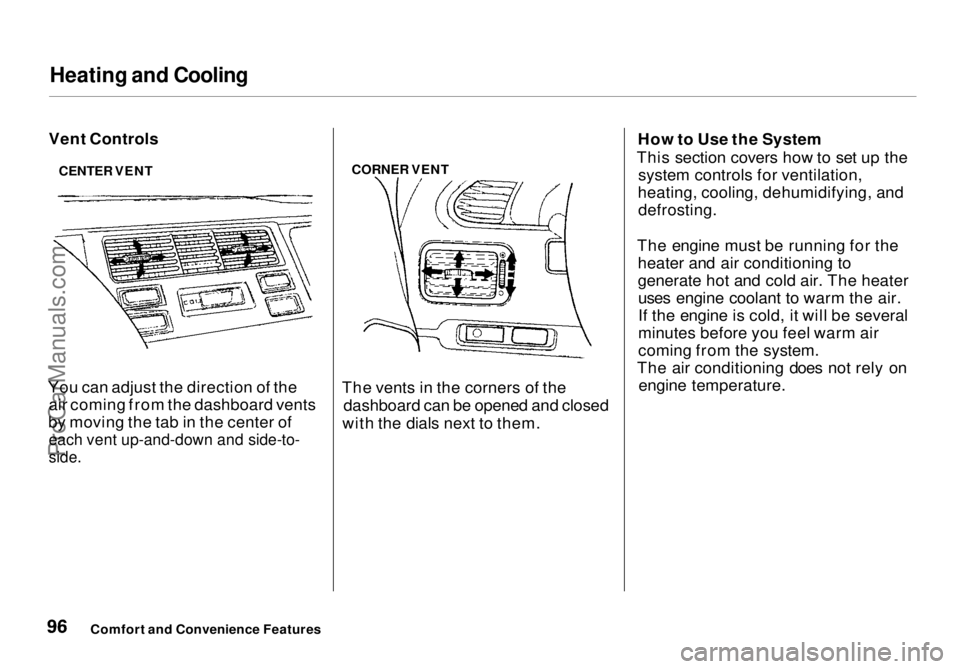
Vent Controls
You can adjust the direction of the air coming from the dashboard vents
by moving the tab in the center of
each vent up-and-down and side-to-
side.
CORNER VENT
The vents in the corners of the dashboard can be opened and closed
with the dials next to them. How to Use the System
This section covers how to set up the system controls for ventilation,
heating, cooling, dehumidifying, and defrosting.
The engine must be running for the heater and air conditioning to
generate hot and cold air. The heateruses engine coolant to warm the air.
If the engine is cold, it will be several
minutes before you feel warm air
coming from the system.
The air conditioning does not rely on engine temperature.
Comfort and Convenience Features
CENTER VENTProCarManuals.comMain Menu Table of Contents s t
Page 97 of 272
Heating and Cooling
It is best to leave the system in mode under almost all
conditions. Keeping the system in mode, particularly with the
A/C off, can cause the windows to fog up. Switch to mode when
you are driving through smoky or dusty conditions, then switch back to mode when the condition
clears.
The outside air intakes for the heating and cooling system are at
the base of the windshield. Keep
these clear of leaves and other
debris.
Ventilation
The flow-through ventilation system draws in outside air, circulates it
through the interior, then exhausts it
through vents near the rear side
panels.
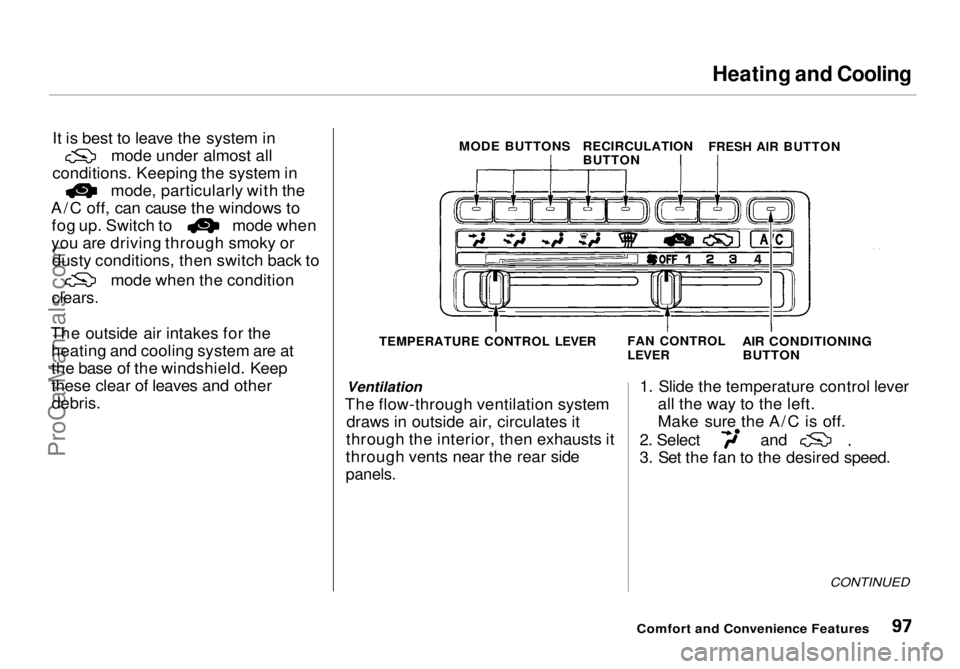
1. Slide the temperature control lever
all the way to the left.
Make sure the A/C is off. 2. Select and
3. Set the fan to the desired speed.
CONTINUED
Comfort and Convenience Features
MODE BUTTONS
RECIRCULATION
BUTTON
FRESH AIR BUTTON
TEMPERATURE CONTROL LEVER FAN CONTROL
LEVER
AIR CONDITIONING
BUTTONProCarManuals.comMain Menu Table of Contents s t
Page 98 of 272
Heating and Cooling
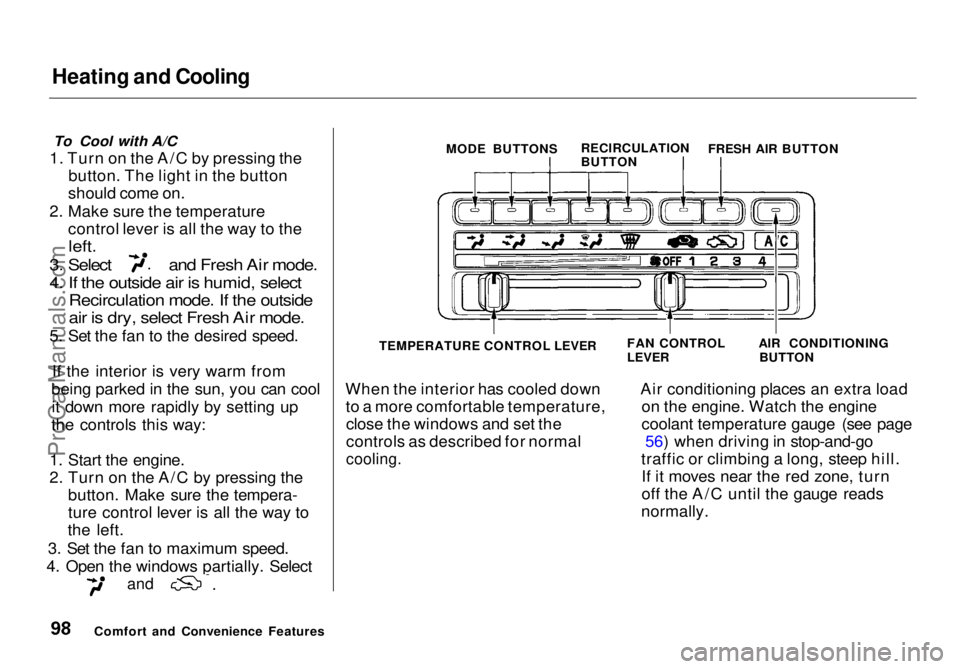
To Cool with A/C
1. Turn on the A/C by pressing the button. The light in the button
should come on.
2. Make sure the temperature control lever is all the way to the
left.
3. Select and Fresh Air mode.
4. If the outside air is humid, select
Recirculation mode. If the outside
air is dry, select Fresh Air mode.
5. Set the fan to the desired speed.
If the interior is very warm from
being parked in the sun, you can cool it down more rapidly by setting up
the controls this way:
1. Start the engine.
2. Turn on the A/C by pressing the button. Make sure the tempera-
ture control lever is all the way to
the left.
3. Set the fan to maximum speed.
4. Open the windows partially. Select
and
When the interior has cooled down
to a more comfortable temperature,close the windows and set the
controls as described for normal
cooling.
Air conditioning places an extra load
on the engine. Watch the engine
coolant temperature gauge (see page 56) when driving in stop-and-go
traffic or climbing a long, steep hill. If it moves near the red zone, turn
off the A/C until the gauge reads
normally.
Comfort and Convenience Features MODE BUTTONS
RECIRCULATION
BUTTONFRESH AIR BUTTON
TEMPERATURE CONTROL LEVER
FAN CONTROL
LEVER
AIR CONDITIONING
BUTTONProCarManuals.comMain Menu Table of Contents s t
Page 99 of 272
Heating and Cooling
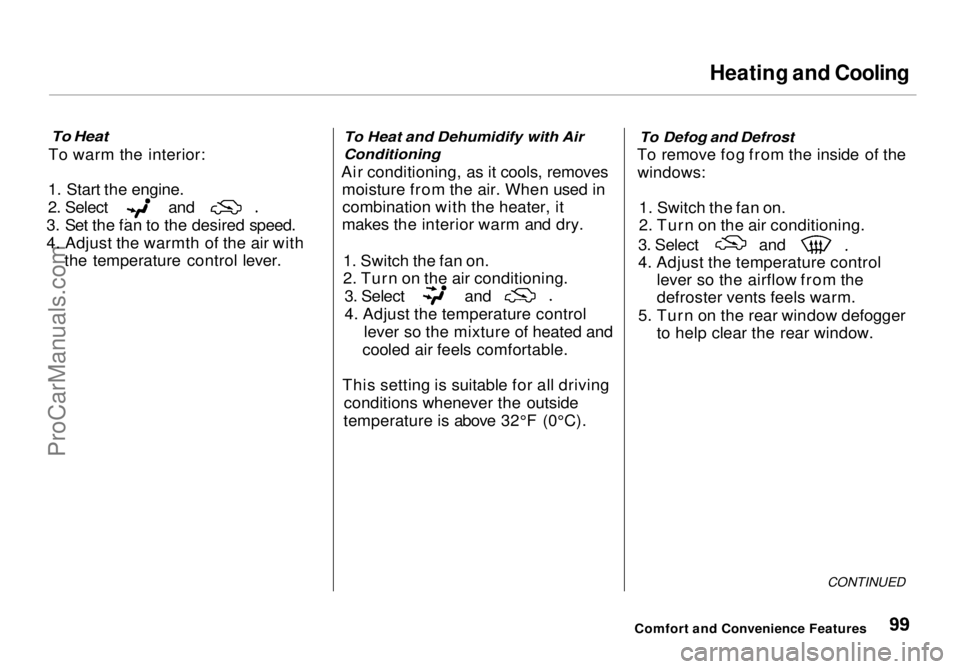
To Heat
To warm the interior:
1. Start the engine. 2. Select and
3. Set the fan to the desired speed.
4. Adjust the warmth of the air with the temperature control lever.
To Heat and Dehumidify with Air
Conditioning
Air conditioning, as it cools, removes moisture from the air. When used incombination with the heater, it
makes the interior warm and dry.
1. Switch the fan on.
2. Turn on the air conditioning. 3. Select and
4. Adjust the temperature control
lever so the mixture of heated and
cooled air feels comfortable.
This setting is suitable for all driving conditions whenever the outside
temperature is above 32°F (0°C).
To Defog and Defrost
To remove fog from the inside of the windows:
1. Switch the fan on.
2. Turn on the air conditioning. 3. Select and
4. Adjust the temperature control
lever so the airflow from the
defroster vents feels warm.
5. Turn on the rear window defogger to help clear the rear window.
CONTINUED
Comfort and Convenience FeaturesProCarManuals.comMain Menu Table of Contents s t