manual radio set HONDA ODYSSEY 1998 Owners Manual
[x] Cancel search | Manufacturer: HONDA, Model Year: 1998, Model line: ODYSSEY, Model: HONDA ODYSSEY 1998Pages: 272, PDF Size: 2.67 MB
Page 93 of 272
Comfort and Convenience Features
The heating and air conditioning systems in your Honda provide a
comfortable driving environment in all weather conditions.
The standard audio system has
many features. This section de-
scribes those features and how to
use them. (If you selected an optional audio system, refer to the
operating instructions that came
with it.)
Some models have an anti-theft
audio system that requires a code
number to enable it.
Heating and Cooling........................ 94
What Each Control Does............ 94How to Use the System............... 96
To Turn Everything Off........... 101
Rear A/C Unit............................ 102
Audio System (U.S. LX and
Canadian EX)......................... 103
Operating the Radio.................. 104
Adjusting the Sound.................. 106
Audio System Lighting............. 106
Radio Frequencies and Reception................................ 106
Operating the Cassette Player...................................... 107
Tape Search Functions............. 108 Caring for Cassettes.................. 109
Operating the Optional CD Player/Changer..................... 110
Audio System (U.S. EX)................ 112 Operating the Radio.................. 113
Adjusting the Sound.................. 116 Radio Frequencies..................... 117
Radio Reception......................... 117
Operating the Cassette Player...................................... 119
Tape Search Functions............. 120 Caring for the Cassette
Player...................................... 121
Operating the Optional CD Player/Changer..................... 122
Protecting Compact Discs........ 124 CD Changer Error
Indications.............................. 125
Theft Protection........................ 126
Comfort and Convenience FeaturesProCarManuals.comMain Menu s t
Page 104 of 272
Audio System
Operating the Radio
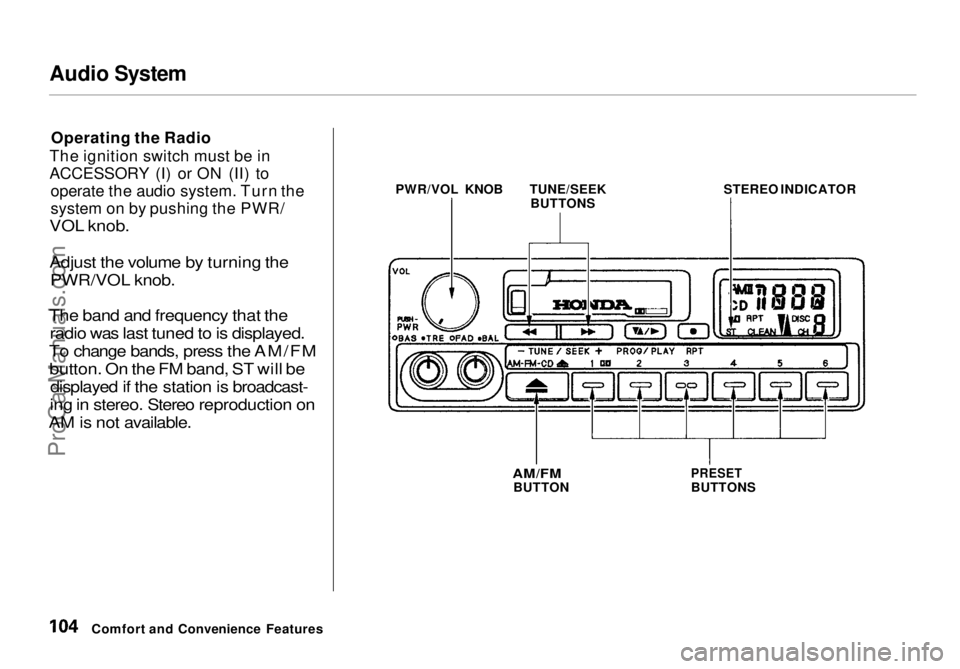
The ignition switch must be in
ACCESSORY (I) or ON (II) to operate the audio system. Turn the
system on by pushing the PWR/
VOL knob.
Adjust the volume by turning the
PWR/VOL knob.
The band and frequency that the radio was last tuned to is displayed.
To change bands, press the AM/FM button. On the FM band, ST will be displayed if the station is broadcast-
ing in stereo. Stereo reproduction on
AM is not available.
Comfort and Convenience Features PWR/VOL KNOB
TUNE/SEEK
BUTTONS STEREO INDICATOR
AM/FM
BUTTON
PRESET
BUTTONSProCarManuals.comMain Menu Table of Contents s t
Page 105 of 272
Audio System
You can use any of three methods to find radio stations on the selected
band: TUNE, SEEK, or the Preset
buttons.
TUNE — Use the TUNE/SEEK buttons to tune the radio to a desired frequency. Press ( ) to change
to a higher frequency, and press
( ) to tune to a lower frequency.
The frequency numbers will start to change rapidly. Release the switch
when the display reaches the desired
frequency. To change the frequency in small increments, press and
release the appropriate TUNE/
SEEK button. SEEK — The SEEK function
searches the band for a station with
a strong signal. To activate it, push
the TUNE/SEEK button until you
hear a beep, then release it. Depending on which TUNE/SEEK
button you pushed, the system scans
upward or downward from the current frequency. It stops when it
finds a station with a strong signal.
Preset — You can store the fre-
quencies of your favorite radiostations in the six preset buttons.
Each button will store one frequency on the AM band, and two on the FM
band.
To store a frequency:
1. Select the desired band, AM or FM. FM1 and FM2 let you store
two frequencies with each Preset
button.
2. Use the TUNE or SEEK function to tune the radio to a desired
station.
3. Pick the Preset button you want for that station. Press the buttonand hold it until you hear a beep.
4. Repeat steps 1 to 3 to store a total of six stations on AM and twelve
on FM.
Once a station's frequency is stored,
simply press and release the proper
Preset button to tune to it.
The preset frequencies will be lost if your vehicle's battery goes dead, is disconnected, or the radio fuse is
removed.
Comfort and Convenience FeaturesProCarManuals.comMain Menu Table of Contents s t
Page 106 of 272
Audio System
Adjusting the Sound
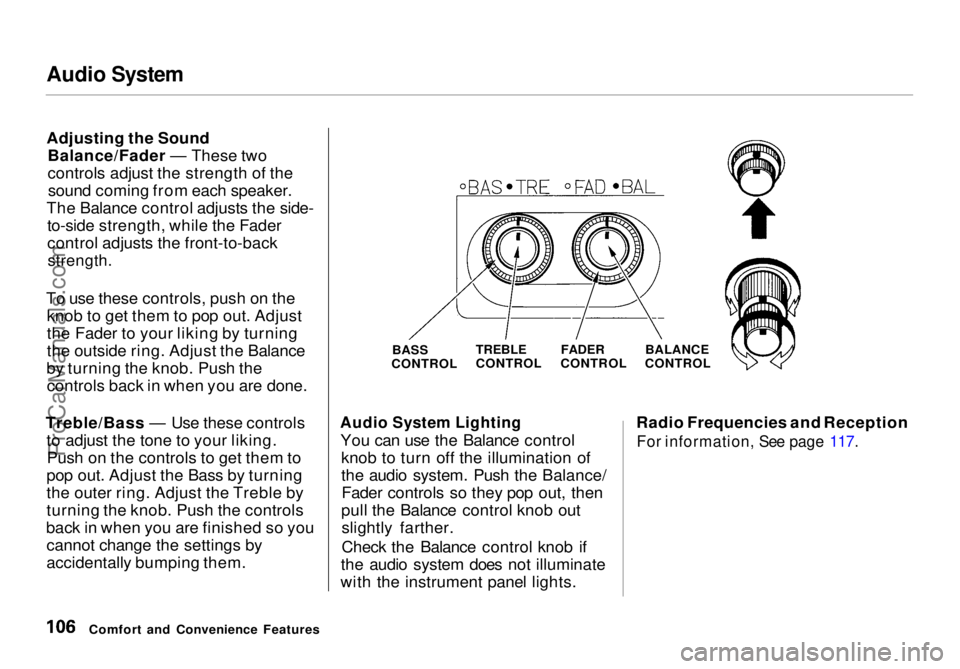
Balance/Fader — These two
controls adjust the strength of thesound coming from each speaker.
The Balance control adjusts the side- to-side strength, while the Fader
control adjusts the front-to-back
strength.
To use these controls, push on the knob to get them to pop out. Adjust
the Fader to your liking by turning
the outside ring. Adjust the Balance
by turning the knob. Push the controls back in when you are done.
Treble/Bass — Use these controls to adjust the tone to your liking.Push on the controls to get them to
pop out. Adjust the Bass by turning
the outer ring. Adjust the Treble by
turning the knob. Push the controls
back in when you are finished so you cannot change the settings by
accidentally bumping them.
Audio System Lighting
You can use the Balance control knob to turn off the illumination of
the audio system. Push the Balance/Fader controls so they pop out, then
pull the Balance control knob out slightly farther.
Check the Balance control knob if
the audio system does not illuminate
with the instrument panel lights. Radio Frequencies and Reception
For information, See page 117.
Comfort and Convenience Features BASS
CONTROL
TREBLE
CONTROL
FADER
CONTROL BALANCE
CONTROLProCarManuals.comMain Menu Table of Contents s t
Page 110 of 272
Audio System
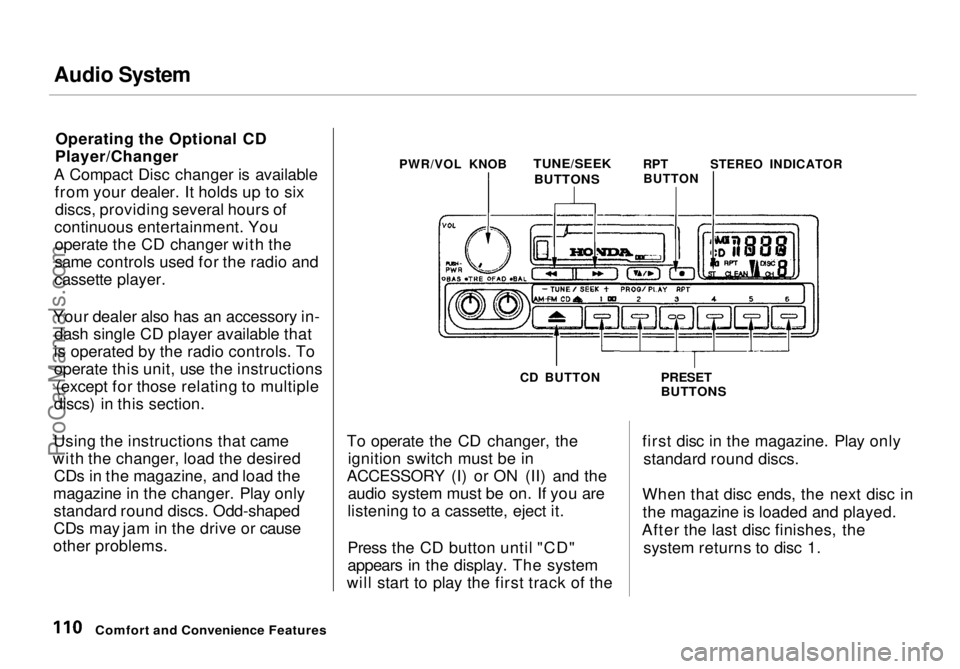
Operating the Optional CD
Player/Changer
A Compact Disc changer is available from your dealer. It holds up to sixdiscs, providing several hours of
continuous entertainment. You operate the CD changer with the
same controls used for the radio and
cassette player.
Your dealer also has an accessory in- dash single CD player available that
is operated by the radio controls. To
operate this unit, use the instructions (except for those relating to multiple
discs) in this section.
Using the instructions that came
with the changer, load the desired CDs in the magazine, and load the
magazine in the changer. Play only standard round discs. Odd-shaped
CDs may jam in the drive or cause
other problems. PWR/VOL KNOB
TUNE/SEEK
RPTSTEREO INDICATOR
CD BUTTON
To operate the CD changer, the ignition switch must be in
ACCESSORY (I) or ON (II) and the audio system must be on. If you are
listening to a cassette, eject it.
Press the CD button until "CD"
appears in the display. The system
will start to play the first track of the
PRESET
BUTTONS
first disc in the magazine. Play only standard round discs.
When that disc ends, the next disc in the magazine is loaded and played.
After the last disc finishes, the system returns to disc 1.
Comfort and Convenience Features
BUTTONS
BUTTONProCarManuals.comMain Menu Table of Contents s t
Page 113 of 272
Audio System
Operating the Radio
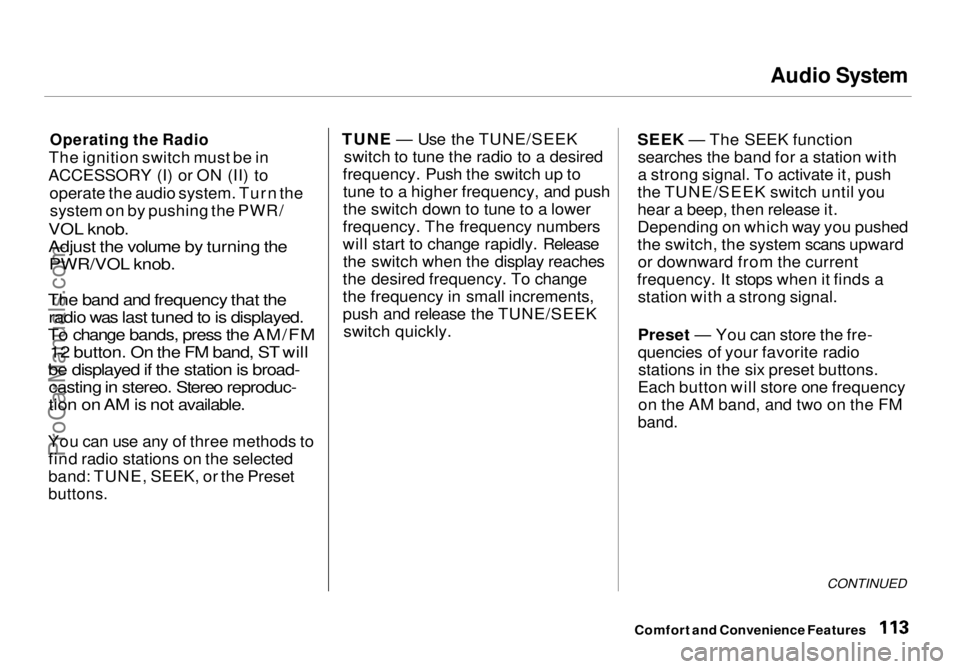
The ignition switch must be in
ACCESSORY (I) or ON (II) to operate the audio system. Turn thesystem on by pushing the PWR/
VOL knob.
Adjust the volume by turning the PWR/VOL knob.
The band and frequency that the radio was last tuned to is displayed.
To change bands, press the AM/FM 1-2 button. On the FM band, ST will
be displayed if the station is broad- casting in stereo. Stereo reproduc-
tion on AM is not available.
You can use any of three methods to find radio stations on the selected
band: TUNE, SEEK, or the Preset
buttons.
TUNE — Use the TUNE/SEEK
switch to tune the radio to a desired
frequency. Push the switch up to tune to a higher frequency, and push
the switch down to tune to a lower
frequency. The frequency numbers
will start to change rapidly. Release the switch when the display reaches
the desired frequency. To change
the frequency in small increments,
push and release the TUNE/SEEK switch quickly. SEEK — The SEEK function
searches the band for a station with
a strong signal. To activate it, push
the TUNE/SEEK switch until you
hear a beep, then release it.
Depending on which way you pushed
the switch, the system scans upward or downward from the current
frequency. It stops when it finds a station with a strong signal.
Preset — You can store the fre-
quencies of your favorite radiostations in the six preset buttons.
Each button will store one frequency on the AM band, and two on the FM
band.
CONTINUED
Comfort and Convenience FeaturesProCarManuals.comMain Menu Table of Contents s t
Page 114 of 272
Audio System
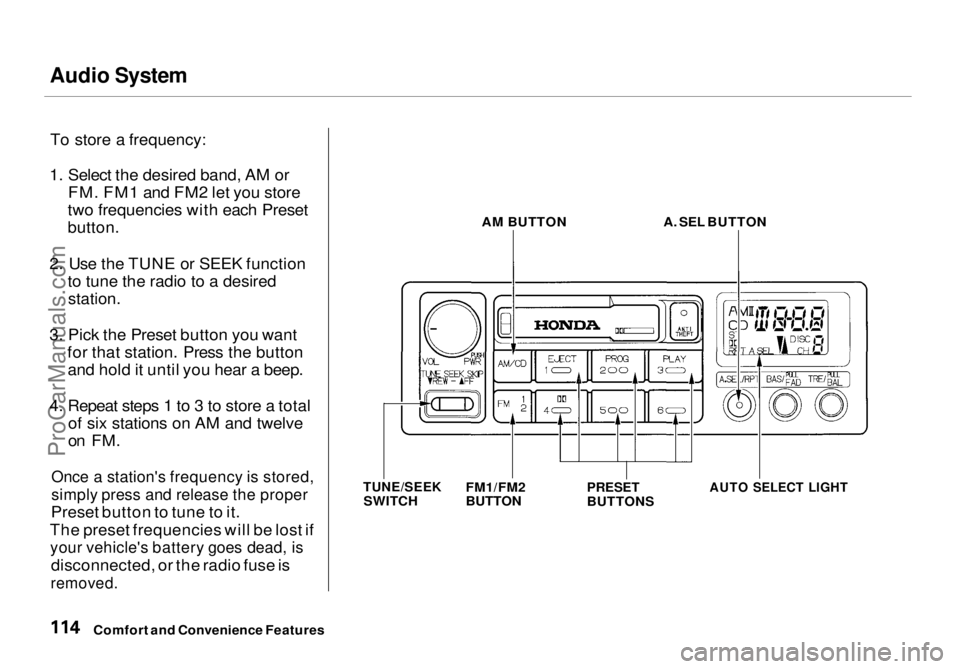
To store a frequency:
1. Select the desired band, AM or FM. FM1 and FM2 let you store
two frequencies with each Preset
button.
2. Use the TUNE or SEEK function to tune the radio to a desired
station.
3. Pick the Preset button you want for that station. Press the buttonand hold it until you hear a beep.
4. Repeat steps 1 to 3 to store a total of six stations on AM and twelve
on FM.
Once a station's frequency is stored,
simply press and release the proper
Preset button to tune to it.
The preset frequencies will be lost if
your vehicle's battery goes dead, is
disconnected, or the radio fuse is
removed.
AM BUTTON
A. SEL BUTTON
PRESET
BUTTONS
AUTO SELECT LIGHT
Comfort and Convenience Features
TUNE/SEEK
SWITCH FM1/FM2
BUTTONProCarManuals.comMain Menu Table of Contents s t
Page 122 of 272
Audio System
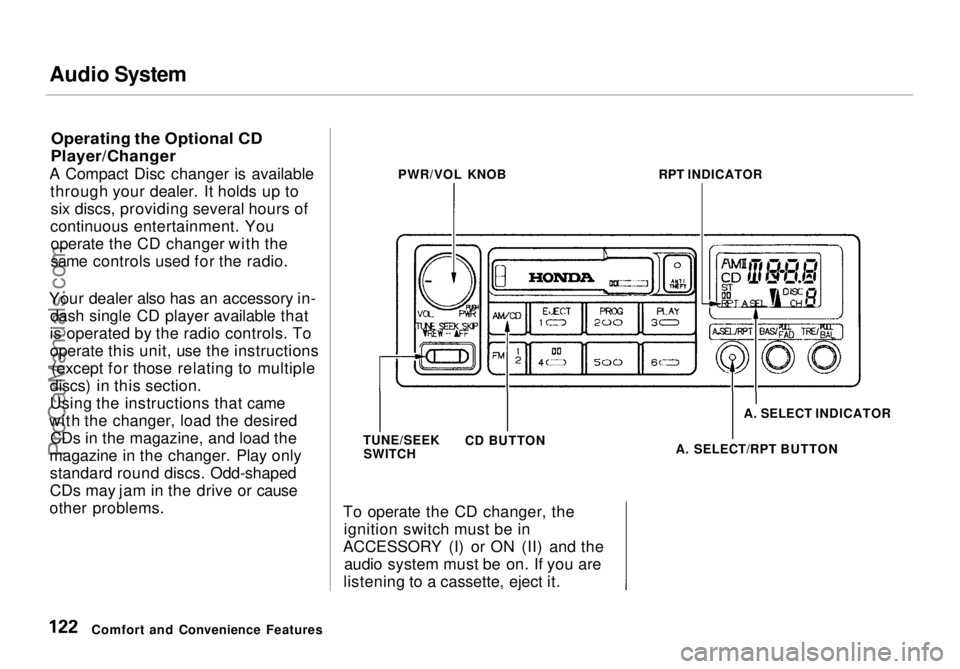
Operating the Optional CD
Player/Changer
A Compact Disc changer is available through your dealer. It holds up tosix discs, providing several hours of
continuous entertainment. You operate the CD changer with the
same controls used for the radio.
Your dealer also has an accessory in- dash single CD player available that
is operated by the radio controls. To
operate this unit, use the instructions (except for those relating to multiple
discs) in this section.
Using the instructions that came
with the changer, load the desired CDs in the magazine, and load the
magazine in the changer. Play only standard round discs. Odd-shaped
CDs may jam in the drive or cause
other problems. To operate the CD changer, the
ignition switch must be in
ACCESSORY (I) or ON (II) and the audio system must be on. If you are
listening to a cassette, eject it.
Comfort and Convenience Features PWR/VOL KNOB
RPT INDICATOR
TUNE/SEEK SWITCH CD BUTTON A. SELECT INDICATOR
A. SELECT/RPT BUTTONProCarManuals.comMain Menu Table of Contents s t
Page 126 of 272
Audio System
Theft Protection
On U.S. EX model
Your vehicle's audio system will disable itself if it is disconnected
from electrical power for any reason.
To make it work again, the user must enter a specific five-digit code
in the Preset buttons. Because thereare hundreds of number
combinations possible from five digits, making the system work
without knowing the exact code is nearly impossible.
You should have received a card that lists your audio system's code
number and serial number. It is best
to store this card in a safe place at
home. In addition, you should write
the audio system's serial number in
this Owner's Manual. If you should
happen to lose the card, you must obtain the code number from your
Honda dealer. To do this, you will
need the system's serial number. If your vehicle's battery is discon-
nected or goes dead, the audio
system will disable itself. If this
happens, you will see "Code" in the
frequency display the next time you
turn on the system. Use the Preset
buttons to enter the five-digit code. If it is entered correctly, the radio willstart playing.
If you make a mistake entering the
code, do not start over or try to
correct your mistake. Complete the
five-digit sequence, then enter the correct code. You have three tries toenter the correct code. If you are
unsuccessful in three attempts, you
must then leave the system on for
one hour before trying again. You will have to store your favorite
stations in the Preset buttons after
the system begins working. Your original settings were lost when
power was disconnected.
Comfort and Convenience FeaturesProCarManuals.comMain Menu Table of Contents s t
Page 189 of 272
Battery
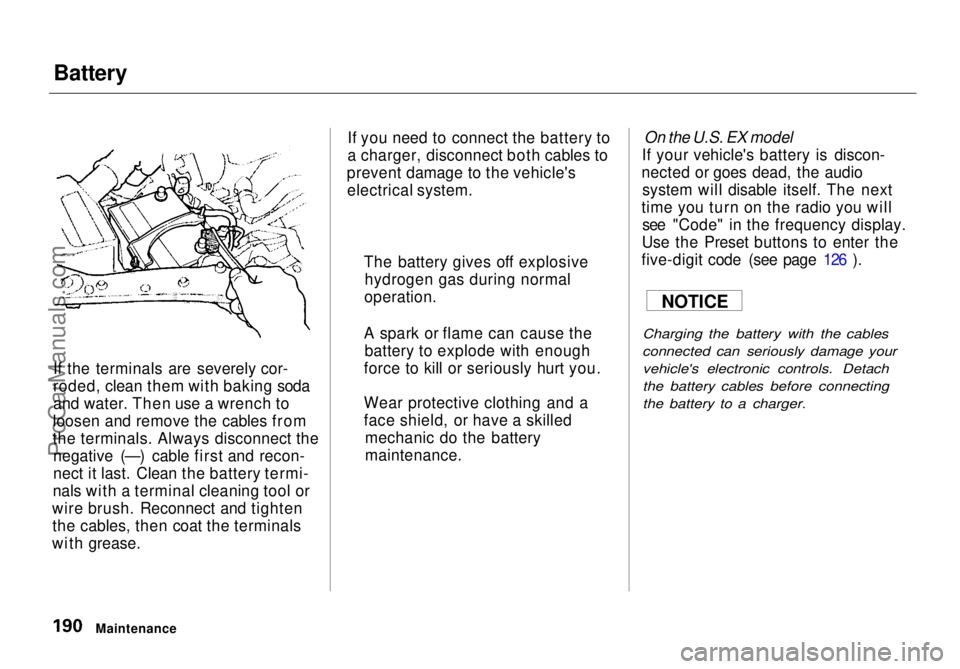
If the terminals are severely cor-
roded, clean them with baking soda
and water. Then use a wrench to
loosen and remove the cables from
the terminals. Always disconnect the negative (—) cable first and recon-
nect it last. Clean the battery termi-
nals with a terminal cleaning tool or
wire brush. Reconnect and tighten the cables, then coat the terminals
with grease. If you need to connect the battery to
a charger, disconnect both cables to
prevent damage to the vehicle's electrical system.
On the U.S. EX model
If your vehicle's battery is discon-
nected or goes dead, the audio system will disable itself. The next
time you turn on the radio you will see "Code" in the frequency display.
Use the Preset buttons to enter the
five-digit code (see page 126 ).
Charging the battery with the cables
connected can seriously damage your vehicle's electronic controls. Detach
the battery cables before connecting
the battery to a charger.
Maintenance The battery gives off explosive
hydrogen gas during normal
operation.
A spark or flame can cause the battery to explode with enough
force to kill or seriously hurt you.
Wear protective clothing and a
face shield, or have a skilled mechanic do the battery
maintenance. NOTICEProCarManuals.comMain Menu Table of Contents s t