ECO mode HONDA ODYSSEY 1999 User Guide
[x] Cancel search | Manufacturer: HONDA, Model Year: 1999, Model line: ODYSSEY, Model: HONDA ODYSSEY 1999Pages: 343, PDF Size: 3.73 MB
Page 78 of 343
Keys and Locks
These keys contain electronic circuits that are activated by the
Immobilizer System. They will not
work to start the engine if the circuits are damaged. Protect the keys from direct
sunlight, high temperature, and
high humidity. Do not drop the keys or set heavy
objects on them.
Keep the keys away from liquids.
If they get wet, dry them immedi-
ately with a soft cloth.
The keys do not contain batteries. Do not try to take them apart.
Remote Transmitter
Some models also come with a
remote transmitter; see page 81 for
an explanation of its operation.
Immobilizer System
The Immobilizer System protects your vehicle from theft. A properly-coded master or valet key must be
used in the ignition switch for theengine to start. If an improperly-
coded key (or other device) is used,
the engine's fuel system is disabled.
When you turn the ignition switch to ON (II), the Immobilizer System
indicator should come on for a few seconds, then go out. If the indicator
starts to blink, it means the system does not recognize the coding of the
key. Turn the ignition switch to LOCK (0), remove the key, reinsert
it, and turn the switch to ON (II)
again.
The system may not recognize your
key's coding if any other immobilizer
key is near the ignition switch. To make sure the system recognizes the
key code, keep each immobilizer key on a separate ring.
If the system repeatedly does not
recognize the coding of your key, contact your Honda dealer.
This indicator will also blink several times when you turn the ignitionswitch from ON (II) to ACCESSORY (I) or LOCK (0).
Do not attempt to alter this system
or add other devices to it. Electrical
problems could result that may make
your vehicle undriveable.
If you have lost your key and you
cannot start the engine, contact your
Honda dealer.
Instruments and Controls CONTINUEDProCarManuals.comMain Menu Table of Contents s t
Page 82 of 343
Keys and Locks
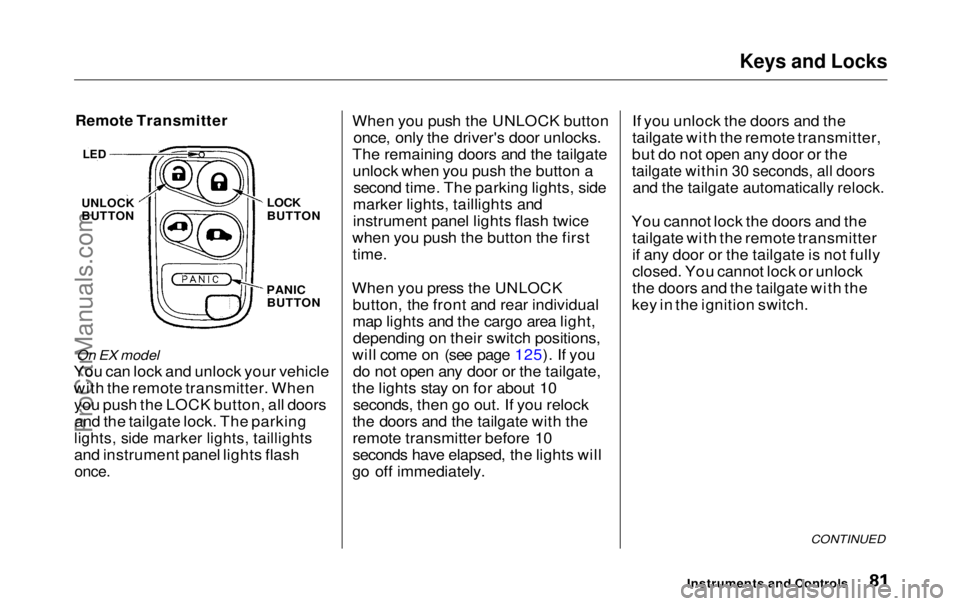
Remote Transmitter
On EX model
You can lock and unlock your vehicle
with the remote transmitter. When you push the LOCK button, all doorsand the tailgate lock. The parking
lights, side marker lights, taillights
and instrument panel lights flash
once.
When you push the UNLOCK button
once, only the driver's door unlocks.
The remaining doors and the tailgate unlock when you push the button a second time. The parking lights, side
marker lights, taillights and
instrument panel lights flash twice
when you push the button the first
time.
When you press the UNLOCK button, the front and rear individual
map lights and the cargo area light,depending on their switch positions,
will come on (see page 125). If you do not open any door or the tailgate,
the lights stay on for about 10 seconds, then go out. If you relock
the doors and the tailgate with the
remote transmitter before 10
seconds have elapsed, the lights will
go off immediately. If you unlock the doors and the
tailgate with the remote transmitter,
but do not open any door or the
tailgate within 30 seconds, all doors
and the tailgate automatically relock.
You cannot lock the doors and the tailgate with the remote transmitter
if any door or the tailgate is not fully
closed. You cannot lock or unlock
the doors and the tailgate with the
key in the ignition switch.
CONTINUED
Instruments and Controls
LED
UNLOCK
BUTTON
LOCK
BUTTON
PANIC BUTTONProCarManuals.comMain Menu Table of Contents s t
Page 83 of 343
Keys and Locks
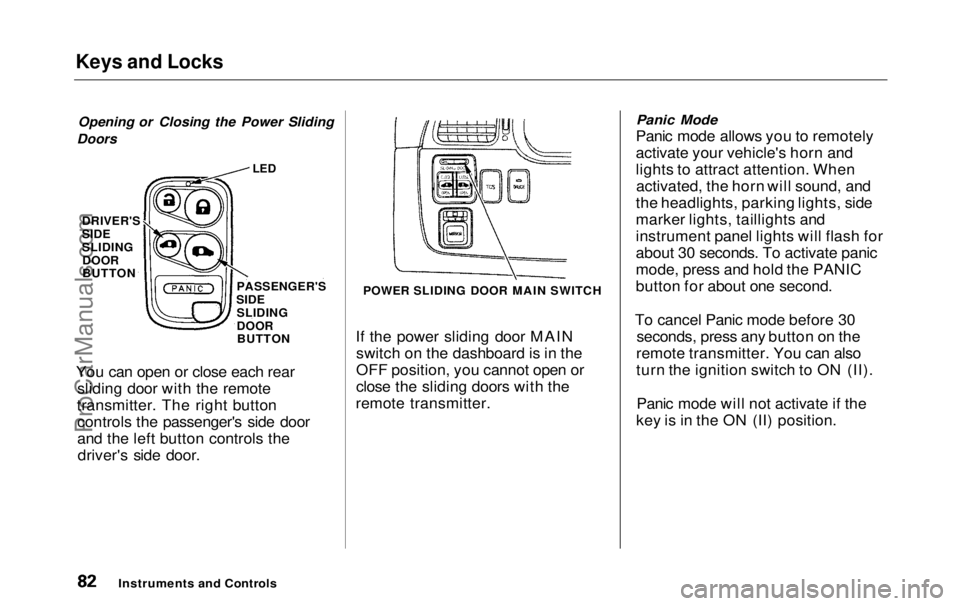
Opening or Closing the Power Sliding
Doors
If the power sliding door MAINswitch on the dashboard is in the
OFF position, you cannot open or
close the sliding doors with the
remote transmitter.
Panic Mode
Panic mode allows you to remotely
activate your vehicle's horn and
lights to attract attention. When activated, the horn will sound, and
the headlights, parking lights, side
marker lights, taillights and
instrument panel lights will flash for
about 30 seconds. To activate panic
mode, press and hold the PANIC
button for about one second.
To cancel Panic mode before 30 seconds, press any button on the
remote transmitter. You can also
turn the ignition switch to ON (II).
Panic mode will not activate if the
key is in the ON (II) position.
Instruments and Controls
You can open or close each rear
sliding door with the remote
transmitter. The right button controls the passenger's side door
and the left button controls thedriver's side door.
LED
PASSENGER'S
SIDE SLIDING
DOORBUTTON
DRIVER'S
SIDE
SLIDING
DOOR
BUTTON
POWER SLIDING DOOR MAIN SWITCHProCarManuals.comMain Menu Table of Contents s t
Page 100 of 343
Seats
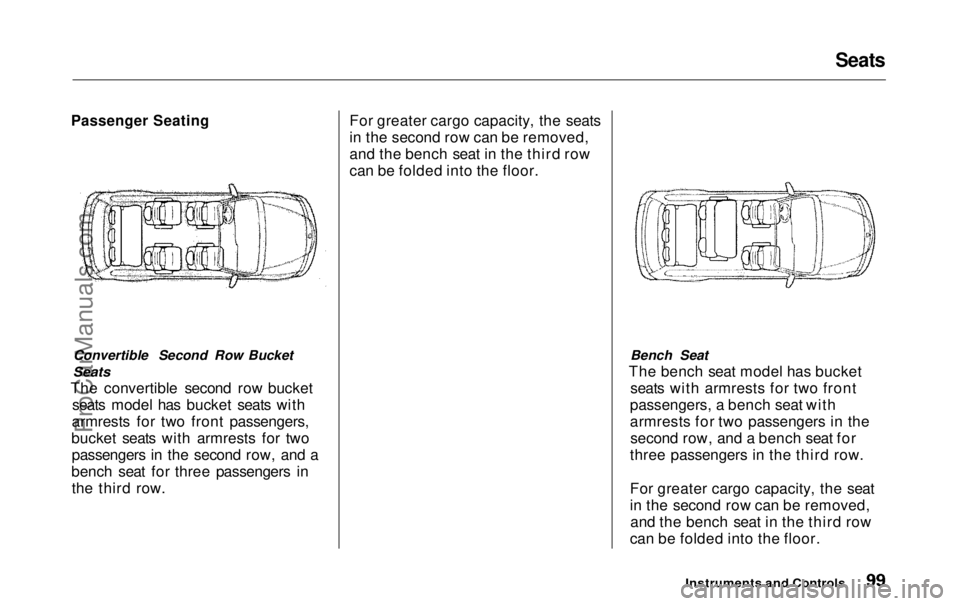
Passenger Seating
Convertible Second Row Bucket
Seats
The convertible second row bucket seats model has bucket seats with
armrests for two front passengers,
bucket seats with armrests for two passengers in the second row, and a
bench seat for three passengers in the third row. For greater cargo capacity, the seats
in the second row can be removed,
and the bench seat in the third row
can be folded into the floor.
Bench Seat
The bench seat model has bucket seats with armrests for two front
passengers, a bench seat with
armrests for two passengers in the second row, and a bench seat for
three passengers in the third row.
For greater cargo capacity, the seat
in the second row can be removed, and the bench seat in the third row
can be folded into the floor.
Instruments and ControlsProCarManuals.comMain Menu Table of Contents s t
Page 101 of 343
Seats
Seat Adjustments
See pages 12 — 13 for important safety
information and warnings about how to
properly position seats and seat-backs.
The EX model has a power adjustable driver's seat. All other
models have manual driver's seat
adjustments.
The front passenger's seat, and the seats in the second and third rows
adjust manually.
Make all seat adjustments before
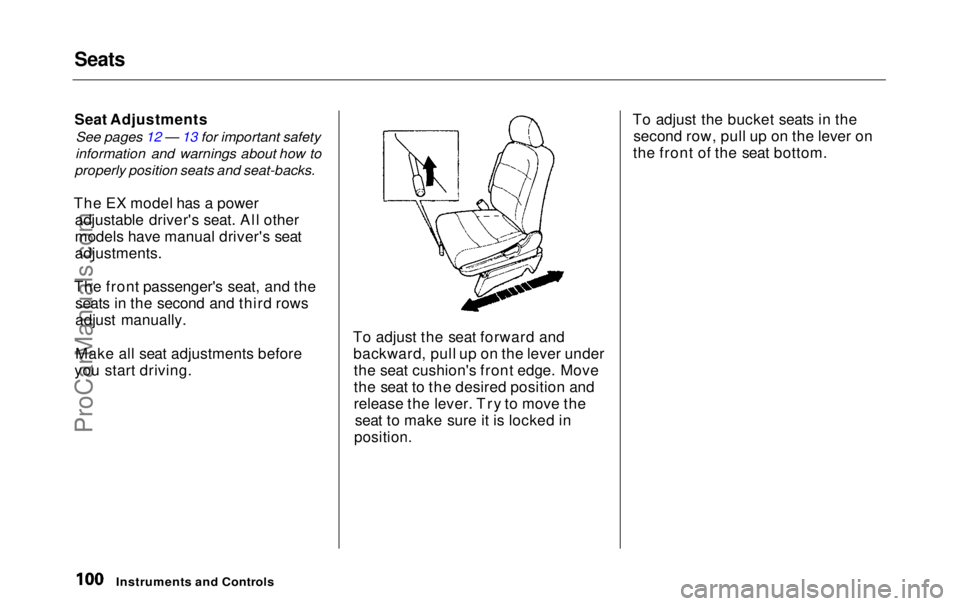
you start driving. To adjust the seat forward and
backward, pull up on the lever underthe seat cushion's front edge. Move
the seat to the desired position and
release the lever. Try to move the seat to make sure it is locked in
position.
To adjust the bucket seats in the
second row, pull up on the lever on
the front of the seat bottom.
Instruments and ControlsProCarManuals.comMain Menu Table of Contents s t
Page 106 of 343
Seats
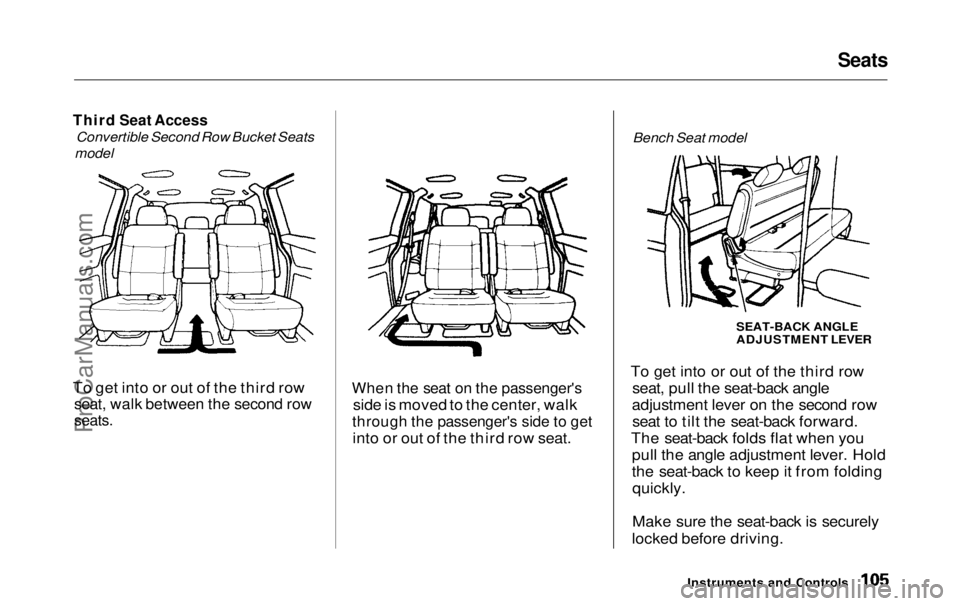
Third Seat Access
Convertible Second Row Bucket Seats
model
To get into or out of the third row
seat, walk between the second row
seats.
When the seat on the passenger's
side is moved to the center, walk
through the passenger's side to get
into or out of the third row seat. Bench Seat model
To get into or out of the third row seat, pull the seat-back angle
adjustment lever on the second row seat to tilt the seat-back forward.
The seat-back folds flat when you pull the angle adjustment lever. Hold
the seat-back to keep it from foldingquickly.
Make sure the seat-back is securely
locked before driving.
Instruments and ControlsSEAT-BACK ANGLE
ADJUSTMENT LEVERProCarManuals.comMain Menu Table of Contents s t
Page 127 of 343
Interior Lights
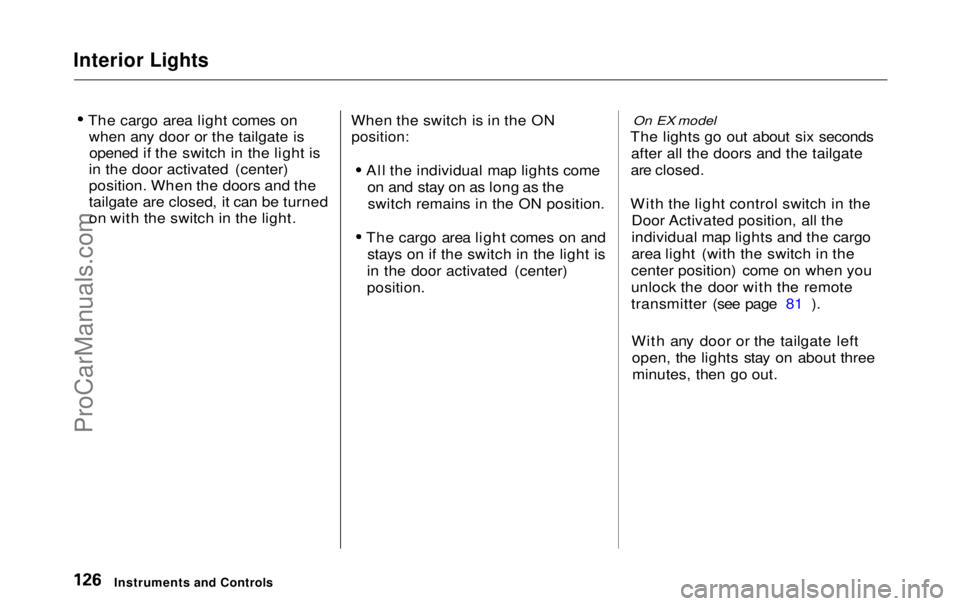
The cargo area light comes onwhen any door or the tailgate isopened if the switch in the light is
in the door activated (center)
position. When the doors and the
tailgate are closed, it can be turned
on with the switch in the light. When the switch is in the ON
position:
All the individual map lights comeon and stay on as long as theswitch remains in the ON position.
The cargo area light comes on and stays on if the switch in the light is
in the door activated (center)
position.
On EX model
The lights go out about six seconds after all the doors and the tailgate
are closed.
With the light control switch in the Door Activated position, all the
individual map lights and the cargo
area light (with the switch in the
center position) come on when you
unlock the door with the remote
transmitter (see page 81 ).
With any door or the tailgate leftopen, the lights stay on about threeminutes, then go out.
Instruments and ControlsProCarManuals.comMain Menu Table of Contents s t
Page 155 of 343
Audio System
Audio System LightingYou can use the instrument panelbrightness control knob to adjust theillumination of the audio system (see
page 67 ). The audio system
illuminates when the parking lightsare on, even if the radio is turned off.
Operating the Cassette Player
Turn the audio system ON. Make sure the tape opening on the cassette
is facing to the right, then insert the
cassette most of the way into the slot.
The system will pull it in the rest of the way, and begin to play.
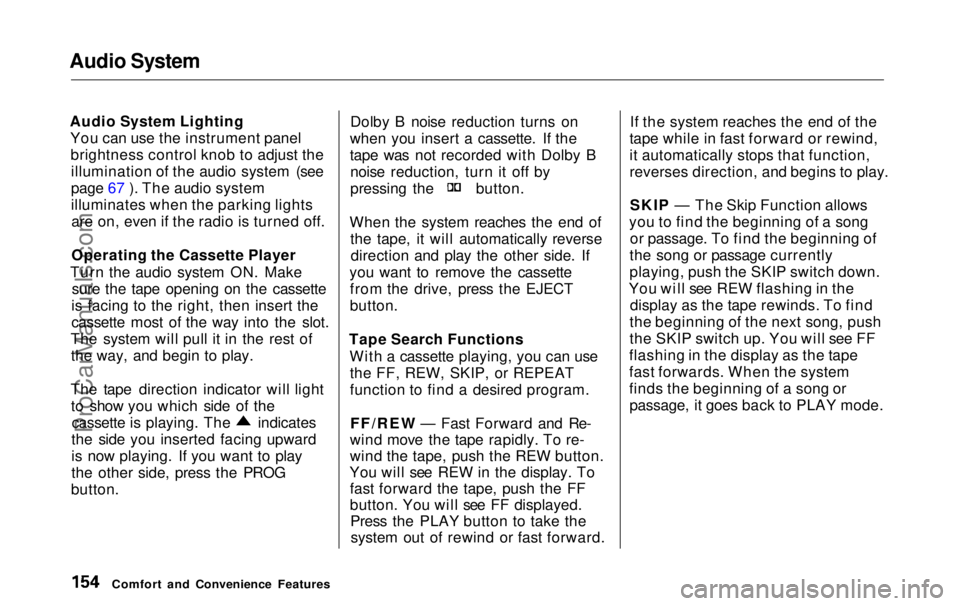
The tape direction indicator will light to show you which side of the cassette is playing. The indicates
the side you inserted facing upward
is now playing. If you want to play
the other side, press the PROG
button. Dolby B noise reduction turns on
when you insert a cassette. If the
tape was not recorded with Dolby B noise reduction, turn it off by pressing the button.
When the system reaches the end of the tape, it will automatically reversedirection and play the other side. If
you want to remove the cassette from the drive, press the EJECT
button.
Tape Search Functions With a cassette playing, you can usethe FF, REW, SKIP, or REPEAT
function to find a desired program.
FF/REW — Fast Forward and Re-
wind move the tape rapidly. To re-
wind the tape, push the REW button.
You will see REW in the display. To fast forward the tape, push the FF
button. You will see FF displayed.Press the PLAY button to take thesystem out of rewind or fast forward. If the system reaches the end of the
tape while in fast forward or rewind,
it automatically stops that function,
reverses direction, and begins to play.
SKIP — The Skip Function allows
you to find the beginning of a song or passage. To find the beginning of
the song or passage currently
playing, push the SKIP switch down.
You will see REW flashing in the display as the tape rewinds. To find
the beginning of the next song, push
the SKIP switch up. You will see FF
flashing in the display as the tape
fast forwards. When the system
finds the beginning of a song or passage, it goes back to PLAY mode.
Comfort and Convenience FeaturesProCarManuals.comMain Menu Table of Contents s t
Page 164 of 343
Audio System
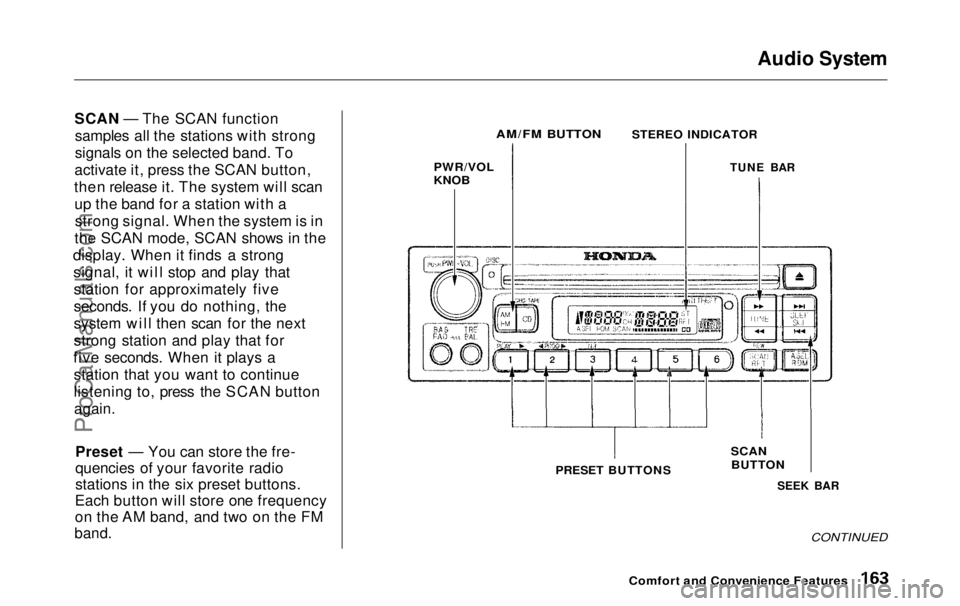
SCAN — The SCAN function samples all the stations with strong
signals on the selected band. To
activate it, press the SCAN button,
then release it. The system will scan up the band for a station with astrong signal. When the system is in
the SCAN mode, SCAN shows in the
display. When it finds a strong signal, it will stop and play thatstation for approximately five
seconds. If you do nothing, the
system will then scan for the next
strong station and play that for
five seconds. When it plays a station that you want to continue
listening to, press the SCAN button
again.
Preset — You can store the fre-
quencies of your favorite radio
stations in the six preset buttons.
Each button will store one frequency
on the AM band, and two on the FM
band.
PWR/VOL
KNOB
SEEK BAR
CONTINUED
Comfort and Convenience Features
SCAN
BUTTON
PRESET BUTTONS
AM/FM BUTTON
STEREO INDICATOR
TUNE BARProCarManuals.comMain Menu Table of Contents s t
Page 166 of 343
Audio System
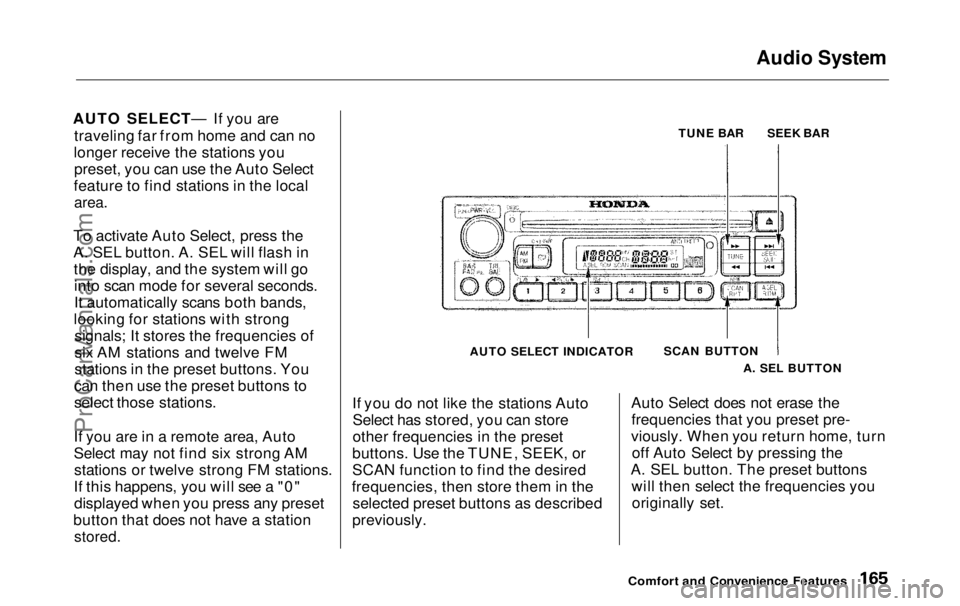
AUTO SELECT— If you are traveling far from home and can no
longer receive the stations you preset, you can use the Auto Select
feature to find stations in the local
area.
To activate Auto Select, press the
A. SEL button. A. SEL will flash in the display, and the system will gointo scan mode for several seconds.
It automatically scans both bands,
looking for stations with strong signals; It stores the frequencies of
six AM stations and twelve FM
stations in the preset buttons. You
can then use the preset buttons to
select those stations.
If you are in a remote area, Auto
Select may not find six strong AM stations or twelve strong FM stations.
If this happens, you will see a "0" displayed when you press any preset
button that does not have a station
stored.
TUNE BAR
AUTO SELECT INDICATOR SCAN BUTTON
If you do not like the stations Auto Select has stored, you can store
other frequencies in the preset
buttons. Use the TUNE, SEEK, or
SCAN function to find the desired
frequencies, then store them in the selected preset buttons as described
previously. Auto Select does not erase the
frequencies that you preset pre-
viously. When you return home, turn off Auto Select by pressing the
A. SEL button. The preset buttons will then select the frequencies youoriginally set.
Comfort and Convenience Features
A. SEL BUTTONSEEK BARProCarManuals.comMain Menu Table of Contents s t