dashboard HONDA ODYSSEY 1999 Owner's Manual
[x] Cancel search | Manufacturer: HONDA, Model Year: 1999, Model line: ODYSSEY, Model: HONDA ODYSSEY 1999Pages: 343, PDF Size: 3.73 MB
Page 133 of 343
Heating and Cooling
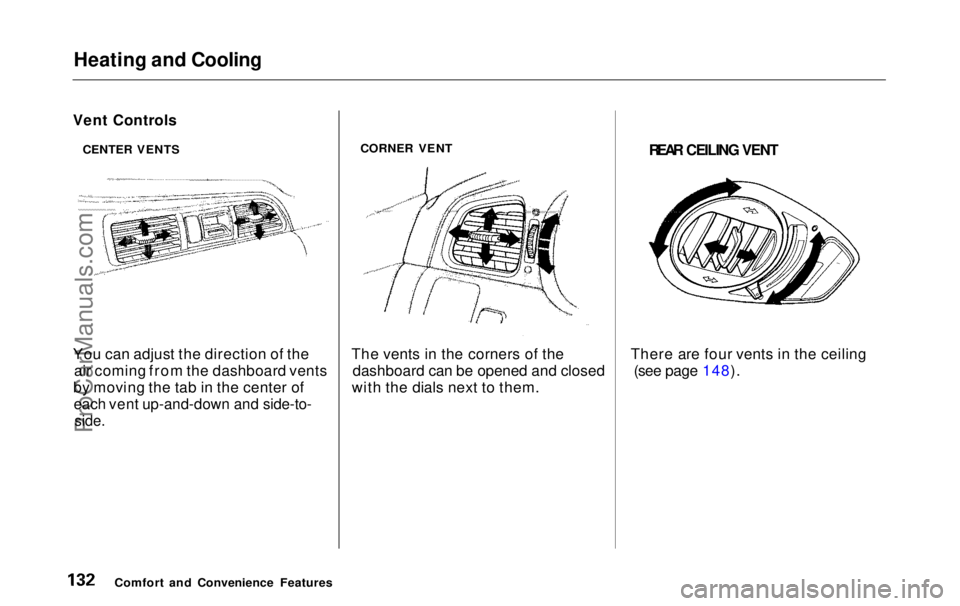
You can adjust the direction of the air coming from the dashboard vents
by moving the tab in the center of
each vent up-and-down and side-to-
side.
CORNER VENT
The vents in the corners of the dashboard can be opened and closed
with the dials next to them.
REAR CEILING VENT
There are four vents in the ceiling (see page 148).
Comfort and Convenience Features
Vent Controls
CENTER VENTSProCarManuals.comMain Menu Table of Contents s t
Page 139 of 343
Climate Control System
On EX model
The automatic climate control system in your Honda picks the
proper combination of air condi-
tioning, heating, and ventilation to maintain the interior temperature
you select. The system also adjusts the fan speed and air flow levels.
Your vehicle also has a rear A/C unit that allows the rear passengers toadjust the heating, cooling, and air
flow (see page 146).
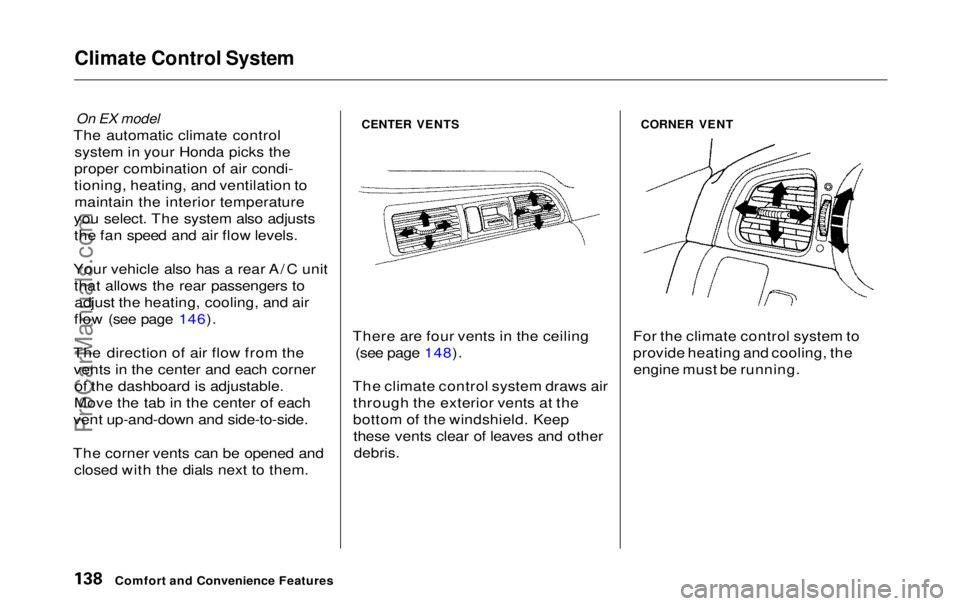
The direction of air flow from the vents in the center and each corner of the dashboard is adjustable.
Move the tab in the center of each
vent up-and-down and side-to-side.
The corner vents can be opened and closed with the dials next to them.
CENTER VENTS
There are four vents in the ceiling (see page 148).
The climate control system draws air through the exterior vents at the
bottom of the windshield. Keepthese vents clear of leaves and other
debris.
CORNER VENT
For the climate control system to
provide heating and cooling, the engine must be running.
Comfort and Convenience FeaturesProCarManuals.comMain Menu Table of Contents s t
Page 143 of 343
Climate Control System
Fan Control Dial
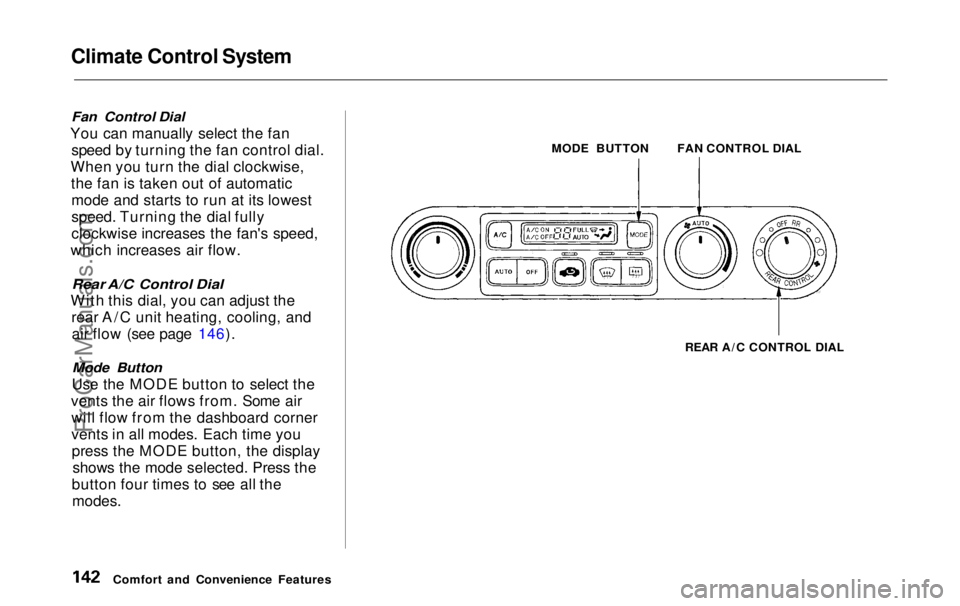
You can manually select the fan speed by turning the fan control dial.
When you turn the dial clockwise, the fan is taken out of automaticmode and starts to run at its lowest
speed. Turning the dial fully
clockwise increases the fan's speed,
which increases air flow.
Rear A/C Control Dial
With this dial, you can adjust the rear A/C unit heating, cooling, andair flow (see page 146).
Mode Button
Use the MODE button to select the
vents the air flows from. Some air will flow from the dashboard corner
vents in all modes. Each time youpress the MODE button, the display shows the mode selected. Press the
button four times to see all the
modes.
MODE BUTTON
REAR A/C CONTROL DIAL
Comfort and Convenience Features FAN CONTROL DIALProCarManuals.comMain Menu Table of Contents s t
Page 144 of 343
Climate Control System
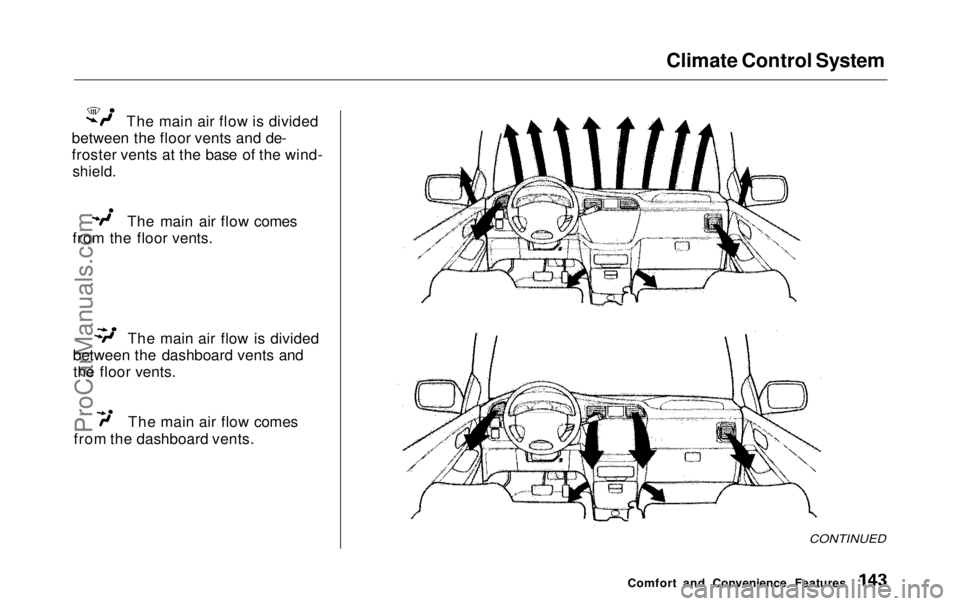
The main air flow is divided
between the floor vents and de-
froster vents at the base of the wind-
shield.
The main air flow comes
from the floor vents. The main air flow is divided
between the dashboard vents and the floor vents. The main air flow comes
from the dashboard vents.
CONTINUED
Comfort and Convenience FeaturesProCarManuals.comMain Menu Table of Contents s t
Page 145 of 343
Climate Control System
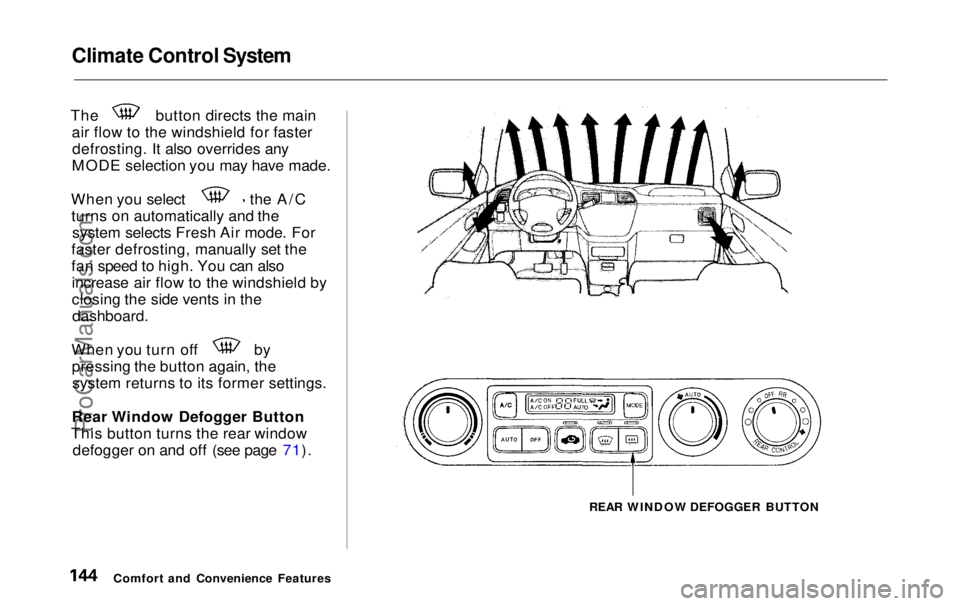
The button directs the main
air flow to the windshield for fasterdefrosting. It also overrides any
MODE selection you may have made. When you select the A/C
turns on automatically and the system selects Fresh Air mode. For
faster defrosting, manually set the
fan speed to high. You can also increase air flow to the windshield by
closing the side vents in the
dashboard.
When you turn off by
pressing the button again, thesystem returns to its former settings.
Rear Window Defogger Button
This button turns the rear window defogger on and off (see page 71).
REAR WINDOW DEFOGGER BUTTON
Comfort and Convenience FeaturesProCarManuals.comMain Menu Table of Contents s t
Page 146 of 343
Climate Control System
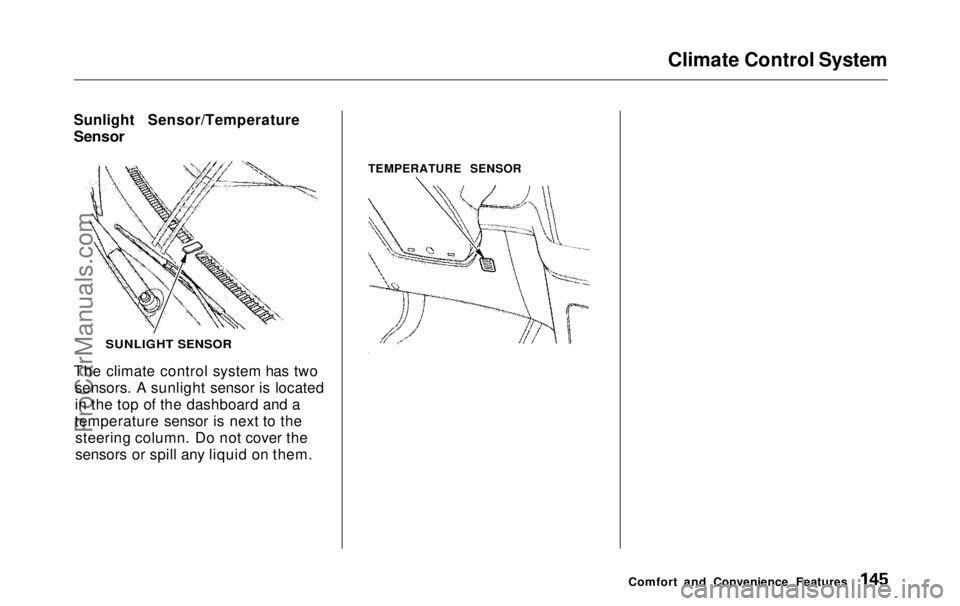
Sunlight Sensor/Temperature
Sensor
The climate control system has two sensors. A sunlight sensor is located
in the top of the dashboard and a
temperature sensor is next to the steering column. Do not cover the
sensors or spill any liquid on them. TEMPERATURE SENSOR
Comfort and Convenience Features
SUNLIGHT SENSORProCarManuals.comMain Menu Table of Contents s t
Page 185 of 343
Service Station Procedures
3. Remove the fuel fill cap slowly.
You may hear a hissing sound aspressure inside the tank escapes.Place the cap in the holder on the
fuel fill door.
4. Stop filling the tank after the fuel pump automatically clicks off. Donot try to "top off" the tank, leavesome room for the fuel to expand
with temperature changes.
5. Screw the fuel fill cap back on, tighten it until it clicks at least
three times. If you do not properly
tighten the cap, the MalfunctionIndicator Lamp may come on (see
page 303 ).
6. Push the fuel fill door closed until it latches.
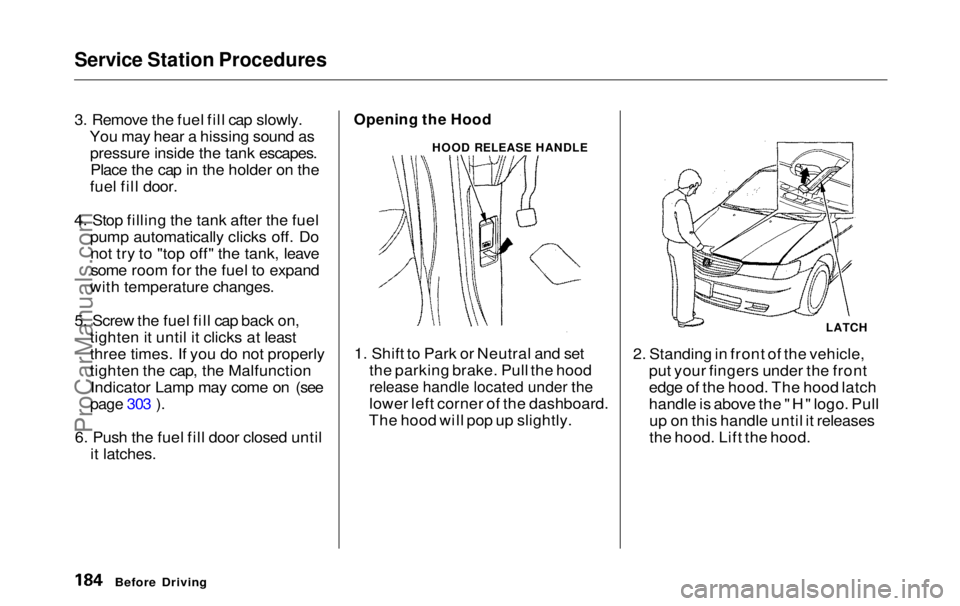
Opening the Hood
1. Shift to Park or Neutral and set the parking brake. Pull the hood
release handle located under the
lower left corner of the dashboard.
The hood will pop up slightly. 2. Standing in front of the vehicle,
put your fingers under the front
edge of the hood. The hood latch
handle is above the "H" logo. Pullup on this handle until it releases
the hood. Lift the hood.
Before Driving
HOOD RELEASE HANDLE
LATCHProCarManuals.comMain Menu Table of Contents s t
Page 191 of 343

Accessories and Modifications
Modifications
Do not remove any original
equipment or modify your vehicle in any way that would alter its design or
operation. This could make your
vehicle unsafe and illegal to drive.
For example, do not make any
modifications that would change the
ride height of your vehicle, or install
wheels and tires with a different overall diameter.
Such modifications can adversely affect handling, and interfere with
the operation of the vehicle's anti-
lock brakes and other systems. In addition, any modifications that
decrease ground clearance increase
the chance of undercarriage parts striking a curb, speed bump, or other
raised object, which could cause
your airbags to deploy.
Do not modify your steering wheelor any other part of your
Supplemental Restraint System.
Modifications could make thesystem ineffective. Additional Safety Precaution
Do not attach or place objects on the
airbag covers. Any object attached to
or placed on the covers marked "SRS
AIRBAG," in the center of the steering wheel and on top of the
dashboard, could interfere with the
proper operation of the airbags. Or,
if the airbags inflate, the objects could be propelled inside the vehicle
and hurt someone.
Before DrivingProCarManuals.comMain Menu Table of Contents s t
Page 304 of 343
Fuses
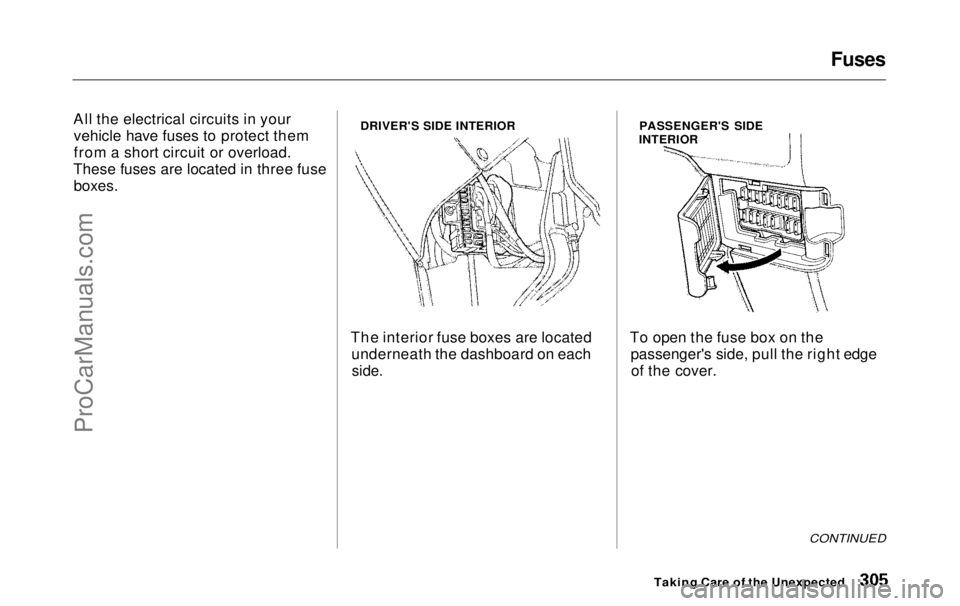
All the electrical circuits in your vehicle have fuses to protect them
from a short circuit or overload.
These fuses are located in three fuse
boxes.
DRIVER'S SIDE INTERIOR
The interior fuse boxes are located underneath the dashboard on each
side.
PASSENGER'S SIDE
INTERIOR
To open the fuse box on the passenger's side, pull the right edgeof the cover.
CONTINUED
Taking Care of the UnexpectedProCarManuals.comMain Menu Table of Contents s t
Page 313 of 343
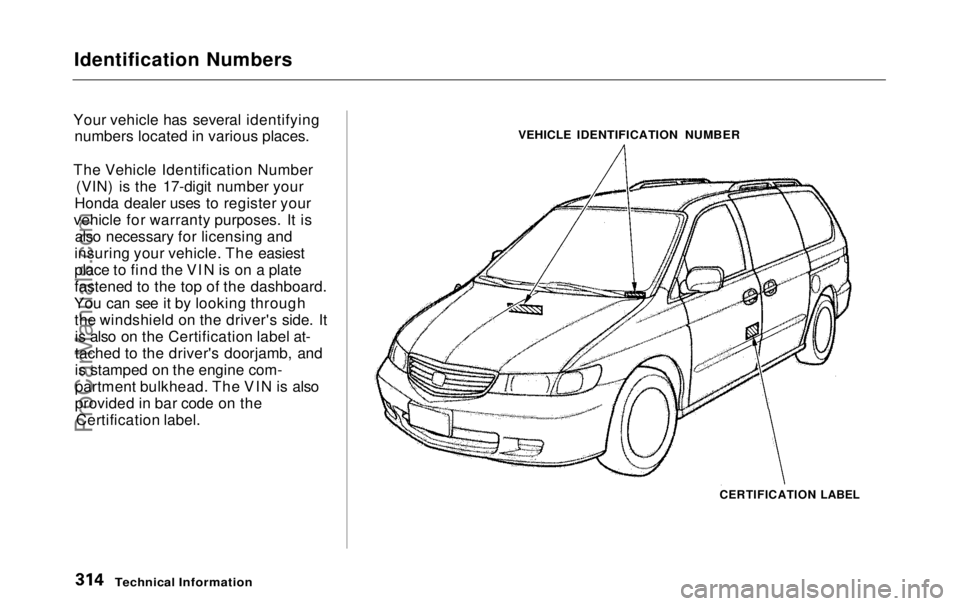
Identification Numbers
Your vehicle has several identifying numbers located in various places.
The Vehicle Identification Number (VIN) is the 17-digit number your
Honda dealer uses to register your
vehicle for warranty purposes. It is also necessary for licensing and
insuring your vehicle. The easiest
place to find the VIN is on a plate
fastened to the top of the dashboard.
You can see it by looking through the windshield on the driver's side. Itis also on the Certification label at-
tached to the driver's doorjamb, and
is stamped on the engine com-
partment bulkhead. The VIN is also
provided in bar code on the Certification label. VEHICLE IDENTIFICATION NUMBER
CERTIFICATION LABEL
Technical InformationProCarManuals.comMain Menu Table of Contents s t