dashboard HONDA ODYSSEY 1999 User Guide
[x] Cancel search | Manufacturer: HONDA, Model Year: 1999, Model line: ODYSSEY, Model: HONDA ODYSSEY 1999Pages: 343, PDF Size: 3.73 MB
Page 49 of 343
Additional Information About Your SRS
SRS Components
Your Supplemental Restraint System (SRS) includes: Two front airbags. The driver's
airbag is stored in the center of
the steering wheel; the front
passenger's airbag is stored in thedashboard. Both are marked "SRS
AIRBAG." Automatic seat belt tensioners
that tighten the front seat beltsduring a moderate to severe
frontal collision. Sensors that can detect a
moderate to severe frontal
collision.
A sophisticated electronic system
that continually monitors the sensors, control unit, the airbag
activators, and all related wiring
when the ignition is ON (II). An indicator light on the
instrument panel that alerts you toa possible problem with the
system (see page 50). Emergency backup power in case
your vehicle's electrical system is
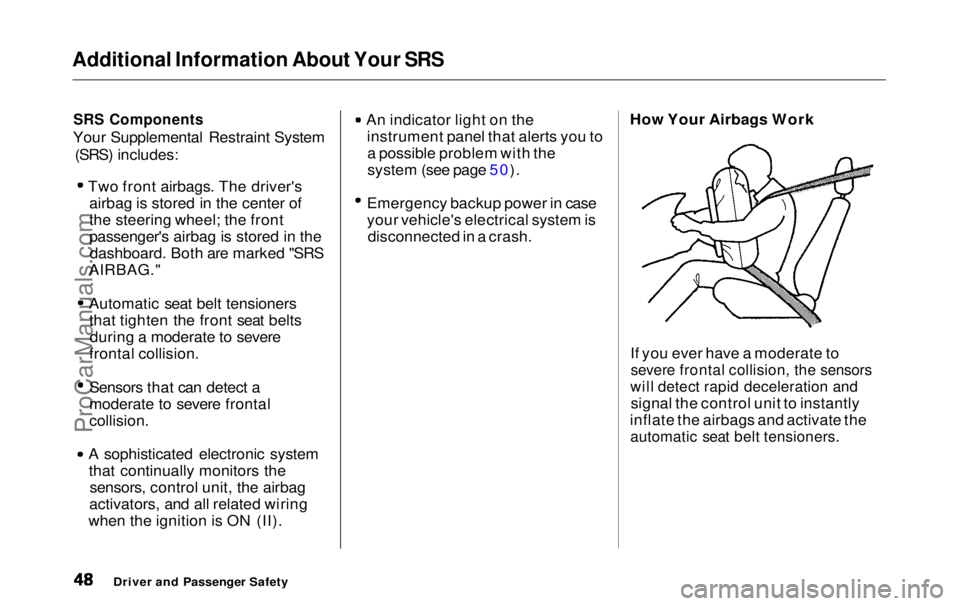
disconnected in a crash. How Your Airbags Work
If you ever have a moderate to
severe frontal collision, the sensors
will detect rapid deceleration and
signal the control unit to instantly
inflate the airbags and activate the
automatic seat belt tensioners.
Driver and Passenger SafetyProCarManuals.comMain Menu Table of Contents s t
Page 61 of 343
Indicator Lights
Power Sliding Door
Indicator
EX model only
This indicator comes on for a few
seconds when you turn the ignition
switch ON (II). If it comes on at anyother time, there is a problem in the
power sliding door system. With this
light on, move the main switch on
the dashboard to the OFF position, and have the system checked by
your Honda dealer as soon as possible. You can still open or closeeach sliding door manually. For
more information on the power
sliding doors, see page 90 . Turn Signal and
Hazard WarningIndicators
The left or right turn signal light blinks when you signal a lane changeor turn. If the light does not blink or
blinks rapidly, it usually means one of the turn signal bulbs is burned out (see page 267). Replace the bulb as
soon as possible, since other drivers
cannot see that you are signalling.
When you turn on the Hazard
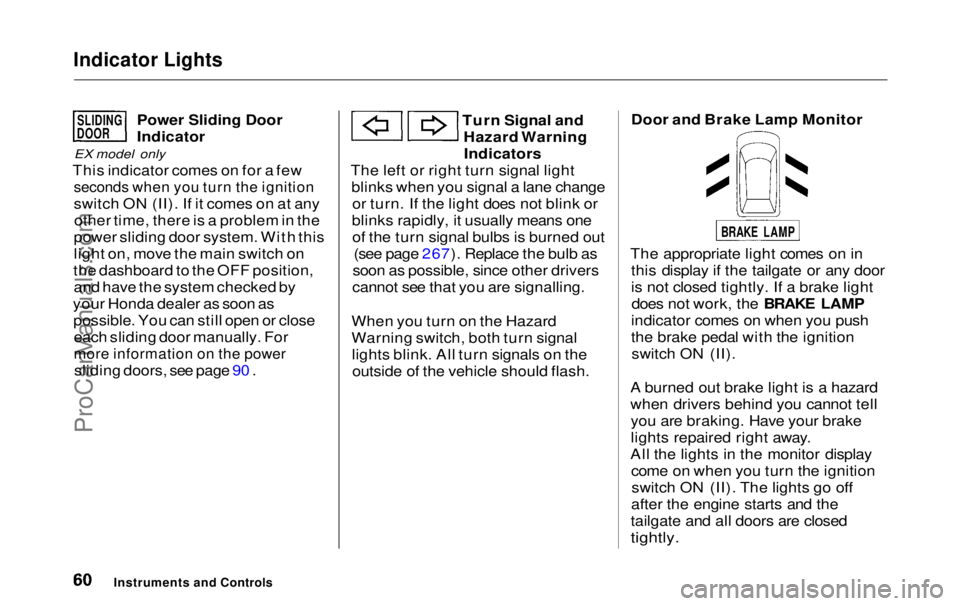
Warning switch, both turn signal lights blink. All turn signals on theoutside of the vehicle should flash. Door and Brake Lamp Monitor
The appropriate light comes on in this display if the tailgate or any door
is not closed tightly. If a brake lightdoes not work, the BRAKE LAMP
indicator comes on when you push
the brake pedal with the ignition switch ON (II).
A burned out brake light is a hazard
when drivers behind you cannot tell you are braking. Have your brake
lights repaired right away.
All the lights in the monitor display come on when you turn the ignitionswitch ON (II). The lights go off
after the engine starts and the
tailgate and all doors are closed
tightly.
Instruments and Controls
SLIDING
DOOR
BRAKE LAMPProCarManuals.comMain Menu Table of Contents s t
Page 83 of 343
Keys and Locks
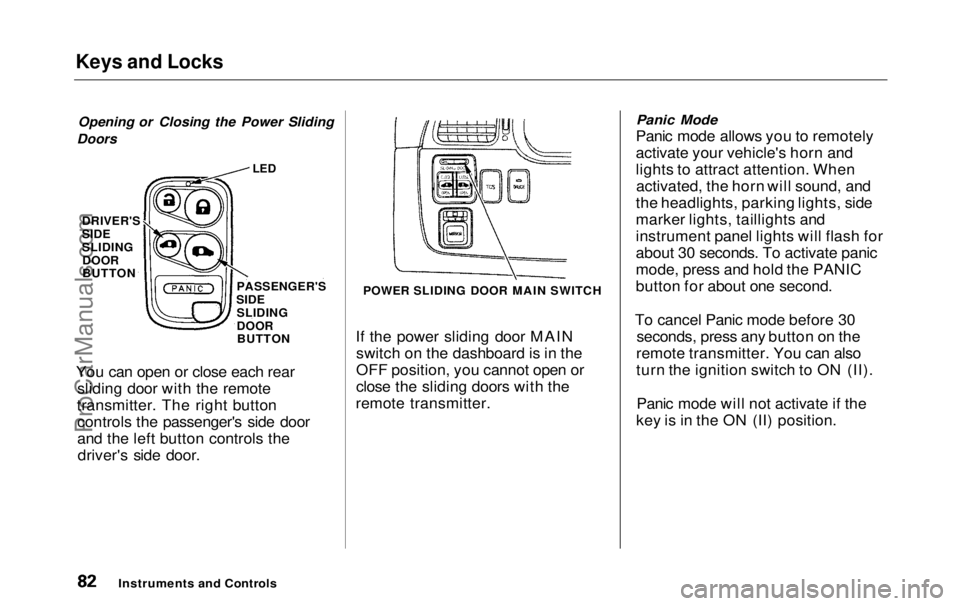
Opening or Closing the Power Sliding
Doors
If the power sliding door MAINswitch on the dashboard is in the
OFF position, you cannot open or
close the sliding doors with the
remote transmitter.
Panic Mode
Panic mode allows you to remotely
activate your vehicle's horn and
lights to attract attention. When activated, the horn will sound, and
the headlights, parking lights, side
marker lights, taillights and
instrument panel lights will flash for
about 30 seconds. To activate panic
mode, press and hold the PANIC
button for about one second.
To cancel Panic mode before 30 seconds, press any button on the
remote transmitter. You can also
turn the ignition switch to ON (II).
Panic mode will not activate if the
key is in the ON (II) position.
Instruments and Controls
You can open or close each rear
sliding door with the remote
transmitter. The right button controls the passenger's side door
and the left button controls thedriver's side door.
LED
PASSENGER'S
SIDE SLIDING
DOORBUTTON
DRIVER'S
SIDE
SLIDING
DOOR
BUTTON
POWER SLIDING DOOR MAIN SWITCHProCarManuals.comMain Menu Table of Contents s t
Page 89 of 343
Sliding Doors
Your Honda is equipped with dual sliding doors. The doors on the LX
model are manually operated. The EX model's doors are electrically-
powered and can be operated with
the remote transmitter, the door
handles, or the switches on the dashboard.
Be sure all passengers are clear of
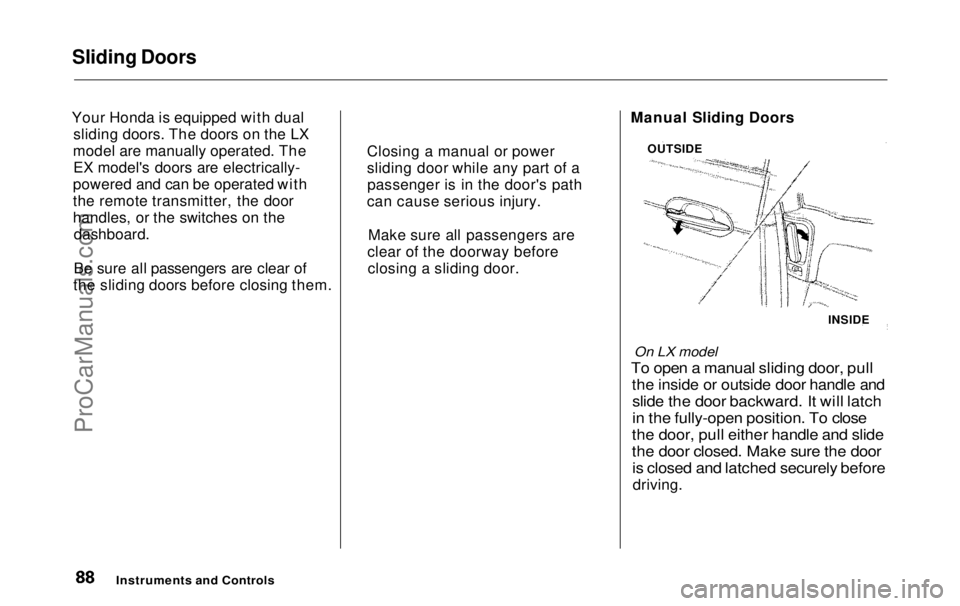
the sliding doors before closing them. Manual Sliding Doors
On LX model
To open a manual sliding door, pull
the inside or outside door handle and
slide the door backward. It will latch
in the fully-open position. To close
the door, pull either handle and slide
the door closed. Make sure the door
is closed and latched securely before
driving.
Instruments and Controls
OUTSIDE
INSIDE
Closing a manual or power
sliding door while any part of a
passenger is in the door's path
can cause serious injury.
Make sure all passengers are
clear of the doorway before closing a sliding door.ProCarManuals.comMain Menu Table of Contents s t
Page 91 of 343
Sliding Doors
Power Sliding Doors
On EX model
The sliding doors on your vehicle are electrically-powered. You can openor close each power sliding door with
the switches on the dashboard, with
the inside or outside door handles, or
with the remote transmitter. The power sliding doors operate
with the ignition switch in anyposition. In addition: The shift lever must be in Park.
The MAIN switch on the
dashboard must be in the ON
position.
The sliding door you want to
operate must be unlocked. To open the door with the inside
handle, the childproof door lockon the door you want to operate
must be unlocked (see page 85).
You should close each sliding door before you start driving.
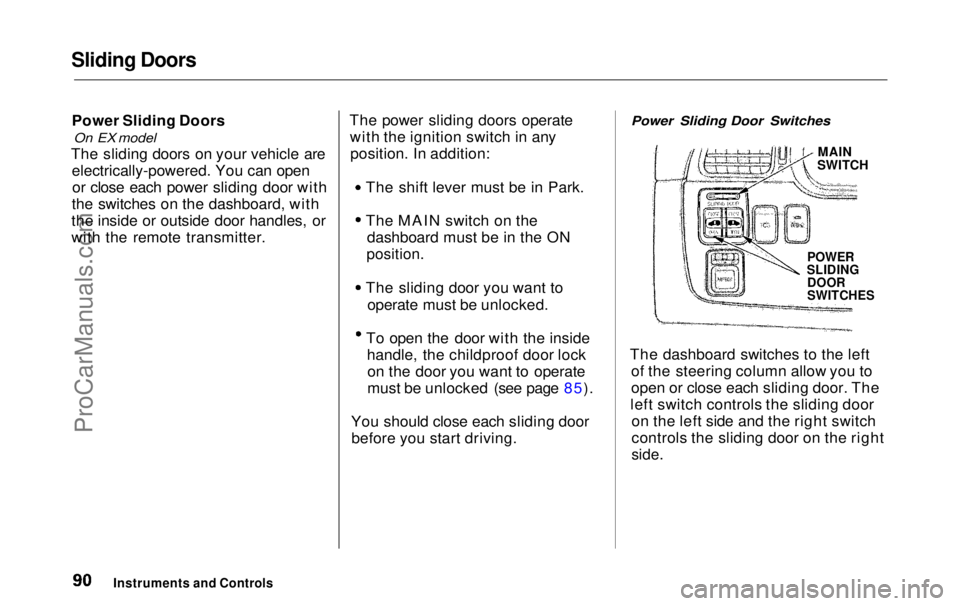
Power Sliding Door Switches
MAIN
SWITCH
POWER
SLIDING
DOOR
SWITCHES
The dashboard switches to the left of the steering column allow you to
open or close each sliding door. The
left switch controls the sliding door on the left side and the right switch
controls the sliding door on the right
side.
Instruments and ControlsProCarManuals.comMain Menu Table of Contents s t
Page 92 of 343
Sliding Doors
To close a sliding door, push the top of the appropriate switch, thenrelease it. To open the door, push
and release the bottom of the switch.
The MAIN switch on the dashboard controls door operation. With theMAIN switch off, automatic
operation with the power sliding
door switches, the door handles, and
the remote transmitter is disabled.
When the MAIN switch is off, you can operate each sliding door
manually. To open or close a door,
pull the inside or outside door handle and slide the door.
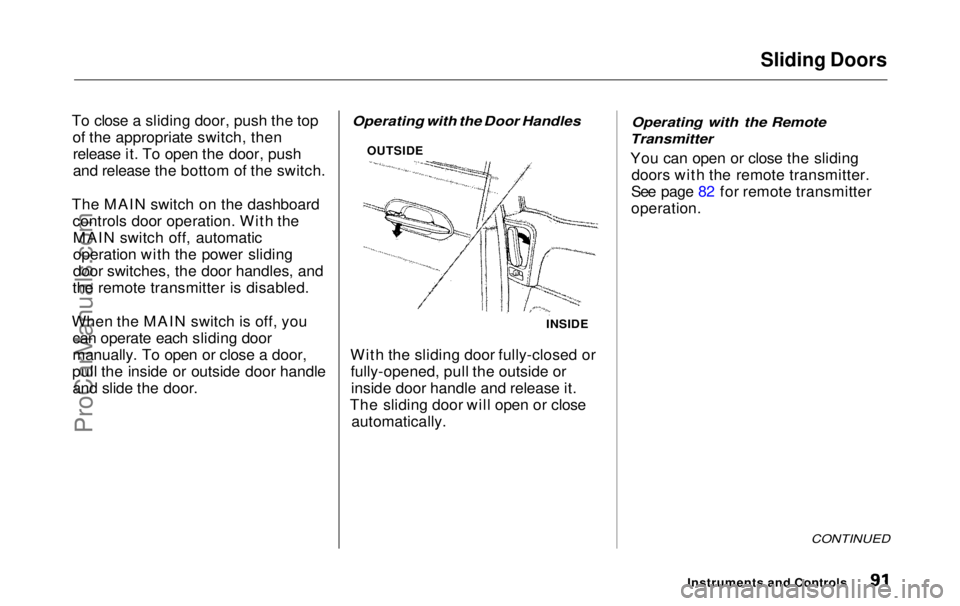
Operating with the Door Handles
With the sliding door fully-closed or fully-opened, pull the outside orinside door handle and release it.
The sliding door will open or close automatically.
Operating with the Remote
Transmitter
You can open or close the sliding doors with the remote transmitter.
See page 82 for remote transmitter
operation.
CONTINUED
Instruments and Controls
INSIDE
OUTSIDEProCarManuals.comMain Menu Table of Contents s t
Page 93 of 343
Sliding Doors
Stopping Power Sliding Door
Movement
To stop automatic operation: Push either side of the dashboard
power sliding door switch for the moving door. Push the button on the remote
transmitter for the moving door. If
you push the same button a second time, the door reverses
direction.
When you stop automatic operation with the dashboard
switch or the remote transmitter,
you will hear three beeps. If you try to open a locked sliding
door with the power sliding door
switch or the remote transmitter,
you will hear three beeps. Unlock the door, then try again.
If you shift out of Park while a door
is opening, you will hear a
continuous tone and the door willstop moving. If you keep driving with
the door open, the tone continues
until you stop and close the door.
If you shift out of Park while a door
is closing, the door will close
completely. You will hear a beep
until the door is completely closed. When parked on steep hills, the
power sliding doors may not open or
close as they do normally.
If a power sliding door runs into any
obstacle while it is closing, the doorwill stop, and then reverse direction.
You will hear three beeps.
Even with this safety feature, you
should still check that all passengers
and objects are away from the sliding
doors before closing them as this
feature stops working when the door is almost closed.
Instruments and ControlsProCarManuals.comMain Menu Table of Contents s t
Page 94 of 343
Sliding Doors
Before refueling, make sure the driver's side sliding door is fully
closed. When you release the fuel fill
door with the handle, the sliding door automatically locks so it cannot
be opened and interfere with the fuel fill door. After you close the fuel filldoor, the sliding door does not
automatically unlock; you must
unlock it manually.
When you drive with children in your vehicle, use the childproof doorlocks. This will prevent children
from opening the doors accidentally (see page 85).
How to Reset the Power Sliding
Doors
If your vehicle's battery is disconnected or goes dead while the
sliding doors are open, the power
sliding door system needs to besynchronized. After reconnecting
the battery: Close each sliding door completely
by hand; or Move the MAIN switch on the
dashboard to the ON position.
Push and hold the upper side of
each door switch until each sliding
door closes completely.
If the power sliding doors are closed,
the system will reset itself automatically once the battery has
been reconnected. If the power sliding doors do not
operate properly after resetting,
have your vehicle checked by a Honda dealer.
CONTINUED
Instruments and ControlsProCarManuals.comMain Menu Table of Contents s t
Page 116 of 343
Mirrors
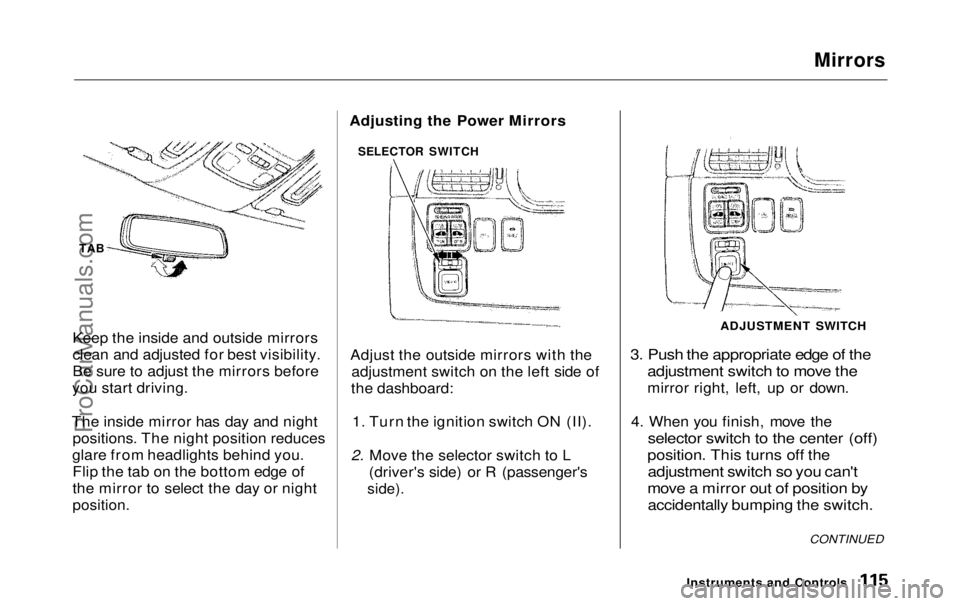
TAB
Keep the inside and outside mirrors
clean and adjusted for best visibility.
Be sure to adjust the mirrors before
you start driving.
The inside mirror has day and night positions. The night position reduces
glare from headlights behind you. Flip the tab on the bottom edge of
the mirror to select the day or night
position.
Adjust the outside mirrors with the
adjustment switch on the left side of
the dashboard:
1. Turn the ignition switch ON (II).
2. Move the selector switch to L (driver's side) or R (passenger's
side).
3. Push the appropriate edge of the
adjustment switch to move the
mirror right, left, up or down.
4. When you finish, move the
selector switch to the center (off)
position. This turns off the
adjustment switch so you can't
move a mirror out of position by
accidentally bumping the switch.
Instruments and Controls
SELECTOR SWITCH
ADJUSTMENT SWITCH
CONTINUED
Adjusting the Power MirrorsProCarManuals.comMain Menu Table of Contents s t
Page 132 of 343
Heating and Cooling
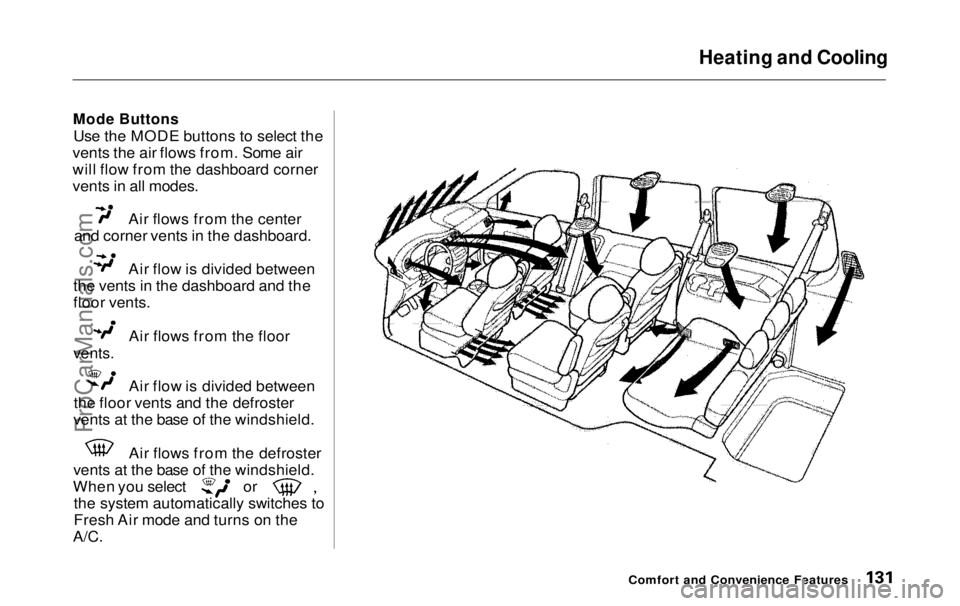
Mode Buttons
Use the MODE buttons to select the
vents the air flows from. Some air
will flow from the dashboard corner
vents in all modes. Air flows from the center
and corner vents in the dashboard. Air flow is divided between
the vents in the dashboard and the
floor vents. Air flows from the floor
vents.
Air flow is divided between
the floor vents and the defroster
vents at the base of the windshield. Air flows from the defroster
vents at the base of the windshield. When you select or
the system automatically switches to
Fresh Air mode and turns on the
A/C.
Comfort and Convenience FeaturesProCarManuals.comMain Menu Table of Contents s t