light HONDA ODYSSEY 1999 Workshop Manual
[x] Cancel search | Manufacturer: HONDA, Model Year: 1999, Model line: ODYSSEY, Model: HONDA ODYSSEY 1999Pages: 343, PDF Size: 3.73 MB
Page 130 of 343
Comfort and Convenience Features
The heating and air conditioning systems in your Honda provide a
comfortable driving environment in
all weather conditions.
The standard audio system has many features. This section de-scribes those features and how to
use them. (If you selected an optional audio system, refer to the
operating instructions that came
with it.)
On EX model
Your Honda has an anti-theft audio
system that requires a code number
to enable it.
Heating and Cooling...................... 130
What Each Control Does.......... 130How to Use the System............. 133
To Turn Everything Off........... 137
Climate Control System ................138 Fully-automatic Operation........ 140
Semi-automatic Operation........ 141
Sunlight Sensor/Temperature Sensor............. 145
Rear A/C Unit............................ 146
Audio System (LX)........................ 149 AM/FM/Cassette StereoAudio System......................... 149
Operating the Radio.................. 150
Adjusting the Sound.................. 153
Audio System Lighting............. 154
Operating the Cassette Player...................................... 154
Tape Search Functions............. 154 Operating the Optional CD Player/Changer..................... 157
CD Changer Error
Indications.............................. 160
Audio System (EX)........................ 161
AM/FM/CD Audio System..... 161
Operating the Radio.................. 162
Adjusting the Sound.................. 166
Audio System Lighting............. 167 Radio Frequencies..................... 167
Radio Reception......................... 167Operating the CD Player.......... 169
Operating the CD Changer...... 171
Protecting Compact Discs........ 172 CD Player Error Indications..... 173
CD Changer Error
Indications.............................. 174
Operating the Cassette Player...................................... 175
Tape Search Functions............. 176 Caring for the Cassette Player...................................... 178
Remote Audio Controls ............ 179
Theft Protection........................ 180
Comfort and Convenience FeaturesProCarManuals.comMain Menu s t
Page 131 of 343
Heating and Cooling
On LX model
Proper use of the Heating and Cooling system can make the
interior dry and comfortable, and
keep the windows clear for best
visibility.
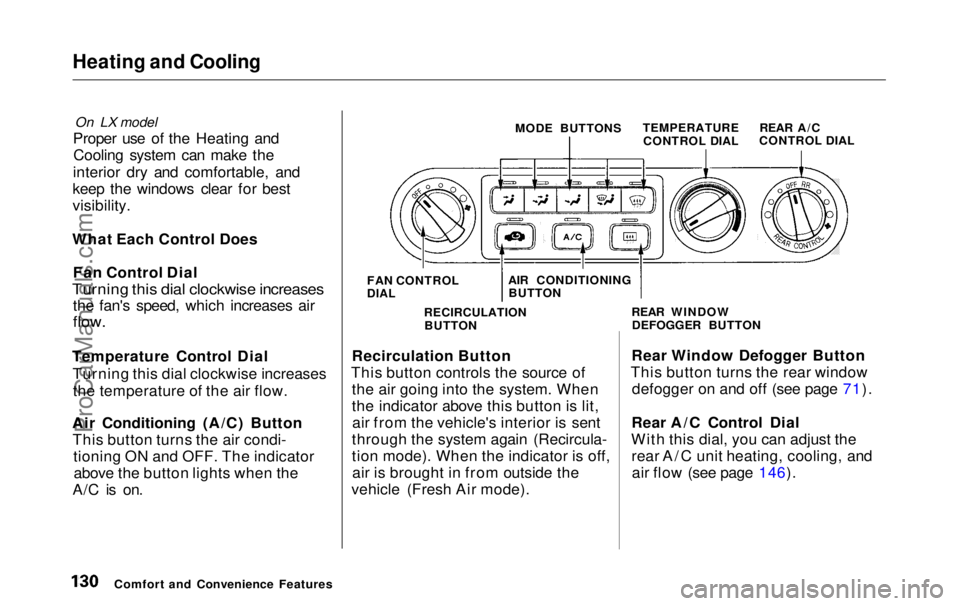
What Each Control Does Fan Control Dial
Turning this dial clockwise increases
the fan's speed, which increases air
flow.
Temperature Control Dial Turning this dial clockwise increasesthe temperature of the air flow.
Air Conditioning (A/C) Button This button turns the air condi- tioning ON and OFF. The indicatorabove the button lights when the
A/C is on. MODE BUTTONS
TEMPERATURE
CONTROL DIAL
Recirculation Button
This button controls the source of the air going into the system. When
the indicator above this button is lit,air from the vehicle's interior is sent
through the system again (Recircula-
tion mode). When the indicator is off, air is brought in from outside the
vehicle (Fresh Air mode). Rear Window Defogger Button
This button turns the rear window defogger on and off (see page 71).
Rear A/C Control Dial
With this dial, you can adjust the rear A/C unit heating, cooling, andair flow (see page 146).
Comfort and Convenience Features FAN CONTROL
DIAL
AIR CONDITIONING
BUTTON
RECIRCULATION BUTTON REAR WINDOW
DEFOGGER BUTTON REAR A/C
CONTROL DIALProCarManuals.comMain Menu Table of Contents s t
Page 135 of 343
Heating and Cooling
To Cool with A/C
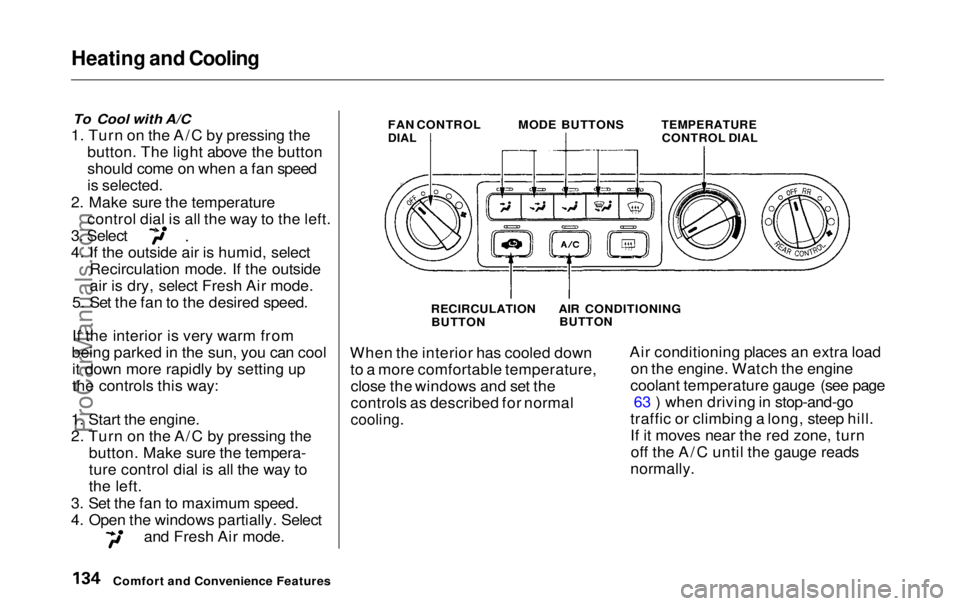
1. Turn on the A/C by pressing the button. The light above the button
should come on when a fan speed
is selected.
2. Make sure the temperature control dial is all the way to the left. 3. Select
4. If the outside air is humid, select
Recirculation mode. If the outside
air is dry, select Fresh Air mode.
5. Set the fan to the desired speed.
If the interior is very warm from
being parked in the sun, you can cool it down more rapidly by setting up
the controls this way:
1. Start the engine.
2. Turn on the A/C by pressing the button. Make sure the tempera-
ture control dial is all the way to
the left.
3. Set the fan to maximum speed.
4. Open the windows partially. Select and Fresh Air mode. FAN CONTROL
DIAL
MODE BUTTONS
TEMPERATURE
CONTROL DIAL
RECIRCULATION BUTTON
When the interior has cooled down to a more comfortable temperature,close the windows and set the
controls as described for normal
cooling.
Air conditioning places an extra load
on the engine. Watch the engine
coolant temperature gauge (see page 63 ) when driving in stop-and-go
traffic or climbing a long, steep hill.
If it moves near the red zone, turn off the A/C until the gauge reads
normally.
Comfort and Convenience Features AIR CONDITIONING
BUTTONProCarManuals.comMain Menu Table of Contents s t
Page 141 of 343
Climate Control System
Fully-automatic Operation
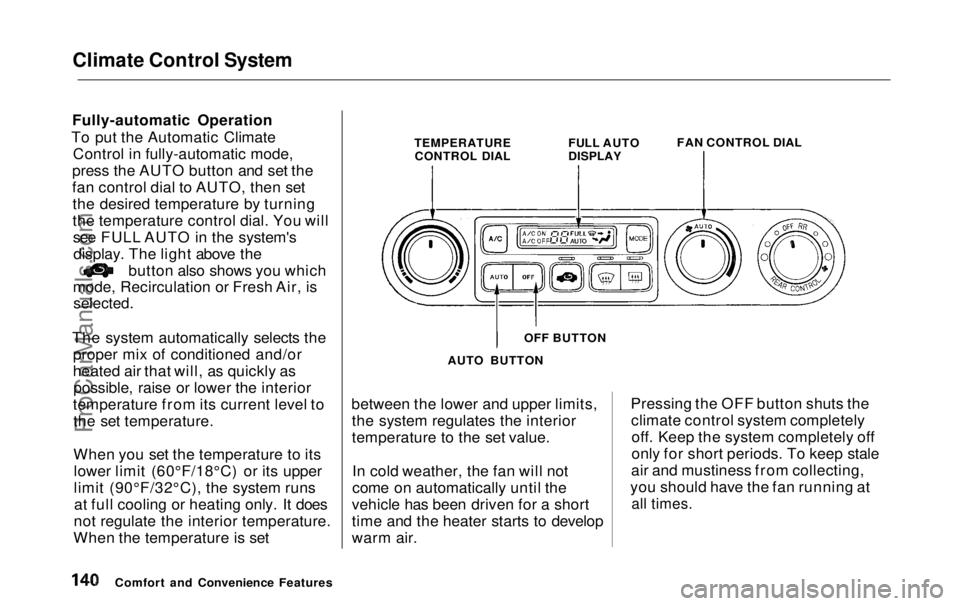
To put the Automatic Climate Control in fully-automatic mode,
press the AUTO button and set the
fan control dial to AUTO, then set the desired temperature by turning
the temperature control dial. You willsee FULL AUTO in the system'sdisplay. The light above the button also shows you which
mode, Recirculation or Fresh Air, is
selected.
The system automatically selects the proper mix of conditioned and/or
heated air that will, as quickly aspossible, raise or lower the interior
temperature from its current level to the set temperature.
When you set the temperature to itslower limit (60°F/18°C) or its upper
limit (90°F/32°C), the system runsat full cooling or heating only. It does
not regulate the interior temperature.
When the temperature is set between the lower and upper limits,
the system regulates the interior
temperature to the set value.
In cold weather, the fan will not
come on automatically until the
vehicle has been driven for a short
time and the heater starts to develop
warm air. Pressing the OFF button shuts the
climate control system completelyoff. Keep the system completely off
only for short periods. To keep stale
air and mustiness from collecting,
you should have the fan running at
all times.
Comfort and Convenience Features TEMPERATURE
CONTROL DIAL FULL AUTO
DISPLAY
FAN CONTROL DIAL
OFF BUTTON
AUTO BUTTONProCarManuals.comMain Menu Table of Contents s t
Page 146 of 343
Climate Control System
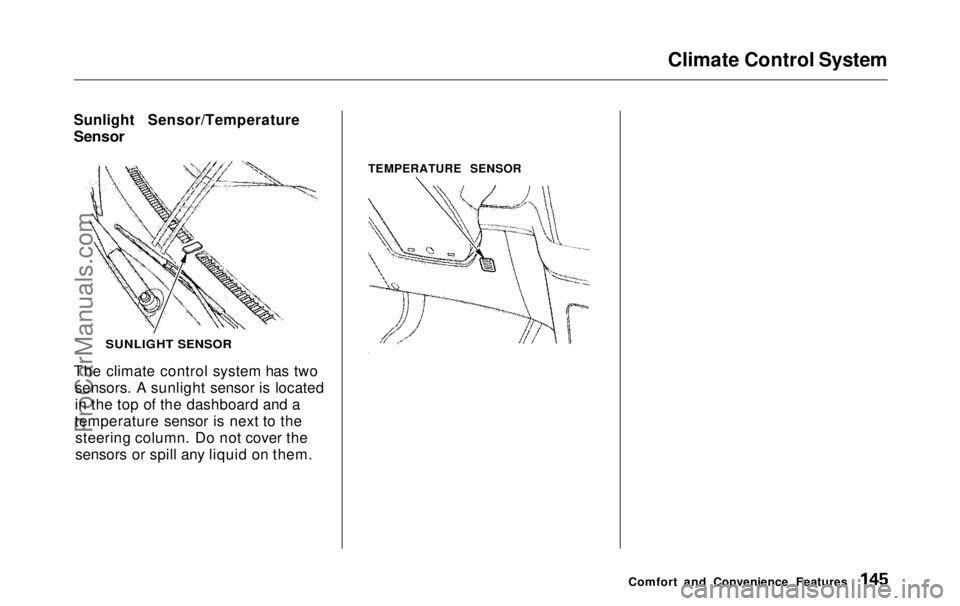
Sunlight Sensor/Temperature
Sensor
The climate control system has two sensors. A sunlight sensor is located
in the top of the dashboard and a
temperature sensor is next to the steering column. Do not cover the
sensors or spill any liquid on them. TEMPERATURE SENSOR
Comfort and Convenience Features
SUNLIGHT SENSORProCarManuals.comMain Menu Table of Contents s t
Page 154 of 343
Audio System
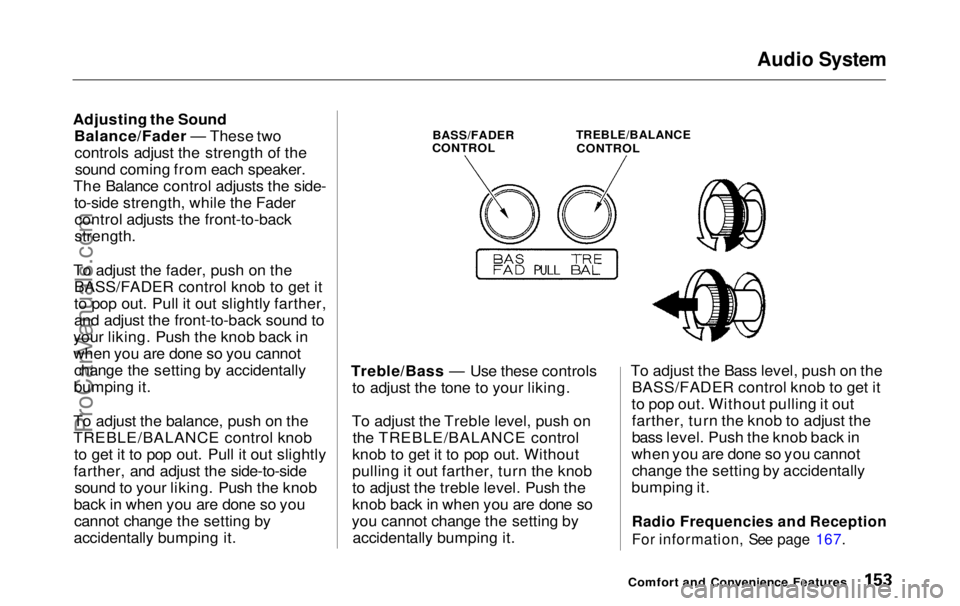
Adjusting the Sound Balance/Fader — These twocontrols adjust the strength of thesound coming from each speaker.
The Balance control adjusts the side- to-side strength, while the Fadercontrol adjusts the front-to-back
strength.
To adjust the fader, push on the BASS/FADER control knob to get it
to pop out. Pull it out slightly farther,
and adjust the front-to-back sound to
your liking. Push the knob back in
when you are done so you cannot change the setting by accidentally
bumping it.
To adjust the balance, push on the
TREBLE/BALANCE control knob to get it to pop out. Pull it out slightly
farther, and adjust the side-to-side sound to your liking. Push the knob
back in when you are done so you cannot change the setting by
accidentally bumping it.
BASS/FADER
CONTROL
TREBLE/BALANCE
CONTROL
Treble/Bass — Use these controls to adjust the tone to your liking.
To adjust the Treble level, push on the TREBLE/BALANCE control
knob to get it to pop out. Without
pulling it out farther, turn the knob
to adjust the treble level. Push the
knob back in when you are done so
you cannot change the setting by accidentally bumping it. To adjust the Bass level, push on the
BASS/FADER control knob to get it
to pop out. Without pulling it out farther, turn the knob to adjust the
bass level. Push the knob back in
when you are done so you cannot change the setting by accidentally
bumping it.
Radio Frequencies and Reception
For information, See page 167.
Comfort and Convenience FeaturesProCarManuals.comMain Menu Table of Contents s t
Page 155 of 343
Audio System
Audio System LightingYou can use the instrument panelbrightness control knob to adjust theillumination of the audio system (see
page 67 ). The audio system
illuminates when the parking lightsare on, even if the radio is turned off.
Operating the Cassette Player
Turn the audio system ON. Make sure the tape opening on the cassette
is facing to the right, then insert the
cassette most of the way into the slot.
The system will pull it in the rest of the way, and begin to play.
The tape direction indicator will light to show you which side of the cassette is playing. The indicates
the side you inserted facing upward
is now playing. If you want to play
the other side, press the PROG
button. Dolby B noise reduction turns on
when you insert a cassette. If the
tape was not recorded with Dolby B noise reduction, turn it off by pressing the button.
When the system reaches the end of the tape, it will automatically reversedirection and play the other side. If
you want to remove the cassette from the drive, press the EJECT
button.
Tape Search Functions With a cassette playing, you can usethe FF, REW, SKIP, or REPEAT
function to find a desired program.
FF/REW — Fast Forward and Re-
wind move the tape rapidly. To re-
wind the tape, push the REW button.
You will see REW in the display. To fast forward the tape, push the FF
button. You will see FF displayed.Press the PLAY button to take thesystem out of rewind or fast forward. If the system reaches the end of the
tape while in fast forward or rewind,
it automatically stops that function,
reverses direction, and begins to play.
SKIP — The Skip Function allows
you to find the beginning of a song or passage. To find the beginning of
the song or passage currently
playing, push the SKIP switch down.
You will see REW flashing in the display as the tape rewinds. To find
the beginning of the next song, push
the SKIP switch up. You will see FF
flashing in the display as the tape
fast forwards. When the system
finds the beginning of a song or passage, it goes back to PLAY mode.
Comfort and Convenience FeaturesProCarManuals.comMain Menu Table of Contents s t
Page 167 of 343
Audio System
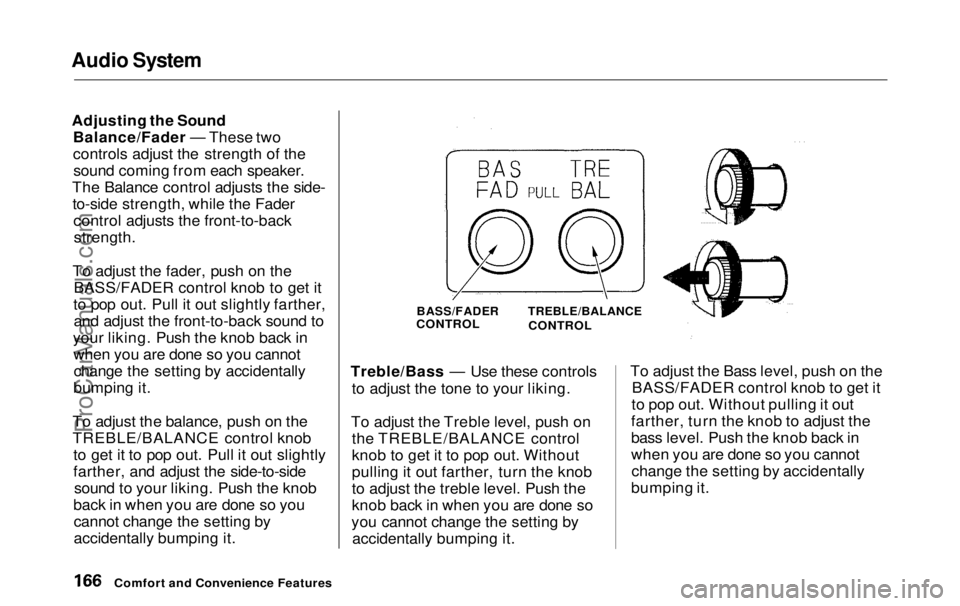
Adjusting the Sound Balance/Fader — These two
controls adjust the strength of thesound coming from each speaker.
The Balance control adjusts the side- to-side strength, while the Fader control adjusts the front-to-back
strength.
To adjust the fader, push on the BASS/FADER control knob to get it
to pop out. Pull it out slightly farther, and adjust the front-to-back sound to
your liking. Push the knob back in when you are done so you cannotchange the setting by accidentally
bumping it.
To adjust the balance, push on the
TREBLE/BALANCE control knob to get it to pop out. Pull it out slightly
farther, and adjust the side-to-sidesound to your liking. Push the knob
back in when you are done so you cannot change the setting by
accidentally bumping it. Treble/Bass — Use these controls
to adjust the tone to your liking.
To adjust the Treble level, push on the TREBLE/BALANCE control
knob to get it to pop out. Without
pulling it out farther, turn the knob
to adjust the treble level. Push the
knob back in when you are done so
you cannot change the setting by accidentally bumping it. To adjust the Bass level, push on the
BASS/FADER control knob to get it
to pop out. Without pulling it out
farther, turn the knob to adjust the
bass level. Push the knob back in
when you are done so you cannot change the setting by accidentally
bumping it.
Comfort and Convenience Features
BASS/FADER
CONTROL
TREBLE/BALANCE
CONTROLProCarManuals.comMain Menu Table of Contents s t
Page 168 of 343
Audio System
Audio System Lighting You can use the instrument panel brightness control knob to adjust the
illumination of the audio system (see
page 67). The audio systemilluminates when the parking lights
are on, even if the radio is turned off.
Radio Frequencies
Your Honda's radio can receive the complete AM and FM bands.
Those bands cover these frequen-
cies:
AM band: 530 to 1,710 kilohertz
FM band:
87.7 to 107.9 megahertz
Radio stations on the AM band are
assigned frequencies at least ten
kilohertz apart (530, 540, 550). Stations on the FM band are
assigned frequencies at least 0.2
megahertz apart (87.9, 88.1, 88.3).
Stations must use these exact
frequencies. It is fairly common for stations to round-off the frequency in
their advertising, so your radio could display a frequency of 100.9 even
though the announcer may identify
the station as "FM101."
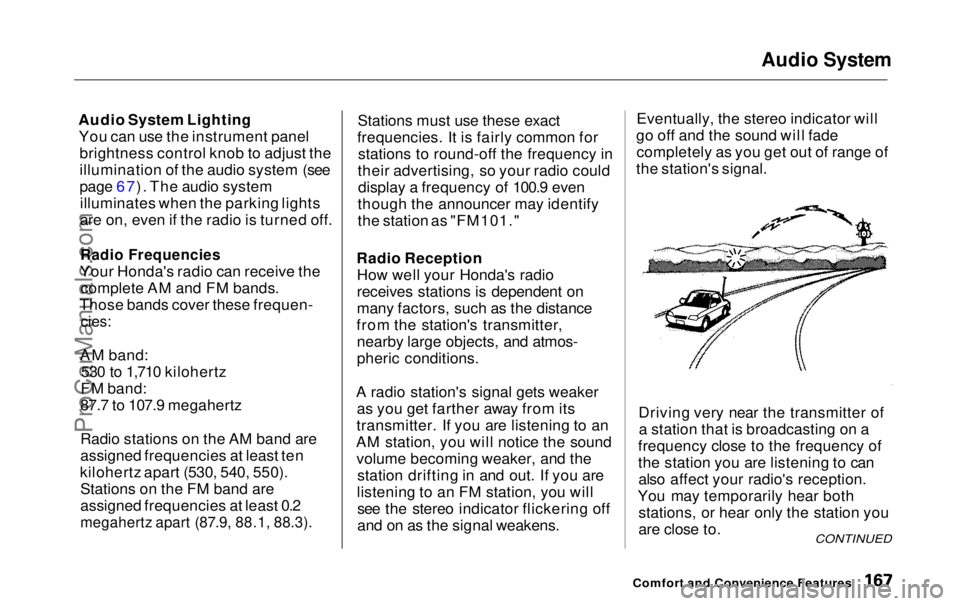
Radio Reception How well your Honda's radio
receives stations is dependent on
many factors, such as the distance
from the station's transmitter, nearby large objects, and atmos-
pheric conditions.
A radio station's signal gets weaker as you get farther away from its
transmitter. If you are listening to an
AM station, you will notice the sound volume becoming weaker, and the station drifting in and out. If you are
listening to an FM station, you will see the stereo indicator flickering off
and on as the signal weakens. Eventually, the stereo indicator will
go off and the sound will fade completely as you get out of range of
the station's signal.
Driving very near the transmitter ofa station that is broadcasting on a
frequency close to the frequency of
the station you are listening to can also affect your radio's reception.
You may temporarily hear both stations, or hear only the station you
are close to.
Comfort and Convenience Features
CONTINUEDProCarManuals.comMain Menu Table of Contents s t
Page 173 of 343
Audio System
Protecting Compact Discs
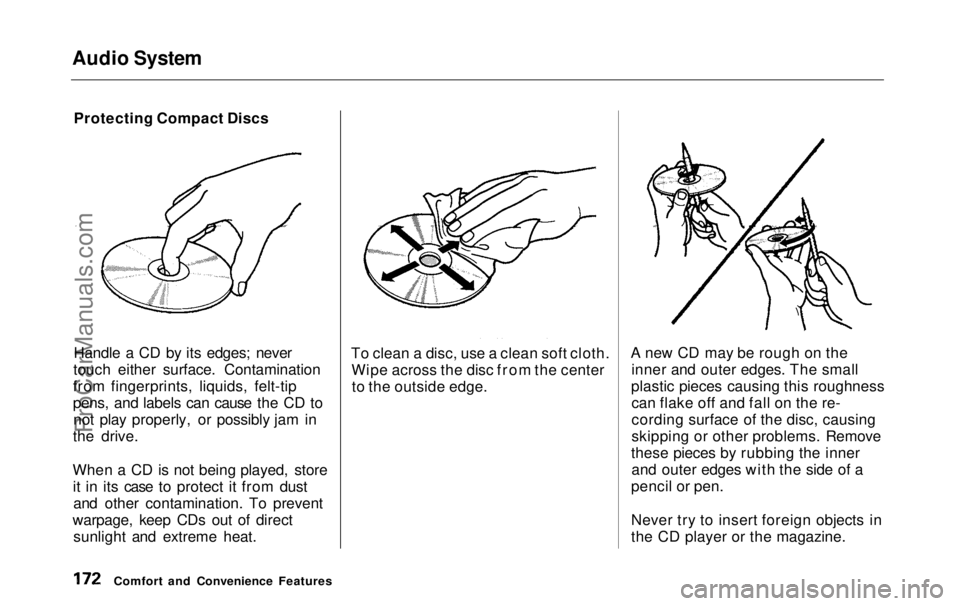
Handle a CD by its edges; never
touch either surface. Contamination
from fingerprints, liquids, felt-tip
pens, and labels can cause the CD to not play properly, or possibly jam in
the drive.
When a CD is not being played, store it in its case to protect it from dustand other contamination. To prevent
warpage, keep CDs out of direct sunlight and extreme heat. To clean a disc, use a clean soft cloth.
Wipe across the disc from the centerto the outside edge. A new CD may be rough on the
inner and outer edges. The small
plastic pieces causing this roughness can flake off and fall on the re-
cording surface of the disc, causing
skipping or other problems. Remove
these pieces by rubbing the inner and outer edges with the side of a
pencil or pen.
Never try to insert foreign objects in
the CD player or the magazine.
Comfort and Convenience FeaturesProCarManuals.comMain Menu Table of Contents s t