buttons HONDA ODYSSEY 2016 RC1-RC2 / 5.G User Guide
[x] Cancel search | Manufacturer: HONDA, Model Year: 2016, Model line: ODYSSEY, Model: HONDA ODYSSEY 2016 RC1-RC2 / 5.GPages: 565
Page 219 of 565
218
uuAudio System Basic Operation uPlaying AM/FM Radio
Features
Playing AM/FM Radio
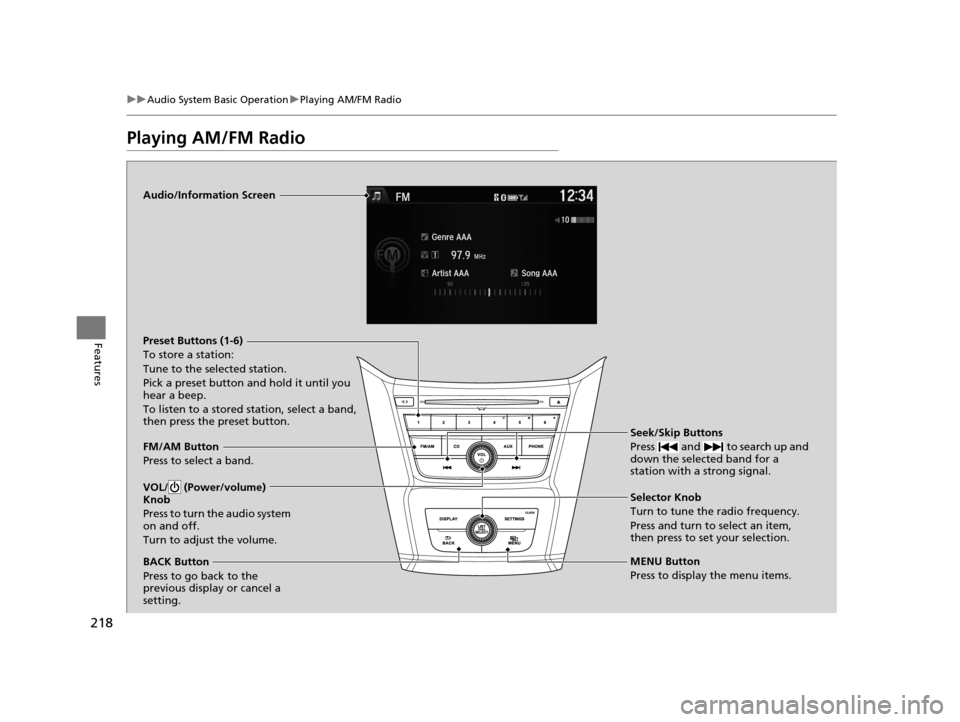
Audio/Information Screen
FM/AM Button
Press to select a band. Preset Buttons (1-6)
To store a station:
Tune to the selected station.
Pick a preset button and hold it until you
hear a beep.
To listen to a stored station, select a band,
then press the preset button.
Seek/Skip Buttons
Press and to search up and
down the selected band for a
station with a strong signal.
MENU Button
Press to display the menu items. Selector Knob
Turn to tune the radio frequency.
Press and turn to select an item,
then press to set your selection.
VOL/ (Power/volume)
Knob
Press to turn the audio system
on and off.
Turn to adjust the volume.
BACK Button
Press to go back to the
previous display or cancel a
setting.
16 US ODYSSEY-31TK86500.book 218 ページ 2015年6月24日 水曜日 午後3時0分
Page 222 of 565
221
uuAudio System Basic Operation uPlaying a CD
Continued
Features
Playing a CD
Your audio system supports audio CDs, CD-Rs and CD-RWs in either MP3, WMA, or
AAC*1 format. With the CD loaded, press the CD button.
*1:Only AAC format files recorded with iTunes are playable on this unit.
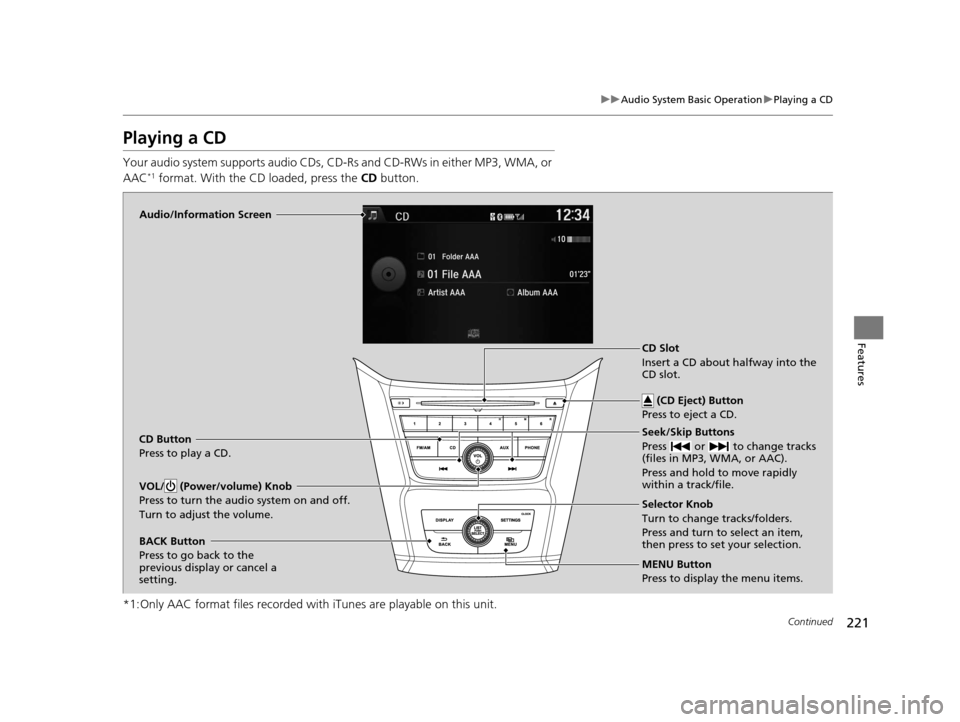
Audio/Information Screen
CD Button
Press to play a CD. Seek/Skip Buttons
Press or to change tracks
(files in MP3, WMA, or AAC).
Press and hold to move rapidly
within a track/file.
MENU Button
Press to display the menu items. Selector Knob
Turn to change tracks/folders.
Press and turn to select an item,
then press to set your selection.
VOL/ (Power/volume) Knob
Press to turn the audio system on and off.
Turn to adjust the volume.
BACK Button
Press to go back to the
previous display or cancel a
setting.CD Slot
Insert a CD about halfway into the
CD slot.
(CD Eject) Button
Press to eject a CD.
16 US ODYSSEY-31TK86500.book 221 ページ 2015年6月24日 水曜日 午後3時0分
Page 225 of 565
224
uuAudio System Basic Operation uPlaying an iPod
Features
Playing an iPod
Connect the iPod using your dock connector to the USB Port, then press the AUX
button.
2 USB Port P. 207
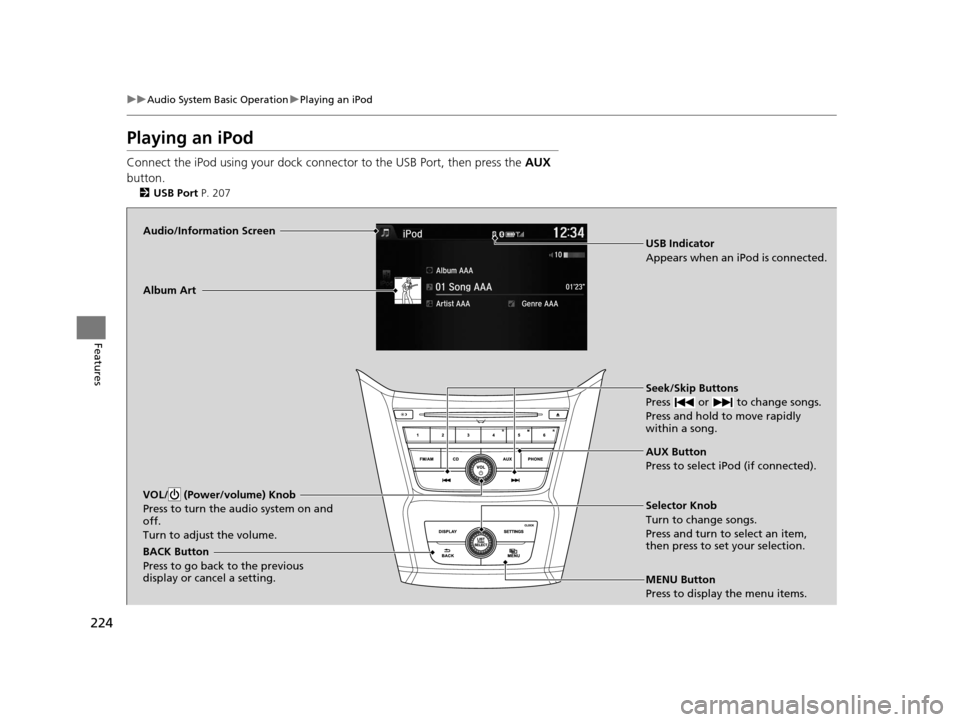
Audio/Information Screen
AUX Button
Press to select iPod (if connected). Seek/Skip Buttons
Press or to change songs.
Press and hold to move rapidly
within a song.
MENU Button
Press to display the menu items. Selector Knob
Turn to change songs.
Press and turn to select an item,
then press to set your selection.
VOL/ (Power/volume) Knob
Press to turn the audio system on and
off.
Turn to adjust the volume.
BACK Button
Press to go back to the previous
display or cancel a setting.Album Art
USB Indicator
Appears when an iPod is connected.
16 US ODYSSEY-31TK86500.book 224 ページ 2015年6月24日 水曜日 午後3時0分
Page 230 of 565
229
uuAudio System Basic Operation uPlaying a USB Flash Drive
Continued
Features
Playing a USB Flash Drive
Your audio system reads and plays sound files on a USB flash drive in either MP3,
WMA or AAC*1 format.
Connect your USB flash drive to the USB port, then press the AUX button.
2USB Port P. 207
*1:Only AAC format files recorded with iTunes are playable on this unit.
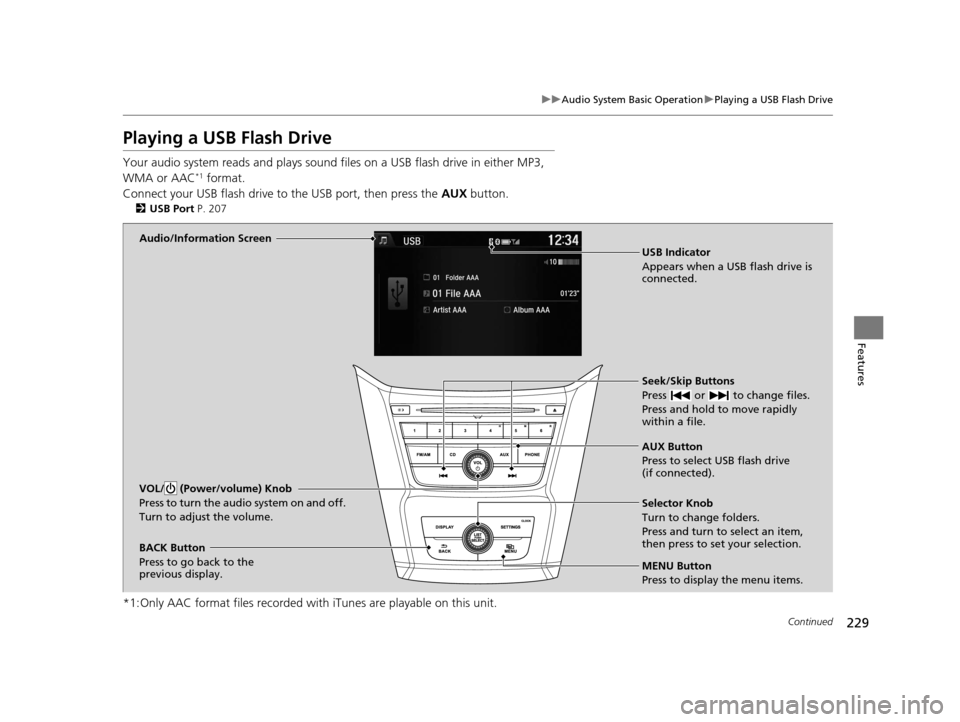
Audio/Information Screen
AUX Button
Press to select USB flash drive
(if connected). Seek/Skip Buttons
Press or to change files.
Press and hold to move rapidly
within a file.
MENU Button
Press to display the menu items. Selector Knob
Turn to change folders.
Press and turn to select an item,
then press to set your selection.
VOL/ (Power/volume) Knob
Press to turn the audio system on and off.
Turn to adjust the volume.
BACK Button
Press to go back to the
previous display. USB Indicator
Appears when a USB flash drive is
connected.
16 US ODYSSEY-31TK86500.book 229 ページ 2015年6月24日 水曜日 午後3時0分
Page 233 of 565
232
uuAudio System Basic Operation uPlaying Bluetooth ® Audio
Features
Playing Bluetooth® Audio
Your audio system allows you to listen to music from your Bluetooth-compatible
phone.
This function is available when the phone is paired and connected to the vehicle's
Bluetooth ® HandsFreeLink ® (HFL) system.
2 Phone Setup P. 334
1Playing Bluetooth ® Audio
Not all Bluetooth -enabled phones with streaming
audio capabilities are comp atible with the system.
For a list of compatible phones:
•U.S.: Visit www.handsfreelink.honda.com , or call
1-888-528-7876.
•Canada: Visit www.handsfreelink.ca , or call 1-888-
528-7876.
In some states, it may be illegal to perform some data
device functions while driving.
If more than one phone is paired to the HFL system,
there will be a delay before the system begins to play.
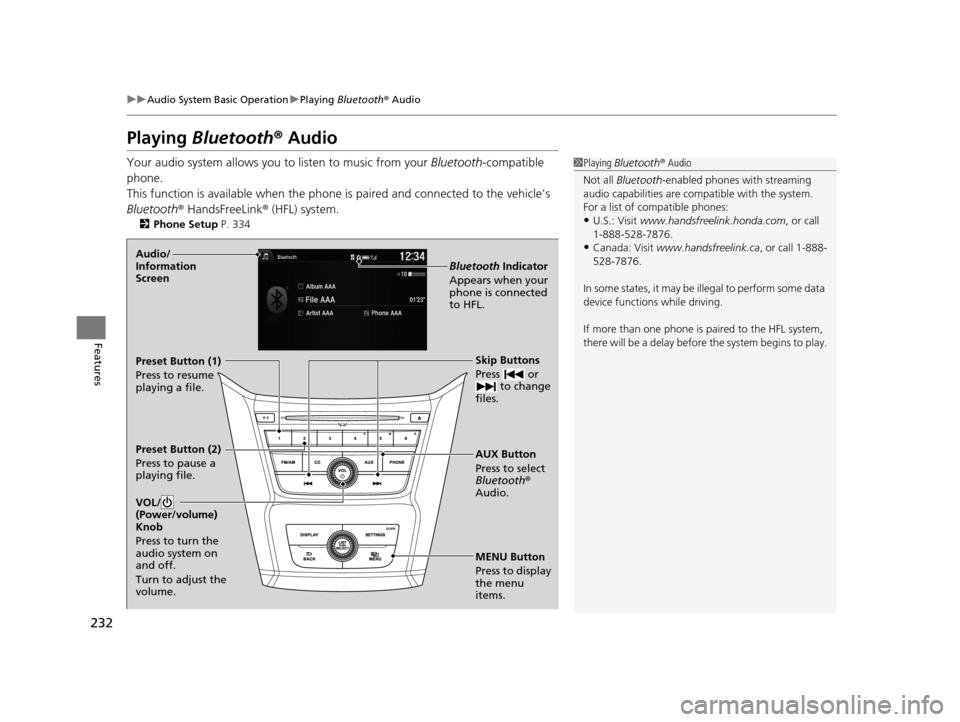
MENU Button
Press to display
the menu
items. AUX Button
Press to select
Bluetooth®
Audio. Skip Buttons
Press or to change
files.
Bluetooth Indicator
Appears when your
phone is connected
to HFL.
VOL/
(Power/volume)
Knob
Press to turn the
audio system on
and off.
Turn to adjust the
volume.Audio/
Information
Screen
Preset Button (1)
Press to resume
playing a file.
Preset Button (2)
Press to pause a
playing file.
16 US ODYSSEY-31TK86500.book 232 ページ 2015年6月24日 水曜日 午後3時0分
Page 239 of 565
238
uuAudio System Basic Operation uAudio/Information Screen
Features
Audio/Information Screen
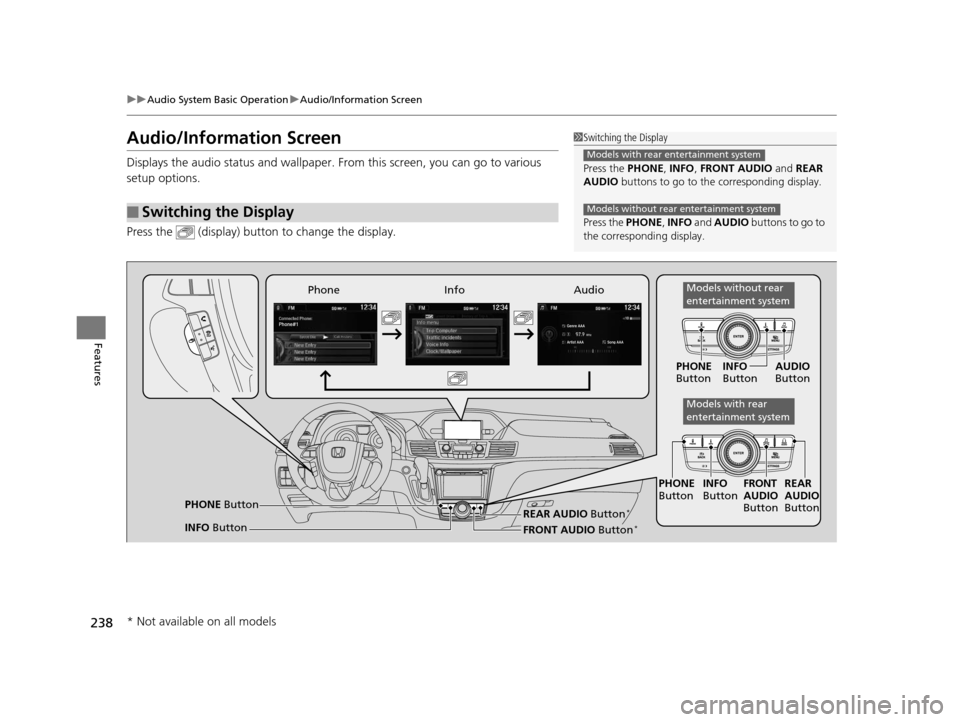
Displays the audio status and wallpaper. From this screen, you can go to various
setup options.
Press the (display) butto n to change the display.
■Switching the Display
1Switching the Display
Press the PHONE, INFO, FRONT AUDIO and REAR
AUDIO buttons to go to the corresponding display.
Press the PHONE, INFO and AUDIO buttons to go to
the corresponding display.
Models with rear entertainment system
Models without rear entertainment system
Audio
Info
Phone
FRONT AUDIO Button*
PHONE Button
INFO Button PHONE
Button INFO
Button FRONT
AUDIO
Button
PHONE
Button INFO
Button AUDIO
Button
REAR
AUDIO
ButtonREAR AUDIO Button*
Models without rear
entertainment system
Models with rear
entertainment system
* Not available on all models
16 US ODYSSEY-31TK86500.book 238 ページ 2015年6月24日 水曜日 午後3時0分
Page 279 of 565
278
uuRear Entertainment System*uOperating the System
Features
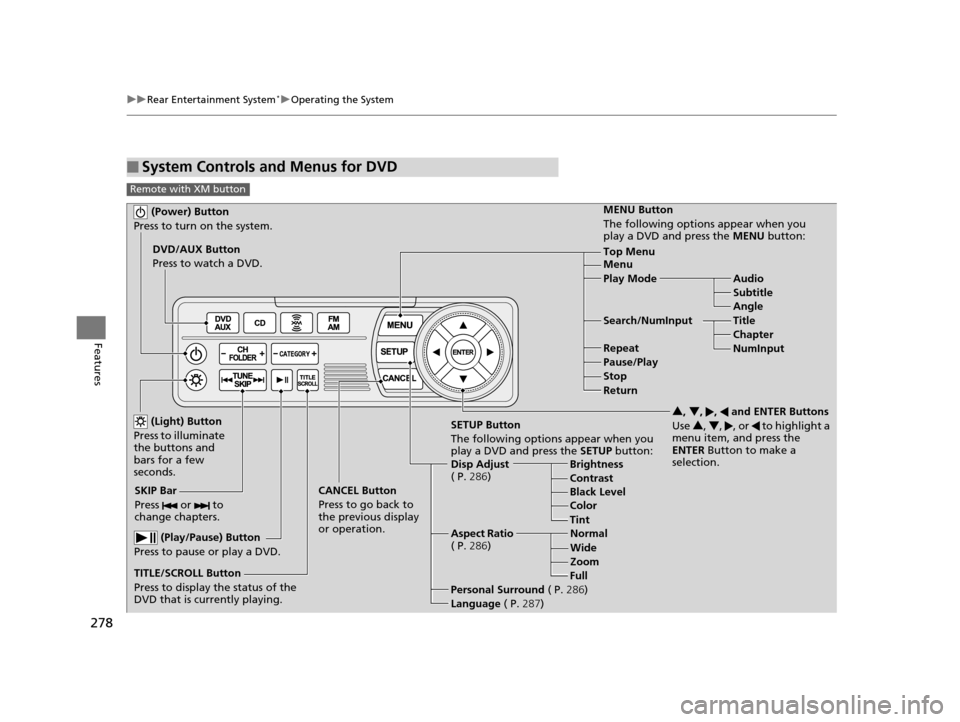
■System Controls and Menus for DVD
Remote with XM button
(Power) Button
Press to turn on the system.
DVD/AUX Button
Press to watch a DVD.
(Light) Button
Press to illuminate
the buttons and
bars for a few
seconds.
SKIP Bar
Press or to
change chapters.
(Play/Pause) Button
Press to pause or play a DVD.
TITLE/SCROLL Button
Press to display the status of the
DVD that is currently playing. MENU Button
The following options appear when you
play a DVD and press the
MENU button:
Top Menu
Menu
Play Mode Audio Subtitle
Angle
Search/NumInput Title Chapter
NumInput
Repeat
Pause/Play
Stop
Return
SETUP Button
The following options appear when you
play a DVD and press the SETUP button:
Disp Adjust
( P. 286) Brightness
Contrast
Black Level
Color
CANCEL Button
Press to go back to
the previous display
or operation. 3
, 4 , , and ENTER Buttons
Use 3, 4 , , or to highlight a
menu item, and press the
ENTER Button to make a
selection.
Tint
Normal
Wide Zoom
Full
Aspect Ratio
( P. 286)
Personal Surround ( P.286)
Language ( P.287)
16 US ODYSSEY-31TK86500.book 278 ページ 2015年6月24日 水曜日 午後3時0分
Page 280 of 565
279
uuRear Entertainment System*uOperating the System
Continued
Features
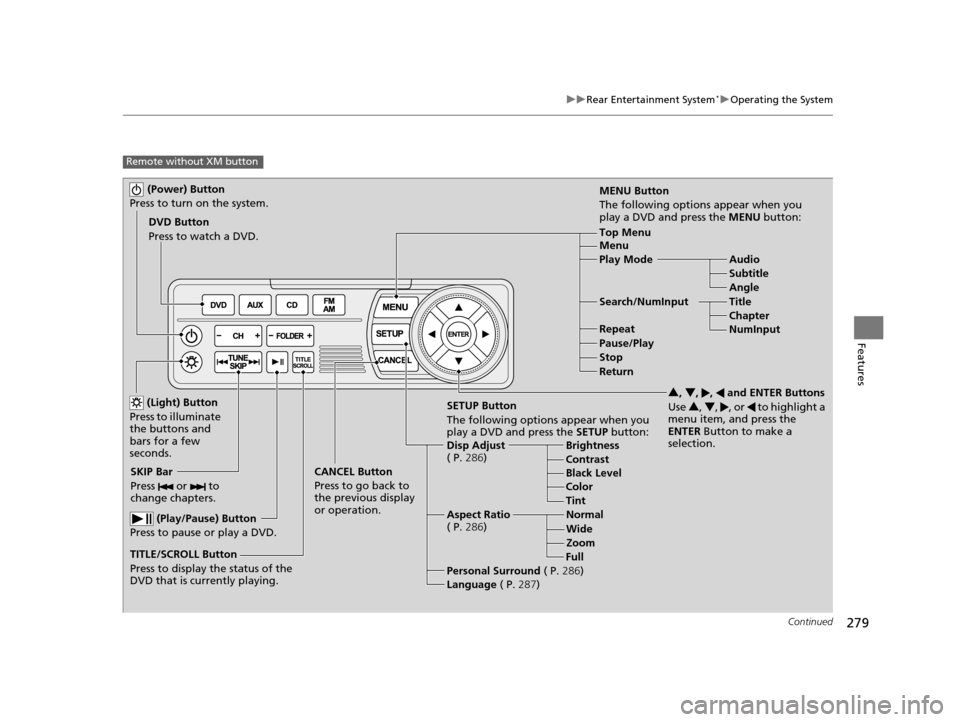
Remote without XM button
(Power) Button
Press to turn on the system.
DVD Button
Press to watch a DVD.
(Light) Button
Press to illuminate
the buttons and
bars for a few
seconds.
SKIP Bar
Press or to
change chapters.
(Play/Pause) Button
Press to pause or play a DVD.
TITLE/SCROLL Button
Press to display the status of the
DVD that is currently playing. MENU Button
The following options appear when you
play a DVD and press the MENU button:
Top Menu
Menu
Play Mode
Audio
Subtitle
Angle
Search/NumInput Title Chapter
NumInput
Repeat
Pause/Play
Stop
Return
SETUP Button
The following options appear when you
play a DVD and press the SETUP button:
Disp Adjust
( P. 286) Brightness
Contrast
Black Level
Color
CANCEL Button
Press to go back to
the previous display
or operation. 3
, 4 , , and ENTER Buttons
Use 3, 4 , , or to highlight a
menu item, and press the
ENTER Button to make a
selection.
Tint
Normal
Wide Zoom
Full
Aspect Ratio
( P. 286)
Personal Surround ( P.286)
Language ( P.287)
16 US ODYSSEY-31TK86500.book 279 ページ 2015年6月24日 水曜日 午後3時0分
Page 283 of 565
uuRear Entertainment System*uOperating the System
282
Features
Rear Control:
Disables controls from the remote.
1. Press the SETTINGS button to display Settings menu in front.
2. Rotate to select Rear Ent Settings, then press .
3. Rotate to select Rear Control, then press .
4. Rotate to select On or Off , then press .
Rear Speaker:
Mutes the sounds from the rear speakers.
1. Press the SETTINGS button to display Settings menu in front.
2. Rotate to select Rear Ent Settings, then press .
3. Rotate to select Rear Speaker, then press .
4. Rotate to select On or Off , then press .
■TITLE/SCROLL button on the remote
Press the TITLE/SCROLL button while the DVD is playing to see the current status of
title, chapter, elapsed time, angle, su btitle, audio, and sound characteristics.
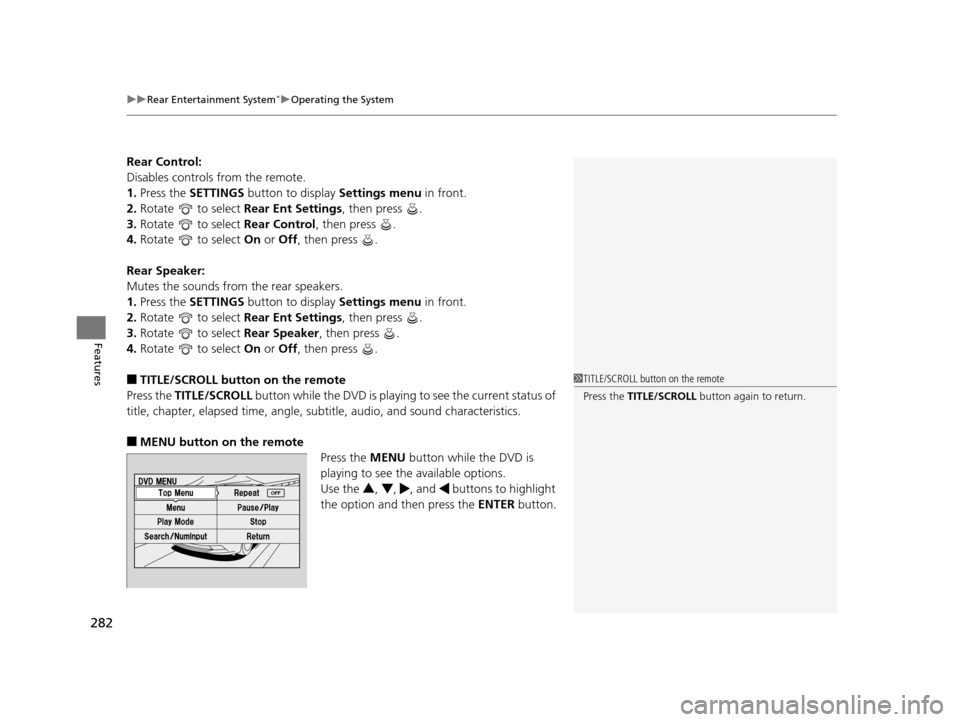
■MENU button on the remote
Press the MENU button while the DVD is
playing to see the available options.
Use the 3, 4 , , and buttons to highlight
the option and then press the ENTER button.
1TITLE/SCROLL button on the remote
Press the TITLE/SCROLL button again to return.
16 US ODYSSEY-31TK86500.book 282 ページ 2015年6月24日 水曜日 午後3時0分
Page 286 of 565
285
uuRear Entertainment System*uOperating the System
Continued
Features
Search:
You can search for a DVD segment from the following methods.
1. Select NumInput to go to the number input screen.
2. Use the 3, 4 , , and buttons to input numbers.
u If you want to delete a number, select DEL.
3. The cursor automatically goes to ENT after you input three digits. Press the
ENTER button to command.
Repeat:
Highlight this option and press the ENTER button to change the repeat mode from
chapter repeat and title repeat, to repeat off. Title Search - Select the title you want to play.
Chapter Search - Select the
chapter you want to play.
NumInput - Enter a three digit number, if issued to the DVD, to find the
segment you want to start to play.
16 US ODYSSEY-31TK86500.book 285 ページ 2015年6月24日 水曜日 午後3時0分