gas type HONDA ODYSSEY 2016 RC1-RC2 / 5.G Quick Guide
[x] Cancel search | Manufacturer: HONDA, Model Year: 2016, Model line: ODYSSEY, Model: HONDA ODYSSEY 2016 RC1-RC2 / 5.GPages: 80, PDF Size: 16.28 MB
Page 6 of 80
4 || 5
SAFETY
SAFETY
INDEX
VOICE COMMAND
INDEX
CUSTOMER
INFORMATION
SPECIFICATIONS
MAINTENANCE
HANDLING THE UNEXPECTED
DRIVING
NAVIGATION
TABLE OF CONTENTS
VISUAL INDEX
SAFETY
INFORMATION
INSTRUMENT PANEL
VEHICLE
CONTROLS
AUDIO AND
CONNECTIVITY
BLUETOOTH®
HANDSFREELINK®
HONDALINK®
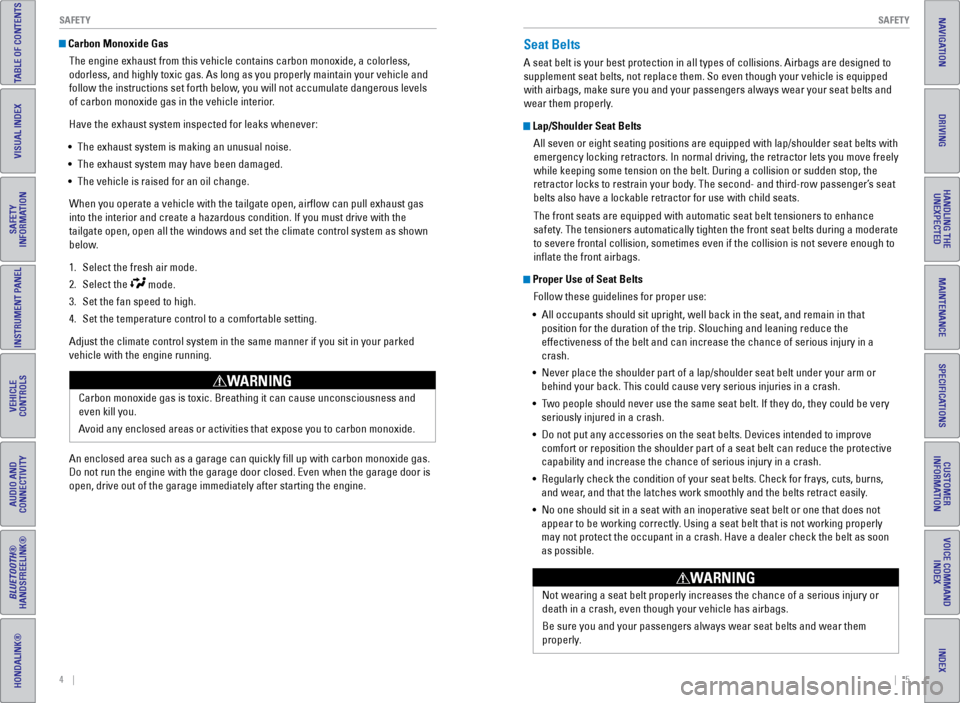
Carbon Monoxide Gas
The engine exhaust from this vehicle contains carbon monoxide, a colorle\
ss,
odorless, and highly toxic gas. As long as you properly maintain your ve\
hicle and
follow the instructions set forth below, you will not accumulate dangerous levels
of carbon monoxide gas in the vehicle interior.
Have the exhaust system inspected for leaks whenever:
• The exhaust system is making an unusual noise.
• The exhaust system may have been damaged.
• The vehicle is raised for an oil change.
When you operate a vehicle with the tailgate open, airflow can pull ex\
haust gas
into the interior and create a hazardous condition. If you must drive wi\
th the
tailgate open, open all the windows and set the climate control system a\
s shown
below.
1. Select the fresh air mode.
2. Select the
mode.
3. Set the fan speed to high.
4. Set the temperature control to a comfortable setting.
Adjust the climate control system in the same manner if you sit in your \
parked
vehicle with the engine running.
Carbon monoxide gas is toxic. Breathing it can cause unconsciousness and\
even kill you.
Avoid any enclosed areas or activities that expose you to carbon monoxide\
.
WARNING
An enclosed area such as a garage can quickly fill up with carbon mono\
xide gas.
Do not run the engine with the garage door closed. Even when the garage \
door is
open, drive out of the garage immediately after starting the engine.
Seat Belts
A seat belt is your best protection in all types of collisions. Airbags \
are designed to
supplement seat belts, not replace them. So even though your vehicle is \
equipped
with airbags, make sure you and your passengers always wear your seat belts and
wear them properly.
Lap/Shoulder Seat BeltsAll seven or eight seating positions are equipped with lap/shoulder seat\
belts with
emergency locking retractors. In normal driving, the retractor lets you \
move freely
while keeping some tension on the belt. During a collision or sudden sto\
p, the
retractor locks to restrain your body. The second- and third-row passenger’s seat
belts also have a lockable retractor for use with child seats.
The front seats are equipped with automatic seat belt tensioners to enha\
nce
safety. The tensioners automatically tighten the front seat belts during a mod\
erate
to severe frontal collision, sometimes even if the collision is not seve\
re enough to
inflate the front airbags.
Proper Use of Seat BeltsFollow these guidelines for proper use:
• All occupants should sit upright, well back in the seat, and remain in t\
hat
position for the duration of the trip. Slouching and leaning reduce the \
effectiveness of the belt and can increase the chance of serious injury \
in a
crash.
• Never place the shoulder part of a lap/shoulder seat belt under your arm\
or
behind your back. This could cause very serious injuries in a crash.
• Two people should never use the same seat belt. If they do, they could be\
very
seriously injured in a crash.
• Do not put any accessories on the seat belts. Devices intended to improv\
e
comfort or reposition the shoulder part of a seat belt can reduce the pr\
otective
capability and increase the chance of serious injury in a crash.
• Regularly check the condition of your seat belts. Check for frays, cuts,\
burns,
and wear, and that the latches work smoothly and the belts retract easily.
• No one should sit in a seat with an inoperative seat belt or one that do\
es not
appear to be working correctly. Using a seat belt that is not working properly
may not protect the occupant in a crash. Have a dealer check the belt as\
soon
as possible.
Not wearing a seat belt properly increases the chance of a serious injur\
y or
death in a crash, even though your vehicle has airbags.
Be sure you and your passengers always wear seat belts and wear them
properly.
WARNING
Page 73 of 80
138 || 139
SPECIFICATIONS
MAINTENANCE
INDEX
VOICE COMMAND
INDEX
CUSTOMER
INFORMATION
SPECIFICATIONS
MAINTENANCE
HANDLING THE UNEXPECTED
DRIVING
NAVIGATION
TABLE OF CONTENTS
VISUAL INDEX
SAFETY
INFORMATION
INSTRUMENT PANEL
VEHICLE
CONTROLS
AUDIO AND
CONNECTIVITY
BLUETOOTH®
HANDSFREELINK®
HONDALINK®
Testing of Readiness Codes
Your vehicle has “readiness codes” as part of the onboard self-diag\
nostic system.
Some states refer to these codes as a test to see if your vehicle’s emissions
components are working properly. The codes may not be read if you go through the
testing just after the battery has gone dead or been disconnected.
To check if they are set, turn the vehicle on without starting the engine\
. The
malfunction indicator lamp will come on for several seconds. If it goes \
off, the
readiness codes are set. If it blinks five times, the readiness codes \
are not set.
If you are required to have your vehicle tested before the readiness cod\
es are set,
prepare the vehicle for retesting by doing the following:
1. Fill the gas tank to approximately 3/4 full.
2. Park the vehicle and leave the engine off for 6 hours or more.
3. Make sure the ambient temperature is between 40°F and 95°F (4°\
C and 35°C).
4. Start the engine without touching the accelerator pedal, and let it idle\
for 20
seconds.
5. Keep the vehicle in Park (P). Increase the engine speed to 2,000 rpm, \
and hold it
there for about 3 minutes.
6. Let the engine idle with your foot off the accelerator for 20 seconds.
7. Select a nearby, lightly traveled major highway where you can maintain a speed
of 50 to 60 mph (80 to 97 km/h) for at least 20 minutes. Drive on the \
highway with
the vehicle in Drive. Do not use cruise control. When traffic allows, \
drive for 90
seconds without using the accelerator pedal. (Vehicle speed may vary slightly;
this is OK.) If you cannot do this for a continuous 90 seconds because \
of traffic
conditions, drive for at least 30 seconds, then repeat two more times (\
for a total of
90 seconds).
8. Drive in city/suburban traffic for at least 10 minutes. When traffic\
conditions
allow, let the vehicle coast for several seconds without using the accelerator
pedal or the brake pedal.
9. Park the vehicle and leave the engine off for 30 minutes.
The readiness codes are erased when the battery is disconnected, and set\
again
only after several days of driving under a variety of conditions.
If a testing facility determines that the readiness codes are not set, y\
ou may be
requested to return at a later date to complete the test, or see your de\
aler. Vehicle
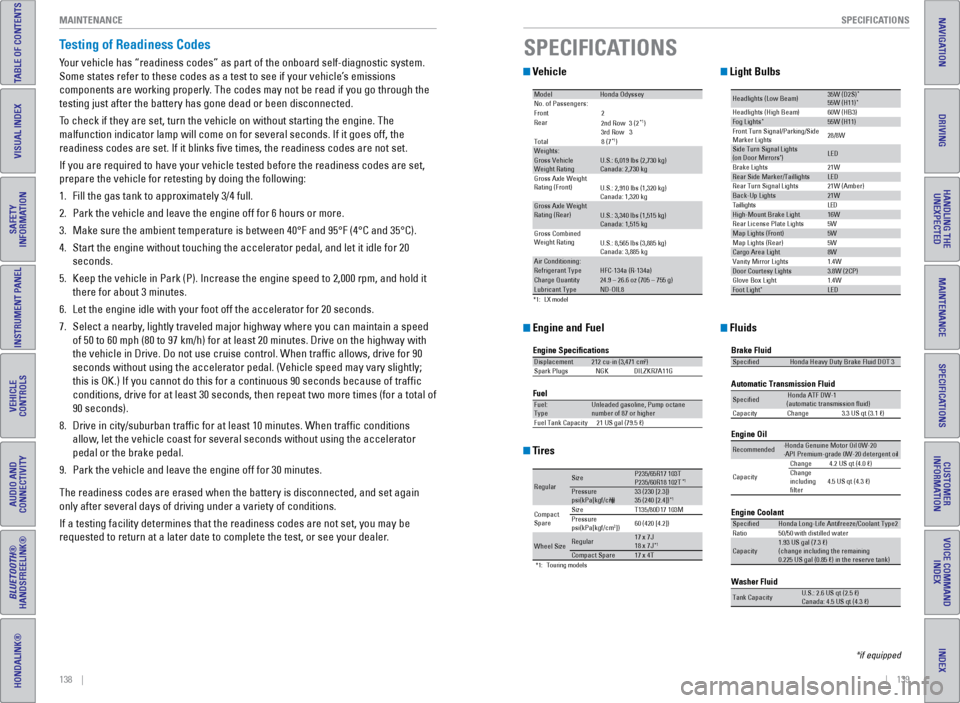
Engine and Fuel
Tires
Light Bulbs
Fluids
*1 :L X mode l
Mode lHonda Odysse yNo. of Passengers:
Front2
Rear
*1)
3rd Ro w3
Tota l8 (7
*1)Weights:Gross Vehicle
Weight Rating U.S.: 6,019 lbs (2,730 kg)
Canada: 2,730 kg
Gross Axle Weight
Rating (Front )U.S.: 2,910 lbs (1,320 kg)
Canada: 1,320 kg
Gross Axle Weight
Rating (R ear)U.S.: 3,340 lbs (1,515 kg)
Canada: 1,515 kg
Gross Combined
Weight Ratin g
U.S.: 8,565 lbs (3,885 kg)
Canada: 3,885 kg
Air Conditioning:Refrigerant Type HFC-134a (R-134a)Charge Quantity24.9 – 26.6 oz (705 – 755 g)Lubricant TypeND-OIL8
2nd Ro w3 (2
Engine Specication s
FuelDisplacement212 cu-in (3,471 cm3)
Spark Plug sN GKDILZKR7A11 G
Fuel:
TypeUnleaded gasoline, Pump octane
number of 87 or higher
Fuel Tank Capacit y21 US gal (79.5 )
*1:T ouring models
Regula rSizeP235/65R17 103TP235/60R18 102T*1Pressure
psi(kPa[kgf/cm2])33 (23 0 [2.3])
35 (24 0 [2.4])*1
Compact
Spar e Size
T135/80D17 103M
Pressure
ps i(kPa[kgf/cm2]) 60 (42
0 [4.2])
Wheel Siz eRegular17 x 7J
18 x 7J*1Compact Spar e17 x 4T
Headlights (Low Beam )35W (D2S)*55W (H11)
60W (HB3)
21W
5W 21W (Amber)*Head lights (High Beam )Fog Lights*55W (H11)
Front Turn Signal/Park ing/Side
Marker Lights 28/8W
Si
de Turn Si gnal Lights
(on Door Mirrors ) *LED
Brake Lights
Rear Side Marker/Taillight sLED
Rear Turn Signal Lights
Back-Up Lights21W D
E
L
s
t
h
g
i
l
l
i
a
T
High-Mount Brake Ligh t16W
Rear License Plate Lights
Map Lights (F ront)5W
5W
1.4W
1.4W
Map Lights (Rear)
Cargo Area Ligh
t8W
Vanity Mirror Lights
Door Courtesy Lights3.8W (2CP )
Glove Box Li ght
Foot Ligh t*LED
Brake Fluid
Automatic Transmission Flui
d
Specie dHonda Heavy Duty Brake Fluid DOT 3
SpeciedHonda ATF DW- 1
(automatic transmission uid )
Ca pacit yC hange3 .3 US qt (3.1)
Engine Oil
Engine Coolant
Recommended·Honda Genuine Motor Oil 0W-2 0
·API Premium-grade 0W-20 detergent oi l
Capacity Change
4.2 US qt (4.0 )
Change
including
lter 4.5 US qt (4.3 )
SpeciedHonda Long-Life Anti
freeze/Coolant Type2
Ratio 50/50 with distilled wate r
Capacity1.93 US gal (7.3 )
(change in cluding the remaining
0.225 US gal (0.85 ) in the reserve tank)
Washer Fluid
Tank CapacityU.S.: 2.6 US qt (2.5 )
Ca nada: 4.5 US qt (4.3 )
SPECIFICATIONS
*if equipped
Page 75 of 80
142 || 143
VOICE COMMAND INDEX
CUSTOMER INFORMATION
INDEX
VOICE COMMAND
INDEX
CUSTOMER
INFORMATION
SPECIFICATIONS
MAINTENANCE
HANDLING THE UNEXPECTED
DRIVING
NAVIGATION
TABLE OF CONTENTS
VISUAL INDEX
SAFETY
INFORMATION
INSTRUMENT PANEL
VEHICLE
CONTROLS
AUDIO AND
CONNECTIVITY
BLUETOOTH®
HANDSFREELINK®
HONDALINK®
Honda Roadside Assistance
24-hour emergency road service is available to you in the United States \
and Canada
throughout your 3-year/36,000-mile warranty term. Services include jump starting,
flat tire and lockout assistance, towing, and more (limitations apply\
).
Call (866) 864-5211 (U.S.) or (800) 465-7587 (Canada).
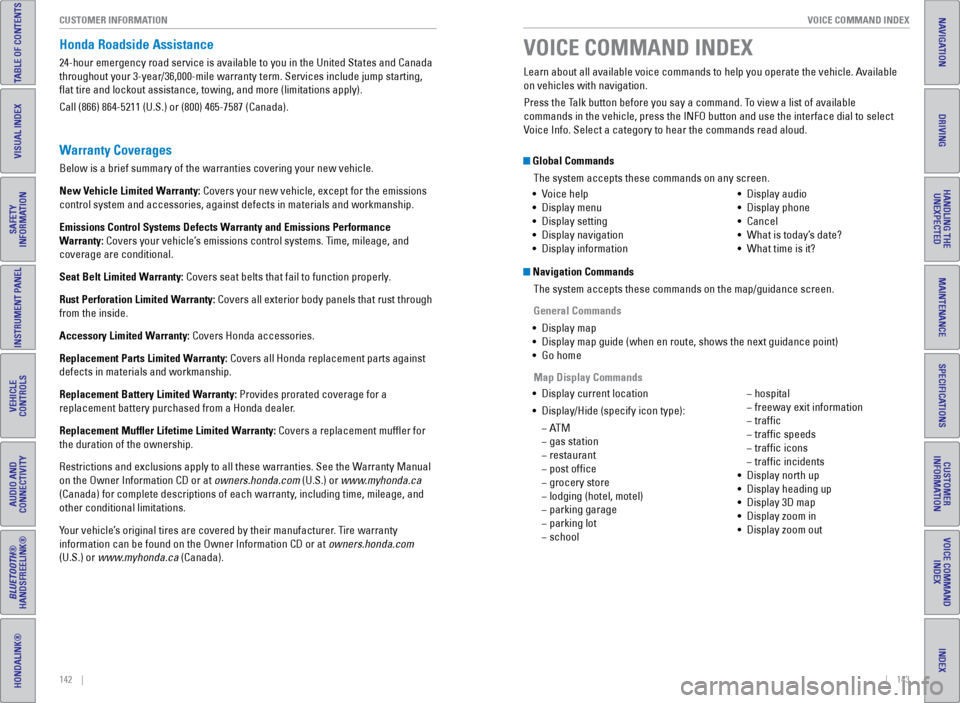
Global Commands
The system accepts these commands on any screen.
Navigation CommandsThe system accepts these commands on the map/guidance screen.
General Commands
• Display map
• Display map guide (when en route, shows the next guidance point)
• Go home
• Display current location
• Display/Hide (specify icon type):
− AT M
− gas station
− restaurant
− post office
− grocery store
− lodging (hotel, motel)
− parking garage
− parking lot
− school
− hospital
− freeway exit information
− traffic
− traffic speeds
− traffic icons
− traffic incidents
• Display north up
• Display heading up
• Display 3D map
• Display zoom in
• Display zoom out
Learn about all available voice commands to help you operate the vehicle\
. Available
on vehicles with navigation.
Press the Talk button before you say a command. To view a list of available
commands in the vehicle, press the INFO button and use the interface dia\
l to select
Voice Info. Select a category to hear the commands read aloud.
VOICE COMMAND INDEX
•
Voice help
• Display menu
• Display setting
• Display navigation
• Display information •
Display audio
• Display phone
• Cancel
• What is today’s date?
• What time is it?
Map Display Commands
Warranty Coverages
Below is a brief summary of the warranties covering your new vehicle.
New Vehicle Limited Warranty: Covers your new vehicle, except for the emissions
control system and accessories, against defects in materials and workman\
ship.
Emissions Control Systems Defects Warranty and Emissions Performance
Warranty: Covers your vehicle’s emissions control systems. Time, mileage, and
coverage are conditional.
Seat Belt Limited Warranty: Covers seat belts that fail to function properly.
Rust Perforation Limited Warranty: Covers all exterior body panels that rust through
from the inside.
Accessory Limited Warranty: Covers Honda accessories.
Replacement Parts Limited Warranty: Covers all Honda replacement parts against
defects in materials and workmanship.
Replacement Battery Limited Warranty: Provides prorated coverage for a
replacement battery purchased from a Honda dealer.
Replacement Muffler Lifetime Limited Warranty: Covers a replacement muffler for
the duration of the ownership.
Restrictions and exclusions apply to all these warranties. See the Warranty Manual
on the Owner Information CD or at owners.honda.com (U.S.) or www.myhonda.ca
(Canada) for complete descriptions of each warranty, including time, mileage, and
other conditional limitations.
Your vehicle’s original tires are covered by their manufacturer. Tire warranty
information can be found on the Owner Information CD or at owners.honda.com
(U.S.) or www.myhonda.ca (Canada).