phone HONDA ODYSSEY 2018 Owner's Manual (in English)
[x] Cancel search | Manufacturer: HONDA, Model Year: 2018, Model line: ODYSSEY, Model: HONDA ODYSSEY 2018Pages: 763, PDF Size: 47.02 MB
Page 4 of 763
Contents
This owner’s manual should be considered a permanent part of the
vehicle and should remain with the vehicle when it is sold.
This owner’s manual covers all models of your vehicle. You may find
descriptions of equipment and features that are not on your
particular model.
Images throughout this owner’s manu al (including the front cover)
represent features and equipment that are available on some, but
not all, models. Your particular mo del may not have some of these
features.
This owner’s manual is for vehicles sold in the United States and
Canada.
The information and specifications in cluded in this publication were
in effect at the time of approval for printing. Honda Motor Co., Ltd.
reserves the right, however, to discontinue or change specifications
or design at any time without notice and without incurring any
obligation.2 Safe Driving P. 33
For Safe Driving P. 34 Seat Belts P. 38 Airbags P. 47
2Instrument Panel P. 83
Indicators P. 84 Gauges and Displays P. 119
2Controls P. 141
Clock P. 142 Locking and Unlocking the Doors P. 144
Security System P. 179 Opening and Closing the Windows P. 182
Adjusting the Mirrors P. 206 Adjusting the Seats P. 209
2Features P. 259
Audio System P. 260 Audio System Basic Operation P. 267, 285
Blu-ray/DVD Rear Entertainment System* P. 396
CabinWatchTM * P. 521 CabinTalkTM* P. 522
2Driving P. 523
Before Driving P. 524 Towing a Trailer P. 530
Multi-View Rear Camera P. 628 Refueling P. 630
2 Maintenance P. 635
Before Performing Maintenance P. 636 Maintenance MinderTM P. 639
Checking and Maintaining Wiper Blades P. 669
Remote Control and Wireless Headphone Care
* P. 685
2 Handling the Unexpected P. 697
Tools P. 698 If a Tire Goes Flat P. 699
Indicator, Coming On/Blinking P. 716 Fuses P. 722
When You Cannot Open the Tailgate P. 731
2 Information P. 737
Specifications P. 738 Identification Numbers P. 740
Warranty Coverages P. 746 Authorized Manuals P. 748
18 US ODYSSEY-31THR6010.book 2 ページ 2018年12月6日 木曜日 午後4時18分
Page 16 of 763
14
Quick Reference Guide
Controls (P141)
Clock (P142)
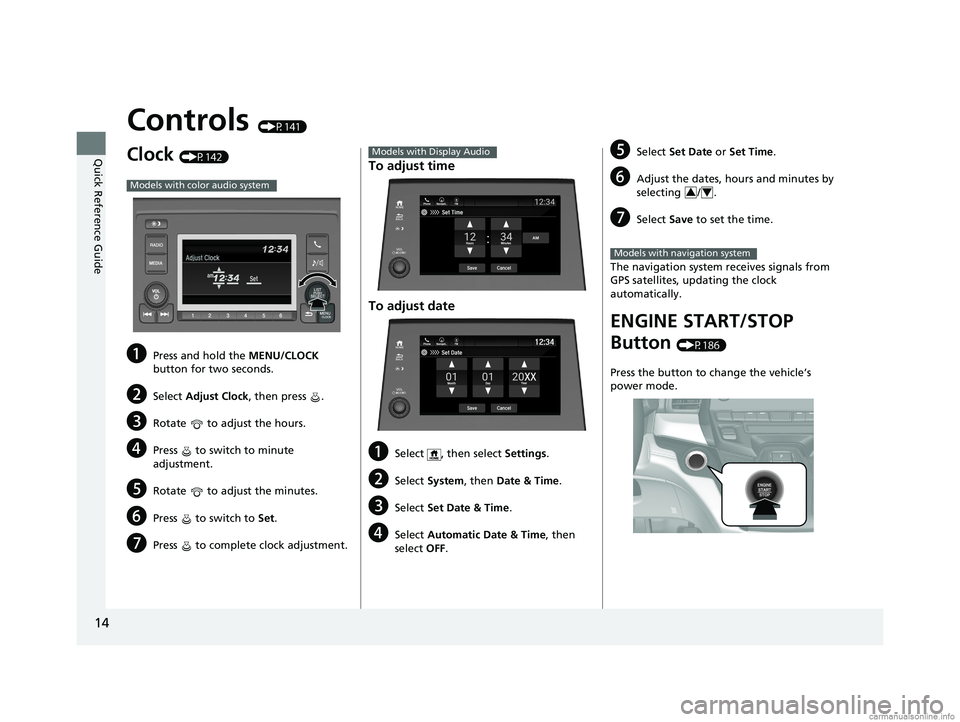
aPress and hold the MENU/CLOCK
button for two seconds.
bSelect Adjust Clock, then press .
cRotate to adjust the hours.
dPress to switch to minute
adjustment.
eRotate to adjust the minutes.
fPress to switch to Set.
gPress to complete clock adjustment.
Models with color audio system
To adjust time
To adjust date
aSelect , then select Settings .
bSelect System , then Date & Time .
cSelect Set Date & Time .
dSelect Automatic Date & Time , then
select OFF.
Models with Display Audio
Set DateBlu-Ray
Save
Month DayYearXX
Cancel
Phone Navigati.. FM12:34
eSelect
Set Date or Set Time .
fAdjust the dates, hours and minutes by
selecting / .
gSelect Save to set the time.
The navigation system receives signals from
GPS satellites, updating the clock
automatically.
ENGINE START/STOP
Button
(P186)
Press the button to change the vehicle’s
power mode.
34
Models with navigation system
18 US ODYSSEY-31THR6010.book 14 ページ 2018年12月6日 木曜日 午後4時18分
Page 22 of 763
20
Quick Reference Guide
Features (P259)
Audio System (P260)
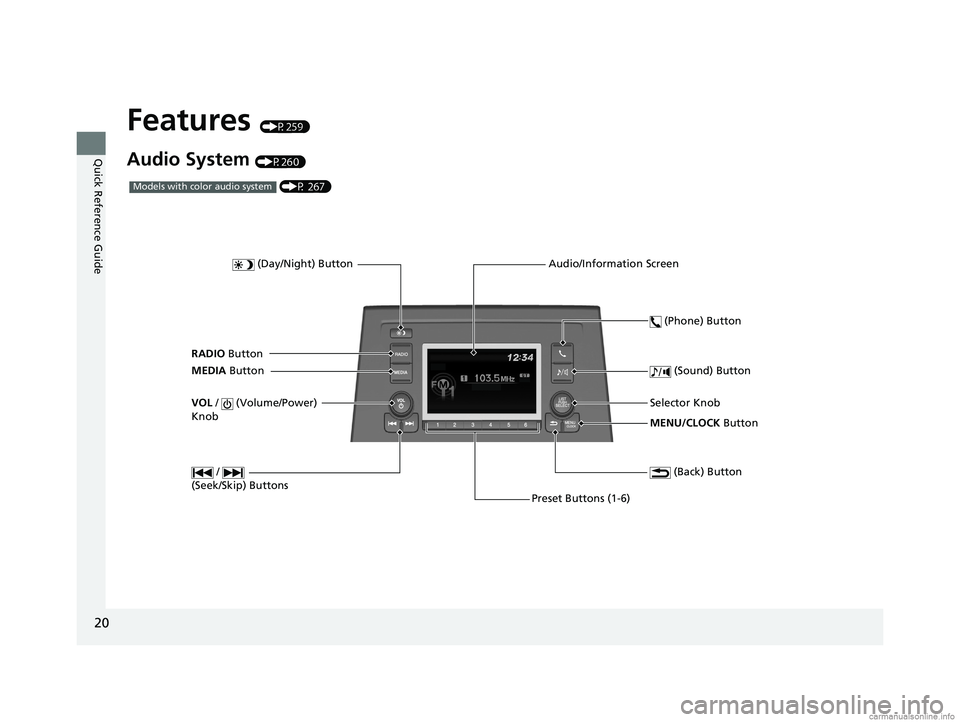
MENU/CLOCK Button
Selector Knob
(Day/Night) Button
(Back) Button
(Sound) Button
VOL
/ (Volume/Power)
Knob
Preset Buttons (1-6) (Phone) Button
RADIO
Button
/
(Seek/Skip) Buttons
MEDIA Button Audio/Information Screen
(P 267)Models with color audio system
18 US ODYSSEY-31THR6010.book 20 ページ 2018年12月6日 木曜日 午後4時18分
Page 36 of 763
34
Safe Driving
For Safe Driving
The following pages explain your vehicle’s safety features and how to use them
properly. The safety precautions below are ones that we consider to be among the
most important.
Important Safety Precautions
■Always wear your seat belt
A seat belt is your best protection in all types of collisions. Airbags are designed to
supplement seat belts, not replace them. So even though your vehicle is equipped
with airbags, make sure you and your passengers always wear your seat belts, and
wear them properly.
■Restrain all children
Children ages 12 and under should ride prop erly restrained in a back seat, not the
front seat. Infants and small children should be restrained in a child seat. Larger
children should use a booster seat and a lap/shoulder seat belt until they can use the
belt properly without a booster seat.
■Be aware of airbag hazards
While airbags can save lives, they can cause serious or fatal injuries to occupants
who sit too close to them, or are not prop erly restrained. Infants, young children,
and short adults are at the greatest risk. Be sure to follow all instructions and
warnings in this manual.
■Don’t drink and drive
Alcohol and driving don’t mix. Even one dr ink can reduce your ability to respond to
changing conditions, and your reaction time gets worse with every additional drink.
So don’t drink and drive, and don’t let your friends drink and drive, either.
1Important Safety Precautions
Some states, provinces and territories prohibit the use
of cell phones other than hands-free devices by the
driver while driving.
18 US ODYSSEY-31THR6010.book 34 ページ 2018年12月6日 木曜日 午後4時18分
Page 37 of 763
35
uuFor Safe Driving uImportant Safety Precautions
Safe Driving
■Pay appropriate attention to the task of driving safely
Engaging in cell phone conversation or other activities that keep you from paying
close attention to the road, other vehicles , and pedestrians could lead to a crash.
Remember, situations can change quickly, and only you can decide when it is safe to
divert some attention away from driving.
■Control your speed
Excessive speed is a major factor in crash injuries and deaths. Generally, the higher
the speed, the greater the risk, but serious injuries can also occur at lower speeds.
Never drive faster than is safe for current conditions, regardless of the maximum
speed posted.
■Keep your vehicle in safe condition
Having a tire blowout or a mechanical failure can be extremely hazardous.
To reduce the possibility of such problems, check your tire pressures and condition
frequently, and perform all re gularly scheduled maintenance.
18 US ODYSSEY-31THR6010.book 35 ページ 2018年12月6日 木曜日 午後4時18分
Page 128 of 763
uuGauges and Displays uDriver Information Interface
126
Instrument Panel
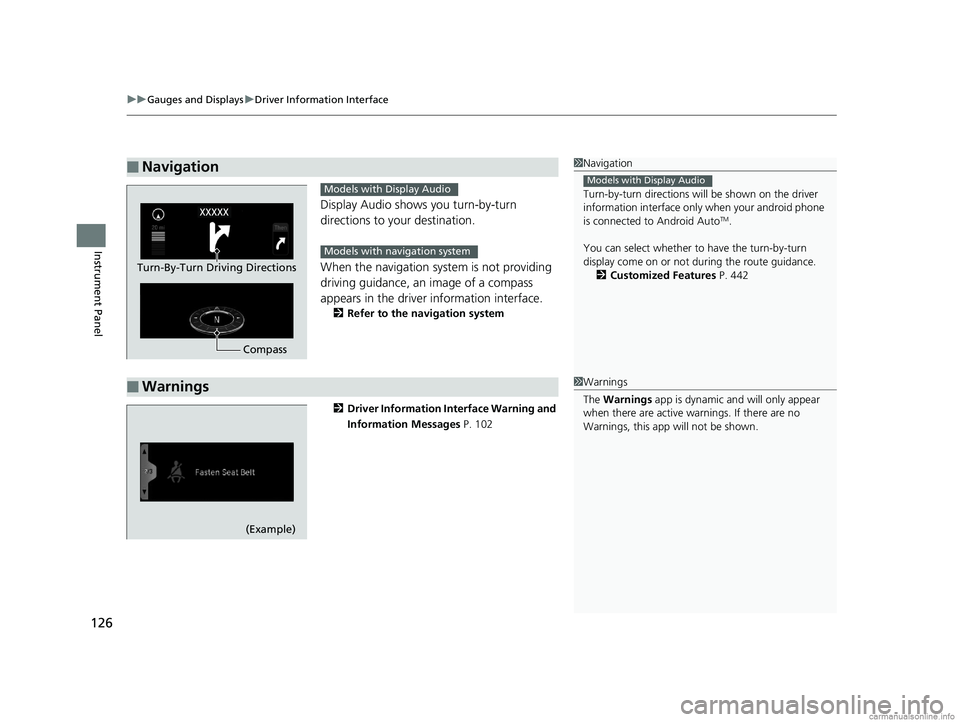
Display Audio shows you turn-by-turn
directions to your destination.
When the navigation system is not providing
driving guidance, an image of a compass
appears in the driver information interface.
2Refer to the navigation system
2 Driver Information Interface Warning and
Information Messages P. 102
■Navigation1Navigation
Turn-by-turn directions wi ll be shown on the driver
information interface only when your android phone
is connected to Android Auto
TM.
You can select whether to have the turn-by-turn
display come on or not dur ing the route guidance.
2 Customized Features P. 442
Models with Display Audio
Compass
Turn-By-Turn Driving Directions
Models with Display Audio
Models with navigation system
■Warnings1Warnings
The Warnings app is dynamic a nd will only appear
when there are active warnings. If there are no
Warnings, this app will not be shown.
(Example)
18 US ODYSSEY-31THR6010.book 126 ページ 2018年12月6日 木曜日 午後4時18分
Page 130 of 763
128
uuGauges and Displays uDriver Information Interface
Instrument Panel
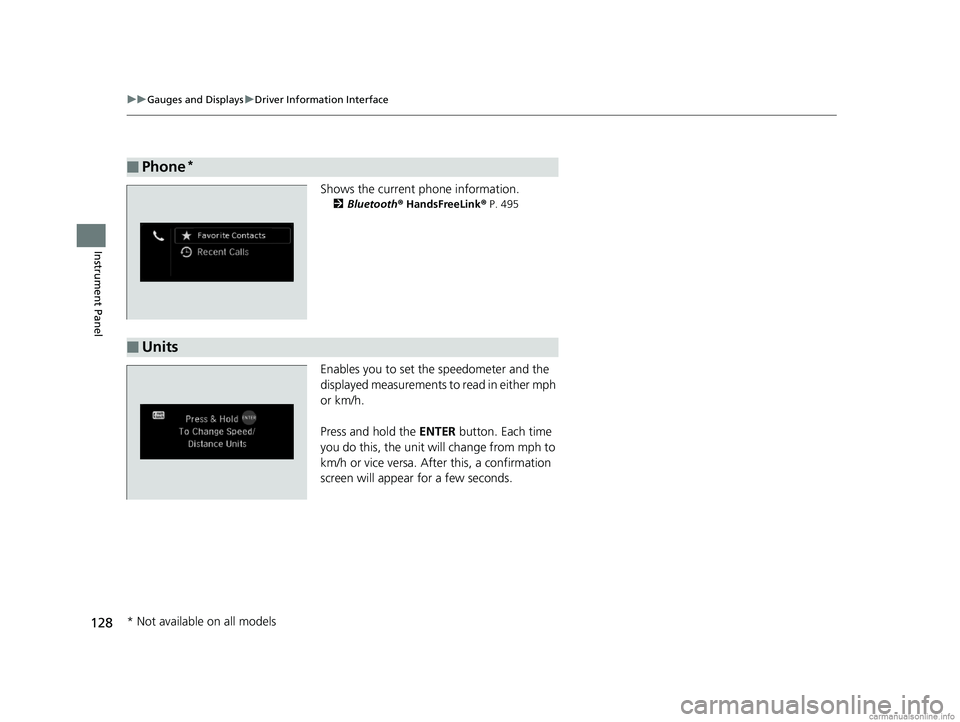
Shows the current phone information.
2 Bluetooth ® HandsFreeLink ® P. 495
Enables you to set the speedometer and the
displayed measurements to read in either mph
or km/h.
Press and hold the ENTER button. Each time
you do this, the unit will change from mph to
km/h or vice versa. A fter this, a confirmation
screen will appear for a few seconds.
■Phone*
■Units
* Not available on all models
18 US ODYSSEY-31THR6010.book 128 ページ 2018年12月6日 木曜日 午後4時18分
Page 145 of 763
143
uuClock uAdjusting the Clock
Controls
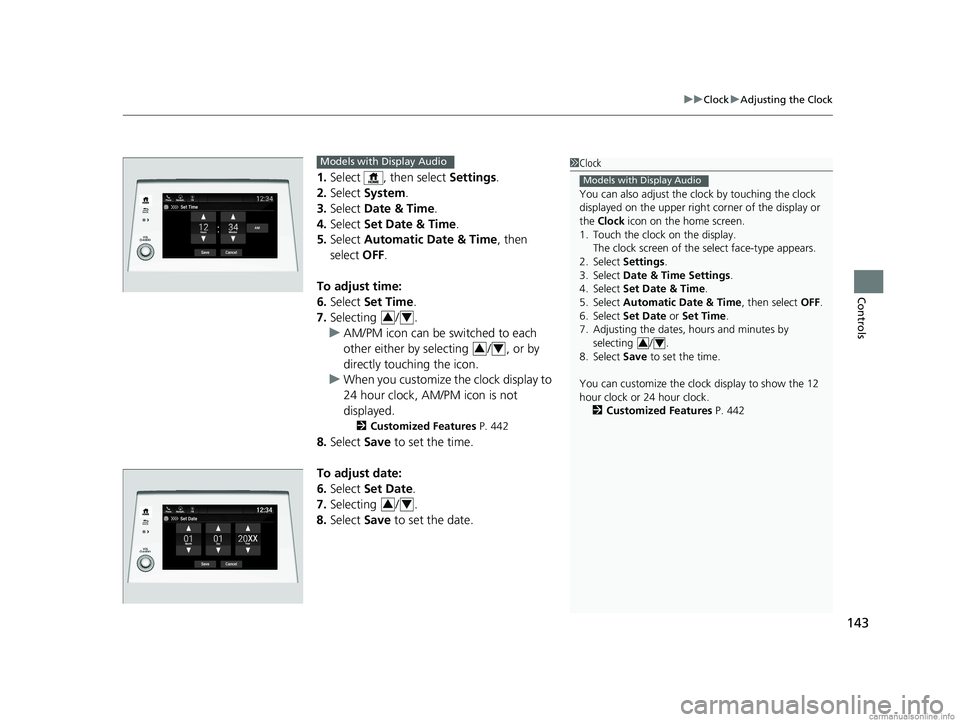
1. Select , then select Settings.
2. Select System.
3. Select Date & Time .
4. Select Set Date & Time .
5. Select Automatic Date & Time , then
select OFF.
To adjust time:
6. Select Set Time.
7. Selecting / .
u AM/PM icon can be switched to each
other either by selecting / , or by
directly touching the icon.
u When you customize the clock display to
24 hour clock, AM/PM icon is not
displayed.
2 Customized Features P. 442
8.Select Save to set the time.
To adjust date:
6. Select Set Date.
7. Selecting / .
8. Select Save to set the date.
1Clock
You can also adjust the clock by touching the clock
displayed on the upper right corner of the display or
the Clock icon on the home screen.
1. Touch the clock on the display.
The clock screen of the select face-type appears.
2. Select Settings .
3. Select Date & Time Settings .
4. Select Set Date & Time .
5. Select Automatic Date & Time , then select OFF.
6. Select Set Date or Set Time.
7. Adjusting the dates, hours and minutes by selecting / .
8. Select Save to set the time.
You can customize the clock display to show the 12
hour clock or 24 hour clock. 2 Customized Features P. 442
Models with Display Audio
34
Set Time
Save
Hours MinutesAM
Cancel
Phone Navigati.. FM
Models with Display Audio
34
34
34
18 US ODYSSEY-31THR6010.book 143 ページ 2018年12月6日 木曜日 午後4時18分
Page 148 of 763
146
uuLocking and Unlocking the Doors uLow Remote Signal Strength
Controls
Low Remote Signal Strength
The vehicle transmits radio waves to locate the remote when locking/unlocking the
doors*, tailgate*, and fuel fill door*, opening the power sliding door* and the power
tailgate*, or to start the engine.
In the following cases, locking/unlocking the doors
*, opening the power sliding
door* and the power tailgate*, or starting the engine may be inhibited or operation
may be unstable:
• Strong radio waves are being tra nsmitted by nearby equipment.
• You are carrying the remote together with telecommunications equipment,
laptop computers, cell phone s, or wireless devices.
• A metallic object is touchi ng or covering the remote.
1Low Remote Signal Strength
Communication between the remote and the vehicle
consumes the remote’s battery.
Battery life is about two years, but this varies
depending on regularity of use.
The battery is consumed whenever the remote is
receiving strong radio waves. Avoid placing it near
electrical appliances such as televisions and personal
computers.
* Not available on all models
18 US ODYSSEY-31THR6010.book 146 ページ 2018年12月6日 木曜日 午後4時18分
Page 262 of 763
260
Features
Audio System
About Your Audio System
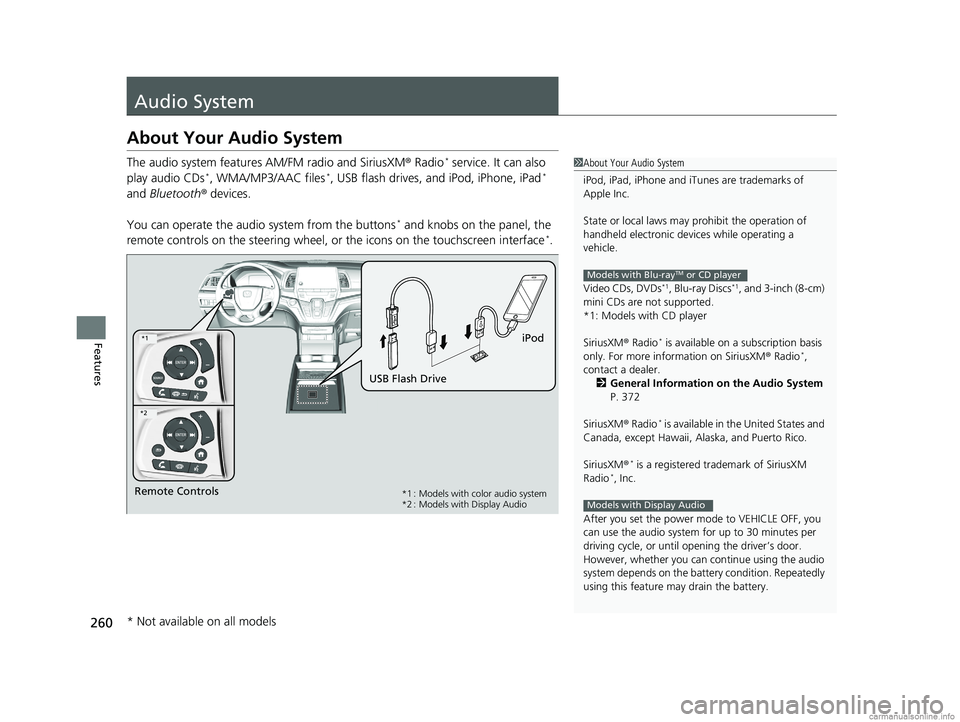
The audio system features AM/FM radio and SiriusXM ® Radio* service. It can also
play audio CDs*, WMA/MP3/AAC files*, USB flash drives, and iPod, iPhone, iPad*
and Bluetooth ® devices.
You can operate the audi o system from the buttons
* and knobs on the panel, the
remote controls on the steering wheel, or the icons on the touchscreen interface*.
1About Your Audio System
iPod, iPad, iPhone and iT unes are trademarks of
Apple Inc.
State or local laws may pr ohibit the operation of
handheld electronic devi ces while operating a
vehicle.
Video CDs, DVDs
*1, Blu-ray Discs*1, and 3-inch (8-cm)
mini CDs are not supported.
*1: Models with CD player
SiriusXM ® Radio
* is available on a subscription basis
only. For more information on SiriusXM ® Radio*,
contact a dealer.
2 General Information on the Audio System
P. 372
SiriusXM ® Radio
* is available in the United States and
Canada, except Ha waii, Alaska, and Puerto Rico.
SiriusXM ®
* is a registered trademark of SiriusXM
Radio*, Inc.
After you set the power m ode to VEHICLE OFF, you
can use the audio system for up to 30 minutes per
driving cycle, or until opening the driver’s door.
However, whether you can continue using the audio
system depends on the batter y condition. Repeatedly
using this feature ma y drain the battery.
Models with Blu-rayTM or CD player
Models with Display AudioRemote Controls iPod
USB Flash Drive*1 : Models with color audio system
*2 : Models with Display Audio
*1
*2
* Not available on all models
18 US ODYSSEY-31THR6010.book 260 ページ 2018年12月6日 木曜日 午後4時18分