jack HONDA ODYSSEY 2019 Owner's Manual (in English)
[x] Cancel search | Manufacturer: HONDA, Model Year: 2019, Model line: ODYSSEY, Model: HONDA ODYSSEY 2019Pages: 767, PDF Size: 47.46 MB
Page 8 of 767
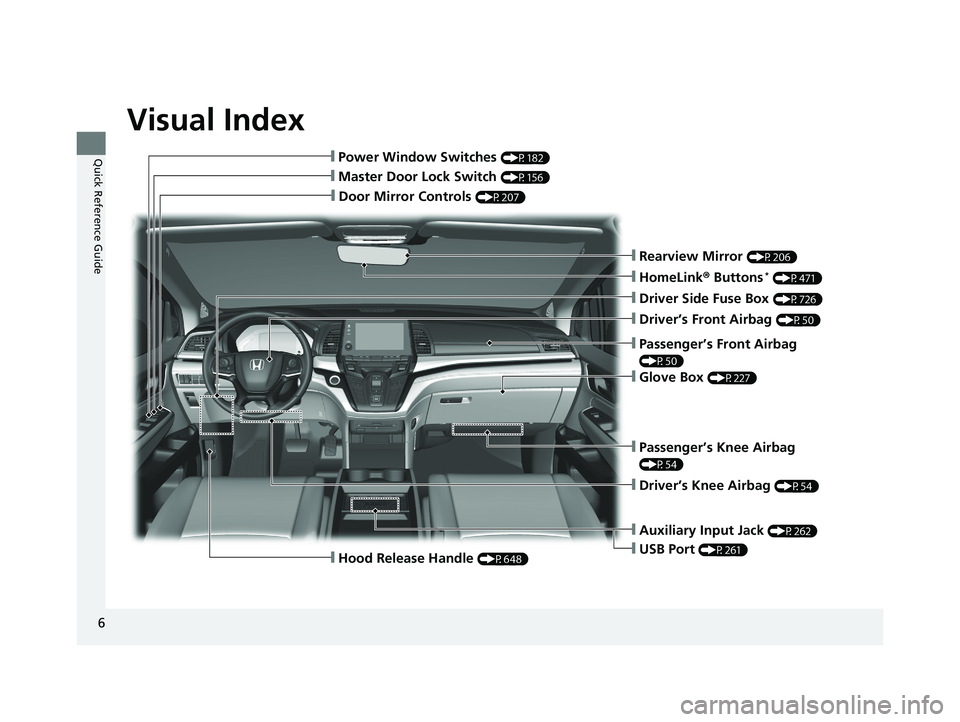
Visual Index
6
Quick Reference Guide
❙Door Mirror Controls (P207)
❙Master Door Lock Switch (P156)
❙Hood Release Handle (P648)
❙Power Window Switches (P182)
❙Rearview Mirror (P206)
❙Driver Side Fuse Box (P726)
❙Glove Box (P227)
❙Driver’s Front Airbag (P50)
❙Passenger’s Knee Airbag
(P54)
❙Driver’s Knee Airbag (P54)
❙Auxiliary Input Jack (P262)
❙USB Port (P261)
❙Passenger’s Front Airbag
(P50)
❙HomeLink® Buttons* (P471)
19 ODYSSEY-31THR6120.book 6 ページ 2018年12月6日 木曜日 午後4時35分
Page 261 of 767
259
Features
This chapter describes how to operate technology features.
Audio SystemAbout Your Audio System ................ 260
USB Ports ......................................... 261
Auxiliary Input Jack .......................... 262
Audio System Theft Protection ......... 263
Audio Remote Controls .................... 264
Audio System Basic Operation ........ 267
Audio/Information Screen ................ 268
Adjusting the Sound ........................ 272
Display Setup ................................... 273
Playing AM/FM Radio ....................... 274
Playing an iPod ................................ 276
Playing a USB Flash Drive ................. 279
Playing Bluetooth ® Audio ................. 282
Models with color audio system
Audio System Basic Operation ........ 285
Audio/Information Screen ................ 286
System Updates ............................... 300
File Manager .................................... 306
Adjusting the Sound ........................ 312
Display Setup ................................... 313
Voice Control Operation .................. 315
Playing AM/FM Radio ....................... 318
Playing SiriusXM ® Radio
*................. 322
Playing a CD*.................................. 332
Playing an iPod ................................ 335
Playing a USB Flash Drive ................. 338
Playing My Honda Music .................. 341
Playing Bluetooth ® Audio................. 345
Models with Display AudioPlaying Social Playlist........................ 347
HondaLink ®..................................... 349
Wi-Fi Connection ............................. 354
Near Field Communication (NFC)
*... 356
Siri Eyes Free .................................... 359
Apple CarPlay .................................. 360
Android Auto .................................. 363
Audio Error Messages ...................... 367
General Information on the Audio System..... 372Blu-ray/DVD Rear Entertainment System*...... 396Customized Features............................. 445
HomeLink ® Universal Transceiver*....... 470
Bluetooth ® HandsFreeLink ®.......... 473 , 498
CabinWatch
TM *....................................... 523
CabinTalkTM *........................................... 524
* Not available on all models
19 ODYSSEY-31THR6120.book 259 ページ 2018年12月6日 木曜日 午後4時35分
Page 264 of 767
262
uuAudio System uAuxiliary Input Jack
Features
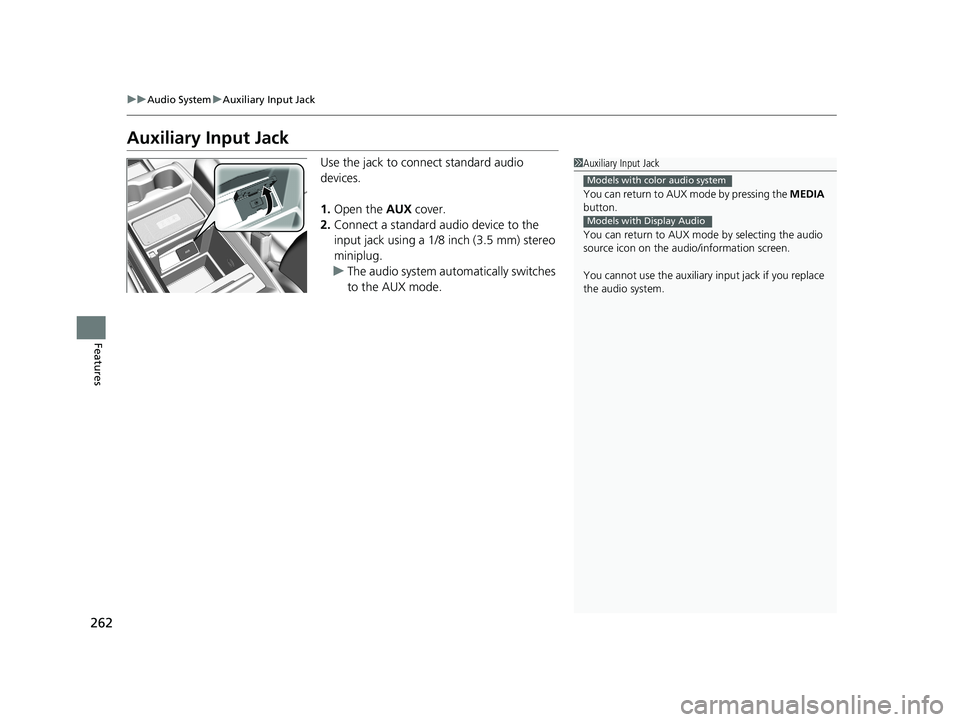
Auxiliary Input Jack
Use the jack to connect standard audio
devices.
1. Open the AUX cover.
2. Connect a standard audio device to the
input jack using a 1/8 inch (3.5 mm) stereo
miniplug.
u The audio system automatically switches
to the AUX mode.1Auxiliary Input Jack
You can return to AUX mode by pressing the MEDIA
button.
You can return to AUX mode by selecting the audio
source icon on the audio/information screen.
You cannot use the auxiliary input jack if you replace
the audio system.
Models with color audio system
Models with Display Audio
19 ODYSSEY-31THR6120.book 262 ページ 2018年12月6日 木曜日 午後4時35分
Page 285 of 767
Continued283
uuAudio System Basic Operation uPlaying Bluetooth ® Audio
Features
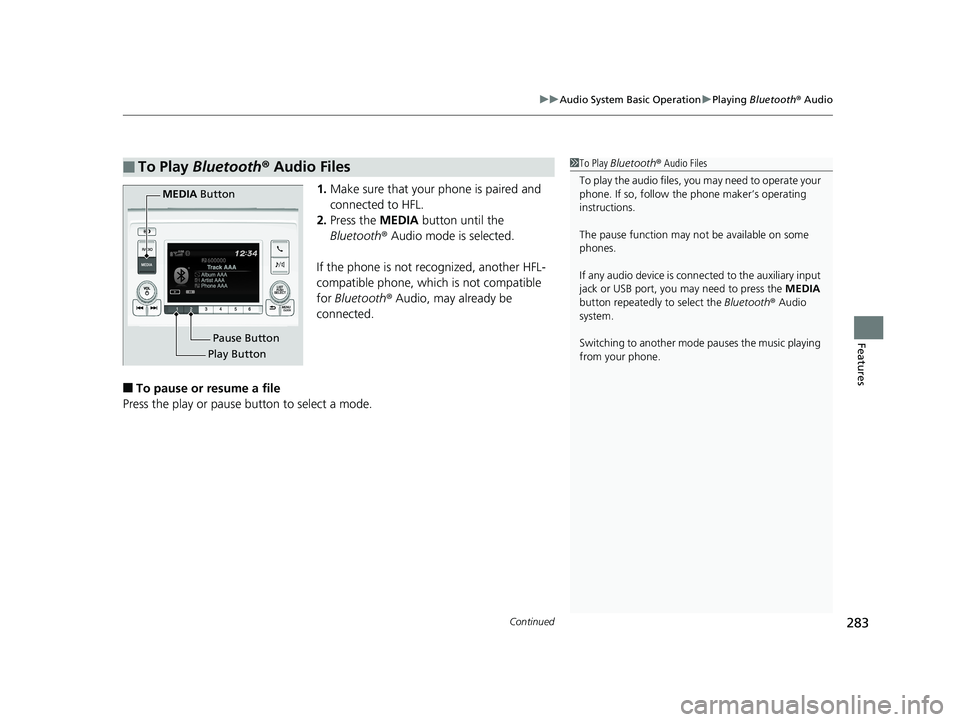
1. Make sure that your phone is paired and
connected to HFL.
2. Press the MEDIA button until the
Bluetooth ® Audio mode is selected.
If the phone is not recognized, another HFL-
compatible phone, which is not compatible
for Bluetooth ® Audio, may already be
connected.
■To pause or resume a file
Press the play or pause button to select a mode.
■To Play Bluetooth ® Audio Files1 To Play Bluetooth ® Audio Files
To play the audio files, y ou may need to operate your
phone. If so, follow the phone maker’s operating
instructions.
The pause function may no t be available on some
phones.
If any audio device is conne cted to the auxiliary input
jack or USB port, you may need to press the MEDIA
button repeatedly to select the Bluetooth ® Audio
system.
Switching to another mode pauses the music playing
from your phone.
Play Button Pause Button
MEDIA
Button
19 ODYSSEY-31THR6120.book 283 ページ 2018年12月6日 木曜日 午後4時35分
Page 375 of 767
373
uuGeneral Information on the Audio System uRecommended CDs*
Continued
Features
Recommended CDs*
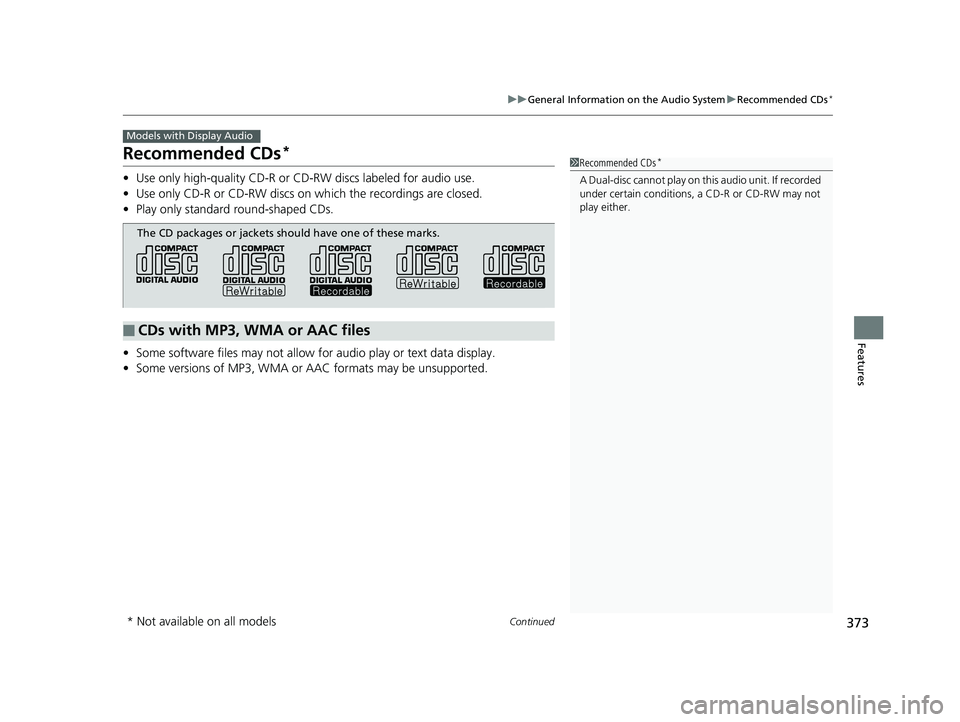
• Use only high-quality CD-R or CD-RW discs labeled for audio use.
• Use only CD-R or CD-RW discs on wh ich the recordings are closed.
• Play only standard round-shaped CDs.
• Some software files may not allow for audio play or text data display.
• Some versions of MP3, WMA or AAC formats may be unsupported.
Models with Display Audio
1Recommended CDs*
A Dual-disc cannot play on th is audio unit. If recorded
under certain conditions, a CD-R or CD-RW may not
play either.
■CDs with MP3, WMA or AAC files
The CD packages or jackets should have one of these marks.
* Not available on all models
19 ODYSSEY-31THR6120.book 373 ページ 2018年12月6日 木曜日 午後4時35分
Page 420 of 767
418
uuBlu-ray/DVD Rear Entertainment System*uPlayable Discs
Features
Playable Discs
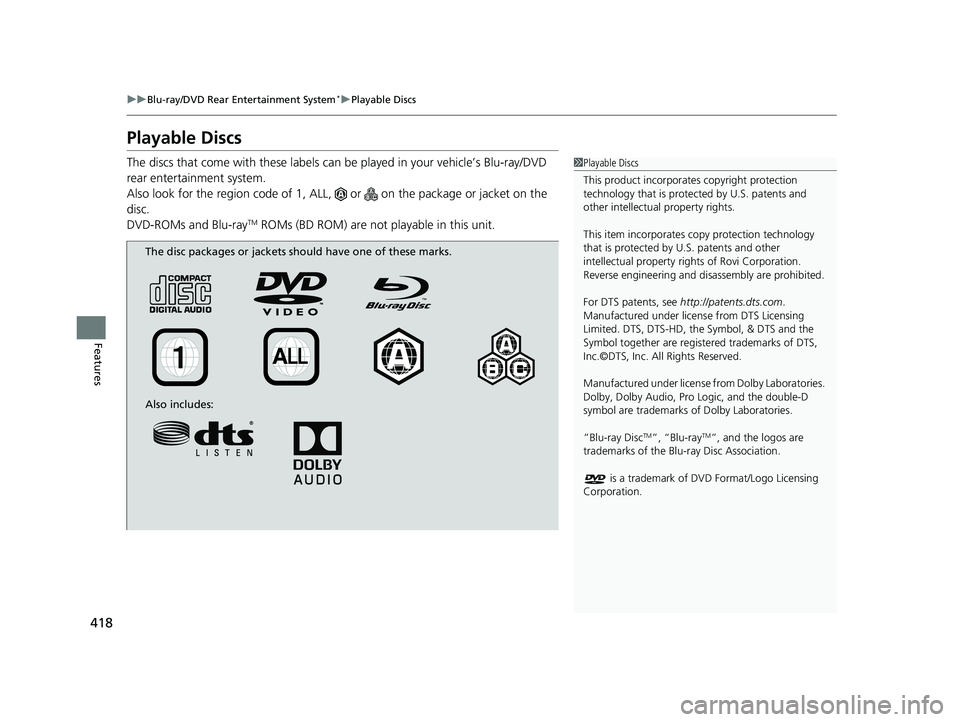
The discs that come with these labels can be played in your vehicle’s Blu-ray/DVD
rear entertainment system.
Also look for the region code of 1, ALL, or on the package or jacket on the
disc.
DVD-ROMs and Blu-ray
TM ROMs (BD ROM) are not pl ayable in this unit.
1Playable Discs
This product incorporates copyright protection
technology that is protec ted by U.S. patents and
other intellectual property rights.
This item incorporates co py protection technology
that is protected by U.S. patents and other
intellectual property righ ts of Rovi Corporation.
Reverse engineering and di sassembly are prohibited.
For DTS patents, see http://patents.dts.com .
Manufactured under licens e from DTS Licensing
Limited. DTS, DTS-HD, the Symbol, & DTS and the
Symbol together are regist ered trademarks of DTS,
Inc.©DTS, Inc. All Rights Reserved.
Manufactured under license from Dolby Laboratories.
Dolby, Dolby Audio, Pro Logic, and the double-D
symbol are trademarks of Dolby Laboratories.
“Blu-ray Disc
TM”, “Blu-rayTM”, and the logos are
trademarks of the Blu-ray Disc Association.
is a trademark of DVD Format/Logo Licensing
Corporation.
The disc packages or jackets should have one of these marks.
Also includes:
19 ODYSSEY-31THR6120.book 418 ページ 2018年12月6日 木曜日 午後4時35分
Page 702 of 767
700
Handling the Unexpected
Tools
Types of Tools
1Types of Tools
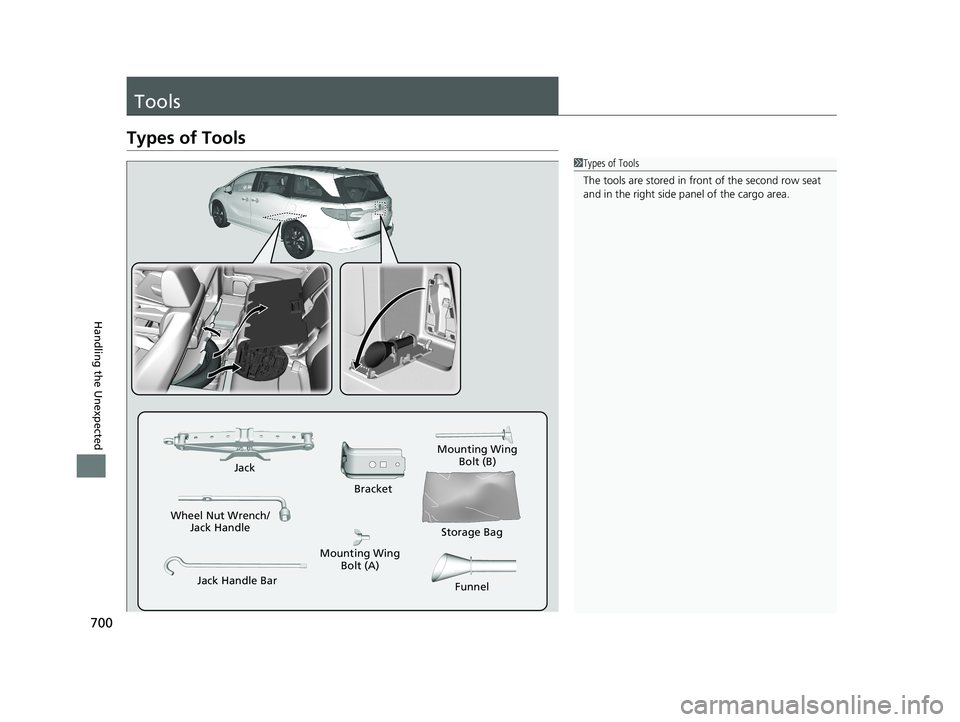
The tools are stored in fr ont of the second row seat
and in the right side pa nel of the cargo area.
Wheel Nut Wrench/
Jack Handle Jack
Jack Handle Bar Bracket
Mounting Wing
Bolt (B)
Mounting Wing Bolt (A) Storage Bag
Funnel
19 ODYSSEY-31THR6120.book 700 ページ 2018年12月6日 木曜日 午後4時35分
Page 703 of 767
701Continued
Handling the Unexpected
If a Tire Goes Flat
Changing a Flat Tire
If a tire goes flat while driving, grasp the steering wheel firmly, and brake gradually
to reduce speed. Then, stop in a safe plac e. Replace the flat tire with a compact
spare tire. Go to a dealer as soon as possib le to have the full-size tire repaired or
replaced.
1. Park the vehicle on a firm, level, non-slippery surface and apply the parking brake.
2. Press the
(P button.
3. Turn on the hazard warning lights an d set the power mode to VEHICLE OFF.
1Changing a Flat Tire
Follow compact spare precautions:
Periodically check the tire pressure of the compact
spare. It should be set to the specified pressure.
Specified Pressure: 60 psi (420 kPa, 4.2 kgf/cm
2)
When driving with the compact spare tire, keep the
vehicle speed under 50 mph (80 km/h). Replace with
a full-size tire as soon as possible.
The compact spare tire and wheel in your vehicle are
specifically for this model. Do not use them with
another vehicle. Do not us e another type of compact
spare tire or wheel with your vehicle.
Do not mount tire chains on a compact spare tire.
If a chain-mounted front tire goes flat, remove one of
the full-size rear tires and replace it with the compact
spare tire. Remove the flat front tire and replace it
with the full-size tire that was removed from the rear.
Mount the tire chains on the front tire.
Do not use a puncture-repairi ng agent on a flat tire,
as it can damage the tire pressure sensor.
Do not use the jack if it doesn’t work properly. Call
your dealer or a prof essional towing service.
19 ODYSSEY-31THR6120.book 701 ページ 2018年12月6日 木曜日 午後4時35分
Page 704 of 767
702
uuIf a Tire Goes Flat uChanging a Flat Tire
Handling the Unexpected
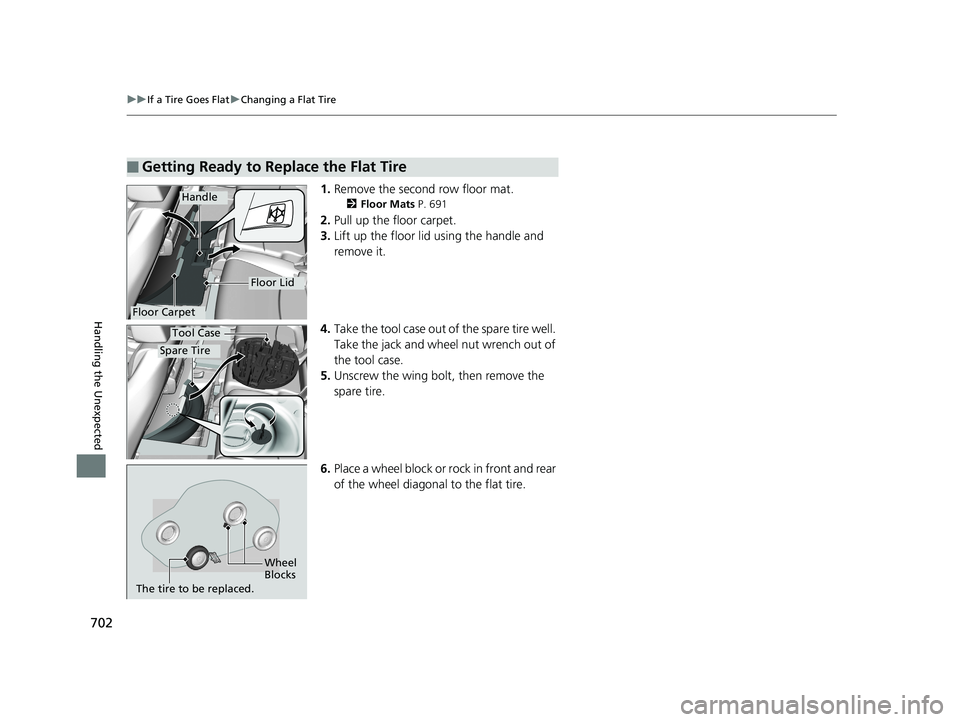
1. Remove the second row floor mat.
2 Floor Mats P. 691
2.Pull up the floor carpet.
3. Lift up the floor lid using the handle and
remove it.
4. Take the tool case out of the spare tire well.
Take the jack and wheel nut wrench out of
the tool case.
5. Unscrew the wing bolt, then remove the
spare tire.
6. Place a wheel block or ro ck in front and rear
of the wheel diagonal to the flat tire.
■Getting Ready to Replace the Flat Tire
Floor Carpet
Handle
Floor Lid
Spare Tire
Tool Case
Wheel
Blocks
The tire to be replaced.
19 ODYSSEY-31THR6120.book 702 ページ 2018年12月6日 木曜日 午後4時35分
Page 706 of 767
uuIf a Tire Goes Flat uChanging a Flat Tire
704
Handling the Unexpected
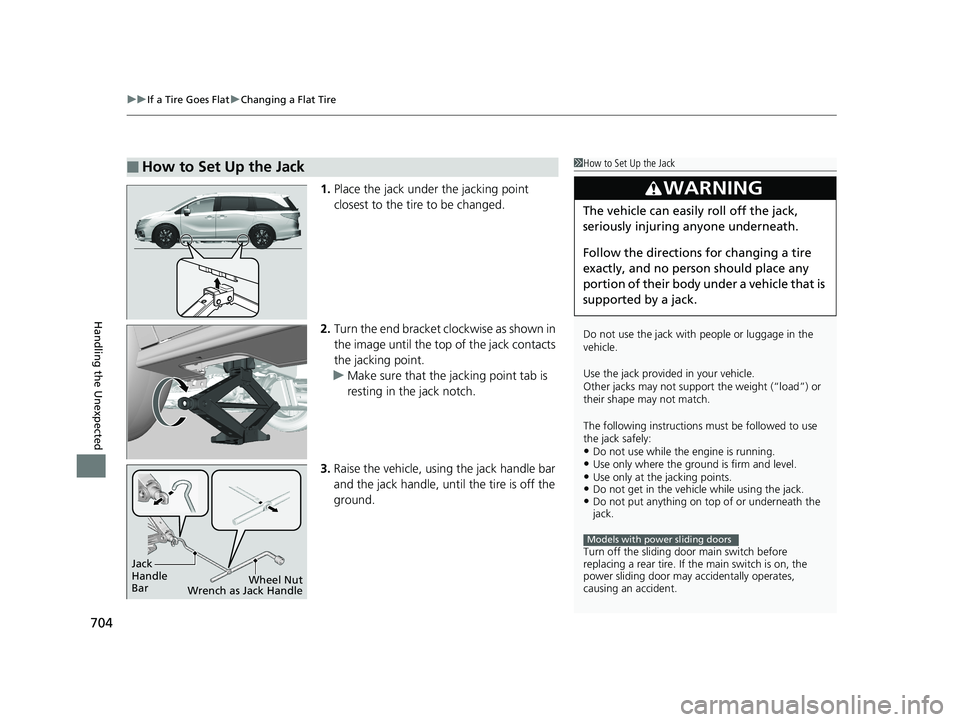
1. Place the jack under the jacking point
closest to the tire to be changed.
2. Turn the end bracket cl ockwise as shown in
the image until the top of the jack contacts
the jacking point.
u Make sure that the jacking point tab is
resting in the jack notch.
3. Raise the vehicle, using the jack handle bar
and the jack handle, until the tire is off the
ground.
■How to Set Up the Jack1How to Set Up the Jack
Do not use the jack with people or luggage in the
vehicle.
Use the jack provided in your vehicle.
Other jacks may not support the weight (“load”) or
their shape may not match.
The following instructions must be followed to use
the jack safely:
•Do not use while the engine is running.•Use only where the ground is firm and level.•Use only at the jacking points.•Do not get in the vehicl e while using the jack.•Do not put anything on top of or underneath the
jack.
Turn off the sliding door main switch before
replacing a rear tire. If the main switch is on, the
power sliding door may a ccidentally operates,
causing an accident.
3WARNING
The vehicle can easily roll off the jack,
seriously injuring anyone underneath.
Follow the directions for changing a tire
exactly, and no person should place any
portion of their body under a vehicle that is
supported by a jack.
Models with power sliding doors
Jack
Handle
Bar Wheel Nut
Wrench as Jack Handle
19 ODYSSEY-31THR6120.book 704 ページ 2018年12月6日 木曜日 午後4時35分