ad blue HONDA ODYSSEY 2020 (in English) Owner's Guide
[x] Cancel search | Manufacturer: HONDA, Model Year: 2020, Model line: ODYSSEY, Model: HONDA ODYSSEY 2020Pages: 767, PDF Size: 43.89 MB
Page 355 of 767
353
uuAudio System Basic Operation uHondaLink ®
Continued
Features
HondaLink ®
HondaLink® connects you to the latest info rmation from Honda. You can connect
your phone wirelessly through Wi-Fi or Bluetooth®.
2Wi-Fi Connection P. 358
2 Phone Setup P. 506
Use the following procedure to connect to HondaLink ® service.
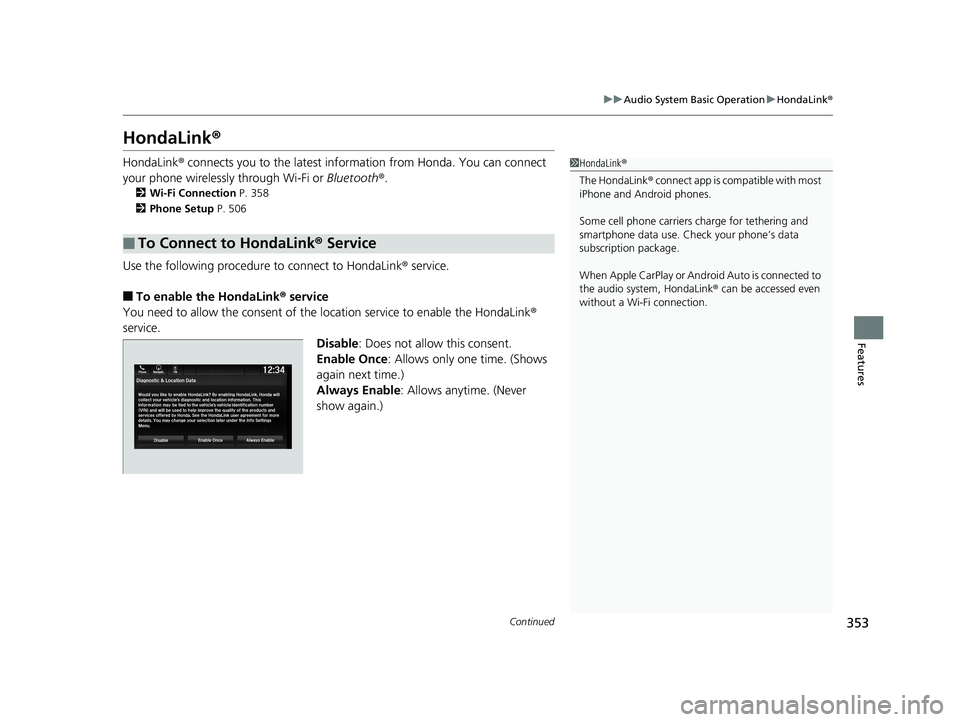
■To enable the HondaLink® service
You need to allow the consent of the location service to enable the HondaLink ®
service.
Disable: Does not allow this consent.
Enable Once : Allows only one time. (Shows
again next time.)
Always Enable: Allows anytime. (Never
show again.)
■To Connect to HondaLink® Service
1HondaLink ®
The HondaLink ® connect app is compatible with most
iPhone and Android phones.
Some cell phone carriers charge for tethering and
smartphone data use. Check your phone’s data
subscription package.
When Apple CarPlay or Android Auto is connected to
the audio system, HondaLink ® can be accessed even
without a Wi-Fi connection.
20 US ODYSSEY-31THR6210.book 353 ページ 2020年2月28日 金曜日 午前7時26分
Page 362 of 767
360
uuAudio System Basic Operation uNear Field Communication (NFC)*
Features
Near Field Comm unication (NFC)*
Near Field Communication (NFC) allows you to connect your phone to the audio
system easily via Bluetooth®.
NFC enables two devices to communicate in close proximity, within about 2 inch (40
mm).
The following features are available:
• Bluetooth ® setup
• Image transfer for wallpaper
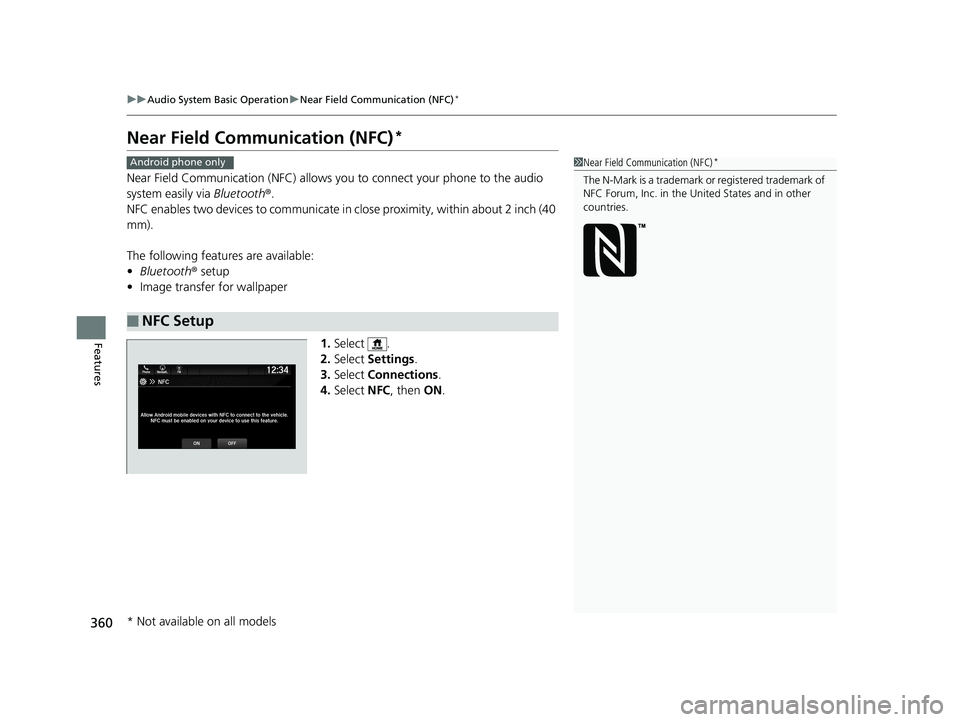
1.Select .
2. Select Settings .
3. Select Connections .
4. Select NFC, then ON.
■NFC Setup
1Near Field Communication (NFC)*
The N-Mark is a trademark or registered trademark of
NFC Forum, Inc. in the United States and in other
countries.
Android phone only
* Not available on all models
20 US ODYSSEY-31THR6210.book 360 ページ 2020年2月28日 金曜日 午前7時26分
Page 363 of 767
361
uuAudio System Basic Operation uNear Field Communication (NFC)*
Continued
Features
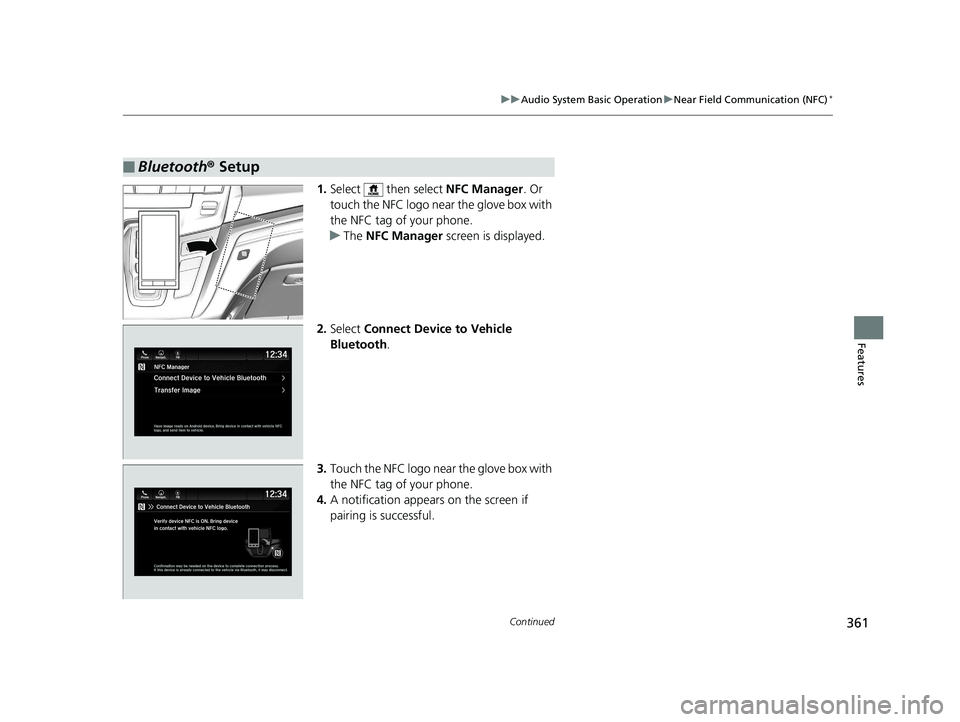
1. Select then select NFC Manager. Or
touch the NFC logo near the glove box with
the NFC tag of your phone.
u The NFC Manager screen is displayed.
2. Select Connect Device to Vehicle
Bluetooth .
3. Touch the NFC logo near the glove box with
the NFC tag of your phone.
4. A notification appears on the screen if
pairing is successful.
■Bluetooth ® Setup
20 US ODYSSEY-31THR6210.book 361 ページ 2020年2月28日 金曜日 午前7時26分
Page 365 of 767
363
uuAudio System Basic Operation uSiri Eyes Free
Features
Siri Eyes Free
You can talk to Siri using the (Talk) button on the steering wheel when your
iPhone is paired to the Bluetooth® HandsFreeLink ® (HFL) system.
2Phone Setup P. 506
■Using Siri Eyes Free
1Siri Eyes Free
Siri is a trademark of Apple Inc.
Check Apple Inc. website for features available for
Siri.
While driving we recomme nd only using Siri through
the button on the steering wheel (Siri Eyes Free).
1Using Siri Eyes Free
Some commands work only on specific phone
features or apps.
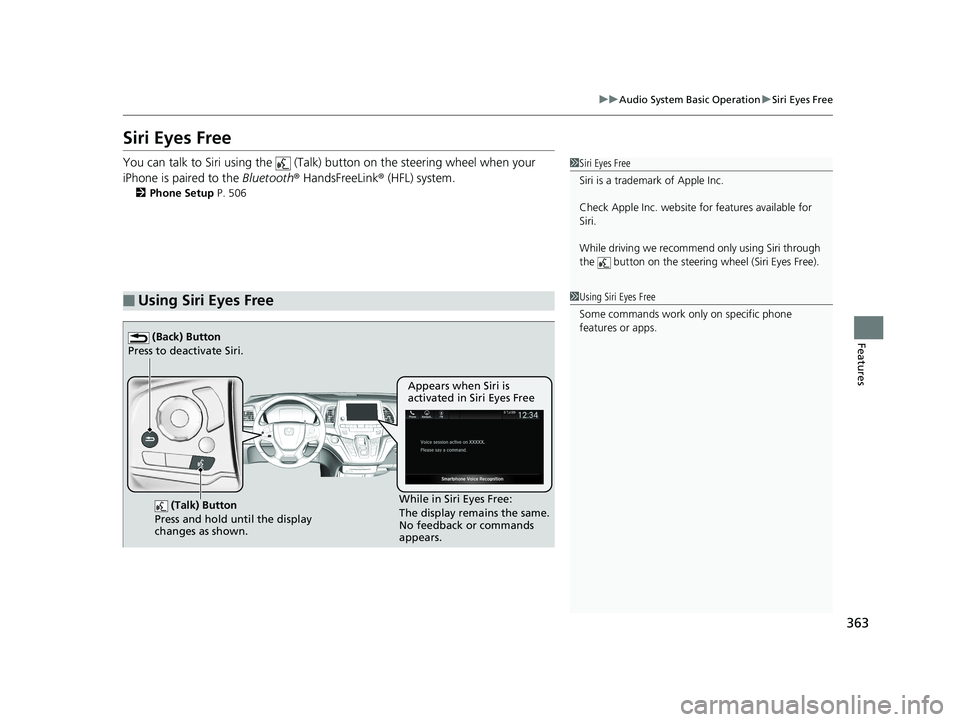
(Talk) Button
Press and hold until the display
changes as shown.
(Back) Button
Press to deactivate Siri.
While in Siri Eyes Free:
The display remains the same.
No feedback or commands
appears. Appears when Siri is
activated in Siri Eyes Free
20 US ODYSSEY-31THR6210.book 363 ページ 2020年2月28日 金曜日 午前7時26分
Page 366 of 767
364
uuAudio System Basic Operation uApple CarPlay
Features
Apple CarPlay
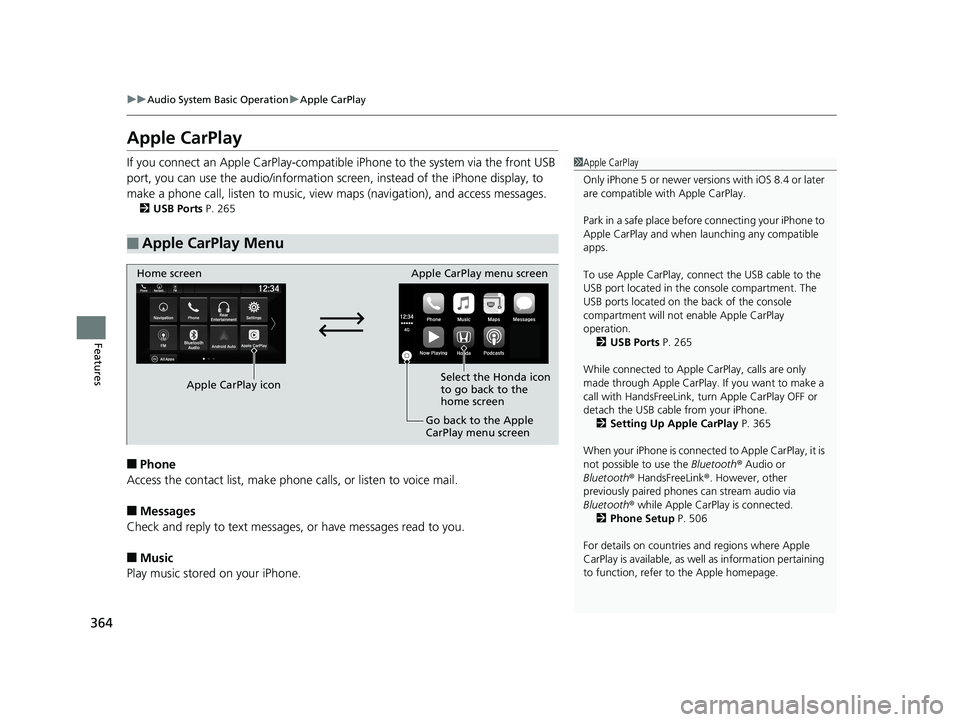
If you connect an Apple CarPlay-compatible iPhone to the system via the front USB
port, you can use the audio/information scr een, instead of the iPhone display, to
make a phone call, listen to music, view maps (navigation), and access messages.
2USB Ports P. 265
■Phone
Access the contact list, make phone calls, or listen to voice mail.
■Messages
Check and reply to text messages, or have messages read to you.
■Music
Play music stored on your iPhone.
■Apple CarPlay Menu
1Apple CarPlay
Only iPhone 5 or newer versi ons with iOS 8.4 or later
are compatible with Apple CarPlay.
Park in a safe place before connecting your iPhone to
Apple CarPlay and when launching any compatible
apps.
To use Apple CarPlay, connect the USB cable to the
USB port located in the console compartment. The
USB ports located on the back of the console
compartment will not enable Apple CarPlay
operation. 2 USB Ports P. 265
While connected to Apple CarPlay, calls are only
made through Apple CarPlay. If you want to make a
call with HandsFreeLink, tu rn Apple CarPlay OFF or
detach the USB cable from your iPhone. 2 Setting Up Apple CarPlay P. 365
When your iPhone is connected to Apple CarPlay, it is
not possible to use the Bluetooth® Audio or
Bluetooth ® HandsFreeLink ®. However, other
previously paired phones can stream audio via
Bluetooth ® while Apple CarPlay is connected.
2 Phone Setup P. 506
For details on c ountries and regions where Apple
CarPlay is available, as well as information pertaining
to function, refer to the Apple homepage.
Home screen
Apple CarPlay icon Apple CarPlay menu screen
Go back to the Apple
CarPlay menu screen
Select the Honda icon
to go back to the
home screen
20 US ODYSSEY-31THR6210.book 364 ページ 2020年2月28日 金曜日 午前7時26分
Page 369 of 767
367
uuAudio System Basic Operation uAndroid Auto
Continued
Features
Android Auto
When you connect an Android phone to the audio system via the front USB port,
Android Auto is automatically initiated. When connected via Android Auto, you can
use the audio/information screen to access the Phone, Google Maps (Navigation),
Google Play Music, and Google Now functions. When you first use Android Auto, a
tutorial will appear on the screen.
We recommend that you comple te this tutorial while safely parked before using
Android Auto.
2 USB Ports P. 265
2 Auto Pairing Connection P. 369
1Android Auto
To use Android Auto, you need to download the
Android Auto app from Google Play to your
smartphone.
Only Android 5.0 (Lollipop) or later versions are
compatible with Android Auto.
Bluetooth A2DP cannot be used with Android Auto
phone.
Park in a safe place befo re connecting your Android
phone to Android Auto and when launching any
compatible apps.
To use Android Auto, connect the USB cable to the
USB port located in the console compartment. The
USB ports located on the back of the console
compartment will not enable Android Auto
operation.
2 USB Ports P. 265
To directly access the Android Auto phone function,
press Phone on the home screen.
2 Auto Pairing Connection P. 369
When your Android phone is connected to Android
Auto, it is not possible to use the Bluetooth® Audio.
However, other previously paired phones can stream
audio via Bluetooth ® while Android Auto is
connected.
2 Phone Setup P. 506
20 US ODYSSEY-31THR6210.book 367 ページ 2020年2月28日 金曜日 午前7時26分
Page 398 of 767
396
uuGeneral Information on the Audio System uLicense Information*
Features
The Bluetooth ® word mark and logos are registered trademarks owned by Bluetooth
SIG, Inc. and any use of such marks by DENSO CORPORATION is under license.
Other trademarks and trade names are those of their respective owners.
This product is protected by certain intelle ctual property rights of Microsoft. Use or
distribution of such technology outside of this product is prohibited without a
license from Microsoft.
■Bluetooth
■Windows Media
20 US ODYSSEY-31THR6210.book 396 ページ 2020年2月28日 金曜日 午前7時26分
Page 408 of 767
406
uuBlu-ray/DVD Rear Entertainment System*uVideo Accessibility
Features
Press any of the following colored buttons on the RES remote three times to turn a
function on or off, or to change a function setting.
Red button: Accessibility
Green button: Subtitles
Yellow button: Secondary Audio
Blue button: Audio Format Switching
■Changing Function Status
20 US ODYSSEY-31THR6210.book 406 ページ 2020年2月28日 金曜日 午前7時26分
Page 409 of 767
407
uuBlu-ray/DVD Rear Entertainment System*uPlaying a DVD/Blu-rayTM
Continued
Features
Playing a DVD/Blu-rayTM
To play a DVD or Blu-rayTM, insert a DVD or Blu-rayTM into the lower slot of the front
audio system, and select Rear in the audio/information screen.
u The system automatically st arts the DVD or Blu-ray
TM. DVD or Blu-rayTM is
available for the rear seat passenger only.
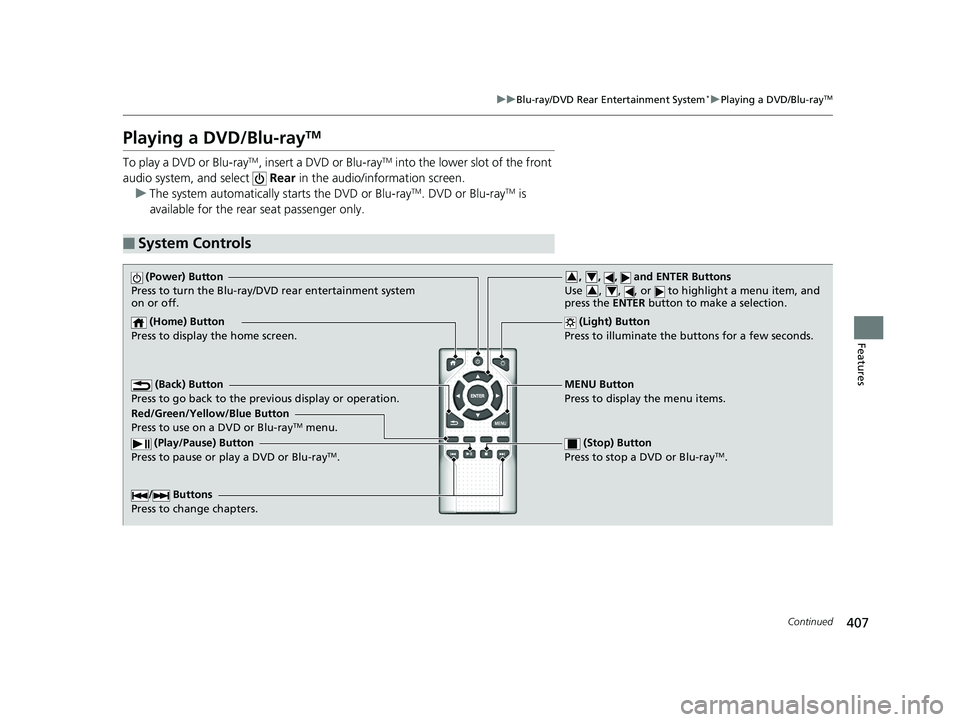
■System Controls
(Power) Button
Press to turn the Blu-ray/DVD rear entertainment system
on or off.
(Home) Button
Press to display the home screen. (Light) Button
Press to illuminate the buttons for a few seconds.
/ Buttons
Press to change chapters.
(Play/Pause) Button
Press to pause or play a DVD or Blu-rayTM.
(Stop) Button
Press to stop a DVD or Blu-rayTM.
MENU Button
Press to display the menu items.
Red/Green/Yellow/Blue Button
Press to use on a DVD or Blu-ray
TM menu.
(Back) Button
Press to go back to the pr evious display or operation.
, , , and ENTER Buttons
Use , , , or to highlight a menu item, and
press the ENTER button to make a selection.34
34
20 US ODYSSEY-31THR6210.book 407 ページ 2020年2月28日 金曜日 午前7時26分
Page 451 of 767
449
uuCustomized Features u
Continued
Features
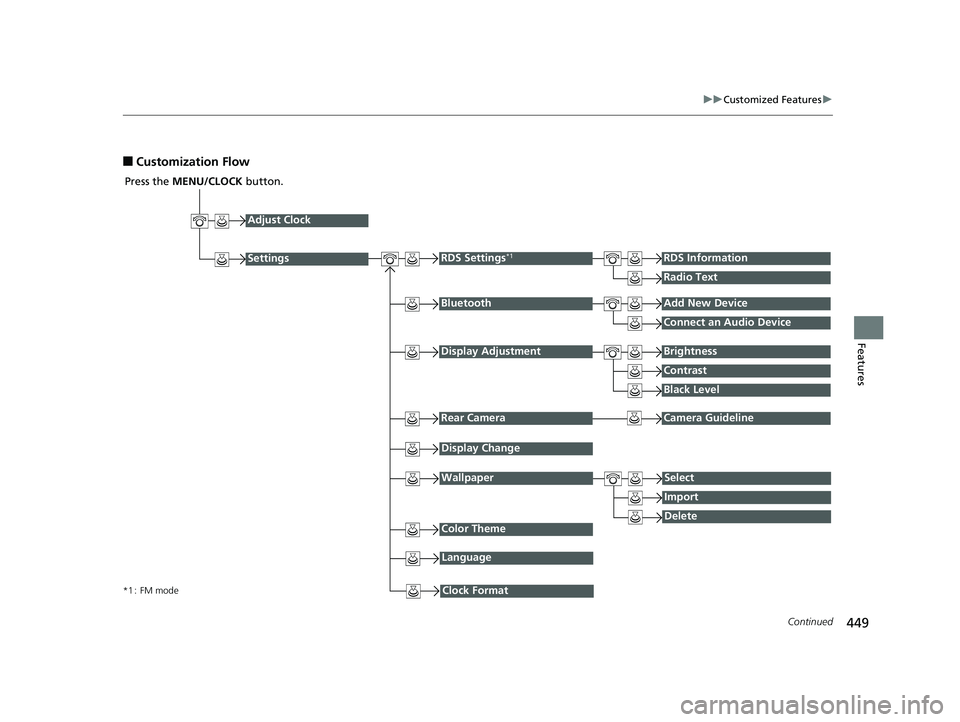
■Customization Flow
Press the MENU/CLOCK button.
Adjust Clock
BluetoothAdd New Device
Connect an Audio Device
Display AdjustmentBrightness
Contrast
Black Level
Rear CameraCamera Guideline
RDS Settings*1RDS Information
Radio Text
Display Change
WallpaperSelect
Import
DeleteColor Theme
Language
Clock Format*1 : FM mode
Settings
20 US ODYSSEY-31THR6210.book 449 ページ 2020年2月28日 金曜日 午前7時26分