ad blue HONDA ODYSSEY 2020 (in English) Repair Manual
[x] Cancel search | Manufacturer: HONDA, Model Year: 2020, Model line: ODYSSEY, Model: HONDA ODYSSEY 2020Pages: 767, PDF Size: 43.89 MB
Page 502 of 767
uuBluetooth ® HandsFreeLink ®u HFL Menus
500
Features
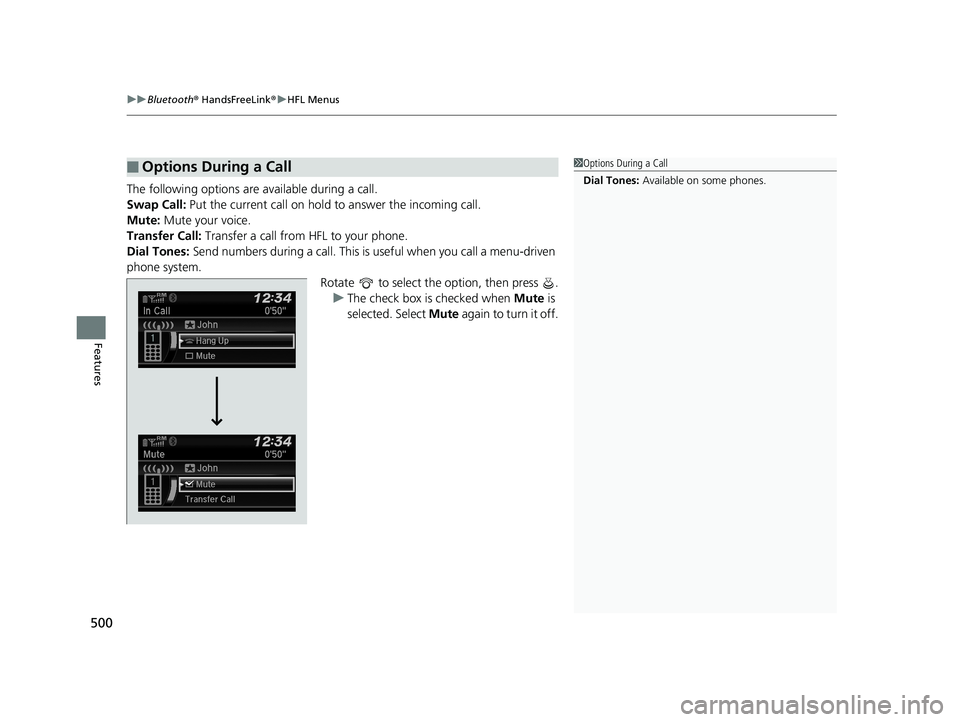
The following options are available during a call.
Swap Call: Put the current call on hold to answer the incoming call.
Mute: Mute your voice.
Transfer Call: Transfer a call from HFL to your phone.
Dial Tones: Send numbers during a call. This is useful when you call a menu-driven
phone system. Rotate to select the option, then press .u The check box is checked when Mute is
selected. Select Mute again to turn it off.
■Options During a Call1Options During a Call
Dial Tones: Available on some phones.
20 US ODYSSEY-31THR6210.book 500 ページ 2020年2月28日 金曜日 午前7時26分
Page 503 of 767
501Continued
Features
Bluetooth® HandsFreeLink ®
Bluetooth® HandsFreeLink ® (HFL) allows you to place and receive phone calls using
your vehicle’s audio system, without handling your cell phone.
Using HFL
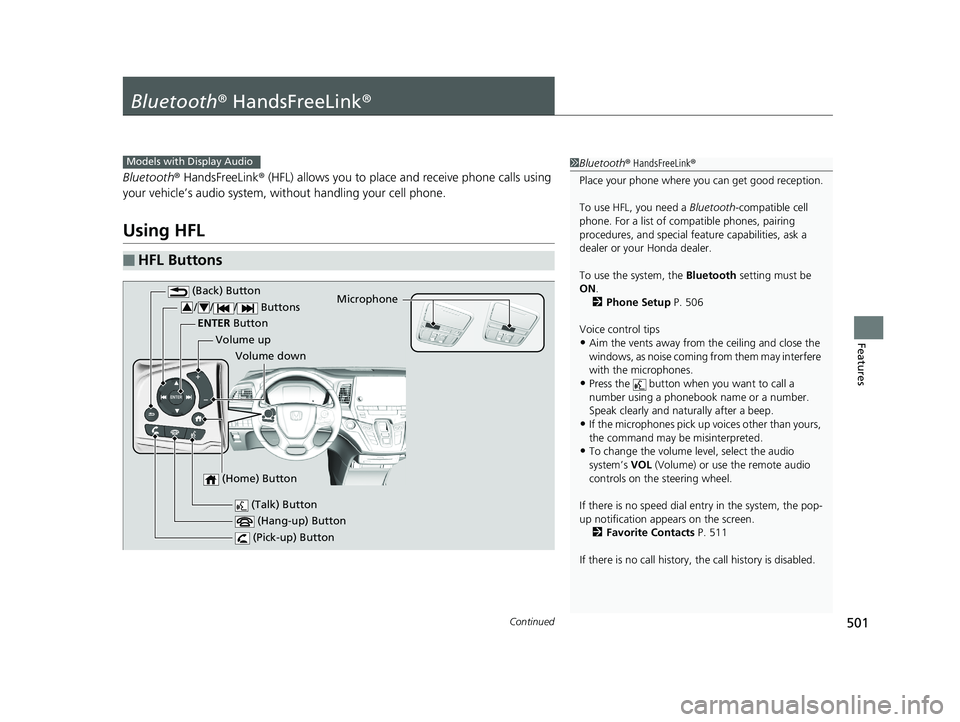
■HFL Buttons
1 Bluetooth ® HandsFreeLink ®
Place your phone where y ou can get good reception.
To use HFL, you need a Bluetooth-compatible cell
phone. For a list of compatible phones, pairing
procedures, and special fe ature capabilities, ask a
dealer or your Honda dealer.
To use the system, the Bluetooth setting must be
ON .
2 Phone Setup P. 506
Voice control tips
•Aim the vents away from the ceiling and close the
windows, as noise coming fr om them may interfere
with the microphones.
•Press the button when you want to call a
number using a phonebook name or a number.
Speak clearly and naturally after a beep.
•If the microphones pick up vo ices other than yours,
the command may be misinterpreted.
•To change the volume level, select the audio
system’s VOL (Volume) or use the remote audio
controls on the steering wheel.
If there is no speed dial entry in the system, the pop-
up notification appe ars on the screen.
2 Favorite Contacts P. 511
If there is no call history, the call history is disabled.
Models with Display Audio
(Talk) Button
Volume up Microphone
(Hang-up) Button
(Pick-up) Button
Volume down
ENTER
Button
(Back) Button
// / Buttons34
(Home) Button
20 US ODYSSEY-31THR6210.book 501 ページ 2020年2月28日 金曜日 午前7時26分
Page 504 of 767
uuBluetooth ® HandsFreeLink ®u Using HFL
502
Features
(Pick-up) button: Press to go directly to the phone screen of the driver
information interface, or to answer an incoming call.
(Hang-up) button: Press to end a call.
(Back) button: Press to go back to the previo us screen, or cancel a command.
(Talk) button: Press to access Voice Portal.
/// buttons: Press to select an item displayed on the phone screen
of the driver information interface.
ENTER button: Press to call a number listed in the selected item on the phone
screen of the driver information interface.
(Home) button: Press to go back to the home sc reen of the driver information
interface.
To go to the phone screen of the driver information interface:
1. Press the (home) button on the steering wheel.
2. Select Phone .
u You can select Favorite Contacts or Recent Calls .1Bluetooth ® HandsFreeLink ®
Bluetooth ® Wireless Technology
The Bluetooth ® word mark and logos are registered
trademarks owned by Bluetooth SIG, Inc., and any
use of such marks by Honda Motor Co., Ltd., is under
license. Other trademarks and trade names are those
of their respective owners.
HFL Limitations
An incoming call on HFL will interrupt the audio
s y s te m wh e n it is p la y i n g . It wi ll re s u m e w h en t h e c a l l
is ended.
34
20 US ODYSSEY-31THR6210.book 502 ページ 2020年2月28日 金曜日 午前7時26分
Page 505 of 767
503
uuBluetooth ® HandsFreeLink ®u Using HFL
Features
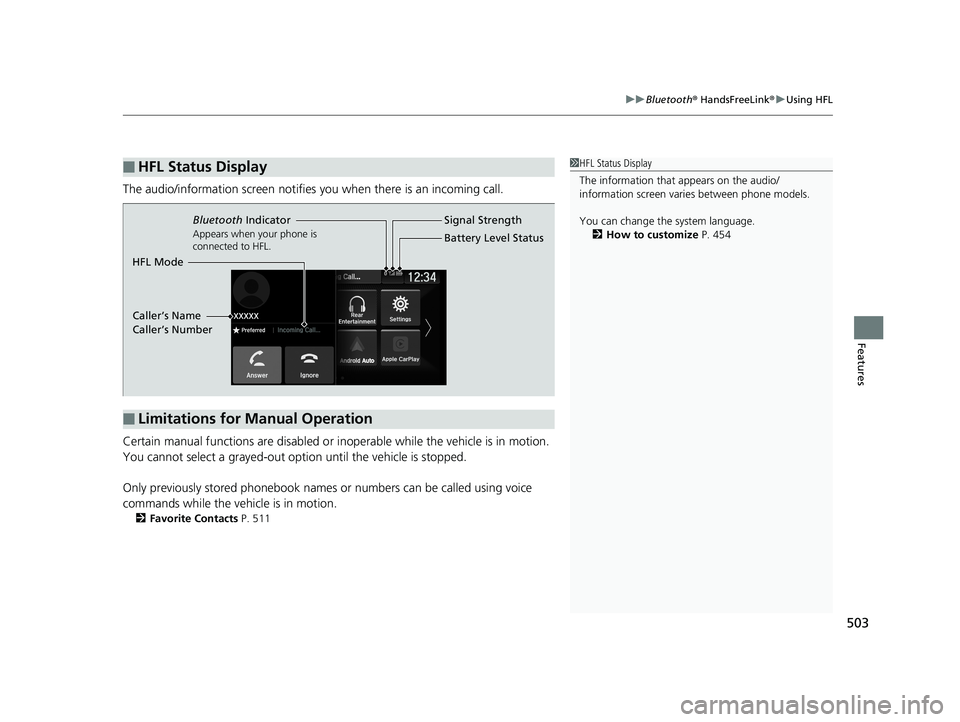
The audio/information scr een notifies you when there is an incoming call.
Certain manual functions are disabled or inoperable while the vehicle is in motion.
You cannot select a grayed-out option until the vehicle is stopped.
Only previously stored phonebook names or numbers can be called using voice
commands while the vehicle is in motion.
2 Favorite Contacts P. 511
■HFL Status Display1HFL Status Display
The information that appears on the audio/
information screen vari es between phone models.
You can change the system language. 2 How to customize P. 454
■Limitations for Manual Operation
Bluetooth Indicator
Appears when your phone is
connected to HFL.
Signal Strength
HFL Mode Battery Level Status
Caller’s Name
Caller’s Number
20 US ODYSSEY-31THR6210.book 503 ページ 2020年2月28日 金曜日 午前7時26分
Page 506 of 767
504
uuBluetooth ® HandsFreeLink ®u HFL Menus
Features
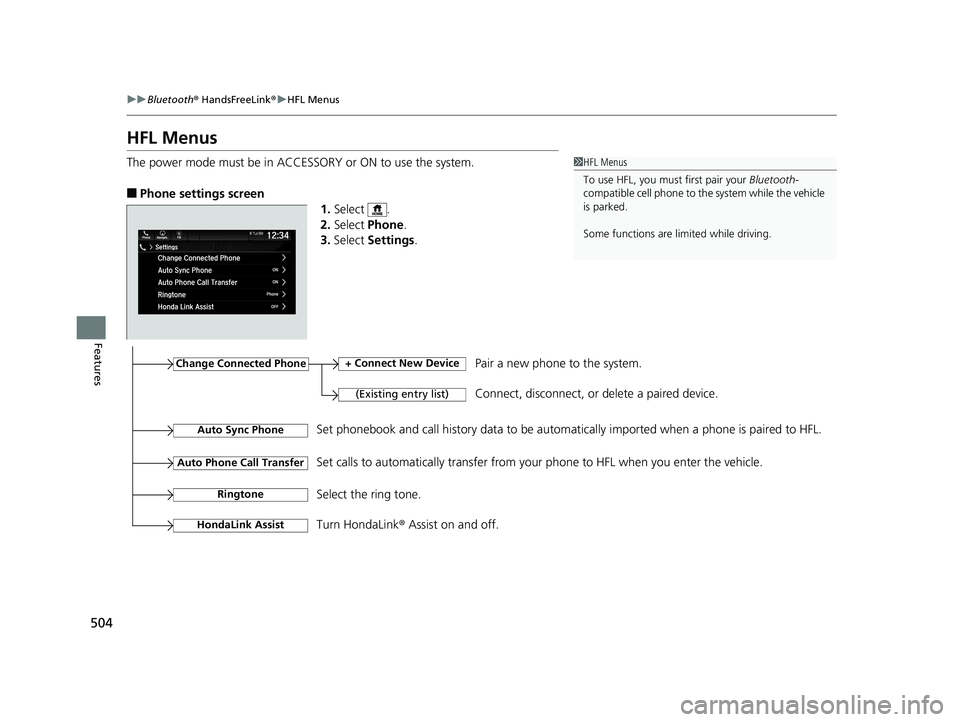
HFL Menus
The power mode must be in ACCESSORY or ON to use the system.
■Phone settings screen
1.Select .
2. Select Phone .
3. Select Settings .
1HFL Menus
To use HFL, you must first pair your Bluetooth-
compatible cell phone to th e system while the vehicle
is parked.
Some functions are li mited while driving.
Change Connected Phone
(Existing entry list)
+ Connect New DevicePair a new phone to the system.
Connect, disconnect, or delete a paired device.
RingtoneSelect the ring tone.
Auto Sync PhoneSet phonebook and call history data to be automa tically imported when a phone is paired to HFL.
Turn HondaLink® Assist on and off.
HondaLink Assist
Auto Phone Call TransferSet calls to automatically transfer from your phone to HFL when you enter the vehicle.
20 US ODYSSEY-31THR6210.book 504 ページ 2020年2月28日 金曜日 午前7時26分
Page 507 of 767
505
uuBluetooth ® HandsFreeLink ®u HFL Menus
Continued
Features
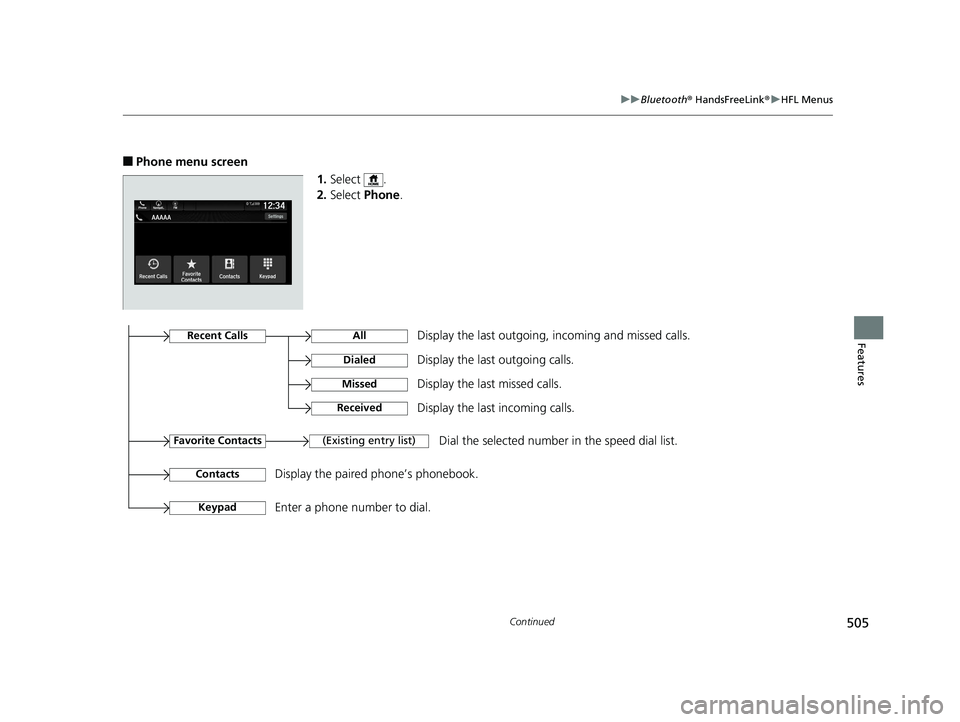
■Phone menu screen
1.Select .
2. Select Phone.
Display the last outgoing, incoming and missed calls.Recent Calls
Favorite Contacts
All
Dialed
Received
Display the last outgoing calls.
Display the last incoming calls.
MissedDisplay the last missed calls.
KeypadEnter a phone number to dial.
(Existing entry list)Dial the selected number in the speed dial list.
ContactsDisplay the paired phone’s phonebook.
20 US ODYSSEY-31THR6210.book 505 ページ 2020年2月28日 金曜日 午前7時26分
Page 508 of 767
506
uuBluetooth ® HandsFreeLink ®u HFL Menus
Features
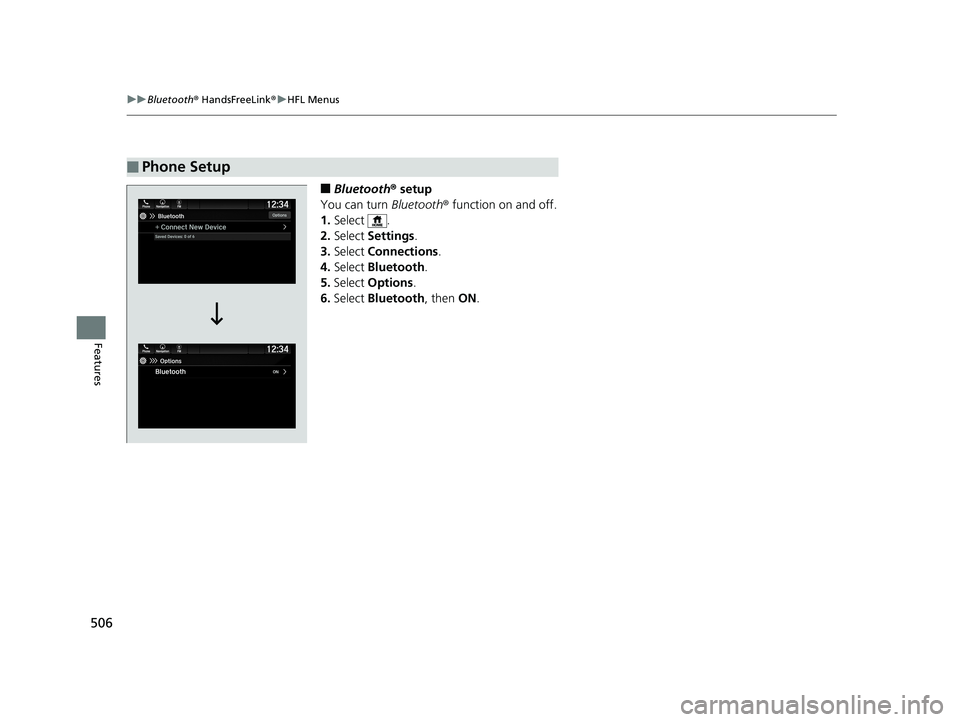
■Bluetooth ® setup
You can turn Bluetooth® function on and off.
1. Select .
2. Select Settings .
3. Select Connections .
4. Select Bluetooth .
5. Select Options.
6. Select Bluetooth , then ON.
■Phone Setup
20 US ODYSSEY-31THR6210.book 506 ページ 2020年2月28日 金曜日 午前7時26分
Page 509 of 767
Continued507
uuBluetooth ® HandsFreeLink ®u HFL Menus
Features
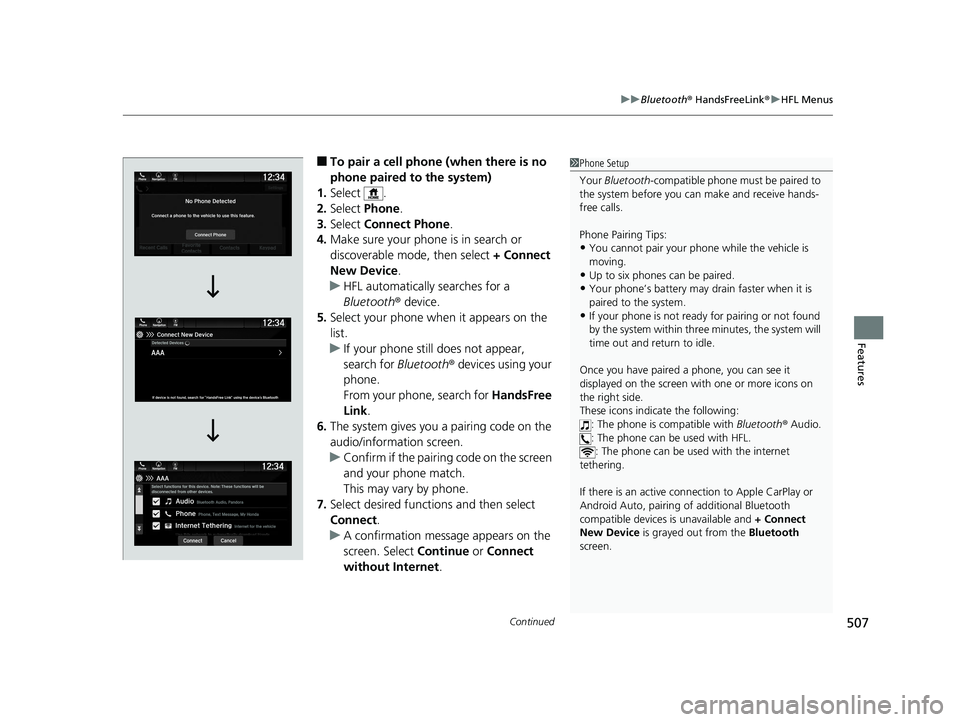
■To pair a cell phone (when there is no
phone paired to the system)
1. Select .
2. Select Phone.
3. Select Connect Phone .
4. Make sure your phone is in search or
discoverable mode, then select + Connect
New Device .
u HFL automatically searches for a
Bluetooth ® device.
5. Select your phone when it appears on the
list.
u If your phone still does not appear,
search for Bluetooth® devices using your
phone.
From your phone, search for HandsFree
Link .
6. The system gives you a pairing code on the
audio/information screen.
u Confirm if the pairing code on the screen
and your phone match.
This may vary by phone.
7. Select desired functions and then select
Connect .
u A confirmation message appears on the
screen. Select Continue or Connect
without Internet .1Phone Setup
Your Bluetooth -compatible phone must be paired to
the system before you ca n make and receive hands-
free calls.
Phone Pairing Tips:
•You cannot pair your phone while the vehicle is
moving.
•Up to six phones can be paired.
•Your phone’s battery may dr ain faster when it is
paired to the system.
•If your phone is not ready for pairing or not found
by the system within three minutes, the system will
time out and return to idle.
Once you have paired a phone, you can see it
displayed on the screen with one or more icons on
the right side.
These icons indicate the following: : The phone is compatible with Bluetooth ® Audio.
: The phone can be used with HFL. : The phone can be used with the internet
tethering.
If there is an active connection to Appl e CarPlay or
Android Auto, pairing of additional Bluetooth
compatible devices is unavailable and + Connect
New Device is grayed out from the Bluetooth
screen.
20 US ODYSSEY-31THR6210.book 507 ページ 2020年2月28日 金曜日 午前7時26分
Page 510 of 767
uuBluetooth ® HandsFreeLink ®u HFL Menus
508
Features
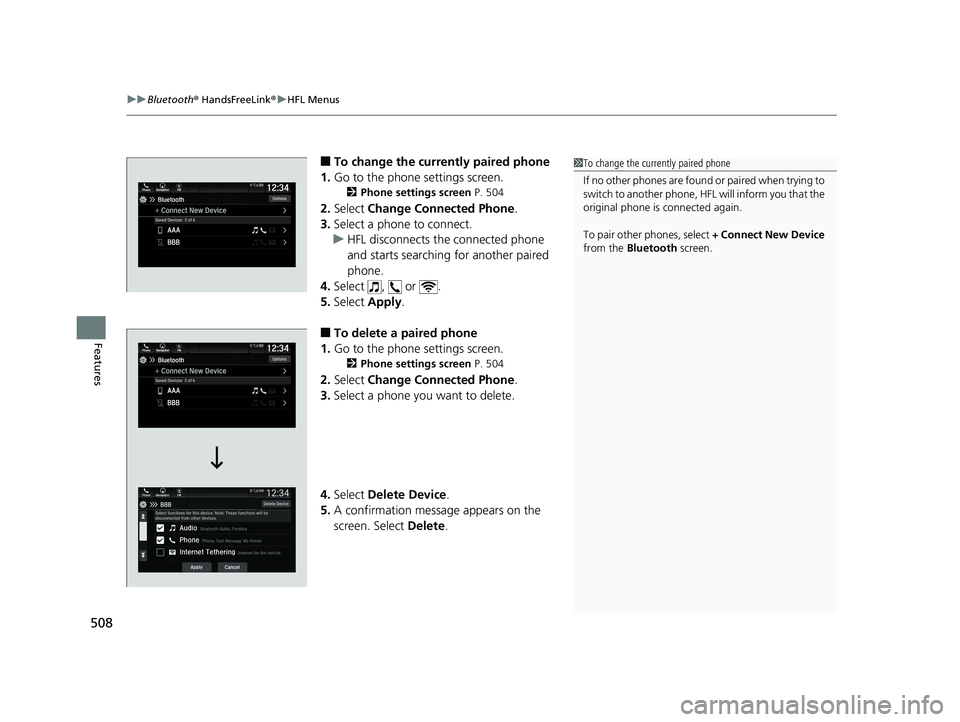
■To change the currently paired phone
1. Go to the phone settings screen.
2 Phone settings screen P. 504
2.Select Change Connected Phone .
3. Select a phone to connect.
u HFL disconnects the connected phone
and starts searching for another paired
phone.
4. Select , or .
5. Select Apply.
■To delete a paired phone
1. Go to the phone settings screen.
2 Phone settings screen P. 504
2.Select Change Connected Phone .
3. Select a phone you want to delete.
4. Select Delete Device .
5. A confirmation message appears on the
screen. Select Delete.
1To change the currently paired phone
If no other phones are found or paired when trying to
switch to another phone, HFL will inform you that the
original phone is connected again.
To pair other phones, select + Connect New Device
from the Bluetooth screen.
20 US ODYSSEY-31THR6210.book 508 ページ 2020年2月28日 金曜日 午前7時26分
Page 511 of 767
Continued509
uuBluetooth ® HandsFreeLink ®u HFL Menus
Features
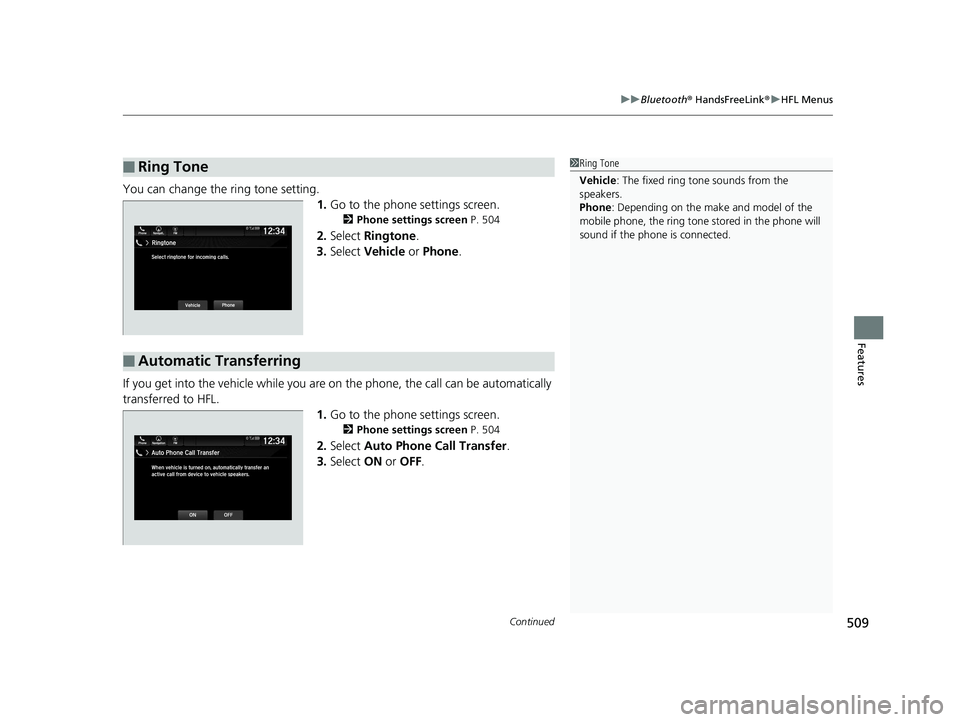
You can change the ring tone setting.
1.Go to the phone settings screen.
2 Phone settings screen P. 504
2.Select Ringtone .
3. Select Vehicle or Phone .
If you get into the vehicle while you are on the phone, the call can be automatically
transferred to HFL. 1.Go to the phone settings screen.
2 Phone settings screen P. 504
2.Select Auto Phone Call Transfer .
3. Select ON or OFF .
■Ring Tone1Ring Tone
Vehicle : The fixed ring tone sounds from the
speakers.
Phone : Depending on the make and model of the
mobile phone, the ring tone stored in the phone will
sound if the phone is connected.
■Automatic Transferring
Phone FMAuto Phone Call Transfer
ONOFF
12:34Navigation
When vehicle is turned on, automatically transfer an
active call from device to vehicle speakers.
20 US ODYSSEY-31THR6210.book 509 ページ 2020年2月28日 金曜日 午前7時26分