ESP HONDA ODYSSEY 2020 (in English) Owner's Guide
[x] Cancel search | Manufacturer: HONDA, Model Year: 2020, Model line: ODYSSEY, Model: HONDA ODYSSEY 2020Pages: 767, PDF Size: 43.89 MB
Page 431 of 767
429
uuBlu-ray/DVD Rear Entertainment System*uPlayable Discs
Continued
Features
If you redistribute modified sources, we would appreciate that you include in the file ChangeLog history information documentin g your
changes.
(4) Others.
(i)You shall not install the programs separately and independently from this Blu-ray product.
(ii)You agree not to reply on the futu re availability of any programs or services which Oracle will provide.
(5) ENTIRE AGREEMENT
You agree that this Agreement is the complete agreement pertain ing to the subject matter hereof (including references to information
contained in a URL) and this Agreement supe rsedes all prior or contemporaneous written or oral agreements or representations existing
between you and Panasonic with resp ect to such subject matter. If any term of this Agreement is found to be invalid or unenforc eable, the
remaining provisions will remain effective. Panasonic’s failure to enforce any right or provisions in this Agreement will not c onstitute a
waiver of such provision, or any other provision of this Agreement.
20 US ODYSSEY-31THR6210.book 429 ページ 2020年2月28日 金曜日 午前7時26分
Page 434 of 767
432
uuBlu-ray/DVD Rear Entertainment System*uPlayable Discs
Features
■OSS
This product incorporates the following software:
(1) The software developed by, or developed for, Panasonic Corporation ("Panasonic"),
(2) The software owned by third party and licensed to Panasonic,
(3) The software licensed under the GNU GENERAL PUBLIC LICENSE, Version 2 ("GPL"),
(4) The software licensed under the GNU LESSER GENE RAL PUBLIC LICENSE, Version 2.1 ("LGPL"), and/or
(5) Open sourced software licensed under terms and conditions other than GPL or LGPL.
For the software classified as (3) or (4) above, please refer to the terms and conditions of GPL and LGPL at the websites liste d below:
http://www.gnu.org/licenses /old-licenses/gpl-2.0.html
http://www.gnu.org/licenses/old-licenses/lgpl-2.1.html
The software classified as (3) and (4) above are copyrighted by multiple people. Please refer to the websites below regarding the copyright
notices of those people.
http://www.hondaopensource2.com/17M_BDP/
At least three (3) years from delivery of produ cts, Panasonic will give to any third party who contacts us at the Contact Information
provided below, for a charge no more than our cost of physically performing source code distri bution, a complete machine-readable copy
of the source code corresponding to the GPL/LGPL Software.
Please note that we are unable to answer any queries regarding source code details, etc.
[Contact Information]
Engineering Administration Group Manager Panasonic Corporation, Automotive Systems Company, 4261 Ikonobe-cho, Tsuzuki-ku,
Yokohama, Kanagawa 224-8520, Japan
Furthermore, source code corresponding to the GPL/LGPL Software li sted above is freely available to you and any member of the public at
the websites listed below:
http://www.hondaopensource2.com/17M_BDP/
The software classified as (5) above co ntains various open sourced software (" OSS") including the following software:
20 US ODYSSEY-31THR6210.book 432 ページ 2020年2月28日 金曜日 午前7時26分
Page 443 of 767
441
uuBlu-ray/DVD Rear Entertainment System*uPlayable Discs
Continued
Features
This License becomes null and void to the extent applicable to Fonts or Font So ftware that has been modified and is distributed under the
"Bitstream Vera" names.
The Font Software may be sold as part of a larger software packag e but no copy of one or more of the Font Software typefaces ma y be
sold by itself.
THE FONT SOFTWARE IS PROVIDED "AS IS", WITHOUT WARRANTY OF ANY KIND, EXPRESS OR IMPLIED, INCLUDING BUT NOT LIMITED
TO ANY WARRANTIES OF MERCHANTABILITY, FITNESS FOR A PARTIC ULAR PURPOSE AND NONINFRINGEMENT OF COPYRIGHT, PATENT,
TRADEMARK, OR OTHER RIGHT. IN NO EVENT SHALL BITSTREAM OR THE GNOME FOUNDATION BE LIABLE FOR ANY CLAIM, DAMAGES
OR OTHER LIABILITY, INCLUDING ANY GENERAL, SPECIAL, INDI RECT, INCIDENTAL, OR CONSEQUENTIAL DAMAGES, WHETHER IN AN
ACTION OF CONTRACT, TORT OR OTHERWISE, ARISING FROM, OUT OF THE USE OR INABILITY TO USE THE FONT SOFTWARE OR FROM
OTHER DEALINGS IN THE FONT SOFTWARE.
Except as contained in this notice, the names of Gnome, the Gn ome Foundation, and Bitstream Inc., shall not be used in advertis ing or
otherwise to promote the sale, use or other dealings in this F ont Software without prior written authorization from the Gnome Foundation
or Bitstream Inc., respectively . For further information, cont act: fonts at gnome dot org.
libtiff
Copyright (c) 1988-1997 Sam Leffler
Copyright (c) 1991-1997 Silicon Graphics, Inc.
Permission to use, copy, modify, distribute, and sell this softw are and its documentation for any purpose is hereby granted without fee,
providedbthat (i) the above copyright notices and this permission notice appear in all copies of the software and related docum entation,
and (ii) the names of Sam Leffler and Silicon Graphics may not be used in any advertising or publicity relating to the software without the
specific, prior written permission of Sam Leffler and Silicon Graphics.
20 US ODYSSEY-31THR6210.book 441 ページ 2020年2月28日 金曜日 午前7時26分
Page 454 of 767
452
uuCustomized Features u
Features
*1:Default Setting
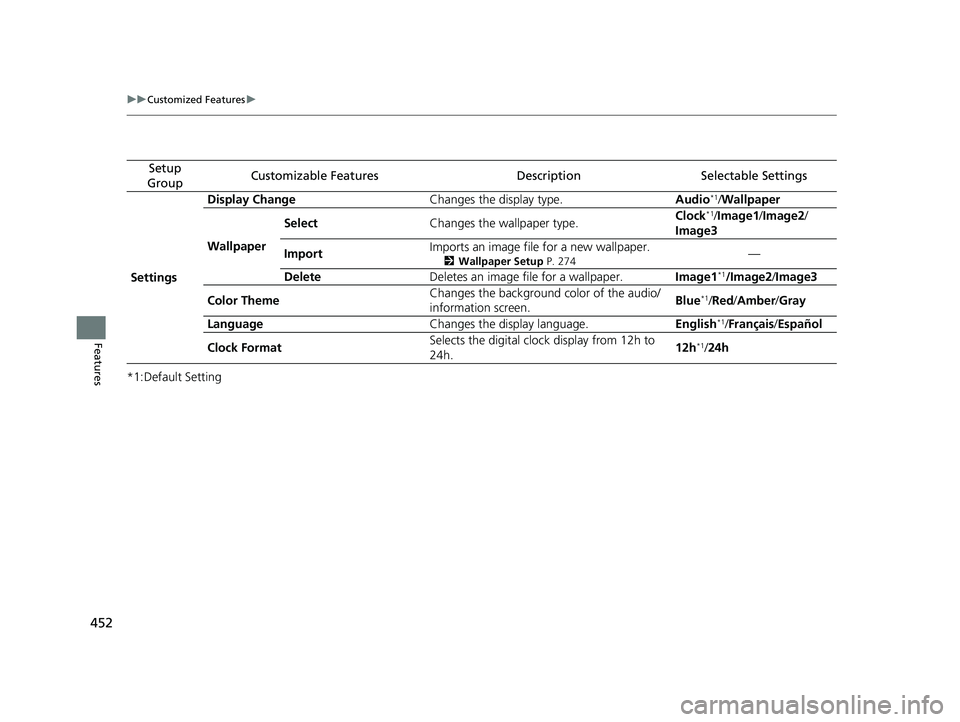
Setup
GroupCustomizable FeaturesDescriptionSelectable Settings
Settings Display Change
Changes the display type. Audio
*1/Wallpaper
Wallpaper Select
Changes the wallpaper type. Clock*1/
Image1/ Image2/
Image3
Import Imports an image file for a new wallpaper.
2
Wallpaper Setup P. 274—
Delete Deletes an image file for a wallpaper. Image1
*1/Image2/Image3
Color Theme Changes the background color of the audio/
information screen.
Blue
*1/
Red/ Amber /Gray
Language Changes the display language. English
*1/Français /Español
Clock Format Selects the digital clock display from 12h to
24h. 12h
*1/
24h
20 US ODYSSEY-31THR6210.book 452 ページ 2020年2月28日 金曜日 午前7時26分
Page 479 of 767
477
uuBluetooth ® HandsFreeLink ®u Using HFL
Features
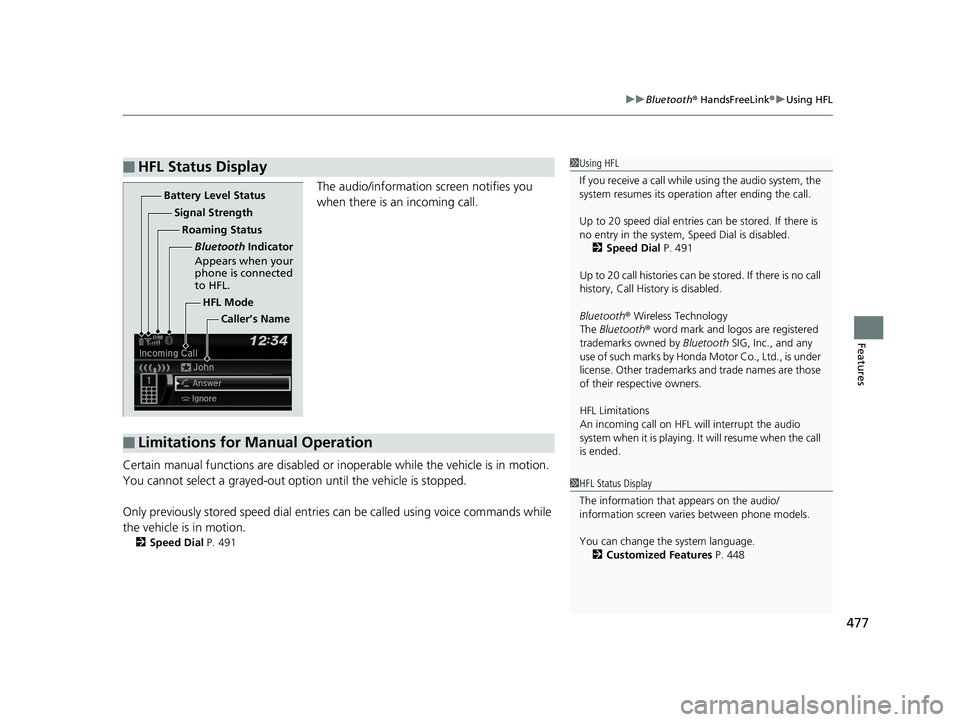
The audio/information screen notifies you
when there is an incoming call.
Certain manual functions are disabled or inoperable while the vehicle is in motion.
You cannot select a grayed-out option until the vehicle is stopped.
Only previously stored speed dial entrie s can be called using voice commands while
the vehicle is in motion.
2 Speed Dial P. 491
■HFL Status Display1Using HFL
If you receive a call while using the audio system, the
system resumes its operati on after ending the call.
Up to 20 speed dial entries can be stored. If there is
no entry in the system, Speed Dial is disabled. 2 Speed Dial P. 491
Up to 20 call histories can be stored. If there is no call
history, Call History is disabled.
Bluetooth ® Wireless Technology
The Bluetooth ® word mark and logos are registered
trademarks owned by Bluetooth SIG, Inc., and any
use of such marks by Honda Motor Co., Ltd., is under
license. Other trademarks and trade names are those
of their respective owners.
HFL Limitations
An incoming call on HFL will interrupt the audio
system when it is playing. It will resume when the call
is ended.
1 HFL Status Display
The information that appears on the audio/
information screen vari es between phone models.
You can change the system language. 2 Customized Features P. 448
HFL Mode
Battery Level Status
Signal Strength
Bluetooth Indicator
Appears when your
phone is connected
to HFL.
Roaming Status
Caller’s Name
■Limitations for Manual Operation
20 US ODYSSEY-31THR6210.book 477 ページ 2020年2月28日 金曜日 午前7時26分
Page 480 of 767
478
uuBluetooth ® HandsFreeLink ®u HFL Menus
Features
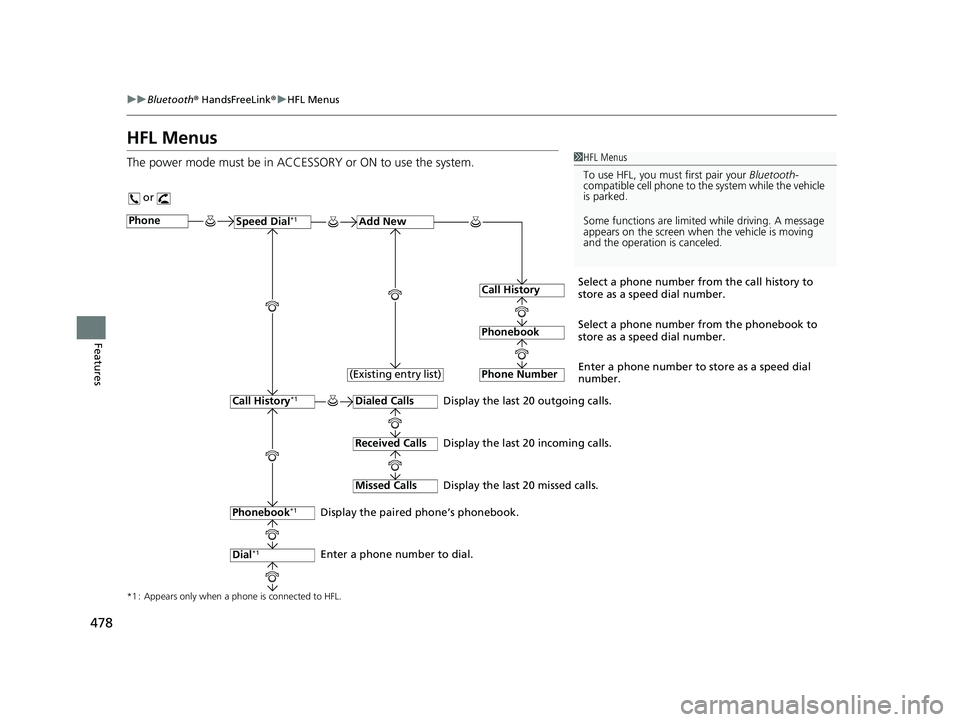
HFL Menus
The power mode must be in ACCESSORY or ON to use the system.1HFL Menus
To use HFL, you must first pair your Bluetooth-
compatible cell phone to th e system while the vehicle
is parked.
Some functions are limited while driving. A message
appears on the screen when the vehicle is moving
and the operation is canceled.
or
Display the last 20 outgoing calls.
Display the last 20 incoming calls.
Display the last 20 missed calls.
*1 : Appears only when a phone is connected to HFL.
PhoneSpeed Dial*1Add New
Select a phone number from the call history to
store as a speed dial number.
Call History
PhonebookSelect a phone number from the phonebook to
store as a speed dial number.
Phone Number
Enter a phone number to store as a speed dial
number.
Dialed Calls
Received Calls
Missed Calls
Phonebook*1
Dial*1
Call History*1
Display the paired phone’s phonebook.
Enter a phone number to dial. (Existing entry list)
20 US ODYSSEY-31THR6210.book 478 ページ 2020年2月28日 金曜日 午前7時26分
Page 493 of 767
Continued491
uuBluetooth ® HandsFreeLink ®u HFL Menus
Features
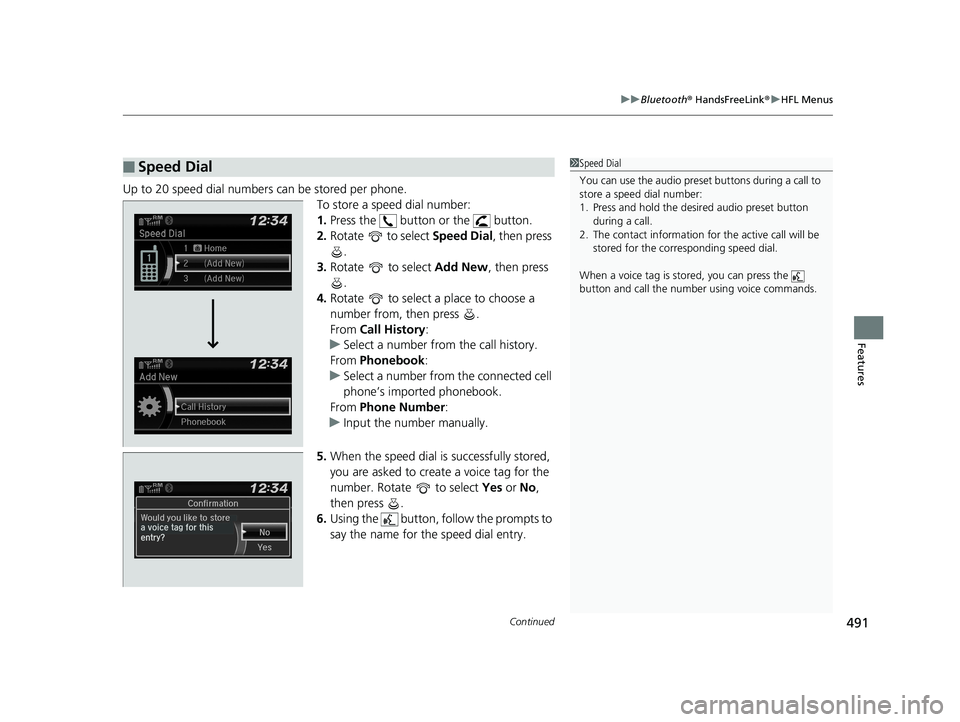
Up to 20 speed dial numbers can be stored per phone.
To store a speed dial number:
1.Press the button or the button.
2. Rotate to select Speed Dial, then press
.
3. Rotate to select Add New, then press
.
4. Rotate to select a place to choose a
number from, then press .
From Call History :
u Select a number from the call history.
From Phonebook:
u Select a number from the connected cell
phone’s imported phonebook.
From Phone Number :
u Input the number manually.
5. When the speed dial is successfully stored,
you are asked to create a voice tag for the
number. Rotate to select Yes or No,
then press .
6. Using the button, follow the prompts to
say the name for the speed dial entry.
■Speed Dial1Speed Dial
You can use the audio preset buttons during a call to
store a speed dial number:
1. Press and hold the desired audio preset button
during a call.
2. The contact information for the active call will be
stored for the corresponding speed dial.
When a voice tag is stored, you can press the
button and call the numbe r using voice commands.
20 US ODYSSEY-31THR6210.book 491 ページ 2020年2月28日 金曜日 午前7時26分
Page 500 of 767
uuBluetooth ® HandsFreeLink ®u HFL Menus
498
Features
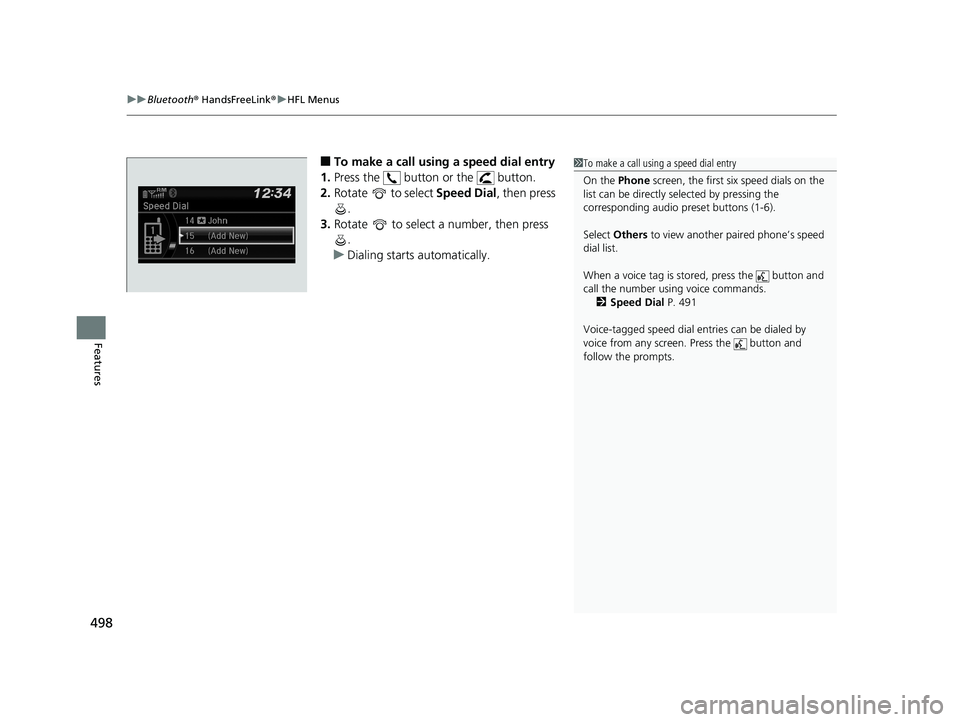
■To make a call using a speed dial entry
1. Press the button or the button.
2. Rotate to select Speed Dial, then press
.
3. Rotate to select a number, then press
.
u Dialing starts automatically.1To make a call using a speed dial entry
On the Phone screen, the first six speed dials on the
list can be directly selected by pressing the
corresponding audio preset buttons (1-6).
Select Others to view another paired phone’s speed
dial list.
When a voice tag is stored, press the button and
call the number using voice commands. 2 Speed Dial P. 491
Voice-tagged speed dial en tries can be dialed by
voice from any screen. Press the button and
follow the prompts.
20 US ODYSSEY-31THR6210.book 498 ページ 2020年2月28日 金曜日 午前7時26分
Page 504 of 767
uuBluetooth ® HandsFreeLink ®u Using HFL
502
Features
(Pick-up) button: Press to go directly to the phone screen of the driver
information interface, or to answer an incoming call.
(Hang-up) button: Press to end a call.
(Back) button: Press to go back to the previo us screen, or cancel a command.
(Talk) button: Press to access Voice Portal.
/// buttons: Press to select an item displayed on the phone screen
of the driver information interface.
ENTER button: Press to call a number listed in the selected item on the phone
screen of the driver information interface.
(Home) button: Press to go back to the home sc reen of the driver information
interface.
To go to the phone screen of the driver information interface:
1. Press the (home) button on the steering wheel.
2. Select Phone .
u You can select Favorite Contacts or Recent Calls .1Bluetooth ® HandsFreeLink ®
Bluetooth ® Wireless Technology
The Bluetooth ® word mark and logos are registered
trademarks owned by Bluetooth SIG, Inc., and any
use of such marks by Honda Motor Co., Ltd., is under
license. Other trademarks and trade names are those
of their respective owners.
HFL Limitations
An incoming call on HFL will interrupt the audio
s y s te m wh e n it is p la y i n g . It wi ll re s u m e w h en t h e c a l l
is ended.
34
20 US ODYSSEY-31THR6210.book 502 ページ 2020年2月28日 金曜日 午前7時26分
Page 529 of 767
527
Features
CabinTalkTM *
Your audio system allows you or the front passenger voices to be broadcast to the
second and third row seat’s passengers us ing the rear speakers and/or headphones.
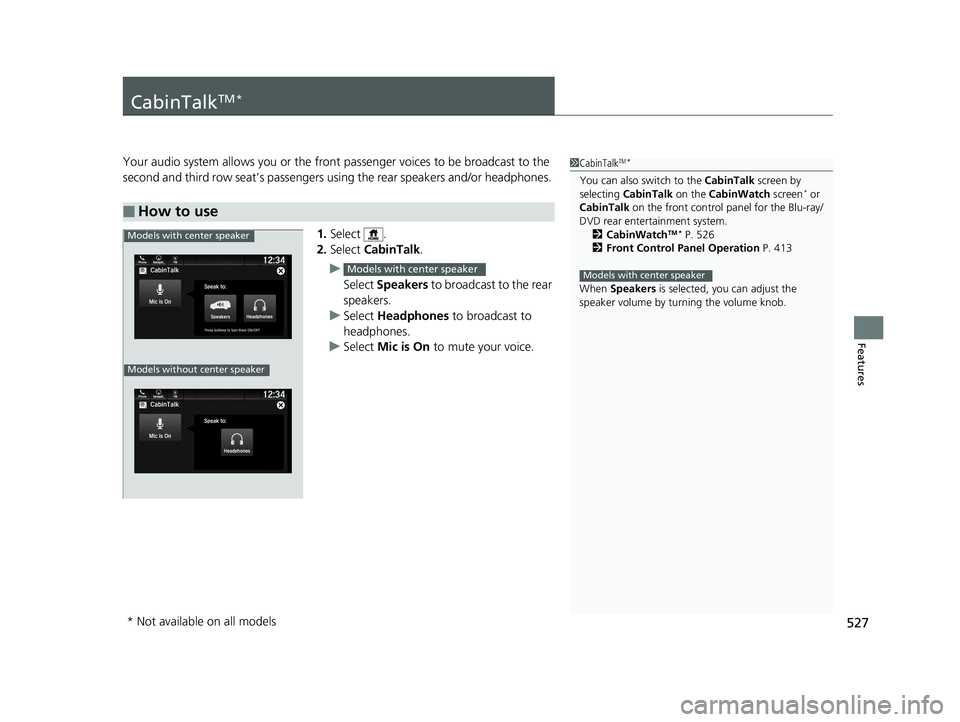
1. Select .
2. Select CabinTalk .
u Select Speakers to broadcast to the rear
speakers.
u Select Headphones to broadcast to
headphones.
u Select Mic is On to mute your voice.
■How to use
1CabinTalkTM *
You can also switch to the CabinTalk screen by
selecting CabinTalk on the CabinWatch screen* or
CabinTalk on the front control panel for the Blu-ray/
DVD rear entertainment system. 2 CabinWatch
TM * P. 526
2 Front Control Panel Operation P. 413
When Speakers is selected, you can adjust the
speaker volume by tu rning the volume knob.
Models with center speaker
Models with center speaker
Phone FMCabinTalk
Mic is On
Speak to:
HeadphonesPress buttons to turn them ON/OFF
12:34Navigati..
Models without center speaker
Models with center speaker
* Not available on all models
20 US ODYSSEY-31THR6210.book 527 ページ 2020年2月28日 金曜日 午前7時26分