tail gate HONDA ODYSSEY 2020 (in English) Service Manual
[x] Cancel search | Manufacturer: HONDA, Model Year: 2020, Model line: ODYSSEY, Model: HONDA ODYSSEY 2020Pages: 767, PDF Size: 43.89 MB
Page 460 of 767
458
uuCustomized Features u
Features
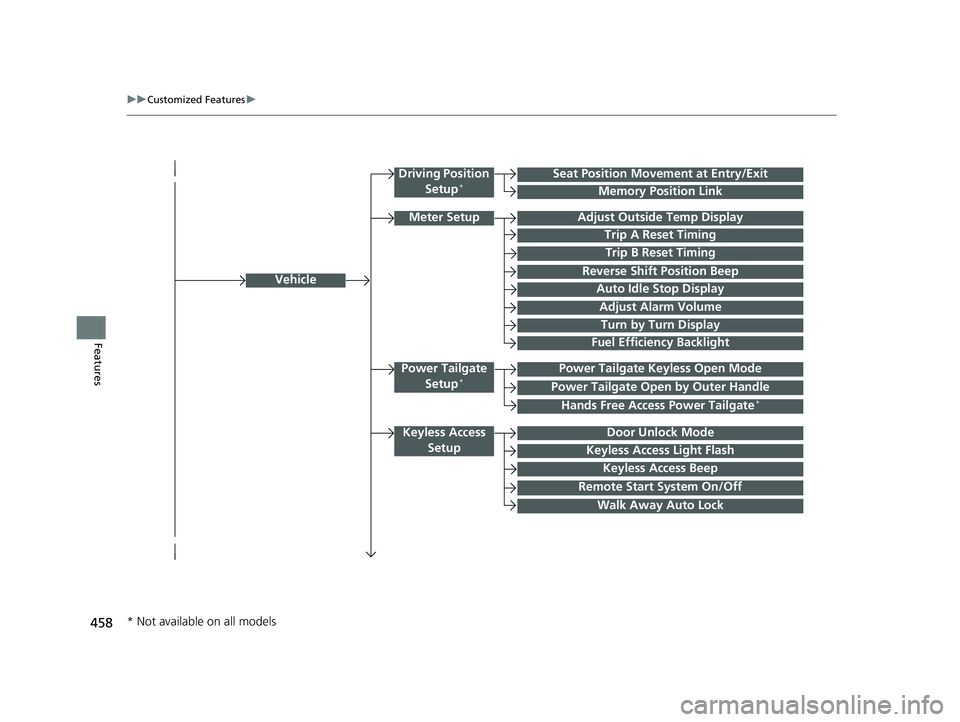
Vehicle
Driving Position
Setup*Seat Position Movem ent at Entry/Exit
Memory Position Link
Meter SetupAdjust Outside Temp Display
Trip A Reset Timing
Trip B Reset Timing
Reverse Shift Position Beep
Auto Idle Stop Display
Adjust Alarm Volume
Turn by Turn Display
Power Tailgate
Setup*Power Tailgate Keyless Open Mode
Power Tailgate Open by Outer Handle
Keyless Access SetupDoor Unlock Mode
Keyless Access Light Flash
Keyless Access Beep
Remote Start System On/Off
Walk Away Auto Lock
Fuel Efficiency Backlight
Hands Free Access Power Tailgate*
* Not available on all models
20 US ODYSSEY-31THR6210.book 458 ページ 2020年2月28日 金曜日 午前7時26分
Page 468 of 767
466
uuCustomized Features u
Features
*1:Default SettingSetup
Group Customizable Features
DescriptionSelectable Settings
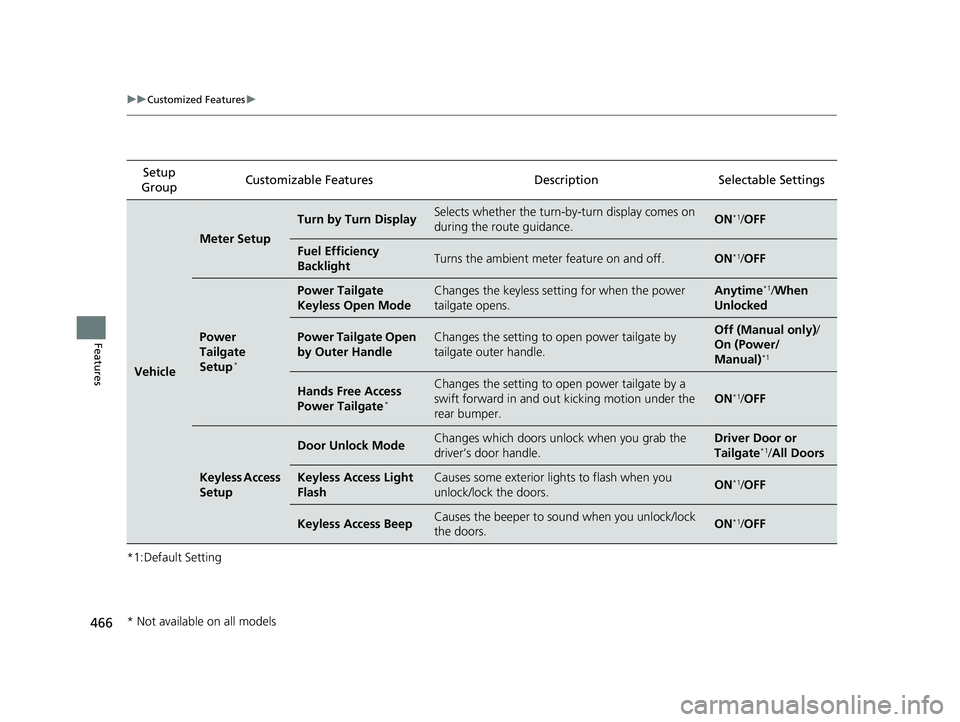
Vehicle
Meter Setup
Turn by Turn DisplaySelects whether the turn-by-turn display comes on
during the route guidance.ON*1/ OFF
Fuel Efficiency
BacklightTurns the ambient meter feature on and off.ON*1/OFF
Power
Tailgate
Setup
*
Power Tailgate
Keyless Open ModeChanges the keyless setting for when the power
tailgate opens.Anytime*1/ When
Unlocked
Power Tailgate Open
by Outer HandleChanges the setting to open power tailgate by
tailgate outer handle.Off (Manual only) /
On (Power/
Manual)
*1
Hands Free Access
Power Tailgate*
Changes the setting to open power tailgate by a
swift forward in and out kicking motion under the
rear bumper.
ON*1/ OFF
Keyless Access
Setup
Door Unlock ModeChanges which doors unlock when you grab the
driver’s door handle.Driver Door or
Tailgate*1/ All Doors
Keyless Access Light
FlashCauses some exterior lig hts to flash when you
unlock/lock the doors.ON*1/ OFF
Keyless Access BeepCauses the beeper to so und when you unlock/lock
the doors.ON*1/ OFF
* Not available on all models
20 US ODYSSEY-31THR6210.book 466 ページ 2020年2月28日 金曜日 午前7時26分
Page 476 of 767
474
uuHomeLink ® Universal Transceiver*u Training HomeLink
Features
Training HomeLink
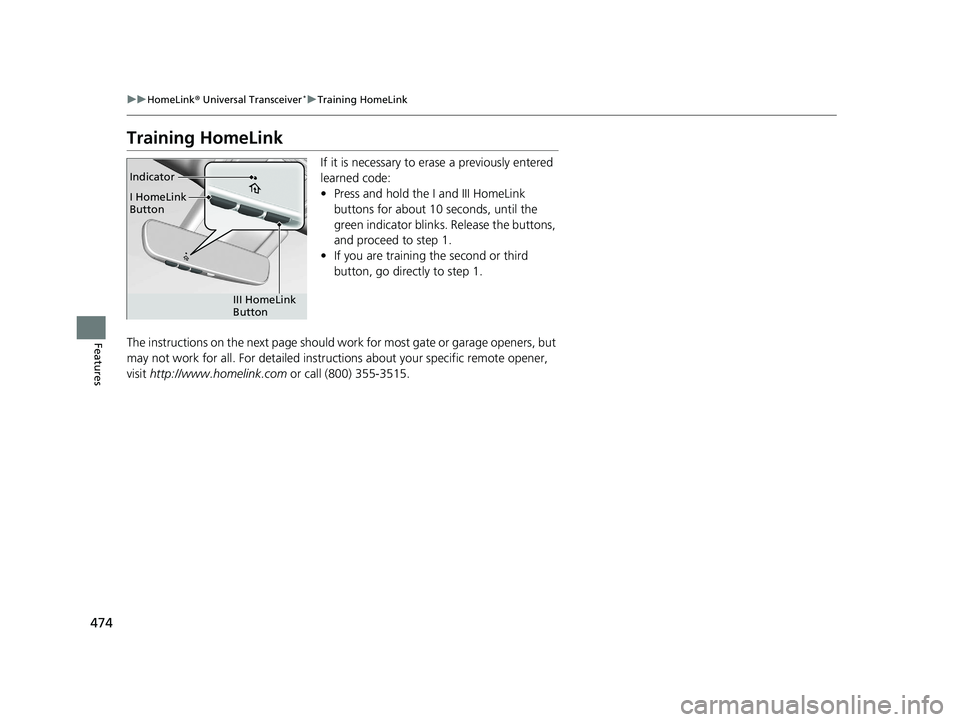
If it is necessary to erase a previously entered
learned code:
• Press and hold the I and III HomeLink
buttons for about 10 seconds, until the
green indicator blinks. Release the buttons,
and proceed to step 1.
• If you are training the second or third
button, go directly to step 1.
The instructions on the next page should work for most gate or garage openers, but
may not work for all. For detailed instruct ions about your specific remote opener,
visit http://www.homelink.com or call (800) 355-3515.
Indicator
I HomeLink
Button
III HomeLink
Button
20 US ODYSSEY-31THR6210.book 474 ページ 2020年2月28日 金曜日 午前7時26分
Page 533 of 767
Continued531
uuBefore Driving uDriving Preparation
Driving
• Store or secure all items on board properly.
u Carrying too much cargo, or improperly storing it, can affect your vehicle’s
handling, stability, sto pping distance, and tires, and make it unsafe.
2Maximum Load Limit P. 533
•Do not pile items higher than the seat height.
u They can block your view and may be thrown forward in the event of sudden
braking.
• Do not place anything in the front seat footwells. Make sure to secure the floor
mat.
u An object or unsecured floor mat can in terfere with your brake and accelerator
pedal operation while driving.
• If you have any animals on board, do not let them move around in the vehicle.
u They may interfere with driv ing and a crash could occur.
• Securely close and lock al l doors and the tailgate.
2Locking/Unlocking the Doors from the Inside P. 156
•Adjust your seating position properly.
u Adjust the head restraint, too.
2Adjusting the Seats P. 212
2 Adjusting the Front and Second Row Outer and Third Row Outer Head
Restraints Positions P. 224
•Adjust the mirrors and steering wh eel properly for your driving.
u Adjust them while sitting in the proper driving position.
2 Adjusting the Mirrors P. 209
2 Adjusting the Steering Wheel P. 208
■Interior Checks1Interior Checks
The headlight aim is set by the factory, and does not
need to be adjusted. Howeve r, if you regularly carry
heavy items in the cargo area or tow a trailer, have
the aiming readjusted at a dealer or by a qualified
technician.
20 US ODYSSEY-31THR6210.book 531 ページ 2020年2月28日 金曜日 午前7時26分
Page 546 of 767
uuWhen Driving uStarting the Engine
544
Driving
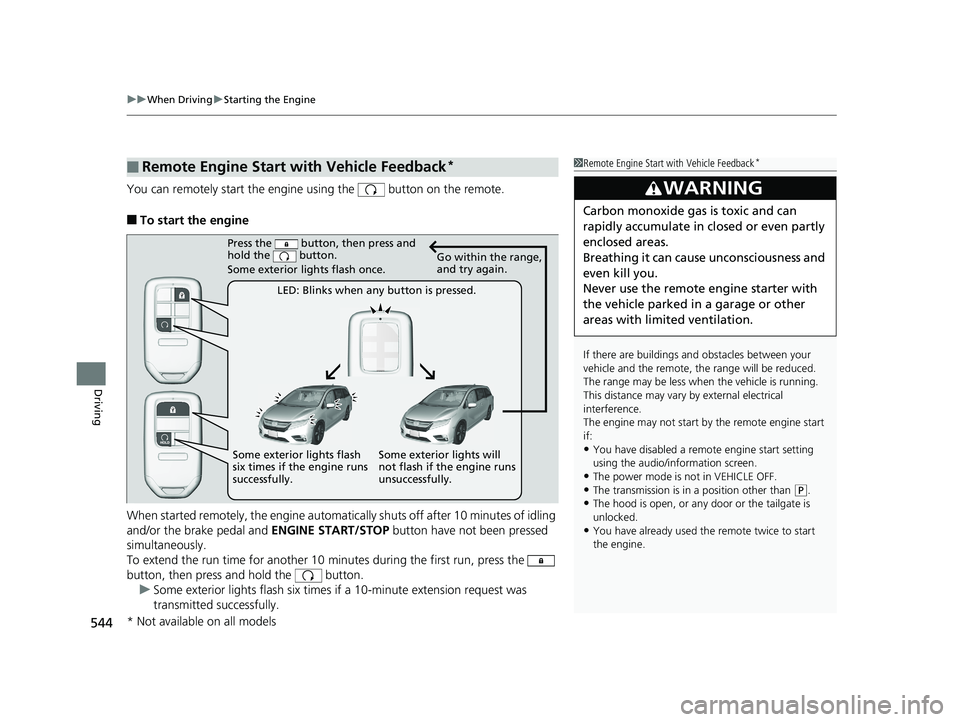
You can remotely start the engine using the button on the remote.
■To start the engine
When started remotely, the engine automati cally shuts off after 10 minutes of idling
and/or the brake pedal and ENGINE START/STOP button have not been pressed
simultaneously.
To extend the run time for another 10 minutes during the first run, press the
button, then press and hold the button. u Some exterior lights flash six times if a 10-minute extension request was
transmitted successfully.
■Remote Engine Start with Vehicle Feedback*1Remote Engine Start with Vehicle Feedback*
If there are buildings an d obstacles between your
vehicle and the remote, th e range will be reduced.
The range may be less when the vehicle is running.
This distance may vary by external electrical
interference.
The engine may not start by the remote engine start
if:
•You have disabled a remo te engine start setting
using the audio/information screen.
•The power mode is not in VEHICLE OFF.
•The transmission is in a position other than ( P.•The hood is open, or any door or the tailgate is
unlocked.
•You have already used the remote twice to start
the engine.
3WARNING
Carbon monoxide ga s is toxic and can
rapidly accumulate in closed or even partly
enclosed areas.
Breathing it can cause unconsciousness and
even kill you.
Never use the remote engine starter with
the vehicle parked in a garage or other
areas with limited ventilation.
Press the button, then press and
hold the button.
Some exterior lights flash once.
LED: Blinks when any button is pressed. Go within the range,
and try again.
Some exterior lights will
not flash if the engine runs
unsuccessfully.
Some exterior lights flash
six times if the engine runs
successfully.
* Not available on all models
20 US ODYSSEY-31THR6210.book 544 ページ 2020年2月28日 金曜日 午前7時26分
Page 547 of 767
Continued545
uuWhen Driving uStarting the Engine
Driving
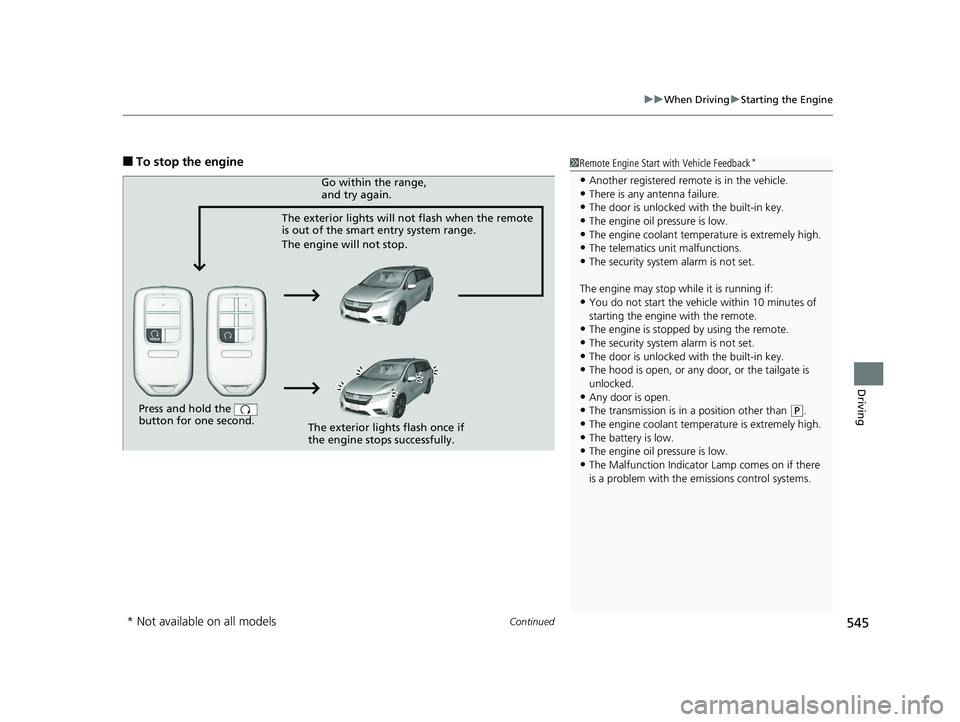
■To stop the engine1Remote Engine Start with Vehicle Feedback*
•Another registered remo te is in the vehicle.•There is any antenna failure.
•The door is unlocked with the built-in key.
•The engine oil pressure is low.•The engine coolant temper ature is extremely high.
•The telematics unit malfunctions.
•The security system alarm is not set.
The engine may stop whil e it is running if:
•You do not start the vehicl e within 10 minutes of
starting the engine with the remote.
•The engine is stopped by using the remote.
•The security system alarm is not set.•The door is unlocked with the built-in key.
•The hood is open, or any door, or the tailgate is
unlocked.
•Any door is open.
•The transmission is in a position other than ( P.
•The engine coolant temper ature is extremely high.
•The battery is low.•The engine oil pressure is low.
•The Malfunction Indicator Lamp comes on if there
is a problem with the em issions control systems.
Press and hold the
button for one second.
The exterior lights will not flash when the remote
is out of the smart entry system range.
The engine will not stop.Go within the range,
and try again.
The exterior lights flash once if
the engine stops successfully.
* Not available on all models
20 US ODYSSEY-31THR6210.book 545 ページ 2020年2月28日 金曜日 午前7時26分
Page 705 of 767
703
Handling the Unexpected
This chapter explains how to handle unexpected troubles.
ToolsTypes of Tools .................................. 704
If a Tire Goes Flat Changing a Flat Tire ......................... 705
Engine Does Not Start Checking the Engine ........................ 714
If the Remote Battery is Weak .......... 715
Emergency Engine Stop ................... 716
Jump Starting .................................... 717
Overheating How to Handle Overheating ............. 719
Indicator, Coming On/Blinking
If the Low Oil Pressure Symbol Appears... 722
If the Charging System Indicator Comes
On ................................................. 722
If the Malfunction Indicator Lamp Comes On or Blinks ................................... 723
If the Brake System Indicator (Red) Comes
On or Blinks ................................... 724
If the Brake System Indicator (Red) Comes On or Blinks at the Same Time When the Brake
System Indicator (Amber) Comes On ..... 725
If the Electric Power Steering (EPS) System Indicator Comes On ....................... 726
If the Low Tire Pressure/TPMS Indicator Comes On or Blinks........................ 726 If the Transmission System Indicator Blinks
along with the Warning Message... 727
Fuses Fuse Locations ................................. 728
Inspecting and Changing Fuses ........ 734
Emergency Towing ........................... 735
When You Cannot Unlock the Fuel Fill Door ................................................. 736When You Cannot Open the Tailgate..... 737When You Cannot Close the Power
Sliding Doors*................................. 739
Refueling
Refueling From a Portable Fuel Container .... 740
* Not available on all models
20 US ODYSSEY-31THR6210.book 703 ページ 2020年2月28日 金曜日 午前7時26分
Page 732 of 767
730
uuFuses uFuse Locations
Handling the Unexpected
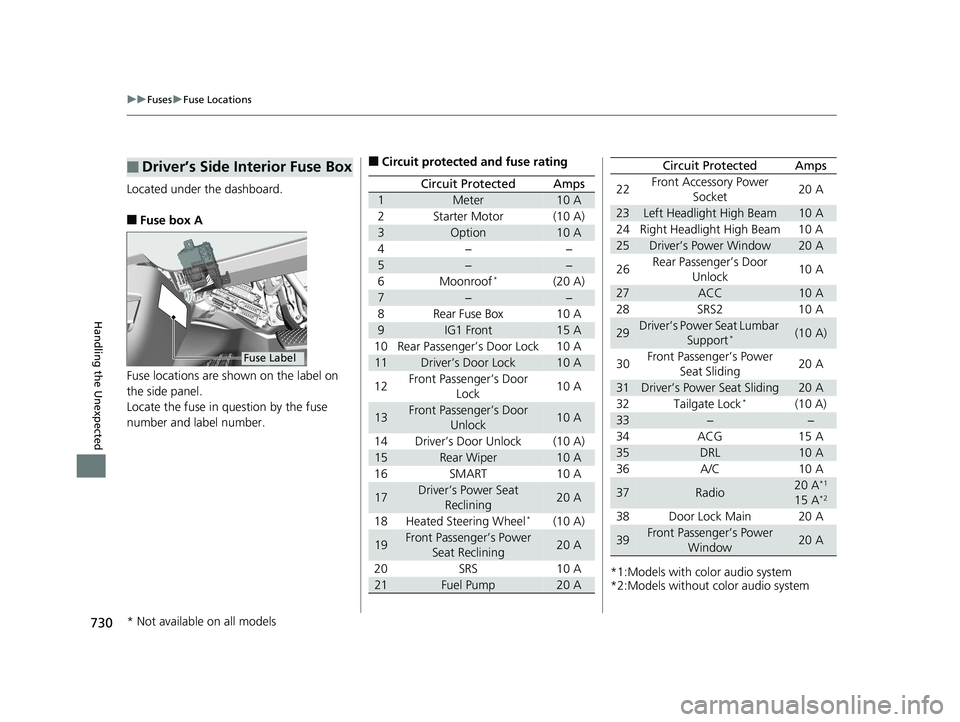
Located under the dashboard.
■Fuse box A
Fuse locations are shown on the label on
the side panel.
Locate the fuse in question by the fuse
number and label number.
■Driver’s Side Interior Fuse Box
Fuse Label
■Circuit protected and fuse rating
Circuit ProtectedAmps
1Meter10 A
2Starter Motor(10 A)
3Option10 A
4−−
5−−
6Moonroof*(20 A)
7−−
8Rear Fuse Box10 A
9IG1 Front15 A
10 Rear Passenger’s Door Lock 10 A
11Driver’s Door Lock10 A
12 Front Passenger’s Door
Lock 10 A
13Front Passenger’s Door
Unlock10 A
14 Driver’s Door Unlock (10 A)
15Rear Wiper10 A
16 SMART 10 A
17Driver’s Power Seat Reclining20 A
18 Heated Steering Wheel
*(10 A)
19Front Passenger’s Power Seat Reclining20 A
20 SRS 10 A
21Fuel Pump20 A*1:Models with color audio system
*2:Models without color audio system22
Front Accessory Power
Socket 20 A
23Left Headlight High Beam10 A
24 Right Headlight High Beam 10 A
25Driver’s Power Window20 A
26 Rear Passenger’s Door
Unlock 10 A
27ACC10 A
28 SRS2 10 A
29Driver’s Power Seat Lumbar Support*(10 A)
30 Front Passenger’s Power
Seat Sliding 20 A
31Driver’s Power Seat Sliding20 A
32 Tailgate Lock*(10 A)
33−−
34 ACG 15 A
35DRL10 A
36 A/C 10 A
37Radio20 A*1
15 A*2
38 Door Lock Main 20 A
39Front Passenger’s Power Window20 A
Circuit ProtectedAmps
* Not available on all models
20 US ODYSSEY-31THR6210.book 730 ページ 2020年2月28日 金曜日 午前7時26分
Page 735 of 767
733
uuFuses uFuse Locations
Handling the Unexpected
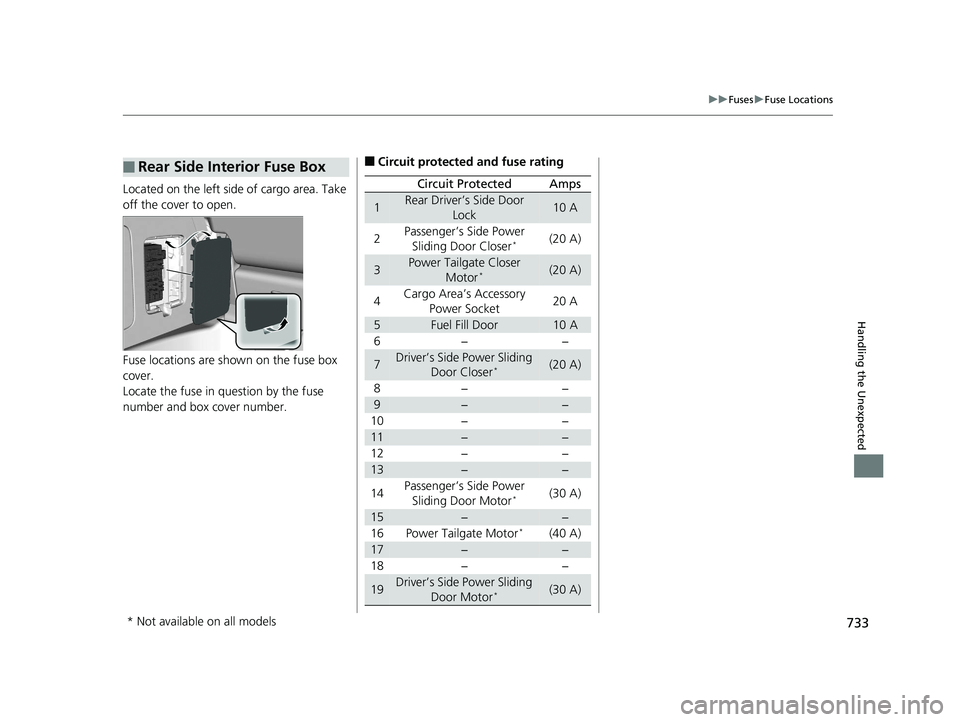
Located on the left side of cargo area. Take
off the cover to open.
Fuse locations are shown on the fuse box
cover.
Locate the fuse in question by the fuse
number and box cover number.
■Rear Side Interior Fuse Box■Circuit protected and fuse rating
Circuit ProtectedAmps
1Rear Driver’s Side Door
Lock10 A
2Passenger’s Side Power Sliding Door Closer*(20 A)
3Power Tailgate Closer Motor*(20 A)
4Cargo Area’s Accessory
Power Socket20 A
5Fuel Fill Door10 A
6−−
7Driver’s Side Power Sliding Door Closer*(20 A)
8−−
9−−
10 − −
11−−
12 − −
13−−
14 Passenger’s Side Power
Sliding Door Motor
*(30 A)
15−−
16 Power Tailgate Motor*(40 A)
17−−
18 − −
19Driver’s Side Power Sliding
Door Motor*(30 A)
* Not available on all models
20 US ODYSSEY-31THR6210.book 733 ページ 2020年2月28日 金曜日 午前7時26分
Page 738 of 767
736
Handling the Unexpected
When You Cannot Unlock the Fuel Fill Door
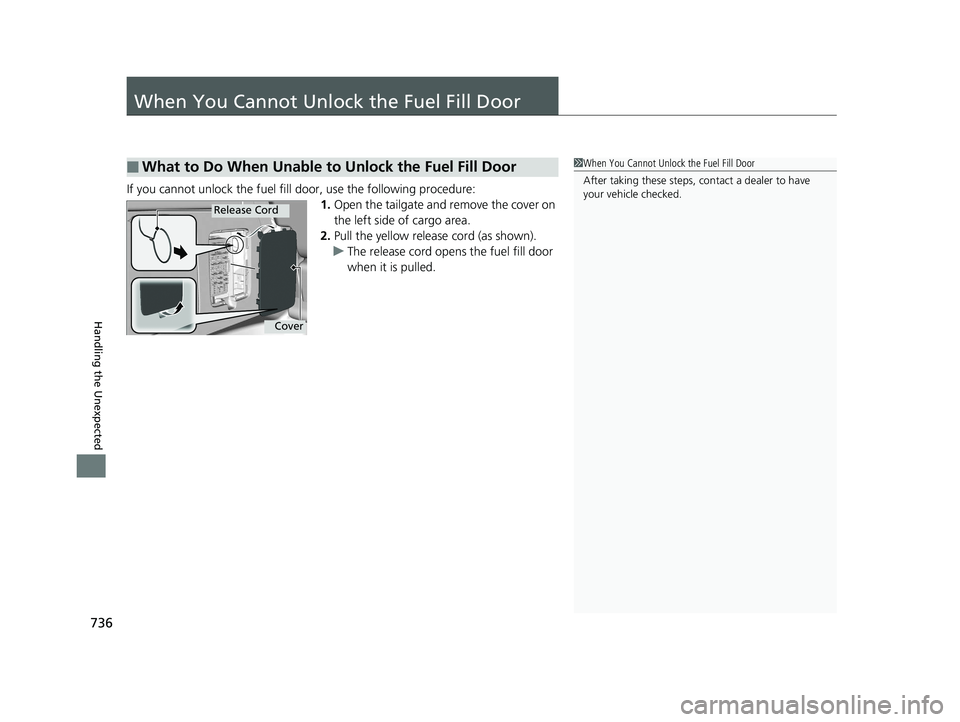
If you cannot unlock the fuel fill door, use the following procedure:1.Open the tailgate and remove the cover on
the left side of cargo area.
2. Pull the yellow releas e cord (as shown).
u The release cord opens the fuel fill door
when it is pulled.
■What to Do When Unable to Unlock the Fuel Fill Door1 When You Cannot Unlo ck the Fuel Fill Door
After taking these steps, contact a dealer to have
your vehicle checked.
Cover
Release Cord
20 US ODYSSEY-31THR6210.book 736 ページ 2020年2月28日 金曜日 午前7時26分