USB Ports HONDA ODYSSEY 2020 Owner's Manual (in English)
[x] Cancel search | Manufacturer: HONDA, Model Year: 2020, Model line: ODYSSEY, Model: HONDA ODYSSEY 2020Pages: 767, PDF Size: 43.89 MB
Page 265 of 767
263
Features
This chapter describes how to operate technology features.
Audio System
About Your Audio System ................ 264
USB Ports ......................................... 265
Auxiliary Input Jack .......................... 266
Audio System Theft Protection ......... 267
Audio Remote Controls .................... 268
Audio System Basic Operation ........ 271
Audio/Information Screen ................ 272
Adjusting the Sound ........................ 276
Display Setup ................................... 277
Playing AM/FM Radio ....................... 278
Playing an iPod ................................ 280
Playing a USB Flash Drive ................. 283
Playing Bluetooth ® Audio ................. 286
Models with color audio system
Audio System Basic Operation ........ 289
Audio/Information Screen ................ 290
System Updates ............................... 304
File Manager .................................... 310
Adjusting the Sound ........................ 316
Display Setup ................................... 317
Voice Control Operation .................. 319
Playing AM/FM Radio ....................... 322
Playing SiriusXM ® Radio
*................. 326
Playing a CD*.................................. 336
Playing an iPod ................................ 339
Playing a USB Flash Drive ................. 342
Playing My Honda Music .................. 345
Playing Bluetooth ® Audio................. 349
Models with Display AudioPlaying Social Playlist........................ 351
HondaLink ®..................................... 353
Wi-Fi Connection ............................. 358
Near Field Communication (NFC)
*... 360
Siri Eyes Free .................................... 363
Apple CarPlay .................................. 364
Android Auto .................................. 367
Audio Error Messages ...................... 371
General Information on the Audio System.. 376Blu-ray/DVD Rear Entertainment System*... 400Customized Features........................ 448
HomeLink ® Universal Transceiver*.. 473
Bluetooth ® HandsFreeLink® ..... 476, 501
CabinWatch
TM *.................................. 526
CabinTalkTM *...................................... 527
* Not available on all models
20 US ODYSSEY-31THR6210.book 263 ページ 2020年2月28日 金曜日 午前7時26分
Page 267 of 767
265
uuAudio System uUSB Ports
Continued
Features
USB Ports
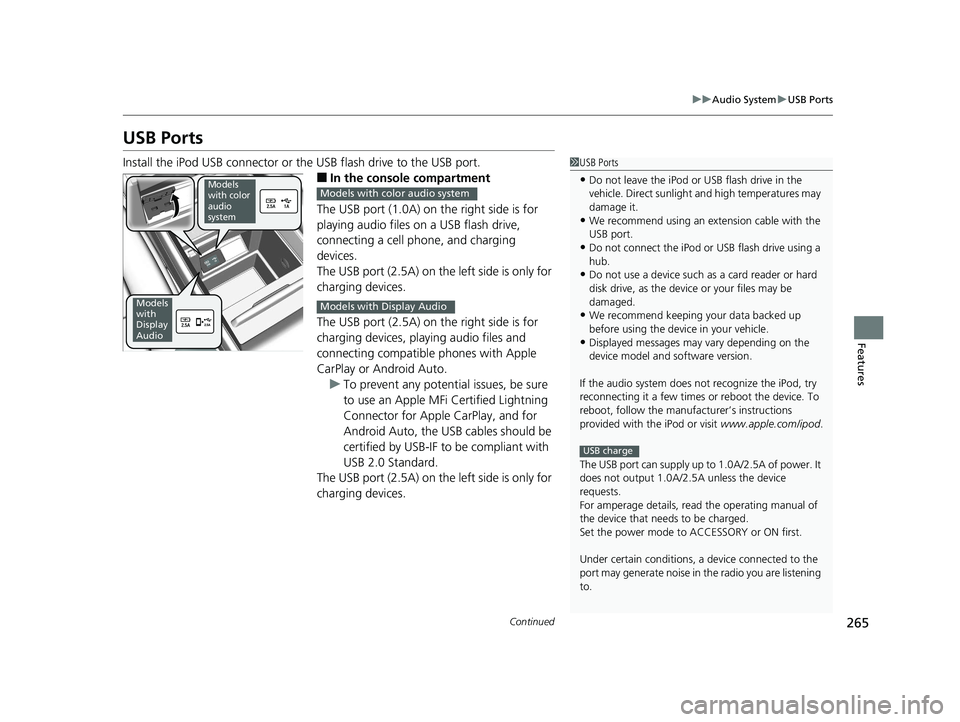
Install the iPod USB connector or the USB flash drive to the USB port.
■In the consol e compartment
The USB port (1.0A) on the right side is for
playing audio files on a USB flash drive,
connecting a cell phone, and charging
devices.
The USB port (2.5A) on the left side is only for
charging devices.
The USB port (2.5A) on the right side is for
charging devices, playing audio files and
connecting compatible phones with Apple
CarPlay or Android Auto. u To prevent any potenti al issues, be sure
to use an Apple MFi Certified Lightning
Connector for Apple CarPlay, and for
Android Auto, the USB cables should be
certified by USB-IF to be compliant with
USB 2.0 Standard.
The USB port (2.5A) on the left side is only for
charging devices.
1 USB Ports
•Do not leave the iPod or USB flash drive in the
vehicle. Direct sunlight and high temperatures may
damage it.
•We recommend using an ex tension cable with the
USB port.
•Do not connect the iPod or USB flash drive using a
hub.
•Do not use a device such as a card reader or hard
disk drive, as the device or your files may be
damaged.
•We recommend keeping y our data backed up
before using the device in your vehicle.
•Displayed messages may vary depending on the
device model and software version.
If the audio system does not recognize the iPod, try
reconnecting it a few times or reboot the device. To
reboot, follow the manufac turer’s instructions
provided with the iPod or visit www.apple.com/ipod.
The USB port can supply up to 1.0A/2.5A of power. It
does not output 1.0A/2.5A unless the device
requests.
For amperage details, read the operating manual of
the device that ne eds to be charged.
Set the power mode to ACCESSORY or ON first.
Under certain condi tions, a device connected to the
port may generate noi se in the radio you are listening
to.
USB charge
Models
with color
audio
system
Models
with
Display
Audio
Models with color audio system
Models with Display Audio
20 US ODYSSEY-31THR6210.book 265 ページ 2020年2月28日 金曜日 午前7時26分
Page 268 of 767
uuAudio System uAuxiliary Input Jack
266
Features
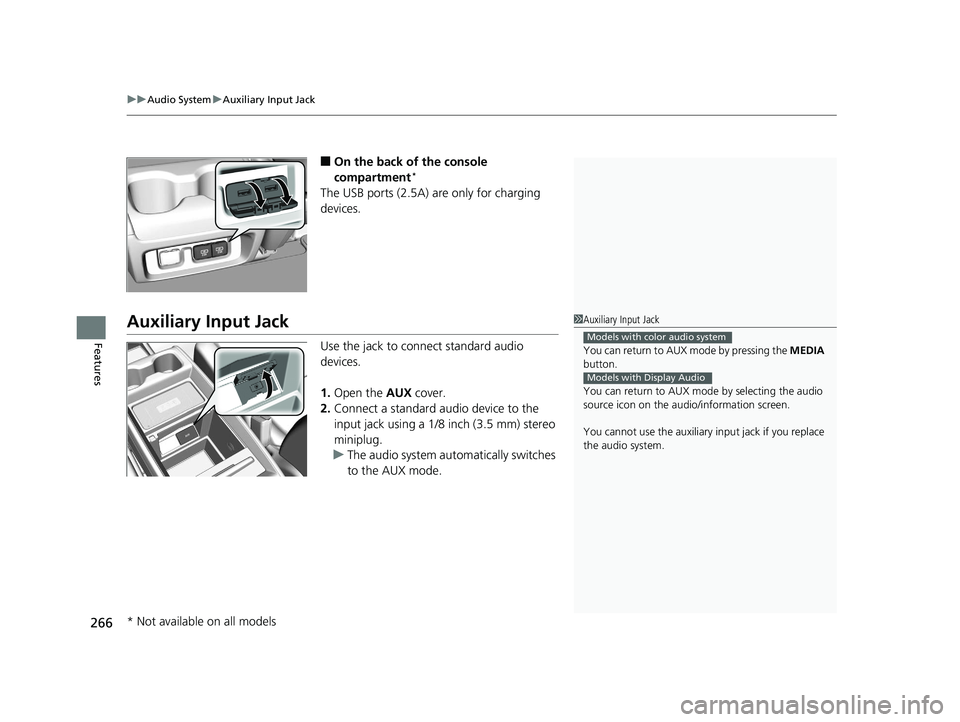
■On the back of the console
compartment*
The USB ports (2.5A) are only for charging
devices.
Auxiliary Input Jack
Use the jack to connect standard audio
devices.
1. Open the AUX cover.
2. Connect a standard audio device to the
input jack using a 1/8 inch (3.5 mm) stereo
miniplug.
u The audio system automatically switches
to the AUX mode.
1Auxiliary Input Jack
You can return to AUX mode by pressing the MEDIA
button.
You can return to AUX mode by selecting the audio
source icon on the audio/information screen.
You cannot use the auxiliary input jack if you replace
the audio system.
Models with color audio system
Models with Display Audio
* Not available on all models
20 US ODYSSEY-31THR6210.book 266 ページ 2020年2月28日 金曜日 午前7時26分
Page 276 of 767
uuAudio System Basic Operation uAudio/Information Screen
274
Features
You can change, store, and delete the wa llpaper on the audio/information screen.
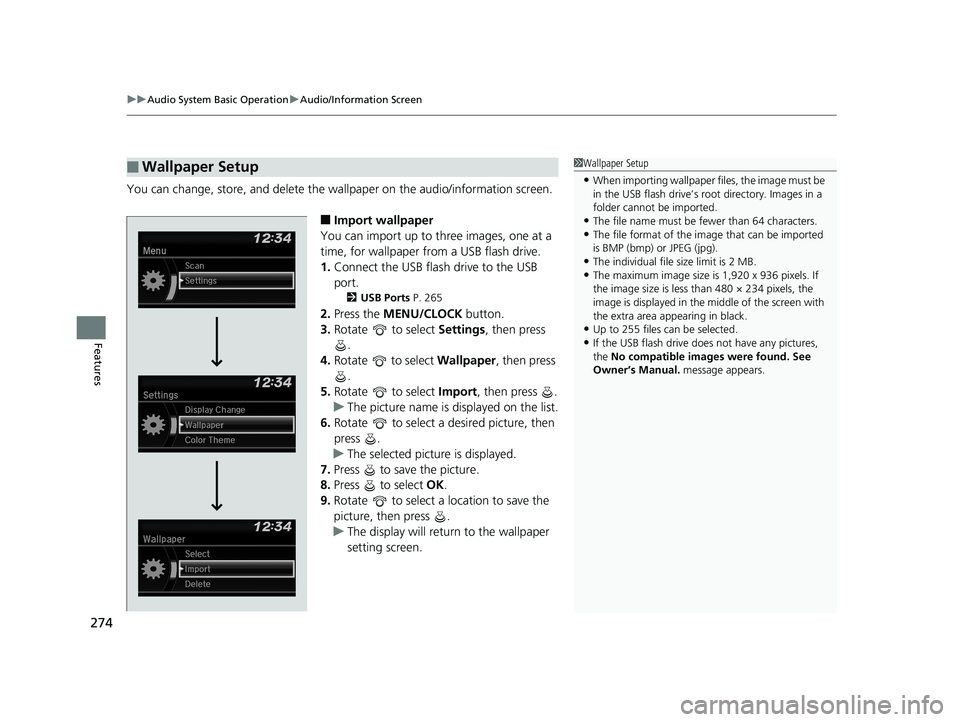
■Import wallpaper
You can import up to three images, one at a
time, for wallpaper from a USB flash drive.
1. Connect the USB flash drive to the USB
port.
2 USB Ports P. 265
2.Press the MENU/CLOCK button.
3. Rotate to select Settings, then press
.
4. Rotate to select Wallpaper , then press
.
5. Rotate to select Import, then press .
u The picture name is displayed on the list.
6. Rotate to select a desired picture, then
press .
u The selected picture is displayed.
7. Press to save the picture.
8. Press to select OK.
9. Rotate to select a location to save the
picture, then press .
u The display will return to the wallpaper
setting screen.
■Wallpaper Setup1Wallpaper Setup
•When importing wallpaper files, the image must be
in the USB flash drive’s root directory. Images in a
folder cannot be imported.
•The file name must be fewer than 64 characters.•The file format of the im age that can be imported
is BMP (bmp) or JPEG (jpg).
•The individual file size limit is 2 MB.•The maximum image size is 1,920 x 936 pixels. If
the image size is less than 480 × 234 pixels, the
image is displayed in the middle of the screen with
the extra area appearing in black.
•Up to 255 files can be selected.
•If the USB flash drive doe s not have any pictures,
the No compatible images were found. See
Owner’s Manual. message appears.
20 US ODYSSEY-31THR6210.book 274 ページ 2020年2月28日 金曜日 午前7時26分
Page 282 of 767
280
uuAudio System Basic Operation uPlaying an iPod
Features
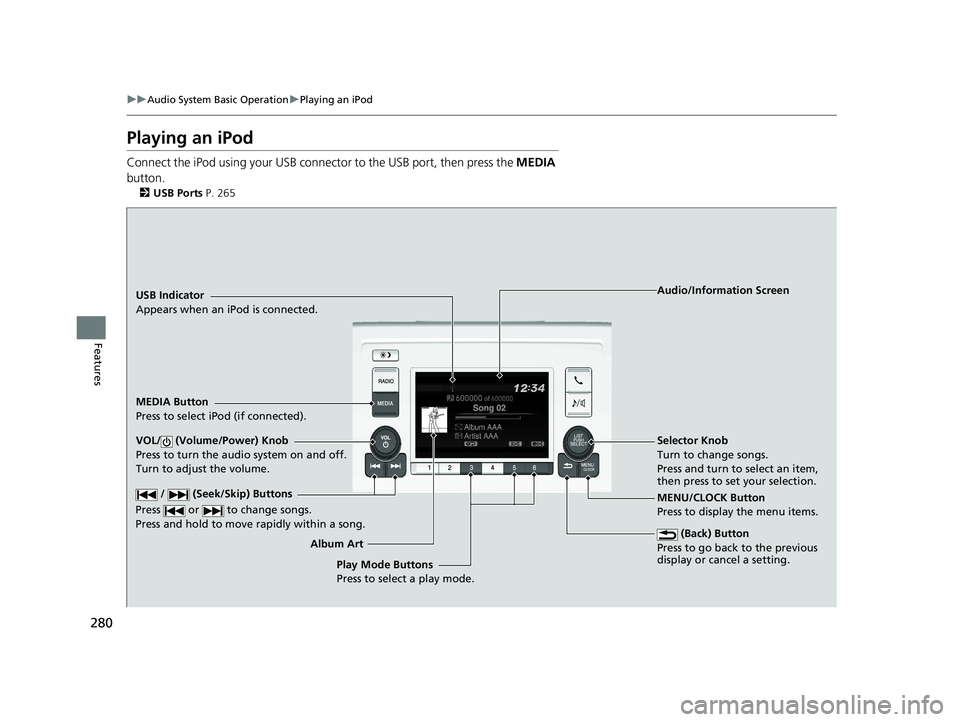
Playing an iPod
Connect the iPod using your USB connector to the USB port, then press the MEDIA
button.
2 USB Ports P. 265
USB Indicator
Appears when an iPod is connected.
MEDIA Button
Press to select iPod (if connected).
(Back) Button
Press to go back to the previous
display or cancel a setting.
/ (Seek/Skip) Buttons
Press or to change songs.
Press and hold to move rapidly within a song.
VOL/ (Volume/Power) Knob
Press to turn the audio system on and off.
Turn to adjust the volume.Selector Knob
Turn to change songs.
Press and turn to select an item,
then press to set your selection.
MENU/CLOCK Button
Press to display the menu items. Audio/Information Screen
Album Art Play Mode Buttons
Press to select a play mode.
20 US ODYSSEY-31THR6210.book 280 ページ 2020年2月28日 金曜日 午前7時26分
Page 285 of 767
283
uuAudio System Basic Operation uPlaying a USB Flash Drive
Continued
Features
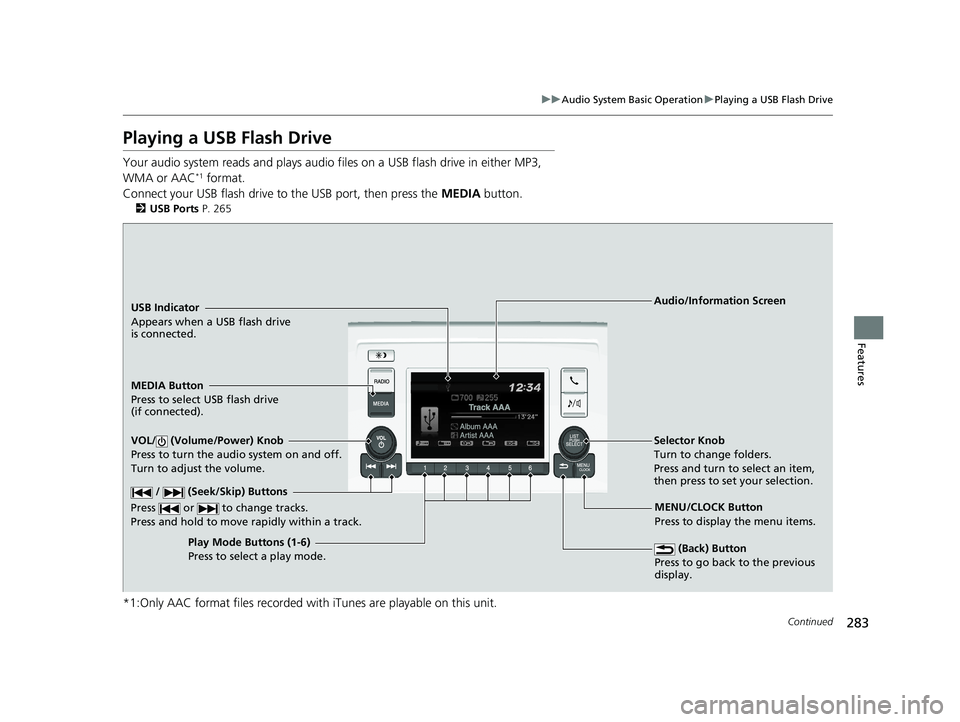
Playing a USB Flash Drive
Your audio system reads and plays audio f iles on a USB flash drive in either MP3,
WMA or AAC*1 format.
Connect your USB flash drive to the USB port, then press the MEDIA button.
2USB Ports P. 265
*1:Only AAC format files recorded with iTunes are playable on this unit.
USB Indicator
Appears when a USB flash drive
is connected.
MEDIA Button
Press to select USB flash drive
(if connected).
(Back) Button
Press to go back to the previous
display.
/ (Seek/Skip) Buttons
Press or to change tracks.
Press and hold to move rapidly within a track.
VOL/ (Volume/Power) Knob
Press to turn the audio system on and off.
Turn to adjust the volume.Selector Knob
Turn to change folders.
Press and turn to select an item,
then press to set your selection.
MENU/CLOCK Button
Press to display the menu items.
Audio/Information Screen
Play Mode Buttons (1-6)
Press to select a play mode.
20 US ODYSSEY-31THR6210.book 283 ページ 2020年2月28日 金曜日 午前7時26分
Page 296 of 767
uuAudio System Basic Operation uAudio/Information Screen
294
Features
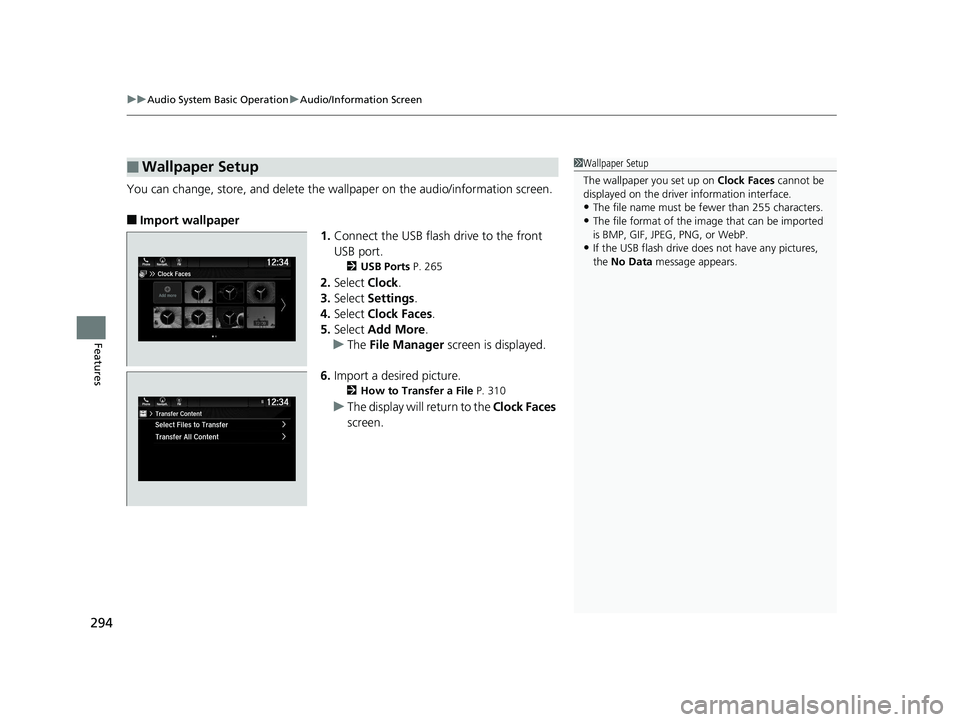
You can change, store, and delete the wa llpaper on the audio/information screen.
■Import wallpaper
1.Connect the USB flash drive to the front
USB port.
2 USB Ports P. 265
2.Select Clock.
3. Select Settings .
4. Select Clock Faces .
5. Select Add More .
u The File Manager screen is displayed.
6. Import a desired picture.
2 How to Transfer a File P. 310
uThe display will return to the Clock Faces
screen.
■Wallpaper Setup1 Wallpaper Setup
The wallpaper you set up on Clock Faces cannot be
displayed on the driver information interface.
•The file name must be fewer than 255 characters.
•The file format of the im age that can be imported
is BMP, GIF, JPEG, PNG, or WebP.
•If the USB flash drive doe s not have any pictures,
the No Data message appears.
20 US ODYSSEY-31THR6210.book 294 ページ 2020年2月28日 金曜日 午前7時26分
Page 310 of 767
uuAudio System Basic Operation uSystem Updates
308
Features
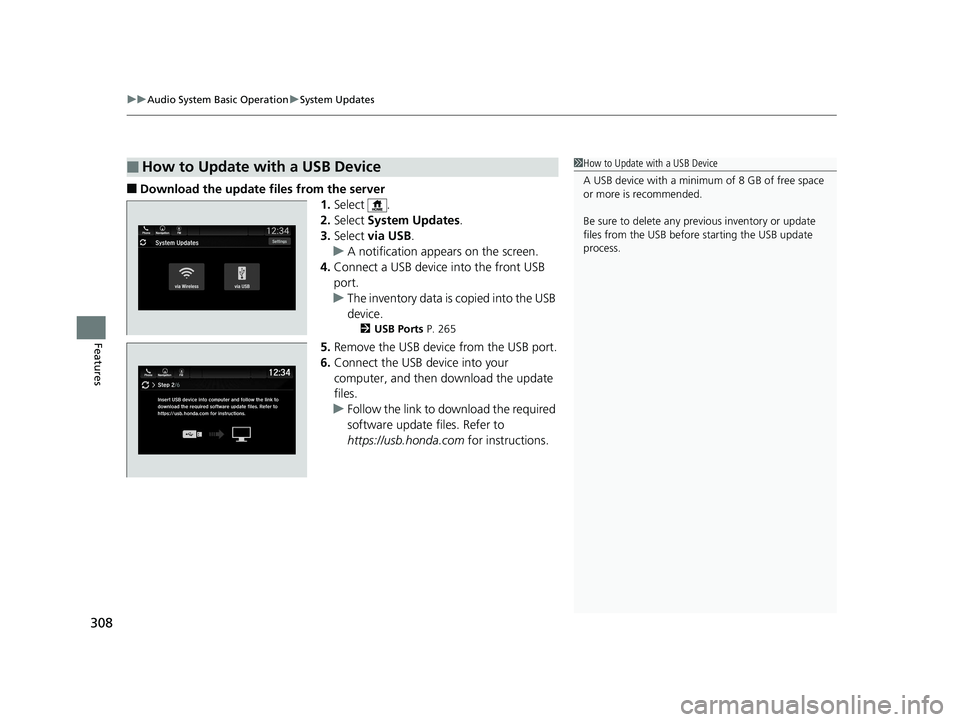
■Download the update files from the server
1.Select .
2. Select System Updates .
3. Select via USB .
u A notification appears on the screen.
4. Connect a USB device into the front USB
port.
u The inventory data is copied into the USB
device.
2 USB Ports P. 265
5.Remove the USB device from the USB port.
6. Connect the USB device into your
computer, and then download the update
files.
u Follow the link to download the required
software update files. Refer to
https://usb.honda.com for instructions.
■How to Update with a USB Device1How to Update with a USB Device
A USB device with a minimum of 8 GB of free space
or more is recommended.
Be sure to delete any pr evious inventory or update
files from the USB before starting the USB update
process.
20 US ODYSSEY-31THR6210.book 308 ページ 2020年2月28日 金曜日 午前7時26分
Page 311 of 767
309
uuAudio System Basic Operation uSystem Updates
Features
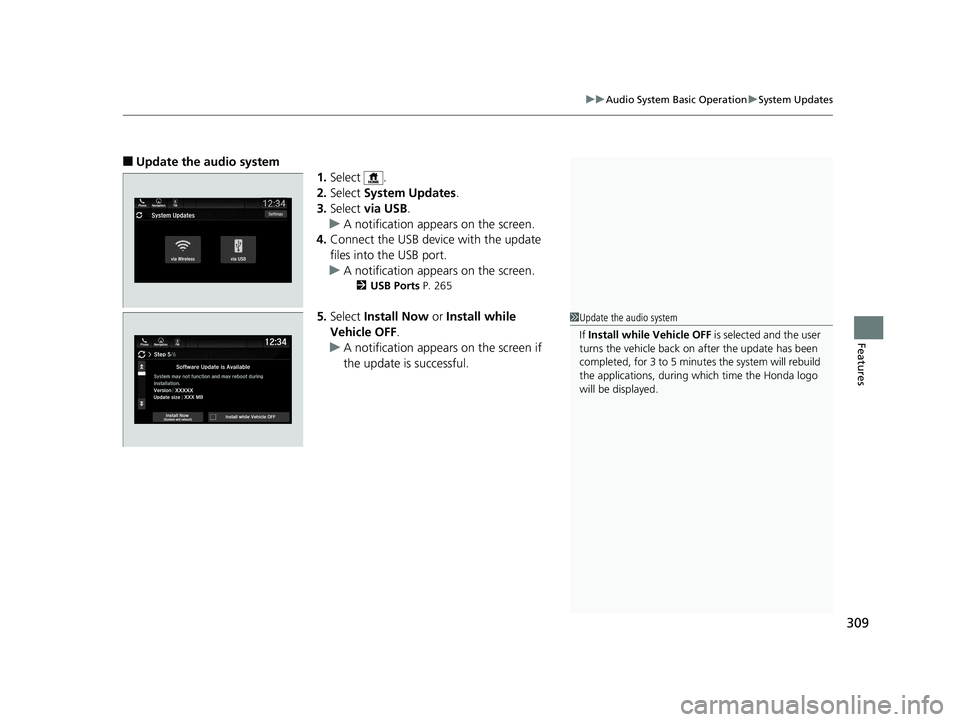
■Update the audio system
1.Select .
2. Select System Updates .
3. Select via USB .
u A notification appears on the screen.
4. Connect the USB device with the update
files into the USB port.
u A notification appears on the screen.
2 USB Ports P. 265
5.Select Install Now or Install while
Vehicle OFF .
u A notification appears on the screen if
the update is successful.1Update the audio system
If Install while Vehicle OFF is selected and the user
turns the vehicle back on after the update has been
completed, for 3 to 5 minutes the system will rebuild
the applications, during which time the Honda logo
will be displayed.
20 US ODYSSEY-31THR6210.book 309 ページ 2020年2月28日 金曜日 午前7時26分
Page 312 of 767
310
uuAudio System Basic Operation uFile Manager
Features
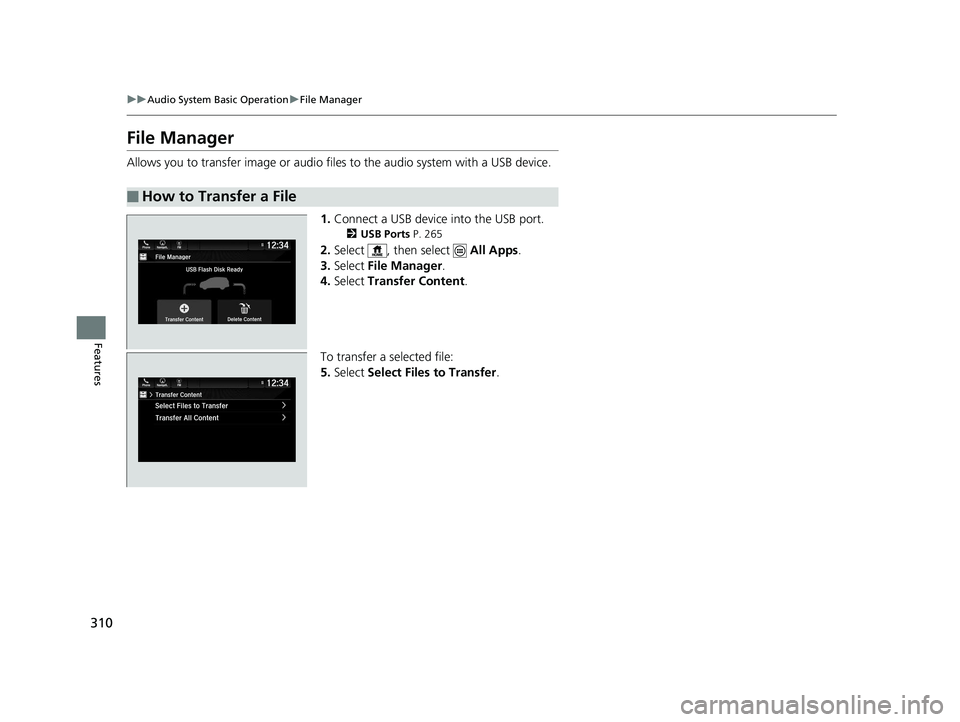
File Manager
Allows you to transfer imag e or audio files to the audio system with a USB device.
1.Connect a USB device into the USB port.
2 USB Ports P. 265
2.Select , then select All Apps.
3. Select File Manager .
4. Select Transfer Content .
To transfer a selected file:
5. Select Select Files to Transfer .
■How to Transfer a File
20 US ODYSSEY-31THR6210.book 310 ページ 2020年2月28日 金曜日 午前7時26分