change HONDA ODYSSEY 2022 Owner's Manual
[x] Cancel search | Manufacturer: HONDA, Model Year: 2022, Model line: ODYSSEY, Model: HONDA ODYSSEY 2022Pages: 782, PDF Size: 27.17 MB
Page 142 of 782
Continued141
uuGauges and Driver Information Interface uDriver Information Interface
Instrument Panel
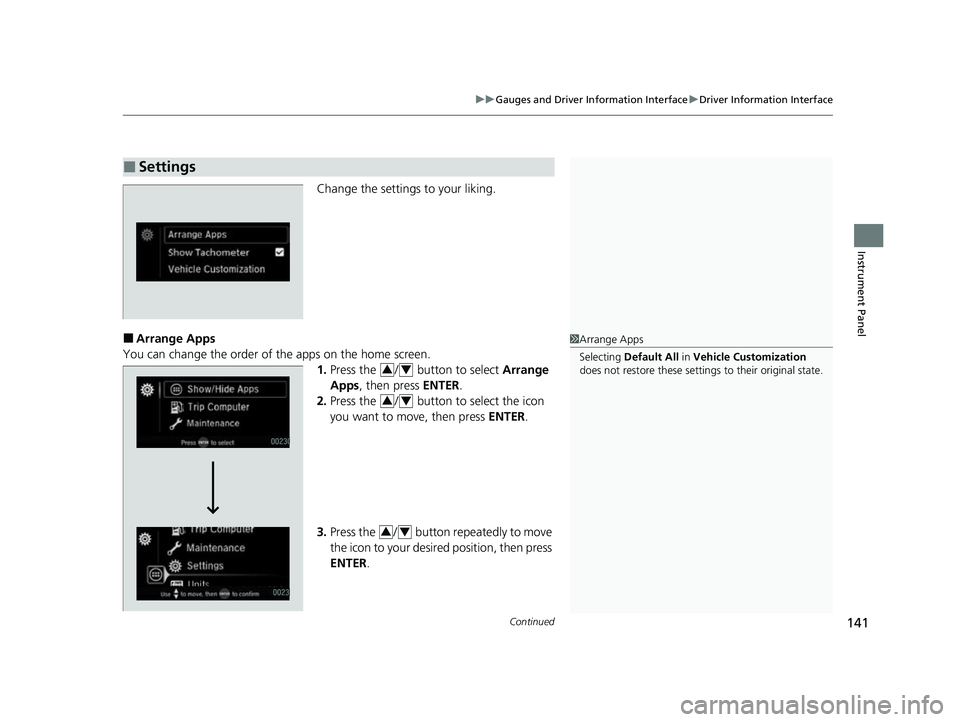
Change the settings to your liking.
■Arrange Apps
You can change the order of the apps on the home screen. 1.Press the / button to select Arrange
Apps , then press ENTER.
2. Press the / button to select the icon
you want to move, then press ENTER.
3. Press the / button repeatedly to move
the icon to your desired position, then press
ENTER .
■Settings
1Arrange Apps
Selecting Default All in Vehicle Customization
does not restore these settings to their original state.
34
34
34
22 US ODYSSEY-31THR6400.book 141 ページ 2020年11月16日 月曜日 午後1時41分
Page 144 of 782
Continued143
uuGauges and Driver Information Interface uDriver Information Interface
Instrument Panel
■Vehicle Customization
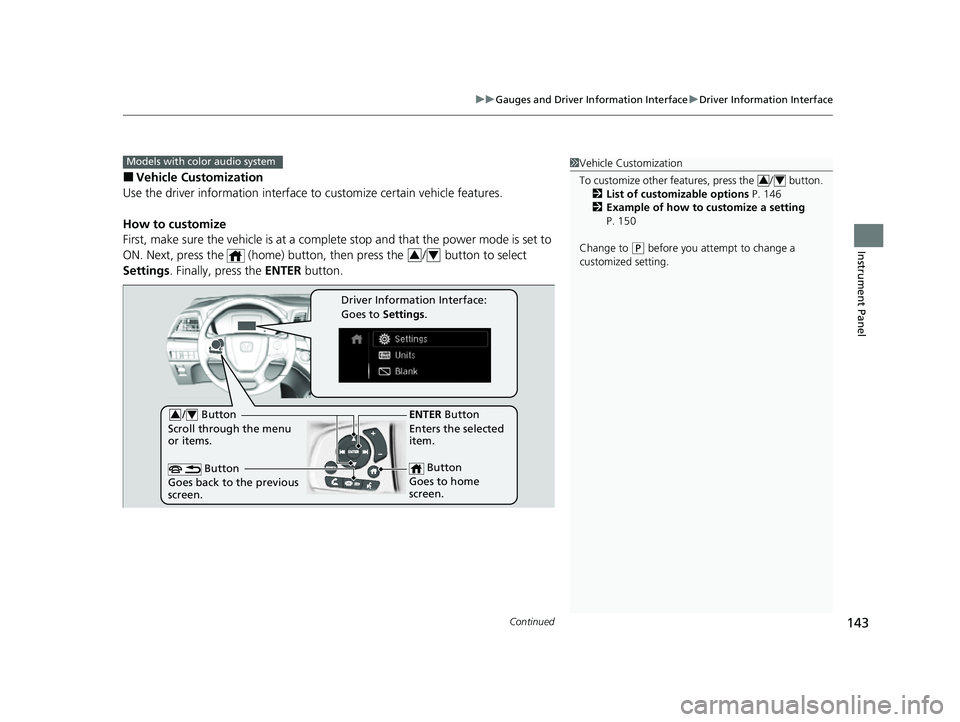
Use the driver information interface to customize certain vehicle features.
How to customize
First, make sure the vehicle is at a complete stop and that the power mode is set to
ON. Next, press the (home) button, then press the / button to select
Settings . Finally, press the ENTER button.
Models with color audio system1Vehicle Customization
To customize other features, press the / button.
2 List of customizable options P. 146
2 Example of how to customize a setting
P. 150
Change to
( P before you attempt to change a
customized setting.
34
34
/ Button
Scroll through the menu
or items.34
Button
Goes back to the previous
screen.
ENTER Button
Enters the selected
item.
Button
Goes to home
screen.
Driver Information Interface:
Goes to Settings.
22 US ODYSSEY-31THR6400.book 143 ページ 2020年11月16日 月曜日 午後1時41分
Page 147 of 782
146
uuGauges and Driver Information Interface uDriver Information Interface
Instrument Panel
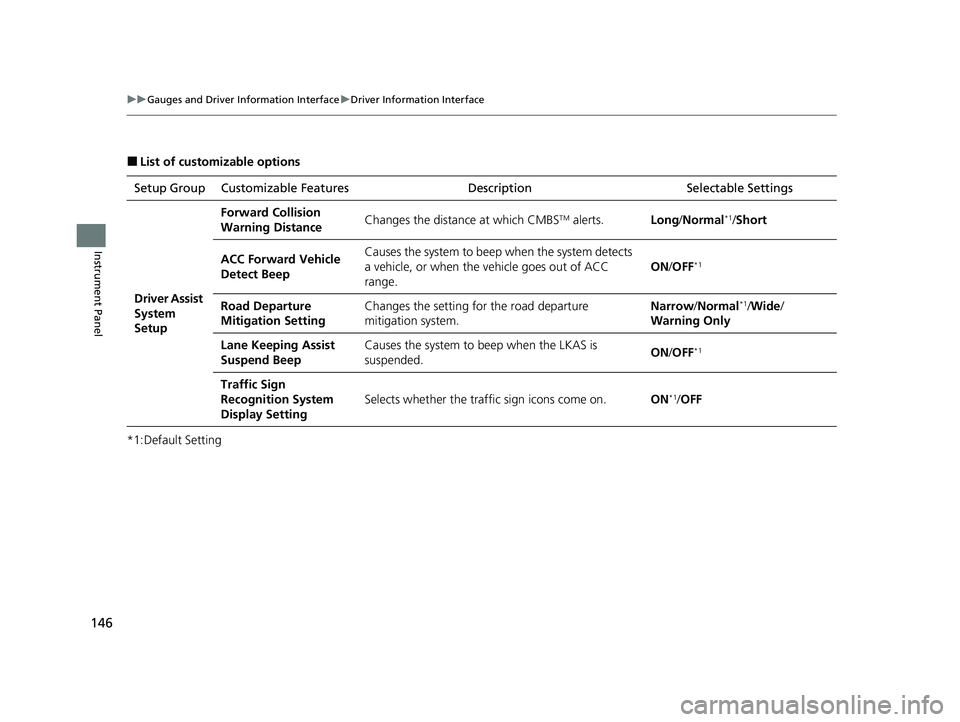
■List of customizable options
*1:Default Setting Setup Group Customizable Features
Description Selectable Settings
Driver Assist
System
Setup
Forward Collision
Warning DistanceChanges the distance at which CMBSTM alerts.Long/Normal*1/Short
ACC Forward Vehicle
Detect BeepCauses the system to beep when the system detects
a vehicle, or when the vehicle goes out of ACC
range.
ON /OFF*1
Road Departure
Mitigation SettingChanges the setting for the road departure
mitigation system.Narrow /Normal*1/Wide /
Warning Only
Lane Keeping Assist
Suspend BeepCauses the system to b eep when the LKAS is
suspended.ON /OFF*1
Traffic Sign
Recognition System
Display Setting
Selects whether the traffi c sign icons come on.ON*1/OFF
22 US ODYSSEY-31THR6400.book 146 ページ 2020年11月16日 月曜日 午後1時41分
Page 148 of 782
147
uuGauges and Driver Information Interface uDriver Information Interface
Continued
Instrument Panel
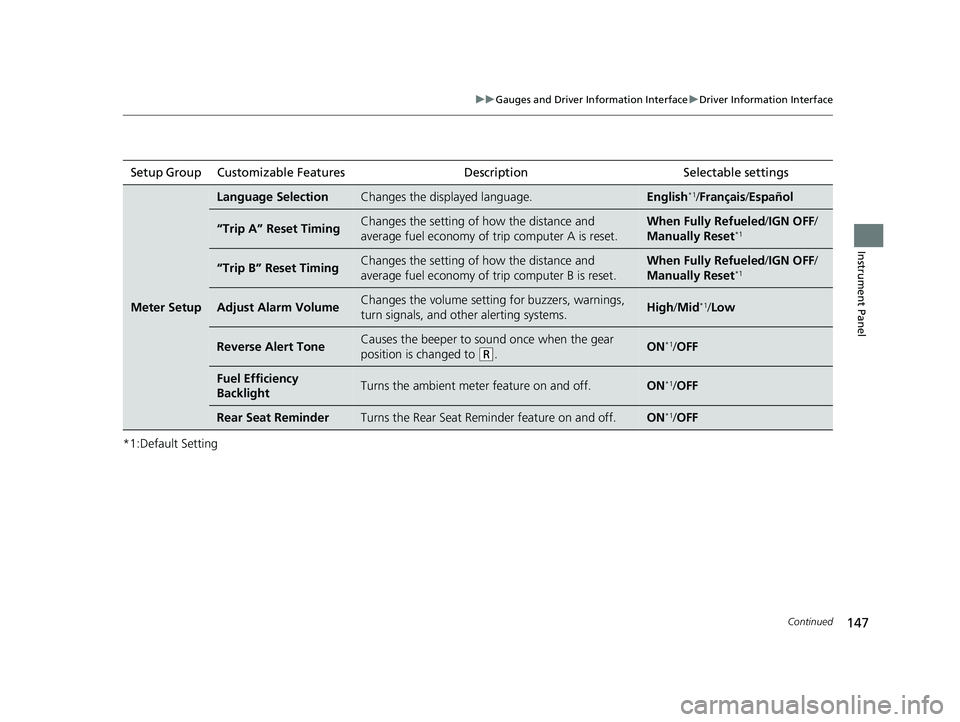
*1:Default SettingSetup Group Customizable Features
Description Selectable settings
Meter Setup
Language SelectionChanges the displayed language.English*1/Français /Español
“Trip A” Reset TimingChanges the setting of how the distance and
average fuel economy of trip computer A is reset.When Fully Refueled /IGN OFF /
Manually Reset*1
“Trip B” Reset TimingChanges the setting of how the distance and
average fuel economy of trip computer B is reset.When Fully Refueled /IGN OFF /
Manually Reset*1
Adjust Alarm VolumeChanges the volume setting for buzzers, warnings,
turn signals, and other alerting systems.High /Mid*1/Low
Reverse Alert ToneCauses the beeper to sound once when the gear
position is changed to
(R.ON*1/OFF
Fuel Efficiency
BacklightTurns the ambient meter feature on and off.ON*1/OFF
Rear Seat ReminderTurns the Rear Seat Reminder feature on and off.ON*1/OFF
22 US ODYSSEY-31THR6400.book 147 ページ 2020年11月16日 月曜日 午後1時41分
Page 149 of 782
148
uuGauges and Driver Information Interface uDriver Information Interface
Instrument Panel
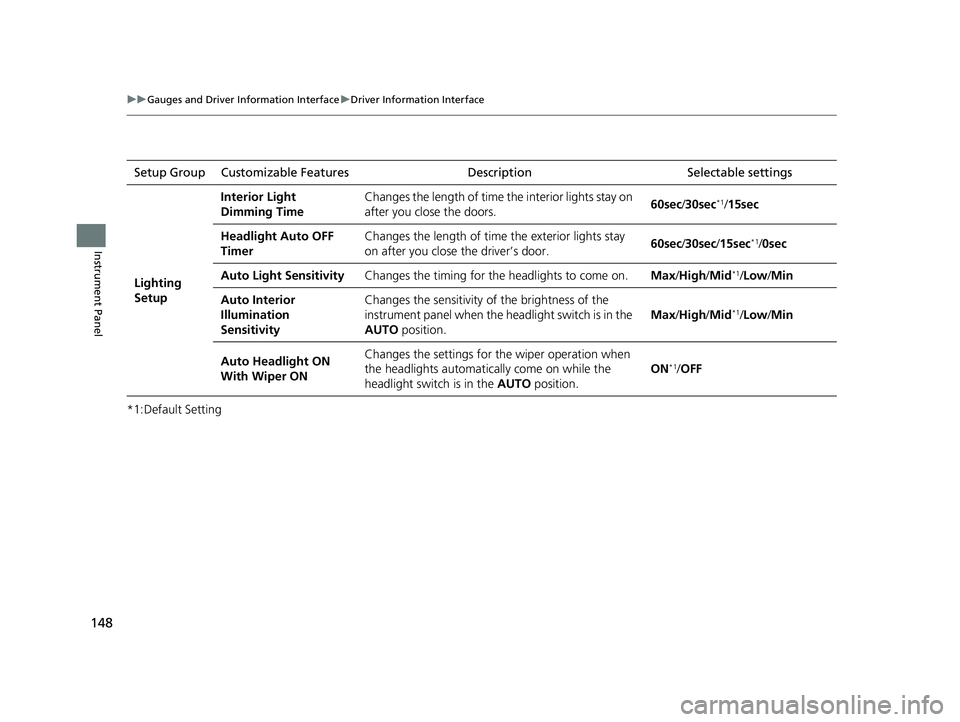
*1:Default SettingSetup Group Customizable Features Description Selectable settings
Lighting
Setup
Interior Light
Dimming Time
Changes the length of time the interior lights stay on
after you close the doors.
60sec
/30sec
*1/15sec
Headlight Auto OFF
Timer Changes the length of time the exterior lights stay
on after you close the driver’s door.
60sec
/30sec /15sec
*1/0sec
Auto Light Sensitivity Changes the timing for the headlights to come on. Max/High /Mid
*1/Low/ Min
Auto Interior
Illumination
Sensitivity Changes the sensitivity of the brightness of the
instrument panel when the headlight switch is in the
AUTO
position. Max
/High /Mid
*1/Low/ Min
Auto Headlight ON
With Wiper ON Changes the settings for the wiper operation when
the headlights automatica
lly come on while the
headlight switch is in the AUTO position. ON
*1/
OFF
22 US ODYSSEY-31THR6400.book 148 ページ 2020年11月16日 月曜日 午後1時41分
Page 150 of 782
149
uuGauges and Driver Information Interface uDriver Information Interface
Continued
Instrument Panel
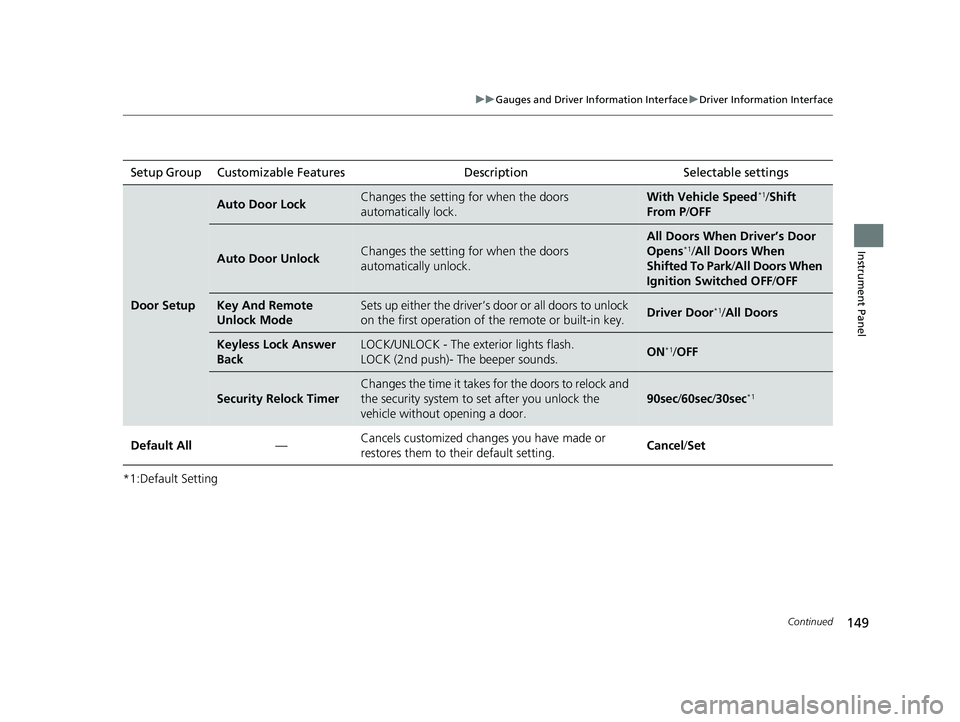
*1:Default SettingSetup Group Customizable Features
Description Selectable settings
Door Setup
Auto Door LockChanges the setting for when the doors
automatically lock.With Vehicle Speed*1/Shift
From P /OFF
Auto Door UnlockChanges the setting for when the doors
automatically unlock.
All Doors When Driver’s Door
Opens*1/All Doors When
Shifted To Park/ All Doors When
Ignition Switched OFF /OFF
Key And Remote
Unlock ModeSets up either the driver’s door or all doors to unlock
on the first operation of the remote or built-in key.Driver Door*1/ All Doors
Keyless Lock Answer
BackLOCK/UNLOCK - The exterior lights flash.
LOCK (2nd push)- The beeper sounds.ON*1/OFF
Security Relock Timer
Changes the time it takes for the doors to relock and
the security system to set after you unlock the
vehicle without opening a door.
90sec /60sec /30sec*1
Default All —Cancels customized changes you have made or
restores them to their default setting.
Cancel
/Set
22 US ODYSSEY-31THR6400.book 149 ページ 2020年11月16日 月曜日 午後1時41分
Page 151 of 782
150
uuGauges and Driver Information Interface uDriver Information Interface
Instrument Panel
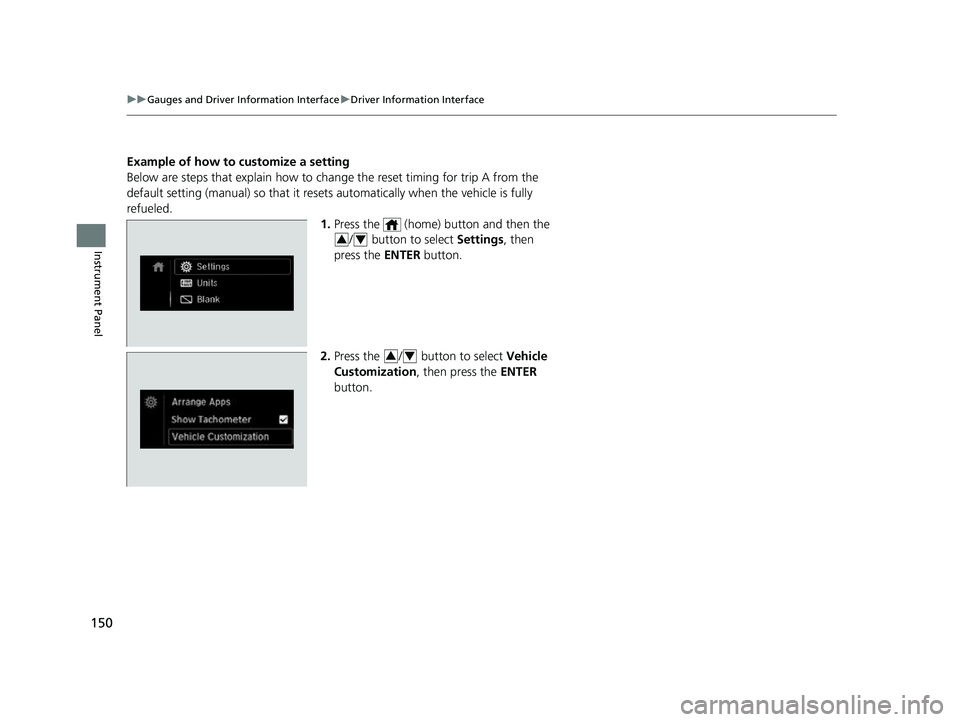
Example of how to customize a setting
Below are steps that explai n how to change the reset timing for trip A from the
default setting (manual) so that it resets automatically when the vehicle is fully
refueled. 1.Press the (home) button and then the
/ button to select Settings , then
press the ENTER button.
2. Press the / button to select Vehicle
Customization , then press the ENTER
button.
34
34
22 US ODYSSEY-31THR6400.book 150 ページ 2020年11月16日 月曜日 午後1時41分
Page 155 of 782
154
Controls
Clock
Adjusting the Clock
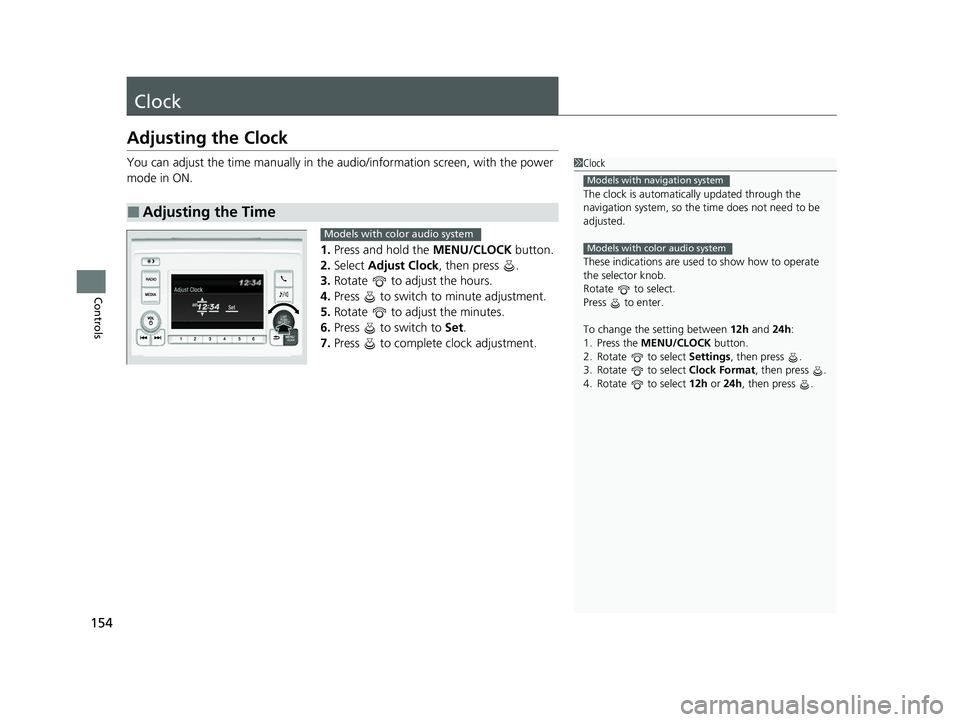
You can adjust the time manually in the audio/information screen, with the power
mode in ON.
1.Press and hold the MENU/CLOCK button.
2. Select Adjust Clock , then press .
3. Rotate to adjust the hours.
4. Press to switch to minute adjustment.
5. Rotate to adjust the minutes.
6. Press to switch to Set.
7. Press to complete clock adjustment.
■Adjusting the Time
1Clock
The clock is automatica lly updated through the
navigation system, so the ti me does not need to be
adjusted.
These indications are used to show how to operate
the selector knob.
Rotate to select.
Press to enter.
To change the setting between 12h and 24h:
1. Press the MENU/CLOCK button.
2. Rotate to select Settings, then press .
3. Rotate to select Clock Format, then press .
4. Rotate to select 12h or 24h , then press .
Models with navigation system
Models with color audio system
Models with color audio system
22 US ODYSSEY-31THR6400.book 154 ページ 2020年11月16日 月曜日 午後1時41分
Page 162 of 782
Continued161
uuLocking and Unlocking the Doors uLocking/Unlocking the Doors from the Outside
Controls
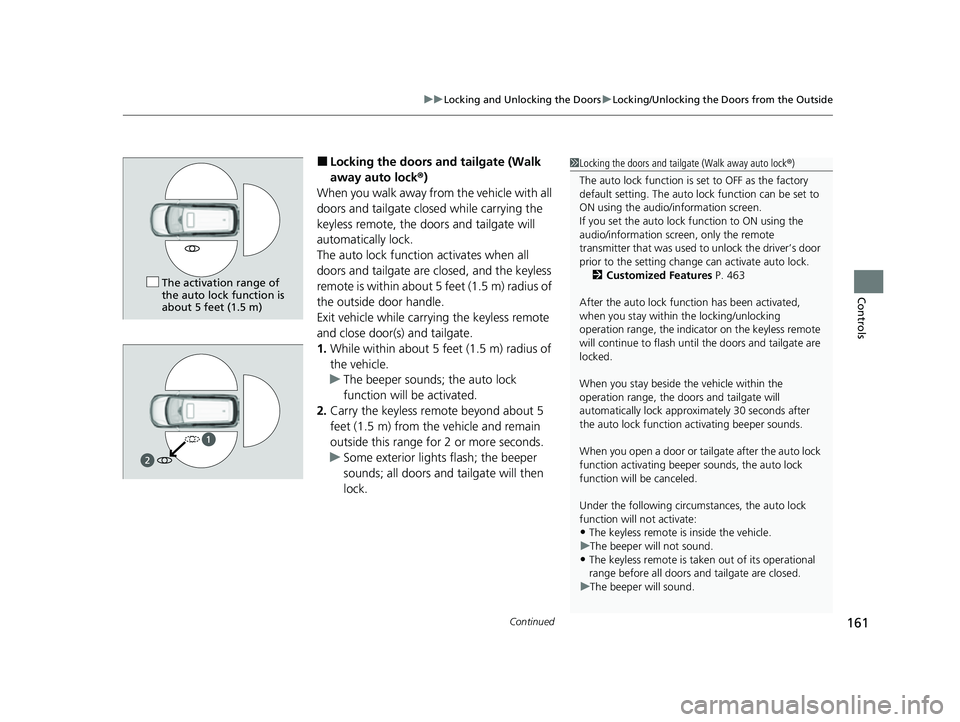
■Locking the doors and tailgate (Walk
away auto lock ®)
When you walk away fro m the vehicle with all
doors and tailgate closed while carrying the
keyless remote, the doors and tailgate will
automatically lock.
The auto lock function activates when all
doors and tailgate are closed, and the keyless
remote is within about 5 feet (1.5 m) radius of
the outside door handle.
Exit vehicle while carrying the keyless remote
and close door(s) and tailgate.
1. While within about 5 feet (1.5 m) radius of
the vehicle.
u The beeper sounds; the auto lock
function will be activated.
2. Carry the keyless remote beyond about 5
feet (1.5 m) from the vehicle and remain
outside this range for 2 or more seconds.
u Some exterior lights flash; the beeper
sounds; all doors and tailgate will then
lock.1Locking the doors and tailg ate (Walk away auto lock®)
The auto lock function is set to OFF as the factory
default setting. The auto lo ck function can be set to
ON using the audio/information screen.
If you set the auto lock function to ON using the
audio/information screen, only the remote
transmitter that was used to unlock the driver’s door
prior to the setting change can activate auto lock. 2 Customized Features P. 463
After the auto lock function has been activated,
when you stay within the locking/unlocking
operation range, the indicato r on the keyless remote
will continue to flash until the doors and tailgate are
locked.
When you stay beside the vehicle within the
operation range, the door s and tailgate will
automatically lock approx imately 30 seconds after
the auto lock function activating beeper sounds.
When you open a door or tailgate after the auto lock
function activating beeper sounds, the auto lock
function will be canceled.
Under the following circumstances, the auto lock
function will not activate:
•The keyless remote is inside the vehicle.
u The beeper will not sound.
•The keyless remote is taken out of its operational
range before all doors a nd tailgate are closed.
u The beeper will sound.
The activation range of
the auto lock function is
about 5 feet (1.5 m)
22 US ODYSSEY-31THR6400.book 161 ページ 2020年11月16日 月曜日 午後1時41分
Page 164 of 782
Continued163
uuLocking and Unlocking the Doors uLocking/Unlocking the Doors from the Outside
Controls
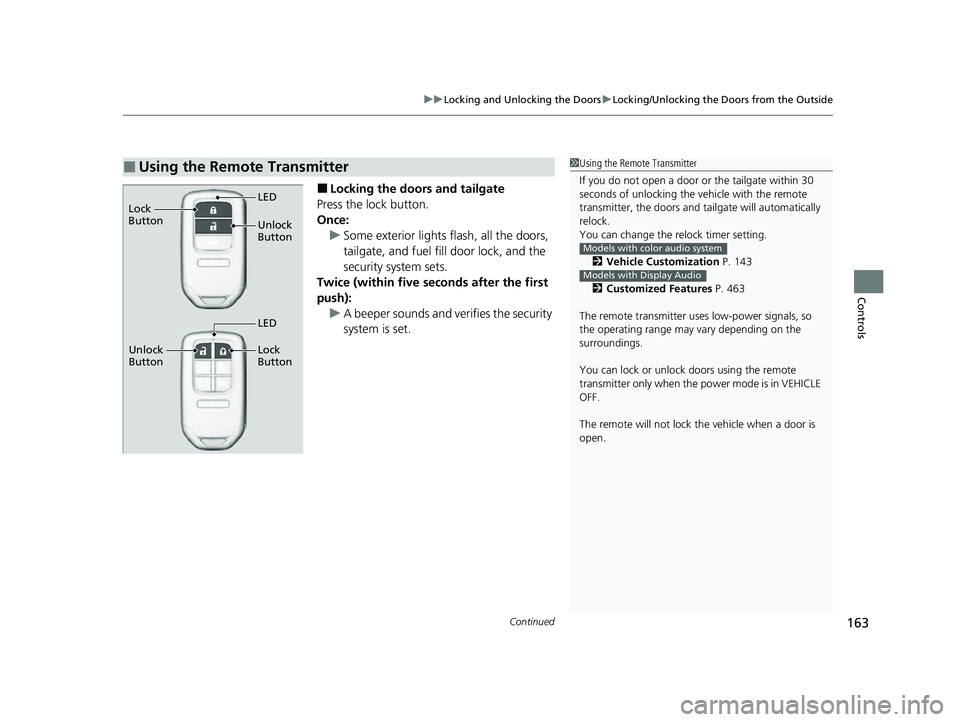
■Locking the doors and tailgate
Press the lock button.
Once: u Some exterior lights flash, all the doors,
tailgate, and fuel fill door lock, and the
security system sets.
Twice (within five se conds after the first
push): u A beeper sounds and verifies the security
system is set.
■Using the Remote Transmitter1Using the Remote Transmitter
If you do not open a door or the tailgate within 30
seconds of unlocking the vehicle with the remote
transmitter, the doors and ta ilgate will automatically
relock.
You can change the relock timer setting.
2 Vehicle Customization P. 143
2 Customized Features P. 463
The remote transmitter us es low-power signals, so
the operating range may vary depending on the
surroundings.
You can lock or unlock doors using the remote
transmitter only when the power mode is in VEHICLE
OFF.
The remote will not lock th e vehicle when a door is
open.
Models with color audio system
Models with Display Audio
Unlock
Button LED
Lock
Button
Unlock
Button Lock
Button
LED
22 US ODYSSEY-31THR6400.book 163 ページ 2020年11月16日 月曜日 午後1時41分