fuel HONDA ODYSSEY 2022 Owner's Manual
[x] Cancel search | Manufacturer: HONDA, Model Year: 2022, Model line: ODYSSEY, Model: HONDA ODYSSEY 2022Pages: 782, PDF Size: 27.17 MB
Page 164 of 782
Continued163
uuLocking and Unlocking the Doors uLocking/Unlocking the Doors from the Outside
Controls
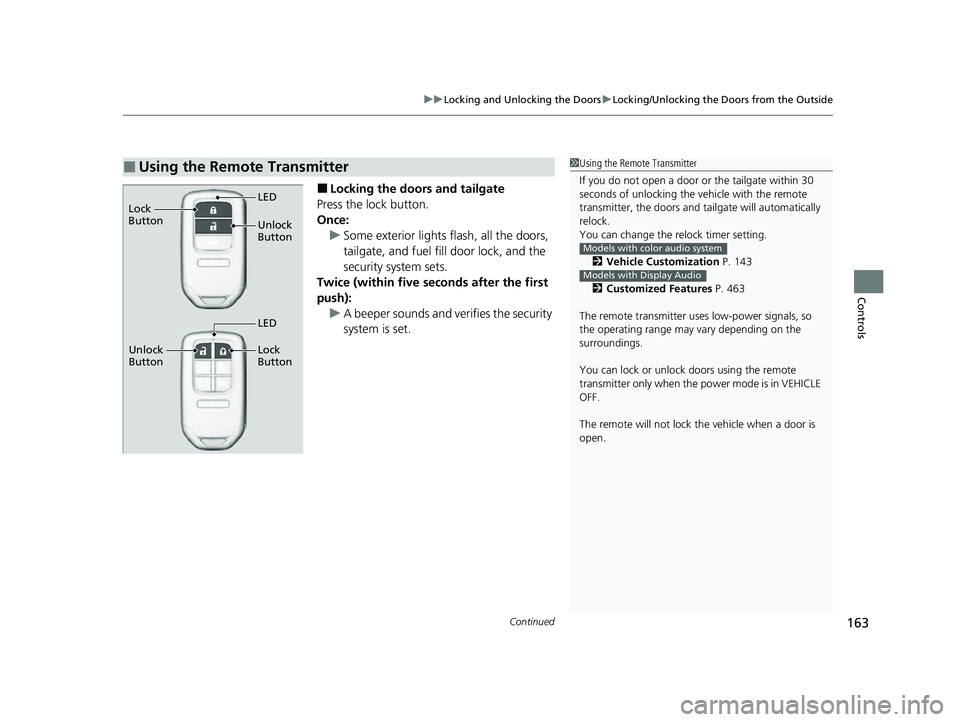
■Locking the doors and tailgate
Press the lock button.
Once: u Some exterior lights flash, all the doors,
tailgate, and fuel fill door lock, and the
security system sets.
Twice (within five se conds after the first
push): u A beeper sounds and verifies the security
system is set.
■Using the Remote Transmitter1Using the Remote Transmitter
If you do not open a door or the tailgate within 30
seconds of unlocking the vehicle with the remote
transmitter, the doors and ta ilgate will automatically
relock.
You can change the relock timer setting.
2 Vehicle Customization P. 143
2 Customized Features P. 463
The remote transmitter us es low-power signals, so
the operating range may vary depending on the
surroundings.
You can lock or unlock doors using the remote
transmitter only when the power mode is in VEHICLE
OFF.
The remote will not lock th e vehicle when a door is
open.
Models with color audio system
Models with Display Audio
Unlock
Button LED
Lock
Button
Unlock
Button Lock
Button
LED
22 US ODYSSEY-31THR6400.book 163 ページ 2020年11月16日 月曜日 午後1時41分
Page 165 of 782
uuLocking and Unlocking the Doors uLocking/Unlocking the Doors from the Outside
164
Controls
■Unlocking the doors and tailgate
Press the unlock button.
Once: u Some exterior lights flash twice, and the driver’s door and fuel fill door unlocks.
Twice: u The remaining doors and the tailgate unlock.
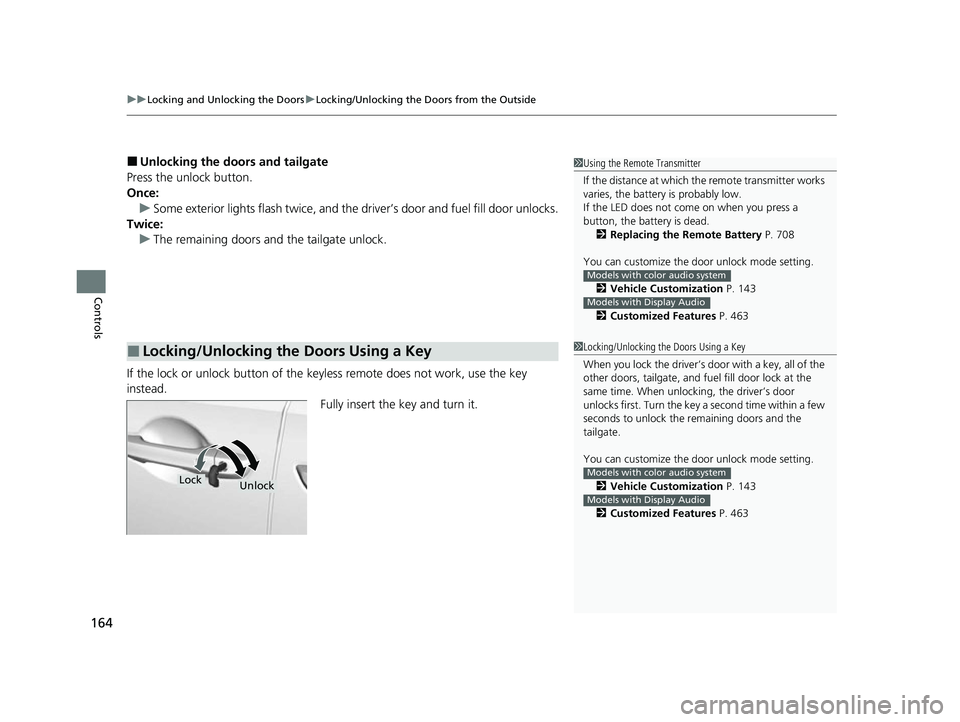
If the lock or unlock button of the key less remote does not work, use the key
instead.
Fully insert the key and turn it.
■Locking/Unlocking the Doors Using a Key
1Using the Remote Transmitter
If the distance at which the remote transmitter works
varies, the batter y is probably low.
If the LED does not come on when you press a
button, the battery is dead. 2 Replacing the Remote Battery P. 708
You can customize the door unlock mode setting. 2 Vehicle Customization P. 143
2 Customized Features P. 463
Models with color audio system
Models with Display Audio
1Locking/Unlocking the Doors Using a Key
When you lock the driver’s door with a key, all of the
other doors, tailgate, and fu el fill door lock at the
same time. When unlock ing, the driver’s door
unlocks first. Turn the key a second time within a few
seconds to unlock the remaining doors and the
tailgate.
You can customize the door unlock mode setting.
2 Vehicle Customization P. 143
2 Customized Features P. 463
Models with color audio system
Models with Display Audio
LockUnlock
22 US ODYSSEY-31THR6400.book 164 ページ 2020年11月16日 月曜日 午後1時41分
Page 166 of 782
165
uuLocking and Unlocking the Doors uLocking/Unlocking the Doors from the Outside
Controls
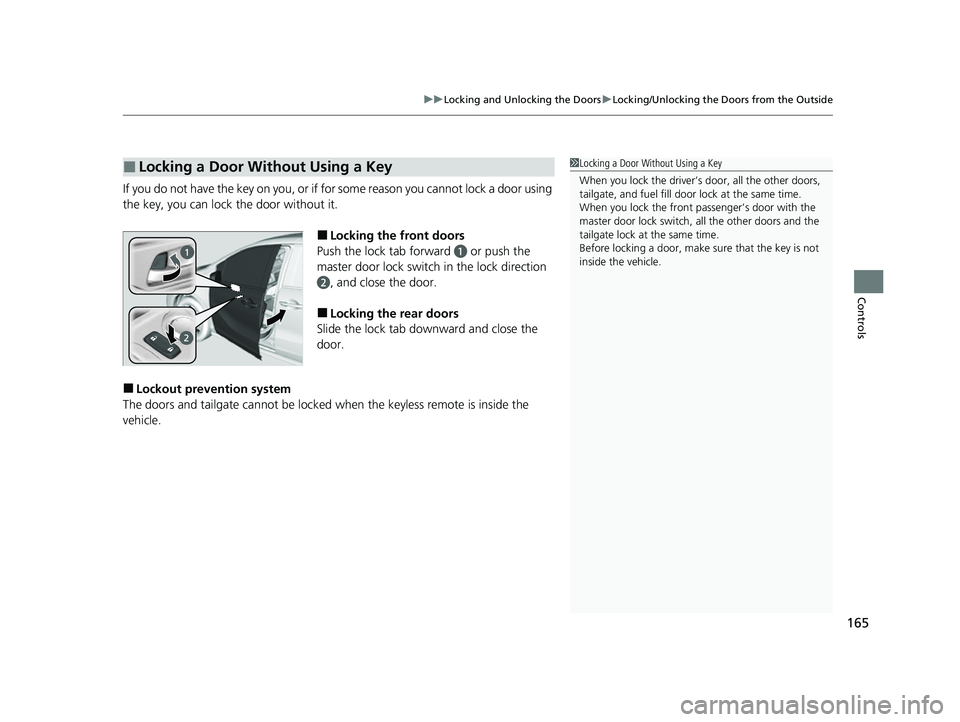
If you do not have the key on you, or if fo r some reason you cannot lock a door using
the key, you can lock the door without it.
■Locking the front doors
Push the lock tab forward
a or push the
master door lock switch in the lock direction
b, and close the door.
■Locking the rear doors
Slide the lock tab downward and close the
door.
■Lockout prevention system
The doors and tailgate cannot be locked when the keyless remote is inside the
vehicle.
■Locking a Door Without Using a Key1 Locking a Door Without Using a Key
When you lock the driver’s door, all the other doors,
tailgate, and fuel fill door lock at the same time.
When you lock the front passenger’s door with the
master door lock switch, all the other doors and the
tailgate lock at the same time.
Before locking a door, make sure that the key is not
inside the vehicle.
22 US ODYSSEY-31THR6400.book 165 ページ 2020年11月16日 月曜日 午後1時41分
Page 167 of 782
166
uuLocking and Unlocking the Doors uLocking/Unlocking the Doors from the Inside
Controls
Locking/Unlocking the Doors from the Inside
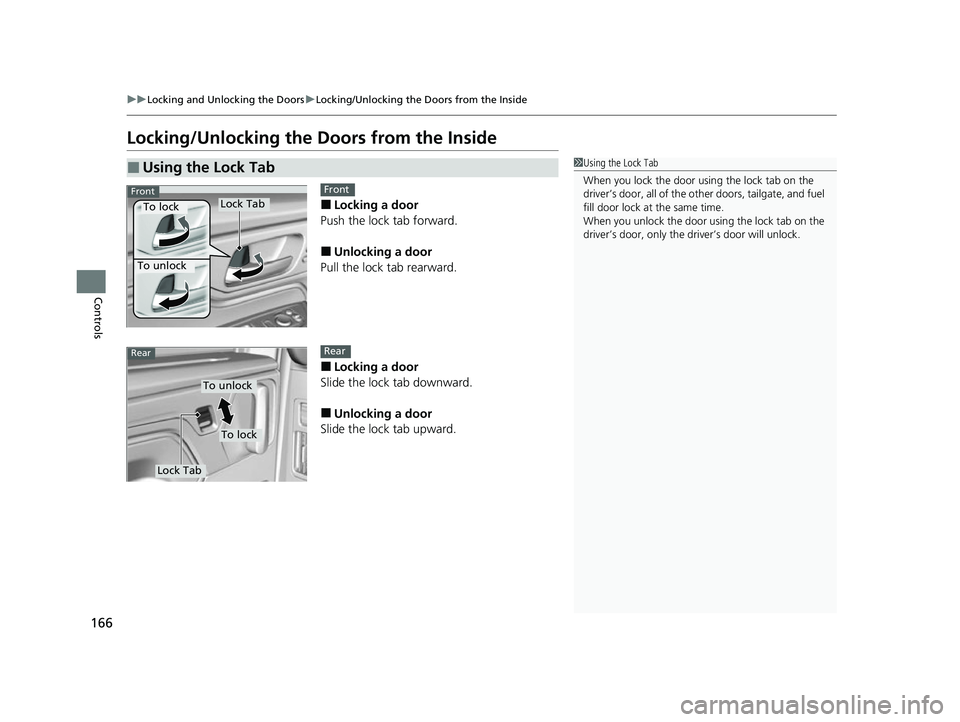
■Locking a door
Push the lock tab forward.
■Unlocking a door
Pull the lock tab rearward.
■Locking a door
Slide the lock tab downward.
■Unlocking a door
Slide the lock tab upward.
■Using the Lock Tab1 Using the Lock Tab
When you lock the door using the lock tab on the
driver’s door, all of the ot her doors, tailgate, and fuel
fill door lock at the same time.
When you unlock the door using the lock tab on the
driver’s door, only the driv er’s door will unlock.
To unlock
Lock TabTo lock
FrontFront
To unlock
Lock Tab
To lock
RearRear
22 US ODYSSEY-31THR6400.book 166 ページ 2020年11月16日 月曜日 午後1時41分
Page 169 of 782
uuLocking and Unlocking the Doors uLocking/Unlocking the Doors from the Inside
168
Controls
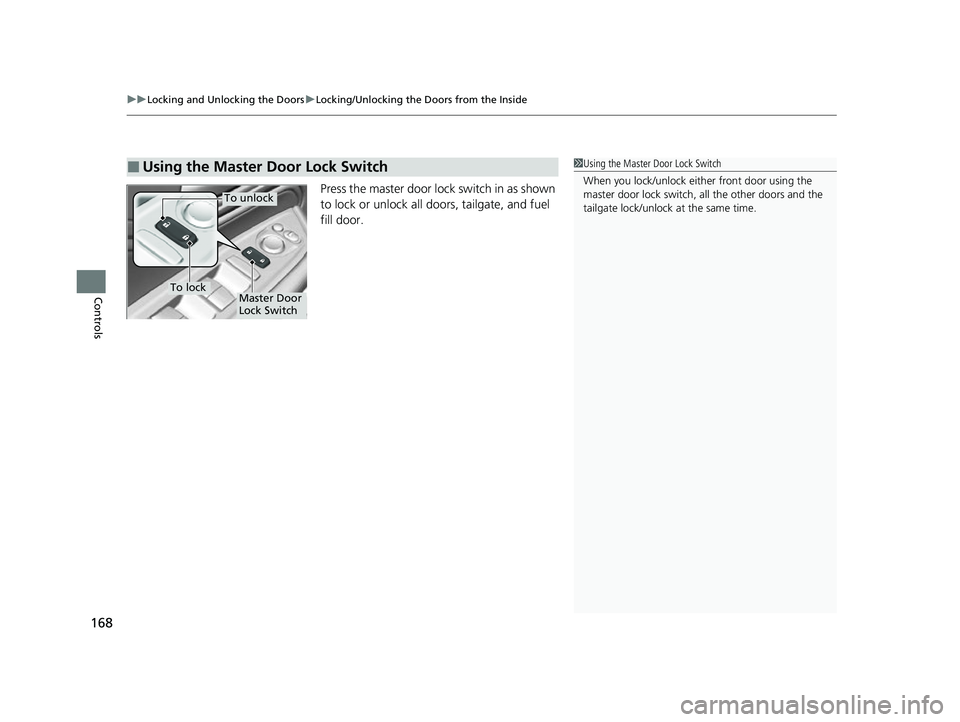
Press the master door lock switch in as shown
to lock or unlock all doors, tailgate, and fuel
fill door.
■Using the Master Door Lock Switch1Using the Master Door Lock Switch
When you lock/unlock eith er front door using the
master door lock switch, all the other doors and the
tailgate lock/unlock at the same time.
To unlock
Master Door
Lock SwitchTo lock
22 US ODYSSEY-31THR6400.book 168 ページ 2020年11月16日 月曜日 午後1時41分
Page 184 of 782
183
uuSliding Doors uOpening/Closing a Sliding Door
Controls
Opening/Closing a Sliding Door
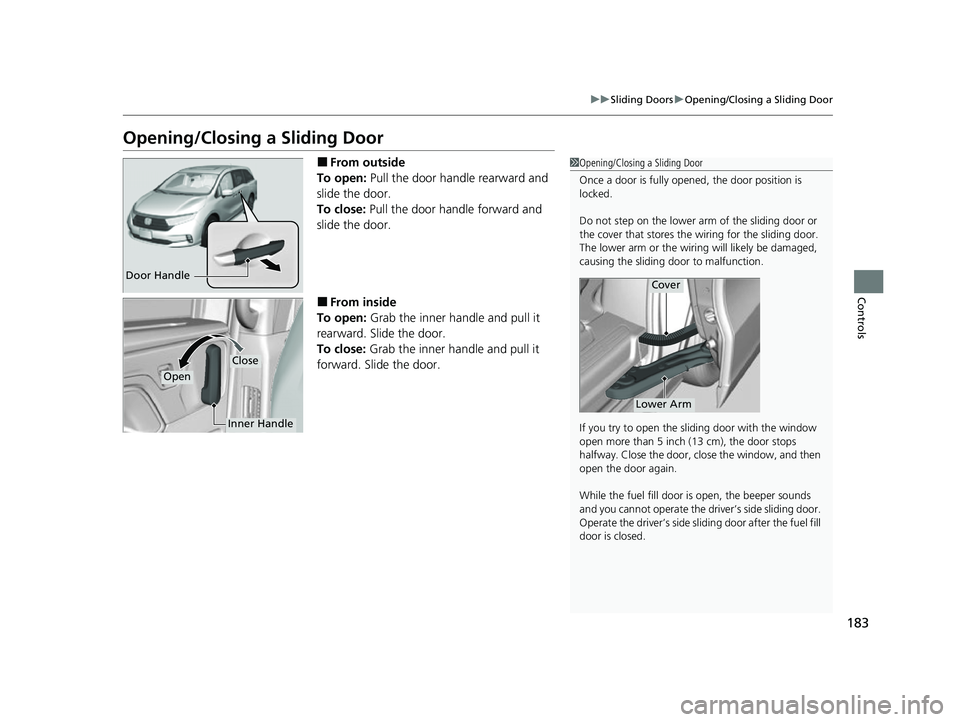
■From outside
To open: Pull the door handle rearward and
slide the door.
To close: Pull the door handle forward and
slide the door.
■From inside
To open: Grab the inner handle and pull it
rearward. Slide the door.
To close: Grab the inner handle and pull it
forward. Slide the door.
1 Opening/Closing a Sliding Door
Once a door is fully opened, the door position is
locked.
Do not step on the lower arm of the sliding door or
the cover that stores the wiring for the sliding door.
The lower arm or the wiring will likely be damaged,
causing the sliding door to malfunction.
If you try to open the sliding door with the window
open more than 5 inch (13 cm), the door stops
halfway. Close the door, close the window, and then
open the door again.
While the fuel fill door is open, the beeper sounds
and you cannot operate the driver’s side sliding door.
Operate the driver’s side sliding door after the fuel fill
door is closed.
Cover
Lower Arm
Door Handle
Inner Handle
Close
Open
22 US ODYSSEY-31THR6400.book 183 ページ 2020年11月16日 月曜日 午後1時41分
Page 185 of 782
184
uuSliding Doors uOpening/Closing the Power Sliding Doors*
Controls
Opening/Closing the Power Sliding Doors*
The power sliding doors can be operated by pressing the power sliding door button
on the keyless remote, pressing the power sliding door switches on the dashboard
or door pillars, or using the door handle.
The power sliding doors can be operated when:
• The sliding door main switch is in the ON position.
• The power sliding door is unlocked.
• The fuel fill door is closed (on the driver’s side sliding door only).
• The power mode is in VEHICLE OFF or the re mote engine start mode is active with
use of the keyless remote.
• The transmission is in
(P, the brake pedal is depressed, or the parking brake is
applied (with the power mode in ON) when using the power sliding door switches
on the dashboard.
1 Opening/Closing the Power Sliding Doors*
If the transmission is in a position other than (P, and
release the brake pedal and the parking brake:
While opening – The sliding door stops and is left
ajar.
While closing – The beeper sounds until the door
closes.
Check that passengers, es pecially children, do not
have their hands on the sliding doors or on the door
pillars before its operation. If someone is caught in
the opening or closing sliding door, it can cause
serious injury.
Before replacing a rear ti re, turn the power sliding
door main switch to OFF.
Operate the power slidi ng doors only when the
vehicle is at a complete stop. Make sure you apply the
brake when rear passengers are boarding or exiting.
* Not available on all models
22 US ODYSSEY-31THR6400.book 184 ページ 2020年11月16日 月曜日 午後1時41分
Page 396 of 782
395
uuGeneral Information on the Audio System uHonda App License Agreement
Continued
Features
E. Information Collection and Storage
1. Information Collection, Use, Transmission a nd Storage of Data. Consent to Use of Data:
You agree that HONDA and PROVIDERS may
collect and use your information gathered in any manner as part of product support services related to the SOFTWARE or related services.
HONDA may share such information with third parties, including, without limitation, PR OVIDERS, third party software and service s
suppliers, their affiliates and/or their designated agents, solely to improve their products or to provide services or technolo gies to you.
HONDA, third party software and systems supplie rs, their affiliates and/or their designated agent may disclose this information to others,
but not in a form that pe rsonally identifies you.
2. Information Storage.
Depending on the type of mult imedia system you have in your VEHICLE, certain information may be stored for ease
of use of the SOFTWARE including, without limitation, search history, location history in certain applications, previous and sa ved
destinations, map locations within certain applications, and device numbers and contact information.
(a) Vehicle Health Information.
Your VEHICLE may remotely transmit information re garding the status and health of your VEHICLE
(“VEHICLE INFORMATION”) to HO NDA without notification to you. VEHICLE INFO RMATION may contain VEHICLE maintenance and
malfunction status that is derived from VEHICLE diagnostic data and includes, but is not limited to, status of powered doors and windows,
battery life data, battery charging data, VE HICLE speed, coolant temperature, air comp ressor revolution, output power, warning codes,
diagnostic trouble codes, fuel injection volume, and engine rotati ons per minute. VEHICLE HEALTH INFORMATION may be used by HON DA
for research and development, to deliver HONDA SERVICES and informat ion to you, and to contact you, and is retained only for a period
of time necessary to fulfill these goals.
(b) VEHICLE Geolocation Data (non-navigation/map based).
If you opt-in to geolocation-based SERVICES, your vehicle’s geolocation data
(latitude and longitude) will be automatically sent from your VEHICLE to HONDA and PROVIDERS.
(c) You understand that the inputting or uploading of information to your VEHICLE’s multimedia system or the SOFTWARE or SERVIC ES is
at your own risk and that HONDA is not responsible for unauthori zed access to or use of any personal or other information. All information
uploaded to the SOFTWARE and SERVICES may be stored on your VEHICLES’s multimedia system and you understand that the security and
safety of your VEHICLE’s multimedia system is your sole responsibility.
22 US ODYSSEY-31THR6400.book 395 ページ 2020年11月16日 月曜日 午後1時41分
Page 468 of 782
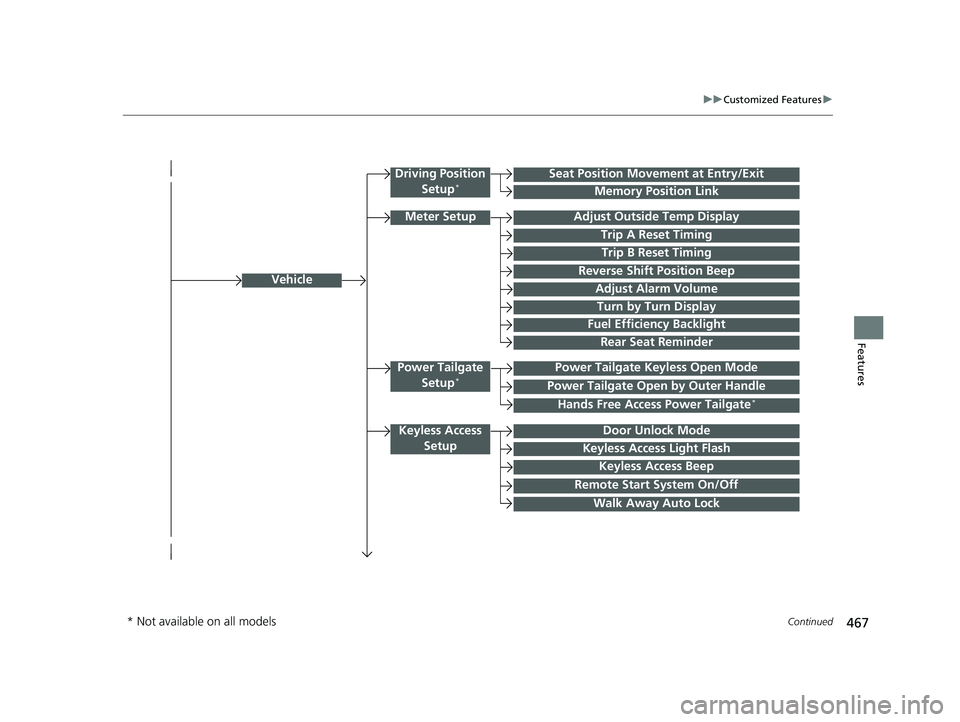
467
uuCustomized Features u
Continued
Features
Vehicle
Driving Position
Setup*Seat Position Movem ent at Entry/Exit
Memory Position Link
Meter SetupAdjust Outside Temp Display
Trip A Reset Timing
Trip B Reset Timing
Reverse Shift Position Beep
Adjust Alarm Volume
Turn by Turn Display
Power Tailgate
Setup*Power Tailgate Keyless Open Mode
Power Tailgate Open by Outer Handle
Keyless Access SetupDoor Unlock Mode
Keyless Access Light Flash
Keyless Access Beep
Remote Start System On/Off
Walk Away Auto Lock
Fuel Efficiency Backlight
Hands Free Access Power Tailgate*
Rear Seat Reminder
* Not available on all models
22 US ODYSSEY-31THR6400.book 467 ページ 2020年11月16日 月曜日 午後1時41分
Page 475 of 782
474
uuCustomized Features u
Features
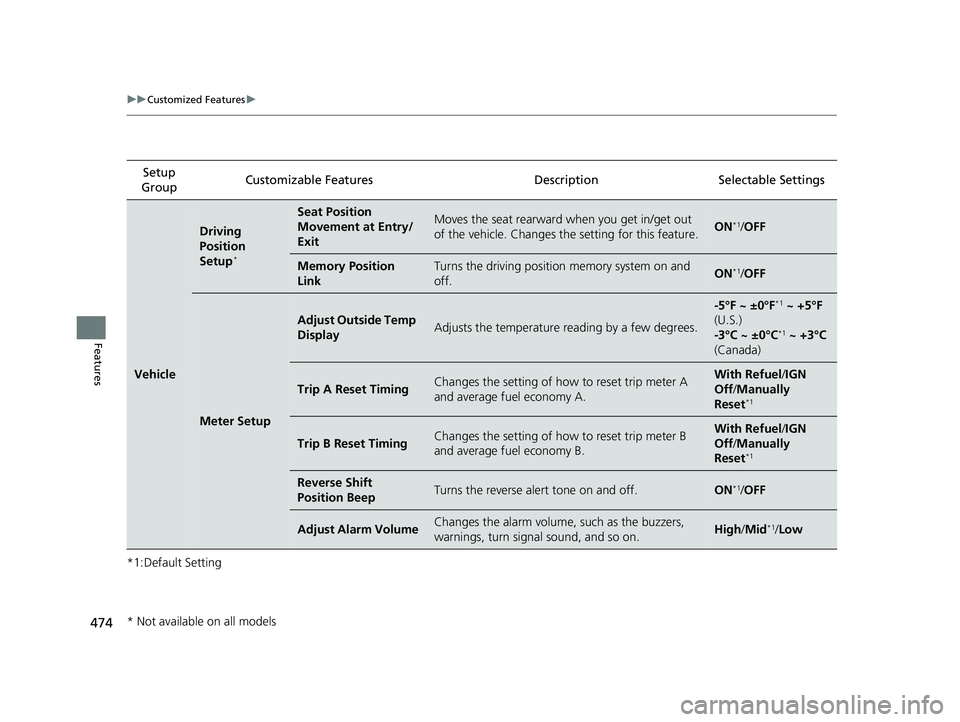
*1:Default SettingSetup
Group Customizable Features Description Selectable Settings
Vehicle
Driving
Position
Setup
*
Seat Position
Movement at Entry/
ExitMoves the seat rearward when you get in/get out
of the vehicle. Changes the setting for this feature.ON*1/
OFF
Memory Position
LinkTurns the driving position memory system on and
off.ON*1/ OFF
Meter Setup
Adjust Outside Temp
DisplayAdjusts the temperature reading by a few degrees.
-5°F ~ ±0°F*1 ~ +5°F
(U.S.)
-3°C ~ ±0°C
*1 ~ +3°C
(Canada)
Trip A Reset TimingChanges the setting of how to reset trip meter A
and average fuel economy A.With Refuel /IGN
Off /Manually
Reset
*1
Trip B Reset TimingChanges the setting of how to reset trip meter B
and average fuel economy B.With Refuel /IGN
Off /Manually
Reset
*1
Reverse Shift
Position BeepTurns the reverse alert tone on and off.ON*1/ OFF
Adjust Alarm VolumeChanges the alarm volume, such as the buzzers,
warnings, turn signal sound, and so on.High /Mid*1/Low
* Not available on all models
22 US ODYSSEY-31THR6400.book 474 ページ 2020年11月16日 月曜日 午後1時41分