warning HONDA ODYSSEY 2022 Owner's Manual
[x] Cancel search | Manufacturer: HONDA, Model Year: 2022, Model line: ODYSSEY, Model: HONDA ODYSSEY 2022Pages: 782, PDF Size: 27.17 MB
Page 98 of 782
97
uuIndicators u
Continued
Instrument Panel
IndicatorNameOn/BlinkingExplanationMessage
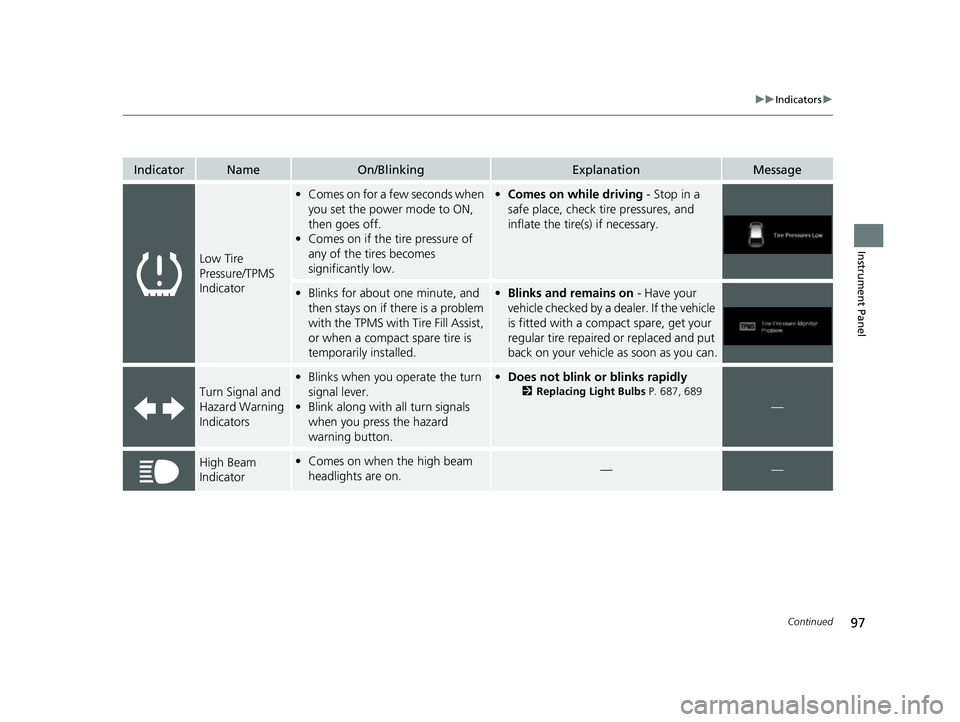
Low Tire
Pressure/TPMS
Indicator
•Comes on for a few seconds when
you set the power mode to ON,
then goes off.
• Comes on if the tire pressure of
any of the tires becomes
significantly low.•Comes on while driving - Stop in a
safe place, check tire pressures, and
inflate the tire(s) if necessary.
• Blinks for about one minute, and
then stays on if there is a problem
with the TPMS with Tire Fill Assist,
or when a compact spare tire is
temporarily installed.•Blinks and remains on - Have your
vehicle checked by a dealer. If the vehicle
is fitted with a compact spare, get your
regular tire repaired or replaced and put
back on your vehicle as soon as you can.
Turn Signal and
Hazard Warning
Indicators
• Blinks when you operate the turn
signal lever.
• Blink along with all turn signals
when you press the hazard
warning button.• Does not blink or blinks rapidly
2 Replacing Light Bulbs P. 687, 689
—
High Beam
Indicator•Comes on when the high beam
headlights are on.——
22 US ODYSSEY-31THR6400.book 97 ページ 2020年11月16日 月曜日 午後1時41分
Page 100 of 782
99
uuIndicators u
Continued
Instrument Panel
IndicatorNameOn/BlinkingExplanationMessage
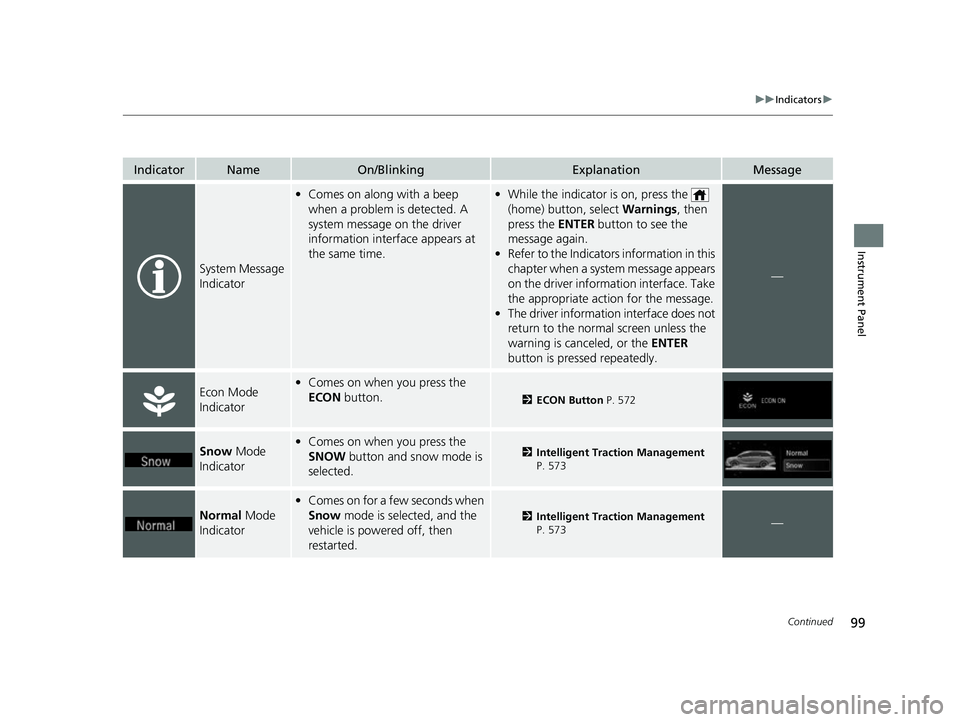
System Message
Indicator
•Comes on along with a beep
when a problem is detected. A
system message on the driver
information interface appears at
the same time.•While the indicator is on, press the
(home) button, select Warnings, then
press the ENTER button to see the
message again.
• Refer to the Indicators information in this
chapter when a system message appears
on the driver information interface. Take
the appropriate action for the message.
• The driver information interface does not
return to the norma l screen unless the
warning is canceled, or the ENTER
button is pressed repeatedly.
—
Econ Mode
Indicator• Comes on when you press the
ECON button.
2ECON Button P. 572
Snow Mode
Indicator• Comes on when you press the
SNOW button and snow mode is
selected.2 Intelligent Traction Management
P. 573
Normal Mode
Indicator
• Comes on for a few seconds when
Snow mode is selected, and the
vehicle is powered off, then
restarted.
2 Intelligent Traction Management
P. 573—
22 US ODYSSEY-31THR6400.book 99 ページ 2020年11月16日 月曜日 午後1時41分
Page 109 of 782
108
uuIndicators uDriver Information Interface Wa rning and Information Messages
Instrument Panel
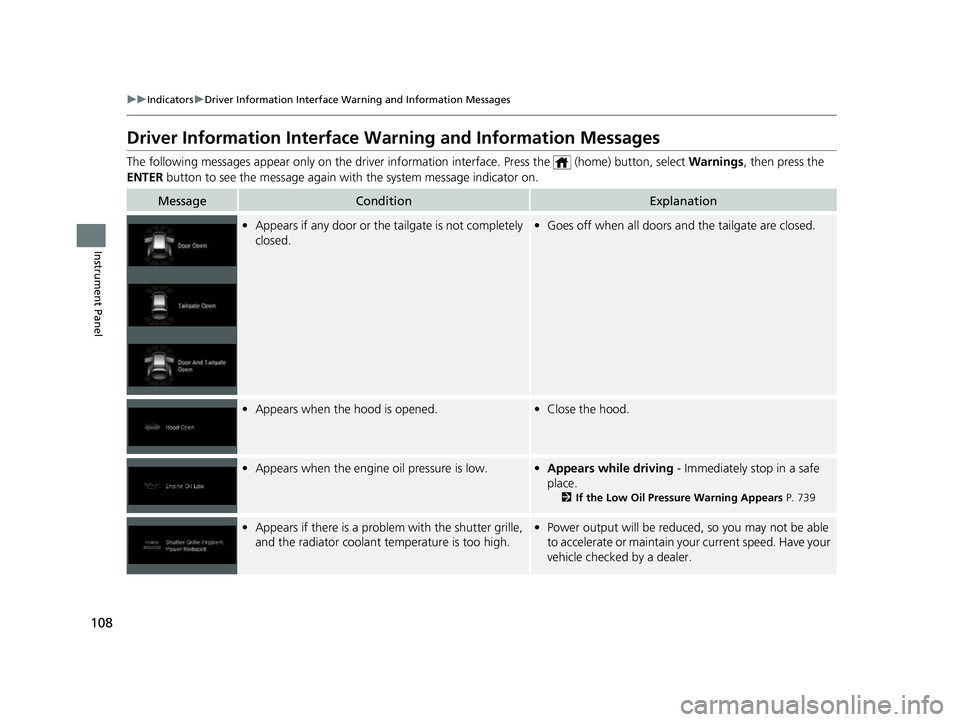
Driver Information Interface Warning and Information Messages
The following messages appear only on the driver information interface. Press the (home) button, select Warnings, then press the
ENTER button to see the message again with the system message indicator on.
MessageConditionExplanation
•Appears if any door or the tailgate is not completely
closed.•Goes off when all doors and the tailgate are closed.
•Appears when the hood is opened.•Close the hood.
•Appears when the engine oil pressure is low.•Appears while driving - Immediately stop in a safe
place.
2 If the Low Oil Pressure Warning Appears P. 739
•Appears if there is a problem with the shutter grille,
and the radiator coolant temperature is too high.• Power output will be reduce d, so you may not be able
to accelerate or maintain your current speed. Have your
vehicle checked by a dealer.
22 US ODYSSEY-31THR6400.book 108 ページ 2020年11月16日 月曜日 午後1時41分
Page 126 of 782
125
uuIndicators uDriver Information Interface Wa rning and Information Messages
Continued
Instrument Panel
MessageConditionExplanation
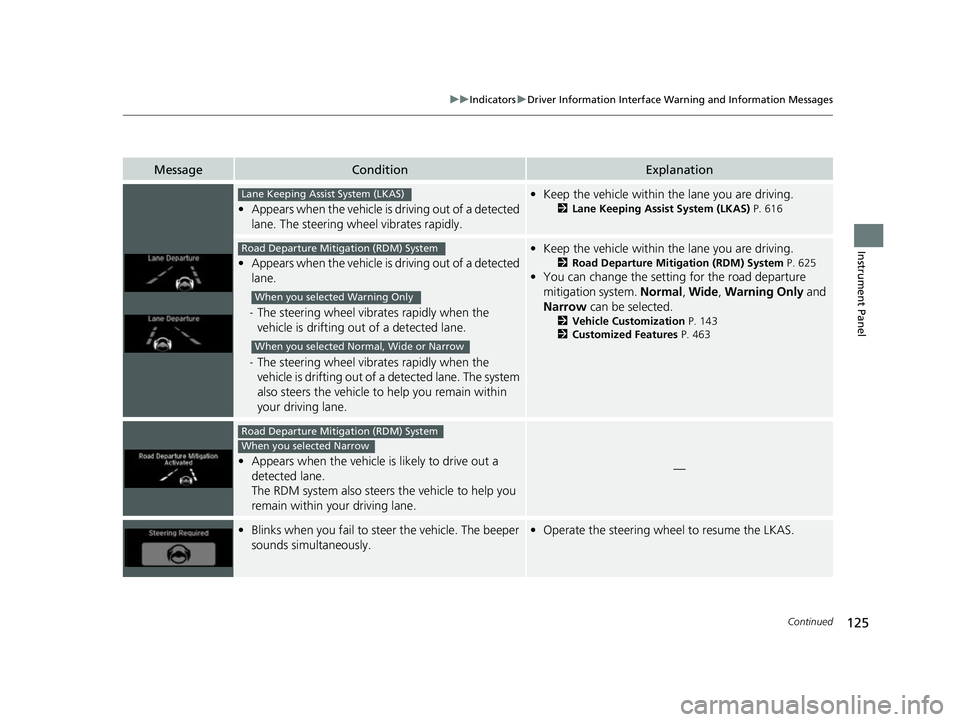
•Appears when the vehicle is driving out of a detected
lane. The steering wheel vibrates rapidly.
•Keep the vehicle within the lane you are driving.
2Lane Keeping Assist System (LKAS) P. 616
•Appears when the vehicle is driving out of a detected
lane.
- The steering wheel vibr ates rapidly when the
vehicle is drifting out of a detected lane.
- The steering wheel vibr ates rapidly when the
vehicle is drifting out of a detected lane. The system
also steers the vehicle to help you remain within
your driving lane.
• Keep the vehicle within the lane you are driving.
2Road Departure Mitigation (RDM) System P. 625
•You can change the setting for the road departure
mitigation system. Normal, Wide , Warning Only and
Narrow can be selected.
2Vehicle Customization P. 143
2 Customized Features P. 463
•Appears when the vehicle is likely to drive out a
detected lane.
The RDM system also steers the vehicle to help you
remain within your driving lane.—
•Blinks when you fail to steer the vehicle. The beeper
sounds simultaneously.•Operate the steering wheel to resume the LKAS.
Lane Keeping Assist System (LKAS)
Road Departure Mitigation (RDM) System
When you selected Warning Only
When you selected Normal, Wide or Narrow
Road Departure Mitigation (RDM) System
When you selected Narrow
22 US ODYSSEY-31THR6400.book 125 ページ 2020年11月16日 月曜日 午後1時41分
Page 129 of 782
128
uuGauges and Driver Information Interface uDriver Information Interface
Instrument Panel
Driver Information Interface
The driver information interface displays the speedometer, tachometer, odometer,
trip computer, outside temperature, and ot her gauges. It also displays important
messages such as warnings an d other helpful information.
Displays your driving speed in mph or km/h.
Shows the number of engine revolutions per minute.
■Speedometer
■Tachometer
1 Speedometer
You can set the speedometer and the displayed
measurements to read in either mph and km/h.
2 Units P. 138
1Tachometer
You can turn on or off the tachometer display.
2 Show Tachometer P. 142
22 US ODYSSEY-31THR6400.book 128 ページ 2020年11月16日 月曜日 午後1時41分
Page 132 of 782
131
uuGauges and Driver Information Interface uDriver Information Interface
Continued
Instrument Panel
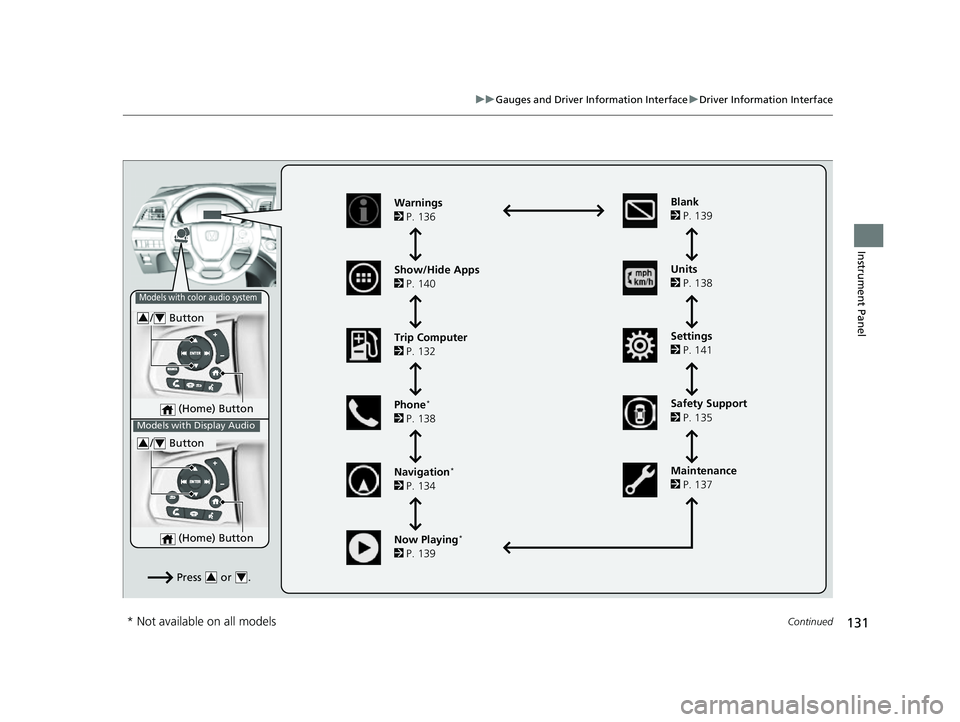
(Home) Button
/ Button34
Press or .34
Warnings
2 P. 136
Show/Hide Apps
2 P. 140
Trip Computer
2 P. 132
Phone
*
2 P. 138
Navigation
*
2 P. 134 Units
2
P. 138
Settings
2 P. 141
Maintenance
2 P. 137
Now Playing
*
2 P. 139 Blank
2
P. 139
Models with color audio system
Models with Display Audio
(Home) Button
/ Button34
Safety Support
2 P. 135
* Not available on all models
22 US ODYSSEY-31THR6400.book 131 ページ 2020年11月16日 月曜日 午後1時41分
Page 137 of 782
uuGauges and Driver Information Interface uDriver Information Interface
136
Instrument Panel
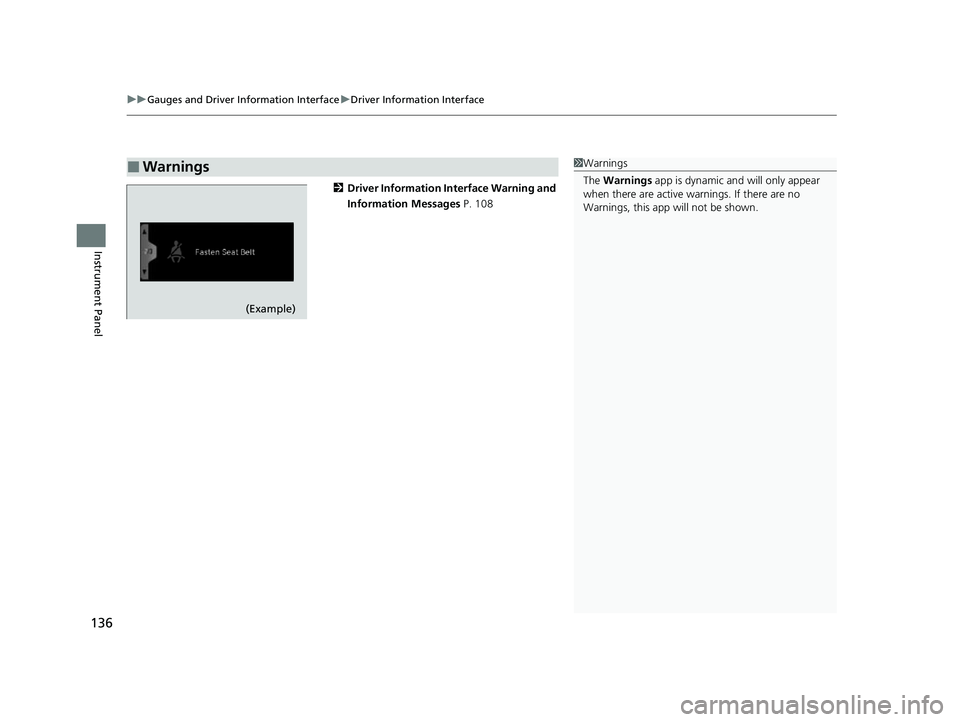
2 Driver Information Interface Warning and
Information Messages P. 108
■Warnings1Warnings
The Warnings app is dynamic a nd will only appear
when there are active warnings. If there are no
Warnings, this app will not be shown.
(Example)
22 US ODYSSEY-31THR6400.book 136 ページ 2020年11月16日 月曜日 午後1時41分
Page 145 of 782
144
uuGauges and Driver Information Interface uDriver Information Interface
Instrument Panel
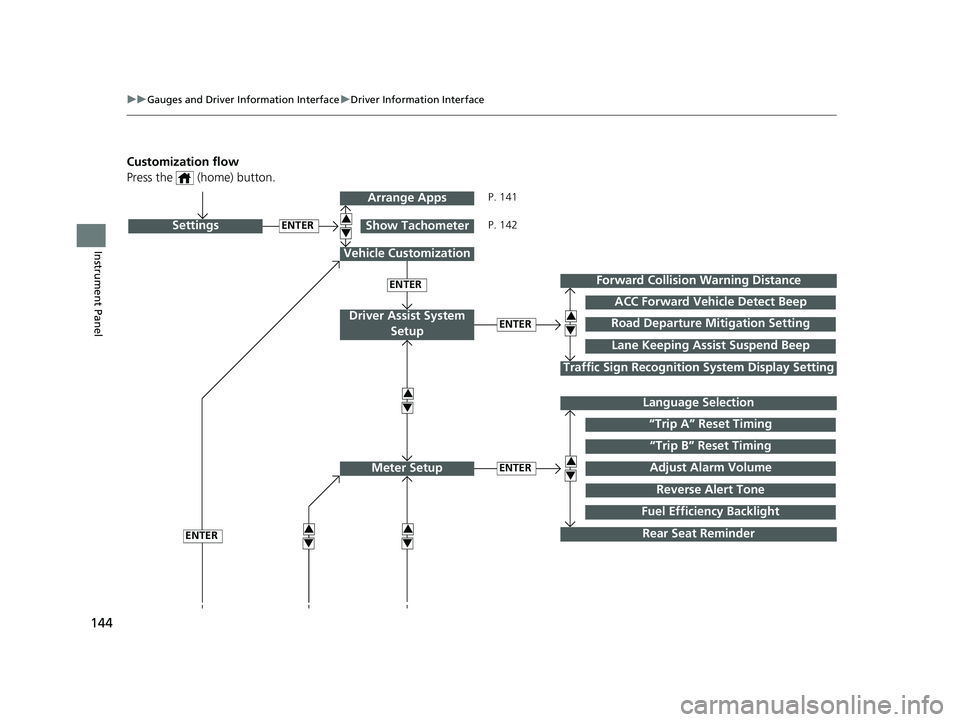
Customization flow
Press the (home) button.
ENTER
“Trip B” Reset Timing
Reverse Alert Tone
Fuel Efficiency Backlight
“Trip A” Reset Timing
Language Selection
Adjust Alarm VolumeMeter Setup
ENTERSettings
Arrange Apps
Show Tachometer3
4
3
4
3
4
Vehicle Customization
ENTER
P. 141
P. 142
Rear Seat Reminder
ENTERRoad Departure Mi tigation Setting
Lane Keeping Assist Suspend Beep
ACC Forward Vehicle Detect Beep
Forward Collision Warning Distance
Driver Assist System
Setup3
4
Traffic Sign Recognition System Display Setting
3
4
ENTER3
4
22 US ODYSSEY-31THR6400.book 144 ページ 2020年11月16日 月曜日 午後1時41分
Page 147 of 782
146
uuGauges and Driver Information Interface uDriver Information Interface
Instrument Panel
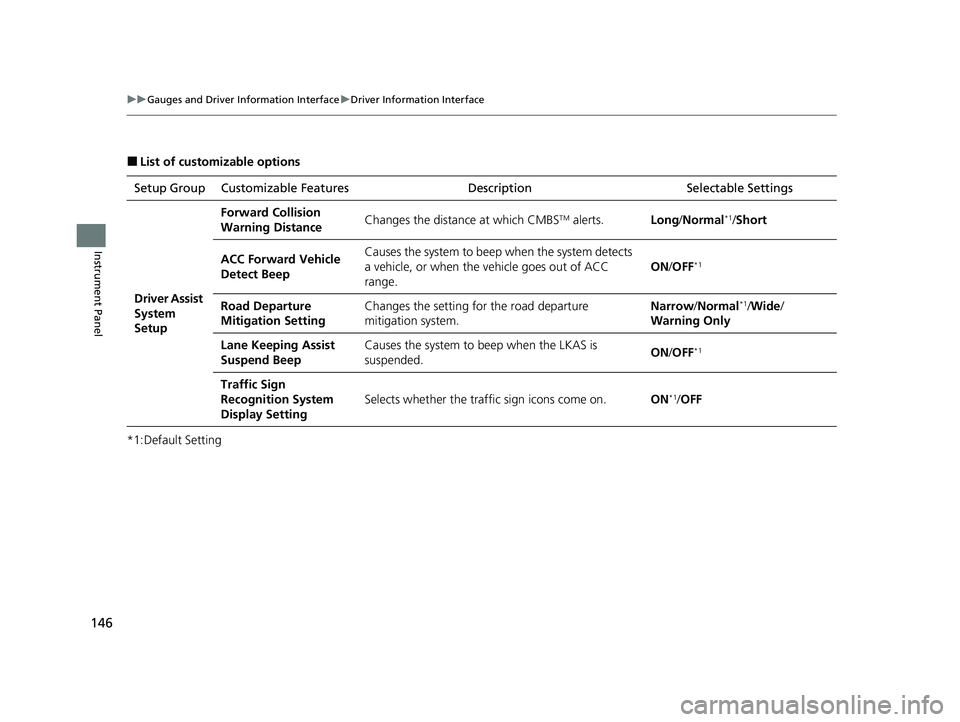
■List of customizable options
*1:Default Setting Setup Group Customizable Features
Description Selectable Settings
Driver Assist
System
Setup
Forward Collision
Warning DistanceChanges the distance at which CMBSTM alerts.Long/Normal*1/Short
ACC Forward Vehicle
Detect BeepCauses the system to beep when the system detects
a vehicle, or when the vehicle goes out of ACC
range.
ON /OFF*1
Road Departure
Mitigation SettingChanges the setting for the road departure
mitigation system.Narrow /Normal*1/Wide /
Warning Only
Lane Keeping Assist
Suspend BeepCauses the system to b eep when the LKAS is
suspended.ON /OFF*1
Traffic Sign
Recognition System
Display Setting
Selects whether the traffi c sign icons come on.ON*1/OFF
22 US ODYSSEY-31THR6400.book 146 ページ 2020年11月16日 月曜日 午後1時41分
Page 148 of 782
147
uuGauges and Driver Information Interface uDriver Information Interface
Continued
Instrument Panel
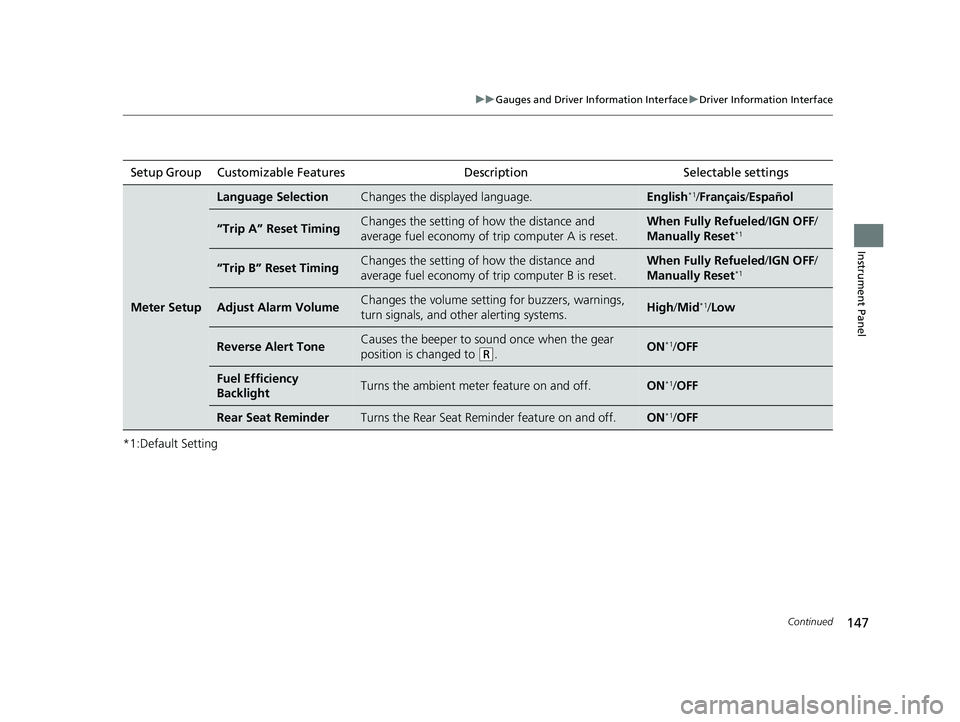
*1:Default SettingSetup Group Customizable Features
Description Selectable settings
Meter Setup
Language SelectionChanges the displayed language.English*1/Français /Español
“Trip A” Reset TimingChanges the setting of how the distance and
average fuel economy of trip computer A is reset.When Fully Refueled /IGN OFF /
Manually Reset*1
“Trip B” Reset TimingChanges the setting of how the distance and
average fuel economy of trip computer B is reset.When Fully Refueled /IGN OFF /
Manually Reset*1
Adjust Alarm VolumeChanges the volume setting for buzzers, warnings,
turn signals, and other alerting systems.High /Mid*1/Low
Reverse Alert ToneCauses the beeper to sound once when the gear
position is changed to
(R.ON*1/OFF
Fuel Efficiency
BacklightTurns the ambient meter feature on and off.ON*1/OFF
Rear Seat ReminderTurns the Rear Seat Reminder feature on and off.ON*1/OFF
22 US ODYSSEY-31THR6400.book 147 ページ 2020年11月16日 月曜日 午後1時41分